steering wheel adjustment VOLVO V60 TWIN ENGINE 2020 Owners Manual
[x] Cancel search | Manufacturer: VOLVO, Model Year: 2020, Model line: V60 TWIN ENGINE, Model: VOLVO V60 TWIN ENGINE 2020Pages: 673, PDF Size: 14.2 MB
Page 80 of 673

DISPLAYS AND VOICE CONTROL
* Option/accessory.
78
Instruments and controls in left- hand drive vehicles The overviews show the location of the vehi- cle's displays and controls.
Steering wheel and dashboard
Parking lights, daytime running lights, low beams, high beams, turn signals, rear foglight, trip computer reset
Steering wheel paddles for manual shift- ing *
Head-up display *
Instrument panel
Wipers and washers, rain sensor *
Right-side steering wheel keypad
Steering wheel adjustment
Horn
Left-side steering wheel keypad
Hood open
Display lighting, tailgate unlock/open */
close *, halogen headlight height adjust-
ment
Ceiling console
Front reading lights and courtesy lighting
Panoramic roof *
Ceiling console display ON CALL button
HomeLink ®
*
Center and tunnel console
Center display
Hazard warning flashers, defrosting, media
Gear selector
Start knob
Drive modes
Parking brake
Auto-hold brakes
Page 143 of 673

DISPLAYS AND VOICE CONTROL
}}
* Option/accessory.141
Activating and deactivating the head-up display *
The head-up display can be activated and deactivated when the vehicle has beenstarted.
Press the Head-up Displaybutton in the center display's Function view. An indicatorlight in the button will illumi-nate when the function isactivated.
Related information
Head-up display settings
* (p. 141)
Head-up display
* (p. 139)
Head-up display settings *
Adjusting settings for the head-up display.
Settings can be adjusted when the vehicle is started and a projected image is displayed onthe windshield.
Selecting display optionsSelect the functions to be shown in the head-up display. 1. Tap
Settings in the center display's Top
view.
2. Tap
My CarDisplaysHead-Up
Display Options.
3. Select one or more functions:
Show Navigation
Show Road Sign Information
Show Driver Support
Show Phone
This setting is stored as a personal setting in the driver profile.
Adjusting brightness and height position
1.Press the Head-up Display Adjustmentsbutton in the center display's Function view.
2. Adjust the brightness of the projected image and the height position in the driv-er's field of vision using the right-sidesteering wheel lever.
Decreasing brightness
Increasing brightness
Page 188 of 673
||
SEATS AND STEERING WHEEL
* Option/accessory.
186
Raise/lower the seat by moving the con- trol up/down.
Move the seat forward/rearward by mov- ing the control forward/rearward.
Change the backrest tilt by moving the control forward/backward.
Only one movement (forward/rearward/up/down) can be performed at a time. The front seat backrests cannot be folded down completely.
Related information
Manual front seats (p. 184)
Power
* front seats (p. 185)
Storing positions for seats, mirrors and head-up display
* (p. 186)
Using stored positions for seats, mirrorsand head-up display
* (p. 187)
Adjusting front seat massage settings
*
(p. 189)
Adjusting
* front seat cushion length
(p. 190)
Front seat massage
* settings (p. 188)
Adjusting front seat side bolster settings
*
(p. 191)
Adjusting front seat lumbar support
*
(p. 191)
Adjusting the passenger seat from thedriver's seat
* (p. 193)
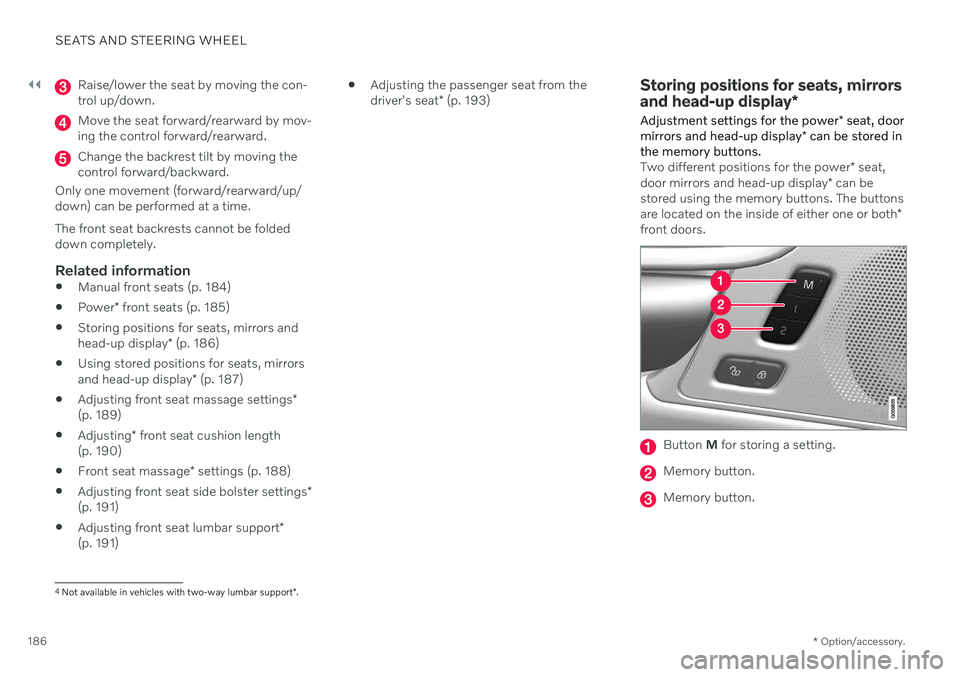
Storing positions for seats, mirrors and head-up display *
Adjustment settings for the power * seat, door
mirrors and head-up display * can be stored in
the memory buttons.
Two different positions for the power * seat,
door mirrors and head-up display * can be
stored using the memory buttons. The buttons are located on the inside of either one or both *
front doors.
Button M for storing a setting.
Memory button.
Memory button.
4
Not available in vehicles with two-way lumbar support *.
Page 190 of 673

||
SEATS AND STEERING WHEEL
* Option/accessory.
188
Front door closed
–Press and hold one of the memory buttons 1 (
) or 2 () until the seat, door mirrors
and head-up display stop in the positions stored in that memory button.
If the memory button is released, the seat,door mirrors and head-up display will stopmoving.
WARNING
This list point needs to be translated exactly to: "Because the driver's seatcan be adjusted with the ignition off,children should never be left unatten-ded in the vehicle.
Movement of the seat can be STOP-PED at any time by pressing any but-ton on the power seat control panel.
Do not adjust the seat while driving.
The seat should be adjusted so that thebrake pedal can be depressed fully. Inaddition, position the seat as far rear-ward as comfort and control allow.
The seat rails on the floor must not beobstructed in any way when the seat isin motion.
Related information
Manual front seats (p. 184)
Power
* front seats (p. 185)
Adjusting the power
* front seats (p. 185)
Storing positions for seats, mirrors and head-up display
* (p. 186)
Adjusting front seat massage settings
*
(p. 189)
Adjusting
* front seat cushion length
(p. 190)
Front seat massage
* settings (p. 188)
Adjusting front seat side bolster settings
*
(p. 191)
Adjusting front seat lumbar support
*
(p. 191)
Adjusting the passenger seat from thedriver's seat
* (p. 193)
Adjusting the door mirrors (p. 170)
Head-up display settings
* (p. 141)
Front seat massage * settings
The settings for the multifunctional seats can be adjusted using either the mutifunctioncontrol on the side of the seat or the centerdisplay. The adjustment settings are shown inthe center display.
Multifunction control, located on the side of the seat cushion.
Massage settingsThe following massage settings are available:
On/Off: Select On/Off to turn on/off the
massage function.
Programs 1-5: There are 5 preset mas-
sage programs. Select Swell, Tread,Advanced, Lumbar or Shoulder.
Intensity: Select Low, Normal or High.
Speed: Select Slow, Normal or Fast.
Page 191 of 673

SEATS AND STEERING WHEEL
* Option/accessory.189
Restarting the massage function
The massage function turns off automatically after 20 minutes. The function is reactivatedmanually.
–Tap Restart, which is displayed in the
center display, to restart the selected mas- sage program.
> The massage program will restart. If no selection is made, the message will be stored in Top view.
Related information
Manual front seats (p. 184)
Power
* front seats (p. 185)
Adjusting the power
* front seats (p. 185)
Storing positions for seats, mirrors and head-up display
* (p. 186)
Using stored positions for seats, mirrorsand head-up display
* (p. 187)
Adjusting front seat massage settings
*
(p. 189)
Adjusting
* front seat cushion length
(p. 190)
Adjusting front seat side bolster settings
*
(p. 191)
Adjusting front seat lumbar support
*
(p. 191)
Adjusting the passenger seat from thedriver's seat
* (p. 193)
Adjusting front seat massage settings *
The settings for the multifunctional seats can be adjusted using either the mutifunctioncontrol on the seat or the center display. Theadjustment settings are shown in the centerdisplay.
Adjusting front seat massage settingsThe front seat backrests have a massage func- tion. Air-filled cushions provide the massagingaction and a number of settings are available. The massage function can only be activated when the engine is running.
1. Activate the multifunction control by turn-
ing the control
upward/downward. The
seat settings view will appear in the center display. 2.
Select
Massage in the seat settings view.
3. Select massage settings by tapping the center display or by moving the cursor up/ down using the multifunction control's upper
/lower buttons. Change a set-
ting in the selected function by tapping the arrows on the center display or by using the multifunction control's front
/
rear
buttons.
Related information
Manual front seats (p. 184)
Power
* front seats (p. 185)
Adjusting the power
* front seats (p. 185)
Storing positions for seats, mirrors and head-up display
* (p. 186)
Using stored positions for seats, mirrorsand head-up display
* (p. 187)
Adjusting
* front seat cushion length
(p. 190)
Front seat massage
* settings (p. 188)
Adjusting front seat side bolster settings
*
(p. 191)
Adjusting front seat lumbar support
*
(p. 191)
Adjusting the passenger seat from thedriver's seat
* (p. 193)
Page 193 of 673
SEATS AND STEERING WHEEL
}}
* Option/accessory.191
Adjusting front seat side bolster settings*
Enhance comfort in the front seat by adjust- ing the sides of the backrest.
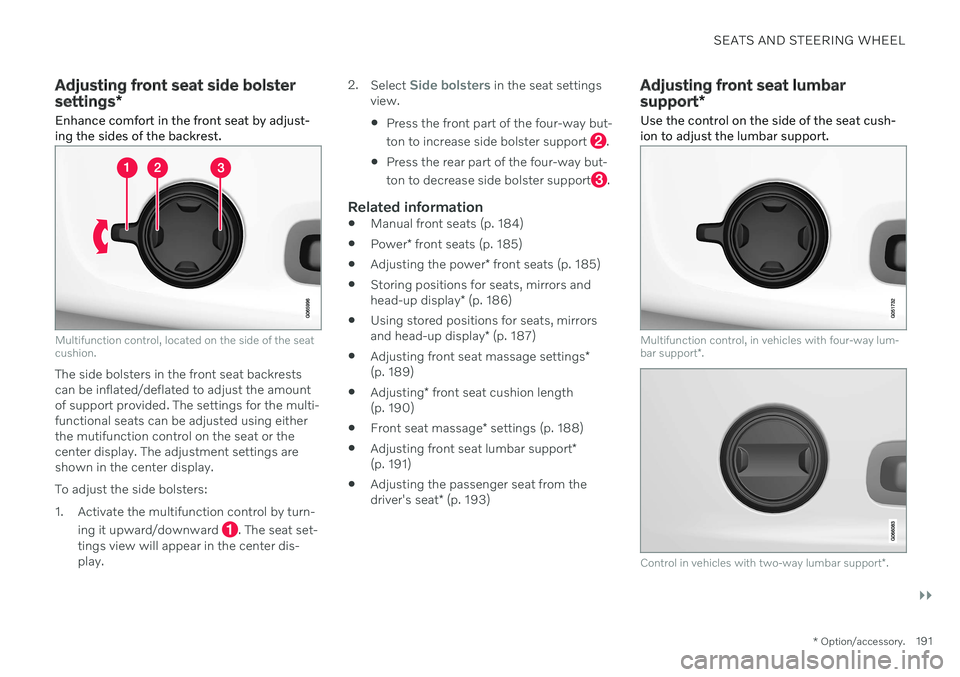
Multifunction control, located on the side of the seat cushion.
The side bolsters in the front seat backrests can be inflated/deflated to adjust the amountof support provided. The settings for the multi-functional seats can be adjusted using eitherthe mutifunction control on the seat or thecenter display. The adjustment settings areshown in the center display. To adjust the side bolsters:
1. Activate the multifunction control by turn-
ing it upward/downward
. The seat set-
tings view will appear in the center dis- play. 2.
Select
Side bolsters in the seat settings
view. Press the front part of the four-way but- ton to increase side bolster support
.
Press the rear part of the four-way but- ton to decrease side bolster support
.
Related information
Manual front seats (p. 184)
Power
* front seats (p. 185)
Adjusting the power
* front seats (p. 185)
Storing positions for seats, mirrors and head-up display
* (p. 186)
Using stored positions for seats, mirrorsand head-up display
* (p. 187)
Adjusting front seat massage settings
*
(p. 189)
Adjusting
* front seat cushion length
(p. 190)
Front seat massage
* settings (p. 188)
Adjusting front seat lumbar support
*
(p. 191)
Adjusting the passenger seat from thedriver's seat
* (p. 193)
Adjusting front seat lumbar support *
Use the control on the side of the seat cush- ion to adjust the lumbar support.
Multifunction control, in vehicles with four-way lum- bar support *.
Control in vehicles with two-way lumbar support *.
Page 195 of 673
SEATS AND STEERING WHEEL
* Option/accessory.193
Adjusting the passenger seat from the driver's seat *
The front passenger seat can be adjusted from the driver's seat.
Activating the functionThe function is activated via the function view in the center display:
Tap the
Adjust Passenger
Seat button to activate.
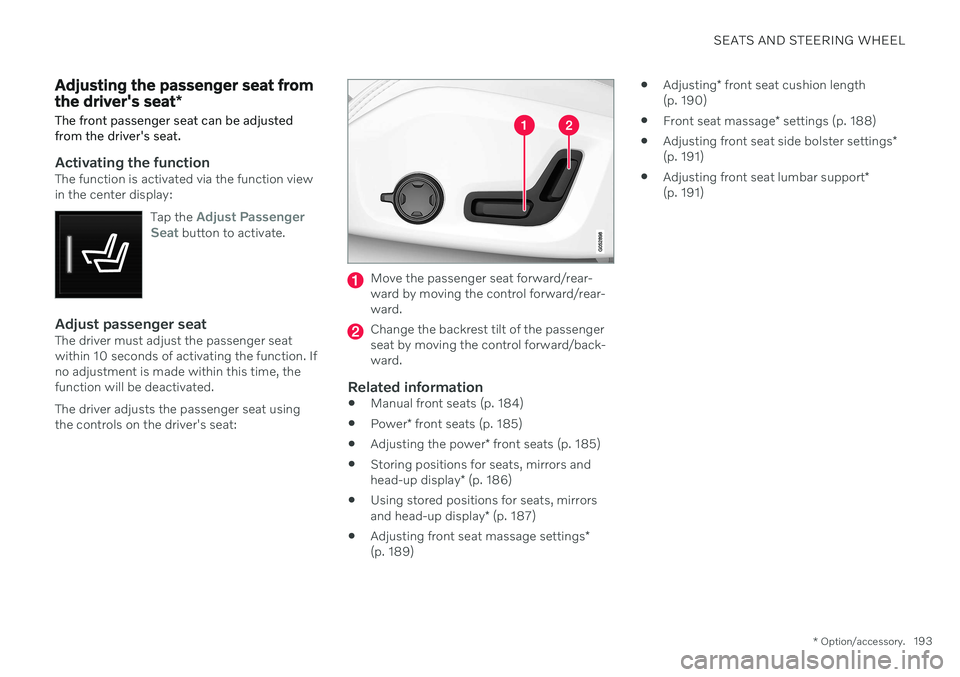
Adjust passenger seatThe driver must adjust the passenger seat within 10 seconds of activating the function. Ifno adjustment is made within this time, thefunction will be deactivated. The driver adjusts the passenger seat using the controls on the driver's seat:
Move the passenger seat forward/rear- ward by moving the control forward/rear-ward.
Change the backrest tilt of the passenger seat by moving the control forward/back-ward.
Related information
Manual front seats (p. 184)
Power
* front seats (p. 185)
Adjusting the power
* front seats (p. 185)
Storing positions for seats, mirrors and head-up display
* (p. 186)
Using stored positions for seats, mirrorsand head-up display
* (p. 187)
Adjusting front seat massage settings
*
(p. 189)
Adjusting
* front seat cushion length
(p. 190)
Front seat massage
* settings (p. 188)
Adjusting front seat side bolster settings
*
(p. 191)
Adjusting front seat lumbar support
*
(p. 191)
Page 196 of 673
SEATS AND STEERING WHEEL
* Option/accessory.
194
Folding down the rear seat backrests The rear seat backrest is split into two sec- tions. The two sections can be folded forwardindividually.
WARNING
Adjust the seat and ensure it locks into position before driving. Use cautionwhen adjusting the seat. Uncontrolledor careless adjustments could lead toinjury.
Long objects must always be securelytied down to help prevent injury ordamage in the event of sudden brak-ing.
Always turn off the engine and applythe parking brake when loading orunloading the vehicle.
Put the gear selector in
P to help pre-
vent the gear selector from being inad-vertently moved.
CAUTION
When the backrest is folded down, make sure there are no objects in the rear seat,and the seat belts are not buckled. Other-wise there is a risk of damage to theupholstery.
CAUTION
The armrest * in the center seat must be
raised before the seat backrest is folded down. The ski hatch must be closed before the seat backrest is folded down.
NOTE
The front seats may need to be pushed for- ward and/or the backrest adjusted so thatthe rear seat backrests can be fully low-ered.
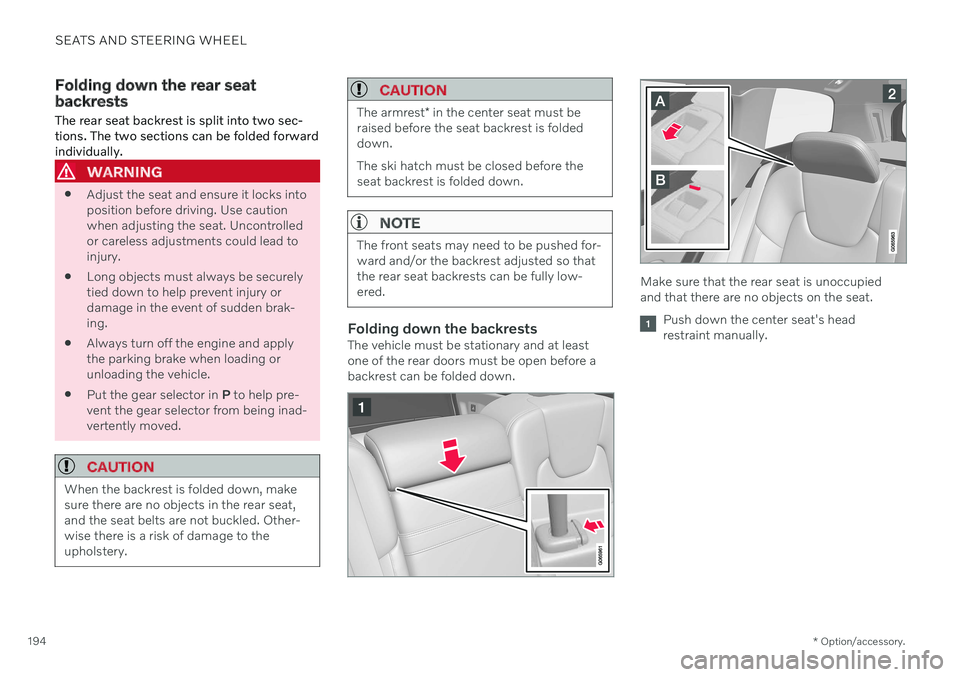
Folding down the backrestsThe vehicle must be stationary and at least one of the rear doors must be open before abackrest can be folded down.
Make sure that the rear seat is unoccupied and that there are no objects on the seat.
Push down the center seat's head restraint manually.
Page 655 of 673

INDEX
653
1, 2, 3 ...
4WD 419
A
ABSanti-lock brakes 405
AC (Air conditioning) 221
Accessories and extra equipment 35 installation 36
Accessory installation warning 36, 37
Active Bending Lights 157
Adapting driving characteristics 421
Adaptive Cruise Control 278 activating 280
auto-brake 300
change cruise control functionality 284
limitations 283
manage speed 298
passing 304
set time interval 299
standby mode 282
switching target vehicles 297
Symbols and messages 285
troubleshooting 283
turn off 281
WARNING 296
Adjusting the steering wheel 197
Adjustment of headlight pattern 152
Airbag 52
activation/deactivation 56
driver's side 53
passenger side 53, 56
Air bag, see Airbag 52
Air conditioning 221Air conditioning, fluid volume and grade 650
Air distribution 205 air vents 205, 207
changing 206
defrosting 216
recirculation 215
table showing options 208
Air quality 202, 204 allergy and asthma 204
passenger compartment filter 205
Air recirculation 215
Alarm 263 deactivating 264
Allergy and asthma-inducing sub-
stances 204
All Wheel Drive, AWD 419
All Wheel Drive (AWD) 419
All Wheel Drive (four-wheel drive) 419Android Auto 492, 493, 494 Antenna location 252
Apple CarPlay 488, 489, 491
Approach lighting 160
Apps 460
Assistance at risk of collision 351 activating/deactivating 352
at risk of run-off 352
during collision risks from behind 354 during collision risks from oncoming
traffic 353
limitations 355
Symbols and messages 356
Audio and media 458 Audio system HD digital radio 469 SiriusXM ® Satellite radio 470, 471, 472
Auto-climate 215
Auto hold 412
Auto-hold brakes 412 activating/deactivating 413
after collision 414
driver support 268
Automatic car wash 627
Automatic high beam 155
Automatic locking 256
INDEX
Page 660 of 673

INDEX
658Front seat manual 184
Front seats, power 185
adjusting passenger seat from driv-
er's seat 193
adjusting seat 185
Lumbar support 191
massage 188, 189, 190
multifunction control 188, 189, 190, 191
Side bolsters 191
store position 186, 187
FSC, environmental labeling 23
Fuel 437 Travel Link service 477
Fuel filling 436
Fuel gauge 83
Fuel requirements 437, 438Fuel tank volume 650
Fuse box 599
Fuses 599 below the glove compartment 608
in engine compartment 601
in the cargo compartment 614
replacing 599
G
Gasoline grade 437 Gauge fuel gauge 83
hybrid battery 84
Gear selector positions automatic transmission 415
Glass, laminated/reinforced 166
Glove compartment 563Gracenote ® 483
Grocery bag holders 567
Gross vehicle weight 645
H
Handbrake 408
Hand wash 625 Hard disk space 512
Hazard warning flashers 160
HD radio 467 Headlamp beam adjustment 152
Headlight pattern, adjustment 152
Head restraint 195
Head-up display 139 activating/deactivating 141
cleaning 620
Distance Alert 273
replacing windshield 585
settings 141
store position 141, 186, 187
Heated wiper blades 176
Heater 229 auxiliary heater 229
parking heater 229
Heating Seats 212, 213
steering wheel 214
windows 217
high beams 154, 155
High engine temperature 441
Hill Start Assist 413 Hill Start Assist (HSA) 413
Hoisting the vehicle 583Hold vehicle function 432
HomeLink ® 450
programming 451
type approval 454
use 453
HomeLink ® remote control
programmable 450