light VOLVO V70 2008 Owner's Manual
[x] Cancel search | Manufacturer: VOLVO, Model Year: 2008, Model line: V70, Model: VOLVO V70 2008Pages: 274, PDF Size: 7.82 MB
Page 69 of 274

Display
Control for setting the clock.
Turn the control clockwise/counterclockwise to set the time. The set time is shown in the information display.
80 03 Your driving environment
Ignition modes
Functions
Inserting and removing the remote key
The various ignition modes are accessed by inserting the remote key into the ignition slot.
The remote key can be removed from the ignition slot by pressing the key in. It will then be ejected slightly and can
be removed from the slot. The gear selector must be in position P (Park) .
NOTE
The brake pedal must not be depressed when accessing ignition modes I or II.
CAUTION
Foreign objects in the ignition slot can impair function or damage the lock.
Ignition mode 0
Insert the remote key in the ignition slot.
ProCarManuals.com
Page 70 of 274

Ignition mode I
Press the remote key into the ignition slot and press START/STOP ENGINE.
Ignition mode II
Press the remote key into the ignition slot and press START/STOP ENGINE for approx. 2 seconds.
Ignition mode III (engine start)
Start the engine, see page 109
.
Stopping the engine
Press START/STOP ENGINE . (If the engine is running and the vehicle is moving, keep the button depressed until
the engine stops).
Return to ignition mode 0
Press START/STOP ENGINE to return from I, II, or III to ignition mode 0.
NOTE
During towing, ignition mode II should be used so that the lighting can be switched on.
81 03 Your driving environment
Ignition modes
Functions with timer
The audio system can be operated without a key for 15 minutes at a time by pressing the POWER button. The power
windows work for several minutes after the key has been removed, although not after the door has been opened.
NOTE
Use the POWER button for the audio system when the engine is not running to avoid discharging the battery.
82 03 Your driving environment
ProCarManuals.com
Page 77 of 274
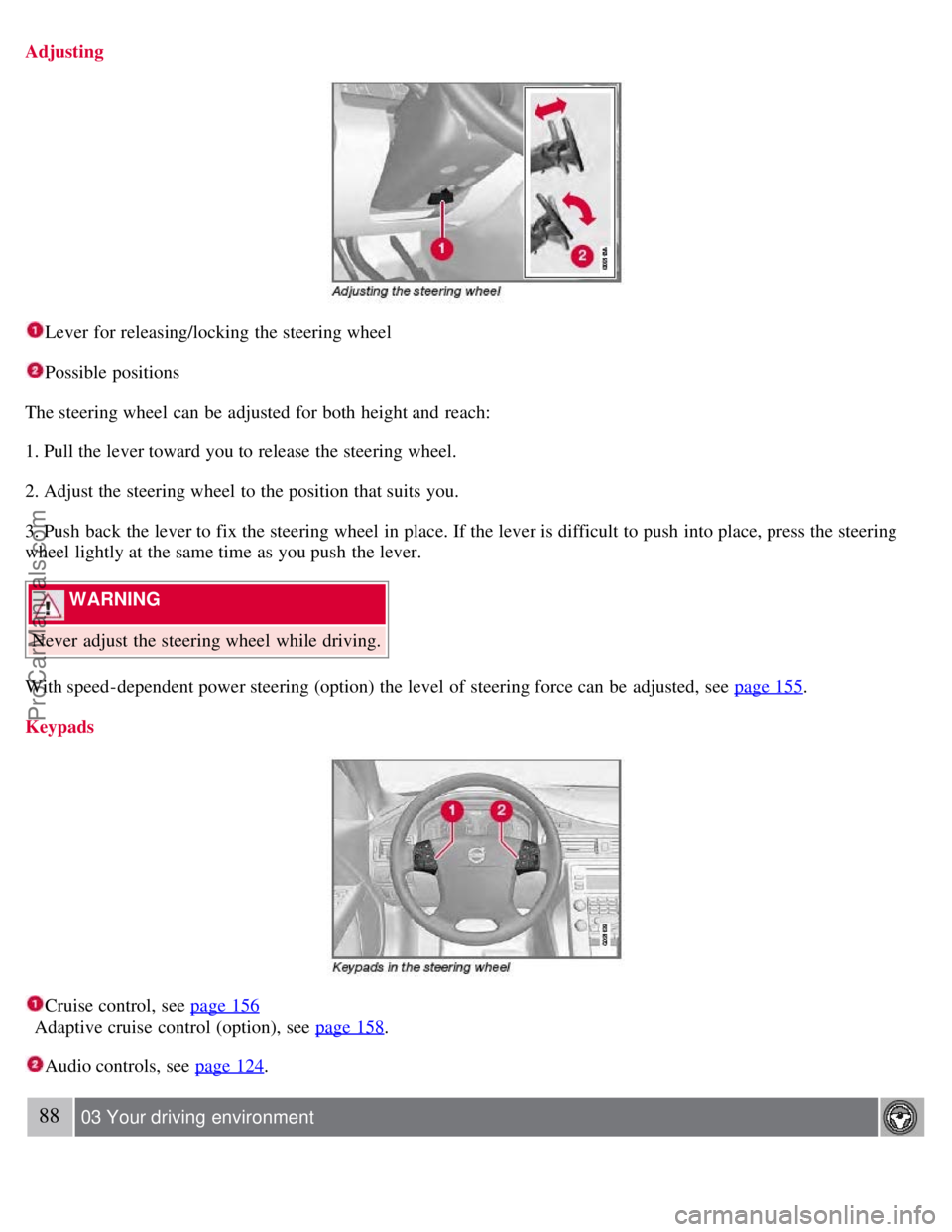
Adjusting
Lever for releasing/locking the steering wheel
Possible positions
The steering wheel can be adjusted for both height and reach:
1. Pull the lever toward you to release the steering wheel.
2. Adjust the steering wheel to the position that suits you.
3. Push back the lever to fix the steering wheel in place. If the lever is difficult to push into place, press the steering
wheel lightly at the same time as you push the lever.
WARNING
Never adjust the steering wheel while driving.
With speed-dependent power steering (option) the level of steering force can be adjusted, see page 155
.
Keypads
Cruise control, see page 156
Adaptive cruise control (option), see page 158
.
Audio controls, see page 124.
88 03 Your driving environment
ProCarManuals.com
Page 78 of 274
Steering wheel
Horn
Press the steering wheel hub to sound the horn.
89 03 Your driving environment
Lighting
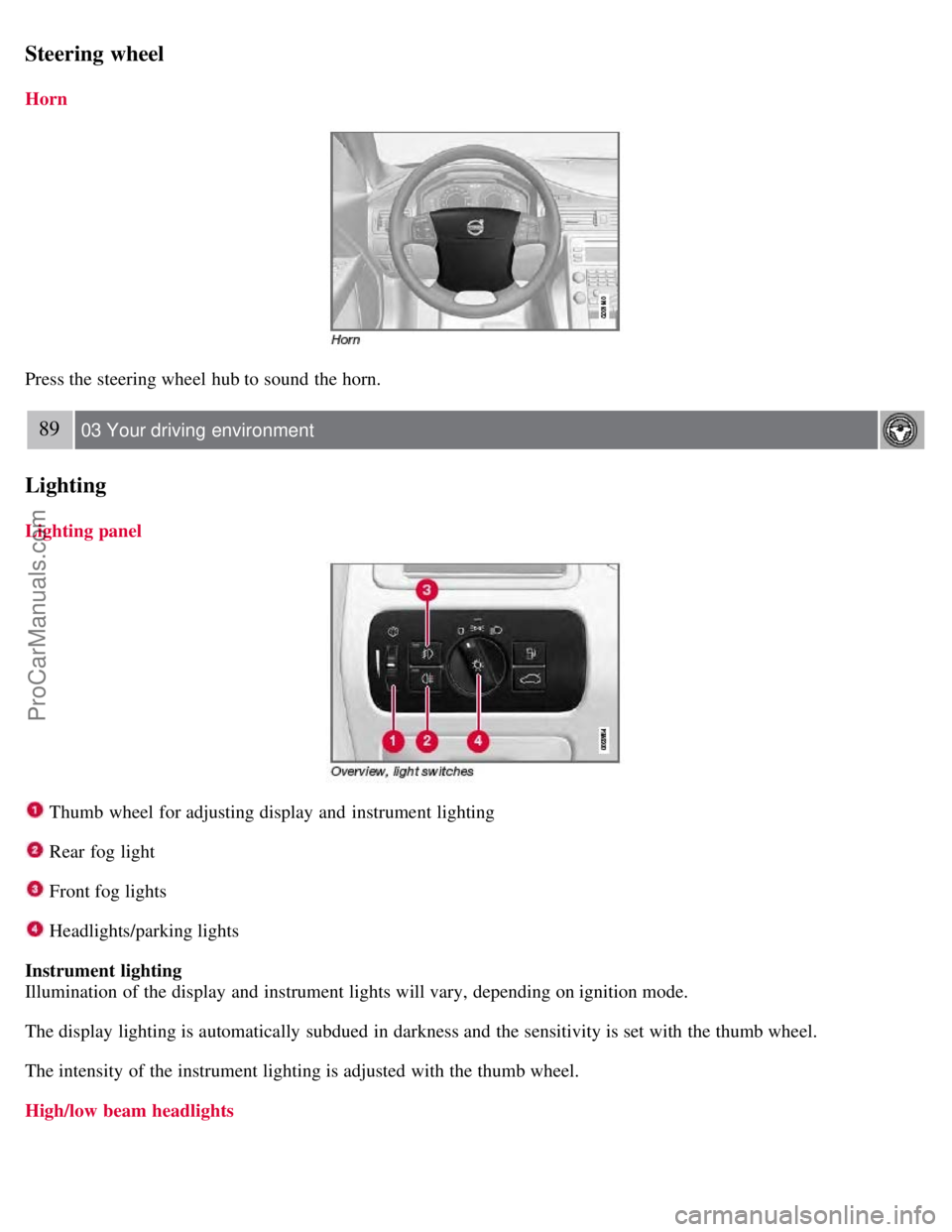
Lighting panel
Thumb wheel for adjusting display and instrument lighting
Rear fog light
Front fog lights
Headlights/parking lights
Instrument lighting
Illumination of the display and instrument lights will vary, depending on ignition mode.
The display lighting is automatically subdued in darkness and the sensitivity is set with the thumb wheel.
The intensity of the instrument lighting is adjusted with the thumb wheel.
High/low beam headlights
ProCarManuals.com
Page 79 of 274
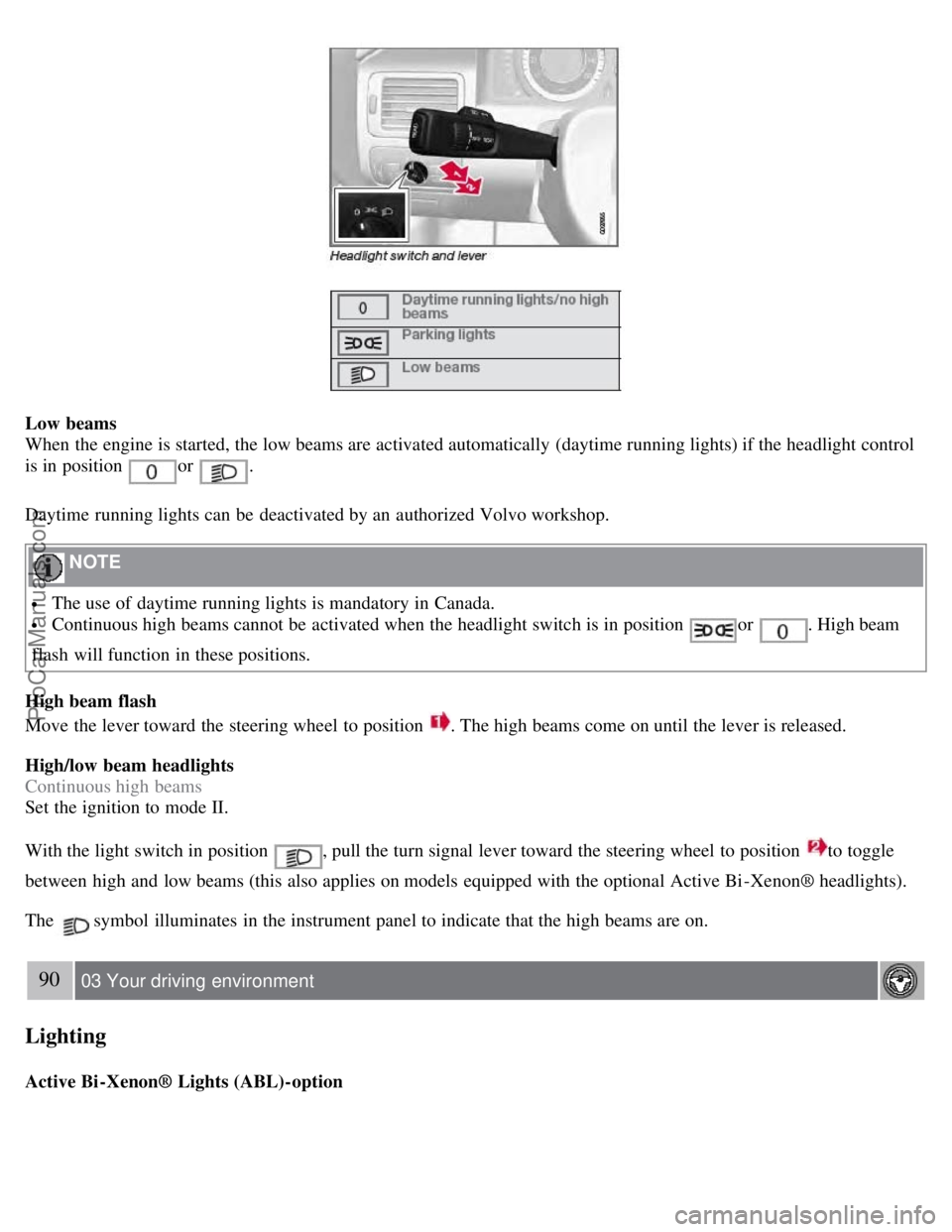
Low beams
When the engine is started, the low beams are activated automatically (daytime running lights) if the headlight control
is in position
or .
Daytime running lights can be deactivated by an authorized Volvo workshop.
NOTE
The use of daytime running lights is mandatory in Canada.
Continuous high beams cannot be activated when the headlight switch is in position or . High beam
flash will function in these positions.
High beam flash
Move the lever toward the steering wheel to position
. The high beams come on until the lever is released.
High/low beam headlights
Continuous high beams
Set the ignition to mode II.
With the light switch in position
, pull the turn signal lever toward the steering wheel to position to toggle
between high and low beams (this also applies on models equipped with the optional Active Bi -Xenon® headlights).
The
symbol illuminates in the instrument panel to indicate that the high beams are on.
90 03 Your driving environment
Lighting
Active Bi -Xenon® Lights (ABL)-option
ProCarManuals.com
Page 80 of 274

When the ABL function is activated, the headlight beams adjust laterally to help light up a curve according to
movements of the steering wheel (see the right-pointing beam in the illustration).
This function is activated automatically when the engine is started and can be deactivated/reactivated by pressing the
ABL button
in the center console. This button lights up when the ABL function is activated, and will flash if
there is a fault in the system.
NOTE
This function is only active in twilight or dark conditions, and only when the vehicle is in motion.
Parking lights
The front and rear parking lights can be turned on even when the ignition is switched off.
Turn the headlight control to the center position (the license plate lighting comes on at the same time).
The lighting also comes on when the trunk lid is opened in order to alert anyone traveling behind your vehicle.
91 03 Your driving environment
Lighting
Brake lights
The brake lights come on automatically when the brakes are applied.
Emergency brake lights (EBL)
ProCarManuals.com
Page 81 of 274

Emergency Brake Lights, EBL, activate in the event of sudden braking or if the ABS system is activated. This function
causes an additional taillight on each side of the vehicle to illuminate to help alert vehicles traveling behind.
The EBL function activates if:
The ABS system activates for more than approximately a half second
In the event of sudden braking while the vehicle is moving at speeds above approximately 6 mph (10 km/h)
When the vehicle has come to a stop, the brake lights and additional taillights remain on for as long as the brake pedal
is depressed or until braking force on the vehicle is reduced.
Front fog lights
The front fog lights can be switched on together with high/low beams or the parking lights.
Press the button to switch the fog lights on/off. The light in the button comes on when the fog lights are on.
NOTE
Regulations regarding the use of the front fog lights may vary, depending on where you drive.
92 03 Your driving environment
Lighting
Rear fog light
The single rear fog light is located in the driver's side taillight cluster.
The rear fog light will only function in combination with the high/low beam headlights or the optional front fog lights.
ProCarManuals.com
Page 82 of 274

Press the button to switch the rear fog light on/off. The rear fog light indicator symbol on the instrument panel
and the light in the button come on when the rear fog light is switched on.
NOTE
The rear fog light is considerably brighter than the normal tail lights and should be used only when conditions such
as fog, rain, snow, smoke or dust reduce visibility for other vehicles to less than 500 ft. (150 meters).
Hazard warning flashers
The hazard warning flasher should be used to indicate that the vehicle has become a traffic hazard. To activate the
flashers, press the button in the center dash. Press the button again to turn off the flashers.
NOTE
Regulations regarding the use of the hazard warning flasher may vary, depending on where you live.
The hazard warning flashers will be activated automatically if an airbag deploys.
93 03 Your driving environment
Lighting
Turn signals
When changing lanes
The driver can automatically flash the turn signals 3 times by moving the turn signal lever up or down to the first
position and releasing it.
ProCarManuals.com
Page 83 of 274

When turning
Move the lever as far up or down as possible to start the turn signals. The turn signals will be cancelled
automatically by the movement of the steering wheel, or the lever can be returned to its initial position by hand.
NOTE
This automatic flashing sequence can be interrupted by immediately moving the lever in the opposite direction.
If the turn signal indicator flashes faster than normal, check for a burned-out turn signal bulb.
Interior lighting, front
Drivers side front reading light, on/off
Passenger's side front reading light, on/off
Overhead courtesy lighting.
The lighting in the front part of the passenger compartment is controlled with the buttons
and in the roof console.
Switch
has three positions for all passenger compartment lighting:
Off - right side depressed, automatic lighting off.
Neutral position.
On - left side depressed, passenger compartment lighting on.
94 03 Your driving environment
Lighting
Interior lighting, rear
ProCarManuals.com
Page 84 of 274

The lights are switched on or off by pressing each respective button.
Courtesy lights/door step lighting (option)
The courtesy lights/door step lighting switch on/off automatically when one of the front doors is opened/closed.
Glove compartment lighting
The glove compartment lighting switches on/off automatically when the lid is opened/closed.
Overhead courtesy lighting
The passenger compartment lighting is switched on and off automatically when button
is in the neutral position.
The lighting comes on and remains on for 30 seconds if:
the vehicle is unlocked from the outside with the key or remote control
the engine is switched off and the ignition is in mode 0.
The lighting switches off when:
the engine is started
the vehicle is locked from the outside.
The lighting comes on and remains on for two minutes if one of the doors is open.
The passenger compartment lighting can be switched on and off manually within 30 minutes after the vehicle has been
unlocked.
If the lighting is switched on manually and the vehicle is locked, the courtesy lighting will switch off automatically
after one minute.
Home safe lighting
When you leave your vehicle at night, you can make use of the home safe lighting function to illuminate the area in
front of the vehicle.
1. Remove the key from the ignition slot.
2. Pull the direction indicator lever as far as possible towards the steering wheel and release it.
3. Exit the vehicle and lock the doors.
The headlights, parking lights, turn signals, lights in the door mirrors, license plate lights, and footwell lighting will
illuminate and remain on for 30
1, 60 or 90 seconds. The time interval can be set under Car settingsLight settings
Home safe lighting . For a description of the menu system, see page 125.
ProCarManuals.com