wheel VOLVO V70 2009 Owner´s Manual
[x] Cancel search | Manufacturer: VOLVO, Model Year: 2009, Model line: V70, Model: VOLVO V70 2009Pages: 286, PDF Size: 9.21 MB
Page 131 of 286

04 Comfort and driving pleasure
Audio system
04``131 Introduction
The audio system is available in two versions:
High Performance och Premium Sound. The
system version is shown in the display when
the audio system is switched on.
If the audio system is on when the ignition is
switched off, it will come on automatically the
next time the ignition is put in mode I or higher.
The audio system can be operated without a
key in the ignition slot for 15 minutes at a time
by pressing the POWER button (the driver's
door must be closed on vehicles with the
optional keyless drive).
Some functions are controlled from the menu
system in the center console. For more infor-
mation on menus, see page 120.
Dolby Surround Pro Logic II and the sym-
bol are trademarks of Dolby Laboratories
Licensing Corporation. The Dolby Surround
Pro Logic II System is manufactured under
license from Dolby Laboratories Licensing Cor-
poration.
Overview
G021398
Socket for external audio source (AUX,
USB, iPod) - optionSteering wheel keypadCenter console control panelControl panel with headphones socket
(option)
Steering wheel keypad
G021399
Confirm selection in menu system and
controls for a bluetooth-connected cell
phone (see page 143).Go higher in the menu system. Interrupt
current function.VolumeA short press scrolls between CD tracks or
preset radio stations. A long press
searches within CD tracks or searches for
radio stations automatically.
Page 132 of 286

04 Comfort and driving pleasureAudio system
04132
USB/iPod connector (option)An auxiliary device, such as an iPod, MP3
player or a USB flash drive can be connected
to the audio system via the connector in the
center console storage compartment. A stand-
ard cable from an iPod or MP3 player can be
routed under the cover to the AUX connector
in the storage compartment.
A sound source must be chosen, depending on
the device that has been connected:
1.
UseMODE to select
iPod
or
USB
. The text
CONNECT DEVICE
will be displayed.
2. Connect the device to the connector in the
center console storage compartment (see
the illustration).
The text
LOADING
will be displayed while the
system loads the files (folder structure) on the
device. This may take a short time.
When information about the files (the folder
structure) on the device has been loaded, the
resulting list includes information on the artist,
genre and song title.
To navigate in the folder structure, press
ENTER and scroll up and down the folders
using the arrow buttons (on the audio system
control panel or on the steering wheel keypad).
Press the right arrow button to select a folder.
Press the left arrow button to go up a level inthe folder structure. Press ENTER to go down
a level in the folder structure.
Tracks can be selected in two ways:
•
Turn the Tuning knob clockwise or coun-
terclockwise
•
Use the right or left arrow keys on the nav-
igation control to select the desired track.
The arrow keys on the steering wheel key-
pad can also be used in the same way.NOTE
The system supports playback of files in the
most common versions of formats such as
mp3, wma, and wav. However, there may be
versions of these formats that the system
does not support.USB flash driveTo simplify the use of a USB flash drive, it is
advisable to only store music files on the drive.
It will take considerably longer for the system
to index the files on the drive if it contains any-
thing other than compatible music files.MP3 playerMany mp3 players have a file indexing system
that is not supported by the vehicle's audio
system. In order to use an mp3 player, the sys-
tem must be set to USB Removable device/
Mass Storage Device.
iPodAn iPod receives current and its battery is
charged through the connecting cord. How-
ever, if the iPod's battery is completely
drained, it should be recharged before the iPod
is connected to the audio system.
NOTE
When an iPOD is used as a sound source,
the vehicle's audio system has a menu
structure similar to the one in the iPOD. See
the iPOD's manual for detailed information.For further information, refer to the accessory
manual USB/iPod Music Interface.Rear control panel with headphones
socket (option)Headphones with an impedance of
16 – 32 ohm and sensitivity of 102 dB or higher
are recommended for best sound reproduc-
tion.
Page 136 of 286

04 Comfort and driving pleasureAudio system
04136
Playing a CD (CD player
4)
If a music CD is in the player when CD is
pressed, it will be played automatically. Other-
wise, insert a disc and press CD.Playing a CD (CD changer)If a CD position with a music CD is already
selected when CD is pressed, it will be played
automatically. Otherwise select a disc with the
number buttons 1 – 6 or
/
on the naviga-
tion button.
Insert a CD (CD changer)1. Select an empty position with the number
buttons1 – 6 or
/
on the navigation
button.
> An empty position is marked on the dis-
play. The text
Insert disc
shows that a
new disc can be inserted. The CD
changer can hold up to six CDs.
2. Insert a CD in the CD changer slot.
Disc ejectFor reasons of traffic safety, an ejected CD
must be removed within 12 seconds or it will
be automatically drawn back into the slot and
the CD player will enter pause mode. Press the
CD button to restart the disc.Eject individual discs by pressing the eject but-
ton.
Eject all discs with a long press on the eject
button. The entire magazine is emptied disc by
disc.
NOTE
The Eject all function can only be used while
the vehicle is at a standstill and will be can-
celled if the vehicle begins to move.PauseWhen the audio system volume is turned off
completely, the CD player will pause and will
resume playing when the volume is turned up
again.Sound filesIn addition to playing normal music CDs, the
CD player/changer can also play discs con-
taining files in mp3 or wma format.
NOTE
Some copy protected sound files may not
be read by the player.When a CD containing sound files is inserted
into the player the disc's directory structure isscanned before the CD begins playing. The
length of time that this takes depends on the
quality of the disc.
Navigating the disc and playing tracksIf a disc containing sound files is inside the CD
player, press ENTER to display the disc's
directory structure. The directory structure is
navigated in the same way as the audio sys-
tem's menu structure. Sound files have the
symbol and directories have the
symbol. Press ENTER to play a selected folder
or a file.
When the music file has been played, the
player will continue to play the rest of the files
in the current folder. When all of the files in the
folder have been played, the player will auto-
matically go to the next folder and play the files
in it.Fast-forward/change CD tracks and
sound filesShort presses
/
on the navigation button
are used to scroll between CD tracks/sound
files. Long presses are used to search within
CD tracks/sound files. TUNING (or the steering
wheel keypad) can also be used for this pur-
pose.
4Certain markets only.
Page 143 of 286

04 Comfort and driving pleasure
Bluetooth hands-free connection
04``143 Introduction
G021443
System overview
Cell phoneLocation of the microphoneSteering wheel keypadCenter console control panel and display
BluetoothŸ hands-freeThis option makes it possible to set up a wire-
less connection between a Bluetooth-enabled
cell phone and the vehicle’s audio system. This
enables the audio system to function as a
hands-free connection and allows you to
remote-control a number of the phone’s func-
tions. The microphone used by this system is
located in the ceiling console (2). The buttons
and other controls on the cell phone canalways be used regardless of whether or not
the phone is connected to the hands-free sys-
tem.
NOTE
Not all cell phones are fully compatible with
the hands-free system. A list of compatible
phones is available at your Volvo retailer or
at www.volvocars.us
WARNING
Never use the hands-free feature or any
other device in your vehicle in a way that
distracts you from the task of driving safely.
Distraction can lead to a serious accident.
Bluetooth functions in the center
console control panel
G021444
VOLUME – This function is also available
on the steering wheel keypad.Keys containing letters and numbers for
dialing numbers, adding phone book
entries, etc.PHONE – Press to activate/deactivate the
BluetoothŸ functionNavigation buttonsEXIT – Press to end or defer calls, erase
characters that have been entered, end an
ongoing function. This function is also
available on the steering wheel keypad.ENTER – Answer a call. Press once to dis-
play the most recently dialed number. This
Page 144 of 286

04 Comfort and driving pleasureBluetoothŸ hands-free connection
04144
function is also available on the steering
wheel keypad.
Getting startedUse the controls on steering wheel keypad (3)
and in the center console (4) to access, navi-
gate and make selections in the hands-free
system’s menus (see page 148).Activating/deactivatingA short press on the PHONE button in the cen-
ter console activates the hands-free system.
The text
TELEPHONE
will appear at the top of
the display to indicate that the audio system is
in telephone mode.
The
symbol indicates that the hands-free
system is active.
A long press on the PHONE button deactivates
the hands-free system and disconnects the
cell phone.
Connecting cell phonesThe procedure for connecting a cell phone var-
ies, depending on the phone itself, and on
whether or not the phone has been previously
connected.
If this is the first time the phone is to be con-
nected to the hands-free system, proceed as
follows:Alternative 1–using the vehicle's menus
1.
Activate the cell phone’s BluetoothŸ func-
tion (refer to the phone’s owner’s manual if
necessary) or go to www.volvocars.com
2.
Activate the vehicle’s BluetoothŸ hands-
free system by briefly pressing the
PHONE button.
>
Add phone
will be displayed. If one or
more cell phones are already registered
in the system, they will also be dis-
played.
3.
Select
Add phone
.
> The audio system will search for cell
phones that are in range. This search
takes approximately 30 seconds. Any
phones detected will be displayed with
their BluetoothŸ names. The hands-free
system’s BluetoothŸ name will appear
in the cell phone’s display as
My Car
.
4. Select one of the cell phones shown in the
audio system’s (center console) display.
5. Using the cell phone’s keypad, enter the
digits shown in the audio system’s display.
Alternative 2–using the cell phone’s menus
1. Activate the hands-free system by briefly
pressing the PHONE button in the center
console. If there is a cell phone connected,
disconnect it from the hands-free system(by pressing PHONE in the center console
for several seconds).
2. Perform a search using the cell phone’s
BluetoothŸ function (consult the cell
phone’s owner’s manual if necessary).
3.
Select
My Car
in the list of devices shown
in the cell phone’s display.
4. When prompted, enter the PIN code 1234
in the cell phone.
5.
Connect to
My Car
from the cell phone.
The cell phone will be registered and will be
connected automatically to the audio system
while the text
Synchronising
is displayed. For
more information on synchronizing a cell
phone, see page 146.
When a connection has been established, the
symbol and the cell phone’s BluetoothŸ
name will be displayed. The cell phone can
now be controlled from the audio system.Making a call1.
Ensure that
TELEPHONE
is shown at the
top of the center console display and that
the
symbol is visible (by pressing briefly
onPHONE on the center console).
2. Dial the desired phone number or use the
phone book (see page 146).
3.
PressENTER.
Page 145 of 286

04 Comfort and driving pleasure
Bluetooth hands-free connection
04``145
End the call by pressing EXIT.Disconnecting the cell phoneThe cell phone is automatically disconnected
from the audio system if it is moved out of
range. For more information about connec-
tions, see page 144.
The cell phone can be manually disconnected
from the hands-free system by pressing
PHONE. The hands-free system is also deac-
tivated when the ignition is switched off (or if
the driver’s door is opened on vehicles equip-
ped with the optional keyless drive).
When the cell phone is disconnected from the
hands-free system, a call in progress can be
continued using the cell phone’s own speaker
and microphone.
NOTE
Certain cell phones may require confirma-
tion from the phone’s keypad when a call is
transferred from hands-free to the cell
phone.
Handling callsIncoming callsPressENTER to answer a call, even if the audio
system is currently in e.g., CD or FM mode.
PressEXIT to defer a call.Automatic answerThis function means that incoming calls will be
answered automatically. Activate or deactivate
the function in the menu system under Phone
settings
Call options
Automatic
answer.
Call settingsWhile a call is in progress, press MENU or
ENTER on the center console to access the
following functions:•
Microphone off
–mute the audio system’s
microphone.
•
Transfer call to mobile
–transfer the call
from hands-free to the cell phone.
•
Phone book
–this feature enables you to
search for a stored telephone number.
NOTE
•
On certain cell phones, the connection
is broken when the mute function is
used, which is normal. If this happens,
the hands-free system will prompt you
to reconnect.
•
A new call cannot be initiated while
another call is in progress.
Sound settingsCall volumeCall volume can be adjusted when the hands-
free system is activated. Use the buttons in the
steering wheel keypad or the audio system’s
volume control.Audio system volumeWhile a phone call is in progress, volume for
the audio system can be adjusted in the normal
way with the audio system's volume control. In
order to adjust volume during a phone call, the
audio system must be switched to one of the
other modes (FM, CD, etc).
Audio system sound can be automatically
muted when a phone call is received in Phone
settings
Sounds and volume
Mute
radio and adjust the volume with the
/
keys on the center console.
Page 147 of 286

04 Comfort and driving pleasure
Bluetooth hands-free connection
04``147
Searching for contactsThe easiest way to search for a contact in the
phone book is to press and hold any of the
buttons2–9 (see the illustration on page 143).
This starts a search based on the first letter on
the button that has been pressed.
The phone book can also be accessed by
pressing the navigation buttons
/
on the
center console or by pressing
/
on the
steering wheel keypad. A search can also be
made in the phone book’s search menu in
Phone book
Search:
1. Enter the first letter of the contact’s name
and press ENTER or simply press ENTER.
2. Select the desired contact and press
ENTER to make a call to that person.
Voice controlIf the cell phone that is currently connected
allows calls to be made via voice commands,
this function can be used by pressing and hold-
ingENTER.Voice mail numberThe phone number to your voice mail can be
changed in the menu Phone settings
Call
options
Voice mail number. If no number
has been stored, this menu can be accessed
by a prolonged press on button 1. Once aphone number has been stored, press and hold
1 to dial this number.
Call listsLists of calls in a particular cell phone are cop-
ied to the hands-free system each time that
phone is connected. These lists are then upda-
ted while the phone is connected. Press
ENTER to show the most recently dialed num-
bers. Other call lists can be found under
Call
register
.NOTE
Certain cell phones display the list of the
most recently dialed numbers in reverse
order.Entering textText is entered by using the number buttons in
the center console. Press a button once to
enter the first letter on the button, twice to enter
the second letter, etc. Continue to press the
button to display other characters.
PressEXIT briefly to erase a character. Press
and hold EXIT to erase all of the characters that
have been entered. Use the
/
buttons on
the center console to navigate among the char-
acters.
Button
FunctionSpace
.1-? ! , : " ' ( )
A B C 2 Ä Å À Æ ÇD E F 3 È ÉG H I 4 ÌJ K L 5M N O 6 Ñ Ö Ò ØP Q R S 7 ßT U V 8 Ü ÙW X Y Z 9Press briefly if two characters are
to be entered in succession from
the same button.+ 0 @ * # & $ £ / %Shift between uppercase and
lowercase letters
Page 149 of 286
04 Comfort and driving pleasure
Rear Seat Entertainment - Dual Screen (RSE)–option
04``149 Introduction
The RSE system can be used at the same time
as the vehicle’s audio system.
When the rear seat passengers play a DVD,
connect an external device to the RSE AUX
connectors, etc., and listen to the audio
through the cordless headphones, the driver
and front seat passenger can still use the vehi-
cle's audio system to listen to the radio, a CD,
music stored on an MP3 player, etc.
Please also refer to the Quick Guide provided
with the RSE system for additional information.Electrical current - ignition keyThe RSE system can be activated with the igni-
tion in mode I or II. or when the engine is
running. While the engine is being started, a
film or music that is currently being played will
pause momentarily and resume playing when
the engine has started.
When the RSE system has been used once
when the ignition is switched off, it will be then
be blocked for further use. RSE can be restar-
ted by putting the ignition in mode I.
NOTE
Using RSE for more than approximately
10 minutes with the engine switched off may
drain the vehicle’s battery and make it diffi-
cult or impossible to start the engine.
If this occurs, a message will be displayed
on the RSE system’s screens.MusicListening to a music CD1. Open the cover on the armrest between the
front seats and insert a CD into the RSE
player’s slot with the disc’s label facing for-
ward (away from the buttons).
> The CD will begin to play automatically.
2. Switch on the cordless headphones and
selectCH A for the left screen or CH B for
the right screen.
> This will direct the sound to the head-
phones.
3. Adjust the headphone volume by using the
thumb wheel on the headphones.
To listen through the vehicle’s audio sys-
tem speakers, press MODE on the audio
system control panel and select
AUX
.
Press
A B
on the RSE remote to route
the sound through the speakers.
Selecting a folder on the CD1. Insert the CD in the player.
2.
Press
.
3. Use the navigation buttons (the arrow keys
surrounding the OK button on the RSE
remote control) to highlight a folder and/or
a specific track.
4.
Press to select a sub-folder.
Playback alternativesThe CD can be played in several different ways.
Use the navigation buttons to select one of the
alternatives.
With the dialogue box displayed:
1. Press the right navigation button to access
the menu to the right..
2. Use the navigation keys to select one of the
alternatives.
3.
Confirm your choice by pressing
.
Changing tracks on the CD±
Change tracks on the CD by pressing
or
. Hold the respective
buttons down for fast forward or reverse.
Page 152 of 286
04 Comfort and driving pleasureTrip computer
04152
Introduction
G022909
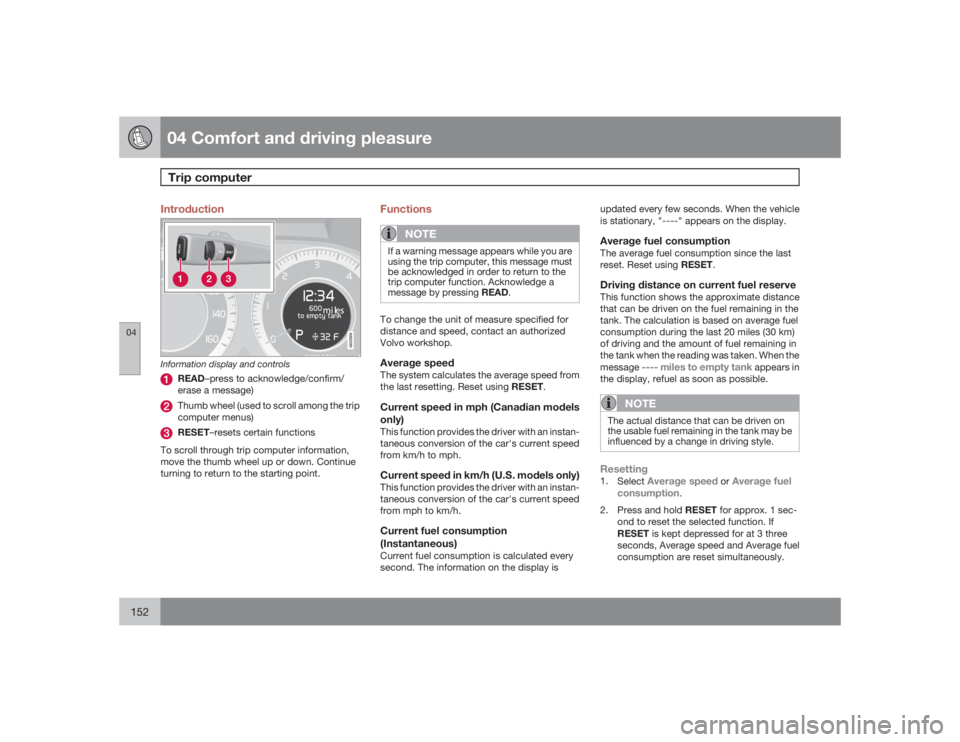
Information display and controls
READ–press to acknowledge/confirm/
erase a message)Thumb wheel (used to scroll among the trip
computer menus)RESET–resets certain functions
To scroll through trip computer information,
move the thumb wheel up or down. Continue
turning to return to the starting point.
Functions
NOTE
If a warning message appears while you are
using the trip computer, this message must
be acknowledged in order to return to the
trip computer function. Acknowledge a
message by pressing READ.To change the unit of measure specified for
distance and speed, contact an authorized
Volvo workshop.Average speedThe system calculates the average speed from
the last resetting. Reset using RESET.Current speed in mph (Canadian models
only)This function provides the driver with an instan-
taneous conversion of the car's current speed
from km/h to mph.Current speed in km/h (U.S. models only)This function provides the driver with an instan-
taneous conversion of the car's current speed
from mph to km/h.Current fuel consumption
(Instantaneous)Current fuel consumption is calculated every
second. The information on the display isupdated every few seconds. When the vehicle
is stationary, "
----
" appears on the display.
Average fuel consumptionThe average fuel consumption since the last
reset. Reset using RESET.Driving distance on current fuel reserveThis function shows the approximate distance
that can be driven on the fuel remaining in the
tank. The calculation is based on average fuel
consumption during the last 20 miles (30 km)
of driving and the amount of fuel remaining in
the tank when the reading was taken. When the
message
---- miles to empty tank
appears in
the display, refuel as soon as possible.
NOTE
The actual distance that can be driven on
the usable fuel remaining in the tank may be
influenced by a change in driving style.Resetting1.
Select
Average speed
or
Average fuel
consumption
.
2.
Press and hold RESET for approx. 1 sec-
ond to reset the selected function. If
RESET is kept depressed for at 3 three
seconds, Average speed and Average fuel
consumption are reset simultaneously.
Page 155 of 286
04 Comfort and driving pleasure
Stability system
04``155 Introduction
The Dynamic Stability and Traction Control
system (DSTC) consists of a number of func-
tions designed help reduce wheel spin, coun-
teract skidding, and to generally help improve
directional stability.
CAUTION
A pulsating sound will be audible when the
system is actively operating and is normal.Traction control (TC)This function is designed to help reduce wheel
spin by transferring power from a drive wheel
that begins to lose traction to the wheel on the
opposite side of the vehicle (on the same axle).
TC is most active at low speeds.
This is one of DSTC's permanent functions and
cannot be switched off.Active Yaw Control (AYC)This function helps maintain directional stabil-
ity, for example when cornering, by braking
one or more of the wheels if the vehicle shows
a tendency to skid or slide laterally.
This is one of DSTC's permanent functions and
cannot be switched off.
Spin control (SC)The spin control function is designed to help
prevent the drive wheels from spinning while
the vehicle is accelerating.
Under certain circumstances, such as when
driving with snow chains, or driving in deep
snow or loose sand, it may be advisable to
temporarily switch off this function for maxi-
mum tractive force.
WARNING
The car's handling and stability characteris-
tics will be altered if the spin control function
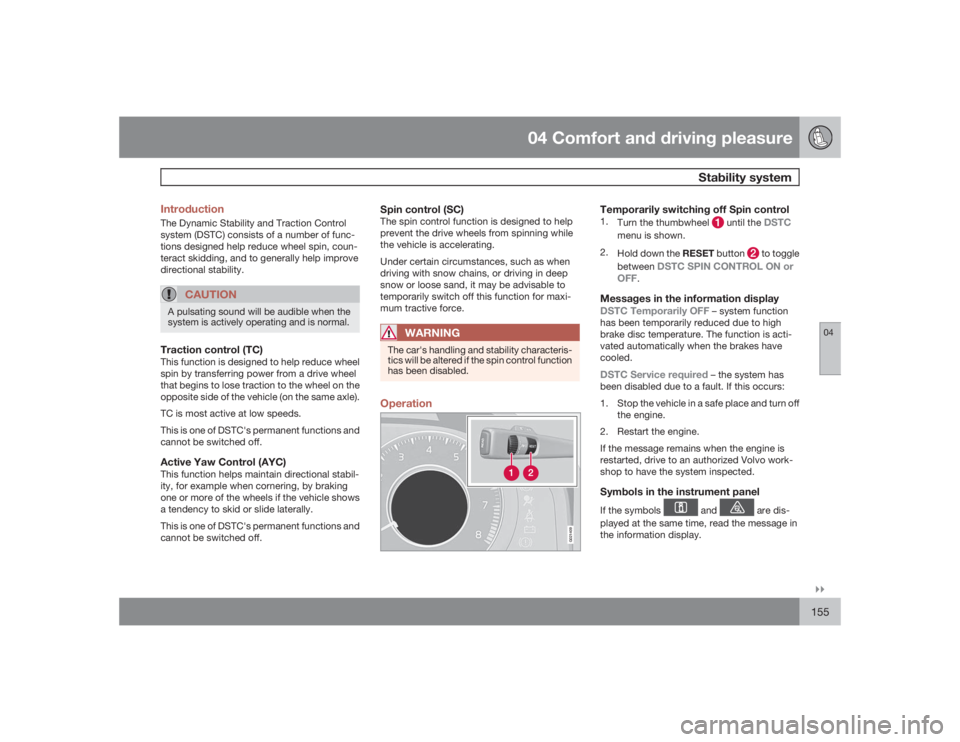
has been disabled.Operation
G021409
Temporarily switching off Spin control1.
Turn the thumbwheel
until the
DSTC
menu is shown.
2.
Hold down the RESET button
to toggle
between
DSTC SPIN CONTROL ON or
OFF
.
Messages in the information displayDSTC Temporarily OFF
– system function
has been temporarily reduced due to high
brake disc temperature. The function is acti-
vated automatically when the brakes have
cooled.
DSTC Service required
– the system has
been disabled due to a fault. If this occurs:
1. Stop the vehicle in a safe place and turn off
the engine.
2. Restart the engine.
If the message remains when the engine is
restarted, drive to an authorized Volvo work-
shop to have the system inspected.
Symbols in the instrument panelIf the symbols
and
are dis-
played at the same time, read the message in
the information display.