display VOLVO V90 2017 Owners Manual
[x] Cancel search | Manufacturer: VOLVO, Model Year: 2017, Model line: V90, Model: VOLVO V90 2017Pages: 594, PDF Size: 15.07 MB
Page 264 of 594
||
LOCKS AND ALARM
* Option/accessory.
262
The door is blocked against opening from the inside.
The door can be opened from both the out- side and the inside.
NOTE
• A door's knob control only blocks that particular door - not both rear doorssimultaneously.
• Cars with an electric child safety lock donot have a manual child lock.
Related information
• Detachable key blade (p. 250)
• Ignition positions (p. 385)
Alarm
*
The alarm alerts e.g. in the event of a break-in in the car.
When armed, the alarm is triggered if:
• a door, the bonnet or the tailgate is opened 18
• a movement is detected in the passenger compartment (if fitted with a movement detector
*)
• the car is raised or towed away (if fitted witha tilt detector
*)
• the starter battery's cable is disconnected or
• the siren is disconnected.
If there is a fault in the alarm system, the driver display shows the symbol and the message
Alarm system
failure Service required. In which
case, contact a workshop - an authorised Volvo workshop is recommended.
NOTE
Do not attempt to repair or alter components in the alarm system yourself. Any suchattempts may affect the terms of the insur-ance.
NOTE
The movement sensors trigger an alarm in the event of movement in the passengercompartment - air currents are also regis-tered. For this reason the alarm is triggered ifthe car is left with a window or the panoramic roof * open or if the passenger compartment
heater is used. To avoid this: Close the window/panoramic roof when leaving the car. If the car's inte-grated parking heater (or a portable electricheater) shall be used - direct the airflow fromthe air vents so that they are not pointingupwards into the passenger compartment.Alternatively, reduced alarm level can be used- see the section further down in this article.
Arming the alarmLock and arm the car alarm as follows:
• press the remote control key's lock button
• touch in the marked area on the outside of the door handle 19
or
• push on the tailgate's rubberised pressureplate 19
.
If the car is equipped with a power-operated tail- gate, the button on the underside of the tailgatecan also be used to lock the car and arm the caralarm.
18 Applies to certain markets.
19 Only applies to a car with keyless locking/entry (Passive Entry *)
Page 265 of 594
LOCKS AND ALARM
* Option/accessory.263
Deactivate the alarmUnlock and disarm the car alarm as follows:
• press the remote control key's unlock button
• grip one of the door handles 19
or
• push on the tailgate's rubberised pressure plate 19
.
Switching off a triggered alarm
–Press the remote control key's unlock button or set the car in ignition position I by turning
the ignition dial to START and then releas-
ing.
NOTE
• Remember that the alarm is activated when the car is locked.
• If any of the doors are opened from theinside then the alarm is triggered.
Alarm signalsWhen the alarm has been triggered, the following happens:
• A siren sounds for 30 seconds or until thealarm is switched off.
• The direction indicators flash for 5 minutesor until the alarm is switched off. If the cause of alarm activation is not rectified, the alarm cycle is repeated up to 10 times
20
.
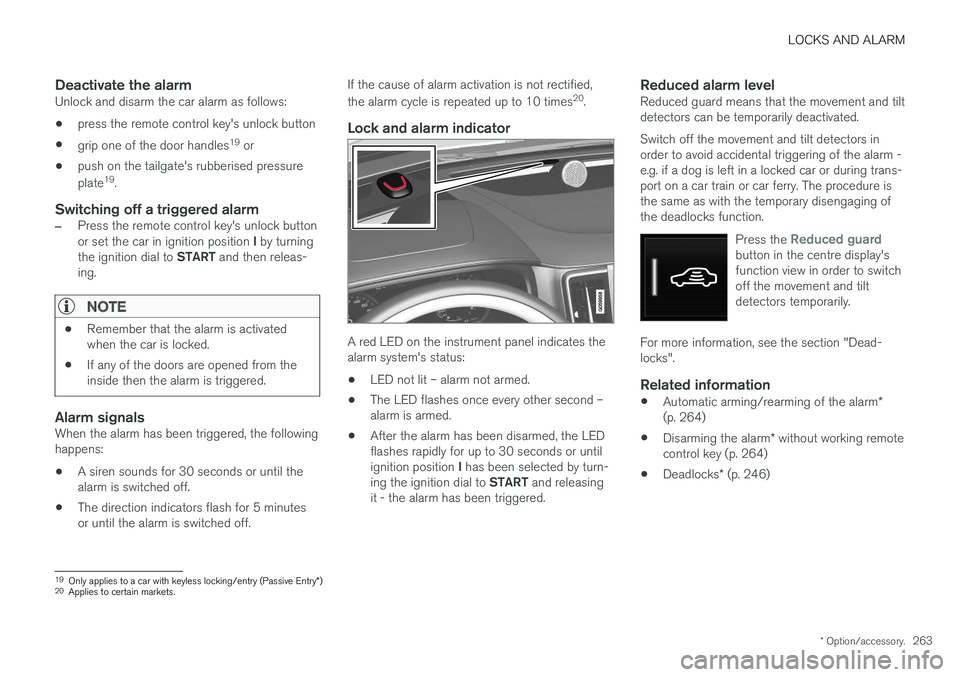
Lock and alarm indicator
A red LED on the instrument panel indicates the alarm system's status:
• LED not lit – alarm not armed.
• The LED flashes once every other second –alarm is armed.
• After the alarm has been disarmed, the LEDflashes rapidly for up to 30 seconds or until ignition position
I has been selected by turn-
ing the ignition dial to START and releasing
it - the alarm has been triggered.
Reduced alarm levelReduced guard means that the movement and tilt detectors can be temporarily deactivated. Switch off the movement and tilt detectors in order to avoid accidental triggering of the alarm -e.g. if a dog is left in a locked car or during trans-port on a car train or car ferry. The procedure isthe same as with the temporary disengaging ofthe deadlocks function.
Press the
Reduced guardbutton in the centre display's function view in order to switchoff the movement and tiltdetectors temporarily.
For more information, see the section "Dead- locks".
Related information
•Automatic arming/rearming of the alarm
*
(p. 264)
• Disarming the alarm
* without working remote
control key (p. 264)
• Deadlocks
* (p. 246)
19
Only applies to a car with keyless locking/entry (Passive Entry *)
20 Applies to certain markets.
Page 274 of 594
DRIVER SUPPORT
* Option/accessory.
272
Speed-dependent steering force Speed related power steering causes the steer- ing wheel force to increase with the speed of thecar in order to give the driver enhanced sensitiv-ity.
On motorways the steering feels firmer. When parking and at low speed steering is light andrequires only a slight effort.
NOTE
In certain situations the power steering may become too hot and then needs to be tempo-rarily cooled - during this time the powersteering operates with reduced power andturning the steering wheel may then be per-ceived to be slightly heavier. In parallel with the temporarily reduced steer- ing assistance, the driver display shows amessage.
Change the steering force level *To select the steering force level, go to the "Drive modes" section and see the description at thealternative INDIVIDUAL under the heading"Selectable drive modes". For the car models without a drive mode control with its INDIVIDUAL option, the selection ofsteering force is instead made via the centre dis-play's top view and the following search path:
SettingsMy CarDrive ModesSteering force
Selection of steering force is not accessible while turning is in progress.
Related information
•Drive modes
* (p. 400)
Roll Stability Control Roll Stability Control (RSC) is a stabiliser sys- tem that minimises the risk of overturning, forexample during sudden evasive manoeuvres or ifthe car skids.
The RSC system registers if and how much the car's lateral inclination changes. This informationis used to calculate the risk of the car overturn-ing. If the car is at risk, its electronic stability con-trol system engages, the engine torque isreduced and one or more wheels are braked untilthe car has regained its stability.
WARNING
Under normal driving conditions, the RSC sys- tem improves the car's road safety, but thismust not be taken as a reason to increasespeed. Always follow the normal precautionsfor safe driving.
Related information
• Electronic stability control (p. 273)
• Safety (p. 56)
Page 278 of 594
||
DRIVER SUPPORT
276
Related information
•Electronic stability control (p. 273)
• Sport mode for electronic stability control (p. 274)
• Managing messages in the driver display andthe centre display (p. 108)
Page 280 of 594
DRIVER SUPPORT
* Option/accessory.
278
Activating and starting the speed limiter
The speed limiter function (Speed Limiter - SL) must first be selected and activated in order tobe able to regulate the speed.
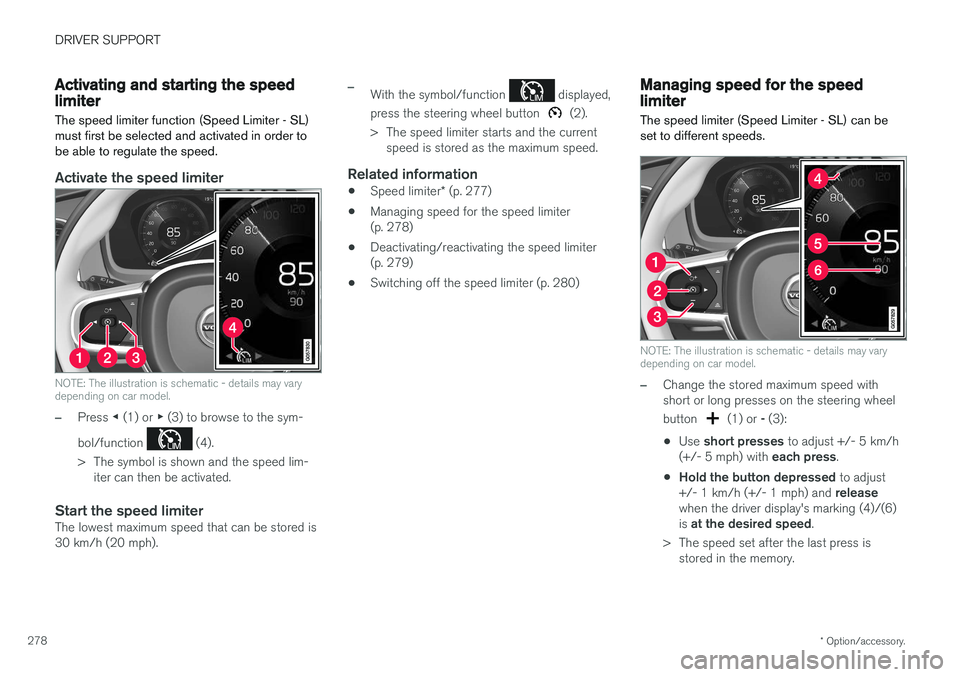
Activate the speed limiter
NOTE: The illustration is schematic - details may vary depending on car model.
–Press ◀ (1) or ▶ (3) to browse to the sym-
bol/function
(4).
> The symbol is shown and the speed lim- iter can then be activated.
Start the speed limiterThe lowest maximum speed that can be stored is 30 km/h (20 mph).
–With the symbol/function displayed,
press the steering wheel button
(2).
> The speed limiter starts and the current speed is stored as the maximum speed.
Related information
• Speed limiter
* (p. 277)
• Managing speed for the speed limiter (p. 278)
• Deactivating/reactivating the speed limiter(p. 279)
• Switching off the speed limiter (p. 280)
Managing speed for the speed limiter
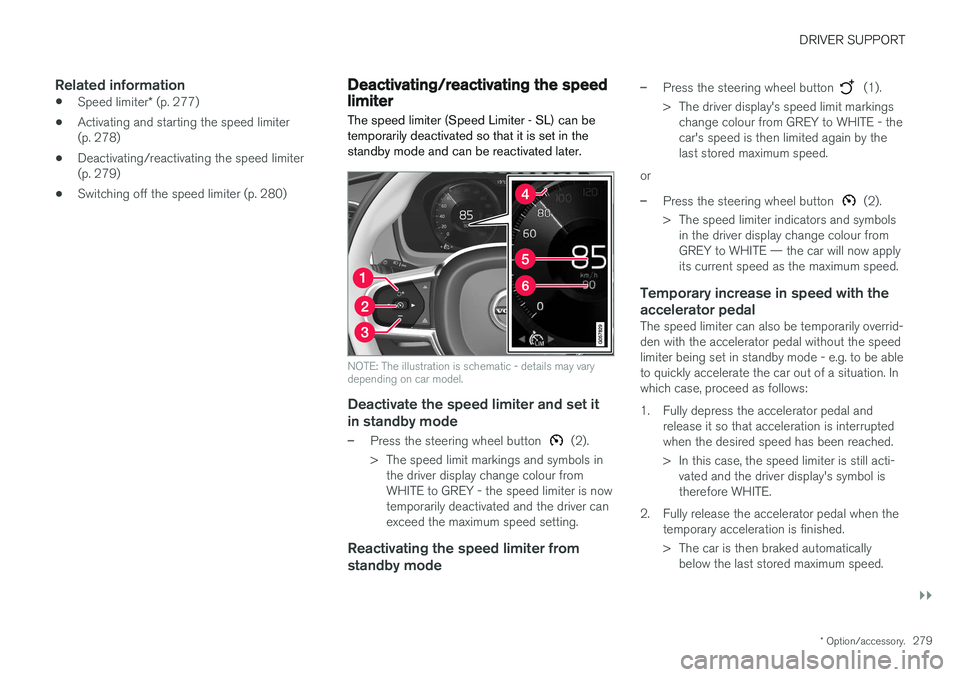
The speed limiter (Speed Limiter - SL) can be set to different speeds.
NOTE: The illustration is schematic - details may vary depending on car model.
–Change the stored maximum speed with short or long presses on the steering wheel button
(1) or - (3):
• Use
short presses to adjust +/- 5 km/h
(+/- 5 mph) with each press.
• Hold the button depressed
to adjust
+/- 1 km/h (+/- 1 mph) and release
when the driver display's marking (4)/(6) is at the desired speed .
> The speed set after the last press is stored in the memory.
Page 281 of 594
DRIVER SUPPORT
}}
* Option/accessory.279
Related information
•Speed limiter
* (p. 277)
• Activating and starting the speed limiter (p. 278)
• Deactivating/reactivating the speed limiter(p. 279)
• Switching off the speed limiter (p. 280)
Deactivating/reactivating the speed limiter
The speed limiter (Speed Limiter - SL) can be temporarily deactivated so that it is set in thestandby mode and can be reactivated later.
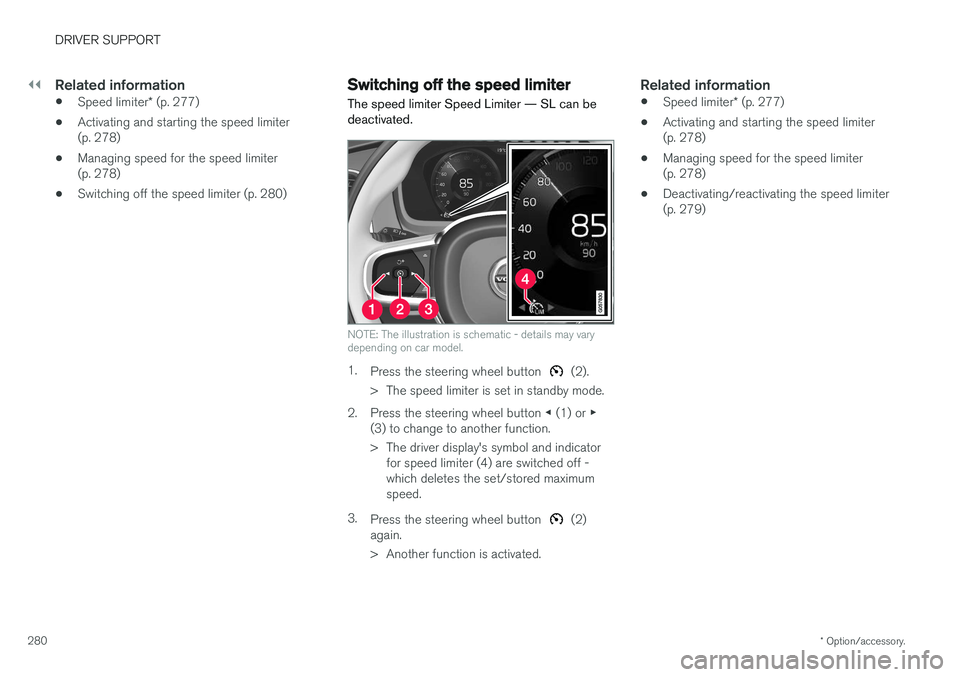
NOTE: The illustration is schematic - details may vary depending on car model.
Deactivate the speed limiter and set it
in standby mode
–Press the steering wheel button (2).
> The speed limit markings and symbols in the driver display change colour from WHITE to GREY - the speed limiter is nowtemporarily deactivated and the driver canexceed the maximum speed setting.
Reactivating the speed limiter from standby mode
–Press the steering wheel button (1).
> The driver display's speed limit markings change colour from GREY to WHITE - the car's speed is then limited again by thelast stored maximum speed.
or
–Press the steering wheel button (2).
> The speed limiter indicators and symbols in the driver display change colour from GREY to WHITE — the car will now applyits current speed as the maximum speed.
Temporary increase in speed with the accelerator pedal
The speed limiter can also be temporarily overrid- den with the accelerator pedal without the speedlimiter being set in standby mode - e.g. to be ableto quickly accelerate the car out of a situation. Inwhich case, proceed as follows:
1. Fully depress the accelerator pedal and release it so that acceleration is interrupted when the desired speed has been reached.
> In this case, the speed limiter is still acti-vated and the driver display's symbol is therefore WHITE.
2. Fully release the accelerator pedal when the temporary acceleration is finished.
> The car is then braked automaticallybelow the last stored maximum speed.
Page 282 of 594
||
DRIVER SUPPORT
* Option/accessory.
280
Related information
• Speed limiter
* (p. 277)
• Activating and starting the speed limiter (p. 278)
• Managing speed for the speed limiter(p. 278)
• Switching off the speed limiter (p. 280)
Switching off the speed limiter
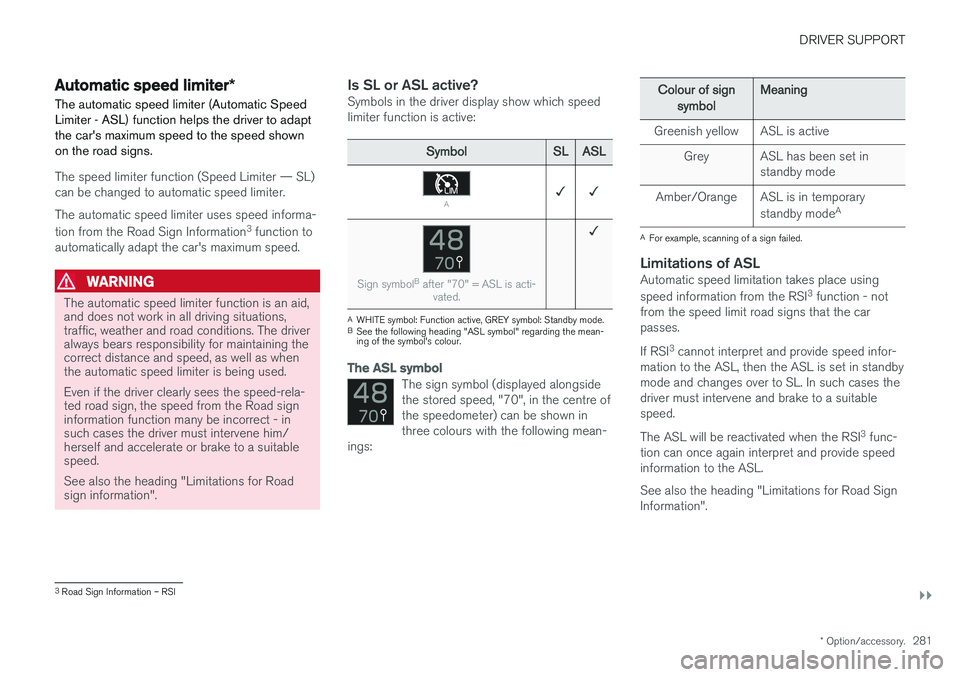
The speed limiter Speed Limiter — SL can be deactivated.
NOTE: The illustration is schematic - details may vary depending on car model.
1. Press the steering wheel button (2).
> The speed limiter is set in standby mode.
2. Press the steering wheel button ◀ (1) or ▶
(3) to change to another function.
> The driver display's symbol and indicator for speed limiter (4) are switched off - which deletes the set/stored maximumspeed.
3. Press the steering wheel button
(2)
again.
> Another function is activated.
Related information
• Speed limiter
* (p. 277)
• Activating and starting the speed limiter (p. 278)
• Managing speed for the speed limiter(p. 278)
• Deactivating/reactivating the speed limiter(p. 279)
Page 283 of 594
DRIVER SUPPORT
}}
* Option/accessory.281
Automatic speed limiter *
The automatic speed limiter (Automatic Speed
Limiter - ASL) function helps the driver to adaptthe car's maximum speed to the speed shownon the road signs.
The speed limiter function (Speed Limiter — SL) can be changed to automatic speed limiter. The automatic speed limiter uses speed informa- tion from the Road Sign Information 3
function to
automatically adapt the car's maximum speed.
WARNING
The automatic speed limiter function is an aid, and does not work in all driving situations,traffic, weather and road conditions. The driveralways bears responsibility for maintaining thecorrect distance and speed, as well as whenthe automatic speed limiter is being used. Even if the driver clearly sees the speed-rela- ted road sign, the speed from the Road signinformation function many be incorrect - insuch cases the driver must intervene him/herself and accelerate or brake to a suitablespeed. See also the heading "Limitations for Road sign information".
Is SL or ASL active?Symbols in the driver display show which speed limiter function is active:
Symbol SLASL
A✓ ✓
Sign symbol B
after "70" = ASL is acti-
vated.
✓
AWHITE symbol: Function active, GREY symbol: Standby mode.
B See the following heading "ASL symbol" regarding the mean- ing of the symbol's colour.
The ASL symbol
The sign symbol (displayed alongside the stored speed, "70", in the centre ofthe speedometer) can be shown inthree colours with the following mean-
ings:
Colour of sign
symbol Meaning
Greenish yellow ASL is active Grey ASL has been set in standby mode
Amber/Orange ASL is in temporary standby modeA
A
For example, scanning of a sign failed.
Limitations of ASLAutomatic speed limitation takes place using speed information from the RSI 3
function - not
from the speed limit road signs that the car passes. If RSI 3
cannot interpret and provide speed infor-
mation to the ASL, then the ASL is set in standby mode and changes over to SL. In such cases thedriver must intervene and brake to a suitablespeed. The ASL will be reactivated when the RSI 3
func-
tion can once again interpret and provide speed information to the ASL. See also the heading "Limitations for Road Sign Information".
3 Road Sign Information – RSI
Page 284 of 594
||
DRIVER SUPPORT
* Option/accessory.
282
Related information
• Speed limiter
* (p. 277)
• Activating/deactivating the automatic speed limiter (p. 282)
• Changing the tolerance for the Automaticspeed limiter (p. 283)
• Road Sign Information
* (p. 348)
• Limitations of Road Sign Information
*
(p. 352)
Activating/deactivating the automatic speed limiter
The automatic speed limiter function (Automatic Speed Limiter - ASL) can be activated anddeactivated as a supplement to the speed limiter(Speed Limiter - SL).
The function is activated/deac- tivated in function view in thecentre display.
Activating the automatic speed limiter1. Tap on the Speed Sign Assist button in
function view.
> ASL is set in standby mode, a green indi- cator appears on the button, and the driver display shows a sign symbol in thecentre of the speedometer.
2. Press the steering wheel button
.
> ASL is activated with the car
Page 287 of 594
DRIVER SUPPORT
}}
285
–With the symbol/function displayed,
press the steering wheel button
(2).
> Cruise Control starts and the current speed becomes the stored speed.
NOTE
Cruise Control cannot be enabled at speeds below 30 km/h (20 mph).
Related information
• Cruise control (p. 284)
• Managing speed for the Cruise control (p. 285)
• Deactivating/reactivating the cruise control(p. 286)
• Deactivating Cruise Control (p. 287)
Managing speed for the Cruise control The cruise control (Cruise Control - CC) can be set to different speeds.
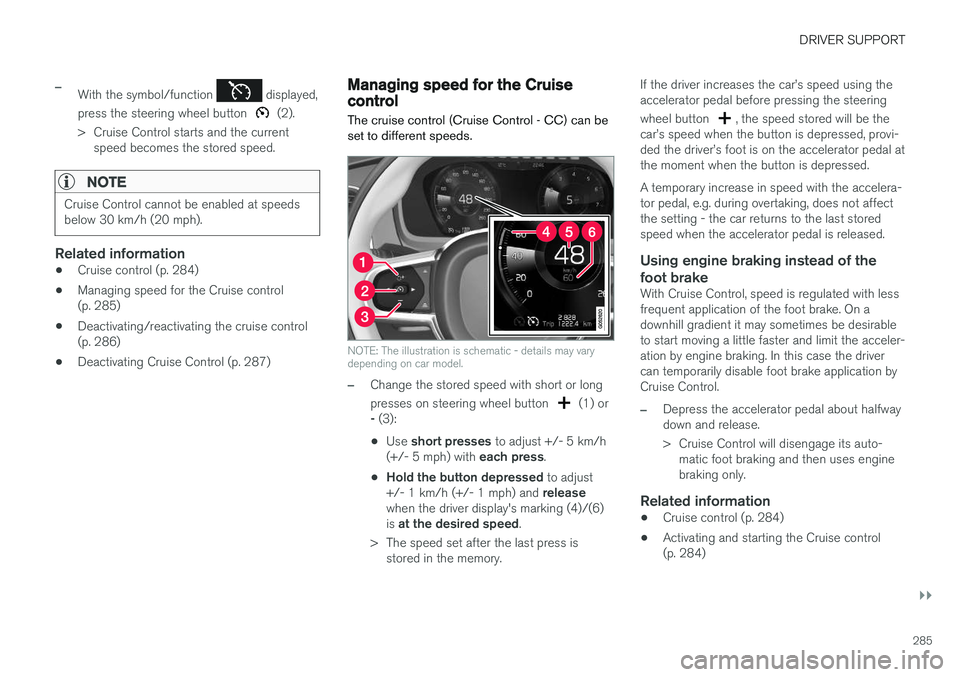
NOTE: The illustration is schematic - details may vary depending on car model.
–Change the stored speed with short or long presses on steering wheel button
(1) or
- (3):
• Use
short presses to adjust +/- 5 km/h
(+/- 5 mph) with each press.
• Hold the button depressed
to adjust
+/- 1 km/h (+/- 1 mph) and release
when the driver display's marking (4)/(6) is at the desired speed .
> The speed set after the last press is stored in the memory. If the driver increases the car