instrument panel VOLVO V90 2017 User Guide
[x] Cancel search | Manufacturer: VOLVO, Model Year: 2017, Model line: V90, Model: VOLVO V90 2017Pages: 594, PDF Size: 15.07 MB
Page 154 of 594
INSTRUMENTS AND CONTROLS
152
Operating power windows Using the driver's door control panel, all power windows can be operated - using the controlpanels in the other doors operates the powerwindow in the individual door.
WARNING
Check that no children or other passengers are trapped when the windows are closedfrom the driver's door.
WARNING
Check that no children or other passengers are trapped if/when the windows are closedusing the remote control key.
WARNING
If there are children in the car - remember to always switch off the power supply to thepower windows by setting the car's electrical system in ignition position 0 and then take
the remote control key with you when leaving the car.
Operating
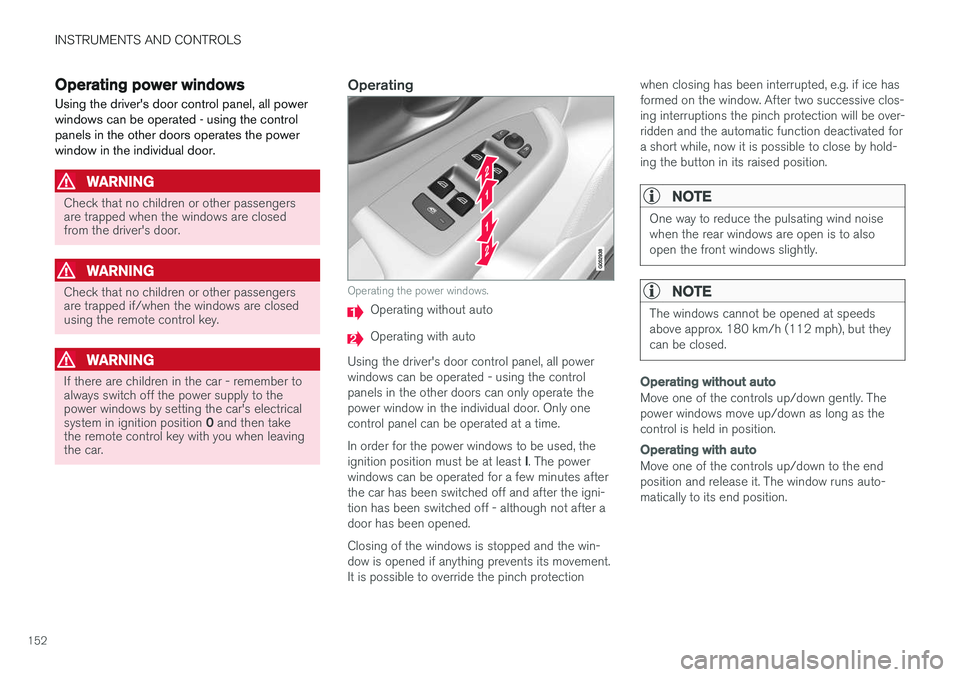
Operating the power windows.
Operating without auto
Operating with auto
Using the driver's door control panel, all power windows can be operated - using the controlpanels in the other doors can only operate thepower window in the individual door. Only onecontrol panel can be operated at a time. In order for the power windows to be used, the ignition position must be at least I. The power
windows can be operated for a few minutes after the car has been switched off and after the igni-tion has been switched off - although not after adoor has been opened. Closing of the windows is stopped and the win- dow is opened if anything prevents its movement.It is possible to override the pinch protection when closing has been interrupted, e.g. if ice hasformed on the window. After two successive clos-ing interruptions the pinch protection will be over-ridden and the automatic function deactivated fora short while, now it is possible to close by hold-ing the button in its raised position.
NOTE
One way to reduce the pulsating wind noise when the rear windows are open is to alsoopen the front windows slightly.
NOTE
The windows cannot be opened at speeds above approx. 180 km/h (112 mph), but theycan be closed.
Operating without auto
Move one of the controls up/down gently. The power windows move up/down as long as thecontrol is held in position.
Operating with auto
Move one of the controls up/down to the end position and release it. The window runs auto-matically to its end position.
Page 155 of 594
INSTRUMENTS AND CONTROLS
}}
* Option/accessory.153
Operating with the remote control key, door handle or central locking button
To control the power windows from the outside with the remote control key or door handle, orfrom the inside with the central locking button,see the section "Remote control key", "Locking/unlocking from the outside" or "Locking/unlock-ing from the inside".
ResettingIf the starter battery is disconnected then thefunction for automatic opening must be reset sothat it can work correctly.
1. Gently raise the front section of the button to
raise the window to its end position and hold it there for one second.
2. Release the button briefly.
3. Raise the front section of the button again for one second.
WARNING
A reset must take place for pinch protection to work.
Related information
• Power windows (p. 151)
• Ignition positions (p. 385)
• Remote control key (p. 236)
• Locking/unlocking from the outside (p. 241)
• Locking/unlocking from the inside (p. 245)
Using the sun blind
*
Sun blinds are built into each rear door.
In the rear door - manually operated
Hook with associated catch
–Pull up the sun blind and attach it to the hook in the upper door frame.
The window can still be opened and closed withthe sun blind up.
Adjusting the door mirrors
The door mirror positions are adjusted with the joystick in the driver's door control panel.
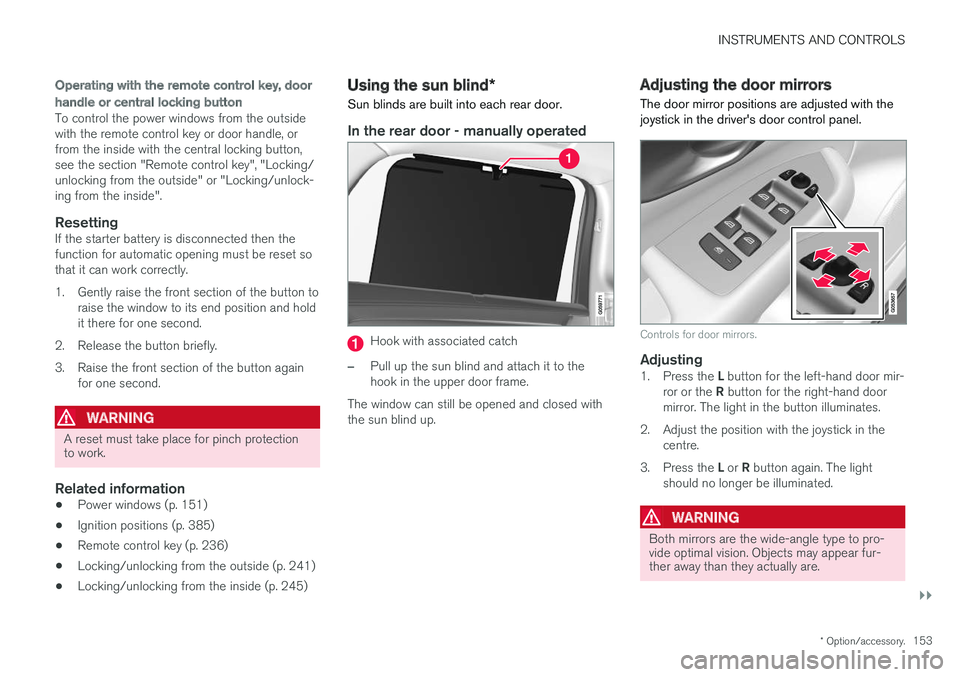
Controls for door mirrors.
Adjusting1. Press the L button for the left-hand door mir-
ror or the R button for the right-hand door
mirror. The light in the button illuminates.
2. Adjust the position with the joystick in the centre.
3. Press the L or R button again. The light
should no longer be illuminated.
WARNING
Both mirrors are the wide-angle type to pro- vide optimal vision. Objects may appear fur-ther away than they actually are.
Page 164 of 594
||
INSTRUMENTS AND CONTROLS
* Option/accessory.
162 blind once more in the same direction without pinch protection, if this is done within 10 secondsafter pinch protection deployment. It is thereforepossible to override the pinch protection whenclosing has been interrupted e.g. if ice hasformed around the glass cover, by continuallypressing the control forward/downward until theglass cover and/or sun blind is closed.
Related information
•
Panorama roof
* (p. 158)
• Ignition positions (p. 385)
• Remote control key (p. 236)
• Locking/unlocking from the inside (p. 245)
• Locking/unlocking from the outside (p. 241)
HomeLink ®
*30
HomeLink ®
is a programmable remote control
that is integrated into the car's electrical system.
General
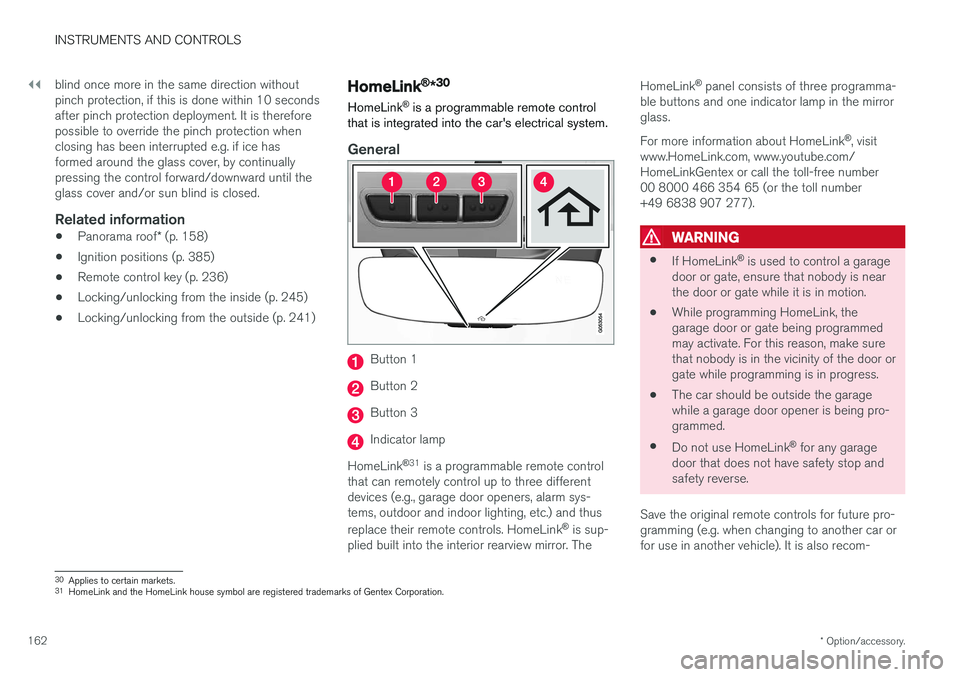
Button 1
Button 2
Button 3
Indicator lamp
HomeLink ®
31
is a programmable remote control
that can remotely control up to three different devices (e.g., garage door openers, alarm sys-tems, outdoor and indoor lighting, etc.) and thus replace their remote controls. HomeLink ®
is sup-
plied built into the interior rearview mirror. The HomeLink
®
panel consists of three programma-
ble buttons and one indicator lamp in the mirror glass. For more information about HomeLink ®
, visit
www.HomeLink.com, www.youtube.com/ HomeLinkGentex or call the toll-free number00 8000 466 354 65 (or the toll number+49 6838 907 277).
WARNING
• If HomeLink ®
is used to control a garage
door or gate, ensure that nobody is near the door or gate while it is in motion.
• While programming HomeLink, thegarage door or gate being programmedmay activate. For this reason, make surethat nobody is in the vicinity of the door orgate while programming is in progress.
• The car should be outside the garagewhile a garage door opener is being pro-
grammed.
• Do not use HomeLink ®
for any garage
door that does not have safety stop andsafety reverse.
Save the original remote controls for future pro-gramming (e.g. when changing to another car orfor use in another vehicle). It is also recom-
30 Applies to certain markets.
31 HomeLink and the HomeLink house symbol are registered trademarks of Gentex Corporation.
Page 199 of 594

CLIMATE CONTROL
}}
* Option/accessory.197
NOTE
It is not possible to activate air recirculation when max defroster is activated.
Activating/deactivating the timer for air recirculation
It is possible set whether the air recirculation timer should be activated/deactivated. When thetimer is activated, air recirculation is automaticallyswitched off after 20 minutes. 1.
Press
Settings in the top view in the centre
display.
2. Press
Climate.
3. Select
Recirculation Timer to activate/
deactivate the air recirculation timer.
Related information
• Climate controls in the centre display (p. 187)
Air distribution
The climate control system distributes the incoming air via a number of different vents inthe passenger compartment.
Overview of air distribution
Air distribution in the passenger compartment with 4- zone climate.
Automatic and manual air distributionWith auto-regulated climate running the air distri- bution takes place automatically. If necessary, theair distribution can be controlled manually.
Adjustable air vents
There are 6 or 8 * adjustable air vents in the pas-
senger compartment depending on the climatecontrol system.
Location of adjustable air vents in the passenger com- partment.
With 2-zone climate - four on the instrument panel and one on each of the door pillarsbetween the front and rear doors.
Addition with 4-zone climate * - two at the
rear of the tunnel console.
NOTE
Remember that small children may be sensi- tive to air flows and draughts.
Related information
• Climate control (p. 182)
• Changing the air distribution (p. 198)
• Opening/closing and aiming the air vents (p. 199)
Page 200 of 594
CLIMATE CONTROL
198•
Table of air distribution options (p. 201)
• Auto-regulating the climate (p. 189)
Changing the air distribution
The air distribution can be changed manually if required.
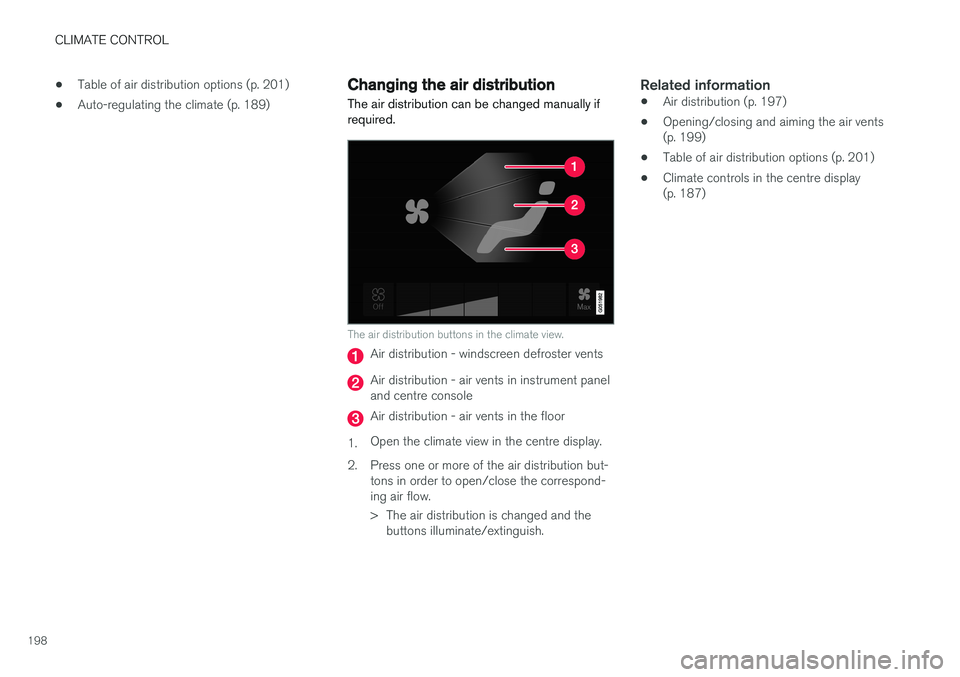
The air distribution buttons in the climate view.
Air distribution - windscreen defroster vents
Air distribution - air vents in instrument panel and centre console
Air distribution - air vents in the floor
1. Open the climate view in the centre display.
2. Press one or more of the air distribution but- tons in order to open/close the correspond- ing air flow.
> The air distribution is changed and thebuttons illuminate/extinguish.
Related information
• Air distribution (p. 197)
• Opening/closing and aiming the air vents (p. 199)
• Table of air distribution options (p. 201)
• Climate controls in the centre display(p. 187)
Page 201 of 594
CLIMATE CONTROL
}}
199
Opening/closing and aiming the air vents Some air vents in the passenger compartment can be opened, closed and aimed individually.
If the door pillar vents and instrument panel outer vents are aimed toward the side windows, thenmisting can be removed. If the door pillar vents are aimed inwards then, in a hot climate, a comfortable environment isobtained in the passenger compartment.
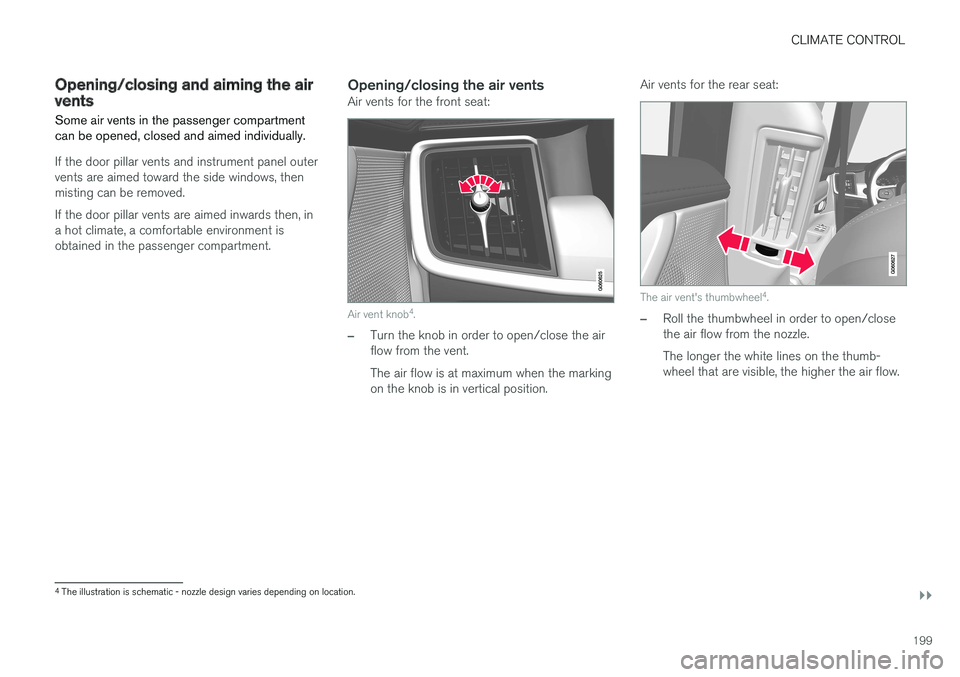
Opening/closing the air ventsAir vents for the front seat:
Air vent knob4
.
–Turn the knob in order to open/close the air flow from the vent. The air flow is at maximum when the marking on the knob is in vertical position. Air vents for the rear seat:
The air vent's thumbwheel
4
.
–Roll the thumbwheel in order to open/close the air flow from the nozzle. The longer the white lines on the thumb- wheel that are visible, the higher the air flow.
4 The illustration is schematic - nozzle design varies depending on location.
Page 203 of 594
CLIMATE CONTROL
}}
201
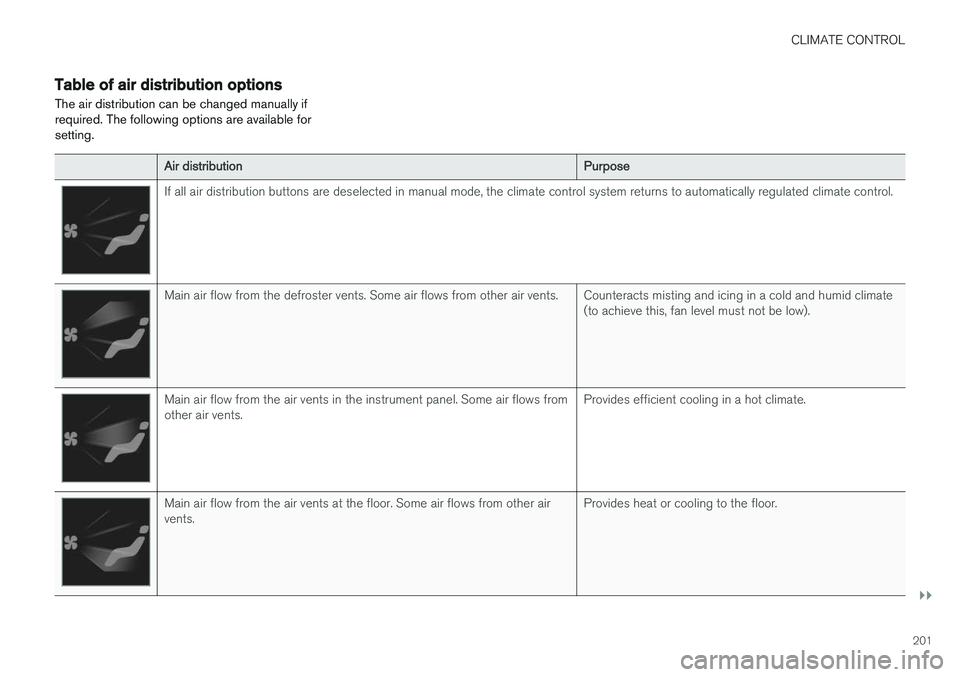
Table of air distribution optionsThe air distribution can be changed manually if required. The following options are available forsetting.
Air distribution Purpose
If all air distribution buttons are deselected in manual mode, the climate control system returns to automatically regulated climate control.
Main air flow from the defroster vents. Some air flows from other air vents. Counteracts misting and icing in a cold and humid climate
(to achieve this, fan level must not be low).
Main air flow from the air vents in the instrument panel. Some air flows from other air vents.Provides efficient cooling in a hot climate.
Main air flow from the air vents at the floor. Some air flows from other air vents.Provides heat or cooling to the floor.
Page 204 of 594
||
CLIMATE CONTROL
202
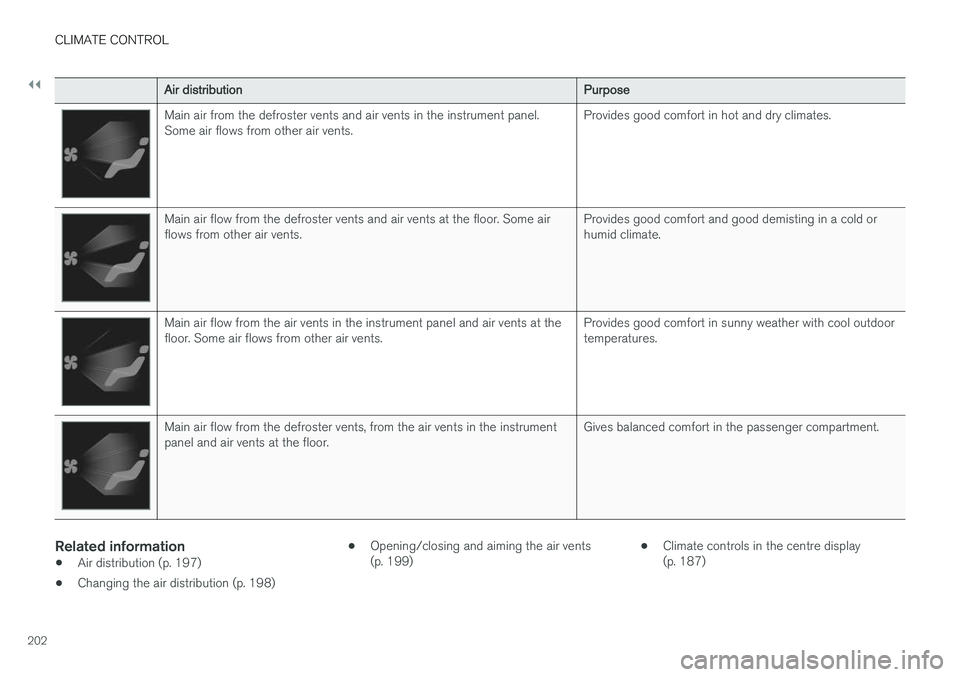
Air distributionPurpose
Main air from the defroster vents and air vents in the instrument panel. Some air flows from other air vents.Provides good comfort in hot and dry climates.
Main air flow from the defroster vents and air vents at the floor. Some air flows from other air vents.Provides good comfort and good demisting in a cold orhumid climate.
Main air flow from the air vents in the instrument panel and air vents at the floor. Some air flows from other air vents.Provides good comfort in sunny weather with cool outdoortemperatures.
Main air flow from the defroster vents, from the air vents in the instrument panel and air vents at the floor.Gives balanced comfort in the passenger compartment.
Related information
•
Air distribution (p. 197)
• Changing the air distribution (p. 198) •
Opening/closing and aiming the air vents (p. 199) •
Climate controls in the centre display(p. 187)
Page 245 of 594
LOCKS AND ALARM
}}
* Option/accessory.243
Related information
•Remote control key (p. 236)
• Power operated tailgate
* (p. 253)
• Locking/unlocking the tailgate (p. 247)
• Opening/closing the tailgate with foot move- ment
* (p. 256)
• Remote control key range (p. 238)
• Detachable key blade (p. 250)
• Alarm
* (p. 262)
Indication on locking/unlocking the car
When the car is locked or unlocked using the remote control key, the direction indicators con-firm that locking/unlocking was correctly per-formed.
It is possible to separately adapt the indication for locking/unlocking, see the heading "Select howthe car confirms locking and unlocking".
Exterior indicationLocking
• The car's hazard warning flashers indicatelocking by flashing and retracting the door mirrors 6
.
Unlocking
• The car's hazard warning flashers indicate unlocking by two flashes and extending the door mirrors 6
.
All doors, tailgate and bonnet must be closed to indicate the car is locked. If locking is performed with only the driver's door closed 7
, the car will be locked but indication will
only occur after all doors, tailgate and bonnet have been closed.
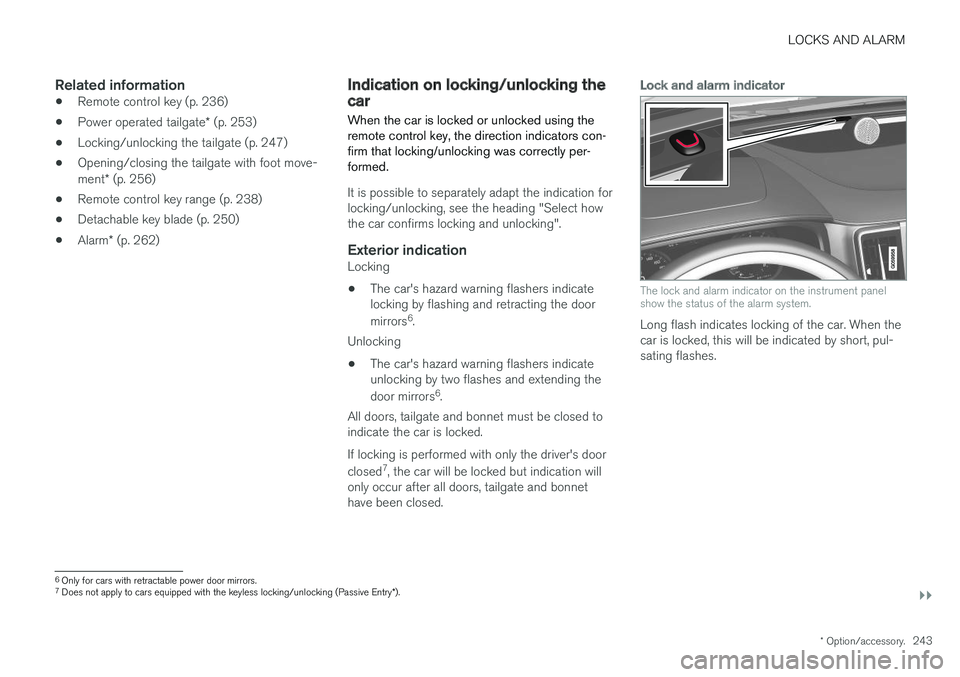
Lock and alarm indicator
The lock and alarm indicator on the instrument panel show the status of the alarm system.
Long flash indicates locking of the car. When the car is locked, this will be indicated by short, pul-sating flashes.
6 Only for cars with retractable power door mirrors.
7 Does not apply to cars equipped with the keyless locking/unlocking (Passive Entry *).
Page 255 of 594
LOCKS AND ALARM
}}
* Option/accessory.253
NOTE
•A door's lock reset only locks that partic- ular door - not all doors simultaneously.
• A manually locked rear door with acti-vated manual or electric child safety lockscannot be opened from either the outsideor the inside. A rear door that is locked inthis way can only be unlocked with theremote control key or central locking but-ton.
Related information
• Detachable key blade (p. 250)
Power operated tailgate
*
The car's tailgate can be opened/closed electri- cally.
Opening/closing via a foot movement is also available as an extended option - see the section"Opening/closing the power operated tailgatewith foot movement" for more information.
OpeningThe tailgate can be opened with its handle, with foot movement *, a button on the instrument
panel or the remote control key.
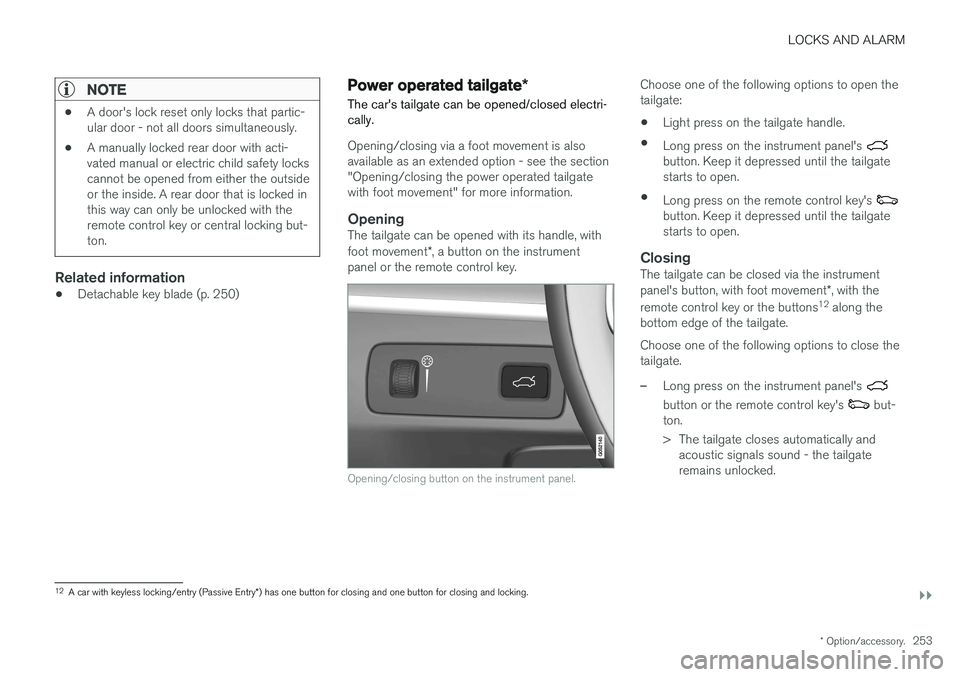
Opening/closing button on the instrument panel.
Choose one of the following options to open the tailgate:
• Light press on the tailgate handle.
• Long press on the instrument panel's
button. Keep it depressed until the tailgate starts to open.
• Long press on the remote control key's
button. Keep it depressed until the tailgate starts to open.
ClosingThe tailgate can be closed via the instrument panel's button, with foot movement *, with the
remote control key or the buttons 12
along the
bottom edge of the tailgate. Choose one of the following options to close the tailgate.
–Long press on the instrument panel's
button or the remote control key's but-
ton.
> The tailgate closes automatically and acoustic signals sound - the tailgate remains unlocked.
12A car with keyless locking/entry (Passive Entry *) has one button for closing and one button for closing and locking.