parking brake VOLVO V90 2017 User Guide
[x] Cancel search | Manufacturer: VOLVO, Model Year: 2017, Model line: V90, Model: VOLVO V90 2017Pages: 594, PDF Size: 15.07 MB
Page 315 of 594
DRIVER SUPPORT
}}
* Option/accessory.313
Change of target and automatic braking with Pilot Assist *
In combination with automatic gearbox, Pilot Assist has functionality for change of target and braking at certain speeds.
Change of target
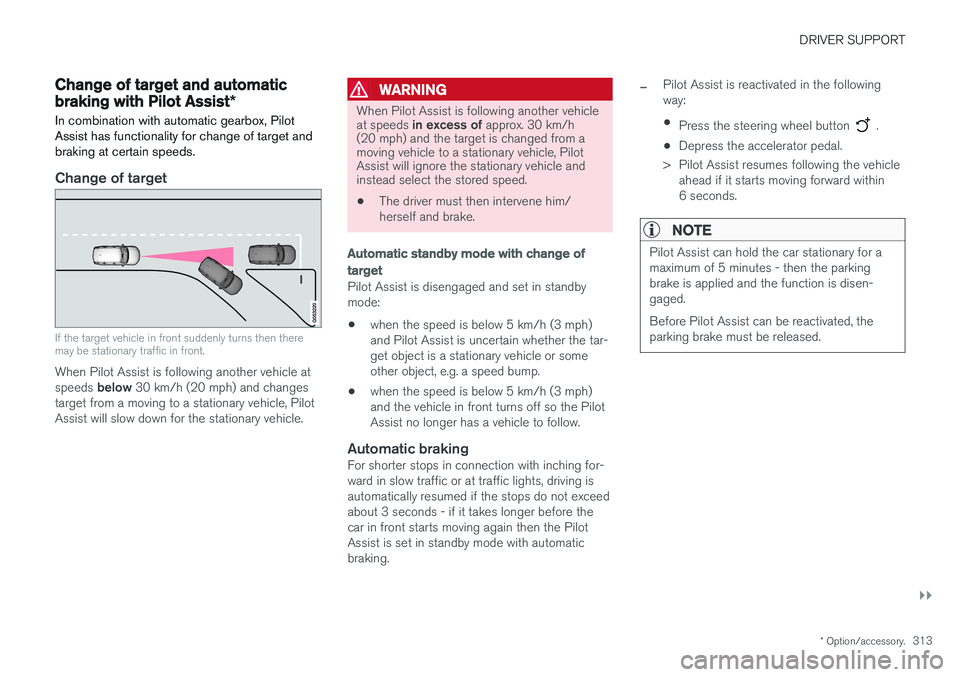
If the target vehicle in front suddenly turns then there may be stationary traffic in front.
When Pilot Assist is following another vehicle at speeds below 30 km/h (20 mph) and changes
target from a moving to a stationary vehicle, Pilot Assist will slow down for the stationary vehicle.
WARNING
When Pilot Assist is following another vehicle at speeds in excess of approx. 30 km/h
(20 mph) and the target is changed from a moving vehicle to a stationary vehicle, PilotAssist will ignore the stationary vehicle andinstead select the stored speed.
• The driver must then intervene him/ herself and brake.
Automatic standby mode with change of target
Pilot Assist is disengaged and set in standby mode: •when the speed is below 5 km/h (3 mph) and Pilot Assist is uncertain whether the tar-get object is a stationary vehicle or someother object, e.g. a speed bump.
• when the speed is below 5 km/h (3 mph)and the vehicle in front turns off so the PilotAssist no longer has a vehicle to follow.
Automatic brakingFor shorter stops in connection with inching for-ward in slow traffic or at traffic lights, driving isautomatically resumed if the stops do not exceedabout 3 seconds - if it takes longer before thecar in front starts moving again then the PilotAssist is set in standby mode with automaticbraking.
–Pilot Assist is reactivated in the following way:
• Press the steering wheel button
.
• Depress the accelerator pedal.
> Pilot Assist resumes following the vehicle ahead if it starts moving forward within 6 seconds.
NOTE
Pilot Assist can hold the car stationary for a maximum of 5 minutes - then the parkingbrake is applied and the function is disen-gaged. Before Pilot Assist can be reactivated, the parking brake must be released.
Page 316 of 594
||
DRIVER SUPPORT
* Option/accessory.
314
Cessation of automatic braking
In some situations, automatic braking ceases on coming to a standstill and Pilot Assist is set instandby mode. This means that the brakes arereleased and the car may start to roll - the drivermust therefore intervene and brake the car him-self/herself to keep it stationary. This may take place in the following situations:
• the driver puts his/her foot on the brake pedal
• the parking brake is applied
• the gear selector is moved to
P, N , or R posi-
tion
• the driver sets Pilot Assist in the standbymode.
Automatic activation of parking brakeIn certain situations the parking brake is appliedto keep the car stationary. This takes place if Pilot Assist is holding the car stationary with the foot brake and: •
the driver opens the door or takes off his/her seatbelt
• Pilot Assist has kept the car stationary formore than approx. 5 minutes
• the brakes have overheated
• the engine is switched off.
Related information
•
Pilot Assist
* (p. 304)
• Activating and starting the Pilot Assist
*
(p. 307)
• Managing the speed for Pilot Assist
* (p. 309)
• Setting the time interval for Pilot Assist
*
(p. 310)
• Deactivating/activating the Pilot Assist
*
(p. 311)
• Overtaking assistance with the adaptive cruise control
* or Pilot Assist * (p. 298)
• Limitations of Pilot Assist
* (p. 314)
• Symbols and messages for Pilot Assist
*
(p. 316)
Limitations of Pilot Assist *
The Pilot Assist function may have limitations in certain situations.
The Pilot Assist function is an aid which can help the driver in many situations. But the driver is atall times responsible for maintaining a safe dis-tance to surrounding objects and a correct posi-tion in the lane.
Page 340 of 594
||
DRIVER SUPPORT
338
Low speed
City Safety is not activated at very low speeds - below 4 km/h (3 mph) - and the system there-fore does not intervene in situations where yourcar is approaching a vehicle ahead very slowly,e.g. when parking.
Active driver
Driver commands are always prioritised, which is why City Safety does not intervene or postponewarning/intervention in situations where thedriver is steering and accelerating in a decisivemanner, even if a collision is unavoidable. Active and aware driving behaviour can therefore delay a collision warning and intervention in orderto minimise unnecessary warnings.
Miscellaneous
WARNING
Warnings and brake interventions could be implemented late or not at all if a traffic situa-tion or external influences mean that the cam-era and radar unit cannot detect pedestrians,cyclists, large animals or vehicles correctly. For vehicles to be detected at night, their headlamps and rear lamp cluster must beswitched on and shining clearly. The camera and radar unit has a limited range for pedestrians and cyclists. The system canprovide effective warnings and brake interven-tions as long as the relative speed is below50 km/h (30 mph). For stationary or slow-moving vehicles, warnings and brake interven-tions are effective at vehicle speeds up to70 km/h (43 mph). Speed reduction for largeanimals is less than 15 km/h (9 mph) andcan be achieved at vehicle speeds above70 km/h (43 mph). The warning and brakeintervention for large animals is less effectiveat lower speeds. Warnings for stationary or slow-moving vehi- cles and large animals could be disengageddue to darkness or poor visibility. Warnings and brake interventions for pedes- trians and cyclists are deactivated at vehiclespeeds exceeding 70 km/h (43 mph). Do not place, stick or mount anything on the outside or inside of the windscreen in front ofor around the camera and radar unit — thiscan interfere with camera-dependent func-tions.
Objects, snow, ice or dirt in the area of the camera sensor may reduce its function, fullydeactivate it or give incorrect functionresponse.
NOTE
The function uses the car's camera unit, which has some general limitations, see the"Limitations for camera unit" section.
NOTE
The function uses the car's radar unit, which has some general limitations, see the "Limita-tions for radar unit" section.
Related information
•City Safety (p. 330)
• Limitations of the camera unit (p. 327)
• Limitations of the radar unit (p. 319)
Page 366 of 594
||
DRIVER SUPPORT
* Option/accessory.
364
Along the sides
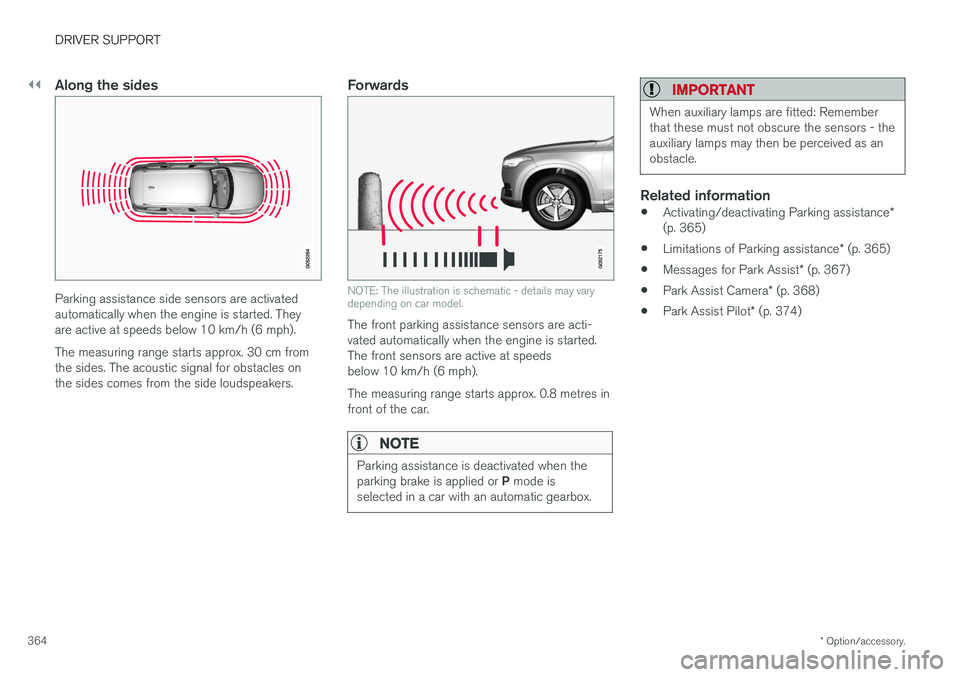
Parking assistance side sensors are activated automatically when the engine is started. Theyare active at speeds below 10 km/h (6 mph). The measuring range starts approx. 30 cm from the sides. The acoustic signal for obstacles onthe sides comes from the side loudspeakers.
Forwards
NOTE: The illustration is schematic - details may vary depending on car model.
The front parking assistance sensors are acti- vated automatically when the engine is started.The front sensors are active at speedsbelow 10 km/h (6 mph). The measuring range starts approx. 0.8 metres in front of the car.
NOTE
Parking assistance is deactivated when the parking brake is applied or P mode is
selected in a car with an automatic gearbox.
IMPORTANT
When auxiliary lamps are fitted: Remember that these must not obscure the sensors - theauxiliary lamps may then be perceived as anobstacle.
Related information
• Activating/deactivating Parking assistance
*
(p. 365)
• Limitations of Parking assistance
* (p. 365)
• Messages for Park Assist
* (p. 367)
• Park Assist Camera
* (p. 368)
• Park Assist Pilot
* (p. 374)
Page 367 of 594
DRIVER SUPPORT
}}
* Option/accessory.365
Activating/deactivating Parking assistance*
The Parking assistance function can be acti- vated/deactivated.
The front and side parking assistance sensors are activated automatically when the engine isstarted. The rear sensors activate if the car rollsbackwards or if reverse gear in engaged.
The function is activated/deac-tivated in function view in thecentre display. Parking assistance can also be activated/deactivated from thecamera views.
–Tap on the Park Assist button in function
view.
> Parking assistance is activated/deacti- vated, a green/grey indicator is displayed in the button.
Related information
• Park Assist
* (p. 363)
• Cross Traffic Alert
* (p. 343)
Limitations of Parking assistance *
The Parking assistance function may have limita- tions in certain situations.
NOTE
Since a towbar is configured with the car's electrical system, towbar protrusion isincluded when the function measures the dis-tance to an object behind the car.
IMPORTANT
Objects e.g. chains, thin glossy poles or low barriers may be in the "signal shadow" andare then temporarily not detected by the sen-sors - the pulsating tone may then unexpect-edly stop instead of changing over to theexpected constant tone. The sensors cannot detect high objects, such as projecting loading docks.
• In such situations, pay extra attention andmanoeuvre/reposition the car particularlyslowly or stop the current parkingmanoeuvre - there may be a high risk ofdamage to vehicles or other objects sinceinformation from the sensors is notalways reliable in such situations.
IMPORTANT
In certain conditions the parking assistance system may produce incorrect warning sig-nals that are caused by external soundsources that emit the same ultrasonic fre-quencies that the system works with. Examples of such sources include horns, wet tyres on asphalt, pneumatic brakes andexhaust noises from motorcycles, etc.
Maintenance
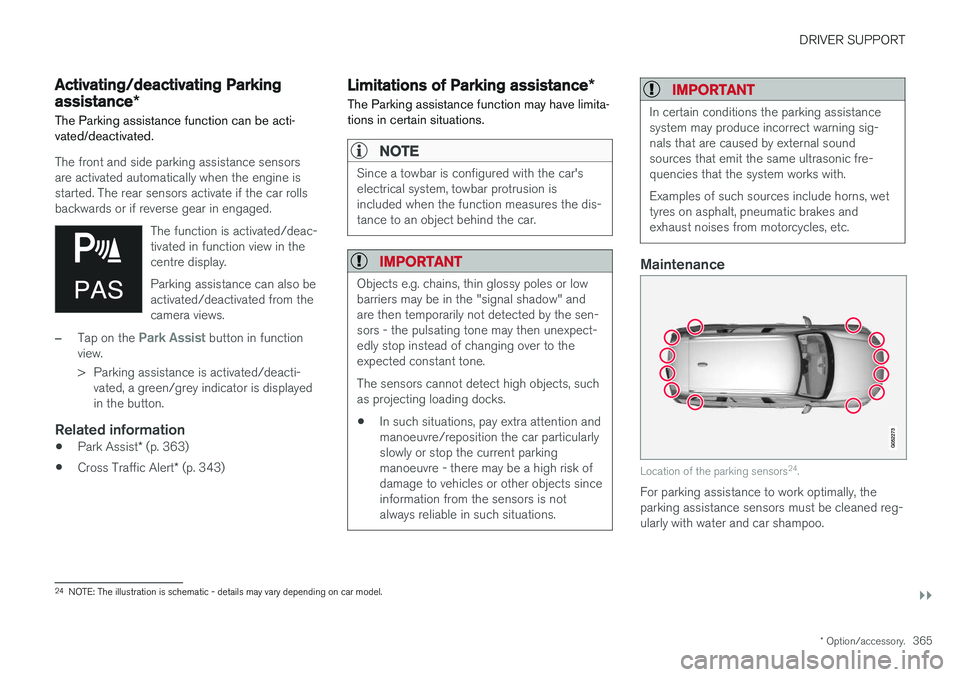
Location of the parking sensors 24
.
For parking assistance to work optimally, the parking assistance sensors must be cleaned reg-ularly with water and car shampoo.
24 NOTE: The illustration is schematic - details may vary depending on car model.
Page 376 of 594

||
DRIVER SUPPORT
* Option/accessory.
374
The car's left-hand camera is out of order.
Black camera sector
A black camera sector is also shown in the fol- lowing instances, but then without the symbol for
defective camera:
• open door
• open tailgate
• folded-in door mirror.
Light conditionsThe camera image is adjusted automatically according to prevailing light conditions. Becauseof this, the image may vary slightly in brightnessand quality. Poor light conditions can result inreduced image quality.
MaintenanceClean camera lenses regularly with lukewarmwater and car shampoo - be careful not toscratch the lenses.
NOTE
Keep the camera lens clear of dirt, snow and ice to ensure optimum function. This is partic-ularly important in poor light.
Related information
•
Park Assist Camera
* (p. 368)
• Starting the Park Assist Camera
* (p. 372)
• Park assist lines and fields for the Park Assist Camera
* (p. 370)
Park Assist Pilot *
Active parking assistance (Park Assist Pilot - PAP) helps the driver to park in or leave a park-ing space.
PAP checks first if a space is sufficiently big and thereafter helps the driver to turn the steeringwheel and manoeuvre the car into the space. The centre display indicates with symbols, graph- ics and text the various operations to be carriedout and when to do so.
NOTE
The PAP function measures the space and steers the car - the driver's task is to:
• keep a close watch around the car
• follow the instructions in the centre dis-play
• change gear (reverse/forward)
• control and maintain a safe speed
• brake and stop.
Page 378 of 594
DRIVER SUPPORT
* Option/accessory.
376
Parking with Active parking assistance *
The Active parking assistance (Park Assist Pilot - PAP) helps the driver park in three steps. Thefunction can also help the driver to leave a park-ing space.
NOTE
The PAP function measures the space and steers the car - the driver's task is to:
• keep a close watch around the car
• follow the instructions in the centre dis-play
• change gear (reverse/forward)
• control and maintain a safe speed
• brake and stop.
PAP can be activated if the following criteria are met once the engine has been started:
• No trailer is attached to the car.
• Speed must be lower than 30 km/h(20 mph).
NOTE
The distance between the car and parking spaces should be 0.5-1.5 metres while PAPis searching for a parking space.
ParkingThe PAP function parks the car using the follow- ing steps:
1. A parking space is identified and measured.
2. The car is reversed into the space.
3. The car is positioned into the space - the
system may then request that the driver changes gear.
Finding and measuring parking spaces
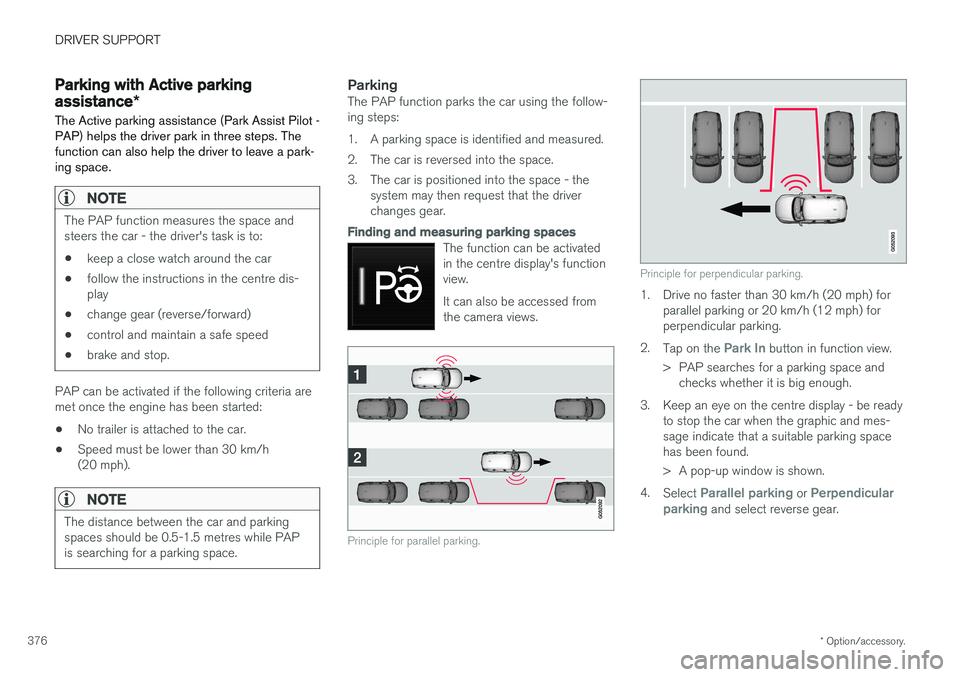
The function can be activated in the centre display's functionview. It can also be accessed from the camera views.
Principle for parallel parking.
Principle for perpendicular parking.
1. Drive no faster than 30 km/h (20 mph) forparallel parking or 20 km/h (12 mph) for perpendicular parking.
2. Tap on the
Park In button in function view.
> PAP searches for a parking space and checks whether it is big enough.
3. Keep an eye on the centre display - be ready to stop the car when the graphic and mes- sage indicate that a suitable parking spacehas been found.
> A pop-up window is shown.
4. Select
Parallel parking or Perpendicular
parking and select reverse gear.
Page 381 of 594
DRIVER SUPPORT
}}
* Option/accessory.379
Limitations of Park Assist Pilot *
The Active parking assistance (Park Assist Pilot – PAP) function may have limitations in certainsituations.
Parking is discontinuedA parking sequence will be discontinued:
• if the driver moves the steering wheel
• if the car is driven too quickly - above 7 km/h (4 mph)
• if the driver presses
Cancel in the centre
display
• when the anti-lock brakes or the Electronic stability control are engaged - e.g. when awheel loses grip on a slippery road.
Where applicable, a message in the centre dis-play states the reason for a parking sequencebeing discontinued.
NOTE
Dirt, ice and snow covering the sensors will reduce their function and may prevent meas-urement.
IMPORTANT
Under certain circumstances, PAP is unable to find parking spaces - one reason for thismay be the fact that there is interference withthe sensors from external sound sourceswhich emit the same ultrasound frequenciesas those with which the system works. Examples of such sources include horns, wet tyres on asphalt, pneumatic brakes andexhaust noises from motorcycles etc.
Driver responsibilityThe driver should bear in mind that the PAP is an aid – not an infallible, fully-automatic function.The driver must therefore be prepared to inter-rupt a parking step. There are also a few details to bear in mind while parking, e.g.:
• PAP bases itself on the locations of vehiclesalready parked nearby - if they are inap-propriately parked, your own car's tyres andwheel rims may be damaged by contact withthe kerb.
• PAP is designed for parking on straightstreets - not sharp curves or bends. For thisreason, make sure the car is parallel to theparking space when PAP measures thespace. •
Parking spaces on narrow streets are notalways feasible, since the space required formanoeuvring may not be sufficient.
• Bear in mind that the front of the car mayswing out towards oncoming traffic whilebeing parked.
• Objects situated higher than the detectionareas of the sensors are not taken intoaccount when calculating the parkingmanoeuvre. This may cause PAP to turn intothe parking space too early, and hence suchparking spaces should be avoided.
• The driver is responsible for determiningwhether the space selected by PAP is suita-ble for parking.
• Use approved tyres 28
with the correct tyre
pressure - this affects the ability of PAP topark the car.
• Heavy rain or snow may cause the system tomeasure the parking space incorrectly.
• Do not use PAP if snow chains or a sparewheel are fitted.
• Do not use PAP if cargo items are protrudingfrom the car.
• Perpendicular parking spaces may be missedor offered unnecessarily if one parked car isprotruding more than other parked cars.
28
"Approved tyres" refers to tyres of the same type and make as those fitted new on delivery from the factory.
Page 392 of 594
||
STARTING AND DRIVING
* Option/accessory.
390
Symbol Specification
Information or error message for gearbox. Follow the recommenda-tion given.
Hot or overheated gearbox. Follow the recommendation given.
Related information
•Gear positions for automatic gearbox (p. 390)
• Manual gearbox (p. 392)
• Gear shift indicator
* (p. 392)
Gear positions for automatic gearbox
With an automatic gearbox, the system chooses the gear so that driving is optimal. The gearboxalso has a manual gearshift mode.
Gear positions in the driver display
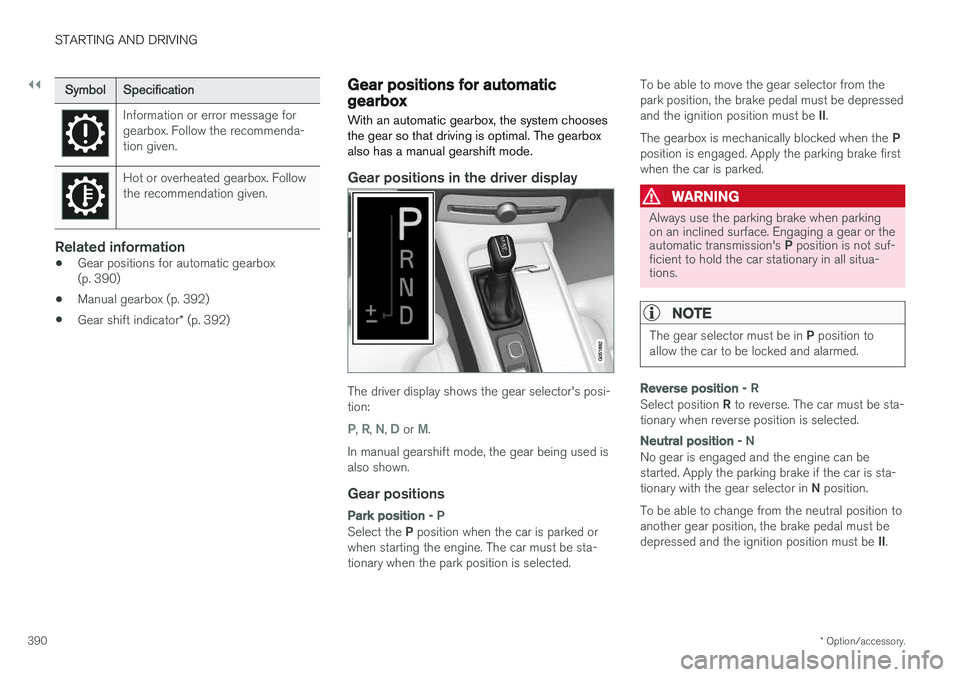
The driver display shows the gear selector's posi- tion:
P, R, N, D or M.
In manual gearshift mode, the gear being used is also shown.
Gear positions
Park position - P
Select the P position when the car is parked or
when starting the engine. The car must be sta- tionary when the park position is selected. To be able to move the gear selector from thepark position, the brake pedal must be depressed and the ignition position must be
II.
The gearbox is mechanically blocked when the P
position is engaged. Apply the parking brake first when the car is parked.
WARNING
Always use the parking brake when parking on an inclined surface. Engaging a gear or the automatic transmission's P position is not suf-
ficient to hold the car stationary in all situa- tions.
NOTE
The gear selector must be in P position to
allow the car to be locked and alarmed.
Reverse position - R
Select position R to reverse. The car must be sta-
tionary when reverse position is selected.
Neutral position - N
No gear is engaged and the engine can be started. Apply the parking brake if the car is sta- tionary with the gear selector in N position.
To be able to change from the neutral position to another gear position, the brake pedal must be depressed and the ignition position must be II.
Page 394 of 594
STARTING AND DRIVING
* Option/accessory.
392
Manual gearbox
With a manual gearbox, the driver selects a suit- able gear manually, according to speed andpower requirements at the time.
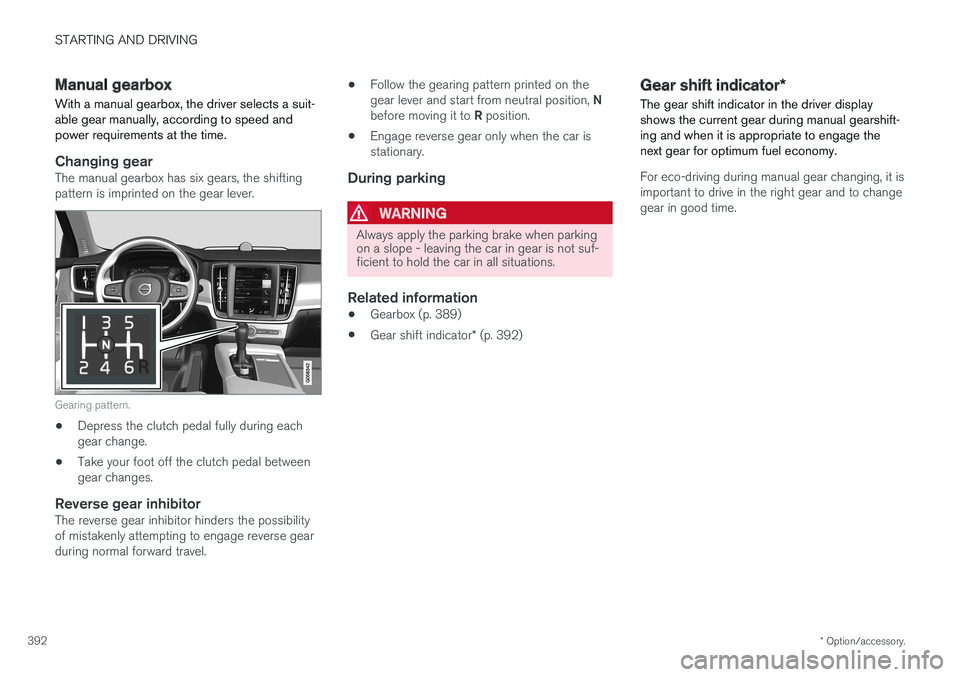
Changing gearThe manual gearbox has six gears, the shifting pattern is imprinted on the gear lever.
Gearing pattern.
• Depress the clutch pedal fully during each gear change.
• Take your foot off the clutch pedal betweengear changes.
Reverse gear inhibitorThe reverse gear inhibitor hinders the possibilityof mistakenly attempting to engage reverse gearduring normal forward travel. •
Follow the gearing pattern printed on the gear lever and start from neutral position,
N
before moving it to R position.
• Engage reverse gear only when the car is stationary.
During parking
WARNING
Always apply the parking brake when parking on a slope - leaving the car in gear is not suf-ficient to hold the car in all situations.
Related information
• Gearbox (p. 389)
• Gear shift indicator
* (p. 392)
Gear shift indicator *
The gear shift indicator in the driver display shows the current gear during manual gearshift-ing and when it is appropriate to engage thenext gear for optimum fuel economy.
For eco-driving during manual gear changing, it is important to drive in the right gear and to changegear in good time.