roof VOLVO V90 2017 User Guide
[x] Cancel search | Manufacturer: VOLVO, Model Year: 2017, Model line: V90, Model: VOLVO V90 2017Pages: 594, PDF Size: 15.07 MB
Page 118 of 594
||
INSTRUMENTS AND CONTROLS
116
Related information
•Using voice recognition (p. 116)
• Voice recognition control of the phone (p. 118)
• Voice recognition control of radio and media(p. 118)
• Voice recognition control of climate control(p. 119)
• Voice recognition and map navigation(p. 120)
• Settings for voice recognition (p. 117)Using voice recognition 9
Basic instructions for using voice recognition control.
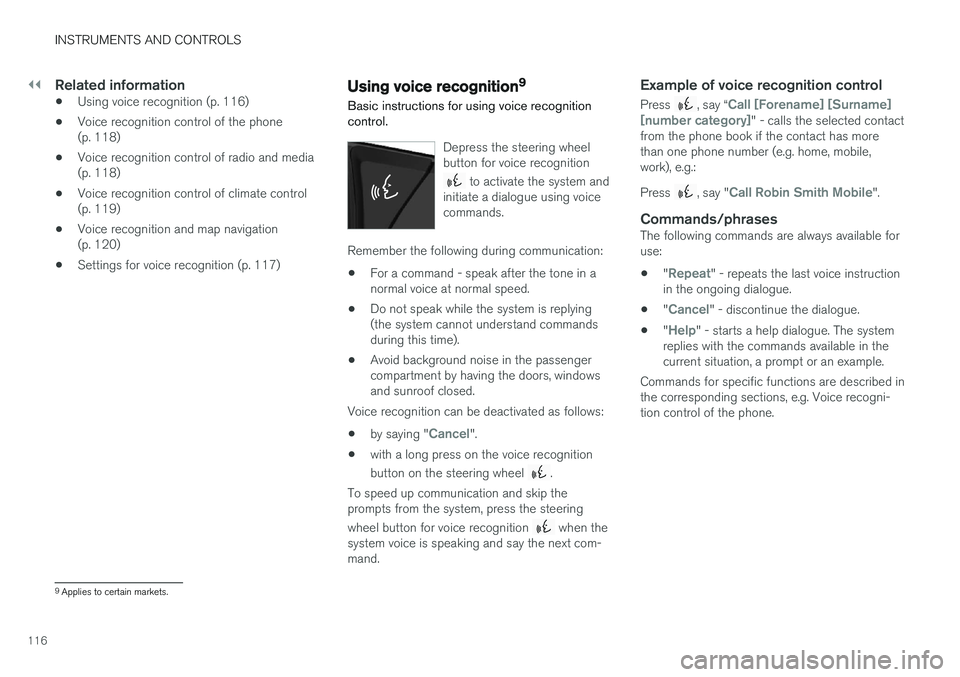
Depress the steering wheel button for voice recognition
to activate the system and
initiate a dialogue using voice commands.
Remember the following during communication:
• For a command - speak after the tone in a normal voice at normal speed.
• Do not speak while the system is replying(the system cannot understand commandsduring this time).
• Avoid background noise in the passengercompartment by having the doors, windowsand sunroof closed.
Voice recognition can be deactivated as follows:
• by saying "
Cancel".
• with a long press on the voice recognition button on the steering wheel
.
To speed up communication and skip the prompts from the system, press the steering wheel button for voice recognition
when the
system voice is speaking and say the next com- mand.
Example of voice recognition control
Press , say “Call [Forename] [Surname]
[number category]" - calls the selected contact
from the phone book if the contact has more than one phone number (e.g. home, mobile,work), e.g.: Press
, say "Call Robin Smith Mobile".
Commands/phrasesThe following commands are always available for use:
• "
Repeat" - repeats the last voice instruction
in the ongoing dialogue.
• "
Cancel" - discontinue the dialogue.
• "
Help" - starts a help dialogue. The system
replies with the commands available in the current situation, a prompt or an example.
Commands for specific functions are described inthe corresponding sections, e.g. Voice recogni-tion control of the phone.
9 Applies to certain markets.
Page 147 of 594
INSTRUMENTS AND CONTROLS
}}
145
Passenger compartment lighting
The passenger compartment lighting is acti- vated/deactivated with the buttons in the over-head controls above the front seats and the rearseat.
All lighting in the passenger compartment can be switched on and off manually within 30 minutesfrom when:
• the car has been switched off and its electri- cal system is in ignition position
0
• the car has been unlocked but it has not been started.
Front lighting
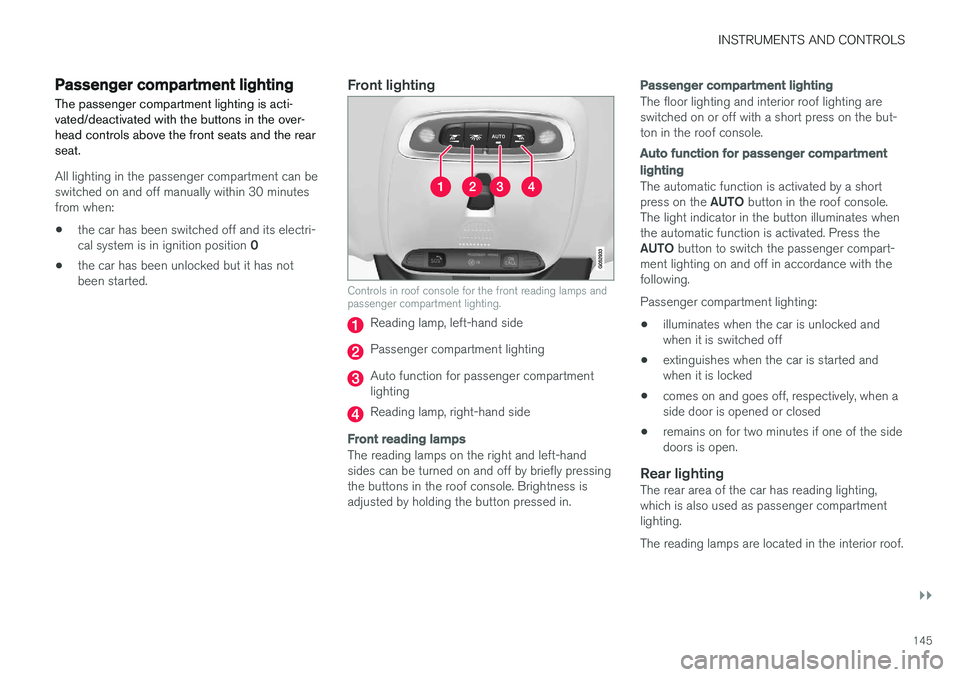
Controls in roof console for the front reading lamps and passenger compartment lighting.
Reading lamp, left-hand side
Passenger compartment lighting
Auto function for passenger compartment lighting
Reading lamp, right-hand side
Front reading lamps
The reading lamps on the right and left-hand sides can be turned on and off by briefly pressingthe buttons in the roof console. Brightness isadjusted by holding the button pressed in.
Passenger compartment lighting
The floor lighting and interior roof lighting are switched on or off with a short press on the but-ton in the roof console.
Auto function for passenger compartment lighting
The automatic function is activated by a short press on the
AUTO button in the roof console.
The light indicator in the button illuminates when the automatic function is activated. Press the AUTO button to switch the passenger compart-
ment lighting on and off in accordance with the following. Passenger compartment lighting: • illuminates when the car is unlocked and when it is switched off
• extinguishes when the car is started andwhen it is locked
• comes on and goes off, respectively, when aside door is opened or closed
• remains on for two minutes if one of the sidedoors is open.
Rear lightingThe rear area of the car has reading lighting,which is also used as passenger compartmentlighting. The reading lamps are located in the interior roof.
Page 148 of 594
||
INSTRUMENTS AND CONTROLS
* Option/accessory.
146
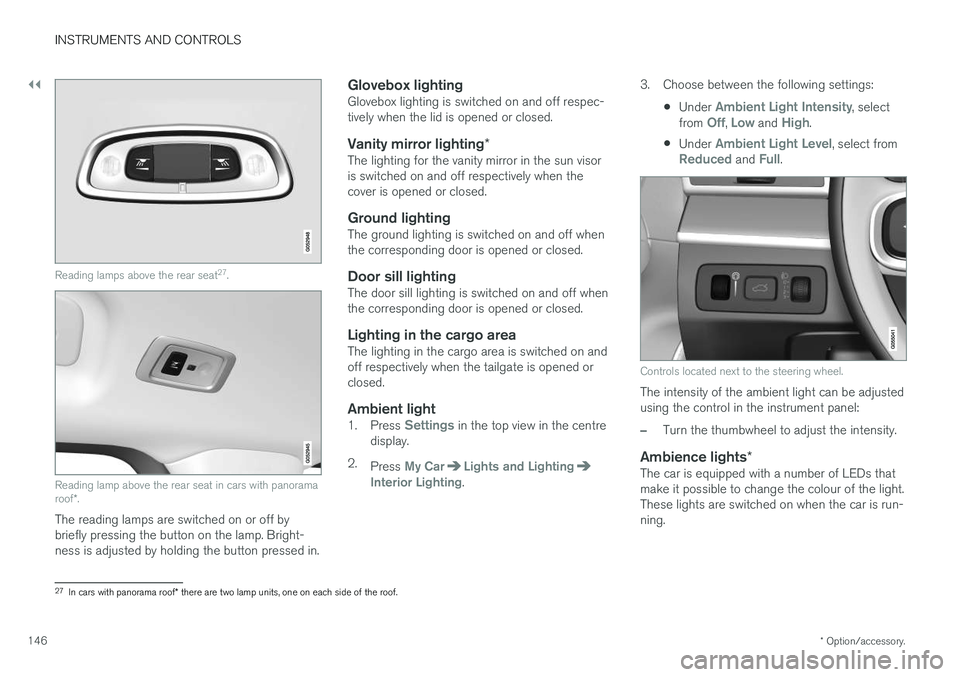
Reading lamps above the rear seat 27
.
Reading lamp above the rear seat in cars with panorama roof *.
The reading lamps are switched on or off by briefly pressing the button on the lamp. Bright-ness is adjusted by holding the button pressed in.
Glovebox lightingGlovebox lighting is switched on and off respec-tively when the lid is opened or closed.
Vanity mirror lighting *The lighting for the vanity mirror in the sun visoris switched on and off respectively when thecover is opened or closed.
Ground lightingThe ground lighting is switched on and off whenthe corresponding door is opened or closed.
Door sill lightingThe door sill lighting is switched on and off whenthe corresponding door is opened or closed.
Lighting in the cargo areaThe lighting in the cargo area is switched on andoff respectively when the tailgate is opened orclosed.
Ambient light1.
Press Settings in the top view in the centre
display.
2. Press
My CarLights and LightingInterior Lighting. 3. Choose between the following settings:
•Under
Ambient Light Intensity, select
from Off, Low and High.
• Under
Ambient Light Level, select fromReduced and Full.
Controls located next to the steering wheel.
The intensity of the ambient light can be adjusted using the control in the instrument panel:
–Turn the thumbwheel to adjust the intensity.
Ambience lights
*The car is equipped with a number of LEDs that make it possible to change the colour of the light.These lights are switched on when the car is run-ning.
27
In cars with panorama roof * there are two lamp units, one on each side of the roof.
Page 150 of 594
INSTRUMENTS AND CONTROLS
* Option/accessory.
148
Home safe light duration
Some of the exterior lighting can be kept switched on to work as home safe lighting afterthe car has been locked.
To activate the function:
1. Switch off the car.
2. Move the left-hand stalk switch forward toward the instrument panel and release.
3. Get out of the car and lock the door.When the function is activated, dipped beam, position lamps, lighting in the outside handles *
and number plate lighting are switched on. The length of time that home safe lighting remains on can be set via the centre display.
Related information
• Approach light duration (p. 148)
• Settings view (p. 169)
Approach light duration
Approach lighting is switched on when the car is unlocked and is used to switch on the car'slighting at a distance.
When the function is activated with the remote control key during unlocking, the position lamps, lighting in outer handles *, number plate lighting,
interior roof lighting and floor lighting will switch on. If a door is opened within the activation time, the time for the lighting in the outside handles *
and the interior lighting will be extended. The function can be deactivated/activated via the centre display.
Related information
• Home safe light duration (p. 148)
• Remote control key (p. 236)
• Settings view (p. 169)
Using windscreen wipers
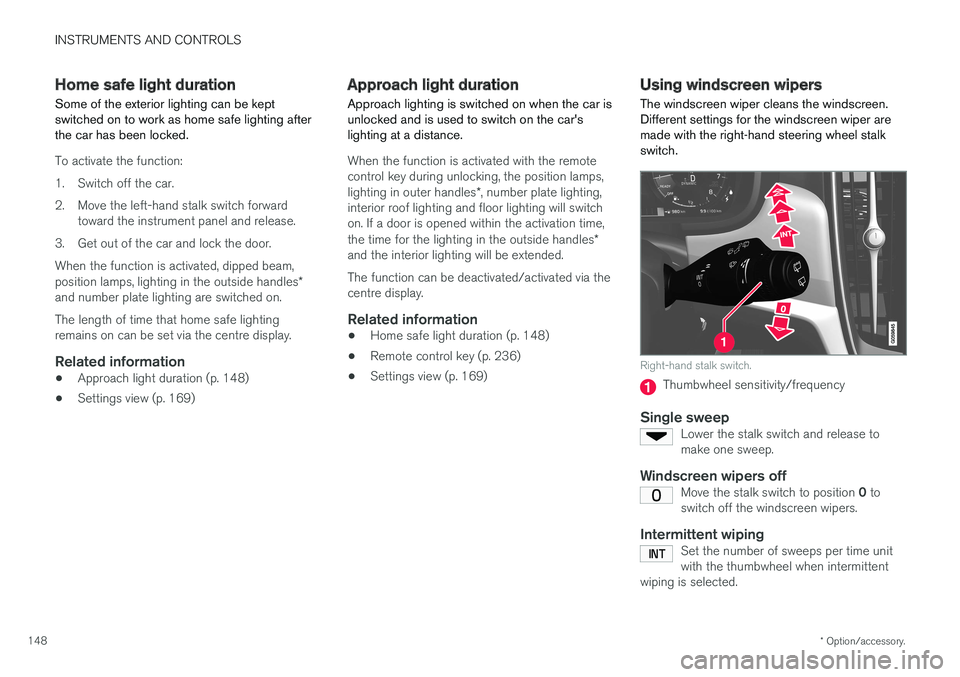
The windscreen wiper cleans the windscreen. Different settings for the windscreen wiper aremade with the right-hand steering wheel stalkswitch.
Right-hand stalk switch.
Thumbwheel sensitivity/frequency
Single sweepLower the stalk switch and release to make one sweep.
Windscreen wipers offMove the stalk switch to position 0 to
switch off the windscreen wipers.
Intermittent wipingSet the number of sweeps per time unit with the thumbwheel when intermittent
wiping is selected.
Page 160 of 594
INSTRUMENTS AND CONTROLS
* Option/accessory.
158
Panorama roof *
The panorama roof is divided into two glass sec- tions. The front section can be opened verticallyat the rear edge (ventilation position) or horizon-tally (open position). The rear section is fixedroof glass. The panoramic roof has a wind deflector.
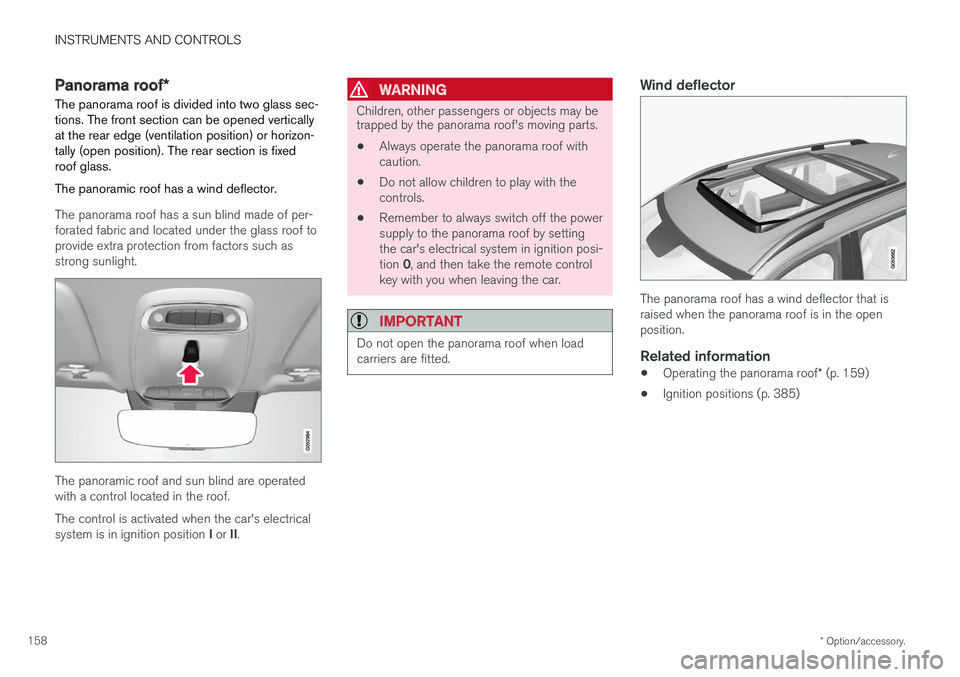
The panorama roof has a sun blind made of per- forated fabric and located under the glass roof toprovide extra protection from factors such asstrong sunlight.
The panoramic roof and sun blind are operated with a control located in the roof. The control is activated when the car's electrical system is in ignition position I or II.
WARNING
Children, other passengers or objects may be trapped by the panorama roof's moving parts.
• Always operate the panorama roof with caution.
• Do not allow children to play with thecontrols.
• Remember to always switch off the powersupply to the panorama roof by settingthe car's electrical system in ignition posi- tion
0, and then take the remote control
key with you when leaving the car.
IMPORTANT
Do not open the panorama roof when load carriers are fitted.
Wind deflector
The panorama roof has a wind deflector that is raised when the panorama roof is in the openposition.
Related information
• Operating the panorama roof
* (p. 159)
• Ignition positions (p. 385)
Page 161 of 594
INSTRUMENTS AND CONTROLS
}}
* Option/accessory.159
Operating the panorama roof *
When operating with the control in the roof, the panoramic roof is first opened horizontally to acomfort position. In ventilation position, the front glass cover in the roof is raised at the rear.
WARNING
Children, other passengers or objects may be trapped by the panorama roof's moving parts.
• Always operate the panorama roof with caution.
• Do not allow children to play with thecontrols.
• Remember to always switch off the powersupply to the panorama roof by settingthe car's electrical system in ignition posi- tion
0, and then take the remote control
key with you when leaving the car.
IMPORTANT
Do not open the panorama roof when load carriers are fitted.
In order that the panoramic roof and sun blind can be operated, the car's electrical system must be in at least ignition position I.
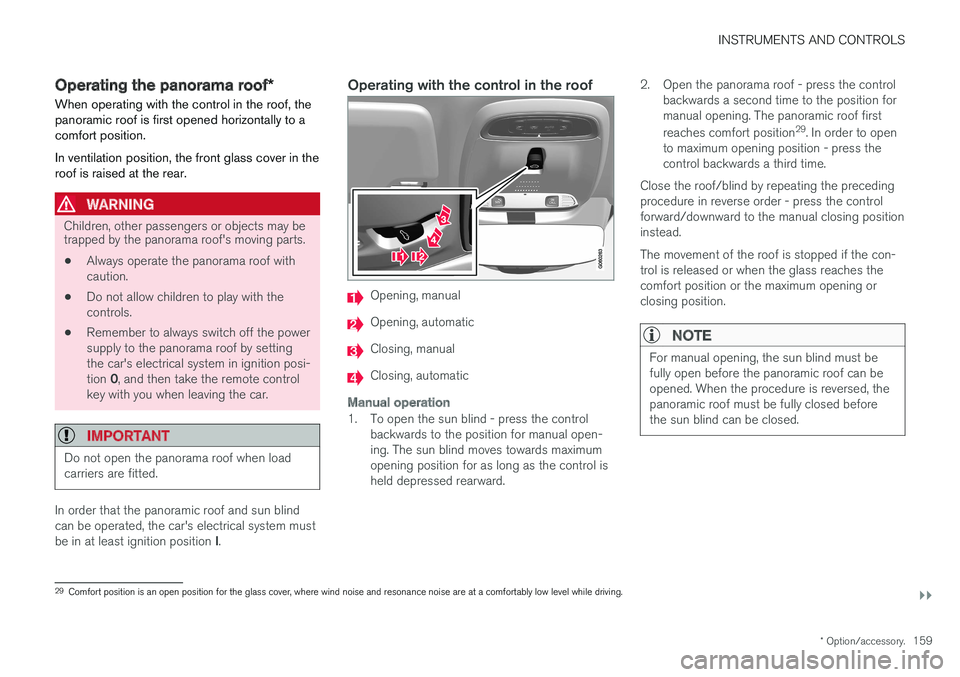
Operating with the control in the roof
Opening, manual
Opening, automatic
Closing, manual
Closing, automatic
Manual operation
1. To open the sun blind - press the control
backwards to the position for manual open- ing. The sun blind moves towards maximumopening position for as long as the control isheld depressed rearward. 2. Open the panorama roof - press the control
backwards a second time to the position formanual opening. The panoramic roof first reaches comfort position 29
. In order to open
to maximum opening position - press the control backwards a third time.
Close the roof/blind by repeating the precedingprocedure in reverse order - press the controlforward/downward to the manual closing positioninstead. The movement of the roof is stopped if the con- trol is released or when the glass reaches thecomfort position or the maximum opening orclosing position.
NOTE
For manual opening, the sun blind must be fully open before the panoramic roof can beopened. When the procedure is reversed, thepanoramic roof must be fully closed beforethe sun blind can be closed.
29 Comfort position is an open position for the glass cover, where wind noise and resonance noise are at a comfortably low level while driving.
Page 162 of 594
||
INSTRUMENTS AND CONTROLS
160
Automatic operation
1. Open the sun blind to maximum position -press the control backward to the position for automatic opening and release.
2. To open the panorama roof, press the control backwards a second time to the position forautomatic opening and release. The panor- amic roof first reaches comfort position 29
. To
open to the maximum opening position - press the control a third time backward tothe position for automatic opening andrelease.
Close the roof/blind by repeating the precedingprocedure in reverse order - press the controlforward/downward to the automatic closing posi-tion instead. The movement of the roof is stopped when the glass reaches the comfort position or the maxi-mum opening or closing position. The movementis also stopped if the control is operated again inthe opposite direction to the direction of move-ment in progress. The movement of the roof is not stopped when the glass reaches the comfort position whenclosing from maximum opening position.
Automatic operation - rapid opening/closing
The panorama roof and sun blind can be opened/closed simultaneously:
–To open - press the control rearward to the automatic operation position twice andrelease.
–To close - press the control forward/down- ward to the automatic operation positiontwice and release.
The movement of the roof is stopped when theglass reaches the comfort position or the closingposition. The movement is also stopped if thecontrol is operated again in the opposite directionto the direction of movement in progress. The movement of the roof is not stopped when the glass reaches the comfort position whenclosing from maximum opening position. Themovement of the blind is never stopped when theroof reaches comfort position.
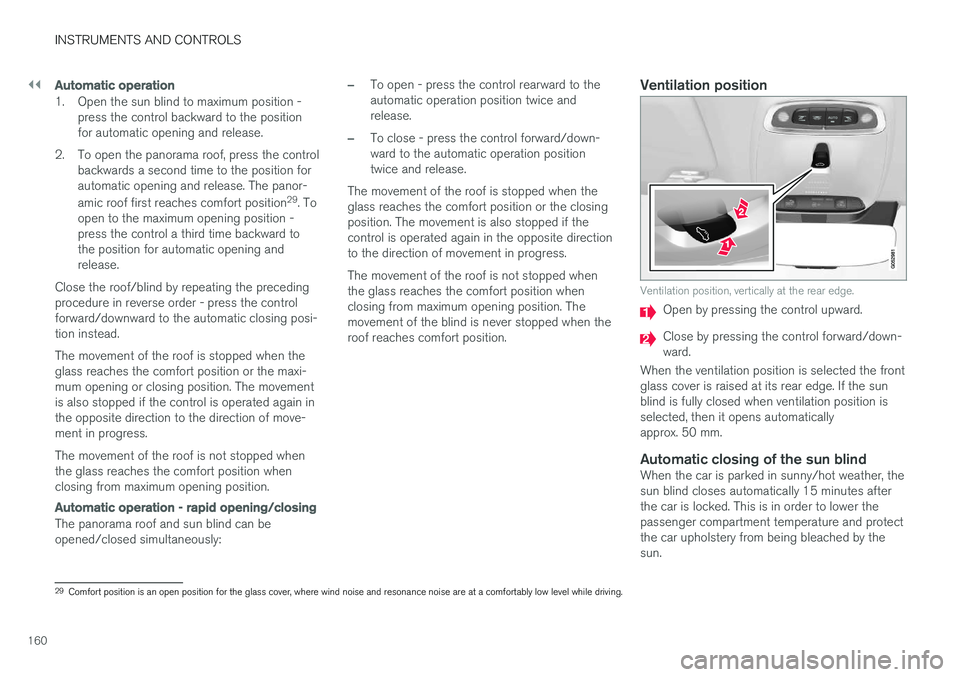
Ventilation position
Ventilation position, vertically at the rear edge.
Open by pressing the control upward.
Close by pressing the control forward/down- ward.
When the ventilation position is selected the frontglass cover is raised at its rear edge. If the sunblind is fully closed when ventilation position isselected, then it opens automaticallyapprox. 50 mm.
Automatic closing of the sun blindWhen the car is parked in sunny/hot weather, thesun blind closes automatically 15 minutes afterthe car is locked. This is in order to lower thepassenger compartment temperature and protectthe car upholstery from being bleached by thesun.
29 Comfort position is an open position for the glass cover, where wind noise and resonance noise are at a comfortably low level while driving.
Page 163 of 594
INSTRUMENTS AND CONTROLS
}}
* Option/accessory.161
The function is deactivated when the car is sup- plied from the factory and can be activated/deac-tivated: 1.
Press
Settings in the top view in the centre
display.
2. Press
My CarLocking.
Select
Auto Close Sunroof Curtain to
activate/deactivate.
Closing using the remote control key, central locking button or door handles
Remote control key
–Give a long press on the remote control key's lock button
until the panorama roof and
sun blind start moving towards the closed position. Then release the lock button.
Movement stops if the remote control key's lockbutton is pressed again or when the roof/blindhas reached the closed position.
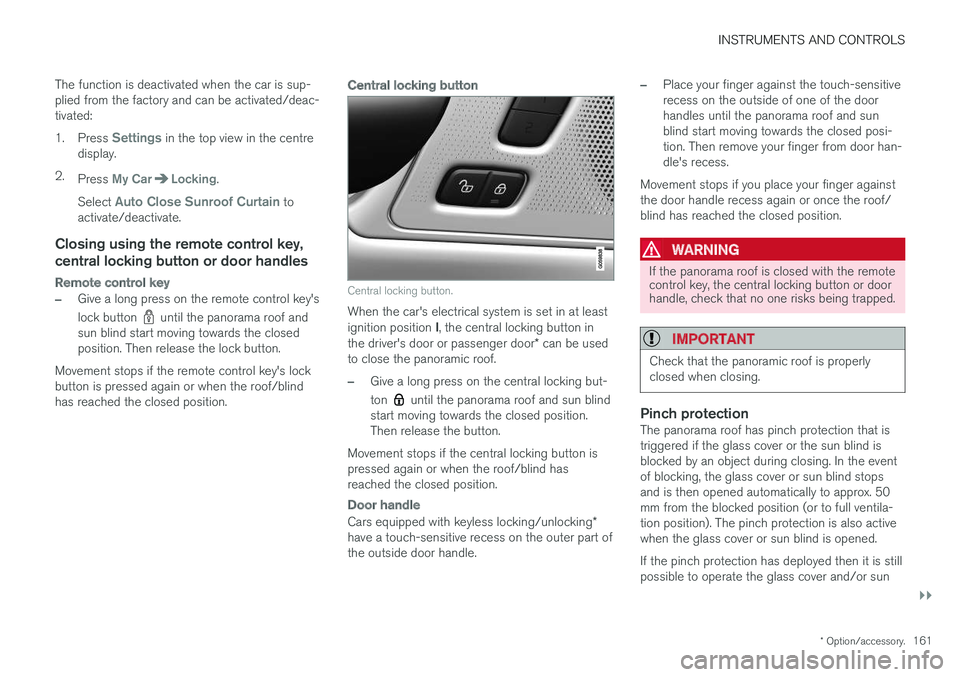
Central locking button
Central locking button.
When the car's electrical system is set in at least ignition position I, the central locking button in
the driver's door or passenger door * can be used
to close the panoramic roof.
–Give a long press on the central locking but- ton
until the panorama roof and sun blind
start moving towards the closed position. Then release the button.
Movement stops if the central locking button ispressed again or when the roof/blind hasreached the closed position.
Door handle
Cars equipped with keyless locking/unlocking *
have a touch-sensitive recess on the outer part of the outside door handle.
–Place your finger against the touch-sensitive recess on the outside of one of the doorhandles until the panorama roof and sunblind start moving towards the closed posi-tion. Then remove your finger from door han-dle's recess.
Movement stops if you place your finger againstthe door handle recess again or once the roof/blind has reached the closed position.
WARNING
If the panorama roof is closed with the remote control key, the central locking button or doorhandle, check that no one risks being trapped.
IMPORTANT
Check that the panoramic roof is properly closed when closing.
Pinch protectionThe panorama roof has pinch protection that is triggered if the glass cover or the sun blind isblocked by an object during closing. In the eventof blocking, the glass cover or sun blind stopsand is then opened automatically to approx. 50mm from the blocked position (or to full ventila-tion position). The pinch protection is also activewhen the glass cover or sun blind is opened. If the pinch protection has deployed then it is still possible to operate the glass cover and/or sun
Page 164 of 594
||
INSTRUMENTS AND CONTROLS
* Option/accessory.
162 blind once more in the same direction without pinch protection, if this is done within 10 secondsafter pinch protection deployment. It is thereforepossible to override the pinch protection whenclosing has been interrupted e.g. if ice hasformed around the glass cover, by continuallypressing the control forward/downward until theglass cover and/or sun blind is closed.
Related information
•
Panorama roof
* (p. 158)
• Ignition positions (p. 385)
• Remote control key (p. 236)
• Locking/unlocking from the inside (p. 245)
• Locking/unlocking from the outside (p. 241)
HomeLink ®
*30
HomeLink ®
is a programmable remote control
that is integrated into the car's electrical system.
General
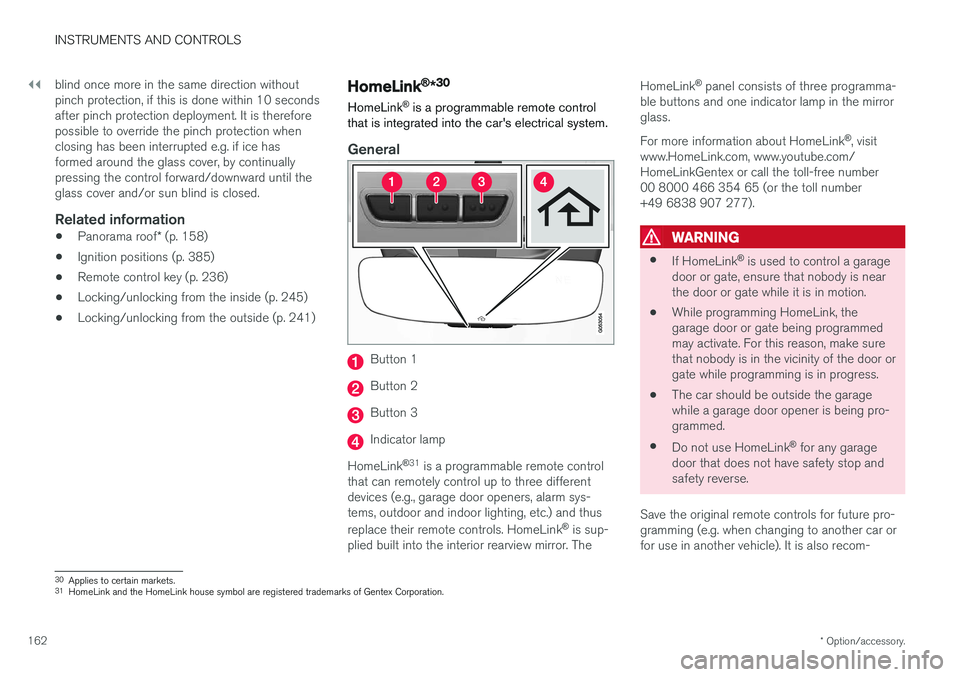
Button 1
Button 2
Button 3
Indicator lamp
HomeLink ®
31
is a programmable remote control
that can remotely control up to three different devices (e.g., garage door openers, alarm sys-tems, outdoor and indoor lighting, etc.) and thus replace their remote controls. HomeLink ®
is sup-
plied built into the interior rearview mirror. The HomeLink
®
panel consists of three programma-
ble buttons and one indicator lamp in the mirror glass. For more information about HomeLink ®
, visit
www.HomeLink.com, www.youtube.com/ HomeLinkGentex or call the toll-free number00 8000 466 354 65 (or the toll number+49 6838 907 277).
WARNING
• If HomeLink ®
is used to control a garage
door or gate, ensure that nobody is near the door or gate while it is in motion.
• While programming HomeLink, thegarage door or gate being programmedmay activate. For this reason, make surethat nobody is in the vicinity of the door orgate while programming is in progress.
• The car should be outside the garagewhile a garage door opener is being pro-
grammed.
• Do not use HomeLink ®
for any garage
door that does not have safety stop andsafety reverse.
Save the original remote controls for future pro-gramming (e.g. when changing to another car orfor use in another vehicle). It is also recom-
30 Applies to certain markets.
31 HomeLink and the HomeLink house symbol are registered trademarks of Gentex Corporation.
Page 186 of 594
CLIMATE CONTROL
* Option/accessory.
184
Air quality
The materials selected for the passenger com- partment and the air cleaning system ensure thatthe air quality in the passenger compartment ishigh.
Materials in the passenger compartment
The interior of the passenger compartment is designed to be pleasant and comfortable, evenfor people with contact allergies and for asthmasufferers. Tested materials have been developed in order to minimise the quantity of dust in the passengercompartment and to contribute to making thepassenger compartment easier to keep clean. The carpets in both the passenger compartment and the cargo area are removable and easy toremove and clean. Use cleaning agents and car care products rec- ommended by Volvo to clean the interior.
Air cleaning systemIn addition to the passenger compartment filter,the modifications for Clean Zone Interior Package * and the air quality system Interior Air
Quality System * also help to maintain high air
quality in the passenger compartment.
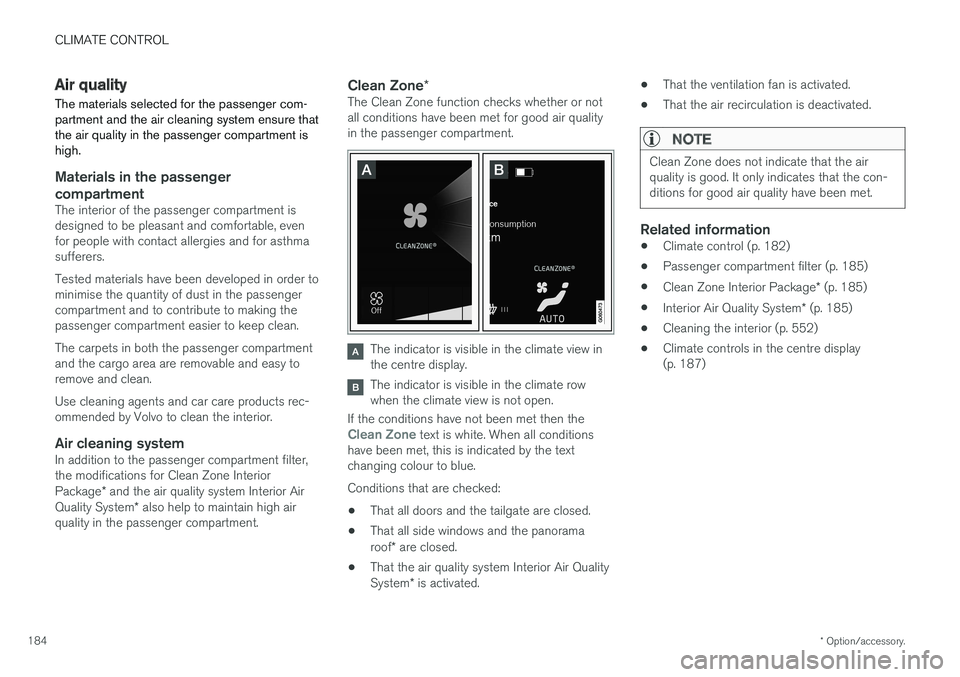
Clean Zone *The Clean Zone function checks whether or not all conditions have been met for good air qualityin the passenger compartment.
The indicator is visible in the climate view in the centre display.
The indicator is visible in the climate row when the climate view is not open.
If the conditions have not been met then the
Clean Zone text is white. When all conditions
have been met, this is indicated by the text changing colour to blue. Conditions that are checked:
• That all doors and the tailgate are closed.
• That all side windows and the panorama roof
* are closed.
• That the air quality system Interior Air QualitySystem
* is activated. •
That the ventilation fan is activated.
• That the air recirculation is deactivated.
NOTE
Clean Zone does not indicate that the air quality is good. It only indicates that the con-ditions for good air quality have been met.
Related information
•Climate control (p. 182)
• Passenger compartment filter (p. 185)
• Clean Zone Interior Package
* (p. 185)
• Interior Air Quality System
* (p. 185)
• Cleaning the interior (p. 552)
• Climate controls in the centre display (p. 187)