ECU VOLVO V90 2017 Owner's Manual
[x] Cancel search | Manufacturer: VOLVO, Model Year: 2017, Model line: V90, Model: VOLVO V90 2017Pages: 594, PDF Size: 15.07 MB
Page 262 of 594
||
LOCKS AND ALARM
* Option/accessory.
260
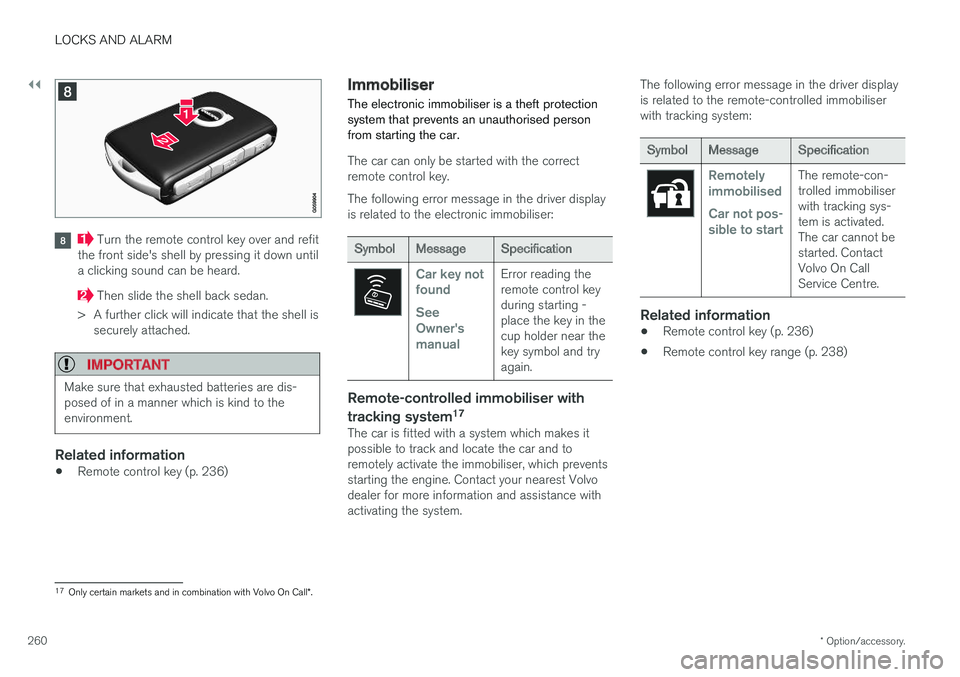
Turn the remote control key over and refit
the front side's shell by pressing it down until a clicking sound can be heard.
Then slide the shell back sedan.
> A further click will indicate that the shell is securely attached.
IMPORTANT
Make sure that exhausted batteries are dis- posed of in a manner which is kind to theenvironment.
Related information
• Remote control key (p. 236)
Immobiliser
The electronic immobiliser is a theft protection system that prevents an unauthorised personfrom starting the car.
The car can only be started with the correct remote control key. The following error message in the driver display is related to the electronic immobiliser:
Symbol Message Specification
Car key not found See Owner'smanualError reading the remote control keyduring starting -place the key in thecup holder near thekey symbol and tryagain.
Remote-controlled immobiliser with tracking system 17
The car is fitted with a system which makes it possible to track and locate the car and toremotely activate the immobiliser, which preventsstarting the engine. Contact your nearest Volvodealer for more information and assistance withactivating the system. The following error message in the driver displayis related to the remote-controlled immobiliserwith tracking system:
Symbol
Message Specification
Remotely immobilised Car not pos- sible to startThe remote-con- trolled immobiliserwith tracking sys-tem is activated.The car cannot bestarted. ContactVolvo On CallService Centre.
Related information
•Remote control key (p. 236)
• Remote control key range (p. 238)
17
Only certain markets and in combination with Volvo On Call *.
Page 325 of 594
DRIVER SUPPORT
}}
323
Type approval for radar unitsType approval for the car's radar units can be
seen in the following table.
Market ACCA
BLIS B
Symbol Type approval
Brazil ✓
Este equipamento opera em caráter secundário, isto é, não tem direito à proteção contra interferência prejudicial, mesmo de estações do mesmo tipo, e não pode causarinterferência a sistemas operando em caráter primário. Modelo: L2C0055TR1500-15-8065EAN: 07897843840978
✓ Modelo: L2C0054TR4122-14-8645EAN: (01)07897843840855
Europe ✓ ✓
Hereby, Delphi Electronics & Safety declares that L2C0054TR / L2C0055TR are in compliance with the essential requirements and other relevant provisions of Directive1999/5/EC. The Declaration of Conformity may be consulted at Delphi Electronics &Safety / 2151 E. Lincoln Road / Kokomo, Indiana 46902 USA
The United Arab Emi-rates ✓
TRA REGISTERED No: ER37536/15DEALER No: DA37380/15
✓ TRAREGISTERED No: ER37357/15DEALER No: DA37380/15
Page 390 of 594
STARTING AND DRIVING
388
Steering lock
The steering lock makes steering difficult if the car is e.g. taken unlawfully. A mechanical noisecan be perceived when the steering lock locksor unlocks.
Activating the steering lockThe steering lock is activated when the car is locked from the outside and the engine isswitched off. If the car is left unlocked then thesteering lock will lock automatically after a while.
Deactivating the steering lockThe steering lock is deactivated when the car isunlocked from outside. If the car is not locked, itis sufficient that the remote control key is insidethe passenger compartment and the engine is started by turning the start knob towards START
in order to unlock the steering lock.
Related information
• Starting the car (p. 386)
• Switching off the car (p. 387)
• Steering wheel (p. 131)
Using jump starting with another battery
If the starter battery is discharged then the car can be started with current from another battery.
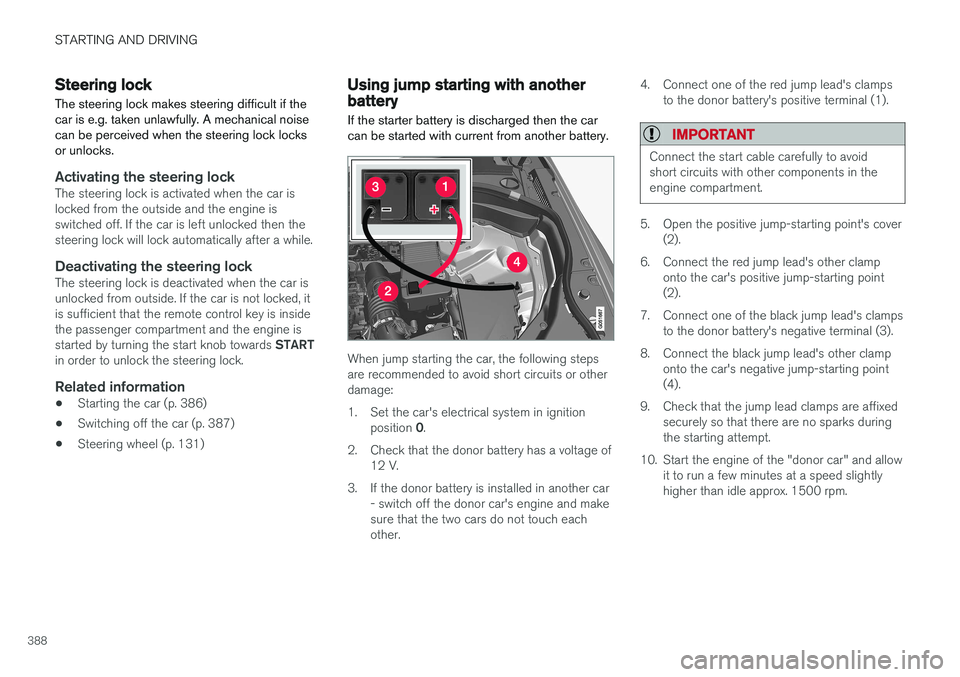
When jump starting the car, the following steps are recommended to avoid short circuits or otherdamage:
1. Set the car's electrical system in ignition position 0.
2. Check that the donor battery has a voltage of 12 V.
3. If the donor battery is installed in another car - switch off the donor car's engine and make sure that the two cars do not touch eachother. 4. Connect one of the red jump lead's clamps
to the donor battery's positive terminal (1).
IMPORTANT
Connect the start cable carefully to avoid short circuits with other components in theengine compartment.
5. Open the positive jump-starting point's cover(2).
6. Connect the red jump lead's other clamp onto the car's positive jump-starting point (2).
7. Connect one of the black jump lead's clamps to the donor battery's negative terminal (3).
8. Connect the black jump lead's other clamp onto the car's negative jump-starting point(4).
9. Check that the jump lead clamps are affixed securely so that there are no sparks duringthe starting attempt.
10. Start the engine of the "donor car" and allow it to run a few minutes at a speed slightlyhigher than idle approx. 1500 rpm.
Page 398 of 594
||
STARTING AND DRIVING
* Option/accessory.
396
Automatic deactivation
In gear position D the steering wheel paddles are
deactivated after a short time if they are not used. This is indicated by means of the figure for thecurrent gear extinguishing. The exception is during engine braking - then the paddles are activated for as long as engine brak-ing is in progress. In gear position M there is no automatic deactiva-
tion.
Related information
• Gear positions for automatic gearbox (p. 390)
• Gear shift indicator
* (p. 392)
Start/Stop
With the Start/Stop function, the engine switches off temporarily when the car has stop-ped e.g. at traffic lights or in a traffic queue, andthen starts again automatically when the journeyis resumed.
Start/Stop is one of several energy-saving func- tions intended to reduce fuel consumption, whichin turn helps to reduce exhaust emissions. The system makes it possible to adopt an envi- ronmentally-conscious driving style by allowingthe car to engine auto-stop when possible.
Related information
• Using the Start/Stop function (p. 396)
• Conditions for the Start/Stop function(p. 398)
Using the Start/Stop function The Start/Stop function temporarily switches off the engine when stationary and then restarts itautomatically when the journey is resumed.
The Start/Stop function is available when the engine is started and can be activated if certainconditions have been met. The driver display indi-cates whether the function is available, active orunavailable, see heading "Symbols in driver dis-play" below. All of the car's normal systems such as lighting, radio, etc. work normally, even when the engine isauto-stopped. However, some equipment mayhave its output temporarily reduced, e.g. the cli-mate control system's fan speed or extremelyhigh volume on the audio system.
Auto-stopThe following is required for the engine to auto-stop:
Page 426 of 594
||
STARTING AND DRIVING
424
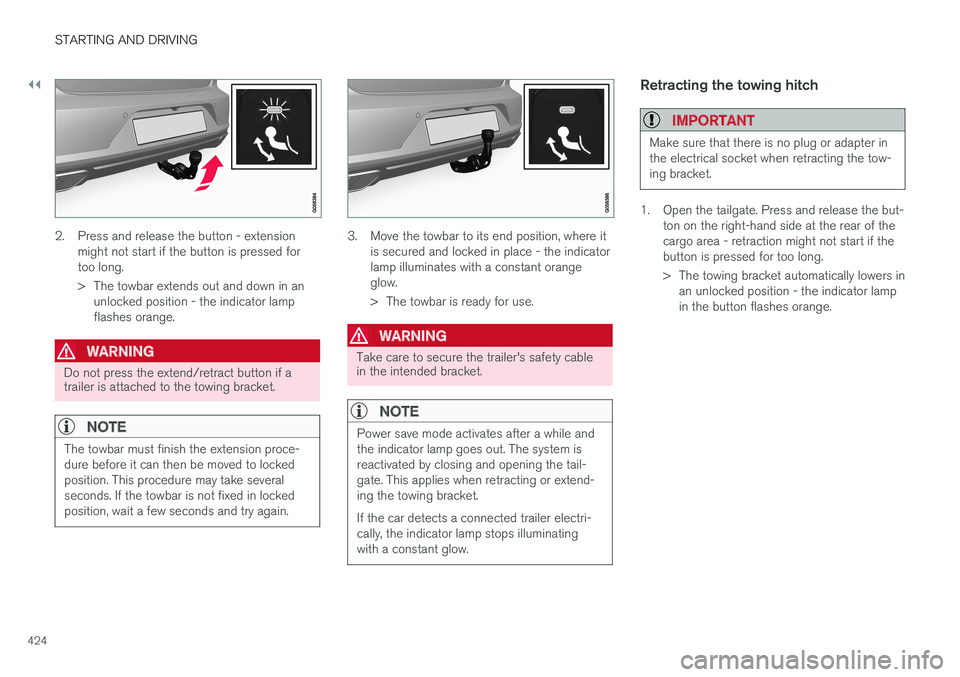
2. Press and release the button - extensionmight not start if the button is pressed for too long.
> The towbar extends out and down in anunlocked position - the indicator lamp flashes orange.
WARNING
Do not press the extend/retract button if a trailer is attached to the towing bracket.
NOTE
The towbar must finish the extension proce- dure before it can then be moved to lockedposition. This procedure may take severalseconds. If the towbar is not fixed in lockedposition, wait a few seconds and try again.
3. Move the towbar to its end position, where it is secured and locked in place - the indicator lamp illuminates with a constant orangeglow.
> The towbar is ready for use.
WARNING
Take care to secure the trailer's safety cable in the intended bracket.
NOTE
Power save mode activates after a while and the indicator lamp goes out. The system isreactivated by closing and opening the tail-gate. This applies when retracting or extend-ing the towing bracket. If the car detects a connected trailer electri- cally, the indicator lamp stops illuminatingwith a constant glow.
Retracting the towing hitch
IMPORTANT
Make sure that there is no plug or adapter in the electrical socket when retracting the tow-ing bracket.
1. Open the tailgate. Press and release the but- ton on the right-hand side at the rear of the cargo area - retraction might not start if thebutton is pressed for too long.
> The towing bracket automatically lowers inan unlocked position - the indicator lamp in the button flashes orange.
Page 433 of 594
STARTING AND DRIVING
}}
431
The towing eye may be used to pull the car up onto a recovery vehicle with a flatbed platform.The car's position and ground clearance deter-mine whether it is possible. If the slope of the recovery vehicle's ramp is too steep, or if the ground clearance under the car isinadequate, then the car may be damaged if youtry to pull it up using the towing eye. If necessary, raise the car by using the recovery vehicle's lifting device. Do not use the towing eye.
WARNING
No one/nothing is allowed to remain behind the recovery vehicle while the car pulled uponto the flatbed platform.
IMPORTANT
The towing eye is only designed for towing on roads -
not for pulling the car unstuck or out
of a ditch. Call a recovery service for recovery assistance.
Related information
• Towing (p. 431)
• Recovering the car (p. 432)
Towing
During towing, one vehicle pulls another vehicle along behind it by means of a towline.
Find out the statutory maximum speed limit for towing before the towing begins.
Preparations and towing1. Activate the car's hazard warning flashers.
2. Secure the towline in the towing eye.
3. Deactivate the steering lock by unlocking the car.
NOTE
In ignition position II the steering lock is
deactivated if the car has been unlocked. See section “Ignition position” for more informa-tion.
4. Set the car in ignition position II by turning
the ignition dial to START and holding the
ignition dial in the START position for
approx. 4 seconds. Then release the knob, which automatically returns to its startingposition.
5. Move the gear selector to neutral position N
and release the parking brake.
> The towing vehicle can now start towing. 6. Keep the towline taut when the towing vehi-
cle reduces speed by holding your foot gen- tly pressed on the brake pedal - therebyavoiding unnecessary jerking.
7. Be prepared to brake to stop.
IMPORTANT
Note that the car must always be towed with the wheels rolling forward. • Do not tow cars with automatic transmis- sion at speeds higher than 80 km/h(50 mph) or for distances in excess of 80km.
WARNING
•Check that the steering lock is unlocked before towing.
• Ignition position
II must be active - in
ignition position I all airbags are deacti-
vated.
• Always keep the remote control key in thecar when it is being towed.
WARNING
The brake servo and power steering do not work when the engine is switched off - thebrake pedal needs to be depressedabout 5 times more heavily and the steering isconsiderably heavier than normal.
Page 467 of 594
AUDIO AND MEDIA
}}
* Option/accessory.465
When a phone is connected to the car, it is saved for future use. When the maximum number ofsaved phones (50) is reached, the first con-nected phones are deleted. To show the list ofsaved networks or manually delete saved net- works, press
SettingsWi-FiSaved
networks.
For network connection requirements, see the section “Technology and security for Wi-Fi”.
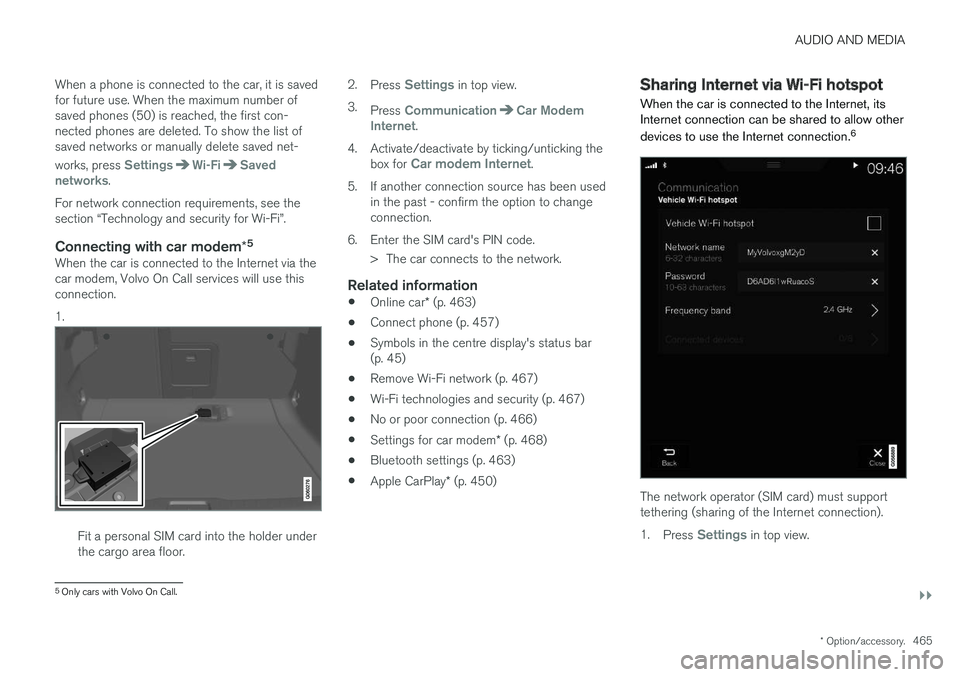
Connecting with car modem *5When the car is connected to the Internet via thecar modem, Volvo On Call services will use thisconnection. 1.
Fit a personal SIM card into the holder under the cargo area floor. 2.
Press
Settings in top view.
3. Press
CommunicationCar Modem
Internet.
4. Activate/deactivate by ticking/unticking the box for
Car modem Internet.
5. If another connection source has been used in the past - confirm the option to change connection.
6. Enter the SIM card's PIN code. > The car connects to the network.
Related information
• Online car
* (p. 463)
• Connect phone (p. 457)
• Symbols in the centre display's status bar(p. 45)
• Remove Wi-Fi network (p. 467)
• Wi-Fi technologies and security (p. 467)
• No or poor connection (p. 466)
• Settings for car modem
* (p. 468)
• Bluetooth settings (p. 463)
• Apple CarPlay
* (p. 450)
Sharing Internet via Wi-Fi hotspot
When the car is connected to the Internet, its Internet connection can be shared to allow other devices to use the Internet connection. 6
The network operator (SIM card) must support tethering (sharing of the Internet connection). 1.
Press
Settings in top view.
5
Only cars with Volvo On Call.
Page 468 of 594
||
AUDIO AND MEDIA
* Option/accessory.
466 2.
Press
CommunicationCar Wi-Fi
Hotspot.
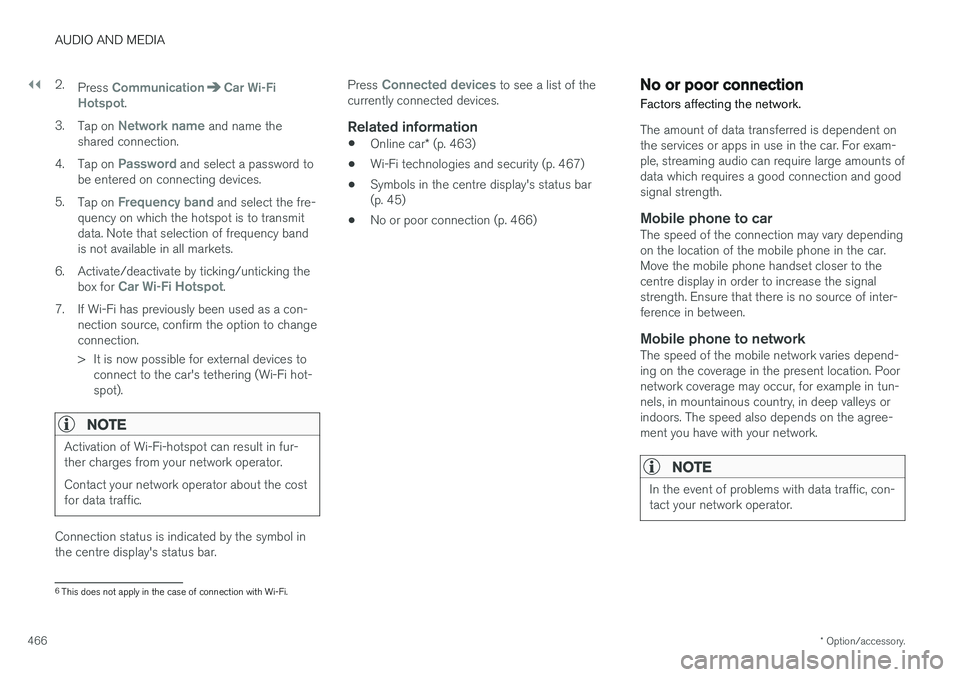
3. Tap on
Network name and name the
shared connection.
4. Tap on
Password and select a password to
be entered on connecting devices.
5. Tap on
Frequency band and select the fre-
quency on which the hotspot is to transmit data. Note that selection of frequency bandis not available in all markets.
6. Activate/deactivate by ticking/unticking the box for
Car Wi-Fi Hotspot.
7. If Wi-Fi has previously been used as a con- nection source, confirm the option to change connection.
> It is now possible for external devices toconnect to the car's tethering (Wi-Fi hot- spot).
NOTE
Activation of Wi-Fi-hotspot can result in fur- ther charges from your network operator. Contact your network operator about the cost for data traffic.
Connection status is indicated by the symbol in the centre display's status bar. Press
Connected devices to see a list of the
currently connected devices.
Related information
• Online car
* (p. 463)
• Wi-Fi technologies and security (p. 467)
• Symbols in the centre display's status bar (p. 45)
• No or poor connection (p. 466)
No or poor connection
Factors affecting the network.
The amount of data transferred is dependent on the services or apps in use in the car. For exam-ple, streaming audio can require large amounts ofdata which requires a good connection and goodsignal strength.
Mobile phone to carThe speed of the connection may vary dependingon the location of the mobile phone in the car.Move the mobile phone handset closer to thecentre display in order to increase the signalstrength. Ensure that there is no source of inter-ference in between.
Mobile phone to networkThe speed of the mobile network varies depend-ing on the coverage in the present location. Poornetwork coverage may occur, for example in tun-nels, in mountainous country, in deep valleys orindoors. The speed also depends on the agree-ment you have with your network.
NOTE
In the event of problems with data traffic, con- tact your network operator.
6 This does not apply in the case of connection with Wi-Fi.
Page 469 of 594
AUDIO AND MEDIA
* Option/accessory.467
Restarting the phoneIf there are problems with the connection then it may help to restart the phone.
Related information
•Online car
* (p. 463)
• Connecting the car (p. 464)
Remove Wi-Fi network
Removing a network that is not to be used.
1. Press Settings in top view.
2. Press
Wi-FiSaved networks.
3. Tap on
Forget alongside the network to be
removed.
4. Confirm the selection. > The car will no longer connect to the net-work in future.
Remove all networksAll networks can be removed simultaneously by restoring factory settings. Please note that alluser data and system settings are reset to origi-nal factory settings.
Related information
• Online car
* (p. 463)
• Connecting the car (p. 464)
• Resetting settings in the settings view(p. 173)
Wi-Fi technologies and security
Possible network types to connect to.
It is only possible to connect to the following types of network:
• Frequency — 2.4 or 5 GHz 7
.
• Standards — 802.11 a/b/g/n.
• Security type - WPA2-AES-CCMP.
The car
Page 480 of 594
||
AUDIO AND MEDIA
478
Country/ Area Brazil:
Este equipamento opera em caráter secundário isto e, náo tem direito a protecão contra interferéncia prejudicial, mesmo tipo, e não pode causar interferéncia a sistemas operando em caráter primário. Para consultas, visite: www.anatel.gov.br
Kazakh- stan:
Model name: NR 0V Manufacturer: Mitsubishi Electric CorporationExporting country: Japan