ECU VOLVO V90 2017 User Guide
[x] Cancel search | Manufacturer: VOLVO, Model Year: 2017, Model line: V90, Model: VOLVO V90 2017Pages: 594, PDF Size: 15.07 MB
Page 135 of 594
INSTRUMENTS AND CONTROLS
133
Steering wheel adjustment can be made in differ- ent ways depending on whether or not the car is equipped with knee airbag
19
.
WARNING
Adjust the steering wheel and fix it before driving away.
With speed related power steering the level of steering force can be adjusted. Steering force isregulated according to the car's speed in order togive the driver enhanced road responsiveness.
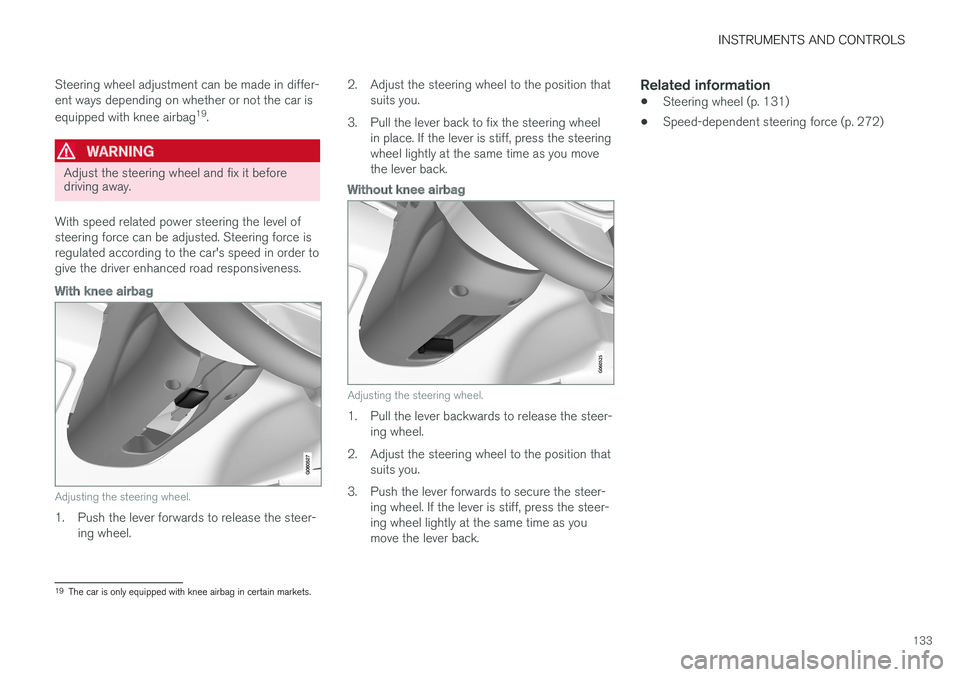
With knee airbag
Adjusting the steering wheel.
1. Push the lever forwards to release the steer- ing wheel. 2. Adjust the steering wheel to the position that
suits you.
3. Pull the lever back to fix the steering wheel in place. If the lever is stiff, press the steering wheel lightly at the same time as you movethe lever back.
Without knee airbag
Adjusting the steering wheel.
1. Pull the lever backwards to release the steer-ing wheel.
2. Adjust the steering wheel to the position that suits you.
3. Push the lever forwards to secure the steer- ing wheel. If the lever is stiff, press the steer- ing wheel lightly at the same time as youmove the lever back.
Related information
• Steering wheel (p. 131)
• Speed-dependent steering force (p. 272)
19
The car is only equipped with knee airbag in certain markets.
Page 228 of 594
||
LOADING AND STORAGE
* Option/accessory.
226
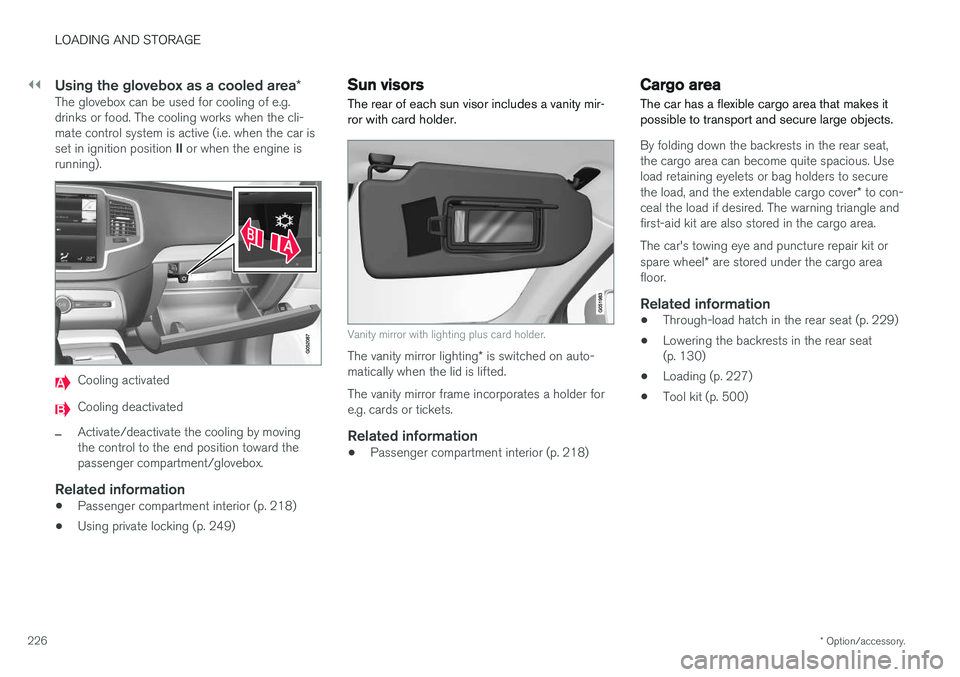
Using the glovebox as a cooled area *The glovebox can be used for cooling of e.g. drinks or food. The cooling works when the cli-mate control system is active (i.e. when the car is set in ignition position II or when the engine is
running).
Cooling activated
Cooling deactivated
–Activate/deactivate the cooling by moving the control to the end position toward thepassenger compartment/glovebox.
Related information
• Passenger compartment interior (p. 218)
• Using private locking (p. 249)
Sun visors The rear of each sun visor includes a vanity mir- ror with card holder.
Vanity mirror with lighting plus card holder.
The vanity mirror lighting
* is switched on auto-
matically when the lid is lifted. The vanity mirror frame incorporates a holder for e.g. cards or tickets.
Related information
• Passenger compartment interior (p. 218)
Cargo area
The car has a flexible cargo area that makes it possible to transport and secure large objects.
By folding down the backrests in the rear seat, the cargo area can become quite spacious. Useload retaining eyelets or bag holders to secure the load, and the extendable cargo cover * to con-
ceal the load if desired. The warning triangle and first-aid kit are also stored in the cargo area. The car's towing eye and puncture repair kit or spare wheel * are stored under the cargo area
floor.
Related information
• Through-load hatch in the rear seat (p. 229)
• Lowering the backrests in the rear seat (p. 130)
• Loading (p. 227)
• Tool kit (p. 500)
Page 230 of 594
||
LOADING AND STORAGE
* Option/accessory.
228
WARNING
The car's centre of gravity and driving charac- teristics are altered by roof loads. Read about maximum permitted roof load in the section on Weights.
Related information
• Load retaining eyelets (p. 228)
• Locking/unlocking the tailgate (p. 247)
• Through-load hatch in the rear seat (p. 229)
• Lowering the backrests in the rear seat (p. 130)
• Safety grille
* (p. 233)
• Safety net
* (p. 232)
• Cargo cover
* (p. 230)
• Weights (p. 563)
Load retaining eyelets
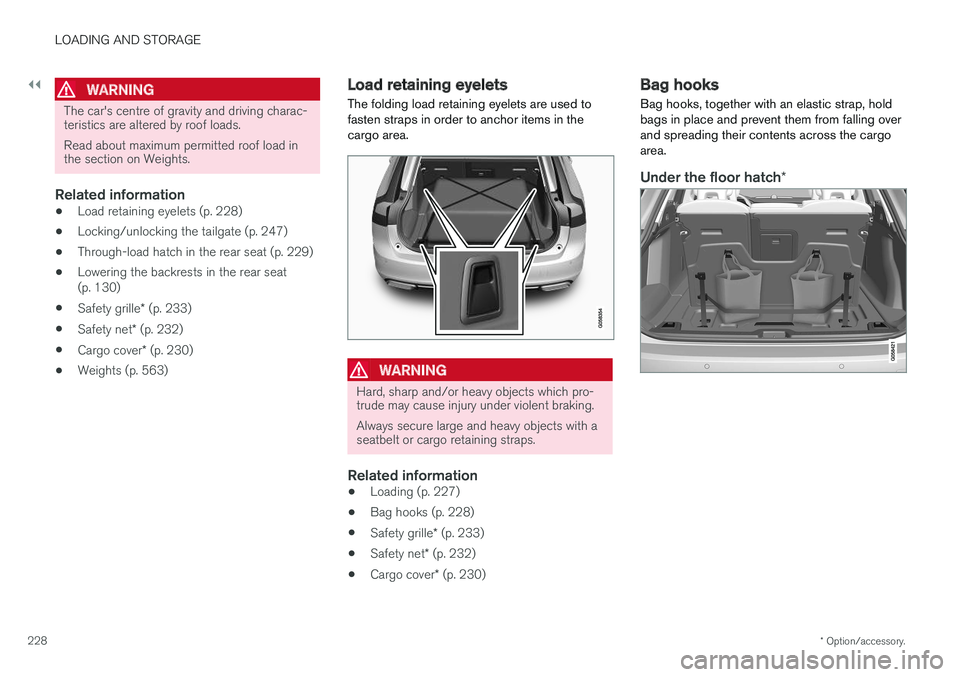
The folding load retaining eyelets are used to fasten straps in order to anchor items in thecargo area.
WARNING
Hard, sharp and/or heavy objects which pro- trude may cause injury under violent braking. Always secure large and heavy objects with a seatbelt or cargo retaining straps.
Related information
• Loading (p. 227)
• Bag hooks (p. 228)
• Safety grille
* (p. 233)
• Safety net
* (p. 232)
• Cargo cover
* (p. 230)
Bag hooks
Bag hooks, together with an elastic strap, hold bags in place and prevent them from falling overand spreading their contents across the cargoarea.
Under the floor hatch *
Page 232 of 594
LOADING AND STORAGE
* Option/accessory.
230
Cargo cover *
In the extended position, the cargo cover pre- vents visual access to the cargo area.
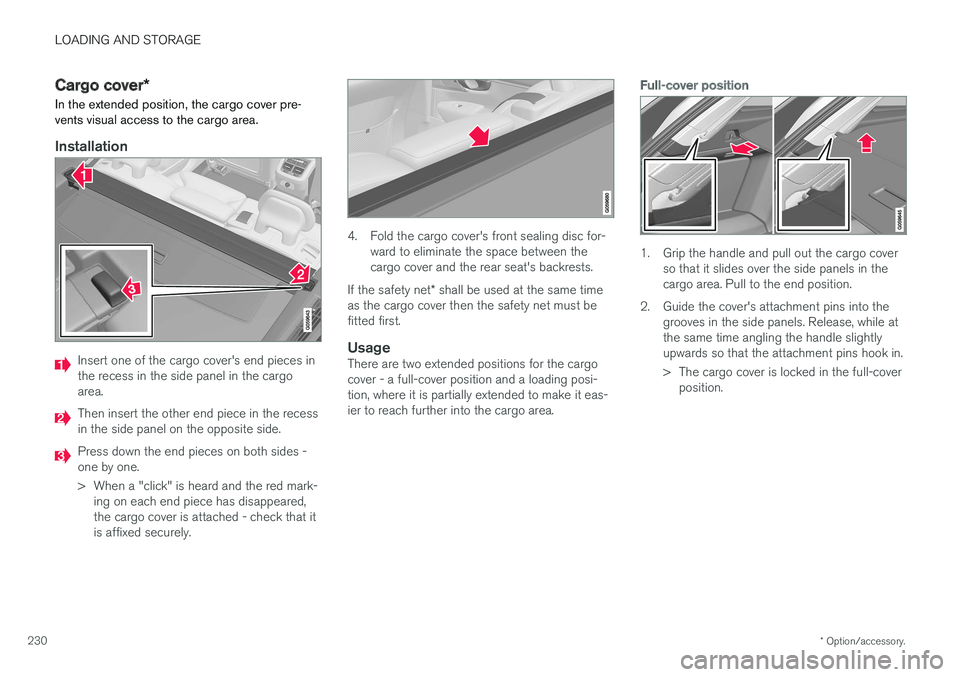
Installation
Insert one of the cargo cover's end pieces in the recess in the side panel in the cargoarea.
Then insert the other end piece in the recess in the side panel on the opposite side.
Press down the end pieces on both sides - one by one.
> When a "click" is heard and the red mark- ing on each end piece has disappeared, the cargo cover is attached - check that itis affixed securely.
4. Fold the cargo cover's front sealing disc for- ward to eliminate the space between the cargo cover and the rear seat's backrests.
If the safety net * shall be used at the same time
as the cargo cover then the safety net must befitted first.
UsageThere are two extended positions for the cargocover - a full-cover position and a loading posi-tion, where it is partially extended to make it eas-ier to reach further into the cargo area.
Full-cover position
1. Grip the handle and pull out the cargo cover so that it slides over the side panels in the cargo area. Pull to the end position.
2. Guide the cover's attachment pins into the grooves in the side panels. Release, while atthe same time angling the handle slightlyupwards so that the attachment pins hook in.
> The cargo cover is locked in the full-coverposition.
Page 234 of 594
LOADING AND STORAGE
* Option/accessory.
232 •
Safety net
* (p. 232)
• Load retaining eyelets (p. 228)
Safety net
*
The safety net prevents loads from being thrown forward in the passenger compartment in theevent of sudden braking.
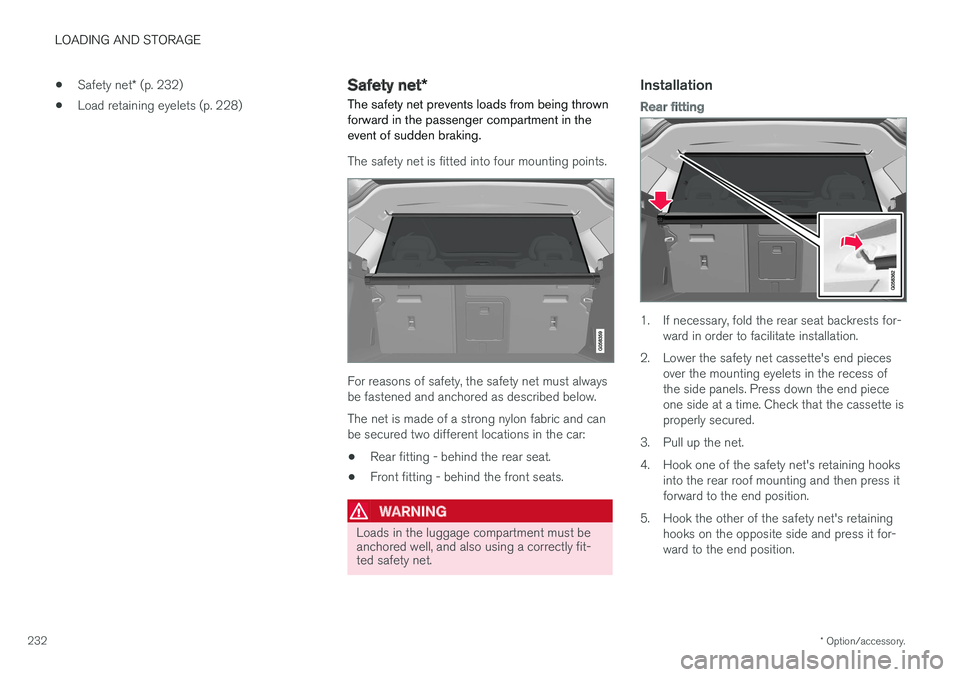
The safety net is fitted into four mounting points.
For reasons of safety, the safety net must always be fastened and anchored as described below. The net is made of a strong nylon fabric and can be secured two different locations in the car:
• Rear fitting - behind the rear seat.
• Front fitting - behind the front seats.
WARNING
Loads in the luggage compartment must be anchored well, and also using a correctly fit-ted safety net.
Installation
Rear fitting
1. If necessary, fold the rear seat backrests for-
ward in order to facilitate installation.
2. Lower the safety net cassette's end pieces over the mounting eyelets in the recess of the side panels. Press down the end pieceone side at a time. Check that the cassette isproperly secured.
3. Pull up the net.
4. Hook one of the safety net's retaining hooks into the rear roof mounting and then press it forward to the end position.
5. Hook the other of the safety net's retaining hooks on the opposite side and press it for-ward to the end position.
Page 244 of 594
||
LOCKS AND ALARM
* Option/accessory.
242
Touch-sensitive surfaces
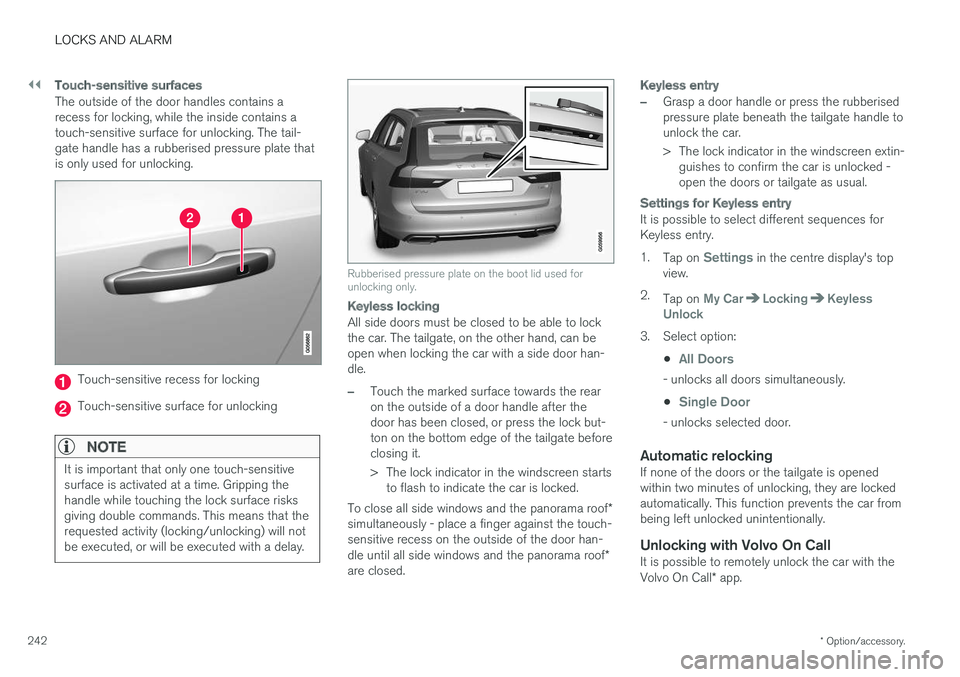
The outside of the door handles contains a recess for locking, while the inside contains atouch-sensitive surface for unlocking. The tail-gate handle has a rubberised pressure plate thatis only used for unlocking.
Touch-sensitive recess for locking
Touch-sensitive surface for unlocking
NOTE
It is important that only one touch-sensitive surface is activated at a time. Gripping thehandle while touching the lock surface risksgiving double commands. This means that therequested activity (locking/unlocking) will notbe executed, or will be executed with a delay.
Rubberised pressure plate on the boot lid used for unlocking only.
Keyless locking
All side doors must be closed to be able to lock the car. The tailgate, on the other hand, can beopen when locking the car with a side door han-dle.
–Touch the marked surface towards the rear on the outside of a door handle after thedoor has been closed, or press the lock but-ton on the bottom edge of the tailgate beforeclosing it.
> The lock indicator in the windscreen starts
to flash to indicate the car is locked.
To close all side windows and the panorama roof *
simultaneously - place a finger against the touch- sensitive recess on the outside of the door han- dle until all side windows and the panorama roof *
are closed.
Keyless entry
–Grasp a door handle or press the rubberised pressure plate beneath the tailgate handle tounlock the car.
> The lock indicator in the windscreen extin- guishes to confirm the car is unlocked - open the doors or tailgate as usual.
Settings for Keyless entry
It is possible to select different sequences for Keyless entry. 1. Tap on
Settings in the centre display's top
view.
2. Tap on
My CarLockingKeyless
Unlock
3. Select option:
•
All Doors
- unlocks all doors simultaneously.
•
Single Door
- unlocks selected door.
Automatic relockingIf none of the doors or the tailgate is opened within two minutes of unlocking, they are lockedautomatically. This function prevents the car frombeing left unlocked unintentionally.
Unlocking with Volvo On CallIt is possible to remotely unlock the car with the Volvo On Call * app.
Page 251 of 594
LOCKS AND ALARM
}}
* Option/accessory.249
Related information
•Remote control key (p. 236)
• Power operated tailgate
* (p. 253)
• Opening/closing the tailgate with foot move- ment
* (p. 256)
Using private locking
The tailgate can be locked with the private lock- ing function when the car is taken in for service,left at a hotel or similar.
NOTE
The car needs to be in ignition mode I as a
minimum for the private locking function to be activated.
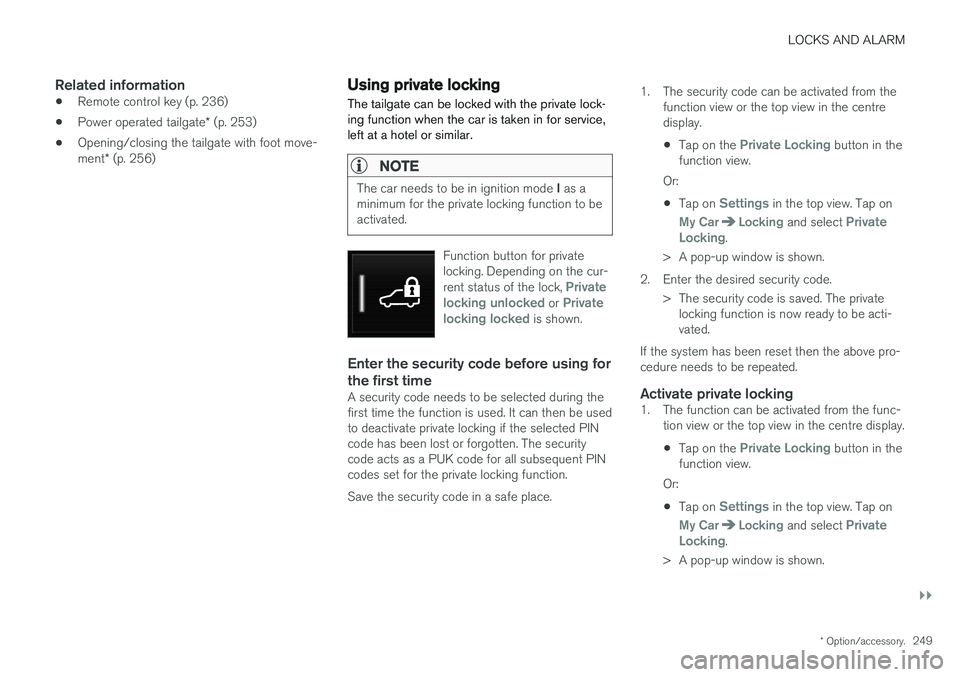
Function button for private locking. Depending on the cur- rent status of the lock,
Private
locking unlocked or Private
locking locked is shown.
Enter the security code before using for the first time
A security code needs to be selected during the first time the function is used. It can then be usedto deactivate private locking if the selected PINcode has been lost or forgotten. The securitycode acts as a PUK code for all subsequent PINcodes set for the private locking function. Save the security code in a safe place. 1. The security code can be activated from the
function view or the top view in the centre display.
• Tap on the
Private Locking button in the
function view.
Or:
• Tap on
Settings in the top view. Tap on
My CarLocking and select Private
Locking.
> A pop-up window is shown.
2. Enter the desired security code. > The security code is saved. The privatelocking function is now ready to be acti- vated.
If the system has been reset then the above pro-cedure needs to be repeated.
Activate private locking1. The function can be activated from the func- tion view or the top view in the centre display.
• Tap on the
Private Locking button in the
function view.
Or:
• Tap on
Settings in the top view. Tap on
My CarLocking and select Private
Locking.
> A pop-up window is shown.
Page 252 of 594
||
LOCKS AND ALARM
* Option/accessory.
250 2. Enter the code to be used in order to unlock
the tailgate after locking and tap on
Confirm.
> The tailgate is locked. Locking is con- firmed by a green indication at the button in the function view and the private lock-ing box being ticked in the settings view.
Deactivate private locking1. The function can be deactivated from the function view or the top view in the centredisplay.
• Tap on the
Private Locking button in the
function view.
Or:
• Tap on
Settings in the top view. Tap on
My CarLocking and select Private
Locking.
> A pop-up window is shown.
2. Enter the code that was used for locking and tap on
Confirm.
> The tailgate is unlocked. Unlocking is con- firmed by the green indication at the but- ton in the function view disappearing andthe tick disappearing from the privatelocking box in the settings view.
NOTE
If the PIN code has been lost/forgotten, or if the wrong PIN code has been entered morethan three times, the security code can beused to deactivate the private locking.
NOTE
Is private locking is activated and the car is unlocked via Volvo On Call * or the Volvo On
Call * app, private locking will be deactivated
automatically.
Related information
• Using the glovebox (p. 225)
• Locking/unlocking the tailgate (p. 247)
Detachable key blade The remote control key contains a detachable key blade of metal with which a number of func-tions can be activated and some operations car-ried out.
The key blade's unique code is provided by authorised Volvo workshops, which are recom-mended when ordering new key blades.
The key blade's application areasUsing the remote control key's detachable keyblade:
• the left-hand 9
front door can be opened
manually if central locking cannot be acti-vated with the remote control key.
• all doors are emergency locked - see thesection "Locking/unlocking with detachablekey blade".
• the rear doors' mechanical child safety lockscan be activated/deactivated - see the sec-tion "Child safety locks".
The button-less key 10
(Key Tag) does not have a
detachable key blade. If necessary, use thedetachable key blade from the normal remotecontrol key.
9 This applies whether the car is left-hand drive or right-hand drive.
10 Supplied with cars equipped with the keyless locking/unlocking option (Passive Entry *).
Page 253 of 594
LOCKS AND ALARM
}}
251
Detaching the key blade
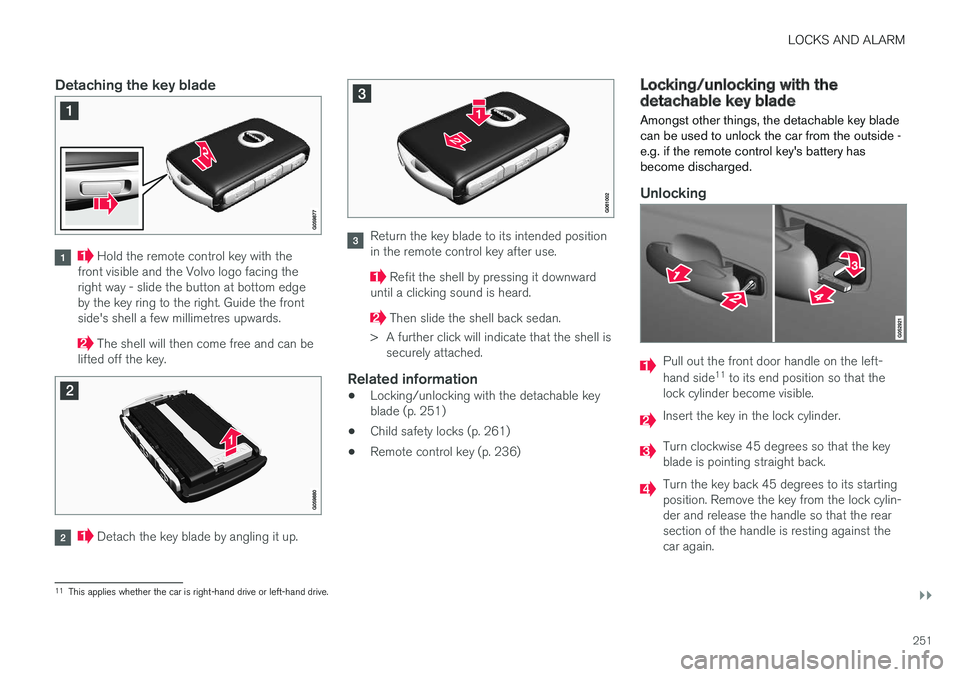
Hold the remote control key with the
front visible and the Volvo logo facing the right way - slide the button at bottom edgeby the key ring to the right. Guide the frontside's shell a few millimetres upwards.
The shell will then come free and can be
lifted off the key.
Detach the key blade by angling it up.
Return the key blade to its intended position in the remote control key after use.
Refit the shell by pressing it downward
until a clicking sound is heard.
Then slide the shell back sedan.
> A further click will indicate that the shell is securely attached.
Related information
• Locking/unlocking with the detachable key blade (p. 251)
• Child safety locks (p. 261)
• Remote control key (p. 236)
Locking/unlocking with the detachable key blade
Amongst other things, the detachable key blade can be used to unlock the car from the outside -e.g. if the remote control key's battery hasbecome discharged.
Unlocking
Pull out the front door handle on the left- hand side 11
to its end position so that the
lock cylinder become visible.
Insert the key in the lock cylinder.
Turn clockwise 45 degrees so that the key blade is pointing straight back.
Turn the key back 45 degrees to its starting position. Remove the key from the lock cylin-der and release the handle so that the rearsection of the handle is resting against thecar again.
11 This applies whether the car is right-hand drive or left-hand drive.
Page 261 of 594
LOCKS AND ALARM
}}
259
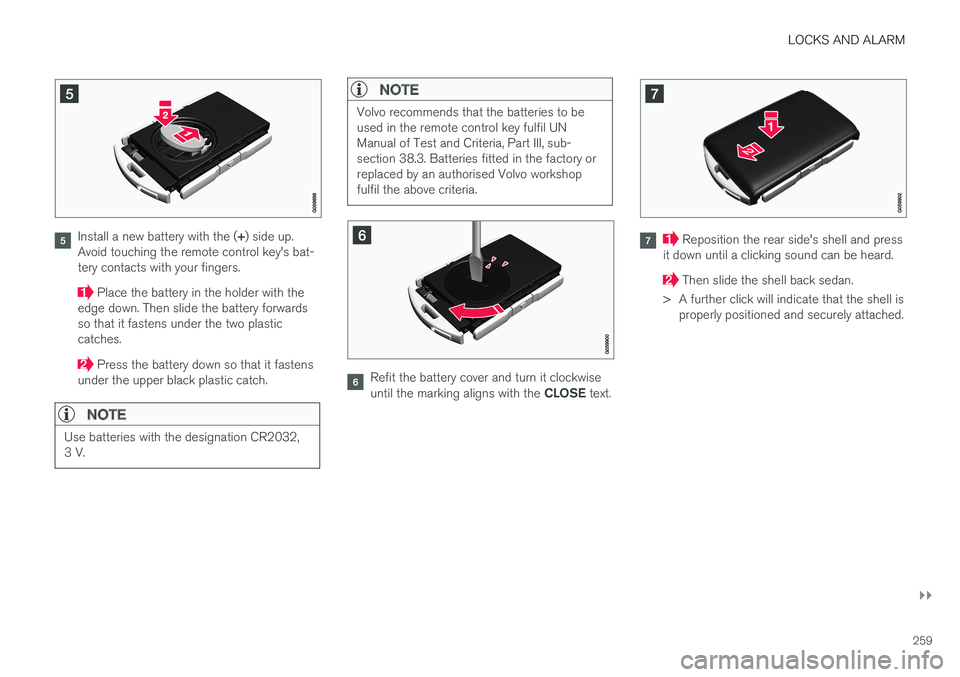
Install a new battery with the (+) side up.
Avoid touching the remote control key's bat- tery contacts with your fingers.
Place the battery in the holder with the
edge down. Then slide the battery forwards so that it fastens under the two plasticcatches.
Press the battery down so that it fastens
under the upper black plastic catch.
NOTE
Use batteries with the designation CR2032, 3 V.
NOTE
Volvo recommends that the batteries to be used in the remote control key fulfil UNManual of Test and Criteria, Part III, sub-section 38.3. Batteries fitted in the factory orreplaced by an authorised Volvo workshopfulfil the above criteria.
Refit the battery cover and turn it clockwise until the marking aligns with the CLOSE text.
Reposition the rear side's shell and press
it down until a clicking sound can be heard.
Then slide the shell back sedan.
> A further click will indicate that the shell is properly positioned and securely attached.