AUDIO AND MEDIA
}}
* Option/accessory.465
When a phone is connected to the car, it is saved for future use. When the maximum number ofsaved phones (50) is reached, the first con-nected phones are deleted. To show the list ofsaved networks or manually delete saved net- works, press
SettingsWi-FiSaved
networks.
For network connection requirements, see the section “Technology and security for Wi-Fi”.
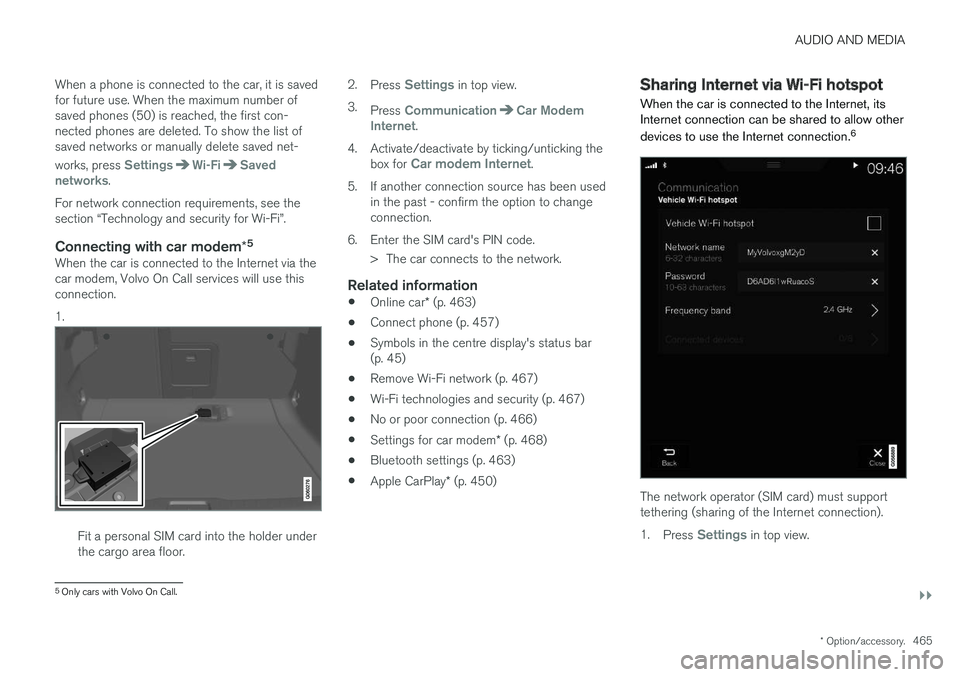
Connecting with car modem *5When the car is connected to the Internet via thecar modem, Volvo On Call services will use thisconnection. 1.
Fit a personal SIM card into the holder under the cargo area floor. 2.
Press
Settings in top view.
3. Press
CommunicationCar Modem
Internet.
4. Activate/deactivate by ticking/unticking the box for
Car modem Internet.
5. If another connection source has been used in the past - confirm the option to change connection.
6. Enter the SIM card's PIN code. > The car connects to the network.
Related information
• Online car
* (p. 463)
• Connect phone (p. 457)
• Symbols in the centre display's status bar(p. 45)
• Remove Wi-Fi network (p. 467)
• Wi-Fi technologies and security (p. 467)
• No or poor connection (p. 466)
• Settings for car modem
* (p. 468)
• Bluetooth settings (p. 463)
• Apple CarPlay
* (p. 450)
Sharing Internet via Wi-Fi hotspot
When the car is connected to the Internet, its Internet connection can be shared to allow other devices to use the Internet connection. 6
The network operator (SIM card) must support tethering (sharing of the Internet connection). 1.
Press
Settings in top view.
5
Only cars with Volvo On Call.
ALPHABETICAL INDEX
578Automatic car washes 549 Automatic engine stop
auto-stop 396
Automatic gearbox 390 trailer 428
Automatic relocking 242
Automatic speed limiter 281AUX jack for connecting media 448
Auxiliary heater 215
AWD, All Wheel Drive 405
B
Backrest front seat, adjusting 121, 122, 124
rear seat, lowering 130
Bag holder 228
Battery 388, 530 jump starting 388
maintenance 530
overload 415
start 530
support 533
symbols on the battery 533
warning symbols 533
Bi-Fuel introduction 54
BLIS 340, 342, 343 Bluetooth connect 447
connect car to Internet 464
phone 456
settings 463
Bonnet, opening 514
Book service and repair 506Brake assist after collision 408
Brake fluid grade 570
Brake functions 406
Brake light 143
Brakes 406 Anti-lock braking system, ABS 406
automatic when stationary 412
brake assist system, BAS 408
brake light 143
brake system 406
emergency brake lights 408
handbrake 409, 410, 411
bulbs, specifications 526C
Camera sensor 337
Car care 549 Leather upholstery 552
Car functions in centre display 47
Cargo area 226 electrical socket 220
lighting 146
mounting points 228
protective net 232
Cargo cover 230
Cargo grille 233
Car holiday 415
Car key battery low 257Car modem connect car to Internet 464
settings 468
Car status 506 Tyre pressure 487
Car upholstery 552
Car washing 549Catalytic converter Recovery 432
CD player 446
central locking 245