change language VOLVO V90 2017 Owners Manual
[x] Cancel search | Manufacturer: VOLVO, Model Year: 2017, Model line: V90, Model: VOLVO V90 2017Pages: 594, PDF Size: 15.07 MB
Page 16 of 594

INTRODUCTION
14
This is how you find owner's informationOwner's information is available in several differ- ent product formats, both digital and printed.The owner's manual is available in the car's cen-tre display, as a mobile app and on the VolvoCars support site. There is a Quick Guide and asupplement to the owner's manual available inthe glovebox, with specifications and fuse infor-mation, amongst other things. A printed owner'smanual can be ordered.The car's centre display 1In the centre display, drag down the top view and tap on
Owner's manual. Available
here are options for visual navi- gation with exterior and interiorimages of the car. The informa-tion is searchable and is also
divided into categories.
Mobile appIn App Store or Google Play, search for "Volvo Manual",download the app to yoursmartphone or tablet and selectthe car. Available in the app arevideo tutorials and options forvisual navigation with exterior
and interior images of the car. It is easy to navi-gate between the different sections in theowner's manual and the content is searchable.
Volvo Cars support siteGo to support.volvocars.com and select your country. Hereyou can find owner's manuals,both online and in PDF format.On the Volvo Cars support sitethere are also video tutorialsand further information and
help regarding your Volvo and your car owner-ship. The page is available for most markets.
Printed informationThere is a supplement to the owner's manual 1
in the glove-
box that contains information on fuses and specifications, aswell as a summary of importantand practical information.
There is also a Quick Guide available in printedformat that helps you to get started with the mostcommonly used functions in the car. Depending on equipment level selected, market, etc. additional owner's information may also beavailable in printed format in the car. A printed owner's manual and associated supple- ment can be ordered. Contact a Volvo dealer toorder.
Changing the language in the car's centre display
Changing the language in the centre display may mean that some owner's information does notcorrespond to national or local laws and regula-tions. Don't change to a language that's difficultto understand, it may then be difficult to find yourway back in the structure on the screen.
1 A complete printed manual is included with the car for markets without owner's manual in the centre display.
Page 53 of 594
INTRODUCTION
}}
51
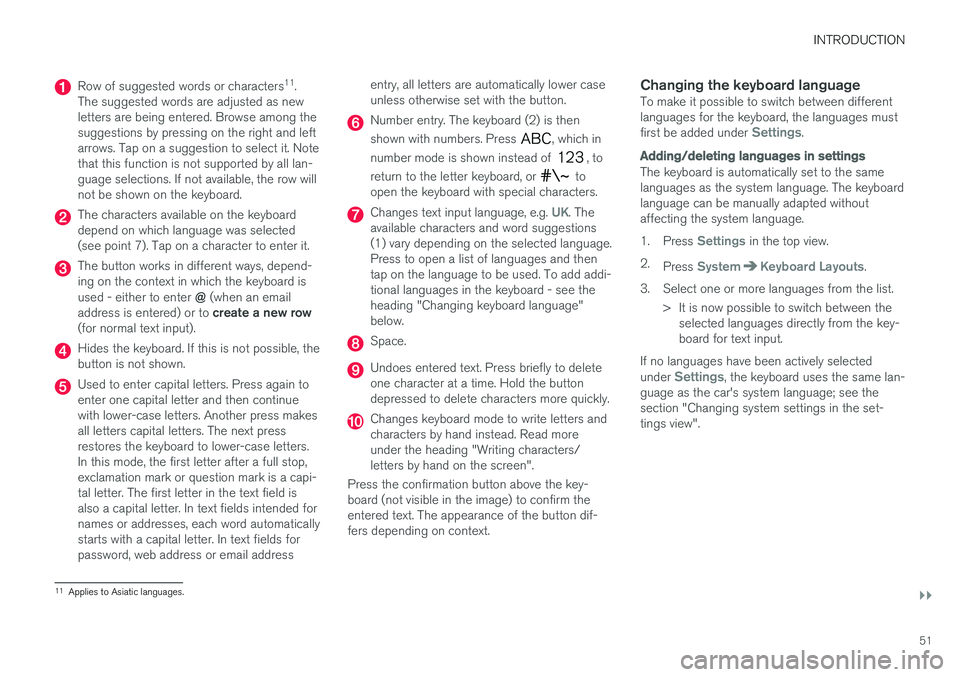
Row of suggested words or characters11
.
The suggested words are adjusted as new letters are being entered. Browse among thesuggestions by pressing on the right and leftarrows. Tap on a suggestion to select it. Notethat this function is not supported by all lan-guage selections. If not available, the row willnot be shown on the keyboard.
The characters available on the keyboard depend on which language was selected(see point 7). Tap on a character to enter it.
The button works in different ways, depend- ing on the context in which the keyboard is used - either to enter @ (when an email
address is entered) or to create a new row
(for normal text input).
Hides the keyboard. If this is not possible, the button is not shown.
Used to enter capital letters. Press again to enter one capital letter and then continuewith lower-case letters. Another press makesall letters capital letters. The next pressrestores the keyboard to lower-case letters.In this mode, the first letter after a full stop,exclamation mark or question mark is a capi-tal letter. The first letter in the text field isalso a capital letter. In text fields intended fornames or addresses, each word automaticallystarts with a capital letter. In text fields forpassword, web address or email address entry, all letters are automatically lower caseunless otherwise set with the button.
Number entry. The keyboard (2) is then shown with numbers. Press
, which in
number mode is shown instead of
, to
return to the letter keyboard, or
to
open the keyboard with special characters.
Changes text input language, e.g. UK. The
available characters and word suggestions (1) vary depending on the selected language.Press to open a list of languages and thentap on the language to be used. To add addi-tional languages in the keyboard - see theheading "Changing keyboard language"below.
Space.
Undoes entered text. Press briefly to delete one character at a time. Hold the buttondepressed to delete characters more quickly.
Changes keyboard mode to write letters and characters by hand instead. Read moreunder the heading "Writing characters/letters by hand on the screen".
Press the confirmation button above the key-board (not visible in the image) to confirm theentered text. The appearance of the button dif-fers depending on context.
Changing the keyboard languageTo make it possible to switch between differentlanguages for the keyboard, the languages must first be added under
Settings.
Adding/deleting languages in settings
The keyboard is automatically set to the same languages as the system language. The keyboardlanguage can be manually adapted withoutaffecting the system language. 1. Press
Settings in the top view.
2. Press
SystemKeyboard Layouts.
3. Select one or more languages from the list. > It is now possible to switch between theselected languages directly from the key- board for text input.
If no languages have been actively selected under
Settings, the keyboard uses the same lan-
guage as the car's system language; see the section "Changing system settings in the set-tings view".
11 Applies to Asiatic languages.
Page 54 of 594
||
INTRODUCTION
52
Switching between different languages in the keyboard
When a number of languages have been selected in
Settings, the keyboard button
(shown in context as number 7 in the illustration above) is usedto switch between different lan-guages.
To change keyboard language:
1. Press and hold the button (see image above).
> A list opens.
2. Select the required language. If more than four languages have been selected under
Settings, it is possible to scroll in the list
from the keyboard.
> The keyboard is adapted to the selected language and other word suggestions are given.
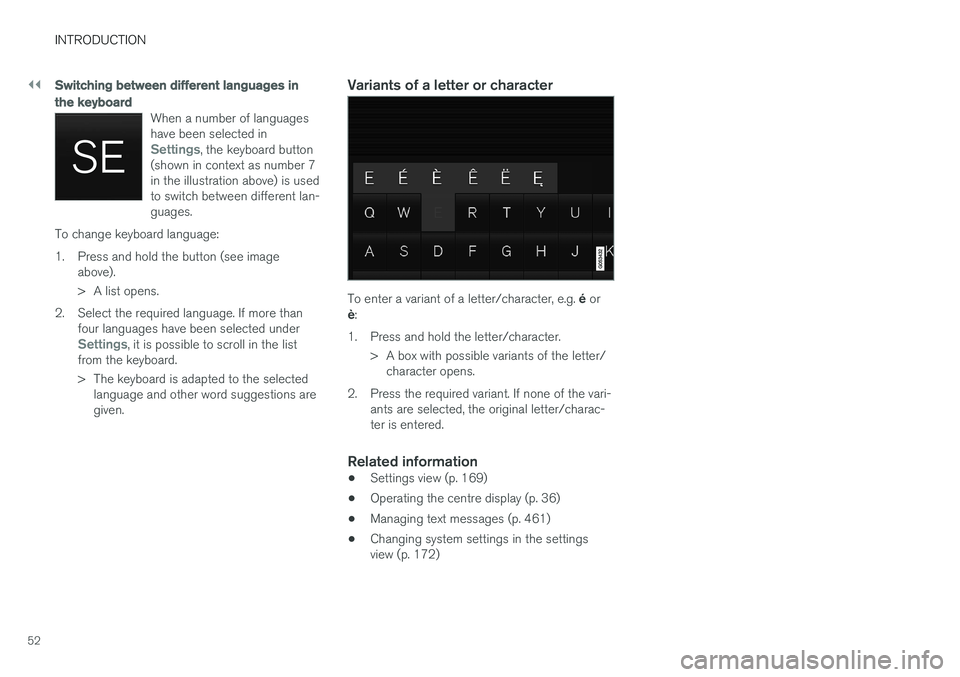
Variants of a letter or character
To enter a variant of a letter/character, e.g. é or
è :
1. Press and hold the letter/character. > A box with possible variants of the letter/character opens.
2. Press the required variant. If none of the vari- ants are selected, the original letter/charac- ter is entered.
Related information
• Settings view (p. 169)
• Operating the centre display (p. 36)
• Managing text messages (p. 461)
• Changing system settings in the settingsview (p. 172)
Page 55 of 594
INTRODUCTION
53
Writing characters/letters by hand on the screen
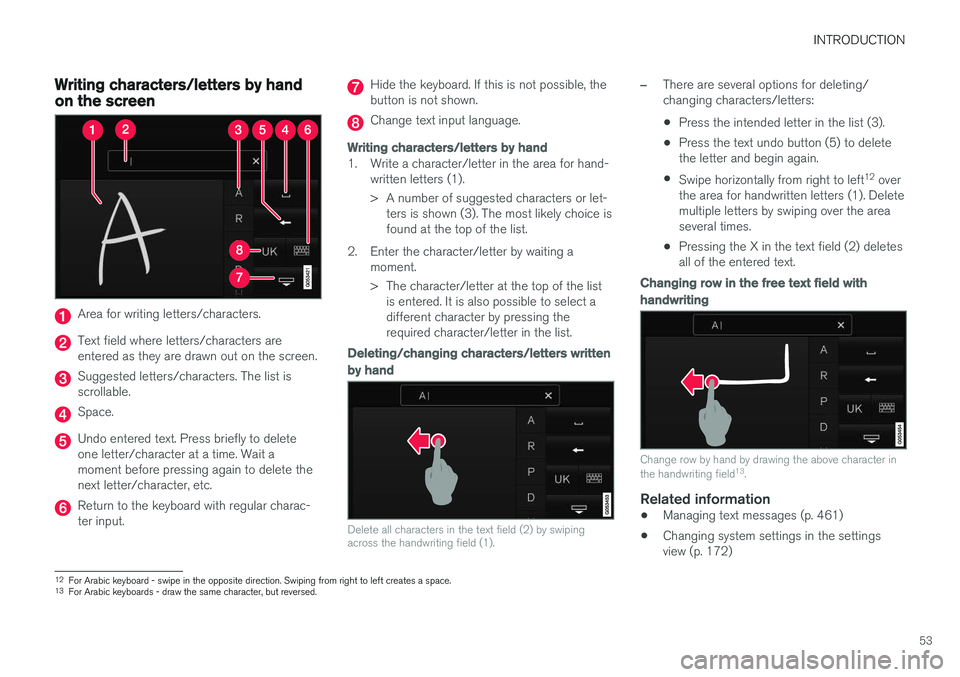
Area for writing letters/characters.
Text field where letters/characters are entered as they are drawn out on the screen.
Suggested letters/characters. The list is scrollable.
Space.
Undo entered text. Press briefly to delete one letter/character at a time. Wait amoment before pressing again to delete thenext letter/character, etc.
Return to the keyboard with regular charac- ter input.
Hide the keyboard. If this is not possible, the button is not shown.
Change text input language.
Writing characters/letters by hand
1. Write a character/letter in the area for hand-written letters (1).
> A number of suggested characters or let-ters is shown (3). The most likely choice is found at the top of the list.
2. Enter the character/letter by waiting a moment.
> The character/letter at the top of the listis entered. It is also possible to select a different character by pressing therequired character/letter in the list.
Deleting/changing characters/letters written by hand
Delete all characters in the text field (2) by swiping across the handwriting field (1).
–There are several options for deleting/ changing characters/letters: •Press the intended letter in the list (3).
• Press the text undo button (5) to delete the letter and begin again.
• Swipe horizontally from right to left 12
over
the area for handwritten letters (1). Deletemultiple letters by swiping over the areaseveral times.
• Pressing the X in the text field (2) deletesall of the entered text.
Changing row in the free text field with handwriting
Change row by hand by drawing the above character in the handwriting field 13
.
Related information
• Managing text messages (p. 461)
• Changing system settings in the settings view (p. 172)
12
For Arabic keyboard - swipe in the opposite direction. Swiping from right to left creates a space.
13 For Arabic keyboards - draw the same character, but reversed.
Page 96 of 594
INSTRUMENTS AND CONTROLS
* Option/accessory.
94
Driver display settings
Settings for the driver display can be made in the driver display's application menu, and in the centre display's
Settings menu.
Settings in the app menuIn the app menu, you can choose which informa- tion is shown on the driver display from
• trip computer
• media player
• phone
• navigation system
*.
The application menu in the driver display is
opened and navigated using the steering wheel'sright-hand keypad, see the section "Using theapplication menu in the driver display".
Settings in the centre display
Selecting information type
1. Tap on Settings in the centre display's top
view.
2. Press
My CarDisplaysDriver
Display Information. 3. Select what should be shown in the back-
ground: •
Show no information in background
•Show information for current playing media
•Show navigation even if no route is set1.
The 12-inch driver display shows the infor- mation in the centre, and the 8-inch driverdisplay shows the information in the topright-hand field.
Selecting theme
1. Tap on Settings in the centre display's top
view.
2. Tap on
My CarDisplaysDisplay
Themes
3. Select a theme (appearance) for the driver display: •
Glass
•Minimalistic
•Performance
•Chrome Rings.
Selecting language
1.Tap on Settings in the centre display's top
view. 2.
Tap on
SystemSystem Language to
select language.
> A change will affect the language in all displays.
Related information
• Driver display (p. 90)
• Application menu in the driver display (p. 105)
• Settings view (p. 169)
1
The map is only shown with 12-inch driver display. In the 8-inch driver display, only guidance is shown. For more information, see the section "Displays and controls for map navigation" and "Map navigation in the driver display".
Page 119 of 594
INSTRUMENTS AND CONTROLS
117
Digits
The number commands are stated differently depending on the function to be controlled: •Phone numbers and postcodes
must be
spoken individually, number by number, e.g. zero three one two two four four three(03122443).
• House numbers
can be spoken individually
or in groups, e.g. two two or twenty-two (22).For English and Dutch, several groups canbe said in sequence, e.g. twenty-two twenty-two (22 22). For English, double or triple canbe used, e.g. double zero (00). Numbers canbe given within the range 0-2300.
• Frequencies
can be spoken as ninety eight
point eight (98.8), a hundred and four pointtwo or hundred four point two (104.2).
Related information
• Voice recognition (p. 115)
• Voice recognition control of the phone(p. 118)
• Voice recognition control of radio and media(p. 118)
• Voice recognition control of climate control(p. 119)
• Voice recognition and map navigation(p. 120)
• Settings for voice recognition (p. 117)
Settings for voice recognition 10
Several settings for the voice recognition system can be made.
1. Press Settings in top view.
2. Press
SystemVoice Control and select
settings.
•
Repeat Voice Command
•Gender
•Speech Rate
Audio settings
1. Press Settings in top view.
2. Press
SoundSystem VolumesVoice
Control and select settings.
Change language
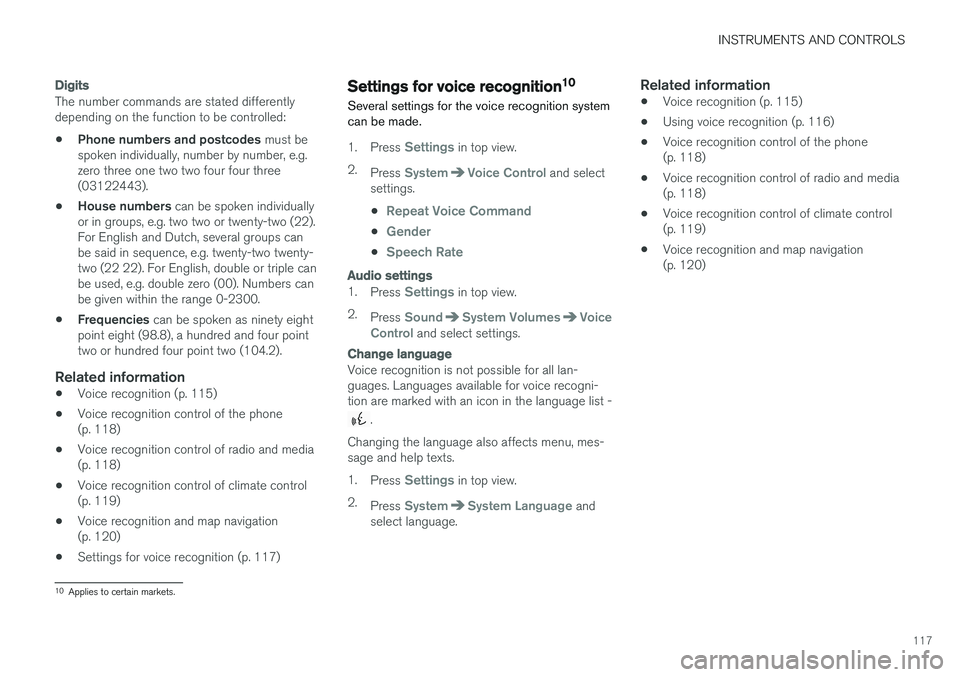
Voice recognition is not possible for all lan- guages. Languages available for voice recogni-tion are marked with an icon in the language list -
.
Changing the language also affects menu, mes- sage and help texts. 1. Press
Settings in top view.
2. Press
SystemSystem Language and
select language.
Related information
• Voice recognition (p. 115)
• Using voice recognition (p. 116)
• Voice recognition control of the phone (p. 118)
• Voice recognition control of radio and media(p. 118)
• Voice recognition control of climate control(p. 119)
• Voice recognition and map navigation(p. 120)
10
Applies to certain markets.
Page 174 of 594
||
INSTRUMENTS AND CONTROLS
172
Related information
•Settings view (p. 169)
• Changing system settings in the settings view (p. 172)
Changing system settings in the settings view The
System category in the settings view col-
lects general settings and information for car systems, such as language and units.
The system settings under Driver Profile, Date
and Time, Keyboard Layouts, Voice Control,Software Updates, Factory reset, Factory
Reset and Services are described in the corres-
ponding section of the owner's manual.
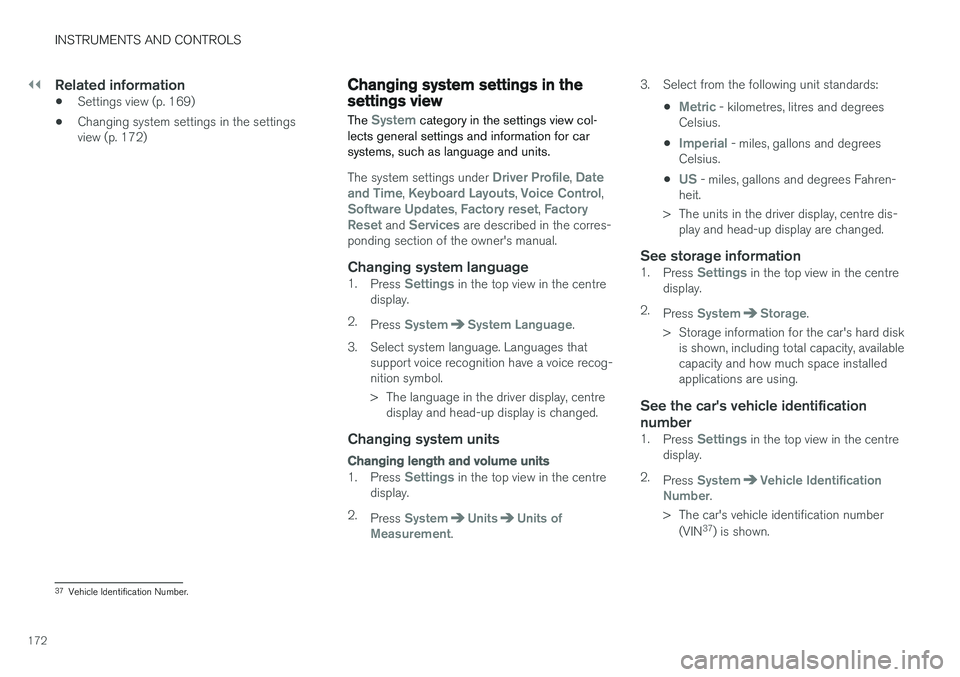
Changing system language1. Press Settings in the top view in the centre
display.
2. Press
SystemSystem Language.
3. Select system language. Languages that support voice recognition have a voice recog- nition symbol.
> The language in the driver display, centredisplay and head-up display is changed.
Changing system units
Changing length and volume units
1. Press Settings in the top view in the centre
display.
2. Press
SystemUnitsUnits of
Measurement. 3. Select from the following unit standards:
•
Metric - kilometres, litres and degrees
Celsius.
•
Imperial - miles, gallons and degrees
Celsius.
•
US - miles, gallons and degrees Fahren-
heit.
> The units in the driver display, centre dis- play and head-up display are changed.
See storage information1. Press Settings in the top view in the centre
display.
2. Press
SystemStorage.
> Storage information for the car's hard disk is shown, including total capacity, available capacity and how much space installedapplications are using.
See the car's vehicle identification number
1. Press Settings in the top view in the centre
display.
2. Press
SystemVehicle Identification
Number.
> The car's vehicle identification number (VIN 37
) is shown.
37 Vehicle Identification Number.
Page 176 of 594
INSTRUMENTS AND CONTROLS
174
Driver profiles
Many of the settings made in the car can be adapted according to the driver's personal pref-erences and can be saved in one or more driverprofiles.
The personal settings are automatically saved in the active driver profile. Each key can be linked toa driver profile. When the linked key is used, thecar is adapted to the settings of that specificdriver profile.
What settings are saved in the driver profiles?
Many of the settings made in the car will be auto-matically saved in the active driver profile if theprofile is not locked; see the section "Editing adriver profile". Settings made in the car are eitherpersonal or global. Only personal settings aresaved in driver profiles. Settings that can be saved in a driver profile include, amongst other things, screens, mirrors,front seats, navigation, audio and media system,language and voice control. Some settings, referred to as global settings, can be changed but are not saved to a specific driverprofile. Changes to global settings affect all pro-files.
Global settings
The global settings and parameters are not changed when changing between driver profiles. They remain the same regardless of which driverprofile is active. Keyboard layout settings are an example of global settings. If driver profile X is used to addadditional languages to the keyboard, theseremain available for use even if driver profile Y isused. The keyboard layout settings are not savedto a specific driver profile - the settings areglobal.
Personal preferences
If driver profile X was used to e.g. set centre dis- play brightness, driver profile Y is not affected bythis setting. It has been saved to driver profile X -the brightness setting is a personal setting. Refer to the section "Categories in the settings view" for more information on which settings arepersonal and which are global.
Related information
•
Editing a driver profile (p. 175)
• Categories in the settings view (p. 170)
• Selecting driver profile (p. 174)
Selecting driver profile
The last used driver profile is the one selected when the car is unlocked. It is possible tochange to another driver profile after the car hasbeen unlocked.
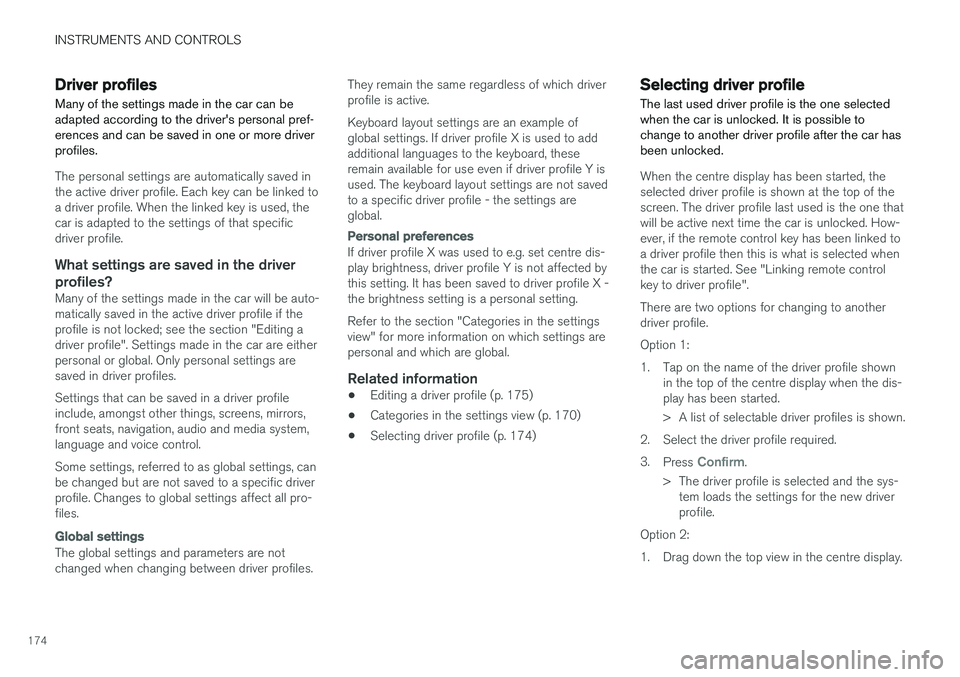
When the centre display has been started, the selected driver profile is shown at the top of thescreen. The driver profile last used is the one thatwill be active next time the car is unlocked. How-ever, if the remote control key has been linked toa driver profile then this is what is selected whenthe car is started. See "Linking remote controlkey to driver profile". There are two options for changing to another driver profile. Option 1:
1. Tap on the name of the driver profile shown in the top of the centre display when the dis- play has been started.
> A list of selectable driver profiles is shown.
2. Select the driver profile required. 3. Press
Confirm.
> The driver profile is selected and the sys- tem loads the settings for the new driver profile.
Option 2:
1. Drag down the top view in the centre display.
Page 446 of 594
||
AUDIO AND MEDIA
* Option/accessory.
444
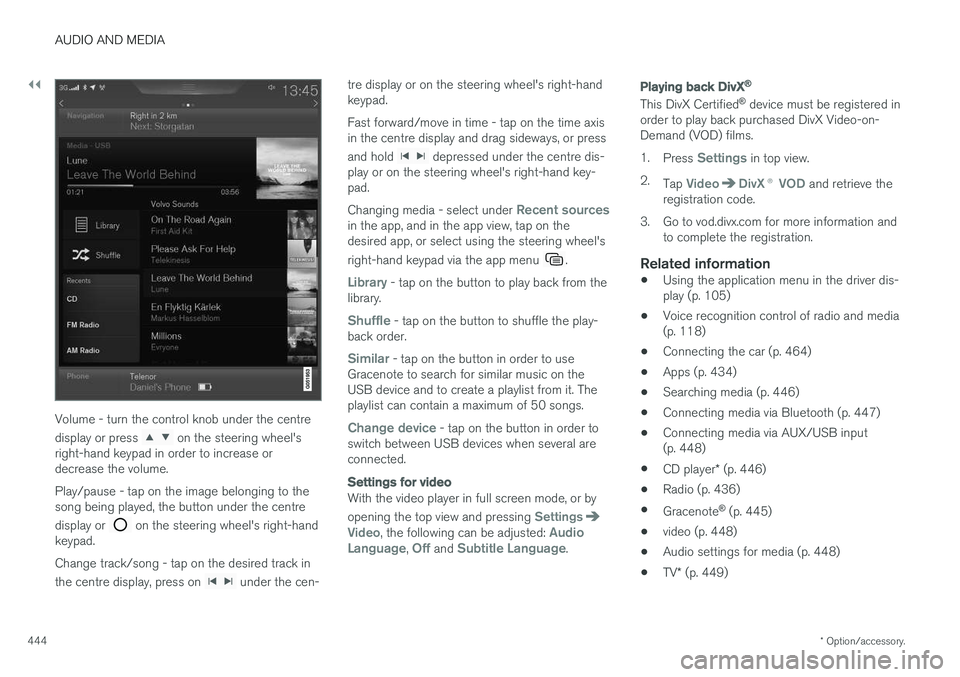
Volume - turn the control knob under the centre display or press
on the steering wheel's
right-hand keypad in order to increase or decrease the volume. Play/pause - tap on the image belonging to the song being played, the button under the centre display or
on the steering wheel's right-hand
keypad. Change track/song - tap on the desired track in the centre display, press on
under the cen- tre display or on the steering wheel's right-hand keypad. Fast forward/move in time - tap on the time axis in the centre display and drag sideways, or press and hold
depressed under the centre dis-
play or on the steering wheel's right-hand key- pad. Changing media - select under
Recent sourcesin the app, and in the app view, tap on the desired app, or select using the steering wheel's right-hand keypad via the app menu
.
Library - tap on the button to play back from the
library.
Shuffle - tap on the button to shuffle the play-
back order.
Similar - tap on the button in order to use
Gracenote to search for similar music on the USB device and to create a playlist from it. Theplaylist can contain a maximum of 50 songs.
Change device - tap on the button in order to
switch between USB devices when several are connected.
Settings for video
With the video player in full screen mode, or by opening the top view and pressing
SettingsVideo, the following can be adjusted: Audio
Language, Off and Subtitle Language.
Playing back DivX®
This DivX Certified ®
device must be registered in
order to play back purchased DivX Video-on- Demand (VOD) films. 1. Press
Settings in top view.
2. Tap
VideoDivX ® VOD and retrieve the
registration code.
3. Go to vod.divx.com for more information and to complete the registration.
Related information
• Using the application menu in the driver dis- play (p. 105)
• Voice recognition control of radio and media(p. 118)
• Connecting the car (p. 464)
• Apps (p. 434)
• Searching media (p. 446)
• Connecting media via Bluetooth (p. 447)
• Connecting media via AUX/USB input(p. 448)
• CD player
* (p. 446)
• Radio (p. 436)
• Gracenote ®
(p. 445)
• video (p. 448)
• Audio settings for media (p. 448)
• TV
* (p. 449)
Page 452 of 594
||
AUDIO AND MEDIA
* Option/accessory.
450
TV guide
A programme guide is available with information about TV programmes for up to 48 hours.
–Tap on Guide to show information about TV
programmes.
NOTE
If the car is moved within the country, e.g. from city to city, it is not certain that
Favourites are available since the frequency
may have changed.
Change the format of the TV picture
Tapping on Picture format enables you to
choose which format the TV picture should be shown in. 1.
Auto - The TV picture is shown in the image
format being transmitted.
2.
Auto fill - The TV picture is maximised with-
out cropping.
Settings for TVThe option to make certain settings is available, both in the top view or when TV-viewing takesplace in full screen mode. With the video player in full screen mode, or by opening the top view and pressing
Settings
MediaTV, the following can be adjusted: •
Subtitle Language
•Audio Language
Related information
•
TV
* (p. 449)
• Voice recognition control of radio and media (p. 118)
• Media playback (p. 443)
• Navigating in the centre display's views(p. 40)
• License agreement for audio and media(p. 470)
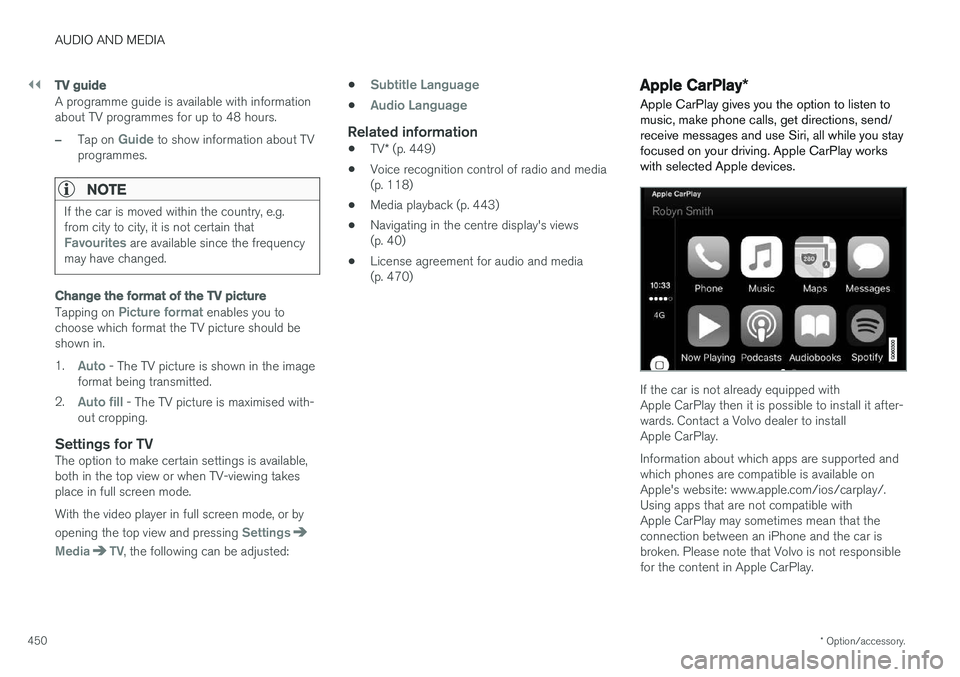
Apple CarPlay
*
Apple CarPlay gives you the option to listen to music, make phone calls, get directions, send/receive messages and use Siri, all while you stayfocused on your driving. Apple CarPlay workswith selected Apple devices.
If the car is not already equipped with Apple CarPlay then it is possible to install it after-wards. Contact a Volvo dealer to installApple CarPlay. Information about which apps are supported and which phones are compatible is available onApple's website: www.apple.com/ios/carplay/.Using apps that are not compatible withApple CarPlay may sometimes mean that theconnection between an iPhone and the car isbroken. Please note that Volvo is not responsiblefor the content in Apple CarPlay.