lane assist VOLVO V90 2017 Owners Manual
[x] Cancel search | Manufacturer: VOLVO, Model Year: 2017, Model line: V90, Model: VOLVO V90 2017Pages: 594, PDF Size: 15.07 MB
Page 9 of 594
7
Symbols and messages for Pilot Assist*
316
Radar unit 318
Limitations of the radar unit 319
Type approval for radar units 323
Camera unit 326
Limitations of the camera unit 327
City Safety 330
Setting the warning distance for City Safety 332
Detection of obstacles with City Safety ™
333
City Safety in cross traffic 335
City Safety when evasive manoeu-vres are prevented 336
Limitations of City Safety 337
Messages for City Safety 339
Rear Collision Warning 340
Blind Spot Information *
340
Activate/deactivate Blind Spot Information * 342
Limitations of Blind Spot Information *
343
Cross Traffic Alert *
343
Activate/deactivate Cross Traffic Alert *
344
Limitations of Cross Traffic Alert 345
Messages for Blind SpotInformation * and Cross Traffic Alert *347
Road Sign Information
*
348
Sign display with Road Sign Information 348
Speed camera information *
350
Activating/deactivating Road Sign Information 351
Limitations of Road Sign Information *
352
Driver Alert Control 352
Activate/deactivate Driver Alert Control 353
Limitations of Driver Alert Control 354
Lane Keeping Aid 354
Activate/deactivate Lane Keeping Aid 356
Symbols and messages for laneassistance 358
Run-off Mitigation 360
Symbols and messages for Run-offMitigation 362
Park Assist *
363
Activating/deactivating Parking assistance * 365
Limitations of Parking assistance *
365
Messages for Park Assist *
367
Park Assist Camera *
368
Park assist lines and fields for thePark Assist Camera * 370
Starting the Park Assist Camera *
372
Limitations of the Park Assist Camera *
373
Park Assist Pilot *
374
Parking with Active parking assistance *
376
Limitations of Park Assist Pilot *
379
Messages for Park Assist Pilot *
381
Page 30 of 594
INTRODUCTION
* Option/accessory.
28
IntelliSafe-driver support
IntelliSafe is the Volvo Cars concept concerning car safety. It comprises a number of systemsthat contribute to making a car journey safe, tothe prevention of injuries and to the protection ofpassengers from other road users.
SupportThere are systems incorporated in IntelliSafe that help the driver to drive the car in a safe manner.The driver support functions incorporated in thecar include e.g. the adaptive cruise control (Adaptive Cruise Control) * that ensures that a
constant distance is held between the car and the vehicle in front. Pilot Assist * helps the driver to keep the car
between the lane's edge markings, combined with maintaining a preset time interval to thevehicle ahead. Park Assist Pilot * helps the driver park the car by
sensing the area around it. Other examples of systems that help the driver are the Active main beam, Cross Traffic Alert (CTA) * and Blind Spot Information (BLIS) * sys-
tems.
PreventionAn example of a function that helps to prevent accidents is City Safety. The function warns thedriver of risks of collision with another vehicle,pedestrians, cyclists or larger animals. If the driver does not react to the warning and the risk of col-lision is imminent then City Safety can automati-cally brake the car. Lane Keeping Aid (LKA)
* is another example of a
function that helps to prevent accidents by warn- ing the driver and giving corrective steering inter-ventions if the car is about to cross a lane sideline. Also available is the run-off mitigation function (Run off mitigation), whose purpose is to reducethe risk of the car unintentionally leaving theroad, and it actively steers the car back onto theroad.
ProtectionTo protect the driver and passengers, the car isequipped with seatbelt tensioners which can ten-sion the seatbelts in critical situations and in col-lisions. It also has airbags and inflatable curtains,as well as Whiplash Protection System (WHIPS)which protects against whiplash injuries. A Pedestrian Protection System (PPS) is also available for mitigating a pedestrian's impact withthe car in the event of a frontal collision.
Related information
• Adaptive cruise control
* (p. 290)
• Park Assist Pilot
* (p. 374)
• Activating/deactivating main beam (p. 138)
• Activate/deactivate Cross Traffic Alert
*
(p. 344) •
Blind Spot Information
* (p. 340)
• City Safety (p. 330)
• Lane Keeping Aid (p. 354)
• Roll Stability Control (p. 272)
• Seatbelt (p. 59)
• Safety (p. 56)
• Airbags (p. 63)
• Pilot Assist
* (p. 304)
• Run-off Mitigation (p. 360)
• Whiplash Protection System (p. 57)
Page 46 of 594
||
INTRODUCTION
* Option/accessory.
44 app view, such as the number of unread text messages for
Messages.
Tap on an app to open it. It then opens in the subview to which it belongs, such as
Media.
Depending on the amount of apps, it is possible to scroll downward in the app view. Do this byswiping/dragging from the bottom and up. To move an app:
1. Tap on the app and hold depressed. > The app becomes slightly transparent andlarger when it is ready to be moved.
2. Drag the app to the desired location.
NOTE
Apps and car function buttons cannot be added to locations that are already occupied.
Go back to the home view again by swiping from left to right 9
across the screen, or by pressing the
home button.
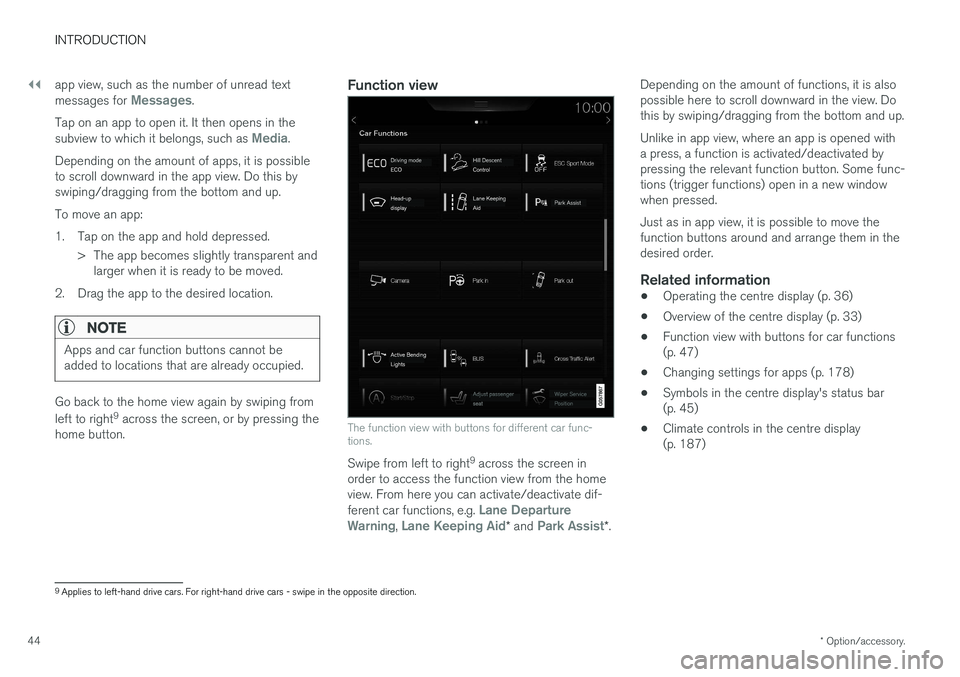
Function view
The function view with buttons for different car func- tions.
Swipe from left to right 9
across the screen in
order to access the function view from the home view. From here you can activate/deactivate dif- ferent car functions, e.g.
Lane Departure
Warning, Lane Keeping Aid* and Park Assist*. Depending on the amount of functions, it is also possible here to scroll downward in the view. Dothis by swiping/dragging from the bottom and up. Unlike in app view, where an app is opened with a press, a function is activated/deactivated bypressing the relevant function button. Some func-tions (trigger functions) open in a new windowwhen pressed. Just as in app view, it is possible to move the function buttons around and arrange them in thedesired order.
Related information
•
Operating the centre display (p. 36)
• Overview of the centre display (p. 33)
• Function view with buttons for car functions(p. 47)
• Changing settings for apps (p. 178)
• Symbols in the centre display's status bar(p. 45)
• Climate controls in the centre display(p. 187)
9
Applies to left-hand drive cars. For right-hand drive cars - swipe in the opposite direction.
Page 98 of 594
||
INSTRUMENTS AND CONTROLS
96
SymbolSpecification
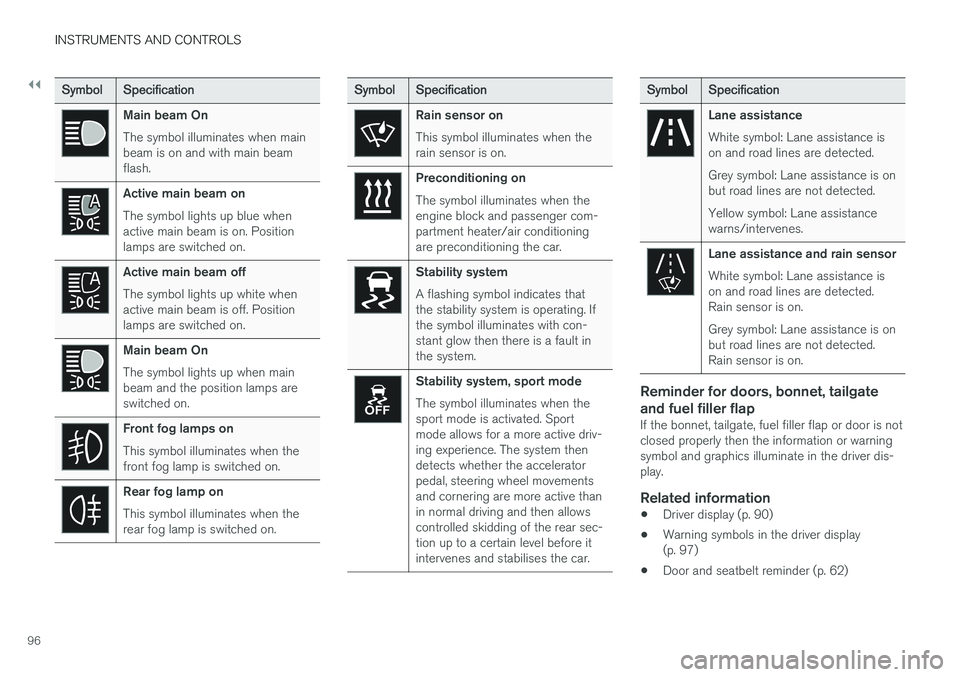
Main beam On The symbol illuminates when main beam is on and with main beamflash.
Active main beam on The symbol lights up blue when active main beam is on. Positionlamps are switched on.
Active main beam off The symbol lights up white when active main beam is off. Positionlamps are switched on.
Main beam On The symbol lights up when main beam and the position lamps areswitched on.
Front fog lamps on This symbol illuminates when the front fog lamp is switched on.
Rear fog lamp on This symbol illuminates when the rear fog lamp is switched on.
SymbolSpecification
Rain sensor on This symbol illuminates when the rain sensor is on.
Preconditioning on The symbol illuminates when the engine block and passenger com-partment heater/air conditioningare preconditioning the car.
Stability system A flashing symbol indicates that the stability system is operating. Ifthe symbol illuminates with con-stant glow then there is a fault inthe system.
Stability system, sport mode The symbol illuminates when the sport mode is activated. Sportmode allows for a more active driv-ing experience. The system thendetects whether the acceleratorpedal, steering wheel movementsand cornering are more active thanin normal driving and then allowscontrolled skidding of the rear sec-tion up to a certain level before itintervenes and stabilises the car.
Symbol Specification
Lane assistance White symbol: Lane assistance is on and road lines are detected. Grey symbol: Lane assistance is on but road lines are not detected. Yellow symbol: Lane assistance warns/intervenes.
Lane assistance and rain sensor White symbol: Lane assistance is on and road lines are detected.Rain sensor is on. Grey symbol: Lane assistance is on but road lines are not detected.Rain sensor is on.
Reminder for doors, bonnet, tailgate and fuel filler flap
If the bonnet, tailgate, fuel filler flap or door is not closed properly then the information or warningsymbol and graphics illuminate in the driver dis-play.
Related information
•Driver display (p. 90)
• Warning symbols in the driver display(p. 97)
• Door and seatbelt reminder (p. 62)
Page 241 of 594
LOCKS AND ALARM
}}
* Option/accessory.239
Red Key - Restricted remote control key*
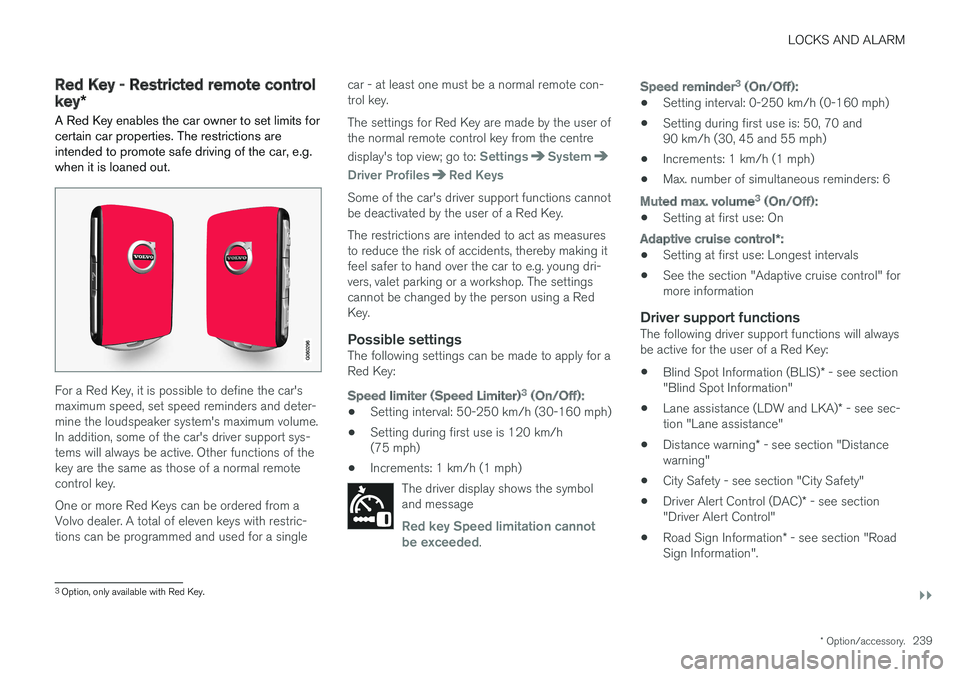
A Red Key enables the car owner to set limits for certain car properties. The restrictions areintended to promote safe driving of the car, e.g.when it is loaned out.
For a Red Key, it is possible to define the car's maximum speed, set speed reminders and deter-mine the loudspeaker system's maximum volume.In addition, some of the car's driver support sys-tems will always be active. Other functions of thekey are the same as those of a normal remotecontrol key. One or more Red Keys can be ordered from a Volvo dealer. A total of eleven keys with restric-tions can be programmed and used for a single car - at least one must be a normal remote con-trol key. The settings for Red Key are made by the user of the normal remote control key from the centre display's top view; go to:
SettingsSystem
Driver ProfilesRed Keys
Some of the car's driver support functions cannot be deactivated by the user of a Red Key. The restrictions are intended to act as measures to reduce the risk of accidents, thereby making itfeel safer to hand over the car to e.g. young dri-vers, valet parking or a workshop. The settingscannot be changed by the person using a RedKey.
Possible settingsThe following settings can be made to apply for aRed Key:
Speed limiter (Speed Limiter)
3
(On/Off):
• Setting interval: 50-250 km/h (30-160 mph)
• Setting during first use is 120 km/h (75 mph)
• Increments: 1 km/h (1 mph)
The driver display shows the symboland message
Red key Speed limitation cannot
be exceeded.
Speed reminder 3
(On/Off):
• Setting interval: 0-250 km/h (0-160 mph)
• Setting during first use is: 50, 70 and 90 km/h (30, 45 and 55 mph)
• Increments: 1 km/h (1 mph)
• Max. number of simultaneous reminders: 6
Muted max. volume 3
(On/Off):
• Setting at first use: On
Adaptive cruise control
*:
• Setting at first use: Longest intervals
• See the section "Adaptive cruise control" for more information
Driver support functionsThe following driver support functions will alwaysbe active for the user of a Red Key:
• Blind Spot Information (BLIS)
* - see section
"Blind Spot Information"
• Lane assistance (LDW and LKA)
* - see sec-
tion "Lane assistance"
• Distance warning
* - see section "Distance
warning"
• City Safety - see section "City Safety"
• Driver Alert Control (DAC)
* - see section
"Driver Alert Control"
• Road Sign Information
* - see section "Road
Sign Information".
3 Option, only available with Red Key.
Page 300 of 594
||
DRIVER SUPPORT
* Option/accessory.
298
Reactivating adaptive cruise control from standby mode
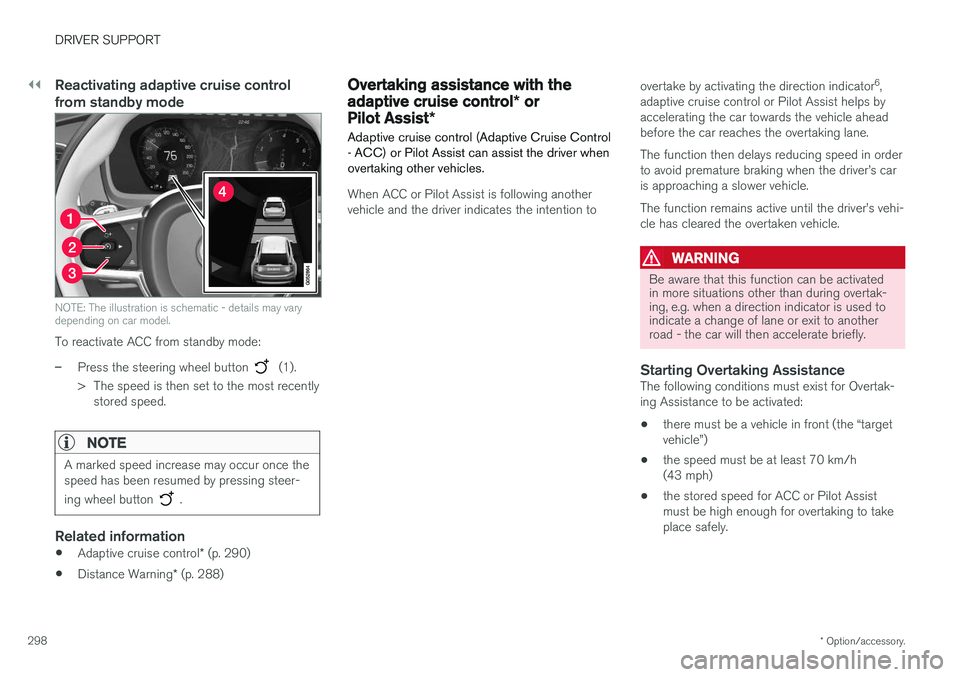
NOTE: The illustration is schematic - details may vary depending on car model.
To reactivate ACC from standby mode:
–Press the steering wheel button (1).
> The speed is then set to the most recently stored speed.
NOTE
A marked speed increase may occur once the speed has been resumed by pressing steer- ing wheel button
.
Related information
• Adaptive cruise control
* (p. 290)
• Distance Warning
* (p. 288)
Overtaking assistance with the adaptive cruise control * or
Pilot Assist *
Adaptive cruise control (Adaptive Cruise Control - ACC) or Pilot Assist can assist the driver whenovertaking other vehicles.
When ACC or Pilot Assist is following another vehicle and the driver indicates the intention to overtake by activating the direction indicator
6
,
adaptive cruise control or Pilot Assist helps byaccelerating the car towards the vehicle aheadbefore the car reaches the overtaking lane. The function then delays reducing speed in order to avoid premature braking when the driver
Page 301 of 594
DRIVER SUPPORT
}}
* Option/accessory.299
–Activate the direction indicator. Use the left direction indicator in a car with the steering wheel on the left, or the rightdirection indicator in a car with the steeringwheel on the right.
> Overtaking assistance is started.
LimitationsWhen using Overtaking Assistance the driver should be prepared for sudden changes in condi-tions. In some conditions Overtaking Assistancecan cause unwanted acceleration. Some situations should be avoided for this rea- son. Examples of such situations are:
• the car is approaching an exit road in orderto turn off in the same direction that is nor-mally used for overtaking
• the vehicle in front slows before your car hasentered the overtaking lane
• traffic in the overtaking lane is slowing
• a car designed for right-hand traffic is beingdriven in a country with left-hand traffic (orvice versa).
Situations of this kind can be avoided by tempo-rarily setting ACC or Pilot Assist in standby mode.
Related information
• Pilot Assist
* (p. 304)
• Adaptive cruise control
* (p. 290)
Change of target and automatic braking with the Adaptive CruiseControl
In combination with automatic gearbox, the adaptive cruise control (Adaptive Cruise Control- ACC ) has functionality for change of targetand braking at certain speeds.
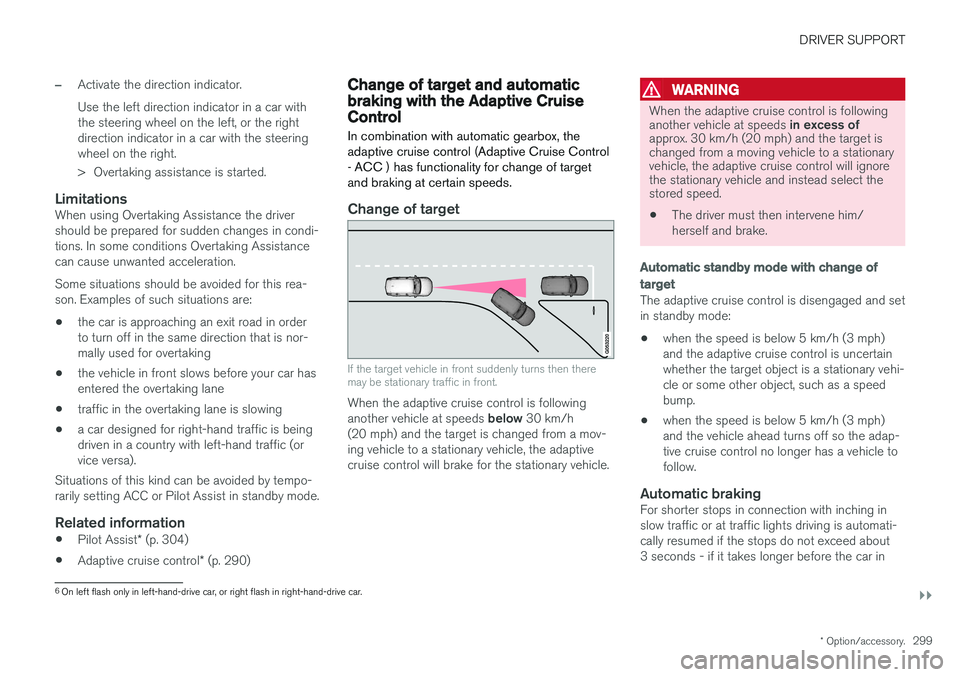
Change of target
If the target vehicle in front suddenly turns then there may be stationary traffic in front.
When the adaptive cruise control is following another vehicle at speeds below 30 km/h
(20 mph) and the target is changed from a mov- ing vehicle to a stationary vehicle, the adaptivecruise control will brake for the stationary vehicle.
WARNING
When the adaptive cruise control is following another vehicle at speeds in excess of
approx. 30 km/h (20 mph) and the target is changed from a moving vehicle to a stationaryvehicle, the adaptive cruise control will ignorethe stationary vehicle and instead select thestored speed.
• The driver must then intervene him/ herself and brake.
Automatic standby mode with change of target
The adaptive cruise control is disengaged and set in standby mode: • when the speed is below 5 km/h (3 mph) and the adaptive cruise control is uncertainwhether the target object is a stationary vehi-cle or some other object, such as a speedbump.
• when the speed is below 5 km/h (3 mph)and the vehicle ahead turns off so the adap-tive cruise control no longer has a vehicle tofollow.
Automatic brakingFor shorter stops in connection with inching inslow traffic or at traffic lights driving is automati-cally resumed if the stops do not exceed about3 seconds - if it takes longer before the car in
6
On left flash only in left-hand-drive car, or right flash in right-hand-drive car.
Page 306 of 594
DRIVER SUPPORT
* Option/accessory.
304
Pilot Assist *
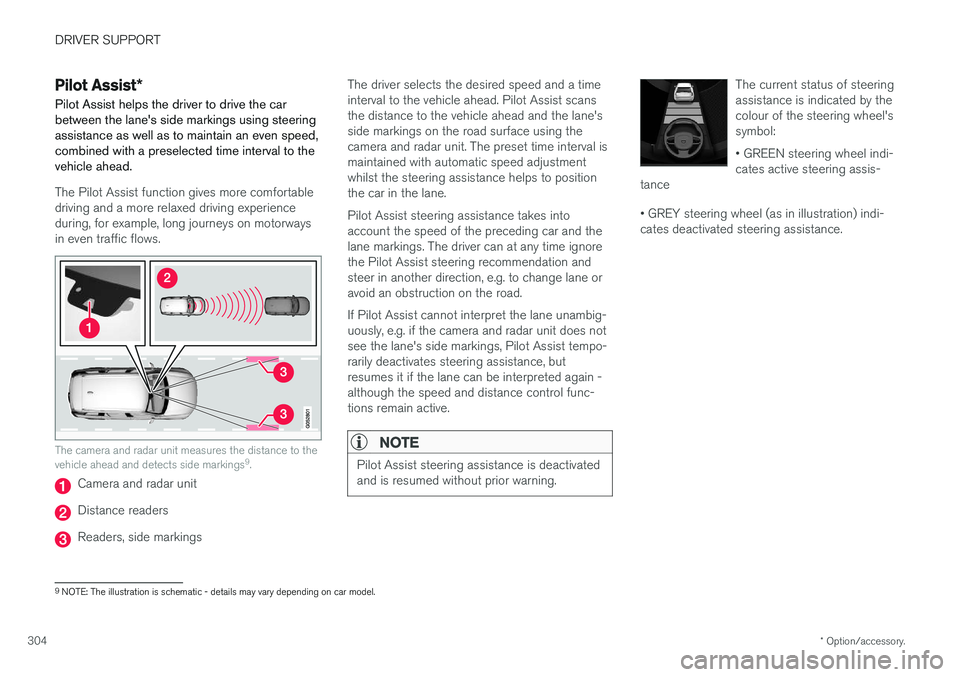
Pilot Assist helps the driver to drive the car between the lane's side markings using steeringassistance as well as to maintain an even speed,combined with a preselected time interval to thevehicle ahead.
The Pilot Assist function gives more comfortable driving and a more relaxed driving experienceduring, for example, long journeys on motorwaysin even traffic flows.
The camera and radar unit measures the distance to the vehicle ahead and detects side markings 9
.
Camera and radar unit
Distance readers
Readers, side markings The driver selects the desired speed and a time interval to the vehicle ahead. Pilot Assist scansthe distance to the vehicle ahead and the lane'sside markings on the road surface using thecamera and radar unit. The preset time interval ismaintained with automatic speed adjustmentwhilst the steering assistance helps to positionthe car in the lane. Pilot Assist steering assistance takes into account the speed of the preceding car and thelane markings. The driver can at any time ignorethe Pilot Assist steering recommendation andsteer in another direction, e.g. to change lane oravoid an obstruction on the road. If Pilot Assist cannot interpret the lane unambig- uously, e.g. if the camera and radar unit does notsee the lane's side markings, Pilot Assist tempo-rarily deactivates steering assistance, butresumes it if the lane can be interpreted again -although the speed and distance control func-tions remain active.
NOTE
Pilot Assist steering assistance is deactivated and is resumed without prior warning.
The current status of steering assistance is indicated by thecolour of the steering wheel'ssymbol: • GREEN steering wheel indi- cates active steering assis-
tance • GREY steering wheel (as in illustration) indi- cates deactivated steering assistance.
9 NOTE: The illustration is schematic - details may vary depending on car model.
Page 307 of 594
DRIVER SUPPORT
}}
305
WARNING
Pilot Assist is an aid which cannot handle all traffic, weather and road conditions. The driver must always be observant with regard to the prevailing traffic conditions andintervene if Pilot Assist does not provide suit-able steering assistance or maintain a suita-ble speed or suitable time interval. Read all the sections about this function in the owner's manual in order to learn about itslimitations, of which the driver should beaware before the function is used. Pilot Assist must only be used if there are clear lane lines painted on the road surfaceon each side of the lane. All other useinvolves increased risk of contact with sur-rounding obstacles that are not detected bythe function. The driver always bears responsibility for how the car is controlled as well as for maintainingthe correct distance and speed, even whenPilot Assist is being used.
Pilot Assist regulates the speed with acceleration and braking. It is normal for the brakes to emit alow sound when they are being used to adjustthe speed. Pilot Assist attempts to regulate the speed smoothly. In situations that demand sudden brak-ing the driver must brake himself/herself. Thisapplies in case of large speed differences or ifthe vehicle in front brakes suddenly. Due to the limitations of the camera and radar unit, brakingmay come unexpectedly or not at all. Pilot Assist aims to follow the vehicle ahead in the same lane at a time interval set by the driver.If the radar unit cannot see any vehicle in frontthen the car will instead maintain the speed setand stored by the driver. This also takes place ifthe speed of the vehicle ahead increases andexceeds the stored speed. The following applies for cars with automatic gearbox:
• Pilot Assist can follow another vehicle atspeeds from 0 km/h up to 200 km/h(125 mph).
• Pilot Assist can give steering assistance fromalmost stationary up to 140 km/h (87 mph).
The following applies for cars with manual gear-box: • Pilot Assist can follow another vehicle at speeds from 30 km/h (20 mph) up to200 km/h (125 mph).
• Pilot Assist can give steering assistance from30 km/h (20 mph) up to 140 km/h(87 mph).
WARNING
Pilot Assist is not a collision avoidance sys- tem. The driver must intervene if the systemdoes not detect a vehicle in front. Pilot Assist does not brake for people, ani- mals, objects, small vehicles (e.g. cycles andmotorcycles), low trailers as well as oncoming,slow or stationary vehicles. Do not use Pilot Assist, for example, in city traffic, at junctions, on slippery surfaces, witha lot of water or slush on the road, in heavyrain/snow, in poor visibility, on winding roads,on slip roads, or with a trailer connected tothe car.
IMPORTANT
Maintenance of Pilot Assist components must only be performed at a workshop - an author-ised Volvo workshop is recommended.
Page 313 of 594
DRIVER SUPPORT
}}
* Option/accessory.311
Deactivating/activating the Pilot Assist*
Pilot Assist can be temporarily deactivated so that it is set in the standby mode and can bereactivated later.
Deactivating and setting Pilot Assist in
standby mode
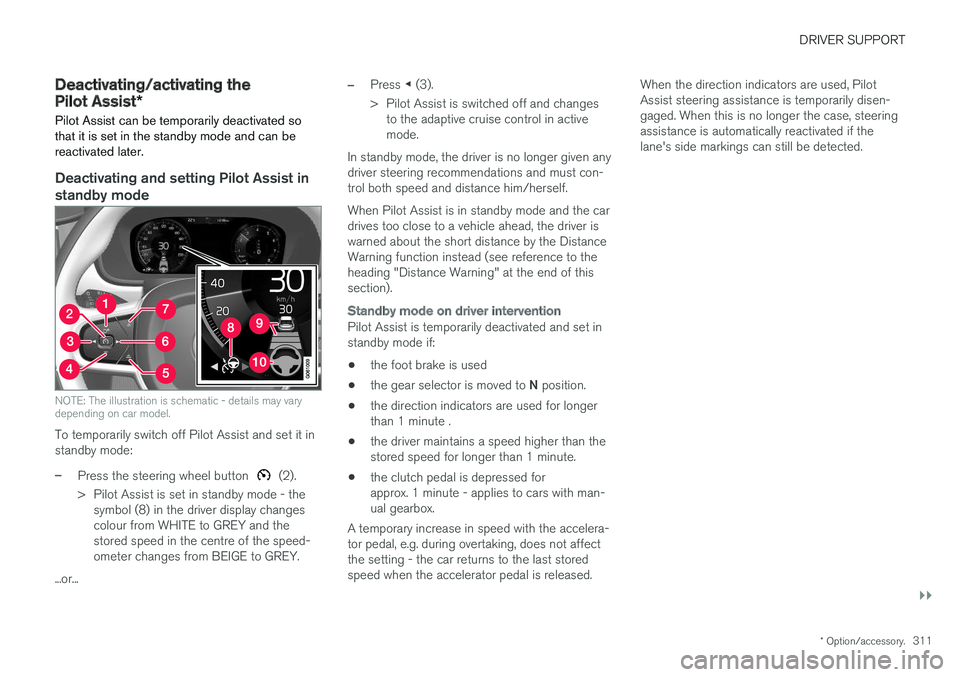
NOTE: The illustration is schematic - details may vary depending on car model.
To temporarily switch off Pilot Assist and set it in standby mode:
–Press the steering wheel button (2).
> Pilot Assist is set in standby mode - the symbol (8) in the driver display changes colour from WHITE to GREY and thestored speed in the centre of the speed-ometer changes from BEIGE to GREY.
...or...
–Press ◀ (3).
> Pilot Assist is switched off and changes to the adaptive cruise control in active mode.
In standby mode, the driver is no longer given anydriver steering recommendations and must con-trol both speed and distance him/herself. When Pilot Assist is in standby mode and the car drives too close to a vehicle ahead, the driver iswarned about the short distance by the DistanceWarning function instead (see reference to theheading "Distance Warning" at the end of thissection).
Standby mode on driver intervention
Pilot Assist is temporarily deactivated and set in standby mode if:
• the foot brake is used
• the gear selector is moved to
N position.
• the direction indicators are used for longerthan 1 minute .
• the driver maintains a speed higher than thestored speed for longer than 1 minute.
• the clutch pedal is depressed forapprox. 1 minute - applies to cars with man-ual gearbox.
A temporary increase in speed with the accelera-tor pedal, e.g. during overtaking, does not affectthe setting - the car returns to the last storedspeed when the accelerator pedal is released. When the direction indicators are used, PilotAssist steering assistance is temporarily disen-gaged. When this is no longer the case, steeringassistance is automatically reactivated if thelane's side markings can still be detected.