lane assist VOLVO V90 2017 User Guide
[x] Cancel search | Manufacturer: VOLVO, Model Year: 2017, Model line: V90, Model: VOLVO V90 2017Pages: 594, PDF Size: 15.07 MB
Page 316 of 594
||
DRIVER SUPPORT
* Option/accessory.
314
Cessation of automatic braking
In some situations, automatic braking ceases on coming to a standstill and Pilot Assist is set instandby mode. This means that the brakes arereleased and the car may start to roll - the drivermust therefore intervene and brake the car him-self/herself to keep it stationary. This may take place in the following situations:
• the driver puts his/her foot on the brake pedal
• the parking brake is applied
• the gear selector is moved to
P, N , or R posi-
tion
• the driver sets Pilot Assist in the standbymode.
Automatic activation of parking brakeIn certain situations the parking brake is appliedto keep the car stationary. This takes place if Pilot Assist is holding the car stationary with the foot brake and: •
the driver opens the door or takes off his/her seatbelt
• Pilot Assist has kept the car stationary formore than approx. 5 minutes
• the brakes have overheated
• the engine is switched off.
Related information
•
Pilot Assist
* (p. 304)
• Activating and starting the Pilot Assist
*
(p. 307)
• Managing the speed for Pilot Assist
* (p. 309)
• Setting the time interval for Pilot Assist
*
(p. 310)
• Deactivating/activating the Pilot Assist
*
(p. 311)
• Overtaking assistance with the adaptive cruise control
* or Pilot Assist * (p. 298)
• Limitations of Pilot Assist
* (p. 314)
• Symbols and messages for Pilot Assist
*
(p. 316)
Limitations of Pilot Assist *
The Pilot Assist function may have limitations in certain situations.
The Pilot Assist function is an aid which can help the driver in many situations. But the driver is atall times responsible for maintaining a safe dis-tance to surrounding objects and a correct posi-tion in the lane.
Page 317 of 594
DRIVER SUPPORT
}}
* Option/accessory.315
IMPORTANT
In certain situations, Pilot Assist steering assistance may have difficulty helping thedriver in the right way or it may be automati-cally deactivated - in which case, the use ofPilot Assist is not recommended. Examples ofsuch situations may be that: •the lane markings are worn, missing or cross each other.
• lane division is unclear, for example, whenthe lanes divide or merge or at exits or inthe event of multiple sets of markings.
• edges or other lines than lane markingsare present on or near the road, e.g.curbs, joints or repairs to the road sur-face, edges of barriers, roadside edges orstrong shadows.
• the lane is narrow or winding.
• the lane contains ridges or holes.
• weather conditions are poor, e.g. rain,snow or fog or slush or impaired viewwith poor light conditions, back-lighting,wet road surface etc.
The driver should also note that Pilot Assisthas the following limitations: • High kerbs, roadside barriers, temporary obstacles (traffic cones, safety barriers,etc.) are not detected. Alternatively, theymay be detected incorrectly as lane
markings, with a subsequent risk of con- tact between the car and such obstacles.The driver must ensure him/herself thatthe car is at a suitable distance from suchobstacles.
• The camera and radar sensor does nothave the capacity to detect all oncomingobjects and obstacles in traffic environ-ments, e.g. potholes, stationary obstaclesor objects which completely or partiallyblock the route.
• Pilot Assist does not "see" pedestrians,animals, etc.
• The recommended steering input is forcelimited, which means that it cannotalways help the driver to steer and keepthe car within the lane.
The driver always has the possibility of correcting or adjusting a steering intervention imposed byPilot Assist and can turn the steering wheel tothe desired position.
Steep roads and/or heavy loadBear in mind that Pilot Assist is primarilyintended for use when driving on level road surfa-ces. The function may have difficulty in keepingthe correct distance from the vehicle ahead whendriving on steep downhill slopes - in which case,be extra attentive and ready to brake. Do not usePilot Assist with a heavy load or with a trailer con-nected to the car.
Miscellaneous
•Off Road drive mode cannot be selected
when Pilot Assist is activated.
NOTE
The function uses the car's camera unit, which has some general limitations, see the"Limitations for camera unit" section.
NOTE
The function uses the car's radar unit, which has some general limitations, see the "Limita-tions for radar unit" section.
Related information
• Pilot Assist
* (p. 304)
• Activating and starting the Pilot Assist
*
(p. 307)
• Managing the speed for Pilot Assist
* (p. 309)
• Setting the time interval for Pilot Assist
*
(p. 310)
• Change of target and automatic braking with Pilot Assist
* (p. 313)
• Deactivating/activating the Pilot Assist
*
(p. 311)
• Overtaking assistance with the adaptivecruise control
* or Pilot Assist * (p. 298)
Page 318 of 594
DRIVER SUPPORT
* Option/accessory.
316 •
Symbols and messages for Pilot Assist
*
(p. 316)
• Limitations of the camera unit (p. 327)
• Limitations of the radar unit (p. 319)
Symbols and messages for Pilot Assist
*
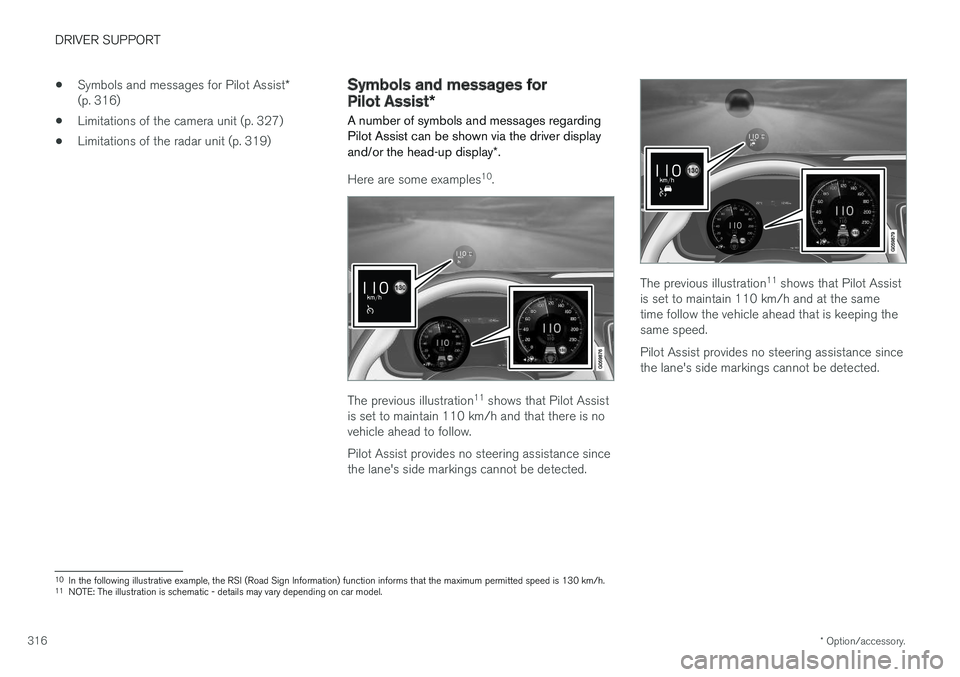
A number of symbols and messages regarding
Pilot Assist can be shown via the driver display and/or the head-up display *.
Here are some examples 10
.
The previous illustration 11
shows that Pilot Assist
is set to maintain 110 km/h and that there is no vehicle ahead to follow. Pilot Assist provides no steering assistance since the lane's side markings cannot be detected.
The previous illustration 11
shows that Pilot Assist
is set to maintain 110 km/h and at the same time follow the vehicle ahead that is keeping thesame speed. Pilot Assist provides no steering assistance since the lane's side markings cannot be detected.
10 In the following illustrative example, the RSI (Road Sign Information) function informs that the maximum permitted speed is 130 km/h.
11 NOTE: The illustration is schematic - details may vary depending on car model.
Page 319 of 594
DRIVER SUPPORT
* Option/accessory.317
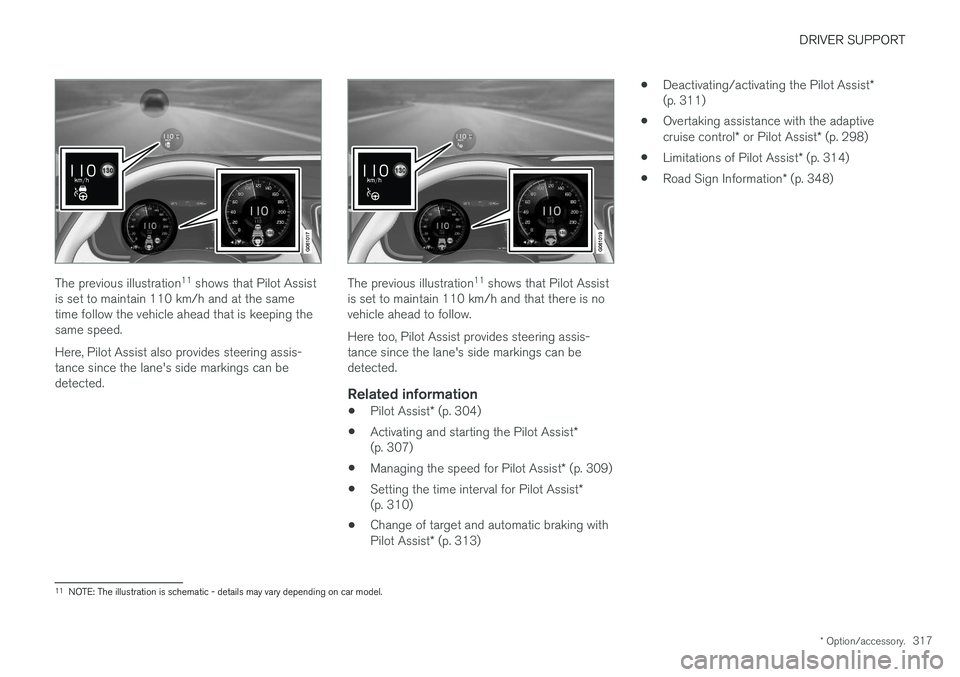
The previous illustration 11
shows that Pilot Assist
is set to maintain 110 km/h and at the same time follow the vehicle ahead that is keeping thesame speed. Here, Pilot Assist also provides steering assis- tance since the lane's side markings can bedetected.The previous illustration 11
shows that Pilot Assist
is set to maintain 110 km/h and that there is no vehicle ahead to follow. Here too, Pilot Assist provides steering assis- tance since the lane's side markings can bedetected.
Related information
• Pilot Assist
* (p. 304)
• Activating and starting the Pilot Assist
*
(p. 307)
• Managing the speed for Pilot Assist
* (p. 309)
• Setting the time interval for Pilot Assist
*
(p. 310)
• Change of target and automatic braking with Pilot Assist
* (p. 313) •
Deactivating/activating the Pilot Assist
*
(p. 311)
• Overtaking assistance with the adaptivecruise control
* or Pilot Assist * (p. 298)
• Limitations of Pilot Assist
* (p. 314)
• Road Sign Information
* (p. 348)
11
NOTE: The illustration is schematic - details may vary depending on car model.
Page 322 of 594
||
DRIVER SUPPORT
320
CauseAction
Water or snow from the road surface swirls up and blocks the radar signals or camera view. No action. Sometimes the unit does not work on a very wet or snow-coveredroad surface.
Dirt has appeared between the inside of the windscreen and the cameraand radar unit. Visit a workshop to have the windscreen inside the unit's cover cleaned - anauthorised Volvo workshop is recommended.
NOTE
Keep the windscreen clean in front of the camera and radar unit.
Vehicle speedThe capacity of the radar unit to detect vehicles ahead is reduced significantly if:
• the speed of the vehicle ahead is signifi-cantly different from that of your own car
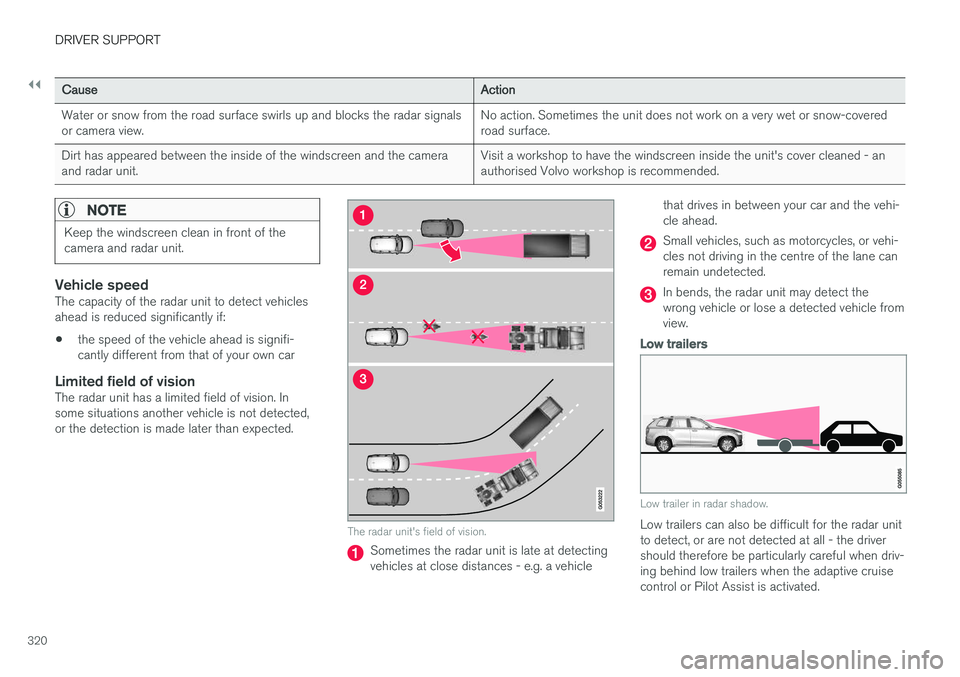
Limited field of visionThe radar unit has a limited field of vision. Insome situations another vehicle is not detected,or the detection is made later than expected.
The radar unit's field of vision.
Sometimes the radar unit is late at detecting vehicles at close distances - e.g. a vehicle that drives in between your car and the vehi-cle ahead.
Small vehicles, such as motorcycles, or vehi- cles not driving in the centre of the lane canremain undetected.
In bends, the radar unit may detect the wrong vehicle or lose a detected vehicle fromview.
Low trailers
Low trailer in radar shadow.
Low trailers can also be difficult for the radar unit to detect, or are not detected at all - the drivershould therefore be particularly careful when driv-ing behind low trailers when the adaptive cruisecontrol or Pilot Assist is activated.
Page 328 of 594
DRIVER SUPPORT
* Option/accessory.
326
Camera unit
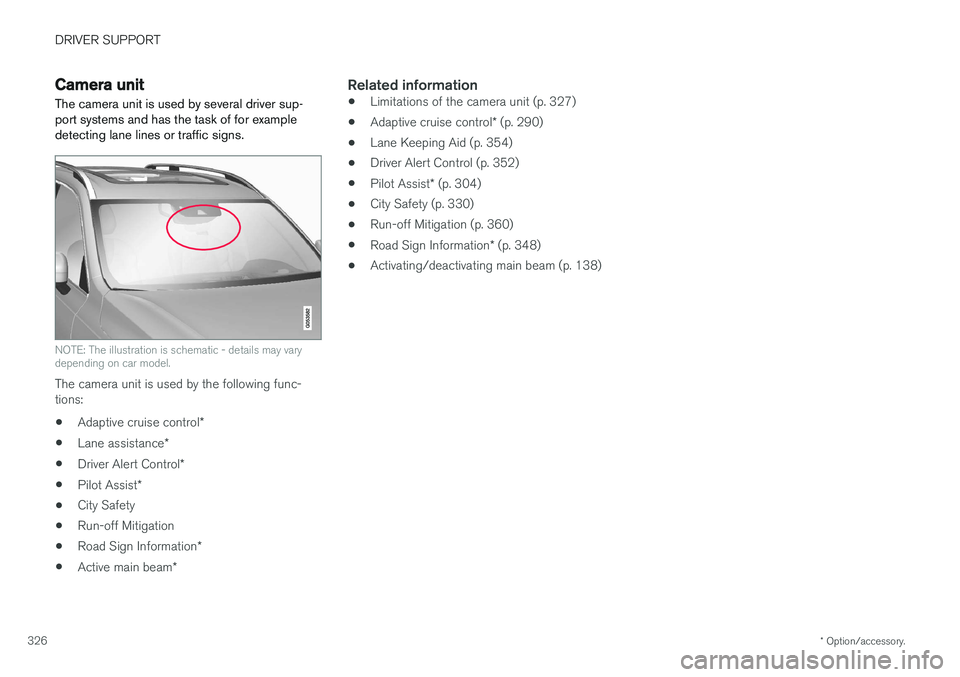
The camera unit is used by several driver sup- port systems and has the task of for exampledetecting lane lines or traffic signs.
NOTE: The illustration is schematic - details may vary depending on car model.
The camera unit is used by the following func- tions:
• Adaptive cruise control
*
• Lane assistance
*
• Driver Alert Control
*
• Pilot Assist
*
• City Safety
• Run-off Mitigation
• Road Sign Information
*
• Active main beam
*
Related information
•Limitations of the camera unit (p. 327)
• Adaptive cruise control
* (p. 290)
• Lane Keeping Aid (p. 354)
• Driver Alert Control (p. 352)
• Pilot Assist
* (p. 304)
• City Safety (p. 330)
• Run-off Mitigation (p. 360)
• Road Sign Information
* (p. 348)
• Activating/deactivating main beam (p. 138)
Page 338 of 594
||
DRIVER SUPPORT
336The following further criteria must also be fulfil- led:
• your car must be travelling at no less than4 km/h (3 mph)
• your car must turn to the left in markets withright-hand traffic (or to the right in left-handtraffic)
• the oncoming vehicle must have its head-lamps switched on.
WARNING
City Safety is an aid and does not work in all driving situations, traffic, weather and roadconditions. Warnings and brake interventions due to a collision risk with an oncoming vehicle oftencome very late. The driver is always responsible for maintain- ing the correct distance and speed - neverwait for a collision warning or for City Safetyto intervene.
Limitations in cross trafficIn some cases City Safety may have difficulty helping the driver deal with collision risks due tooncoming cross traffic. Examples are:
• stability control ESC intervenes in the eventof slippery driving conditions
• if the oncoming vehicle is detected too late •
if the oncoming vehicle is obscured by some-thing
• if the oncoming vehicle has headlampsswitched off
• if the oncoming vehicle drives in an unpre-dictable manner, for example, abruptlychanges lanes at a late stage.
Related information
•
City Safety (p. 330)
City Safety when evasive manoeuvres are prevented City Safety has the facility to assist the driver by automatically braking the car earlier when it isnot possible to avoid a collision by only steeringaway.
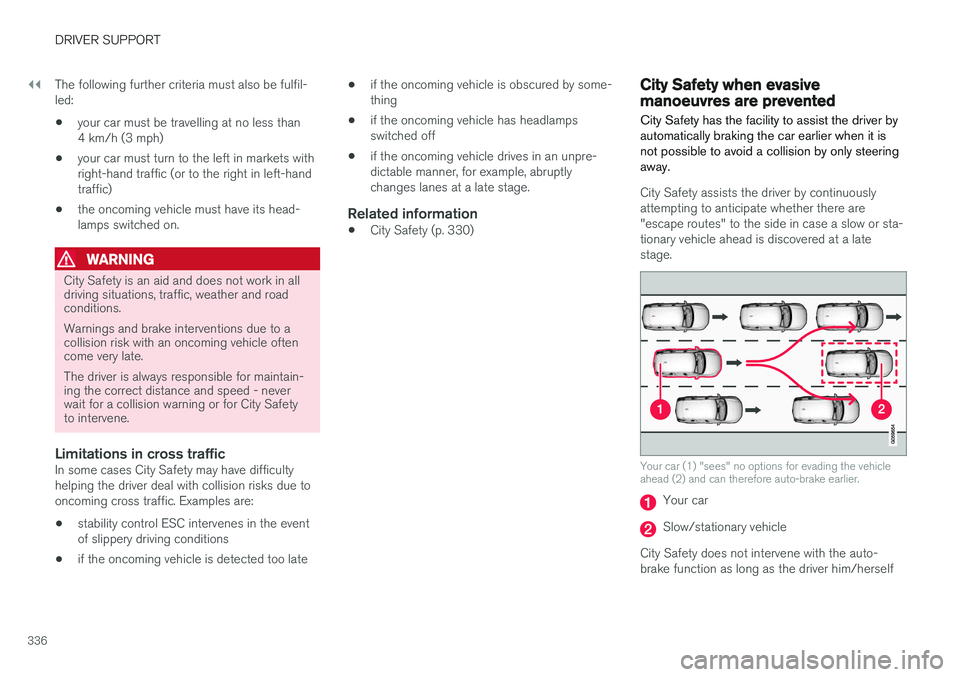
City Safety assists the driver by continuously attempting to anticipate whether there are"escape routes" to the side in case a slow or sta-tionary vehicle ahead is discovered at a latestage.
Your car (1) "sees" no options for evading the vehicle ahead (2) and can therefore auto-brake earlier.
Your car
Slow/stationary vehicle
City Safety does not intervene with the auto- brake function as long as the driver him/herself
Page 339 of 594
DRIVER SUPPORT
}}
337
has the opportunity to avoid a collision via a steering manoeuvre. However, if City Safety anticipates that an evasive manoeuvre is not possible due to traffic in anadjacent lane, the function can assist the driverby automatically starting to brake at an earlierstage.
WARNING
City Safety's ability to anticipate a certain sit- uation is an aid, and does not work in all driv-ing situations or traffic, weather and road con-ditions. The driver always bears ultimate responsibility for ensuring that the vehicle is driven safelyand that applicable laws and road traffic regu-lations are followed.
Related information
•
City Safety (p. 330)
• Limitations of City Safety (p. 337)
Limitations of City Safety
The City Safety function may have limitations in certain situations.
Surroundings
Low objects
Low-hanging objects, e.g. a flag/pennant for pro- jecting load, or accessories such as auxiliarylamps and bull bars that are higher than the bon-net limit the function.
Skidding
On slippery road surfaces the braking distance is extended, which may reduce the capacity of CitySafety to avoid a collision. In such situations, theanti-lock brakes and the stability control ESC willgive the best possible braking force with main-tained stability.
Oncoming light
The visual warning signal in the windscreen may be difficult to notice in the event of strong sun-light, reflections, when sunglasses are beingworn or if the driver is not looking straight ahead.
Heat
In the event of high passenger compartment temperature caused by e.g. strong sunlight, thevisual warning signal in the windscreen may betemporarily disengaged.
The camera and radar unit's field of view
The camera's field of vision is limited, which is why pedestrians, large animals, cyclists and vehi- cles in some situations cannot be detected, orthey are detected later than anticipated. Dirty vehicles may be detected later than others and if it is dark, motorcycles may be detected lateor not at all. If a text message in the driver display indicates that the camera and radar unit is obstructed, CitySafety may be unable to detect pedestrians, largeanimals, cyclists, vehicles or road lines ahead ofthe car. This means that the functionality of CitySafety may be reduced. However, an error message is not shown in all situations where the windscreen sensors areobstructed. The driver must therefore take care tokeep the area of windscreen in front of the cam-era and radar unit clear.
IMPORTANT
Maintenance and replacement of City Safety components must only be performed by aworkshop - an authorised Volvo workshop isrecommended.
Driver intervention
Reversing
When your own car is reversing, City Safety is temporarily deactivated.
Page 342 of 594
DRIVER SUPPORT
* Option/accessory.
340
Rear Collision Warning
The Rear Collision Warning (RCW) function can help the driver to avoid being hit by a vehicleapproaching from behind.
RCW is activated automatically each time the engine is started. The RCW can warn the driver in a vehicle approaching from behind that a collision is immi-nent by rapidly flashing the direction indicators. If, at a vehicle speed below 30 km/h (20 mph), the RCW function detects that the car is in dan-ger of being hit from behind, the seatbelt ten-sioners may tension the front seatbelts and theWhiplash Protection System safety system isactivated. Immediately before the collision, RCW may also activate the foot brake in order to reduce the for-ward acceleration of the car during the collision.However, the foot brake is only activated if thecar is stationary. The foot brake releases immedi-ately if the accelerator pedal is depressed.
LimitationsIn certain cases the RCW may have difficultyhelping the driver in the event of a collision risk.This can be for example:
• if the vehicle approaching from the rear isdetected too late
• if the vehicle approaching from the rearchanges lane at the last moment •
if the vehicle approaching from the rear has aspeed exceeding 80 km/h (50 mph).
NOTE
In certain markets, RCW does
not give a
warning with the direction indicators due to local traffic regulations - in such cases, thispart of the function is deactivated.
NOTE
The warning with direction indicators for Rear Collision Warning is deactivated if the warn-ing distance for collision warning in the CitySafety function is set at the lowest level "
Late".
The seat belt pre-tensioning and braking functions are, however, still active.
Related information
• City Safety (p. 330)
• Setting the warning distance for City Safety (p. 332)
• Seatbelt tensioner (p. 59)
• Whiplash Protection System (p. 57)
Blind Spot Information
*
The Blind Spot Information (BLIS) function is designed to give a warning of vehicles diago-nally behind and to the side of your car so as togive assistance in heavy traffic on roads withseveral lanes in the same direction.
BLIS is a driver aid intended to give a warning of: • vehicles in the car's blind spot
• quickly approaching vehicles in the left and right lanes closest to the car.
Page 356 of 594
||
DRIVER SUPPORT
* Option/accessory.
354 2.
Press
My CarIntelliSafeDriver Alert
Control.
3. Select
Rest Stop Guidance to activate/
deactivate the rest place guide.
Related information
• Driver Alert Control (p. 352)
• Limitations of Driver Alert Control (p. 354)
Limitations of Driver Alert Control
The Driver Alert Control (DAC) function may have limitations in certain situations.
In some cases, driving behaviour may not be affected, despite the driver being tired - e.g. whenusing the Pilot Assist function - with the resultthat the driver is then not given a warning fromDAC. For this reason, it is always very importantto stop and take a break in the event of theslightest sign of driver fatigue, regardless ofwhether DAC has given a warning. In some cases the system may issue a warning despite driving ability not deteriorating, for exam-ple:
• in strong side winds
• on rutted road surfaces.
NOTE
The function uses the car's camera unit, which has some general limitations, see the"Limitations for camera unit" section.
Related information
•
Driver Alert Control (p. 352)
• Activate/deactivate Driver Alert Control (p. 353)
• Limitations of the camera unit (p. 327)
• Pilot Assist
* (p. 304)
Lane Keeping Aid
The function of lane assistance is to help the driver to reduce the risk of the car accidentallyleaving its own lane on motorways and similarmajor routes.
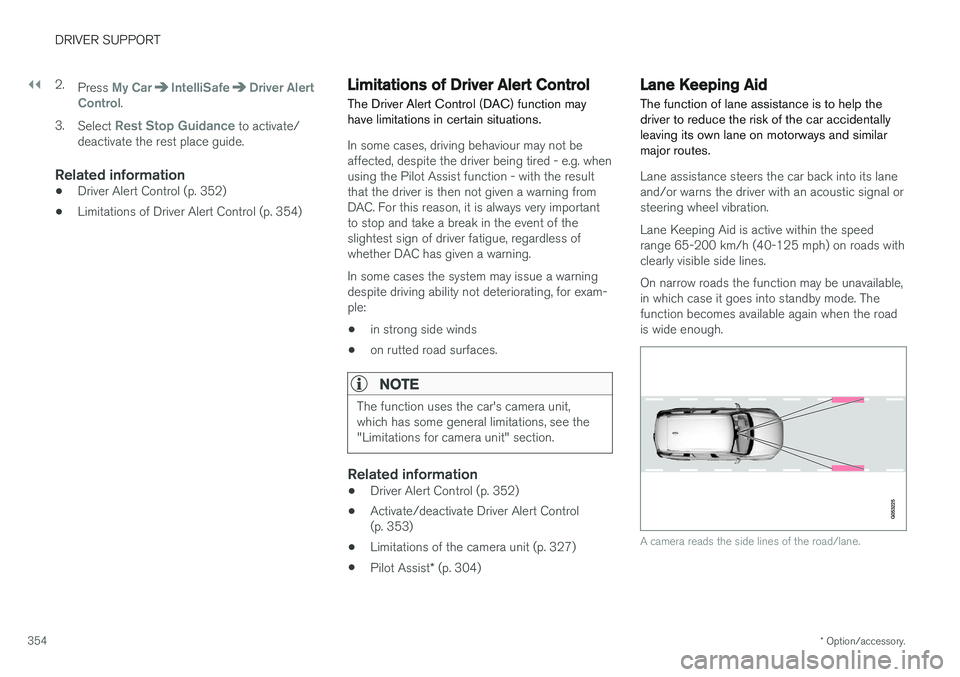
Lane assistance steers the car back into its lane and/or warns the driver with an acoustic signal orsteering wheel vibration. Lane Keeping Aid is active within the speed range 65-200 km/h (40-125 mph) on roads withclearly visible side lines. On narrow roads the function may be unavailable, in which case it goes into standby mode. Thefunction becomes available again when the roadis wide enough.
A camera reads the side lines of the road/lane.