seat memory VOLVO V90 2017 Owners Manual
[x] Cancel search | Manufacturer: VOLVO, Model Year: 2017, Model line: V90, Model: VOLVO V90 2017Pages: 594, PDF Size: 15.07 MB
Page 5 of 594
3
Table for location of i-Size child seats81
Integrated booster cushion *
82
Folding up the integrated booster cushion * 82
Folding down the integrated boostercushion * 84
INSTRUMENTS AND CONTROLS
Instruments and controls, left-hand drive car
86
Instruments and controls, right-handdrive car 87
Driver display 90
Driver display settings 94
Indicator symbols in the driver display 95
Warning symbols in the driver display 97
Outside temperature gauge 98
Clock 99
License agreement for the driver display 99
Application menu in the driver display 105
Using the application menu in thedriver display 105
Messages in the driver display andthe centre display 106
Managing messages in the driverdisplay and the centre display 108
Managing messages saved from thedriver display and centre display 110
Head-up display *
112
Voice recognition 115
Using voice recognition 116
Settings for voice recognition 117
Voice recognition control of the phone 118
Voice recognition control of radioand media 118
Voice recognition control of climate control119
Voice recognition and map navigation 120
Manual front seat 121
Power front seat *
121
Adjusting the power front seat *
122
Using the memory function in the power front seat * 122
Multi-functional front seat *
123
Adjusting functions in the multi-func-tional front seat * 124
Adjusting the passenger seat fromthe driver's seat * 127
Rear seat 128
Adjusting the head restraints in the rear seat 128
Lowering the backrests in the rear seat 130
Steering wheel 131
Adjusting the steering wheel 132
Headlamp control 134
Headlamp levelling 135
Position lamps 136
Daytime running lights 137
Dipped beam 137
Activating/deactivating main beam 138
Active bending lights *
141
Page 89 of 594
INSTRUMENTS AND CONTROLS
}}
* Option/accessory.87
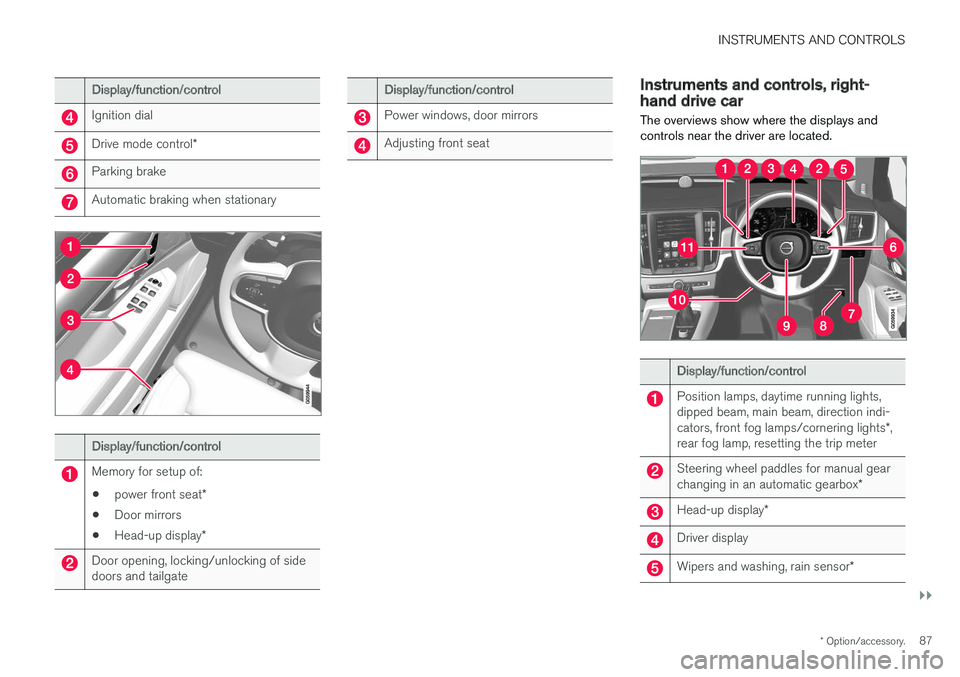
Display/function/control
Ignition dial
Drive mode control *
Parking brake
Automatic braking when stationary
Display/function/control
Memory for setup of:
• power front seat
*
• Door mirrors
• Head-up display
*
Door opening, locking/unlocking of side doors and tailgate
Display/function/control
Power windows, door mirrors
Adjusting front seat
Instruments and controls, right- hand drive car
The overviews show where the displays and controls near the driver are located.
Display/function/control
Position lamps, daytime running lights, dipped beam, main beam, direction indi- cators, front fog lamps/cornering lights *,
rear fog lamp, resetting the trip meter
Steering wheel paddles for manual gear changing in an automatic gearbox *
Head-up display*
Driver display
Wipers and washing, rain sensor *
Page 90 of 594
||
INSTRUMENTS AND CONTROLS
* Option/accessory.
88
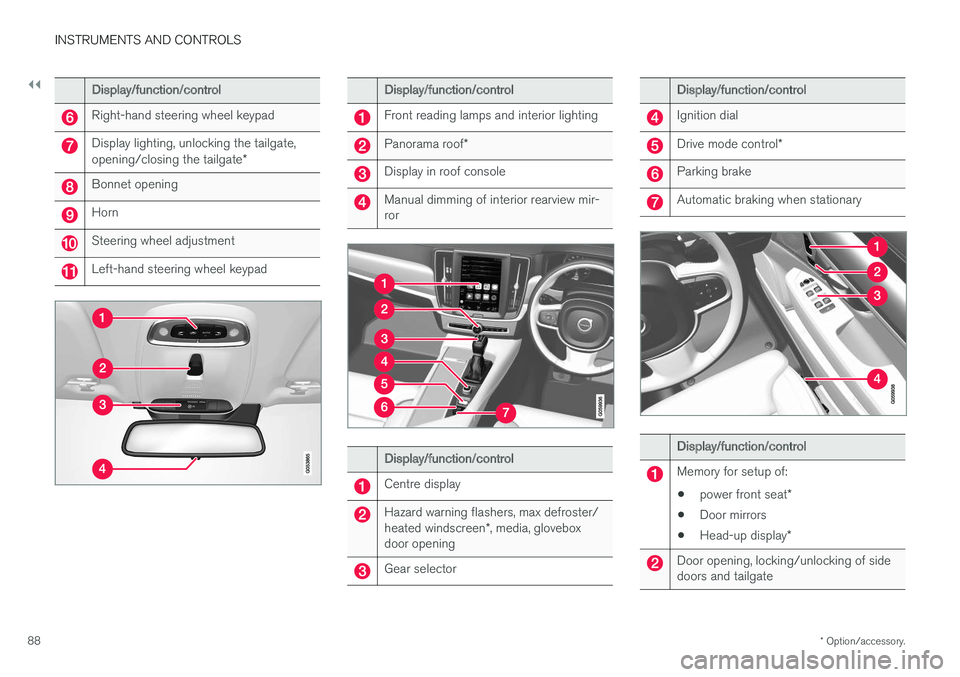
Display/function/control
Right-hand steering wheel keypad
Display lighting, unlocking the tailgate, opening/closing the tailgate *
Bonnet opening
Horn
Steering wheel adjustment
Left-hand steering wheel keypad
Display/function/control
Front reading lamps and interior lighting
Panorama roof*
Display in roof console
Manual dimming of interior rearview mir- ror
Display/function/control
Centre display
Hazard warning flashers, max defroster/ heated windscreen *, media, glovebox
door opening
Gear selector
Display/function/control
Ignition dial
Drive mode control *
Parking brake
Automatic braking when stationary
Display/function/control
Memory for setup of:
• power front seat
*
• Door mirrors
• Head-up display
*
Door opening, locking/unlocking of side doors and tailgate
Page 116 of 594
||
INSTRUMENTS AND CONTROLS
* Option/accessory.
114
Adjusting brightness and vertical position
1.
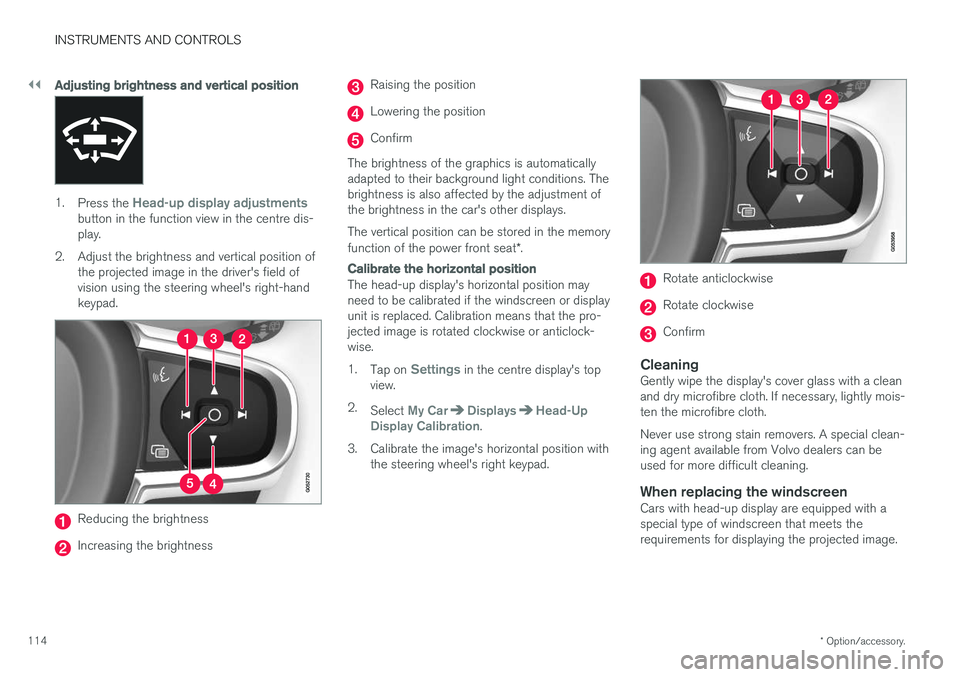
Press the Head-up display adjustmentsbutton in the function view in the centre dis- play.
2. Adjust the brightness and vertical position of the projected image in the driver's field ofvision using the steering wheel's right-handkeypad.
Reducing the brightness
Increasing the brightness
Raising the position
Lowering the position
Confirm
The brightness of the graphics is automatically adapted to their background light conditions. Thebrightness is also affected by the adjustment ofthe brightness in the car's other displays. The vertical position can be stored in the memory function of the power front seat *.
Calibrate the horizontal position
The head-up display's horizontal position may need to be calibrated if the windscreen or displayunit is replaced. Calibration means that the pro-jected image is rotated clockwise or anticlock-wise. 1.
Tap on
Settings in the centre display's top
view.
2. Select
My CarDisplaysHead-Up
Display Calibration.
3. Calibrate the image's horizontal position with the steering wheel's right keypad.
Rotate anticlockwise
Rotate clockwise
Confirm
CleaningGently wipe the display's cover glass with a clean and dry microfibre cloth. If necessary, lightly mois-ten the microfibre cloth. Never use strong stain removers. A special clean- ing agent available from Volvo dealers can beused for more difficult cleaning.
When replacing the windscreenCars with head-up display are equipped with aspecial type of windscreen that meets therequirements for displaying the projected image.
Page 117 of 594
INSTRUMENTS AND CONTROLS
}}
* Option/accessory.115
When replacing the windscreen - contact an authorised workshop
7
. The correct version of the
windscreen must be fitted in order that the head- up display's graphics shall be displayed correctly.
Related information
• Function view with buttons for car functions(p. 47)
• Settings view (p. 169)
• Steering wheel (p. 131)
• Using the memory function in the power front seat
* (p. 122)
• Driver display (p. 90)
Voice recognition 8
The voice recognition system allows the driver to use voice recognition to control certain functionsof the media player, Bluetooth-connected phone,the climate system and Volvo's navigation sys- tem *.
Voice commands offer convenience and help the driver to avoid being distracted, and instead con-centrate on driving and focus attention on theroad and the traffic conditions.
WARNING
The driver always holds overall responsibility for driving the vehicle in a safe manner andcomplying with all applicable rules of the road.
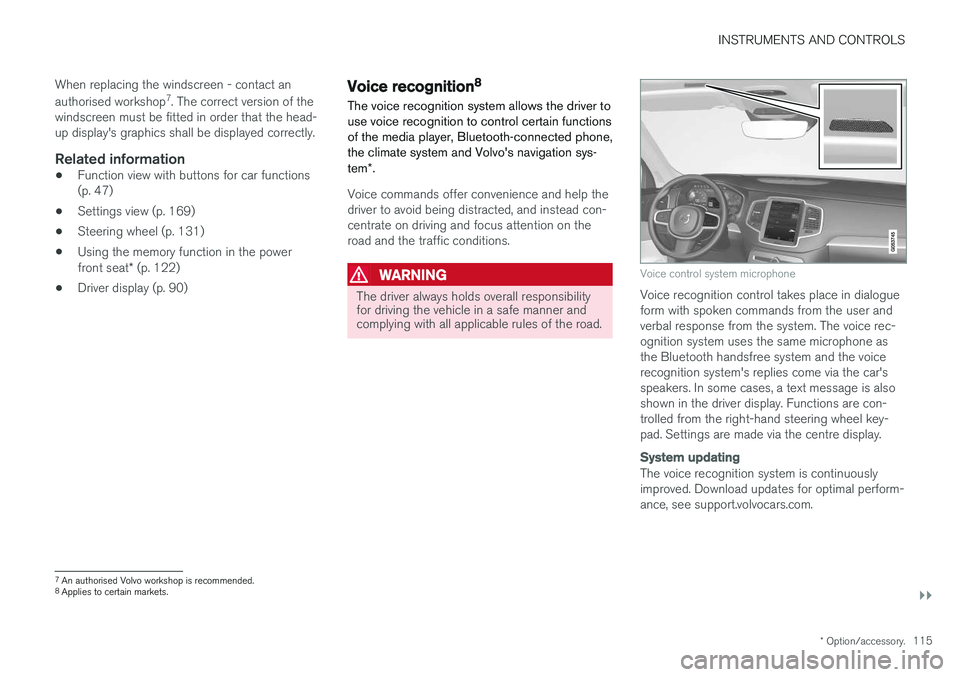
Voice control system microphone
Voice recognition control takes place in dialogue form with spoken commands from the user andverbal response from the system. The voice rec-ognition system uses the same microphone asthe Bluetooth handsfree system and the voicerecognition system's replies come via the car'sspeakers. In some cases, a text message is alsoshown in the driver display. Functions are con-trolled from the right-hand steering wheel key-pad. Settings are made via the centre display.
System updating
The voice recognition system is continuously improved. Download updates for optimal perform-ance, see support.volvocars.com.
7
An authorised Volvo workshop is recommended.
8 Applies to certain markets.
Page 123 of 594
INSTRUMENTS AND CONTROLS
* Option/accessory.121
Manual front seat
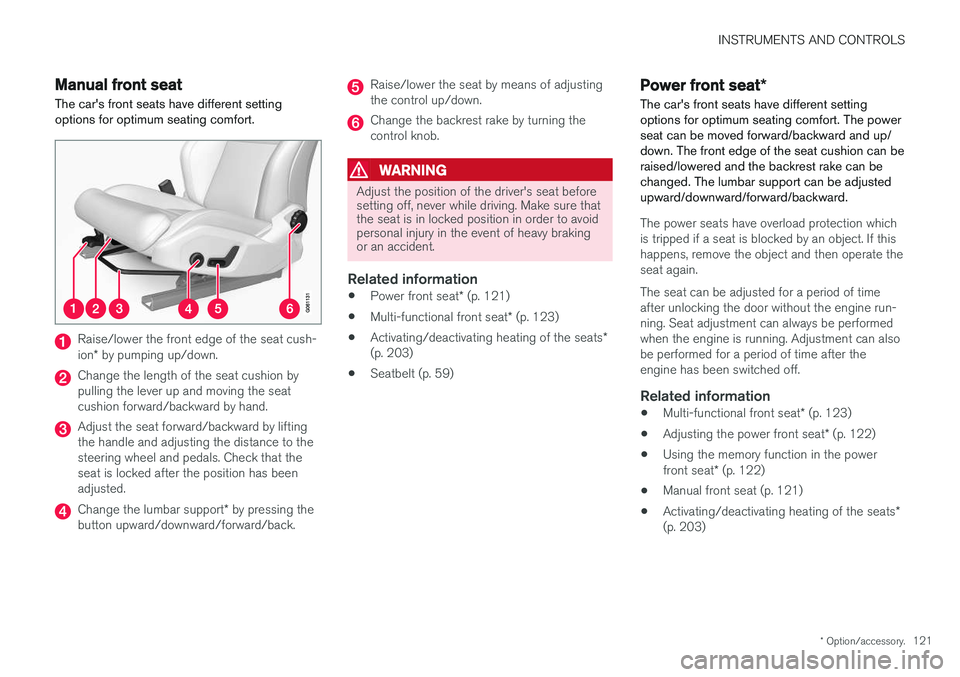
The car's front seats have different setting options for optimum seating comfort.
Raise/lower the front edge of the seat cush- ion * by pumping up/down.
Change the length of the seat cushion by pulling the lever up and moving the seatcushion forward/backward by hand.
Adjust the seat forward/backward by lifting the handle and adjusting the distance to thesteering wheel and pedals. Check that theseat is locked after the position has beenadjusted.
Change the lumbar support * by pressing the
button upward/downward/forward/back.
Raise/lower the seat by means of adjusting the control up/down.
Change the backrest rake by turning the control knob.
WARNING
Adjust the position of the driver's seat before setting off, never while driving. Make sure thatthe seat is in locked position in order to avoidpersonal injury in the event of heavy brakingor an accident.
Related information
• Power front seat
* (p. 121)
• Multi-functional front seat
* (p. 123)
• Activating/deactivating heating of the seats
*
(p. 203)
• Seatbelt (p. 59)
Power front seat
*
The car's front seats have different setting options for optimum seating comfort. The powerseat can be moved forward/backward and up/down. The front edge of the seat cushion can beraised/lowered and the backrest rake can bechanged. The lumbar support can be adjustedupward/downward/forward/backward.
The power seats have overload protection which is tripped if a seat is blocked by an object. If thishappens, remove the object and then operate theseat again. The seat can be adjusted for a period of time after unlocking the door without the engine run-ning. Seat adjustment can always be performedwhen the engine is running. Adjustment can alsobe performed for a period of time after theengine has been switched off.
Related information
• Multi-functional front seat
* (p. 123)
• Adjusting the power front seat
* (p. 122)
• Using the memory function in the power front seat
* (p. 122)
• Manual front seat (p. 121)
• Activating/deactivating heating of the seats
*
(p. 203)
Page 124 of 594
INSTRUMENTS AND CONTROLS
* Option/accessory.
122
Adjusting the power front seat *
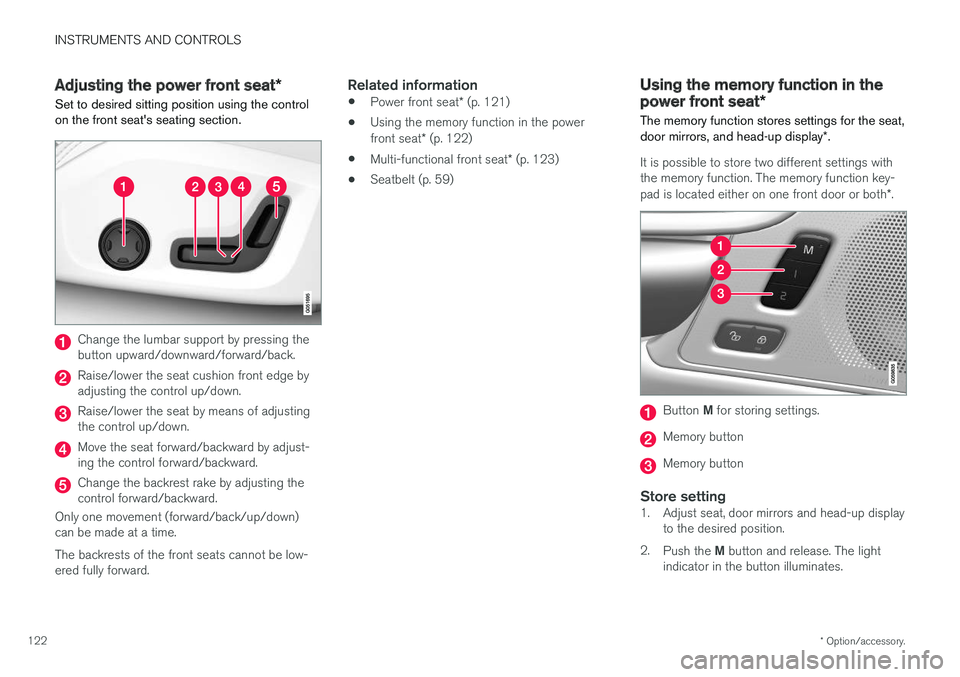
Set to desired sitting position using the control on the front seat's seating section.
Change the lumbar support by pressing the button upward/downward/forward/back.
Raise/lower the seat cushion front edge by adjusting the control up/down.
Raise/lower the seat by means of adjusting the control up/down.
Move the seat forward/backward by adjust- ing the control forward/backward.
Change the backrest rake by adjusting the control forward/backward.
Only one movement (forward/back/up/down)can be made at a time. The backrests of the front seats cannot be low- ered fully forward.
Related information
• Power front seat
* (p. 121)
• Using the memory function in the power front seat
* (p. 122)
• Multi-functional front seat
* (p. 123)
• Seatbelt (p. 59)
Using the memory function in the power front seat
*
The memory function stores settings for the seat, door mirrors, and head-up display *.
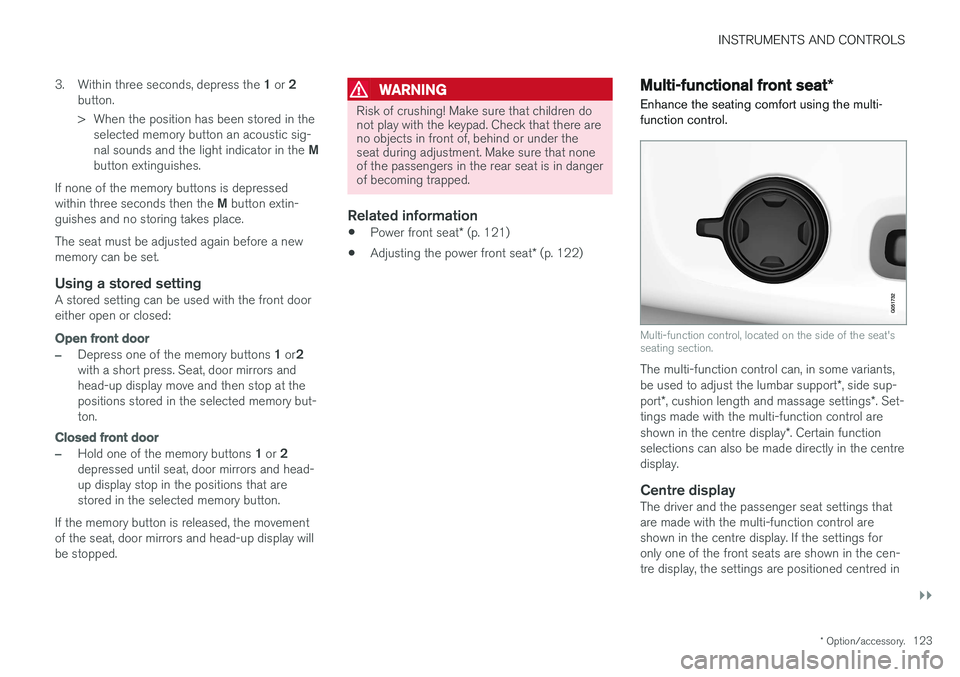
It is possible to store two different settings with the memory function. The memory function key- pad is located either on one front door or both *.
Button M for storing settings.
Memory button
Memory button
Store setting1. Adjust seat, door mirrors and head-up display
to the desired position.
2. Push the M button and release. The light
indicator in the button illuminates.
Page 125 of 594
INSTRUMENTS AND CONTROLS
}}
* Option/accessory.123
3.
Within three seconds, depress the 1 or 2
button.
> When the position has been stored in the selected memory button an acoustic sig- nal sounds and the light indicator in the M
button extinguishes.
If none of the memory buttons is depressedwithin three seconds then the M button extin-
guishes and no storing takes place. The seat must be adjusted again before a new memory can be set.
Using a stored settingA stored setting can be used with the front dooreither open or closed:
Open front door
–Depress one of the memory buttons 1 or 2
with a short press. Seat, door mirrors and head-up display move and then stop at thepositions stored in the selected memory but-ton.
Closed front door
–Hold one of the memory buttons 1 or 2
depressed until seat, door mirrors and head- up display stop in the positions that arestored in the selected memory button.
If the memory button is released, the movementof the seat, door mirrors and head-up display willbe stopped.
WARNING
Risk of crushing! Make sure that children do not play with the keypad. Check that there areno objects in front of, behind or under theseat during adjustment. Make sure that noneof the passengers in the rear seat is in dangerof becoming trapped.
Related information
• Power front seat
* (p. 121)
• Adjusting the power front seat
* (p. 122)
Multi-functional front seat *
Enhance the seating comfort using the multi- function control.
Multi-function control, located on the side of the seat's seating section.
The multi-function control can, in some variants, be used to adjust the lumbar support *, side sup-
port *, cushion length and massage settings *. Set-
tings made with the multi-function control areshown in the centre display *. Certain function
selections can also be made directly in the centre display.
Centre displayThe driver and the passenger seat settings thatare made with the multi-function control areshown in the centre display. If the settings foronly one of the front seats are shown in the cen-tre display, the settings are positioned centred in
Page 156 of 594
||
INSTRUMENTS AND CONTROLS
* Option/accessory.
154
Memory function in power front seat *Door mirror positions can be saved in the mem- ory function of the power front seat.
Angling the door mirror when parking 28The door mirror can be angled down for thedriver to view the side of the road when parkingfor example.
–Engage reverse gear and press the
L or R
button.
When reverse gear is disengaged the mirror automatically returns to its original position afterapprox. 10 seconds, or earlier by pressing the button labelled L or R respectively.
Automatic angling of the door mirror
when parking 28
When reverse gear is engaged the door mirror is automatically angled down so that the driver cansee the side of the road when parking for exam-ple. When reverse gear is disengaged the mirrorautomatically returns to its original position aftera short time. Settings for this function are set via the centre display: 1.
Press
Settings in the top view.
2. Press
My CarMirrors and Easy Entry. 3.
Under
Exterior Mirror Tilt at Reverse,
select Off, Driver, Passenger or Both to
activate/deactivate and to select which review mirror should be angled.
Automatic retraction when locking *When the car is locked/unlocked with the remotecontrol key the door mirrors are automaticallyretracted/extended. The function can be activated/deactivated via the centre display: 1.
Press
Settings in the top view.
2. Press
My CarMirrors and Easy Entry.
3. Select
Fold Mirror When Locked to acti-
vate/deactivate.
Resetting to neutralMirrors that have been moved out of position by an external force must be reset electrically to theneutral position for electric retracting/extendingto work correctly: 1. Retract the mirrors with the L and R buttons.
2. Fold them out again with the L and R but-
tons.
3. Repeat the above procedure as necessary.The mirrors are now reset in neutral position.
Automatic dimming *Bright light from behind is automatically dimmed by the interior rearview and door mirrors. For the door mirrors to be fitted with this function requires that the interior rearview mirror also hasautomatic dimming, see the section "Interior rear-view mirror". Automatic dimming is always active while driving, apart from when gearbox reverse position isselected. Dimming sensitivity can be adjusted inthree levels and will affect the interior rearviewand the door mirrors.
NOTE
When sensitivity is changed there is no imme- diately noticeable change in dimming, but thechange will be complete after a while.
Settings for this function are set via the centre display: 1.
Press
Settings in the top view.
2. Press
My CarMirrors and Easy Entry.
3. Under
Rearview Mirror Auto Dimming,
select Normal, Dark or Light.
28 Only in combination with power seat with memory.
Page 157 of 594
INSTRUMENTS AND CONTROLS
}}
* Option/accessory.155
Retractable power door mirrors *The mirrors can be retracted for parking/driving in narrow spaces: 1.
Depress the L and R buttons simultaneously
(ignition position must be at least I).
2. Release them after approximately 1 second. The mirrors automatically stop in the fully retracted position.
Fold out the mirrors by pressing down the L and
R buttons simultaneously. The mirrors automati-
cally stop in the fully extended position.
Related information
• Interior rearview mirror (p. 155)
• Settings view (p. 169)
• Using the memory function in the power front seat
* (p. 122)
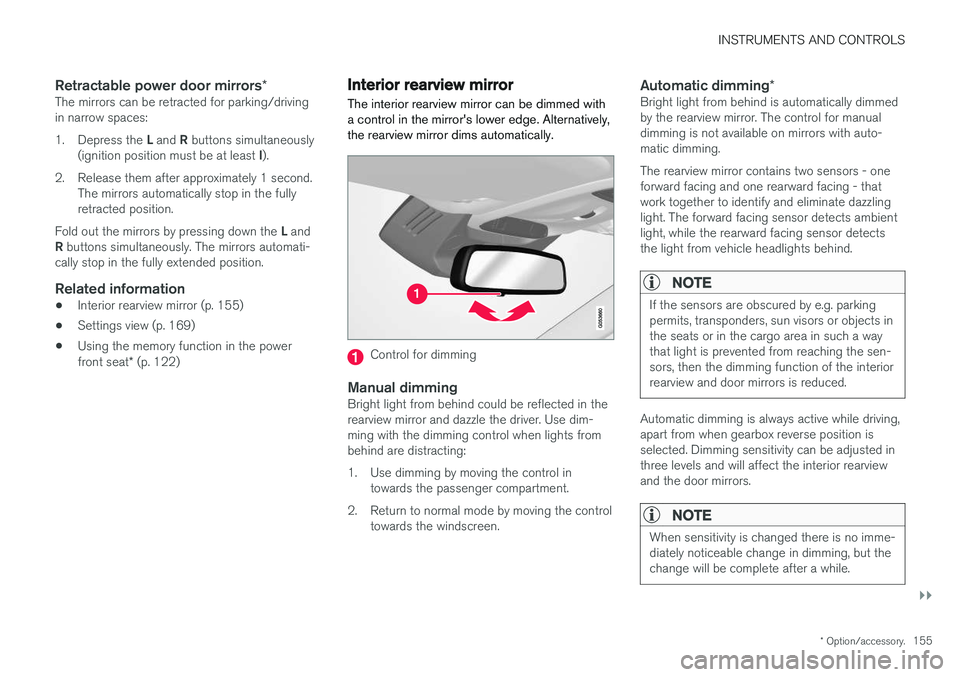
Interior rearview mirror The interior rearview mirror can be dimmed with a control in the mirror's lower edge. Alternatively,the rearview mirror dims automatically.
Control for dimming
Manual dimmingBright light from behind could be reflected in the rearview mirror and dazzle the driver. Use dim-ming with the dimming control when lights frombehind are distracting:
1. Use dimming by moving the control in
towards the passenger compartment.
2. Return to normal mode by moving the control towards the windscreen.
Automatic dimming *Bright light from behind is automatically dimmed by the rearview mirror. The control for manualdimming is not available on mirrors with auto-matic dimming. The rearview mirror contains two sensors - one forward facing and one rearward facing - thatwork together to identify and eliminate dazzlinglight. The forward facing sensor detects ambientlight, while the rearward facing sensor detectsthe light from vehicle headlights behind.
NOTE
If the sensors are obscured by e.g. parking permits, transponders, sun visors or objects inthe seats or in the cargo area in such a waythat light is prevented from reaching the sen-sors, then the dimming function of the interiorrearview and door mirrors is reduced.
Automatic dimming is always active while driving, apart from when gearbox reverse position isselected. Dimming sensitivity can be adjusted inthree levels and will affect the interior rearviewand the door mirrors.
NOTE
When sensitivity is changed there is no imme- diately noticeable change in dimming, but thechange will be complete after a while.