lock VOLVO V90 2018 Owner´s Manual
[x] Cancel search | Manufacturer: VOLVO, Model Year: 2018, Model line: V90, Model: VOLVO V90 2018Pages: 656, PDF Size: 11.78 MB
Page 554 of 656
LOADING, STORAGE AND PASSENGER COMPARTMENT
* Option/accessory.
552
Using the electrical outlets
The 12 V outlet can be used for devices intended for this such as MP3 players, coolersand cellular phones. The high-voltage outlet * can be used for devices
intended for this, such as chargers, laptops, etc.
The ignition must be in at least mode I for the
outlets to supply current. The outlets will then be active as long as there is sufficient charge in thestart battery. If the engine is turned off and the vehicle is locked, the outlets will be deactivated. If theengine is turned off and the vehicle remainsunlocked, the sockets will remain active for up to7 minutes.
NOTE
Bear in mind that using the electrical outlets when the engine is off could cause the starterbattery to have too low of a charge level,which could limit other functionality. Accessories connected to the electrical out- lets can be activated even when the vehicleelectrical system is off or if preconditioning isused. For this reason, disconnect plugs whenthey are not in use to prevent the starter bat-tery from becoming discharged.
WARNING
• Do not use accessories with large or heavy plugs – they could damage the out-let or come loose while you are driving.
• Do not use accessories that could causedisruptions to e.g. the vehicle's radioreceiver or electrical system.
• Position the accessory so that there is norisk of it injuring the driver or passengersin the event of heavy braking or a colli-sion.
• Pay attention to connected accessoriesas they can generate heat that could burnpassengers or the interior.
Using 12 V outlets1. Remove the stopper (tunnel console) or fold
down the cover (trunk/cargo compartment)over the socket and plug in the device.
2. Unplug the device and put the stopper back in (tunnel console) or fold up the cover(trunk/cargo compartment) when the socketis not in use or left unattended.
CAUTION
The maximum power is 120 W (10 A) per outlet.
Using high-voltage outletsThe ignition must be in at least mode I for outlets
to supply current. The outlets will then be active as long as there is sufficient charge in the startbattery. 1. Slide down the cover over the outlet and plug in the device. >
The LED 2
light on the outlet will indicate
its status.
2. The outlet is supplying electrical current when the light is glowing steadily green.
3. Disconnect the device by pulling out the plug (do not pull on the cord). Pull up the cover when the outlet is not in use or is left unattended.
CAUTION
The maximum power is 150 W.
WARNING
Do not attempt to alter or repair the high-volt- age outlet on your own. Volvo recommendscontacting an authorized Volvo workshop.
2LED (Light Emitting Diode)
Page 555 of 656
LOADING, STORAGE AND PASSENGER COMPARTMENT
}}
* Option/accessory.553
WARNING
•Only use accessories that are not dam- aged or malfunctioning. The accessoriesmust be designed for 120 V and 60 Hz,with plugs intended for the outlet. Theaccessories must be CE marked, ULmarked or have an equivalent safetymarking.
• New let outlets, plugs or accessoriescome into contact with water or anotherfluid. Do not touch or use the outlet if itappears damaged or has been in contactwith water or another fluid.
• Do not connect power strips, adapters orextension cords to the outlet has thiscould cause the outlet's safety functionsto malfunction.
• The outlet is equipped with a pet guard.Make sure that no one picks at or dam-ages the outlet in such a way that theguard is disabled. Children should not beleft unsupervised in the vehicle when theoutlet is active.
Failure to follow the above could lead to severe or fatal electrical shocks.
Related information
• Electrical outlets (p. 550)
• Passenger compartment interior (p. 548)
Using the glove compartment
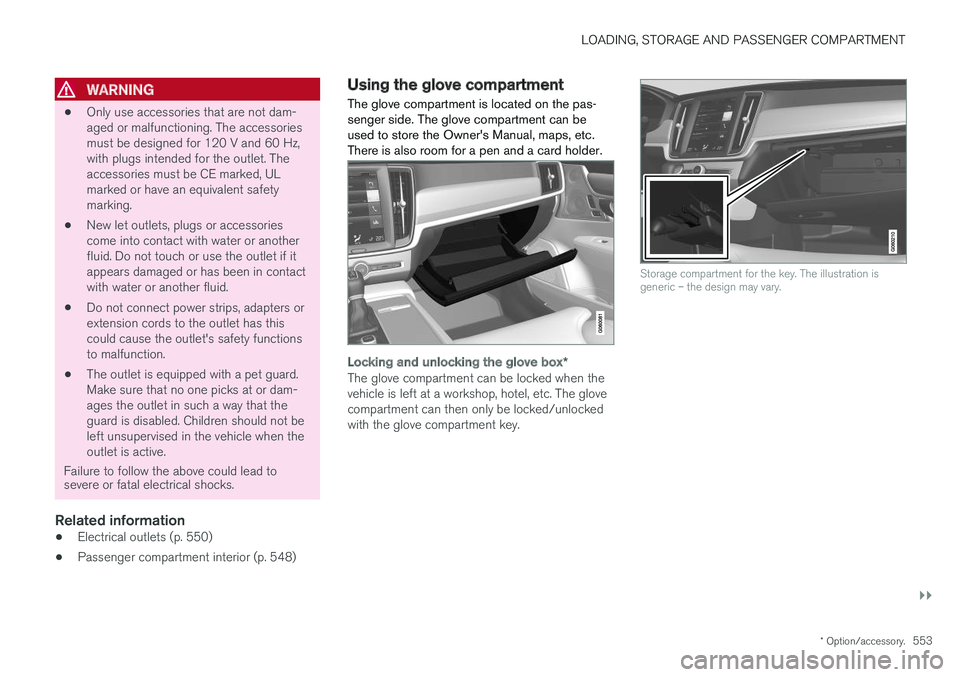
The glove compartment is located on the pas- senger side. The glove compartment can beused to store the Owner's Manual, maps, etc.There is also room for a pen and a card holder.
Locking and unlocking the glove box *
The glove compartment can be locked when the vehicle is left at a workshop, hotel, etc. The glovecompartment can then only be locked/unlockedwith the glove compartment key.
Storage compartment for the key. The illustration is generic – the design may vary.
Page 556 of 656
||
LOADING, STORAGE AND PASSENGER COMPARTMENT
* Option/accessory.
554
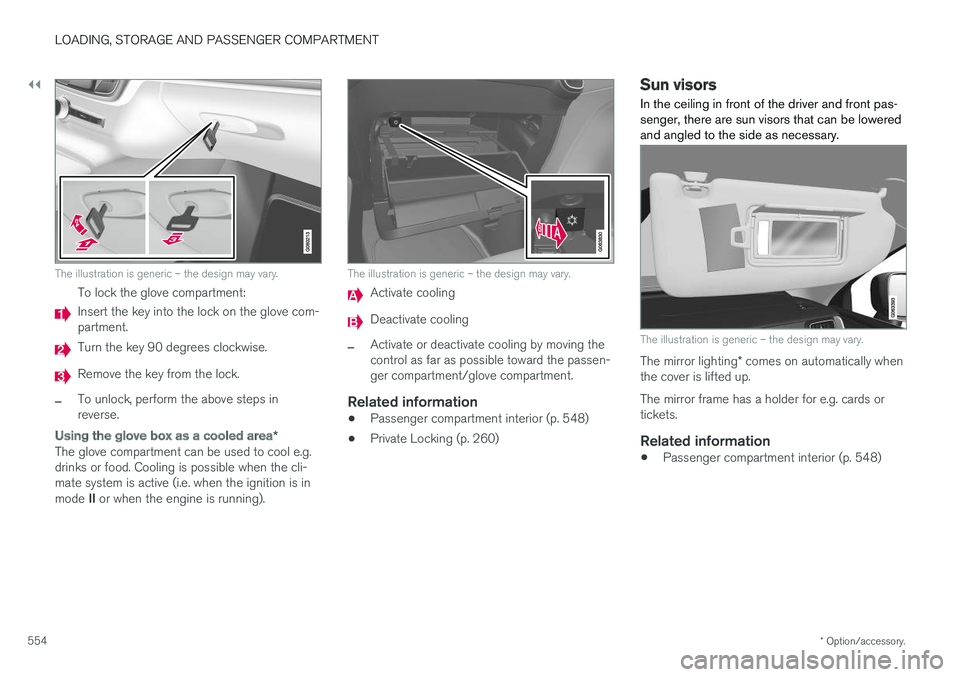
The illustration is generic – the design may vary.
To lock the glove compartment:
Insert the key into the lock on the glove com- partment.
Turn the key 90 degrees clockwise.
Remove the key from the lock.
–To unlock, perform the above steps in reverse.
Using the glove box as a cooled area *
The glove compartment can be used to cool e.g. drinks or food. Cooling is possible when the cli-mate system is active (i.e. when the ignition is in mode II or when the engine is running).
The illustration is generic – the design may vary.
Activate cooling
Deactivate cooling
–Activate or deactivate cooling by moving the control as far as possible toward the passen-ger compartment/glove compartment.
Related information
• Passenger compartment interior (p. 548)
• Private Locking (p. 260)
Sun visors In the ceiling in front of the driver and front pas- senger, there are sun visors that can be loweredand angled to the side as necessary.
The illustration is generic – the design may vary.
The mirror lighting
* comes on automatically when
the cover is lifted up. The mirror frame has a holder for e.g. cards or tickets.
Related information
• Passenger compartment interior (p. 548)
Page 560 of 656
LOADING, STORAGE AND PASSENGER COMPARTMENT
* Option/accessory.
558
Rear seat ski hatch
The hatch in the rear seat backrest can be opened to transport long, narrow objects suchas skis.
1. In the cargo compartment, grasp the ski hatch handle and pull it down.
2. Fold down the armrest in the rear seat. If the private locking * function is used, the hatch
must be closed.
Related information
• Loading recommendations (p. 555)
• Private Locking (p. 260)
• Load anchoring eyelets (p. 557)
Installing and removing the cargo
compartment cover
*
The cover can be rolled out to conceal objects in the cargo compartment.
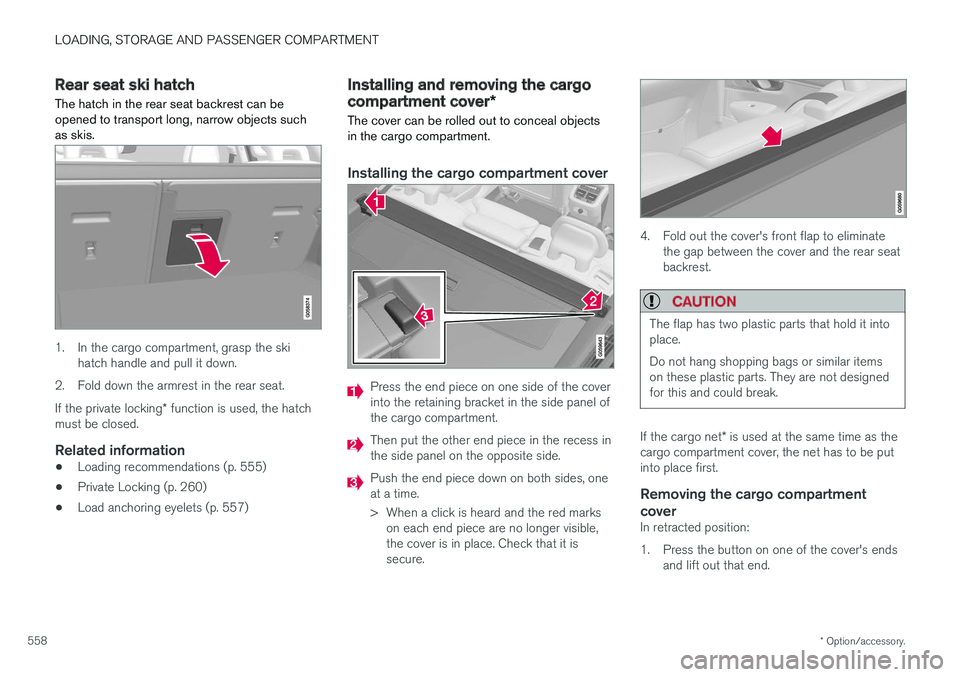
Installing the cargo compartment cover
Press the end piece on one side of the cover into the retaining bracket in the side panel ofthe cargo compartment.
Then put the other end piece in the recess in the side panel on the opposite side.
Push the end piece down on both sides, one at a time.
> When a click is heard and the red marks on each end piece are no longer visible, the cover is in place. Check that it issecure.
4. Fold out the cover's front flap to eliminate the gap between the cover and the rear seat backrest.
CAUTION
The flap has two plastic parts that hold it into place. Do not hang shopping bags or similar items on these plastic parts. They are not designedfor this and could break.
If the cargo net * is used at the same time as the
cargo compartment cover, the net has to be put into place first.
Removing the cargo compartment
cover
In retracted position:
1. Press the button on one of the cover's ends and lift out that end.
Page 570 of 656
||
MAINTENANCE AND SERVICE
568
Related information
•Vehicle status (p. 570)
• Scheduling service and repairs (p. 570)
• Connecting equipment to the vehicle's data link connector (p. 36)
• Technician certification (p. 37)
• Climate control system service (p. 576)
• Maintenance of the brake system (p. 407)
• Engine compartment overview (p. 577)
Data transfer between vehicle andworkshop over Wi-Fi
Volvo workshops have a designated Wi-Fi net- work for secure data transfer between your vehi-cle and the workshop. Your visit to the workshopwill be easier and more effective when diagnos-tics information and software can be transferredover the workshop's network.
When you arrive at the workshop, your technician can connect your vehicle to the workshop's Wi-Finetwork to perform troubleshooting and down-load software. For this type of communication,the vehicle only connects to the workshop's net-work. The vehicle can only be connected to thedesignated workshop networks, not to any othernetwork, e.g. your home network.
Manual connection to workshop Wi-FiManual connection is usually performed by aservice technician. Because the technician usesthe buttons on your remote key to connect thevehicle, it is important that you bring a key withbuttons when taking the vehicle in to a workshop.Pressing the lock button on the remote key threetimes will connect the vehicle to the workshop'sWi-Fi network. When the car is connected to a Wi-Fi network, the
symbol appears in the center display.
WARNING
The vehicle may not be driven when it is con- nected to the workshop's networks and sys-tems.
Related information
• Handling system updates via Download Cen- ter (p. 569)
• Scheduling service and repairs (p. 570)
Page 577 of 656
MAINTENANCE AND SERVICE
}}
575
Opening and closing the hood To open the hood, pull the lever in the passen- ger compartment and then turn the handle underthe hood.
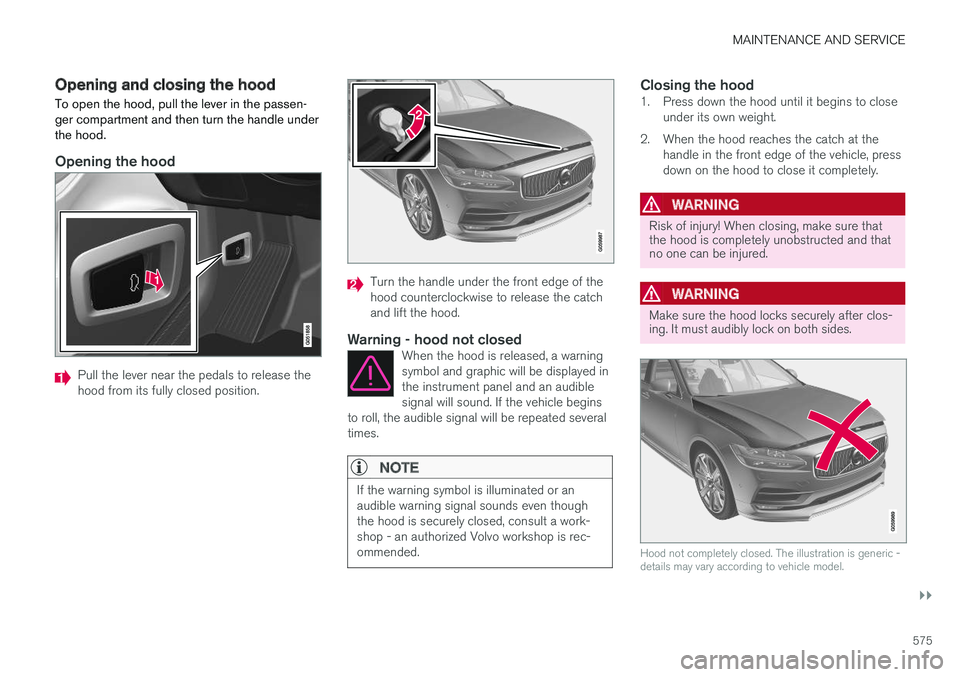
Opening the hood
Pull the lever near the pedals to release the hood from its fully closed position.
Turn the handle under the front edge of the hood counterclockwise to release the catchand lift the hood.
Warning - hood not closedWhen the hood is released, a warningsymbol and graphic will be displayed inthe instrument panel and an audiblesignal will sound. If the vehicle begins
to roll, the audible signal will be repeated severaltimes.
NOTE
If the warning symbol is illuminated or an audible warning signal sounds even thoughthe hood is securely closed, consult a work-shop - an authorized Volvo workshop is rec-ommended.
Closing the hood1. Press down the hood until it begins to close under its own weight.
2. When the hood reaches the catch at the handle in the front edge of the vehicle, press down on the hood to close it completely.
WARNING
Risk of injury! When closing, make sure that the hood is completely unobstructed and thatno one can be injured.
WARNING
Make sure the hood locks securely after clos- ing. It must audibly lock on both sides.
Hood not completely closed. The illustration is generic - details may vary according to vehicle model.
Page 587 of 656
MAINTENANCE AND SERVICE
}}
585
3. Carefully pry the plastic sleeve by the con-
nector's locking lug to release it.
4. Remove the connector from the bulb.
5. Replace the bulb.
6. Position the bulb in the socket and turn it downward.
7. Put the rubber cover back in place.
Related information
• Location of exterior lights (p. 583)
• Removing the plastic cover to replace bulbs (p. 582)
• Bulb specifications (p. 588)
Replacing daytime running lights/front parking light bulbs
The daytime running light/parking light bulbs in the halogen headlights can be changed withoutthe help of a workshop.
Before the bulbs can be replaced, the plastic cov- ering over the headlight must be removed.
NOTE
Daytime running lights/parking lights are eas- ier to reach if the high beam headlight bulbsare removed. The high beam headlights aremounted above and to the side of the daytimerunning lights/parking lights. Remove thehigh beam headlight bulb by turning the bulbholder upward and then pulling it straight out.
CAUTION
Never touch the bulb glass with your bare fin- gers. Grease and oils from your fingers vapor-ize in the heat and will leave a deposit on thereflector, which may damage it.
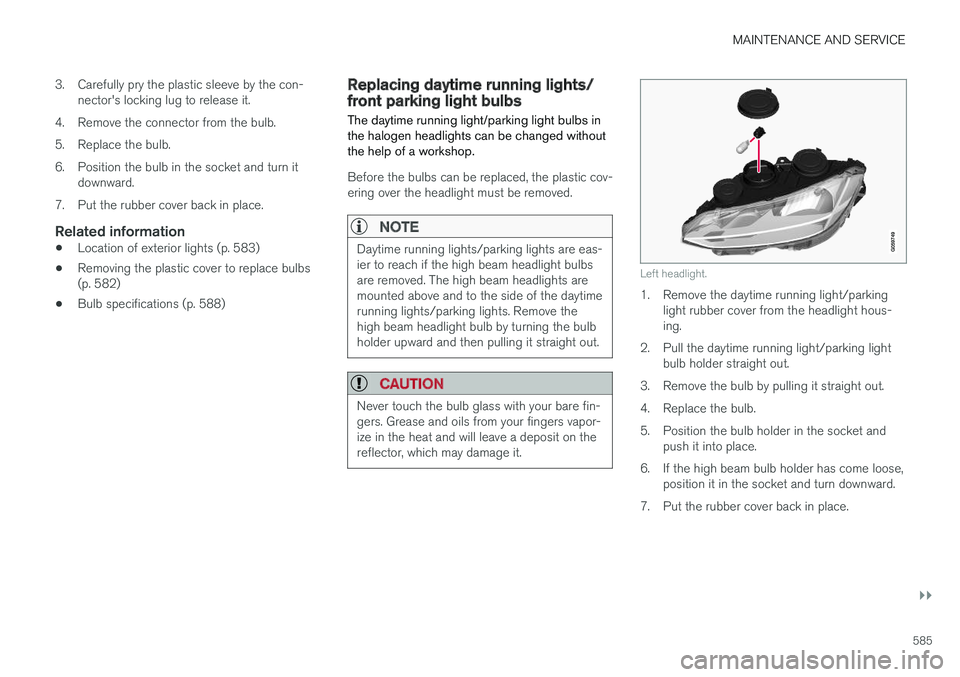
Left headlight.
1. Remove the daytime running light/parking light rubber cover from the headlight hous- ing.
2. Pull the daytime running light/parking light bulb holder straight out.
3. Remove the bulb by pulling it straight out.
4. Replace the bulb.
5. Position the bulb holder in the socket and push it into place.
6. If the high beam bulb holder has come loose, position it in the socket and turn downward.
7. Put the rubber cover back in place.
Page 589 of 656
MAINTENANCE AND SERVICE
}}
587
Replacing backup lights The light bulb for the backup light is located behind the panel in the tailgate.
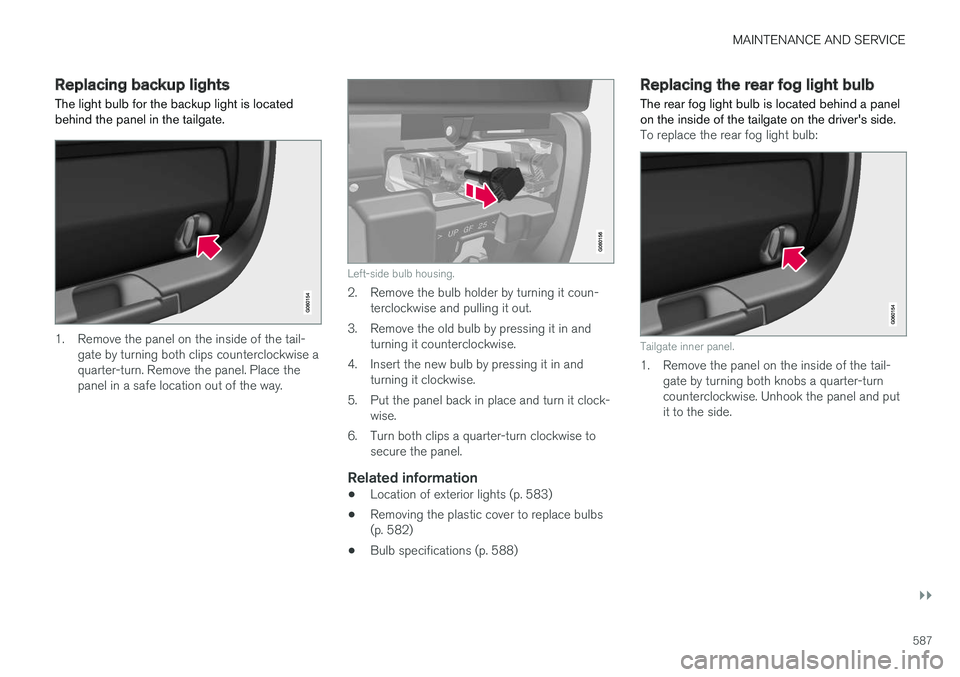
1. Remove the panel on the inside of the tail-gate by turning both clips counterclockwise a quarter-turn. Remove the panel. Place thepanel in a safe location out of the way.
Left-side bulb housing.
2. Remove the bulb holder by turning it coun-terclockwise and pulling it out.
3. Remove the old bulb by pressing it in and turning it counterclockwise.
4. Insert the new bulb by pressing it in and turning it clockwise.
5. Put the panel back in place and turn it clock- wise.
6. Turn both clips a quarter-turn clockwise to secure the panel.
Related information
• Location of exterior lights (p. 583)
• Removing the plastic cover to replace bulbs (p. 582)
• Bulb specifications (p. 588)
Replacing the rear fog light bulb The rear fog light bulb is located behind a panel on the inside of the tailgate on the driver's side.
To replace the rear fog light bulb:
Tailgate inner panel.
1. Remove the panel on the inside of the tail-
gate by turning both knobs a quarter-turn counterclockwise. Unhook the panel and putit to the side.
Page 590 of 656
||
MAINTENANCE AND SERVICE
588
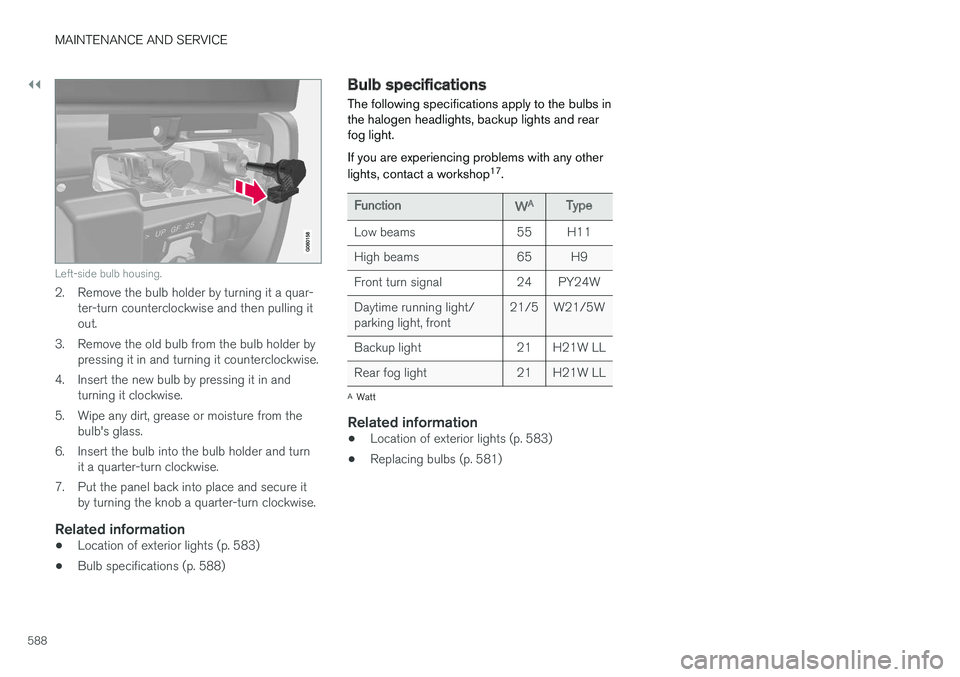
Left-side bulb housing.
2. Remove the bulb holder by turning it a quar-ter-turn counterclockwise and then pulling it out.
3. Remove the old bulb from the bulb holder by pressing it in and turning it counterclockwise.
4. Insert the new bulb by pressing it in and turning it clockwise.
5. Wipe any dirt, grease or moisture from the bulb's glass.
6. Insert the bulb into the bulb holder and turn it a quarter-turn clockwise.
7. Put the panel back into place and secure it by turning the knob a quarter-turn clockwise.
Related information
• Location of exterior lights (p. 583)
• Bulb specifications (p. 588)
Bulb specifications The following specifications apply to the bulbs in the halogen headlights, backup lights and rearfog light. If you are experiencing problems with any other lights, contact a workshop 17
.
FunctionWAType
Low beams 55 H11
High beams 65 H9
Front turn signal 24 PY24WDaytime running light/ parking light, front 21/5 W21/5W
Backup light 21 H21W LL
Rear fog light 21 H21W LL
A Watt
Related information
• Location of exterior lights (p. 583)
• Replacing bulbs (p. 581)
Page 606 of 656
||
MAINTENANCE AND SERVICE
* Option/accessory.
604
Positions
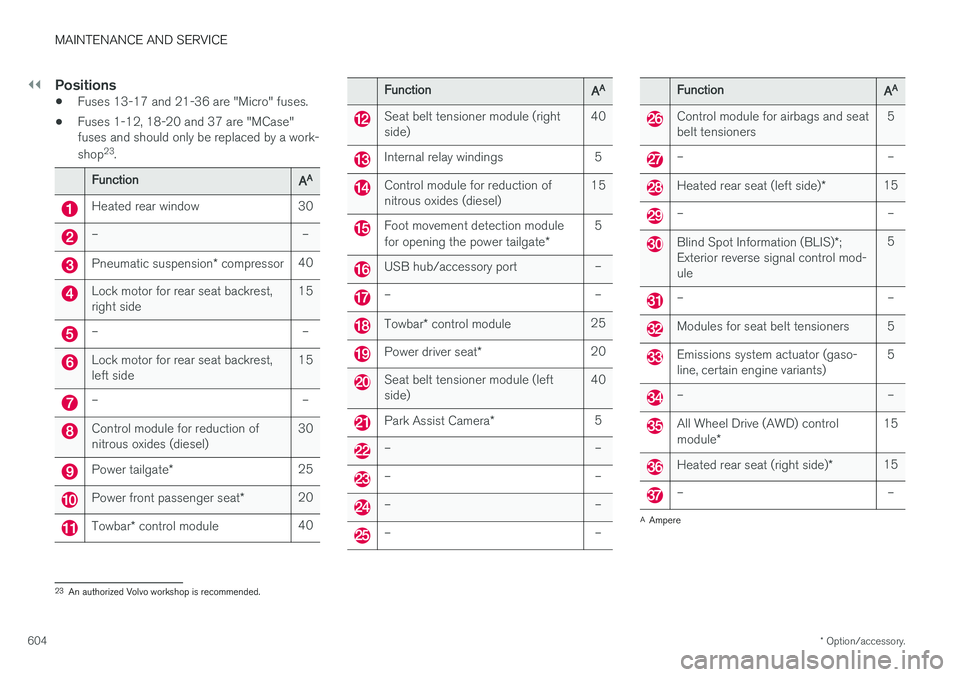
• Fuses 13-17 and 21-36 are "Micro" fuses.
• Fuses 1-12, 18-20 and 37 are "MCase" fuses and should only be replaced by a work- shop 23
.
FunctionAA
Heated rear window 30
– –
Pneumatic suspension * compressor 40
Lock motor for rear seat backrest, right side 15
– –
Lock motor for rear seat backrest, left side15
– –
Control module for reduction of nitrous oxides (diesel)30
Power tailgate
* 25
Power front passenger seat
*20
Towbar
* control module 40
FunctionAA
Seat belt tensioner module (right side) 40
Internal relay windings 5
Control module for reduction of nitrous oxides (diesel)15
Foot movement detection module for opening the power tailgate
*5
USB hub/accessory port –
– –
Towbar
* control module 25
Power driver seat
* 20
Seat belt tensioner module (left side) 40
Park Assist Camera
*5
– –
– –
– –
– –
FunctionAA
Control module for airbags and seat belt tensioners 5
– –
Heated rear seat (left side)
*15
– –
Blind Spot Information (BLIS)
*;
Exterior reverse signal control mod- ule 5
– –
Modules for seat belt tensioners 5
Emissions system actuator (gaso- line, certain engine variants)
5
– –
All Wheel Drive (AWD) control module
* 15
Heated rear seat (right side)
*15
– –
A
Ampere
23 An authorized Volvo workshop is recommended.