ECU VOLVO V90 2018 Owner´s Manual
[x] Cancel search | Manufacturer: VOLVO, Model Year: 2018, Model line: V90, Model: VOLVO V90 2018Pages: 656, PDF Size: 11.78 MB
Page 74 of 656
||
SAFETY
72
Related information
•Child restraints (p. 65)
• Convertible seats (p. 69)
• Infant seats (p. 67)
• Top tether anchors (p. 72)
• Lower child seat attachment points (p. 73)
• ISOFIX/LATCH lower anchors (p. 74)
Top tether anchors
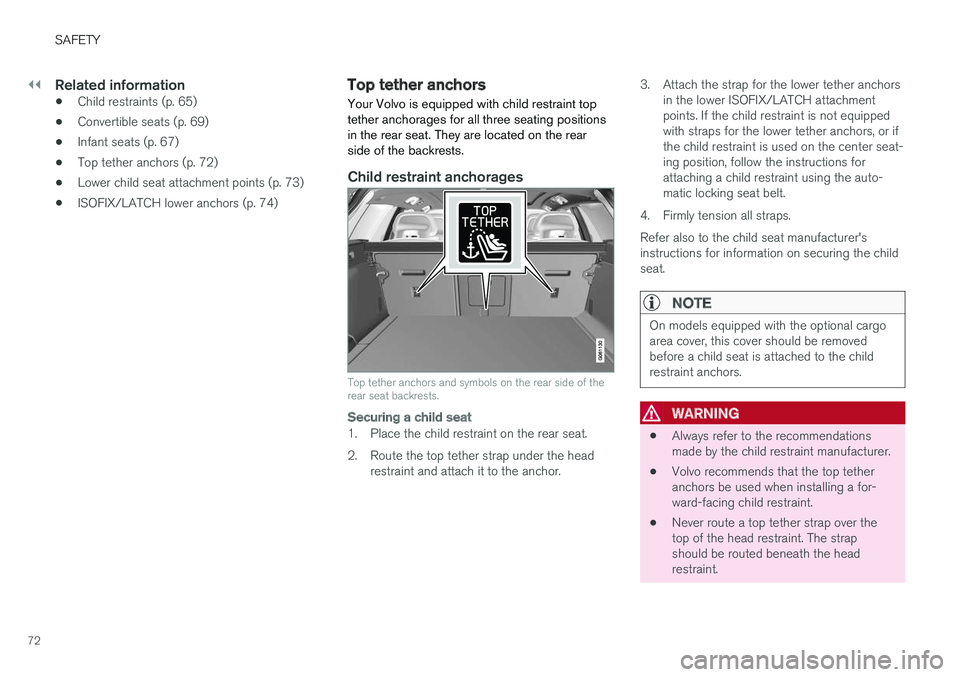
Your Volvo is equipped with child restraint top tether anchorages for all three seating positionsin the rear seat. They are located on the rearside of the backrests.
Child restraint anchorages
Top tether anchors and symbols on the rear side of the rear seat backrests.
Securing a child seat
1. Place the child restraint on the rear seat.
2. Route the top tether strap under the head restraint and attach it to the anchor. 3. Attach the strap for the lower tether anchors
in the lower ISOFIX/LATCH attachment points. If the child restraint is not equippedwith straps for the lower tether anchors, or ifthe child restraint is used on the center seat-ing position, follow the instructions forattaching a child restraint using the auto-matic locking seat belt.
4. Firmly tension all straps. Refer also to the child seat manufacturer's instructions for information on securing the childseat.
NOTE
On models equipped with the optional cargo area cover, this cover should be removedbefore a child seat is attached to the childrestraint anchors.
WARNING
• Always refer to the recommendations made by the child restraint manufacturer.
• Volvo recommends that the top tetheranchors be used when installing a for-ward-facing child restraint.
• Never route a top tether strap over thetop of the head restraint. The strapshould be routed beneath the headrestraint.
Page 76 of 656
SAFETY
74
ISOFIX/LATCH lower anchors Lower anchors for ISOFIX/LATCH-equipped child seats are located in the rear, outboardseats, hidden below the backrest cushions.
Using the ISOFIX/LATCH lower child seat anchors
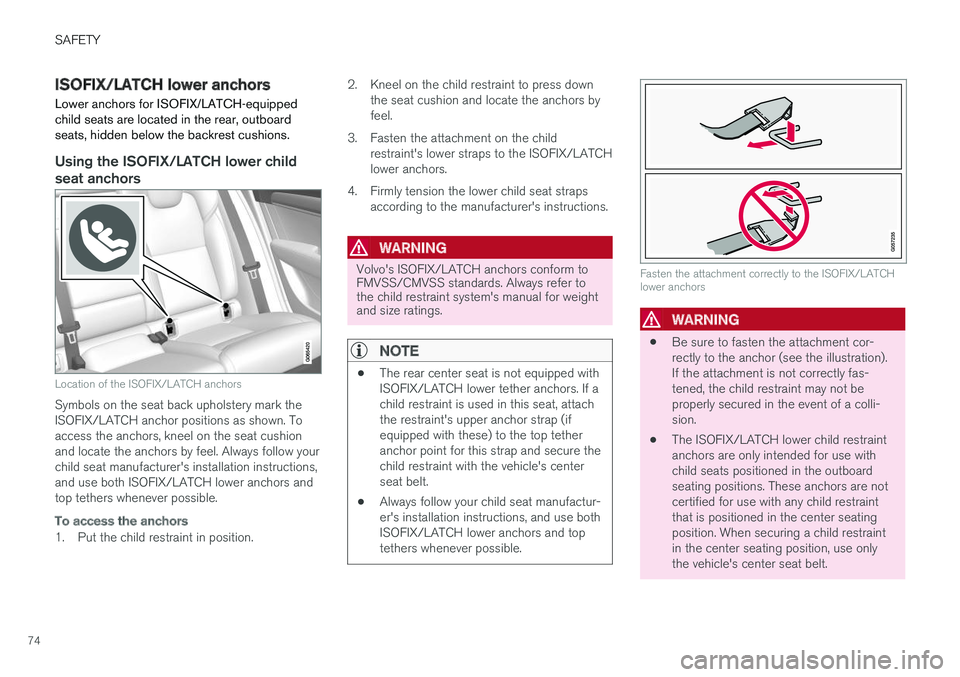
Location of the ISOFIX/LATCH anchors
Symbols on the seat back upholstery mark the ISOFIX/LATCH anchor positions as shown. Toaccess the anchors, kneel on the seat cushionand locate the anchors by feel. Always follow yourchild seat manufacturer's installation instructions,and use both ISOFIX/LATCH lower anchors andtop tethers whenever possible.
To access the anchors
1. Put the child restraint in position.2. Kneel on the child restraint to press down
the seat cushion and locate the anchors by feel.
3. Fasten the attachment on the child restraint's lower straps to the ISOFIX/LATCHlower anchors.
4. Firmly tension the lower child seat straps according to the manufacturer's instructions.
WARNING
Volvo's ISOFIX/LATCH anchors conform to FMVSS/CMVSS standards. Always refer tothe child restraint system's manual for weightand size ratings.
NOTE
• The rear center seat is not equipped with ISOFIX/LATCH lower tether anchors. If achild restraint is used in this seat, attachthe restraint's upper anchor strap (ifequipped with these) to the top tetheranchor point for this strap and secure thechild restraint with the vehicle's centerseat belt.
• Always follow your child seat manufactur-er's installation instructions, and use bothISOFIX/LATCH lower anchors and toptethers whenever possible.
Fasten the attachment correctly to the ISOFIX/LATCH lower anchors
WARNING
• Be sure to fasten the attachment cor- rectly to the anchor (see the illustration).If the attachment is not correctly fas-tened, the child restraint may not beproperly secured in the event of a colli-sion.
• The ISOFIX/LATCH lower child restraintanchors are only intended for use withchild seats positioned in the outboardseating positions. These anchors are notcertified for use with any child restraintthat is positioned in the center seatingposition. When securing a child restraintin the center seating position, use onlythe vehicle's center seat belt.
Page 77 of 656
SAFETY
}}
* Option/accessory.75
Related information
•Child restraints (p. 65)
• Top tether anchors (p. 72)
• ISOFIX/LATCH lower anchors (p. 74)Integrated booster cushion
*1
The integrated booster cushions in the rear seat's outboard seating positions help ensurethat children can sit comfortably and safely.
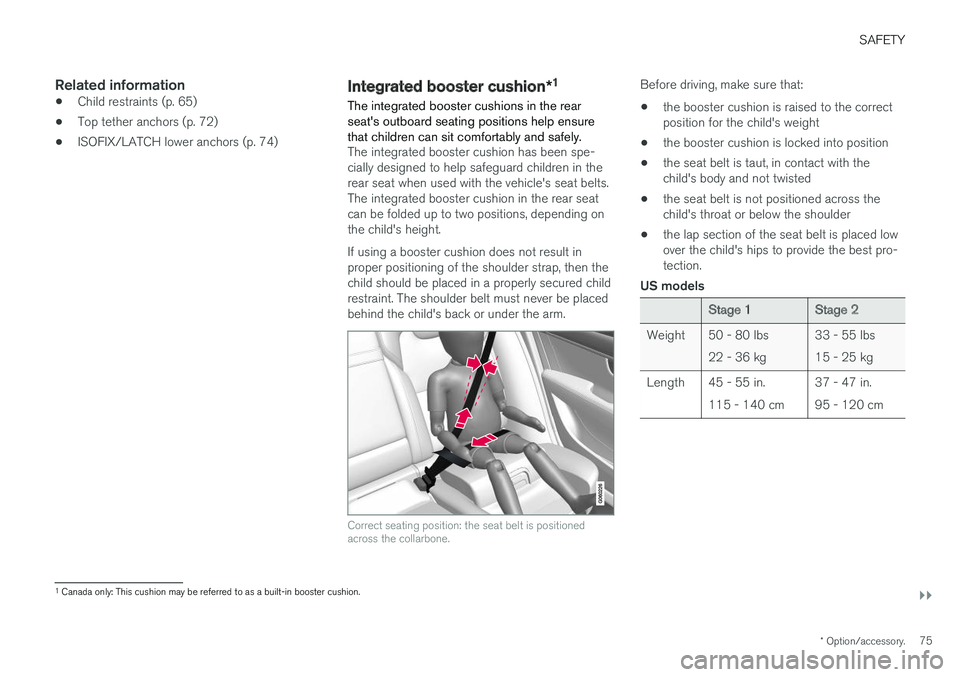
The integrated booster cushion has been spe- cially designed to help safeguard children in therear seat when used with the vehicle's seat belts.The integrated booster cushion in the rear seatcan be folded up to two positions, depending onthe child's height. If using a booster cushion does not result in proper positioning of the shoulder strap, then thechild should be placed in a properly secured childrestraint. The shoulder belt must never be placedbehind the child's back or under the arm.
Correct seating position: the seat belt is positioned across the collarbone.
Before driving, make sure that:
• the booster cushion is raised to the correct position for the child's weight
• the booster cushion is locked into position
• the seat belt is taut, in contact with thechild's body and not twisted
• the seat belt is not positioned across thechild's throat or below the shoulder
• the lap section of the seat belt is placed low over the child's hips to provide the best pro- tection.
US models
Stage 1Stage 2
Weight 50 - 80 lbs 22 - 36 kg 33 - 55 lbs 15 - 25 kg
Length 45 - 55 in. 115 - 140 cm 37 - 47 in.95 - 120 cm
1
Canada only: This cushion may be referred to as a built-in booster cushion.
Page 78 of 656
||
SAFETY
* Option/accessory.
76 Canadian models
Stage 1Stage 2
Weight 22 - 36 kg 50 - 80 lbs 18 - 25 kg 40 - 55 lbs
Length 115 - 140 cm 45 - 55 in. 102 - 120 cm40 - 47 in.
18 kg (40 lbs) is the minimum weight require- ment for a child using booster seats according tothe Canadian regulation CMVSS 213.4.
WARNING
DEATH or SERIOUS INJURY can occur •
Follow all instructions on this child restraint and in the vehicle'sowner's manual.
• Make sure the booster cushion issecurely locked before the childis seated.
• Use this booster cushion only with chil- dren whose height and weight are withinthe permitted limits shown in the table.
• Use only the vehicle's lap and shoulderbelt system when restraining the child inthis booster cushion.
• In the event of a collision while the inte-grated booster cushion was occupied, theentire booster cushion and seat belt mustbe replaced. The booster cushion shouldalso be replaced if it is badly worn ordamaged in any way. This work should beperformed by a trained and qualifiedVolvo service technician only.
Related information
•Child restraints (p. 65)
• Folding up the integrated booster cushion
*
(p. 77) •
Folding down the integrated booster cush- ion
* (p. 78)
Page 80 of 656
||
SAFETY
* Option/accessory.
78
WARNING
DEATH or SERIOUS INJURY can occur •
Follow all instructions on this child restraint and in the vehicle'sowner's manual.
• Make sure the booster cushion issecurely locked before the childis seated.
• Use this booster cushion only with chil- dren whose height and weight are withinthe permitted limits shown in the table.
• Use only the vehicle's lap and shoulderbelt system when restraining the child inthis booster cushion.
• In the event of a collision while the inte-grated booster cushion was occupied, theentire booster cushion and seat belt mustbe replaced. The booster cushion shouldalso be replaced if it is badly worn ordamaged in any way. This work should beperformed by a trained and qualifiedVolvo service technician only.
NOTE
The integrated booster cushion cannot be moved directly from the upper position to thelower position. From the upper position, thebooster cushion must first be folded downcompletely into the rear seat and then raisedto the lower position.
Related information
•
Integrated booster cushion
* (p. 75)
• Folding down the integrated booster cush- ion
* (p. 78)
Folding down the integrated
booster cushion *
When the integrated booster cushion in the rear seat is not in use, it should be stowed (foldeddown).
NOTE
The integrated booster cushion cannot be moved directly from the upper position to thelower position. From the upper position, thebooster cushion must first be folded downcompletely into the rear seat and then raisedto the lower position.
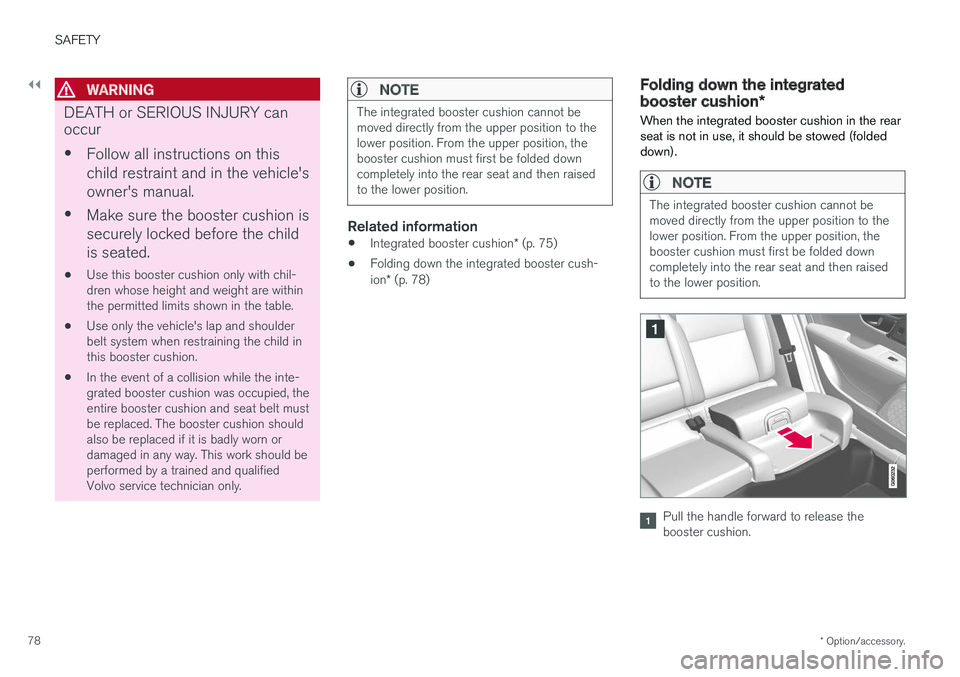
Pull the handle forward to release the booster cushion.
Page 81 of 656
SAFETY
* Option/accessory.79
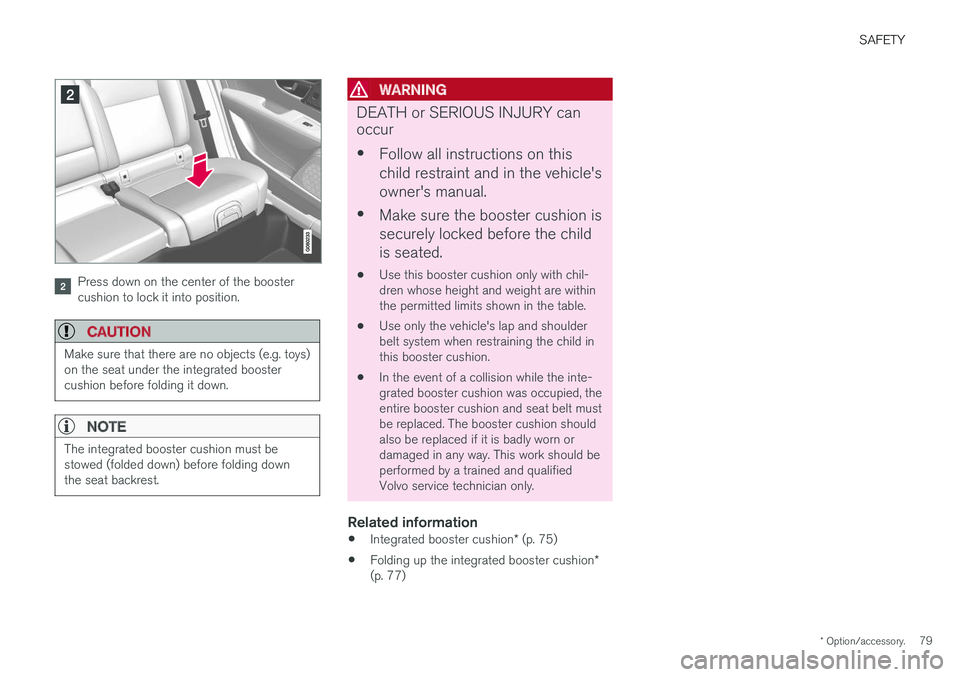
Press down on the center of the booster cushion to lock it into position.
CAUTION
Make sure that there are no objects (e.g. toys) on the seat under the integrated boostercushion before folding it down.
NOTE
The integrated booster cushion must be stowed (folded down) before folding downthe seat backrest.
WARNING
DEATH or SERIOUS INJURY can occur •
Follow all instructions on this child restraint and in the vehicle'sowner's manual.
• Make sure the booster cushion issecurely locked before the childis seated.
• Use this booster cushion only with chil- dren whose height and weight are withinthe permitted limits shown in the table.
• Use only the vehicle's lap and shoulderbelt system when restraining the child inthis booster cushion.
• In the event of a collision while the inte-grated booster cushion was occupied, theentire booster cushion and seat belt mustbe replaced. The booster cushion shouldalso be replaced if it is badly worn ordamaged in any way. This work should beperformed by a trained and qualifiedVolvo service technician only.
Related information
•
Integrated booster cushion
* (p. 75)
• Folding up the integrated booster cushion
*
(p. 77)
Page 96 of 656
DISPLAYS AND VOICE CONTROL
94
Date and timeThe clock is displayed in both the instrument panel and the center display.
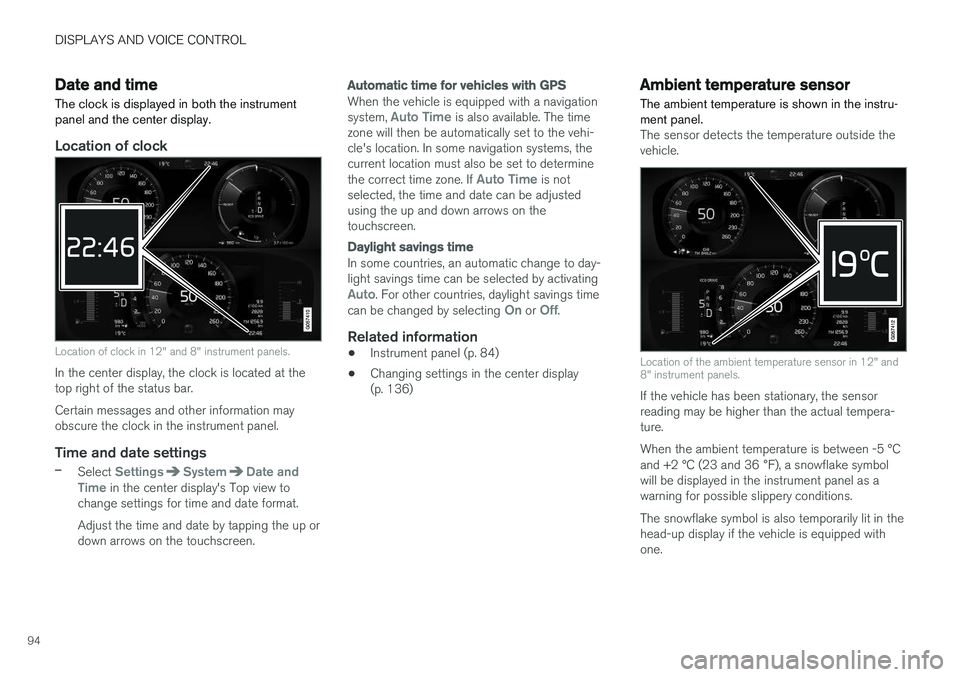
Location of clock
Location of clock in 12" and 8" instrument panels.
In the center display, the clock is located at the top right of the status bar. Certain messages and other information may obscure the clock in the instrument panel.
Time and date settings
–Select SettingsSystemDate and
Time in the center display's Top view to
change settings for time and date format. Adjust the time and date by tapping the up or down arrows on the touchscreen.
Automatic time for vehicles with GPS
When the vehicle is equipped with a navigation system, Auto Time is also available. The time
zone will then be automatically set to the vehi- cle's location. In some navigation systems, thecurrent location must also be set to determine the correct time zone. If
Auto Time is not
selected, the time and date can be adjusted using the up and down arrows on thetouchscreen.
Daylight savings time
In some countries, an automatic change to day- light savings time can be selected by activating
Auto. For other countries, daylight savings time
can be changed by selecting On or Off.
Related information
• Instrument panel (p. 84)
• Changing settings in the center display (p. 136)
Ambient temperature sensor
The ambient temperature is shown in the instru- ment panel.
The sensor detects the temperature outside the vehicle.
Location of the ambient temperature sensor in 12" and 8" instrument panels.
If the vehicle has been stationary, the sensor reading may be higher than the actual tempera-ture. When the ambient temperature is between -5 °C and +2 °C (23 and 36 °F), a snowflake symbol
will be displayed in the instrument panel as a warning for possible slippery conditions. The snowflake symbol is also temporarily lit in the head-up display if the vehicle is equipped withone.
Page 101 of 656
DISPLAYS AND VOICE CONTROL
}}
99
Boost Software License 1.0
Permission is hereby granted, free of charge, to any person or organization obtaining a copy ofthe software and accompanying documentationcovered by this license (the "Software") to use,reproduce, display, distribute, execute, andtransmit the Software, and to prepare derivativeworks of the Software, and to permit third-partiesto whom the Software is furnished to do so, allsubject to the following: The copyright notices inthe Software and this entire statement, includingthe above license grant, this restriction and thefollowing disclaimer, must be included in allcopies of the Software, in whole or in part, and allderivative works of the Software, unless suchcopies or derivative works are solely in the formof machine-executable object code generated bya source language processor. THE SOFTWARE IS PROVIDED "AS IS", WITHOUT WARRANTY OF ANY KIND,EXPRESS OR IMPLIED, INCLUDING BUT NOTLIMITED TO THE WARRANTIES OFMERCHANTABILITY, FITNESS FOR APARTICULAR PURPOSE, TITLE AND NON-INFRINGEMENT. IN NO EVENT SHALL THECOPYRIGHT HOLDERS OR ANYONEDISTRIBUTING THE SOFTWARE BE LIABLEFOR ANY DAMAGES OR OTHER LIABILITY,WHETHER IN CONTRACT, TORT OROTHERWISE, ARISING FROM, OUT OF OR INCONNECTION WITH THE SOFTWARE OR THEUSE OR OTHER DEALINGS IN THESOFTWARE.
BSD 4-clause "Original" or "Old" License
Copyright (c) 1982, 1986, 1990, 1991, 1993 The Regents of the University of California. Allrights reserved. Redistribution and use in source and binary forms, with or without modification, are permittedprovided that the following conditions are met:
1. Redistributions of source code must retainthe above copyright notice, this list of conditions and the following disclaimer.
2. Redistributions in binary form must reproduce the above copyright notice, this listof conditions and the following disclaimer inthe documentation and/or other materialsprovided with the distribution.
3. All advertising materials mentioning features or use of this software must display thefollowing acknowledgement: This productincludes software developed by theUniversity of California, Berkeley and itscontributors.
4. Neither the name of the University nor the names of its contributors may be used toendorse or promote products derived fromthis software without specific prior writtenpermission.
THIS SOFTWARE IS PROVIDED BY THE REGENTS AND CONTRIBUTORS ``AS IS'' AND ANY EXPRESS OR IMPLIED WARRANTIES,INCLUDING, BUT NOT LIMITED TO, THEIMPLIED WARRANTIES OF MERCHANTABILITY AND FITNESS FOR A PARTICULAR PURPOSEARE DISCLAIMED. IN NO EVENT SHALL THEREGENTS OR CONTRIBUTORS BE LIABLEFOR ANY DIRECT, INDIRECT, INCIDENTAL,SPECIAL, EXEMPLARY, OR CONSEQUENTIALDAMAGES (INCLUDING, BUT NOT LIMITED TO,PROCUREMENT OF SUBSTITUTE GOODS ORSERVICES; LOSS OF USE, DATA, OR PROFITS;OR BUSINESS INTERRUPTION) HOWEVERCAUSED AND ON ANY THEORY OF LIABILITY,WHETHER IN CONTRACT, STRICT LIABILITY,OR TORT (INCLUDING NEGLIGENCE OROTHERWISE) ARISING IN ANY WAY OUT OFTHE USE OF THIS SOFTWARE, EVEN IFADVISED OF THE POSSIBILITY OF SUCHDAMAGE.
Page 103 of 656
DISPLAYS AND VOICE CONTROL
}}
101
FreeType Project License
1. 1 Copyright 1996-1999 by David Turner,Robert Wilhelm, and Werner Lemberg Introduction The FreeType Project isdistributed in several archive packages; someof them may contain, in addition to theFreeType font engine, various tools andcontributions which rely on, or relate to, theFreeType Project. This license applies to allfiles found in such packages, and which donot fall under their own explicit license. Thelicense affects thus the FreeType fontengine, the test programs, documentationand makefiles, at the very least. This licensewas inspired by the BSD, Artistic, and IJG(Independent JPEG Group) licenses, whichall encourage inclusion and use of freesoftware in commercial and freewareproducts alike. As a consequence, its mainpoints are that: o We don't promise that thissoftware works. However, we are beinterested in any kind of bug reports. (`as is'distribution) o You can use this software forwhatever you want, in parts or full form,without having to pay us. (`royalty-free'usage) o You may not pretend that you wrotethis software. If you use it, or only parts of it,in a program, you must acknowledgesomewhere in your documentation thatyou've used the FreeType code. (`credits')We specifically permit and encourage theinclusion of this software, with or withoutmodifications, in commercial products, provided that all warranty or liability claimsare assumed by the product vendor. LegalTerms 0. Definitions Throughout this license,the terms `package', `FreeType Project', and`FreeType archive' refer to the set of filesoriginally distributed by the authors (DavidTurner, Robert Wilhelm, and WernerLemberg) as the `FreeType project', be theynamed as alpha, beta or final release. `You'refers to the licensee, or person using theproject, where `using' is a generic termincluding compiling the project's source codeas well as linking it to form a `program' or`executable'. This program is referred to as `aprogram using the FreeType engine'. Thislicense applies to all files distributed in theoriginal FreeType archive, including all sourcecode, binaries and documentation, unlessotherwise stated in the file in its original,unmodified form as distributed in the originalarchive. If you are unsure whether or not aparticular file is covered by this license, youmust contact us to verify this. The FreeTypeproject is copyright (C) 1996-1999 by DavidTurner, Robert Wilhelm, and WernerLemberg. All rights reserved except asspecified below. 1. No Warranty THEFREETYPE ARCHIVE IS PROVIDED `AS IS'WITHOUT WARRANTY OF ANY KIND,EITHER EXPRESSED OR IMPLIED,INCLUDING, BUT NOT LIMITED TO,WARRANTIES OF MERCHANTABILITY ANDFITNESS FOR A PARTICULAR PURPOSE.
IN NO EVENT WILL ANY OF THEAUTHORS OR COPYRIGHT HOLDERS BELIABLE FOR ANY DAMAGES CAUSED BYTHE USE OR THE INABILITY TO USE, OFTHE FREETYPE PROJECT. As you have notsigned this license, you are not required toaccept it. However, as the FreeType projectis copyrighted material, only this license, oranother one contracted with the authors,grants you the right to use, distribute, andmodify it. Therefore, by using, distributing, ormodifying the FreeType project, you indicatethat you understand and accept all the termsof this license.
2. Redistribution Redistribution and use in source and binary forms, with or withoutmodification, are permitted provided that thefollowing conditions are met: o Redistributionof source code must retain this license file(`licence.txt') unaltered; any additions,deletions or changes to the original filesmust be clearly indicated in accompanyingdocumentation. The copyright notices of theunaltered, original files must be preserved inall copies of source files. o Redistribution inbinary form must provide a disclaimer thatstates that the software is based in part ofthe work of the FreeType Team, in thedistribution documentation. We alsoencourage you to put an URL to theFreeType web page in your documentation,though this isn't mandatory. These conditionsapply to any software derived from or based
Page 190 of 656
SEATS AND STEERING WHEEL
* Option/accessory.
188
Manual front seats The power front seats can be adjusted in a num- ber of different ways for optimal comfort andergonomics.
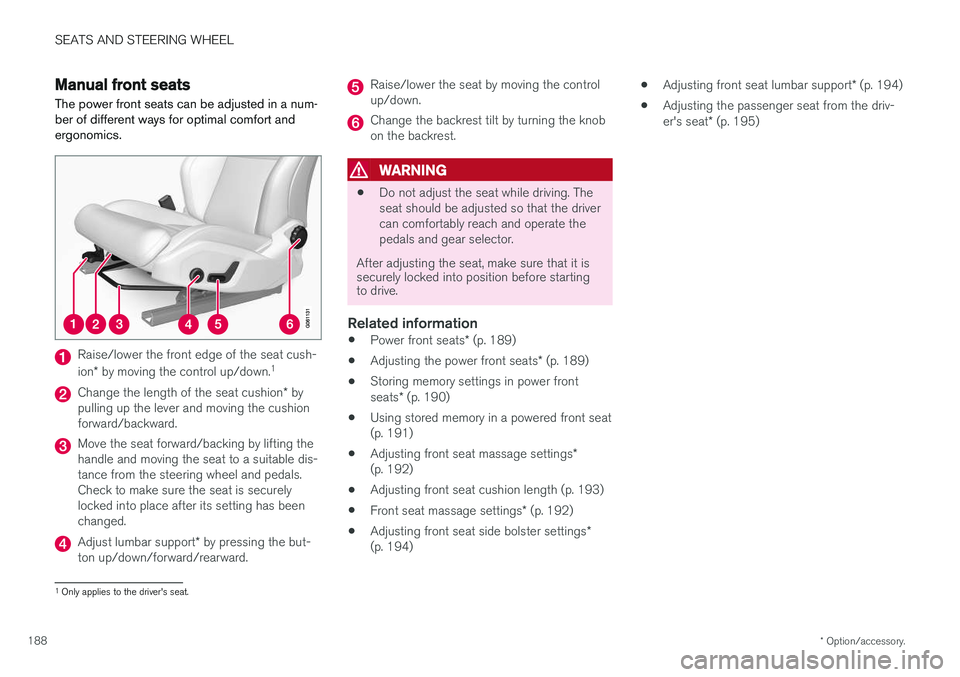
Raise/lower the front edge of the seat cush- ion * by moving the control up/down. 1
Change the length of the seat cushion
* by
pulling up the lever and moving the cushion forward/backward.
Move the seat forward/backing by lifting the handle and moving the seat to a suitable dis-tance from the steering wheel and pedals.Check to make sure the seat is securelylocked into place after its setting has beenchanged.
Adjust lumbar support * by pressing the but-
ton up/down/forward/rearward.
Raise/lower the seat by moving the control up/down.
Change the backrest tilt by turning the knob on the backrest.
WARNING
• Do not adjust the seat while driving. The seat should be adjusted so that the drivercan comfortably reach and operate thepedals and gear selector.
After adjusting the seat, make sure that it is securely locked into position before startingto drive.
Related information
• Power front seats
* (p. 189)
• Adjusting the power front seats
* (p. 189)
• Storing memory settings in power front seats
* (p. 190)
• Using stored memory in a powered front seat (p. 191)
• Adjusting front seat massage settings
*
(p. 192)
• Adjusting front seat cushion length (p. 193)
• Front seat massage settings
* (p. 192)
• Adjusting front seat side bolster settings
*
(p. 194) •
Adjusting front seat lumbar support
* (p. 194)
• Adjusting the passenger seat from the driv- er's seat
* (p. 195)
1
Only applies to the driver's seat.