ECU VOLVO V90 2018 Owner´s Manual
[x] Cancel search | Manufacturer: VOLVO, Model Year: 2018, Model line: V90, Model: VOLVO V90 2018Pages: 656, PDF Size: 11.78 MB
Page 198 of 656
SEATS AND STEERING WHEEL
* Option/accessory.
196 •
Adjusting front seat side bolster settings
*
(p. 194)
• Adjusting front seat lumbar support
* (p. 194)
Folding down the rear seatbackrests
The rear seat backrest is split into two sections. The two sections can be folded forward individu-ally.
WARNING
• Adjust the seat and ensure it locks into position before driving. Use caution whenadjusting the seat. Uncontrolled or care-less adjustments could lead to injury.
• Long objects must always be securelytied down to help prevent injury or dam-age in the event of sudden braking.
• Always turn off the engine and apply theparking brake when loading or unloadingthe vehicle.
• Put the gear selector in
P to help prevent
the gear selector from being inadvertentlymoved.
CAUTION
When the backrest is folded down, make sure there are no objects in the rear seat, and theseat belts are not buckled. Otherwise there isa risk of damage to the upholstery.
CAUTION
The seat cushion of the integrated child restraint * must be in the stowed position
before the rear seat backrest can be folded down. The armrest * in the center seat must be
raised before the seat backrest is folded down. If the vehicle has private locking, the ski hatch must be closed before the seat backrest isfolded down.
NOTE
The front seats may need to be pushed for- ward and/or the backrest adjusted so that therear seat backrests can be fully lowered.
Page 205 of 656
CLIMATE CONTROL
* Option/accessory.203
Climate control sensors
The climate system has a number of sensors to help regulate the climate settings in the vehicle.
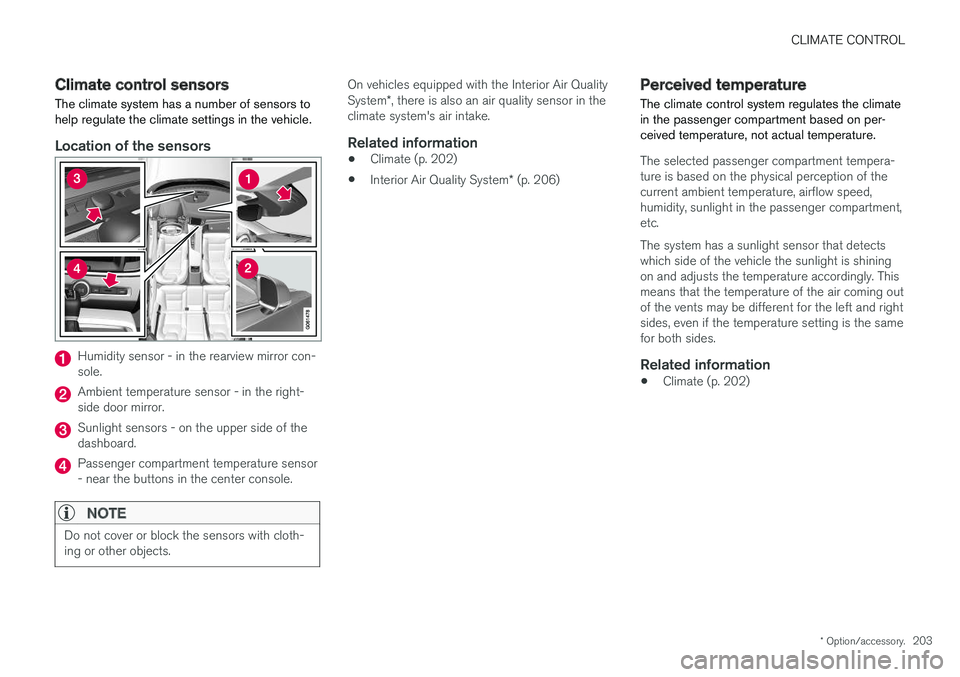
Location of the sensors
Humidity sensor - in the rearview mirror con- sole.
Ambient temperature sensor - in the right- side door mirror.
Sunlight sensors - on the upper side of the dashboard.
Passenger compartment temperature sensor - near the buttons in the center console.
NOTE
Do not cover or block the sensors with cloth- ing or other objects.
On vehicles equipped with the Interior Air Quality System *, there is also an air quality sensor in the
climate system's air intake.
Related information
• Climate (p. 202)
• Interior Air Quality System
* (p. 206)
Perceived temperature
The climate control system regulates the climate in the passenger compartment based on per-ceived temperature, not actual temperature.
The selected passenger compartment tempera- ture is based on the physical perception of thecurrent ambient temperature, airflow speed,humidity, sunlight in the passenger compartment,etc. The system has a sunlight sensor that detects which side of the vehicle the sunlight is shiningon and adjusts the temperature accordingly. Thismeans that the temperature of the air coming outof the vents may be different for the left and rightsides, even if the temperature setting is the samefor both sides.
Related information
• Climate (p. 202)
Page 245 of 656
KEY, LOCKS AND ALARM
* Option/accessory.243
secure when handing over the vehicle to e.g. a young driver, parking attendant or workshop. Thesettings for a Red Key cannot be changed by itsuser; a regular remote key is needed to changesettings.
Related information
•
Red Key
* settings (p. 243)
• Remote key (p. 233)
Red Key
* settings
The holder of a regular remote key can adjust settings for a Red Key. Certain driver supportfunctions are always active.
1. Tap Settings in the center display's Top
view.
2. Tap
SystemDriver ProfilesRed Key.
> The following settings can be made:
•
Set Time Gap For Adaptive Cruise Control
•Reduced Maximum Volume
•Max Speed Limit
•Speed Limit Warning
Adaptive Cruise Control *:
•Default setting: Longest interval
Reduced maximum volume (On/Off):
•Default setting: On
Speed Limiter (On/Off):
•Setting interval: 50-250 km/h (30-160 mph)
• The default setting is 120 km/h (75 mph)
• Increments: 1 km/h (1 mph)
The following symbol and message will be shown in the instrument panel
Red key Speed limitation cannot
be exceeded.
Speed reminder (On/Off):
• Setting interval: 0-250 km/h (0-160 mph)
• Default setting: 50, 70 and 90 km/h (30, 45 and 55 mph)
• Increments: 1 km/h (1 mph)
• Maximum number of simultaneous remind-ers: 6
Driver support functionsThe following driver support functions will alwaysbe active for a Red Key user:
• Blind Spot Information (BLIS)
*
• Lane Keeping Aid (LKA)
*
• Distance Alert
*
• City Safety
• Driver Alert Control (DAC)
*
• Road Sign Information
*
Related information
•Red Key - restricted remote key
* (p. 242)
Page 248 of 656
||
KEY, LOCKS AND ALARM
* Option/accessory.
246
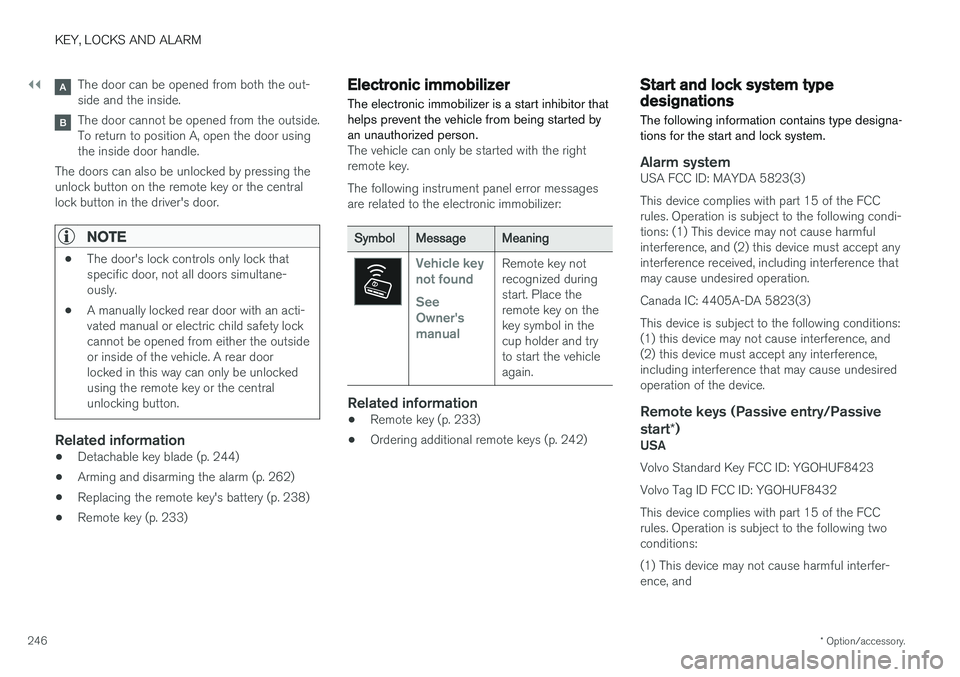
The door can be opened from both the out- side and the inside.
The door cannot be opened from the outside. To return to position A, open the door usingthe inside door handle.
The doors can also be unlocked by pressing theunlock button on the remote key or the centrallock button in the driver's door.
NOTE
• The door's lock controls only lock that specific door, not all doors simultane-ously.
• A manually locked rear door with an acti-vated manual or electric child safety lockcannot be opened from either the outsideor inside of the vehicle. A rear doorlocked in this way can only be unlockedusing the remote key or the centralunlocking button.
Related information
• Detachable key blade (p. 244)
• Arming and disarming the alarm (p. 262)
• Replacing the remote key's battery (p. 238)
• Remote key (p. 233)
Electronic immobilizer
The electronic immobilizer is a start inhibitor that helps prevent the vehicle from being started byan unauthorized person.
The vehicle can only be started with the right remote key. The following instrument panel error messages are related to the electronic immobilizer:
SymbolMessageMeaning
Vehicle key not found See Owner'smanualRemote key not recognized duringstart. Place theremote key on thekey symbol in thecup holder and tryto start the vehicleagain.
Related information
• Remote key (p. 233)
• Ordering additional remote keys (p. 242)
Start and lock system typedesignations
The following information contains type designa- tions for the start and lock system.
Alarm systemUSA FCC ID: MAYDA 5823(3) This device complies with part 15 of the FCC rules. Operation is subject to the following condi-tions: (1) This device may not cause harmfulinterference, and (2) this device must accept anyinterference received, including interference thatmay cause undesired operation. Canada IC: 4405A-DA 5823(3)This device is subject to the following conditions: (1) this device may not cause interference, and(2) this device must accept any interference,including interference that may cause undesiredoperation of the device.
Remote keys (Passive entry/Passive start *)
USA Volvo Standard Key FCC ID: YGOHUF8423 Volvo Tag ID FCC ID: YGOHUF8432This device complies with part 15 of the FCC rules. Operation is subject to the following two conditions: (1) This device may not cause harmful interfer- ence, and
Page 262 of 656
KEY, LOCKS AND ALARM
260
Private Locking The tailgate can be locked using the private locking function to prevent it from being opened,e.g. when the vehicle is left at a workshop orwith a valet.
The function button for private locking is located in the centerdisplay's Function view.Depending on the current sta- tus of the lock,
Private
Locking Unlocked or Private
Locking Locked will be dis-
played.
Related information
• Activating and deactivating private locking (p. 260)
Activating and deactivating privatelocking
Private locking is activated using the function button in the center display and a PIN code.
NOTE
For the valet lock function to be activated the car must be in at least ignition mode I.
Entering security code before initial useThe first time the function is used, a security code must be selected. This code can then beused to deactivate private locking if the selectedPIN code has been lost or forgotten. The securitycode functions as a PUK (security) code for allPIN codes used for private locking. Save the security code in a safe place.To create a security code:
1. Tap the button for private locking in Function
view.
> A pop-up window will appear. 2. Enter your security code.
> The security code is saved. The privatelocking function is now ready for activa- tion.
If the system has been reset, the above proce-dure will need to be repeated.
Activating private locking1. Tap the button for private locking in Function view.
> A pop-up window will appear.
2. Enter the code you would like to use to unlock the tailgate and tap
Confirm.
> The tailgate will lock. A green indicator light will illuminate next to the button in Function view to confirm locked status.
Page 263 of 656
KEY, LOCKS AND ALARM
}}
* Option/accessory.261
Deactivating private locking1. Tap the button for private locking in Function
view.
> A pop-up window will appear.
2. Enter the code used for locking and tap
Confirm.
> The tailgate will unlock. The green indica- tor light next to the button in Function view will go out to confirm unlocked sta-tus.
NOTE
If you have forgotten or lost your PIN code or if the PIN code has been entered incorrectlymore than three times, the security code canbe used to deactivate private locking.
NOTE
If private locking is activated and the vehicle is unlocked using Volvo On Call * or the Volvo
On Call * app, private locking will be deacti-
vated automatically.
Related information
• Private Locking (p. 260)
Alarm
The alarm emits sound and light signals if any- one without a valid remote key attempts to breakinto the vehicle or interferes with the start batteryor alarm siren.
When armed, the alarm will be triggered if:
• the hood, tailgate or any door is opened.
• a battery cable is disconnected
• the alarm siren is disconnected.
Alarm signalsThe following occurs if the alarm is triggered:
• A siren will sound for 30 seconds or until the alarm is turned off.
• All turn signals will flash for 5 minutes oruntil the alarm is turned off.
If the reason the alarm was triggered is not recti- fied, the alarm cycle will repeat up to 10 times 17
.
17 Certain markets only.
Page 402 of 656
STARTING AND DRIVING
* Option/accessory.
400
Starting the vehicle
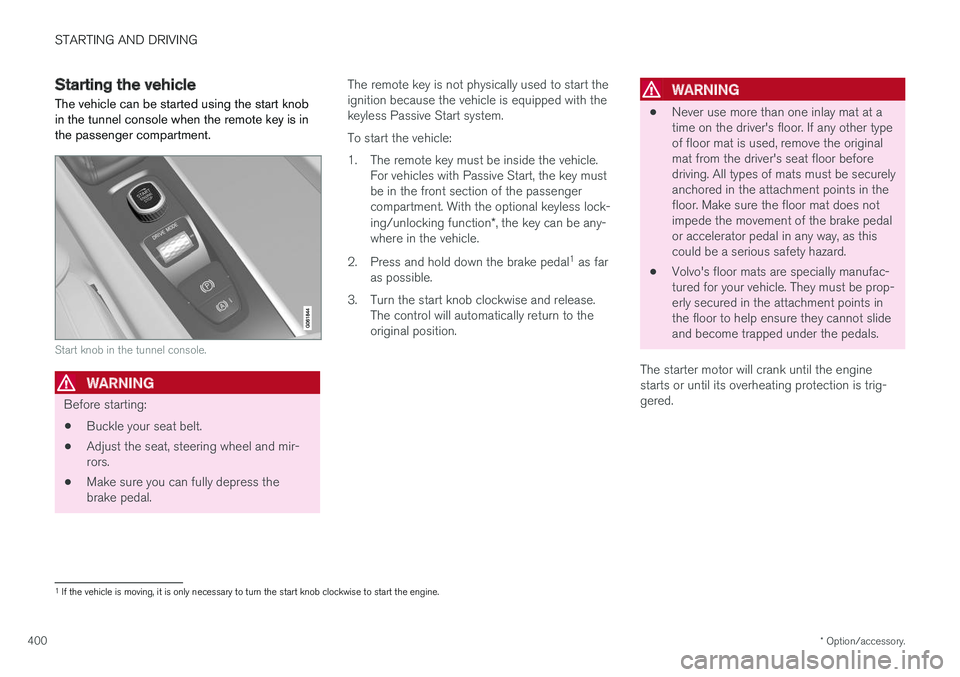
The vehicle can be started using the start knob in the tunnel console when the remote key is inthe passenger compartment.
Start knob in the tunnel console.
WARNING
Before starting:
• Buckle your seat belt.
• Adjust the seat, steering wheel and mir- rors.
• Make sure you can fully depress thebrake pedal. The remote key is not physically used to start theignition because the vehicle is equipped with thekeyless Passive Start system. To start the vehicle:
1. The remote key must be inside the vehicle.
For vehicles with Passive Start, the key must be in the front section of the passengercompartment. With the optional keyless lock- ing/unlocking function *, the key can be any-
where in the vehicle.
2. Press and hold down the brake pedal 1
as far
as possible.
3. Turn the start knob clockwise and release. The control will automatically return to the original position.
WARNING
• Never use more than one inlay mat at a time on the driver's floor. If any other typeof floor mat is used, remove the originalmat from the driver's seat floor beforedriving. All types of mats must be securelyanchored in the attachment points in thefloor. Make sure the floor mat does notimpede the movement of the brake pedalor accelerator pedal in any way, as thiscould be a serious safety hazard.
• Volvo's floor mats are specially manufac-tured for your vehicle. They must be prop-erly secured in the attachment points inthe floor to help ensure they cannot slideand become trapped under the pedals.
The starter motor will crank until the enginestarts or until its overheating protection is trig-gered.
1 If the vehicle is moving, it is only necessary to turn the start knob clockwise to start the engine.
Page 430 of 656
STARTING AND DRIVING
* Option/accessory.
428
Leveling control * and suspension
Self-leveling and suspension functions are con- trolled automatically.
Rear leveling control keeps the rear section of the vehicle at the same height regardless of load.Leveling control may also remain active when thevehicle is parked.
Shock absorbers (Four-C)The shock absorbers are adapted to the selecteddrive mode and vehicle speed. The shock absorb-ers are normally set to provide the best possiblecomfort and are adjusted continuously accordingto the road surface and the vehicle's acceleration,braking and cornering.TransportingWhen transporting the vehicle on a ferry, train ortruck, only secure (lash) the vehicle around thetires, not using any other parts of the chassis.Changes in the pneumatic suspension may occurduring transport, which could adversely affect thelashing and result in damage.
Symbols and messages in driver display
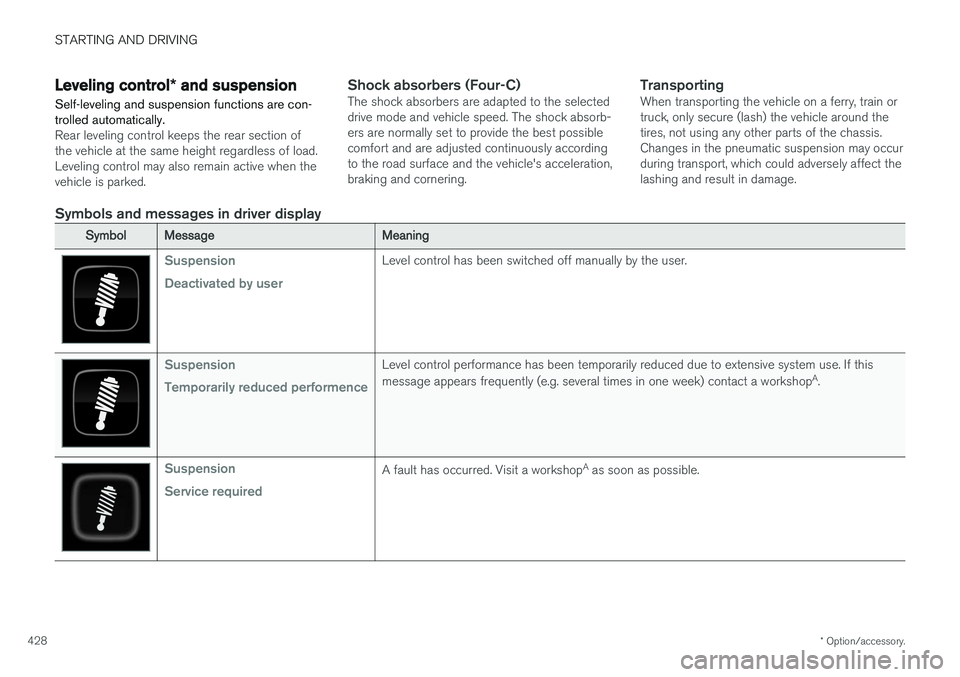
SymbolMessageMeaning
Suspension Deactivated by userLevel control has been switched off manually by the user.
Suspension Temporarily reduced performenceLevel control performance has been temporarily reduced due to extensive system use. If this message appears frequently (e.g. several times in one week) contact a workshop A
.
Suspension Service requiredA fault has occurred. Visit a workshop A
as soon as possible.
Page 441 of 656
STARTING AND DRIVING
}}
439
Jump starting using another batteryIf the start battery is discharged, current from another battery can be used to start the vehicle.
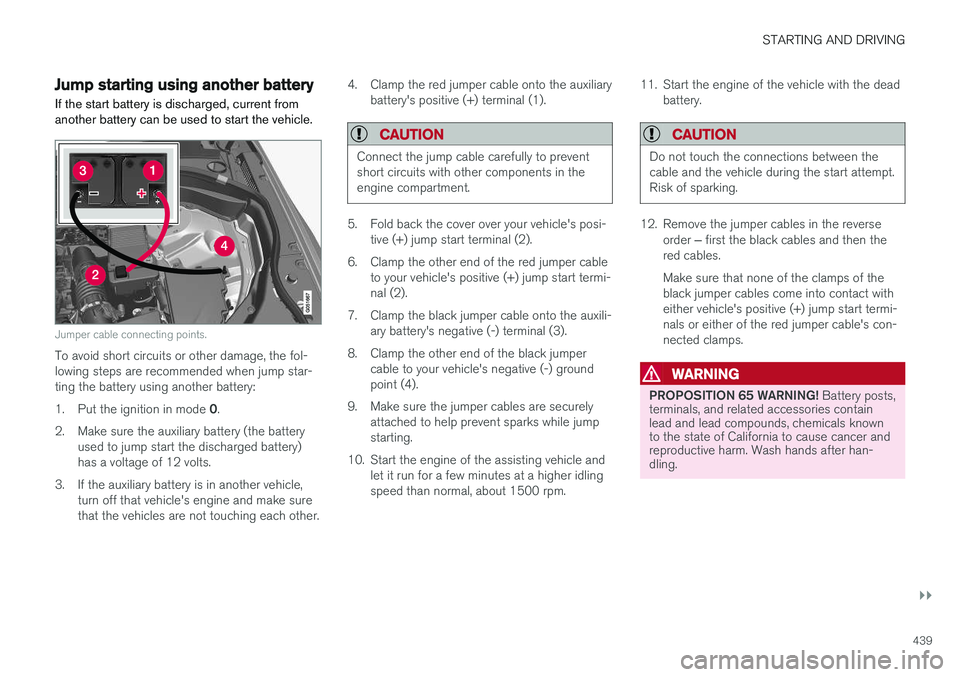
Jumper cable connecting points.
To avoid short circuits or other damage, the fol- lowing steps are recommended when jump star-ting the battery using another battery: 1. Put the ignition in mode 0.
2. Make sure the auxiliary battery (the battery used to jump start the discharged battery) has a voltage of 12 volts.
3. If the auxiliary battery is in another vehicle, turn off that vehicle's engine and make surethat the vehicles are not touching each other. 4. Clamp the red jumper cable onto the auxiliary
battery's positive (+) terminal (1).
CAUTION
Connect the jump cable carefully to prevent short circuits with other components in theengine compartment.
5. Fold back the cover over your vehicle's posi-tive (+) jump start terminal (2).
6. Clamp the other end of the red jumper cable to your vehicle's positive (+) jump start termi- nal (2).
7. Clamp the black jumper cable onto the auxili- ary battery's negative (-) terminal (3).
8. Clamp the other end of the black jumper cable to your vehicle's negative (-) groundpoint (4).
9. Make sure the jumper cables are securely attached to help prevent sparks while jumpstarting.
10. Start the engine of the assisting vehicle and let it run for a few minutes at a higher idlingspeed than normal, about 1500 rpm. 11. Start the engine of the vehicle with the dead
battery.
CAUTION
Do not touch the connections between the cable and the vehicle during the start attempt.Risk of sparking.
12. Remove the jumper cables in the reverse
order ‒ first the black cables and then the
red cables. Make sure that none of the clamps of the black jumper cables come into contact witheither vehicle's positive (+) jump start termi-nals or either of the red jumper cable's con-nected clamps.
WARNING
PROPOSITION 65 WARNING! Battery posts,
terminals, and related accessories contain lead and lead compounds, chemicals knownto the state of California to cause cancer andreproductive harm. Wash hands after han-dling.
Page 447 of 656
STARTING AND DRIVING
}}
445
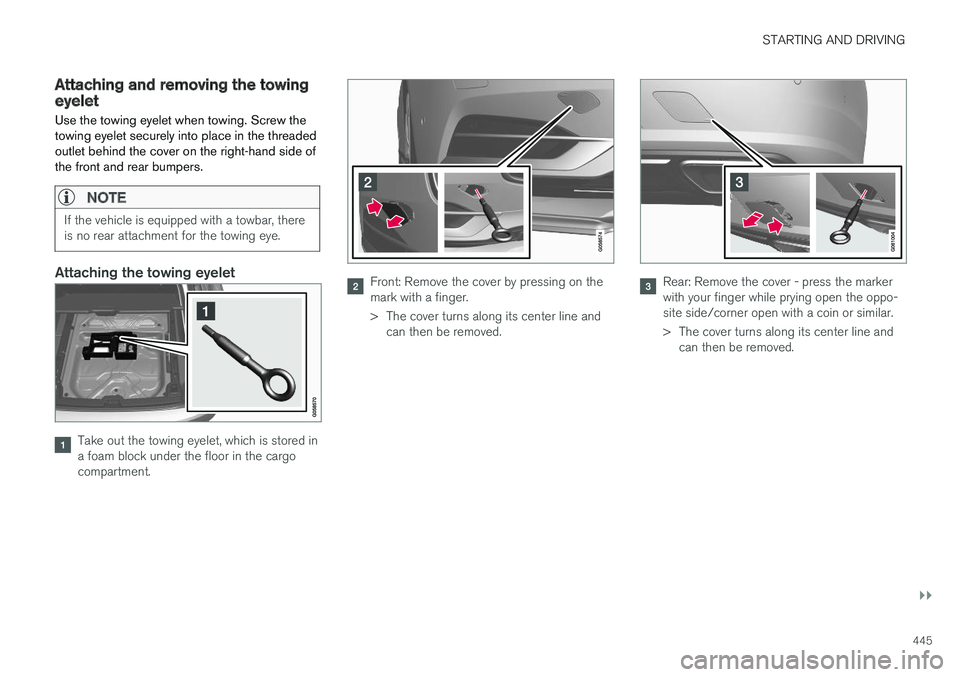
Attaching and removing the towingeyeletUse the towing eyelet when towing. Screw the towing eyelet securely into place in the threadedoutlet behind the cover on the right-hand side ofthe front and rear bumpers.
NOTE
If the vehicle is equipped with a towbar, there is no rear attachment for the towing eye.
Attaching the towing eyelet
Take out the towing eyelet, which is stored in a foam block under the floor in the cargocompartment.
Front: Remove the cover by pressing on the mark with a finger.
> The cover turns along its center line and can then be removed.Rear: Remove the cover - press the marker with your finger while prying open the oppo-site side/corner open with a coin or similar.
> The cover turns along its center line andcan then be removed.