trailer VOLVO V90 2018 Owner´s Manual
[x] Cancel search | Manufacturer: VOLVO, Model Year: 2018, Model line: V90, Model: VOLVO V90 2018Pages: 656, PDF Size: 11.78 MB
Page 348 of 656
DRIVER SUPPORT
* Option/accessory.
346
BLIS messages
A number of messages related to BLIS 84
may
be displayed in the instrument panel.
Some examples of symbols and messages are shown in the table below.
MessageMeaning
Blind spot sensor Service requiredThe system is not functioning as intended. Contact a workshop ‒ an authorized Volvo workshop is recommended.
Blind spot system off Trailer attachedBLIS and CTA have been deactivated because a trailer has been connected to the vehicle's electrical system.
A text message can be erased by briefly pressing the
button in the center of the right-side
steering wheel keypad. If the message persists: Contact a workshop ‒ an
authorized Volvo workshop is recommended.
Related information
• BLIS
* (p. 342)
84
Blind Spot Information
Page 351 of 656
DRIVER SUPPORT
* Option/accessory.349
Examples of further limitations
•Dirt, ice and snow covering the sensors may reduce functionality and prevent the systemfrom providing warnings. For additional infor-mation, see the section "Recommendedmaintenance for Cross Traffic Alert".
• CTA is automatically deactivated if a trailer,bicycle holder or similar is connected to thevehicle's electrical system.
• For CTA to function optimally, bicycle hold-ers, luggage racks or similar should not bemounted on the vehicle's towbar.
Related information
•
Cross Traffic Alert
* (p. 347)
Recommended maintenance forCross Traffic Alert
• For optimal performance, it is important to keep the areas in front of the sensors clean.
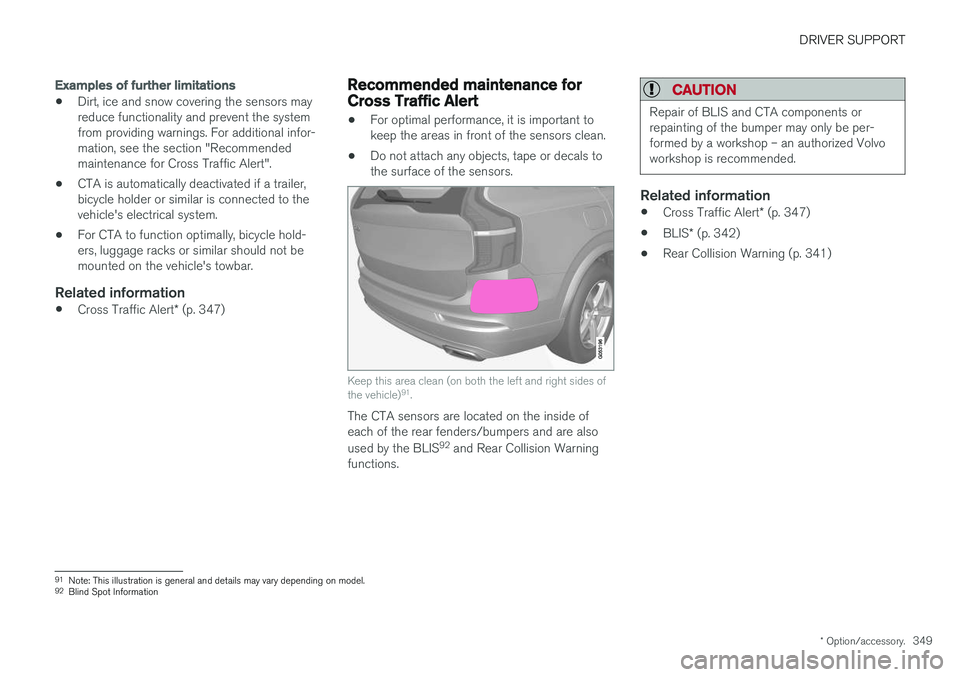
• Do not attach any objects, tape or decals tothe surface of the sensors.
Keep this area clean (on both the left and right sides of the vehicle) 91
.
The CTA sensors are located on the inside of each of the rear fenders/bumpers and are also used by the BLIS 92
and Rear Collision Warning
functions.
CAUTION
Repair of BLIS and CTA components or repainting of the bumper may only be per-formed by a workshop – an authorized Volvoworkshop is recommended.
Related information
• Cross Traffic Alert
* (p. 347)
• BLIS
* (p. 342)
• Rear Collision Warning (p. 341)
91
Note: This illustration is general and details may vary depending on model.
92 Blind Spot Information
Page 352 of 656
DRIVER SUPPORT
* Option/accessory.
350
Cross Traffic Alert messages
A number of messages related to CTA 93
may be
displayed in the instrument panel.
Some examples of symbols and messages are shown in the table below.
MessageMeaning
Blind spot sensor Service requiredThe system is not functioning as intended. Contact a workshop ‒ an authorized Volvo workshop is recommended.
Blind spot system off Trailer attachedBLIS and CTA have been deactivated because a trailer has been connected to the vehicle's electrical system.
A text message can be erased by briefly pressing the
button in the center of the right-side
steering wheel keypad. If the message persists: Contact a workshop ‒ an
authorized Volvo workshop is recommended.
Related information
• Cross Traffic Alert
* (p. 347)
93
Cross Traffic Alert
Page 358 of 656
||
DRIVER SUPPORT
* Option/accessory.
356 •
signs partially or fully covered by frost, snow and/or dirt
• digital road maps 104
that are outdated, incor-
rect or do not contain speed information 105
.
NOTE
Certain types of bike carriers that are con- nected to the trailer socket may be interpre-ted as a connected trailer by the RSI function.In such cases, the instrument panel may indi-cate incorrect speed information.
NOTE
The function uses the vehicle's camera unit, which has some general limitations – see thesection "Camera unit limitations".
Related information
• Road Sign Information
* (p. 351)
Driver Alert Control
The Driver Alert Control (DAC) function is designed to help capture the driver becomeaware of erratic behavior, e.g. if the driver is dis-tracted or showing signs of fatigue.
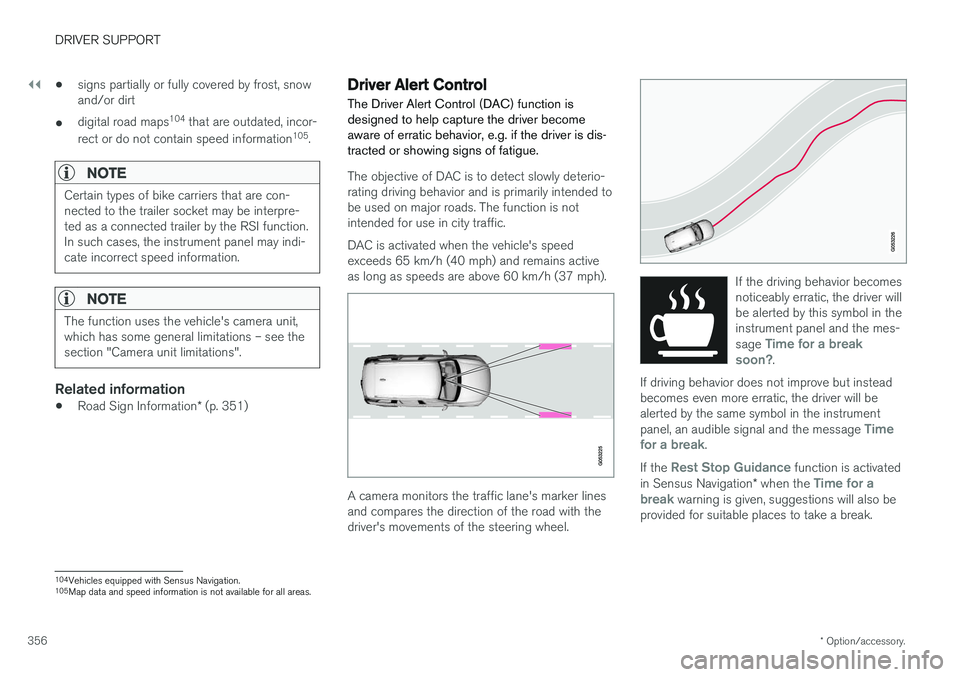
The objective of DAC is to detect slowly deterio- rating driving behavior and is primarily intended tobe used on major roads. The function is notintended for use in city traffic. DAC is activated when the vehicle's speed exceeds 65 km/h (40 mph) and remains activeas long as speeds are above 60 km/h (37 mph).
A camera monitors the traffic lane's marker lines and compares the direction of the road with thedriver's movements of the steering wheel.
If the driving behavior becomes noticeably erratic, the driver willbe alerted by this symbol in theinstrument panel and the mes- sage
Time for a break
soon?.
If driving behavior does not improve but instead becomes even more erratic, the driver will bealerted by the same symbol in the instrument panel, an audible signal and the message
Time
for a break.
If the Rest Stop Guidance function is activated
in Sensus Navigation * when the Time for a
break warning is given, suggestions will also be
provided for suitable places to take a break.
104 Vehicles equipped with Sensus Navigation.
105 Map data and speed information is not available for all areas.
Page 378 of 656
DRIVER SUPPORT
376
Park Assist front, rear and sides
Park Assist has different parameters depending on which part of the vehicle is approaching anobstacle.
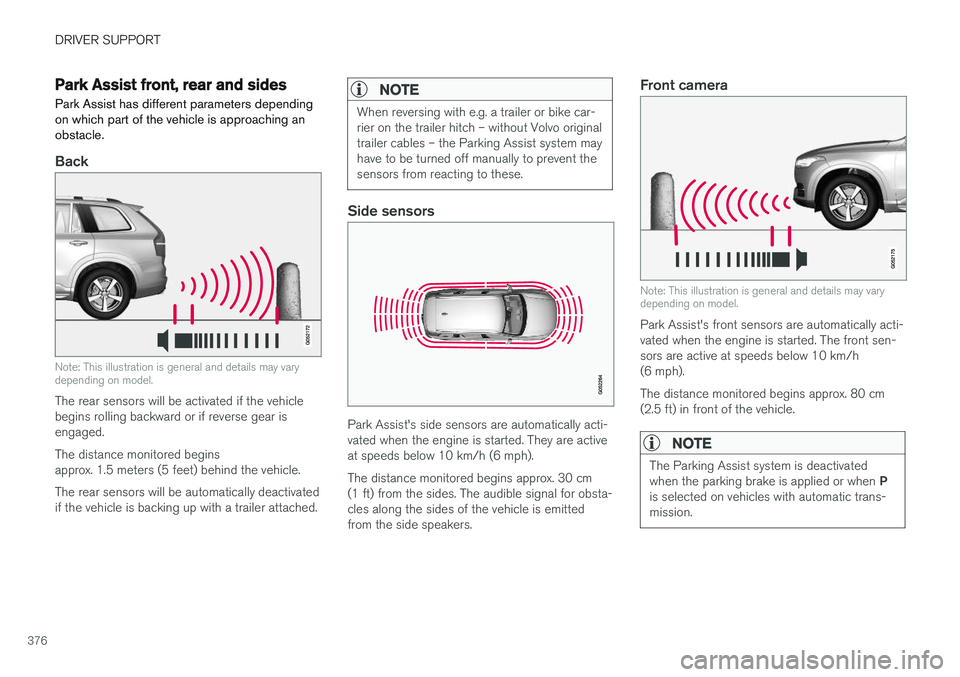
Back
Note: This illustration is general and details may vary depending on model.
The rear sensors will be activated if the vehicle begins rolling backward or if reverse gear isengaged. The distance monitored begins approx. 1.5 meters (5 feet) behind the vehicle. The rear sensors will be automatically deactivated if the vehicle is backing up with a trailer attached.
NOTE
When reversing with e.g. a trailer or bike car- rier on the trailer hitch – without Volvo originaltrailer cables – the Parking Assist system mayhave to be turned off manually to prevent thesensors from reacting to these.
Side sensors
Park Assist's side sensors are automatically acti- vated when the engine is started. They are activeat speeds below 10 km/h (6 mph). The distance monitored begins approx. 30 cm (1 ft) from the sides. The audible signal for obsta-cles along the sides of the vehicle is emittedfrom the side speakers.
Front camera
Note: This illustration is general and details may vary depending on model.
Park Assist's front sensors are automatically acti- vated when the engine is started. The front sen-sors are active at speeds below 10 km/h(6 mph). The distance monitored begins approx. 80 cm (2.5 ft) in front of the vehicle.
NOTE
The Parking Assist system is deactivated when the parking brake is applied or when P
is selected on vehicles with automatic trans- mission.
Page 379 of 656
DRIVER SUPPORT
}}
* Option/accessory.377
CAUTION
When installing auxiliary lights: Make sure these do not obscure the sensors – the auxili-ary lights could be perceived as an obstacle.
Related information
•Park Assist
* (p. 375)
Activating/deactivating Park Assist
The Park Assist Pilot function can be activated/ deactivated.
On/OffPark Assist's front and side sensors are automat- ically activated when the engine is started. Therear sensors are activated if the vehicle is movingbackward or reverse gear is engaged.
The function can be activated/deactivated in the center dis-play's Function view.
–Tap the Park Assist button in Function view.
> The Park Assist Pilot indicator light shows the status of the function: GREEN (on) or GRAY (off).
In vehicles equipped with Park Assist Camera,Park Assist can also be activated/deactivatedfrom the relevant camera view.
Related information
• Park Assist
* (p. 375)
Park Assist limitations
Park Assist may not be able to detect all condi- tions in all situations and functionality may there-fore be limited in certain cases.
The driver should be aware of the following limi- tations for Park Assist:
WARNING
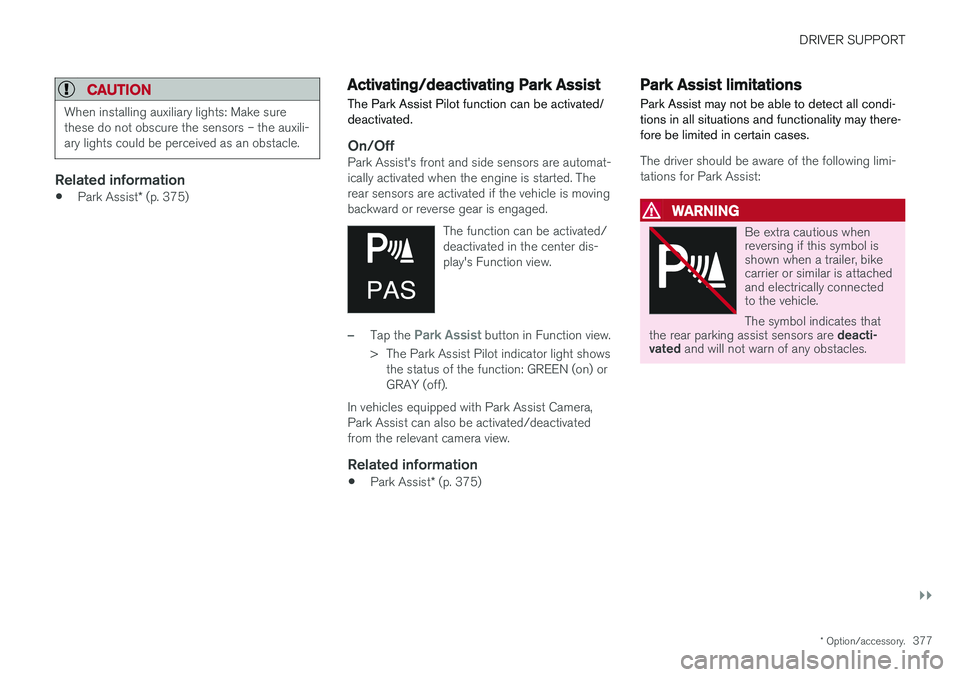
Be extra cautious when reversing if this symbol isshown when a trailer, bikecarrier or similar is attachedand electrically connectedto the vehicle. The symbol indicates that
the rear parking assist sensors are deacti-
vated and will not warn of any obstacles.
Page 380 of 656
||
DRIVER SUPPORT
* Option/accessory.
378
CAUTION
Objects such as chains, thin and glossy poles or low obstacles may end up in the "signalshadow" and then go temporarily undetectedby the sensors – the pulsating tone may thenunexpectedly stop instead of becoming aconstant tone as expected. The sensors cannot detect high objects, such as protruding ramps.
• In such situations, pay extra attention andmaneuver/drive the vehicle very slowly orstop the current parking maneuver –there may be a high risk of damage tothe vehicle or other objects since infor-mation from the sensors is not alwaysreliable in such situations.
CAUTION
In some circumstances, the Park Assist Sys- tem may produce false warnings due to exter-nal sound sources with the same ultrasonicfrequencies as those the system works with. Examples of such sources are horns, wet tires on asphalt, pneumatic brakes, exhaust noisefrom motorcycles, etc.
NOTE
When a trailer hitch is configured with the vehicle electrical system, the trailer hitch pro-trusion is included when the function meas-ures the distance to objects behind the vehi-cle.
Related information
•
Park Assist
* (p. 375)
Recommended maintenance forPark Assist
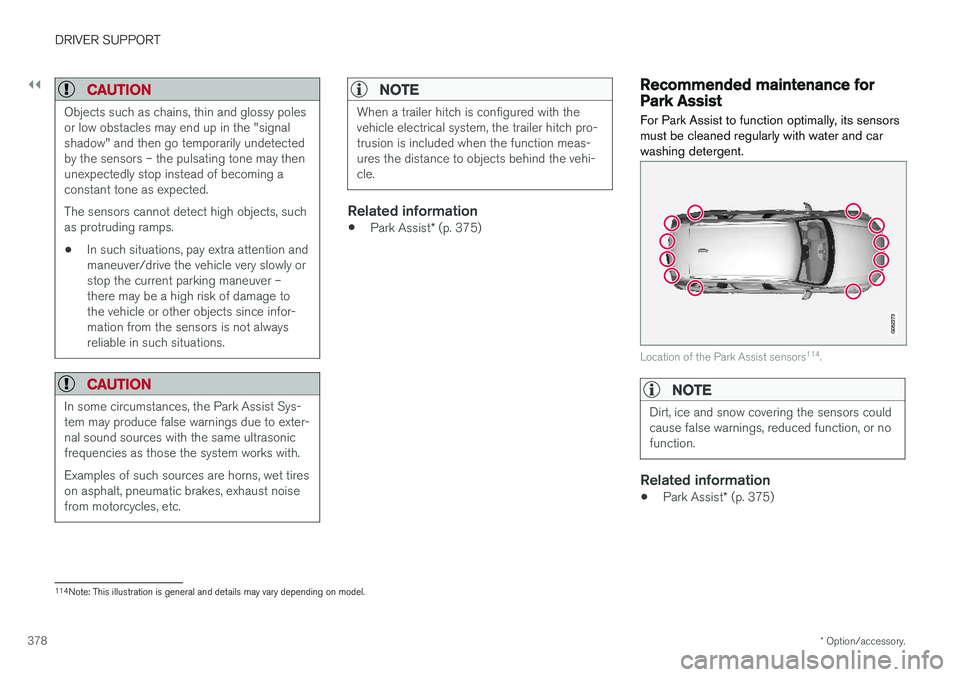
For Park Assist to function optimally, its sensors must be cleaned regularly with water and carwashing detergent.
Location of the Park Assist sensors 114
.
NOTE
Dirt, ice and snow covering the sensors could cause false warnings, reduced function, or nofunction.
Related information
• Park Assist
* (p. 375)
114
Note: This illustration is general and details may vary depending on model.
Page 384 of 656
||
DRIVER SUPPORT
* Option/accessory.
382
Side cameras
The side cameras 119
are located in the rearview mirrors.
The side cameras can show views along each side of the vehicle.
Related information
• Park Assist Camera
* (p. 380)
Park Assist Camera trajectory lines
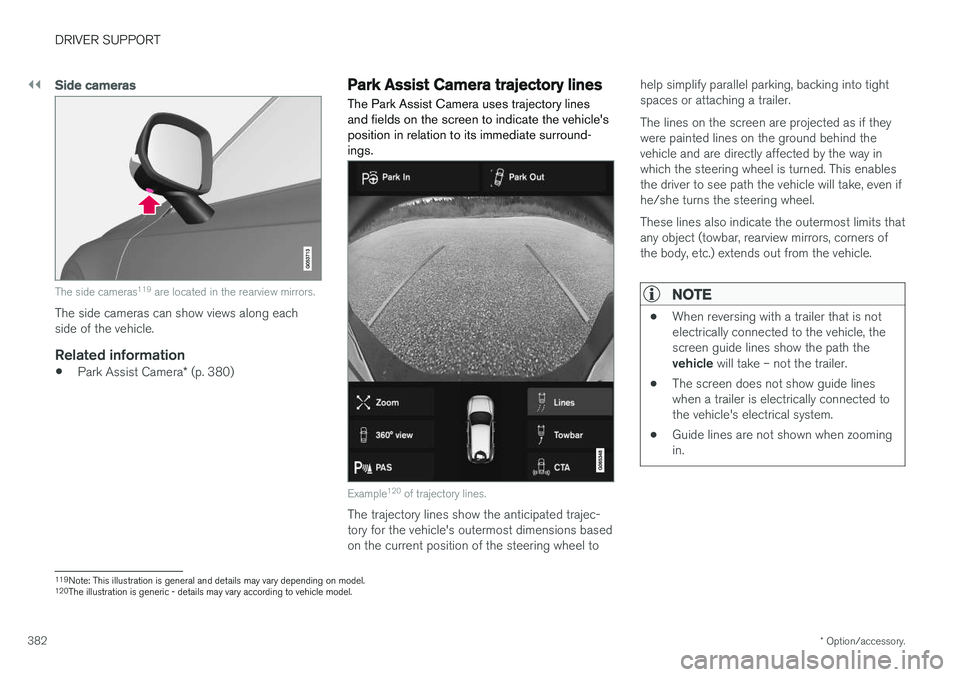
The Park Assist Camera uses trajectory lines and fields on the screen to indicate the vehicle'sposition in relation to its immediate surround-ings.
Example 120
of trajectory lines.
The trajectory lines show the anticipated trajec- tory for the vehicle's outermost dimensions basedon the current position of the steering wheel to help simplify parallel parking, backing into tightspaces or attaching a trailer. The lines on the screen are projected as if they were painted lines on the ground behind thevehicle and are directly affected by the way inwhich the steering wheel is turned. This enablesthe driver to see path the vehicle will take, even ifhe/she turns the steering wheel. These lines also indicate the outermost limits that any object (towbar, rearview mirrors, corners ofthe body, etc.) extends out from the vehicle.
NOTE
•
When reversing with a trailer that is not electrically connected to the vehicle, thescreen guide lines show the path the vehicle
will take – not the trailer.
• The screen does not show guide lines when a trailer is electrically connected tothe vehicle's electrical system.
• Guide lines are not shown when zoomingin.
119
Note: This illustration is general and details may vary depending on model.
120 The illustration is generic - details may vary according to vehicle model.
Page 385 of 656
DRIVER SUPPORT
}}
* Option/accessory.383
CAUTION
•Bear in mind that when the rearward camera view is selected, the screen onlyshows the area behind the vehicle – payattention to the sides and front of thevehicle when steering while reversing.
• The same applies to the reverse – payattention to what is happening with therear parts of the vehicle when the frontcamera view is selected.
• Note that the guide lines show the
short-
est path – pay extra attention to ensure
that the vehicle sides do not come incontact with/travel over anything whensteering while driving forward or that thevehicle front moves toward/over anythingwhen steering while reversing.
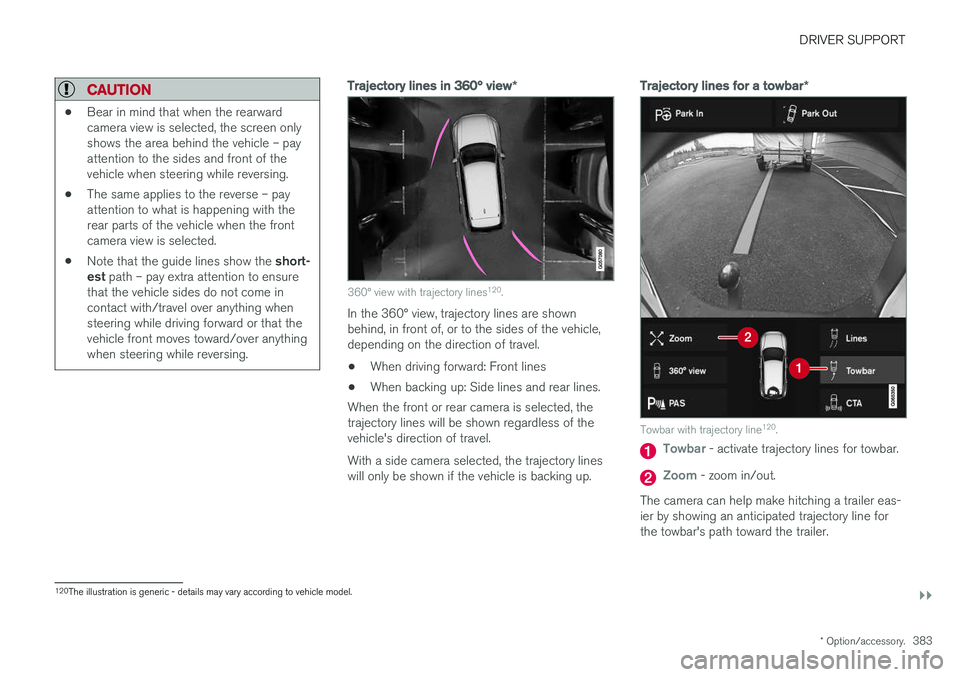
Trajectory lines in 360° view *
360° view with trajectory lines120
.
In the 360° view, trajectory lines are shown behind, in front of, or to the sides of the vehicle,depending on the direction of travel.
• When driving forward: Front lines
• When backing up: Side lines and rear lines.
When the front or rear camera is selected, thetrajectory lines will be shown regardless of thevehicle's direction of travel. With a side camera selected, the trajectory lines will only be shown if the vehicle is backing up.
Trajectory lines for a towbar *
Towbar with trajectory line120
.
Towbar - activate trajectory lines for towbar.
Zoom - zoom in/out.
The camera can help make hitching a trailer eas- ier by showing an anticipated trajectory line for the towbar's path toward the trailer.
120 The illustration is generic - details may vary according to vehicle model.
Page 387 of 656
DRIVER SUPPORT
}}
* Option/accessory.385
Starting the Park Assist Camera
The Park Assist Camera starts automatically when reverse gear is engaged or can be startedmanually using one of the center display's func-tion buttons.
Camera view when backing upWhen reverse gear is engaged, the screen shows the rear view 122
.
Camera view when manually starting
the camera
Start the Park Assist Camera using this button in the centerdisplay's Function view. The screen will first show the most recently used cameraview. However, each time the
engine is started, the previous side view will bereplaced by the 360° view and a previously dis-played zoomed-in rear view will be replaced bythe regular rear view.
Automatically deactivating the cameraFront view switches off when the vehicle's speed reaches 25 km/h (16 mph) to help avoid dis-tracting the driver. It will be automatically reactiva-ted if the vehicle's speed falls below 22 km/h(14 mph) within 1 minute as long as the vehicle'sspeed has not exceeded 50 km/h (31 mph). Other camera views switch off at 15 km/h(9 mph) and are not reactivated.
Related information
•
Park Assist Camera
* (p. 380)
Park Assist Camera limitations
The Park Assist Camera may not be able to detect all conditions in all situations and func-tionality may therefore be limited.
The driver should be aware of the following limi- tations for the Park Assist Camera:
WARNING
Be extra cautious when reversing if this symbol isshown when a trailer, bikecarrier or similar is attachedand electrically connectedto the vehicle. The symbol indicates that
the rear parking assist sensors are deacti-
vated and will not warn of any obstacles.
NOTE
A bike carrier and other accessories mounted on the rear of the vehicle can obscure thecamera's view.
122
In Canada, it is also possible to select the 360° view.