climate control VOLVO V90 2018 Owner´s Manual
[x] Cancel search | Manufacturer: VOLVO, Model Year: 2018, Model line: V90, Model: VOLVO V90 2018Pages: 656, PDF Size: 11.78 MB
Page 230 of 656
CLIMATE CONTROL
* Option/accessory.
228
Setting the temperature for the rear
seats *
The temperature can be set to the desired num- ber of degrees for the rear seat climate zones.
Setting the temperature for the rear seats from the front seats
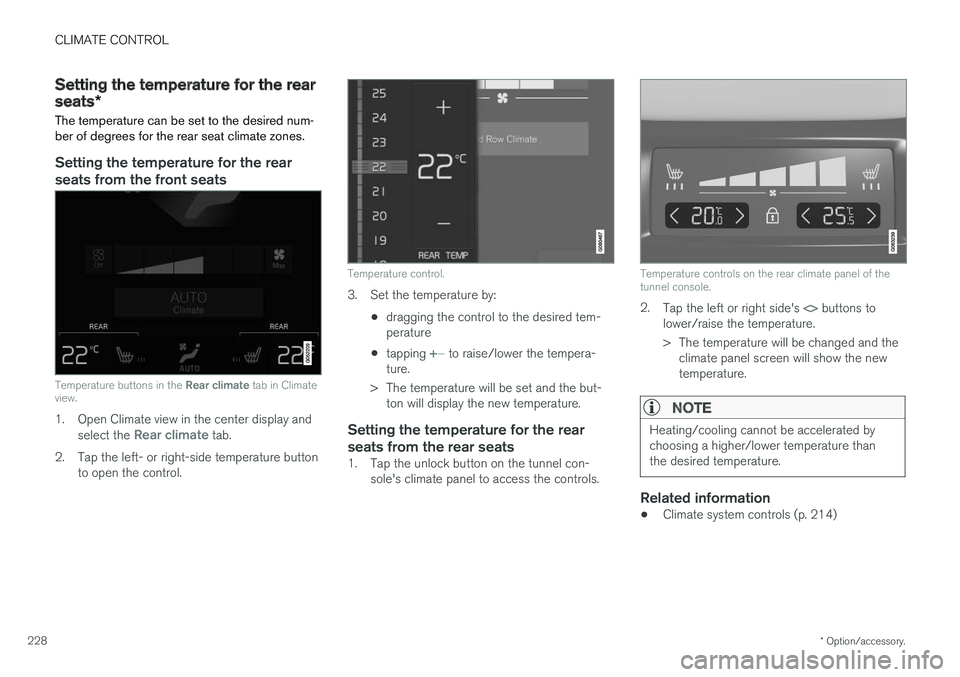
Temperature buttons in the Rear climate tab in Climate
view.
1. Open Climate view in the center display and
select the Rear climate tab.
2. Tap the left- or right-side temperature button to open the control.
Temperature control.
3. Set the temperature by:
•dragging the control to the desired tem- perature
• tapping
+
− to raise/lower the tempera-
ture.
> The temperature will be set and the but- ton will display the new temperature.
Setting the temperature for the rear seats from the rear seats
1. Tap the unlock button on the tunnel con- sole's climate panel to access the controls.
Temperature controls on the rear climate panel of the tunnel console.
2.Tap the left or right side's <> buttons to
lower/raise the temperature.
> The temperature will be changed and the climate panel screen will show the new temperature.
NOTE
Heating/cooling cannot be accelerated by choosing a higher/lower temperature thanthe desired temperature.
Related information
• Climate system controls (p. 214)
Page 231 of 656
CLIMATE CONTROL
}}
* Option/accessory.229
Synchronize temperature
The temperature in the different climate zones of the vehicle can be synchronized with the tem-perature set for the driver's side.
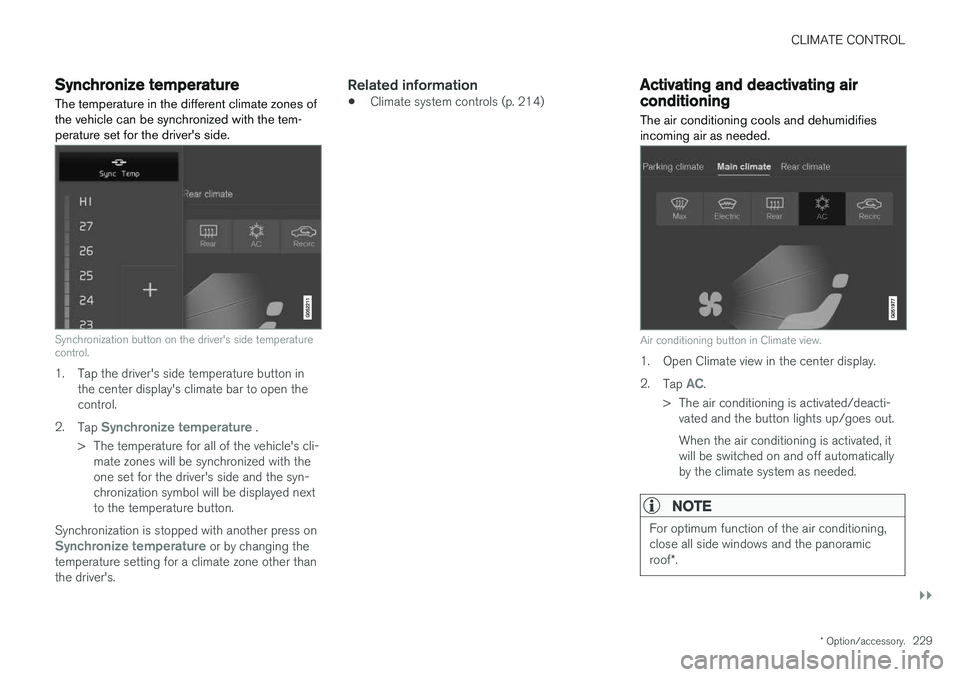
Synchronization button on the driver's side temperature control.
1. Tap the driver's side temperature button in the center display's climate bar to open the control.
2. Tap
Synchronize temperature .
> The temperature for all of the vehicle's cli- mate zones will be synchronized with the one set for the driver's side and the syn-chronization symbol will be displayed nextto the temperature button.
Synchronization is stopped with another press on
Synchronize temperature or by changing the
temperature setting for a climate zone other than the driver's.
Related information
• Climate system controls (p. 214)
Activating and deactivating airconditioning
The air conditioning cools and dehumidifies incoming air as needed.
Air conditioning button in Climate view.
1. Open Climate view in the center display. 2. Tap
AC.
> The air conditioning is activated/deacti- vated and the button lights up/goes out. When the air conditioning is activated, it will be switched on and off automaticallyby the climate system as needed.
NOTE
For optimum function of the air conditioning, close all side windows and the panoramic roof *.
Page 232 of 656
||
CLIMATE CONTROL
230
NOTE
The air conditioning cannot be activated when the fan speed is set to Off.
Related information
•Climate system controls (p. 214)
Page 421 of 656
STARTING AND DRIVING
}}
* Option/accessory.419
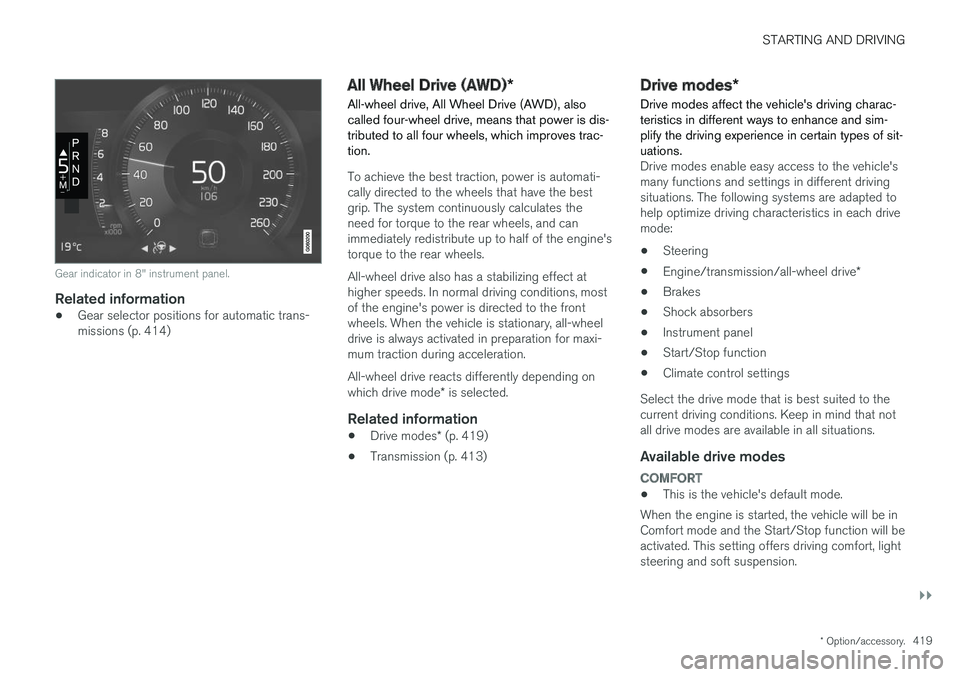
Gear indicator in 8" instrument panel.
Related information
•Gear selector positions for automatic trans- missions (p. 414)
All Wheel Drive (AWD)
*
All-wheel drive, All Wheel Drive (AWD), also called four-wheel drive, means that power is dis-tributed to all four wheels, which improves trac-tion.
To achieve the best traction, power is automati- cally directed to the wheels that have the bestgrip. The system continuously calculates theneed for torque to the rear wheels, and canimmediately redistribute up to half of the engine'storque to the rear wheels. All-wheel drive also has a stabilizing effect at higher speeds. In normal driving conditions, mostof the engine's power is directed to the frontwheels. When the vehicle is stationary, all-wheeldrive is always activated in preparation for maxi-mum traction during acceleration. All-wheel drive reacts differently depending on which drive mode * is selected.
Related information
• Drive modes
* (p. 419)
• Transmission (p. 413)
Drive modes
*
Drive modes affect the vehicle's driving charac- teristics in different ways to enhance and sim-plify the driving experience in certain types of sit-uations.
Drive modes enable easy access to the vehicle's many functions and settings in different drivingsituations. The following systems are adapted tohelp optimize driving characteristics in each drivemode: • Steering
• Engine/transmission/all-wheel drive
*
• Brakes
• Shock absorbers
• Instrument panel
• Start/Stop function
• Climate control settings
Select the drive mode that is best suited to the current driving conditions. Keep in mind that notall drive modes are available in all situations.
Available drive modes
COMFORT
• This is the vehicle's default mode.
When the engine is started, the vehicle will be in Comfort mode and the Start/Stop function will beactivated. This setting offers driving comfort, lightsteering and soft suspension.
Page 422 of 656
||
STARTING AND DRIVING
* Option/accessory.
420
ECO
• Adapt the vehicle for more fuel-efficient and eco-friendly driving with Eco mode.
In this mode, the Start/Stop function is activatedand certain climate settings are reduced. The instrument panel has an ECO gauge to facili- tate fuel-efficient driving.
DYNAMIC
• Dynamic mode is designed to provide sport- ier driving characteristics and a faster accel-eration response.
Gear shifting will be faster and more distinct andthe transmission will prioritize gears with a highertraction force. Steering response is faster and suspension is stiffer 4
to help reduce body roll when cornering.
The Start/Stop function is deactivated.
INDIVIDUAL
• Customizes drive mode to personal preferen- ces.
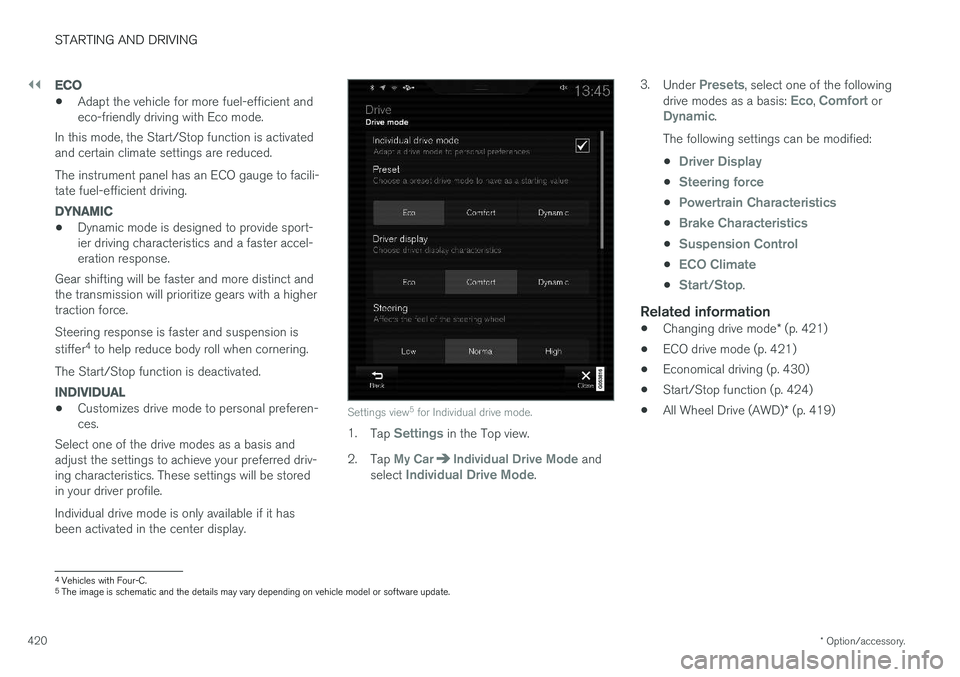
Select one of the drive modes as a basis andadjust the settings to achieve your preferred driv- ing characteristics. These settings will be stored in your driver profile. Individual drive mode is only available if it has been activated in the center display.Settings view 5
for Individual drive mode.
1. Tap Settings in the Top view.
2. Tap
My CarIndividual Drive Mode and
select Individual Drive Mode. 3.
Under
Presets, select one of the following
drive modes as a basis: Eco, Comfort orDynamic.
The following settings can be modified: •
Driver Display
•Steering force
•Powertrain Characteristics
•Brake Characteristics
•Suspension Control
•ECO Climate
•Start/Stop.
Related information
• Changing drive mode
* (p. 421)
• ECO drive mode (p. 421)
• Economical driving (p. 430)
• Start/Stop function (p. 424)
• All Wheel Drive (AWD)
* (p. 419)
4
Vehicles with Four-C.
5 The image is schematic and the details may vary depending on vehicle model or software update.
Page 423 of 656
STARTING AND DRIVING
}}
* Option/accessory.421
Changing drive mode *
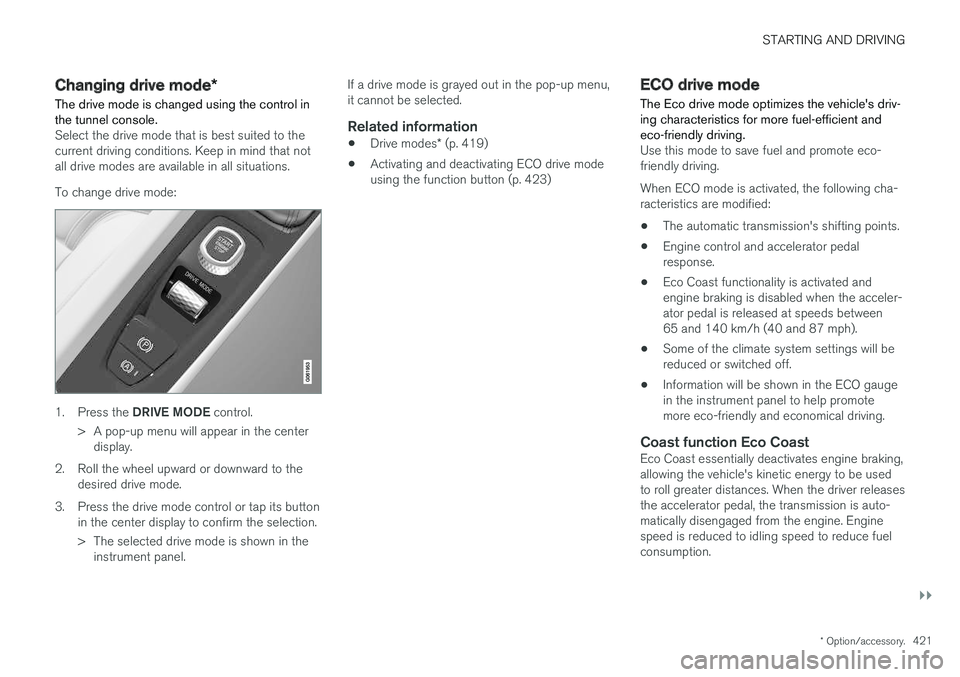
The drive mode is changed using the control in the tunnel console.
Select the drive mode that is best suited to the current driving conditions. Keep in mind that notall drive modes are available in all situations. To change drive mode:
1. Press the DRIVE MODE control.
> A pop-up menu will appear in the center display.
2. Roll the wheel upward or downward to the desired drive mode.
3. Press the drive mode control or tap its button in the center display to confirm the selection.
> The selected drive mode is shown in theinstrument panel. If a drive mode is grayed out in the pop-up menu, it cannot be selected.
Related information
•
Drive modes
* (p. 419)
• Activating and deactivating ECO drive modeusing the function button (p. 423)
ECO drive mode
The Eco drive mode optimizes the vehicle's driv- ing characteristics for more fuel-efficient andeco-friendly driving.
Use this mode to save fuel and promote eco- friendly driving. When ECO mode is activated, the following cha- racteristics are modified:
• The automatic transmission's shifting points.
• Engine control and accelerator pedalresponse.
• Eco Coast functionality is activated andengine braking is disabled when the acceler-ator pedal is released at speeds between65 and 140 km/h (40 and 87 mph).
• Some of the climate system settings will bereduced or switched off.
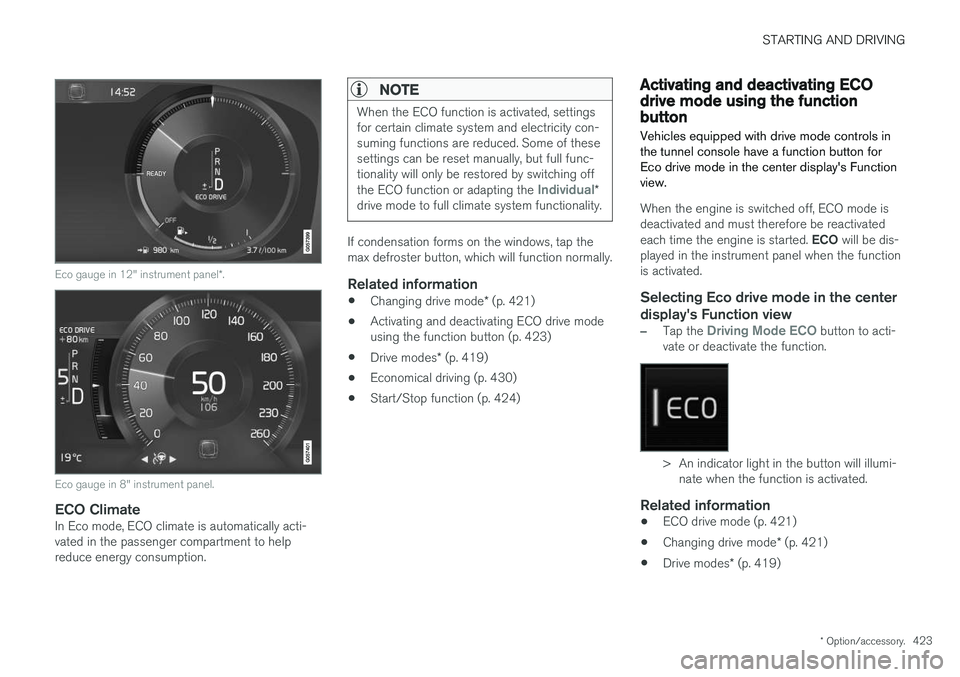
• Information will be shown in the ECO gaugein the instrument panel to help promotemore eco-friendly and economical driving.
Coast function Eco CoastEco Coast essentially deactivates engine braking,allowing the vehicle's kinetic energy to be used to roll greater distances. When the driver releases the accelerator pedal, the transmission is auto- matically disengaged from the engine. Enginespeed is reduced to idling speed to reduce fuelconsumption.
Page 425 of 656
STARTING AND DRIVING
* Option/accessory.423
Eco gauge in 12" instrument panel *.
Eco gauge in 8" instrument panel.
ECO ClimateIn Eco mode, ECO climate is automatically acti- vated in the passenger compartment to helpreduce energy consumption.
NOTE
When the ECO function is activated, settings for certain climate system and electricity con-suming functions are reduced. Some of thesesettings can be reset manually, but full func-tionality will only be restored by switching off the ECO function or adapting the
Individual*
drive mode to full climate system functionality.
If condensation forms on the windows, tap the max defroster button, which will function normally.
Related information
• Changing drive mode
* (p. 421)
• Activating and deactivating ECO drive modeusing the function button (p. 423)
• Drive modes
* (p. 419)
• Economical driving (p. 430)
• Start/Stop function (p. 424)
Activating and deactivating ECOdrive mode using the functionbutton
Vehicles equipped with drive mode controls in the tunnel console have a function button forEco drive mode in the center display's Functionview.
When the engine is switched off, ECO mode is deactivated and must therefore be reactivated each time the engine is started. ECO will be dis-
played in the instrument panel when the function is activated.
Selecting Eco drive mode in the center
display's Function view
–Tap the Driving Mode ECO button to acti-
vate or deactivate the function.
> An indicator light in the button will illumi- nate when the function is activated.
Related information
• ECO drive mode (p. 421)
• Changing drive mode
* (p. 421)
• Drive modes
* (p. 419)
Page 426 of 656
STARTING AND DRIVING
* Option/accessory.
424
Start/Stop function
Start/Stop is a function that temporarily switches off the engine when the vehicle has stopped,e.g. at a traffic light or in heavy traffic, and thenstarts it again automatically when the brakepedal is released.
The Start/Stop function reduces fuel consump- tion, which helps to reduce exhaust emissions. The system makes it possible to drive more eco- nomically and climate-smart by letting the engineauto-stop when appropriate.
Related information
• Driving with the Start/Stop function (p. 424)
• Conditions for the Start/Stop function(p. 426)
• Drive modes
* (p. 419)
Driving with the Start/Stop function
Start/Stop is a function that temporarily turns off the engine when the vehicle is stationary andthen automatically starts it again when the vehi-cle starts moving.
The Start/Stop function is available when the engine is started and can be activated if certainconditions are met. The instrument panel indi-cates if the function is available, active or notavailable. All of the vehicle's ordinary systems, such as lighting, radio, etc. function normally when theengine has been auto-stopped. Certain functionsmay be temporarily reduced, however, such asthe climate system's blower speed or extremelyhigh audio system volume.
Auto-stopTo auto-stop the engine:
• Stop the vehicle by applying the brakes andkeep the brake pedal depressed. The enginewill auto-stop.
In Eco or Comfort 6
drive mode, the engine may
auto-stop before the vehicle has completely stop-ped. With Adaptive Cruise Control or Pilot Assist acti- vated, the engine will auto-stop after approxi-mately three seconds.
Auto-startThe following conditions must be met for theengine to auto-start. • Release the brake pedal. The engine will auto-start and the vehicle can be driven. Onan uphill gradient, Hill Start Assist (HSA) willactivate to help prevent the vehicle from roll-ing backward.
• When Auto-hold is activated, auto-start willbe delayed until the accelerator is pressed.
• When Adaptive Cruise Control or Pilot Assistare activated, the engine will auto-start whenthe accelerator pedal is depressed or the
button on the left-side steering wheel
keypad is pressed.
• Maintain pressure on the brake pedal and press the accelerator pedal. The engine willauto-start.
• On a downhill gradient: Release the brakepedal slightly so that the vehicle begins toroll. The engine will auto-start after a slightincrease in speed.
6
Normal start mode.
Page 438 of 656
||
STARTING AND DRIVING
436
NOTE
When switching to higher octane fuel or changing gasoline brands, it may be neces-sary to fill the tank more than once before adifference in engine operation is noticeable.
Fuel FormulationsDo not use gasoline that contains lead or manga- nese as a knock inhibitor, and do not use leadadditives. Besides damaging the exhaust emis-sion control systems on your vehicle, lead hasbeen strongly linked to certain forms of cancer. Many fuels contain benzene as a solvent. Unburned benzene has been strongly linked tocertain forms of cancer. If you live in an areawhere you must fill your own gas tank, take pre-cautions. These may include: •standing upwind away from the filler nozzle while refueling
• refueling only at gas stations with vaporrecovery systems that fully seal the mouth ofthe filler neck during refueling
• wearing neoprene gloves while handling afuel filler nozzle.
Use of AdditivesWith the exception of gas line antifreeze duringwinter months, do not add solvents, thickeners, or other store-bought additives to your vehicle'sfuel, cooling, or lubricating systems. Overuse maydamage your engine, and some of these additivescontain organically volatile chemicals. Do notneedlessly expose yourself to these chemicals.
WARNING
Never carry a cell phone that is
switched on
while refueling your vehicle. If the phone rings, this may cause a spark that could ignite gaso-line fumes, resulting in fire and injury.
WARNING
Carbon monoxide is a poisonous, colorless, and odorless gas. It is present in all exhaustgases. If you ever smell exhaust fumes insidethe vehicle, make sure the passenger com-partment is ventilated, and immediately returnthe vehicle to a trained and qualified Volvoservice technician for correction.
Demanding drivingIn demanding driving conditions, e.g. when driving in a hot climates, driving with a trailer or drivingfor longer periods at higher altitudes (mountainlandscapes) than normal, it is recommended switching to a higher octane fuel than AKI 91 8
or
changing gasoline brand to take full advantage of your car's engine capacity and obtain the opti-mum driving force.
Related information
• Fuel (p. 434)
• Emission controls (p. 437)
8
AKI (Anti Knock Index) is an average value of RON (Research Octane Number) and MON (Motor Octane Number) - (RON)+(MON)/2
Page 521 of 656
WHEELS AND TIRES
}}
519
imprinted on the sidewall of the tire. The last four digits in the series is the Department ofTransportation (DOT) stamp and indicates theweek and year the tire was manufactured. Thetire in the illustration has 0717 as the last fourdigits, which means it was manufactured week 7of 2017.
Tire ageTires degrade over time, even when they are notbeing used. It is recommended that tires gener-ally be replaced after 6 years of normal service.Heat caused by hot climates, frequent high load-ing conditions or Ultra Violet (U.V.) exposure canaccelerate the aging process. The temporary spare
2
should also be replaced at 6-year inter-
vals, even if it has never been used. A tire with e.g., visible cracks or discoloration should bereplaced immediately.
Tire economy
• Maintain correct tire pressure.
• Avoid fast starts, hard braking and tirescreeching.
• Tire wear increases with speed.
• Correct front wheel alignment is very impor-tant.
• Unbalanced wheels impair tire economy anddriving comfort. •
Tires must maintain the same direction ofrotation throughout their lifetime.
• When replacing tires, the tires with the mosttread should be mounted on the rear wheelsto reduce the chance of oversteer duringhard braking.
• Hitting curbs or potholes can damage thetires and/or wheels permanently.
Tire rotationYour vehicle has no required tire rotation. Drivingstyle, tire pressure, climate and road conditionsaffect how quickly the tires age and exhibit signsof wear. Maintaining the correct tire pressurehelps keep tread wear evenly distributed. To help prevent differences in tread depth and wear patterns forming on the tires, the front andrear wheels should be rotated, i.e. the front tiresmoved to the rear and the rear tires moved to thefront. Ideally, tire rotation should be done the firsttime after approximately 5000 km (ca3100 miles) and thereafter at 10,000 km(approx. 6200 miles) intervals. If you have any questions regarding tread depth, Volvo recommends consulting an authorizedVolvo workshop. If significant differences in wear(> 1 mm difference in tread depth) between thetires have already occurred, the least worn tiresshould always be mounted on the rear wheels. Afront-wheel skid (understeer) is usually easier to control than a rear-wheel skid (oversteer). If thefront wheels skid, the vehicle will continue in astraight line instead of the rear wheels skiddingto the side, which could cause you to completelylose control of the vehicle. It is therefore impor-tant that the rear wheels never lose grip beforethe front wheels.
Storing wheels and tiresWhen storing complete wheels (tires mounted onrims), they should be suspended off the floor orplaced on their sides on the floor. Tires not mounted on rims should be stored on their sides or standing upright, but should not besuspended.
CAUTION
Tires should preferably be stored in a cool, dry, dark place, and should never be stored inclose proximity to solvents, gasoline, oils, etc.
2
Not available on all models.