lights VOLVO V90 2018 Owner´s Manual
[x] Cancel search | Manufacturer: VOLVO, Model Year: 2018, Model line: V90, Model: VOLVO V90 2018Pages: 656, PDF Size: 11.78 MB
Page 6 of 656
4
Setting types in the center display137
Table of settings in the center display 138
Driver profiles 139
Selecting a driver profile 140
Changing a driver profile's name 141
Resetting driver profile settings 141
Linking a remote key to a driver profile 141
Messages in the center display 142
Handling messages in the center display 143
Handling messages saved from the center display 144
Head-up display *
144
Activating and deactivating the head- up display * 146
Head-up display settings *
146
Voice control 147
Using voice commands 148
Voice control for cellular phones 149
Voice control for radio and media 150
Voice control settings 150
LIGHTING
Lighting panel and controls154
Adjusting light functions via the cen- ter display 155
Parking lights 156
Daytime running lights 156
Low beams 157
Using high beam 158
Active high beam 159
Using turn signals 160
Active Bending Lights *
161
Front fog lights/cornering illumination *
161
Rear fog light 162
Brake lights 163
Emergency brake lights 163
Hazard warning flashers 164
Using home safe lighting 164
Welcome Light 164
Interior Lighting 165
Adjusting interior lighting 166
WINDOWS, GLASS AND MIRRORS
Windows, glass and mirrors170
Pinch protection for windows and sun curtains 170
Reset procedure for pinch protection 171
Power windows 171
Operating the power windows 172
Using sun curtains *
173
Rearview/door mirrors 173
Adjusting the rearview mirror dim-ming function 174
Adjusting the door mirrors 175
Panoramic roof *
176
Operating the panoramic roof *
177
Auto closing the panoramic roof * sun
curtain 179
Using the windshield wipers 180
Heated windshield washer nozzles *
181
Using the rain sensor 181
Using the rain sensor's memory function 182
Using the windshield and headlightwashers 183
Using the rear window wiper/washer 184
Using automatic rear window wipingwhen backing up 185
Page 12 of 656
10
Fuel434
Octane rating 435
Emission controls 437
Overheating of engine and transmission 437
Battery drain 438
Jump starting using another battery 439
Driving with a trailer 440
Trailer Stability Assist *
442
Checking trailer lights 443
Towing using a towline 444
Attaching and removing the towing eyelet 445
Recovery 446
HomeLink ®
* 447
Programming HomeLink ®
* 448
Using HomeLink 449
Type approval for HomeLink ®
* 450
Compass 450
Activating and deactivating the compass 451
Calibrating the compass 451
AUDIO, MEDIA AND INTERNET
Audio, media and Internet454
Sound settings 454
Apps 455
Download apps 456
Updating apps 457
Deleting apps 458
Radio 458
Starting the radio 459
Changing waveband and radio station 459
Searching for a radio station 460
Storing radio favorites 461
Radio settings 461
RBDS 462
HD Radio ™
462
Activating and deactivating the HD Radio ™ 464
HD Radio ™ sub-channels
464
HD Radio ™ limitations
465
SiriusXM ®
Satellite radio * 466
Using SiriusXM ®
Satellite radio *467
Settings for SiriusXM ®
Satellite radio *468
SiriusXM Travel Link ®
* 470
SiriusXM Travel Link ®
* - Weather 471
SiriusXM Travel Link ®
* - Notifications 472
SiriusXM Travel Link®
* - Fuel 473
SiriusXM Travel Link ®
* - Sports 474
Media player 475
Playing media 476
Controlling and changing media 477
Media searches 478
Gracenote ®
479
CD player *
479
Video 480
Playing video 480
Playing DivX ®
480
Video settings 481
Streaming media via Bluetooth ®
481
Connecting a device via Bluetooth ®
481
Playing media via the USB port 482
Connecting a device via the USB port 482
Apple ®
CarPlay ®
* 483
Using Apple ®
CarPlay ®
* 483
Settings for Apple ®
CarPlay ®
* 484
Tips for using Apple ®
CarPlay ®
* 485
Android Auto *
486
Using Android Auto *
486
Settings for Android Auto *
487
Page 14 of 656
12
Tire sealing system540
Using the tire sealing system 541
Inflate tires with the compressor included in the tire sealing system 545
Determining the vehicle's permittedweight 546
LOADING, STORAGE AND
PASSENGER COMPARTMENT
Passenger compartment interior
548
Tunnel console 549
Electrical outlets 550
Using the electrical outlets 552
Using the glove compartment 553
Sun visors 554
Cargo compartment 555
Loading recommendations 555
Roof loads and load carriers 556
Grocery bag holders 556
Load anchoring eyelets 557
Rear seat ski hatch 558
Installing and removing the cargo compartment cover * 558
Operating the cargo compartment cover *
559
Installing and removing the steelcargo grid * 560
Installing and removing the cargo net *
562
MAINTENANCE AND SERVICE
Volvo's service program
566
Data transfer between vehicle and workshop over Wi-Fi 568
Download Center 569
Handling system updates via Down-load Center 569
Vehicle status 570
Scheduling service and repairs 570
Sending vehicle information to theworkshop 572
Hoisting the vehicle 573
Opening and closing the hood 575
Climate control system service 576
Replacing a windshield with head-up display * 576
Engine compartment overview 577
Engine oil 577
Checking and filling engine oil 578
Refilling coolant 580
Replacing bulbs 581
Removing the plastic cover to replace bulbs 582
Location of exterior lights 583
Replacing the low beam headlight bulbs 584
Replacing the high beam headlight bulbs 584
Page 15 of 656
13
Replacing daytime running lights/ front parking light bulbs585
Replacing front turn signal bulbs 586
Replacing backup lights 587
Replacing the rear fog light bulb 587
Bulb specifications 588
Start battery 589
Support battery 592
Battery symbols 593
Fuses and fuseboxes 594
Replacing fuses 595
Fuses in the engine compartment 596
Fuses under the glove compartment 599
Fuses in the cargo compartment 602
Cleaning the interior 606
Cleaning the center display 606
Cleaning the head-up display *
607
Cleaning fabric upholstery and ceil-ing liner 608
Cleaning the seat belt 608
Cleaning floor mats and inlay mats 608
Cleaning leather upholstery 609
Cleaning the leather steering wheel 610
Cleaning interior plastic, metal andwood surfaces 611
Cleaning the exterior
611
Polishing and waxing 612
Hand washing 612
Automatic car washes 614
High-pressure washing 615
Cleaning the wiper blades 615
Cleaning exterior plastic, rubber and trim components 616
Cleaning rims 617
Corrosion protection 617
Paintwork 618
Touching up minor paint damage 618
Color codes 619
Changing rear window wipers 620
Replacing windshield wiper blades 621
Windshield wipers in the service position 622
Filling washer fluid 623
SPECIFICATIONS
Type designations626
Dimensions 629
Weights 631
Towing capacity and tongue weight 632
Engine specifications 633
Engine oil specifications 634
Coolant specifications 635
Transmission fluid specifications 635
Brake fluid specifications 635
Fuel tank volume 636
Air conditioning specifications 636
Approved tire pressure 637
Page 46 of 656
||
SAFETY
44
Occupant safety reminders
How safely you drive doesn't depend on how old you are but rather on:
• How well you see.
• Your ability to concentrate.
• How quickly you make decisions understress to avoid an accident.
The following suggestions are intended to helpyou cope with the ever changing traffic environ-ment.
• Never drink and drive.
• If you are taking any medication, consult yourphysician about its potential effects on your driving abilities.
• Take a driver-retraining course.
• Have your eyes checked regularly.
• Keep your windshield and headlights clean.
• Replace wiper blades when they start to leave streaks.
• Take into account the traffic, road, andweather conditions, particularly with regard tostopping distance.
• Never send text messages while driving.
• Refrain from using or minimize the use of acell phone while driving.Related information
• Safety (p. 42)
• Reporting safety defects (p. 44)
• Recall information (p. 45)
Reporting safety defects
The following information will help you report any perceived safety-related defects in your vehicle.
Reporting safety defects in the U.S.
If you believe that your vehicle has a defect which could cause a crash orcould cause injury or death, you shouldimmediately inform the National High-way Traffic Safety Administration(NHTSA) in addition to notifying VolvoCar USA, LLC. If NHTSA receives simi-lar complaints, it may open an investi-gation, and if it finds that a safetydefect exists in a group of vehicles, itmay order a recall and remedy cam-paign. However, NHTSA cannotbecome involved in individual problemsbetween you, your retailer, or Volvo CarUSA, LLC. To contact NHTSA, you mayeither call the Auto Safety Hotline toll-free at 1-888-327-4236(TTY: 1-800-424-9153) or write to: NHTSA, U.S. Department of Transpor-tation, Washington D.C. 20590.
Page 59 of 656
SAFETY
}}
57
NOTE
When the ignition is switched on, the OWS indicator light will illuminate for several sec-onds while the system performs a self-diag-nostic test.
However, if a fault is detected in the system:
• The OWS indicator light will stay on
• The SRS warning light will come on and stay on and a text message will be displayed.
WARNING
If a fault in the system is detected and indi- cated as described, be aware that the pas-senger's side front airbag will not deploy inthe event of a collision. In this case, the SRSsystem and Occupant Weight Sensor shouldbe inspected by a trained and qualified Volvoservice technician as soon as possible.
WARNING
•Never try to open, remove or repair any components in the OWS system. Thiscould cause the system to malfunction.Maintenance or repairs should only becarried out by an a trained and qualifiedVolvo service technician.
• The front passenger's seat should not bemodified in any way. This could reducepressure on the seat cushion, whichmight interfere with the OWS system'sfunction.
Passenger'sseat occu-pancy status
OWS indi-cator lightstatus
Passenger'sside front air-bag status
Seat unoccu- pied OWS indi-cator lightlights up.Passenger'sside front air-bag disabled
Seat occu-pied by lowweight occu- pant/object AOWS indi-
cator light lights up Passenger'sside front air-
bag disabled
Seat occu-pied by heavyoccupant/object OWS indi-cator light is
not lit Passenger'sside front air-bag enabled
A
Volvo recommends that children always be properly restrained in appropriate child restraints in the rear seats. Do not assumethat the passenger's side front airbag is disabled unless thePASSENGER AIRBAG OFF indicator lamp is lit. Make sure thechild restraint is properly installed. If there is any doubt as to thestatus of the passenger's side front airbag, move the childrestraint to the rear seat.
The OWS is designed to enable (may inflate) the passenger's side front airbag in the event of acollision anytime the system senses that a per-son of adult size is sitting properly in the frontpassenger's seat. The PASSENGER AIRBAGOFF indicator lamp will be off and remain off. If a person of adult size is sitting in the front pas- senger's seat, but the PASSENGER AIRBAGOFF indicator lamp is on, it is possible that the
Page 84 of 656
DISPLAYS AND VOICE CONTROL
* Option/accessory.
82
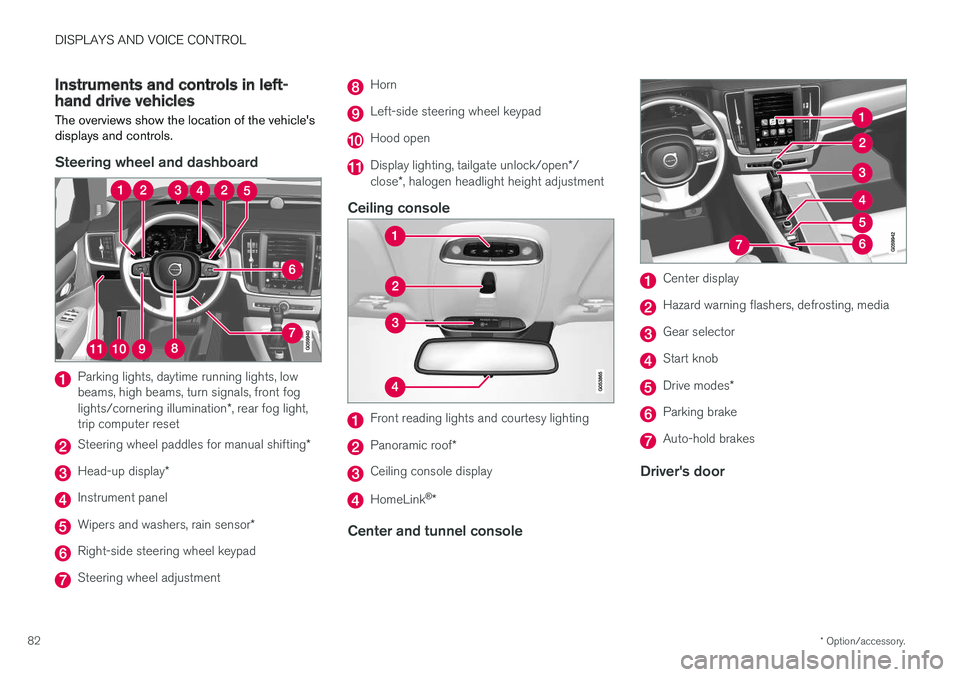
Instruments and controls in left-hand drive vehicles
The overviews show the location of the vehicle's
displays and controls.
Steering wheel and dashboard
Parking lights, daytime running lights, low beams, high beams, turn signals, front fog lights/cornering illumination *, rear fog light,
trip computer reset
Steering wheel paddles for manual shifting *
Head-up display*
Instrument panel
Wipers and washers, rain sensor *
Right-side steering wheel keypad
Steering wheel adjustment
Horn
Left-side steering wheel keypad
Hood open
Display lighting, tailgate unlock/open */
close *, halogen headlight height adjustment
Ceiling console
Front reading lights and courtesy lighting
Panoramic roof *
Ceiling console display
HomeLink®
*
Center and tunnel console
Center display
Hazard warning flashers, defrosting, media
Gear selector
Start knob
Drive modes *
Parking brake
Auto-hold brakes
Driver's door
Page 98 of 656
||
DISPLAYS AND VOICE CONTROL
96
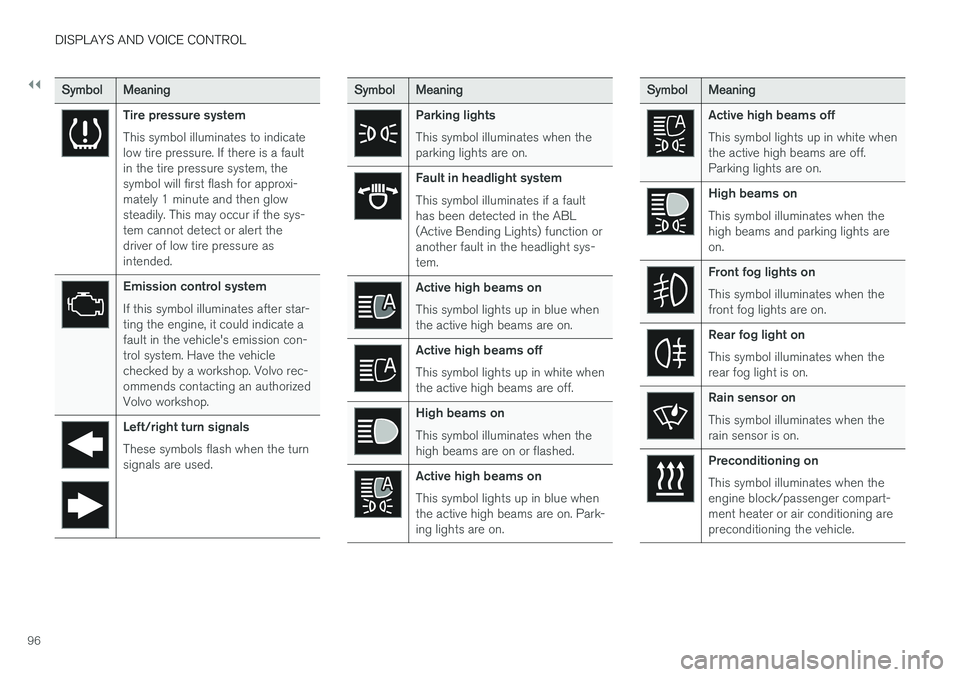
SymbolMeaning
Tire pressure system This symbol illuminates to indicate low tire pressure. If there is a faultin the tire pressure system, thesymbol will first flash for approxi-mately 1 minute and then glowsteadily. This may occur if the sys-tem cannot detect or alert thedriver of low tire pressure asintended.
Emission control system If this symbol illuminates after star- ting the engine, it could indicate afault in the vehicle's emission con-trol system. Have the vehiclechecked by a workshop. Volvo rec-ommends contacting an authorizedVolvo workshop.
Left/right turn signals These symbols flash when the turn signals are used.
SymbolMeaning
Parking lights This symbol illuminates when the parking lights are on.
Fault in headlight system This symbol illuminates if a fault has been detected in the ABL(Active Bending Lights) function oranother fault in the headlight sys-tem.
Active high beams on This symbol lights up in blue when the active high beams are on.
Active high beams off This symbol lights up in white when the active high beams are off.
High beams on This symbol illuminates when the high beams are on or flashed.
Active high beams on This symbol lights up in blue when the active high beams are on. Park-ing lights are on.
SymbolMeaning
Active high beams off This symbol lights up in white when the active high beams are off.Parking lights are on.
High beams on This symbol illuminates when the high beams and parking lights areon.
Front fog lights on This symbol illuminates when the front fog lights are on.
Rear fog light on This symbol illuminates when the rear fog light is on.
Rain sensor on This symbol illuminates when the rain sensor is on.
Preconditioning on This symbol illuminates when the engine block/passenger compart-ment heater or air conditioning arepreconditioning the vehicle.
Page 140 of 656
||
DISPLAYS AND VOICE CONTROL
* Option/accessory.
138
Type ofsettingDescription
Slider Select a level for a function by pressing and dragging the slider control, e.g. to set volume level.
Informa-tion dis-play This is not an actual setting, butinstead displays information suchas the vehicle's VIN number.
Related information
•
Center display overview (p. 111)
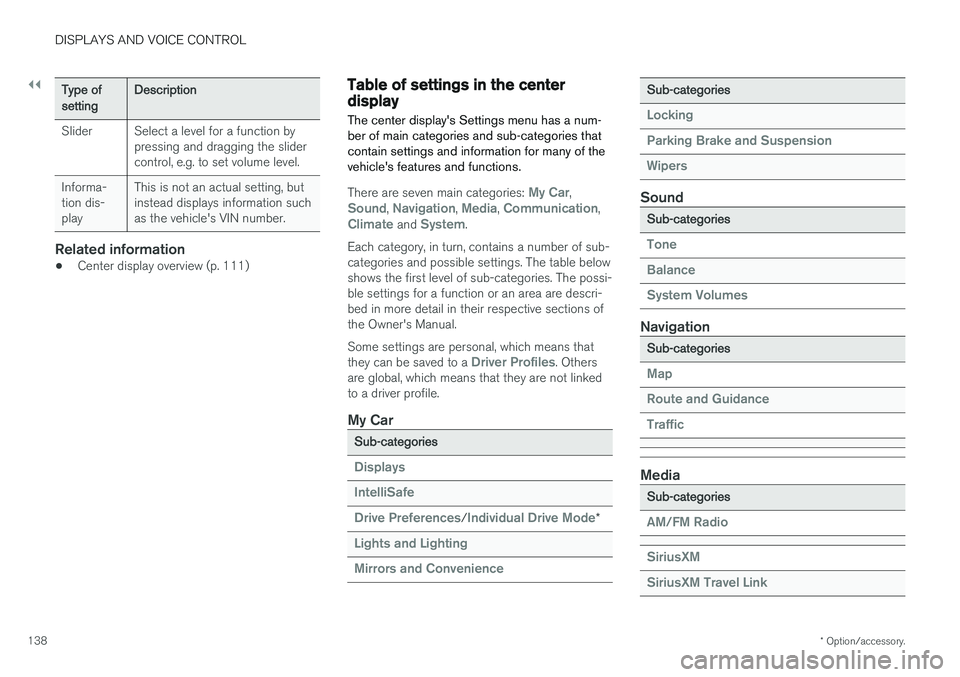
Table of settings in the centerdisplay The center display's Settings menu has a num- ber of main categories and sub-categories thatcontain settings and information for many of thevehicle's features and functions.
There are seven main categories: My Car,Sound, Navigation, Media, Communication,Climate and System.
Each category, in turn, contains a number of sub- categories and possible settings. The table belowshows the first level of sub-categories. The possi-ble settings for a function or an area are descri-bed in more detail in their respective sections ofthe Owner's Manual. Some settings are personal, which means that they can be saved to a
Driver Profiles. Others
are global, which means that they are not linked to a driver profile.
My Car
Sub-categories
Displays IntelliSafe Drive Preferences
/Individual Drive Mode*
Lights and Lighting Mirrors and Convenience
Sub-categories
Locking Parking Brake and SuspensionWipers
Sound
Sub-categories
Tone BalanceSystem Volumes
Navigation
Sub-categories
Map Route and GuidanceTraffic
Media
Sub-categories
AM/FM Radio SiriusXM SiriusXM Travel Link
Page 156 of 656
LIGHTING
* Option/accessory.
154
Lighting panel and controls
The lighting panel and controls can be used to adjust both exterior and interior lighting. Thelighting ring on the left-side steering wheel levercan be used to activate and adjust the exteriorlighting. The brightness of the interior lightingcan be adjusted using the thumb wheel on thedashboard.
Exterior lighting
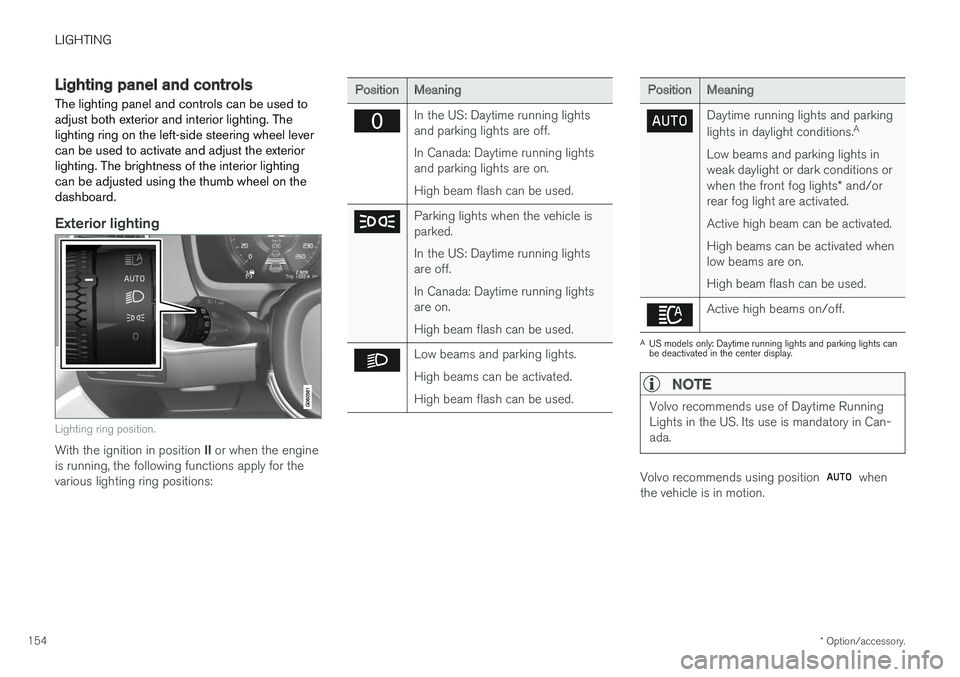
Lighting ring position.
With the ignition in position II or when the engine
is running, the following functions apply for the various lighting ring positions:
PositionMeaning
In the US: Daytime running lights and parking lights are off. In Canada: Daytime running lights and parking lights are on. High beam flash can be used.
Parking lights when the vehicle is parked. In the US: Daytime running lights are off. In Canada: Daytime running lights are on. High beam flash can be used.
Low beams and parking lights. High beams can be activated.High beam flash can be used.
PositionMeaning
Daytime running lights and parking lights in daylight conditions. A
Low beams and parking lights in weak daylight or dark conditions or when the front fog lights * and/or
rear fog light are activated. Active high beam can be activated.High beams can be activated when low beams are on. High beam flash can be used.
Active high beams on/off.
A US models only: Daytime running lights and parking lights can be deactivated in the center display.
NOTE
Volvo recommends use of Daytime Running Lights in the US. Its use is mandatory in Can-ada.
Volvo recommends using position when
the vehicle is in motion.