lock VOLVO V90 CROSS COUNTRY 2017 Owner´s Manual
[x] Cancel search | Manufacturer: VOLVO, Model Year: 2017, Model line: V90 CROSS COUNTRY, Model: VOLVO V90 CROSS COUNTRY 2017Pages: 552, PDF Size: 13.6 MB
Page 284 of 552
||
DRIVER SUPPORT
* Option/accessory.
282
• the lane is at the top of a hill, on an uneven road surface or over a bump.
• bad weather conditions (rain, snow, fog,slush, poor visibility, backlighting, etc).
The driver should also be aware that Pilot Assist has the following limitations: • High curbs, barriers and temporary obsta- cles (cones, barriers etc) may not bedetected or could be detected incorrectlyas side marker lines, which may create arisk of collision. The driver must ensure asafe distance to these obstacles.
• The camera or radar sensor may not beable to detect objects if there are pot-holes or if there are stationary objectspartially or completely blocking the road.
• Pilot Assist does not "see" pedestrians,animals, etc.
• Pilot Assist's steering capacity is limitedand may not always be able to help thedriver keep the vehicle in the lane.
Hands on the steering wheel
Pilot Assist only functions when the driver's hands are on the steering wheel
, which is con-
tinuously monitored by the system. If this is notthe case, the driver will be alerted by a text mes-sage in the instrument panel. If the driver's handsare not returned to the steering wheel, an audiblesignal will sound. If the driver does not return his/her hands to thesteering wheel after the audible signal, PilotAssist will go into standby mode and must be reactivated by pressing
.
Related information
•
Pilot Assist
* (p. 277)
• Changing Pilot Assist speed (p. 282)
• Setting a Pilot Assist time interval (p. 283)
• Changing target vehicles and automatic braking with Pilot Assist (p. 286)
• Deactivating/resuming Pilot Assist (p. 284)
• Passing Assistance with Adaptive CruiseControl or Pilot Assist (p. 270)
• Pilot Assist limitations (p. 287)
• Pilot Assist symbols and messages (p. 289)
Changing Pilot Assist speed
Different speeds can be set for Pilot Assist.
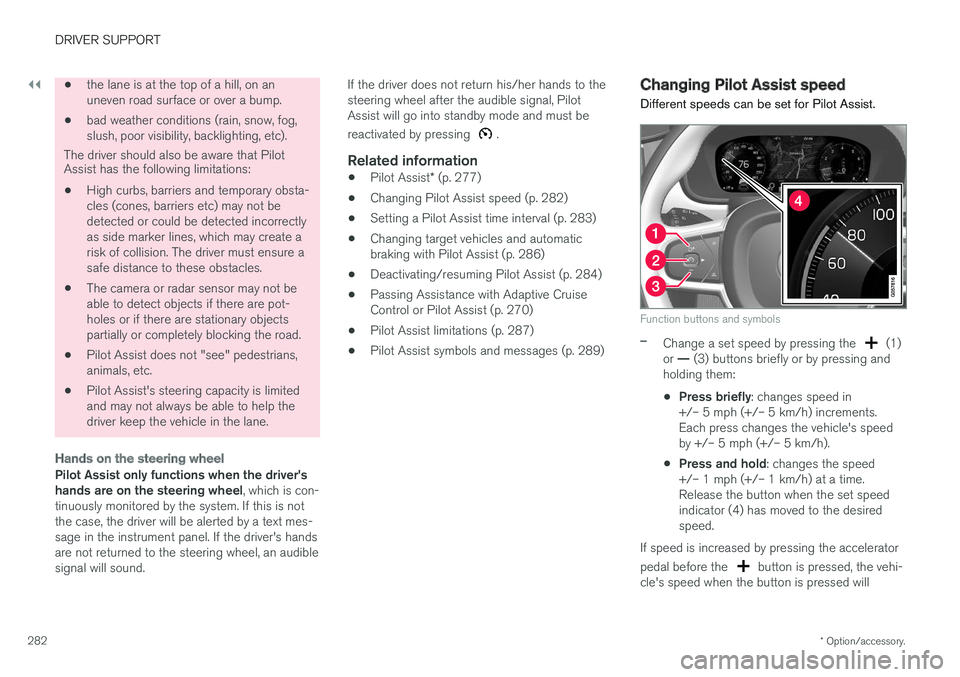
Function buttons and symbols
–Change a set speed by pressing the (1)
or — (3) buttons briefly or by pressing and
holding them:
• Press briefly
: changes speed in
+/– 5 mph (+/– 5 km/h) increments. Each press changes the vehicle's speedby +/– 5 mph (+/– 5 km/h).
• Press and hold
: changes the speed
+/– 1 mph (+/– 1 km/h) at a time.Release the button when the set speedindicator (4) has moved to the desiredspeed.
If speed is increased by pressing the accelerator pedal before the
button is pressed, the vehi-
cle's speed when the button is pressed will
Page 290 of 552
||
DRIVER SUPPORT
* Option/accessory.
288
WARNING
Pilot Assist is not a collision avoidance sys- tem. The driver is always responsible forsteering or applying the brakes if the systemdoes not detect another vehicle. Do not use Pilot Assist in demanding driving conditions such as city driving or other heavytraffic situations, in slippery conditions, whenthere is a great deal of water or slush on theroad, during heavy rain or snow, in poor visibil-ity, on winding roads or on highway on- or off-ramps. In certain situations, it may be difficult for Pilot Assist to assist the driver correctly or to deac-tivate automatically. In such cases, it is advisa-ble not to use Pilot Assist. Examples of suchsituations may be:
• the lane's side market lines are missing, badly faded or cross each other.
• the division of lanes is not clear, e.g.,when a line divides or merges withanother, at exits or if there are many roadsigns/markers.
• there are edges or other lines on or nearthe lane, e.g., curbs, cracks, repairedareas, sharp shadows, etc.
• the lane is narrow or winding.
• the lane is at the top of a hill, on anuneven road surface or over a bump.
•bad weather conditions (rain, snow, fog, slush, poor visibility, backlighting, etc).
The driver should also be aware that Pilot Assist has the following limitations: • High curbs, barriers and temporary obsta- cles (cones, barriers etc) may not bedetected or could be detected incorrectlyas side marker lines, which may create arisk of collision. The driver must ensure asafe distance to these obstacles.
• The camera or radar sensor may not beable to detect objects if there are pot-holes or if there are stationary objectspartially or completely blocking the road.
• Pilot Assist does not "see" pedestrians,animals, etc.
• Pilot Assist's steering capacity is limitedand may not always be able to help thedriver keep the vehicle in the lane.
The driver can always take action to override PilotAssist.
Steep roads and/or heavy loadsPilot Assist is primarily intended for use on rela-tively level roads. The function may not be able tomaintain the correct time interval to the vehicleahead on when driving down steep hills. Thedriver should be attentive and prepared to applythe brakes in these situations. Do not use Pilot Assist when the vehicle is trans-porting a heavy load or if it is towing a trailer.
Additional information
•
The Off Road drive mode cannot be
selected if Pilot Assist is activated.
• Pilot Assist uses the vehicle's camera and radar sensor, which have certain general limi-tations. See the articles "Camera limitations"and "Radar sensor limitations" for additionalinformation.
Related information
•
Pilot Assist
* (p. 277)
• Starting and activating Pilot Assist (p. 280)
• Changing Pilot Assist speed (p. 282)
• Setting a Pilot Assist time interval (p. 283)
• Changing target vehicles and automaticbraking with Pilot Assist (p. 286)
• Deactivating/resuming Pilot Assist (p. 284)
• Passing Assistance with Adaptive CruiseControl or Pilot Assist (p. 270)
• Pilot Assist symbols and messages (p. 289)
• Radar sensor limitations (p. 291)
• Camera limitations (p. 295)
Page 293 of 552
DRIVER SUPPORT
}}
291
Radar sensor limitations
The radar sensor used by several of the driver support systems has certain limitations, whichalso affect the systems using it.
Obstructions
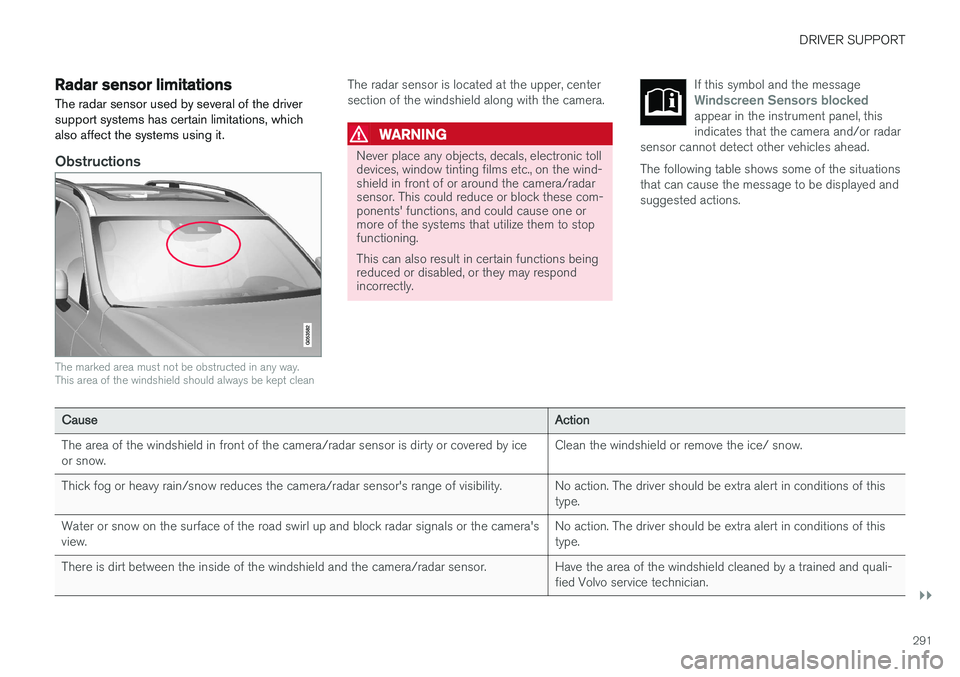
The marked area must not be obstructed in any way. This area of the windshield should always be kept clean
The radar sensor is located at the upper, center section of the windshield along with the camera.
WARNING
Never place any objects, decals, electronic toll devices, window tinting films etc., on the wind-shield in front of or around the camera/radarsensor. This could reduce or block these com-ponents' functions, and could cause one ormore of the systems that utilize them to stopfunctioning. This can also result in certain functions being reduced or disabled, or they may respondincorrectly. If this symbol and the message
Windscreen Sensors blockedappear in the instrument panel, this indicates that the camera and/or radar
sensor cannot detect other vehicles ahead.
The following table shows some of the situations that can cause the message to be displayed andsuggested actions.
Cause Action
The area of the windshield in front of the camera/radar sensor is dirty or covered by ice or snow. Clean the windshield or remove the ice/ snow.
Thick fog or heavy rain/snow reduces the camera/radar sensor's range of visibility. No action. The driver should be extra alert in conditions of this type.
Water or snow on the surface of the road swirl up and block radar signals or the camera'sview. No action. The driver should be extra alert in conditions of thistype.
There is dirt between the inside of the windshield and the camera/radar sensor. Have the area of the windshield cleaned by a trained and quali- fied Volvo service technician.
Page 298 of 552
||
DRIVER SUPPORT
296
CauseAction
Water or snow on the surface of the road swirl up and block radar signals or the camera's view. No action. The driver should be extra alert in conditions of this type.
There is dirt between the inside of the windshield and the camera/radar sensor. Have the area of the windshield cleaned by a trained and qualified Volvo service technician.
Strong backlighting No action required. The came will reset automatically when lightingconditions improve.
High temperaturesIf the temperature in the passenger compartment is very high, the camera and radar sensor may betemporarily turned off for approx. 15 minutesafter the engine has been started to protect theirelectronic components. When the temperaturehas cooled sufficiently, the camera and radarsensor will restart automatically.
Damaged windshield
CAUTION
•Service and maintenance on City Safety may only be carried out by a trained andqualified Volvo service technician.
• If a crack, scratch or stone chip shouldoccur in the section of the windshield infront the camera/radar sensor, contact atrained and qualified Volvo service techni-cian to repair or replace the windshield.Failing to do so may result in reducedCity Safety functionality.
• This can also result in certain functionsbeing reduced or disabled, or they mayrespond incorrectly.
To help avoid the risk of incorrect, reduced ordisabled functionality for driver support sys-tems using the camera or radar sensors:
• Volvo recommends that cracks, scratchesor stone chips on the windshield in front of the camera/radar sensor should
not
be repaired; in such cases, the entire windshield should be replaced.
• Before the windshield is replaced, con-tact a Volvo retailer to ensure that thecorrect windshield is ordered and instal-led. If the wrong type of windshield isused, this may cause City Safety to func-tion improperly or not at all.
• Volvo recommends the use of only Genu-ine Volvo Replacement Windshields.
• When replacing windshield wipers, usethe same type or ones approved by Volvo.
After the windshield has been replaced, thecamera/radar sensor will have to be recalibra-ted by a trained and qualified Volvo servicetechnician to help ensure proper function ofall of the vehicle's camera-/radar-based sys-tems.
Page 307 of 552
DRIVER SUPPORT
}}
* Option/accessory.305
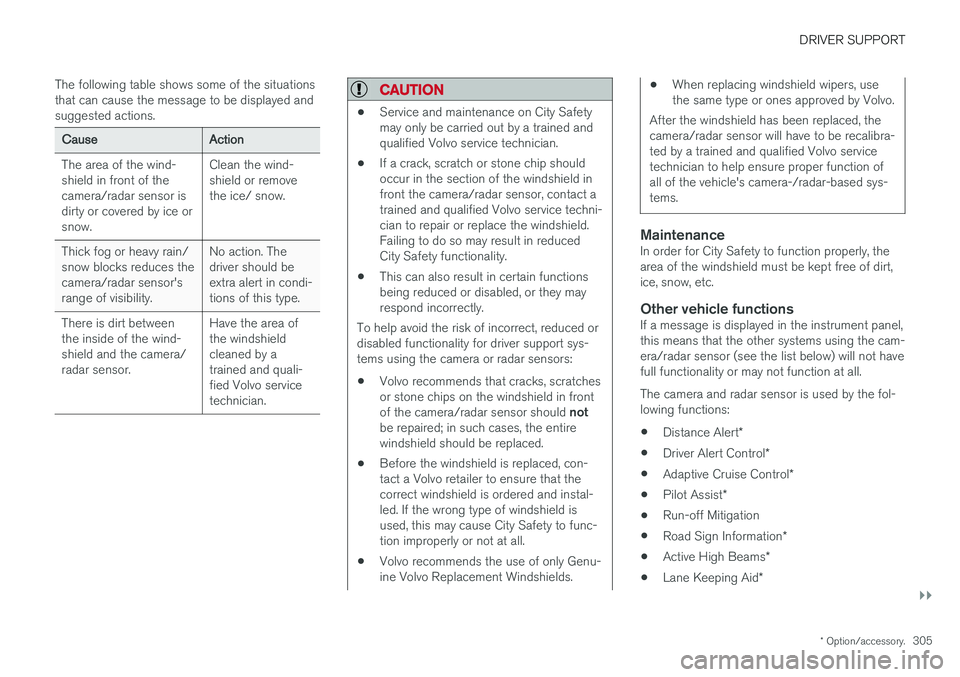
The following table shows some of the situations that can cause the message to be displayed andsuggested actions.
Cause
Action
The area of the wind- shield in front of thecamera/radar sensor isdirty or covered by ice orsnow. Clean the wind-shield or removethe ice/ snow.
Thick fog or heavy rain/snow blocks reduces thecamera/radar sensor'srange of visibility. No action. Thedriver should beextra alert in condi-tions of this type.
There is dirt betweenthe inside of the wind-shield and the camera/radar sensor. Have the area ofthe windshieldcleaned by atrained and quali-fied Volvo servicetechnician.
CAUTION
•
Service and maintenance on City Safety may only be carried out by a trained andqualified Volvo service technician.
• If a crack, scratch or stone chip shouldoccur in the section of the windshield infront the camera/radar sensor, contact atrained and qualified Volvo service techni-cian to repair or replace the windshield.Failing to do so may result in reducedCity Safety functionality.
• This can also result in certain functionsbeing reduced or disabled, or they mayrespond incorrectly.
To help avoid the risk of incorrect, reduced ordisabled functionality for driver support sys-tems using the camera or radar sensors:
• Volvo recommends that cracks, scratchesor stone chips on the windshield in front of the camera/radar sensor should
not
be repaired; in such cases, the entire windshield should be replaced.
• Before the windshield is replaced, con-tact a Volvo retailer to ensure that thecorrect windshield is ordered and instal-led. If the wrong type of windshield isused, this may cause City Safety to func-tion improperly or not at all.
• Volvo recommends the use of only Genu-ine Volvo Replacement Windshields.
• When replacing windshield wipers, use the same type or ones approved by Volvo.
After the windshield has been replaced, thecamera/radar sensor will have to be recalibra-ted by a trained and qualified Volvo servicetechnician to help ensure proper function ofall of the vehicle's camera-/radar-based sys-tems.
MaintenanceIn order for City Safety to function properly, the area of the windshield must be kept free of dirt,ice, snow, etc.
Other vehicle functionsIf a message is displayed in the instrument panel,this means that the other systems using the cam-era/radar sensor (see the list below) will not havefull functionality or may not function at all. The camera and radar sensor is used by the fol- lowing functions: • Distance Alert
*
• Driver Alert Control
*
• Adaptive Cruise Control
*
• Pilot Assist
*
• Run-off Mitigation
• Road Sign Information
*
• Active High Beams
*
• Lane Keeping Aid
*
Page 308 of 552
||
DRIVER SUPPORT
306Do not mount or in any way attach anything on the windshield that could obstruct the camera/radar sensor.
WARNING
•
The camera has the same type of limita- tions as the human eye, i.e., it cannot seeas well in heavy snowfall or rain, thick fogor in heavy blowing dust or snow. In suchconditions, systems depending on thecamera may experience greatly reducedfunctionality or may be temporarily deacti-vated.
• Never place any objects, decals, etc., onthe windshield in front of the camera. Thiscould reduce or block the camera
Page 309 of 552
DRIVER SUPPORT
}}
307
Camera and radar sensor's field of vision
The camera and radar sensor have limited fields of vision. In some situations they may detect avehicle, large animal, pedestrian or cyclist laterthan expected or not detect them at all. Other vehicles that are dirty may be detected later than others and in dark conditions, motorcy-cles may be detected late or not at all. If a text message is displayed in the instrument panel indicates that the camera or radar sensorare blocked, it may be difficult for City Safety todetect a vehicle, pedestrian or cyclist and thesystem's functionality may be reduced.
WARNING
Text messages may not be displayed in all sit- uations in which the camera and/or radarsensor are blocked. It is therefore essential tokeep the windshield in front the camera/radarsensor clean and free from snow, ice, etc. Camera and radar sensor components should only be serviced or replaced by a trained andqualified Volvo service technician.
Action by the driver
Backing up
City Safety is temporarily deactivated while the vehicle is backing up.
Low speed
City Safety is not activated at very low speeds (under approx. 3 mph (4 km/h). This means thatthe system will not be triggered if your vehicleapproaches a vehicle ahead at very low speed,such as when parking.
Active driver
Action by the driver always has priority. For this reason, City Safety may not react or react laterthan expected in situations in which the driver isactively operating the vehicle, even if a collision isimminent. This is also done to help eliminateexcessive warnings.
Other limitations
City Safety uses the vehicle's camera and radar sensor, which have certain general limitations.See the articles "Camera limitations" and "Radarsensor limitations" for additional information.
WARNING
•
Warnings and braking may be delayed or not occur at all if traffic, weather or otherconditions prevent the camera and/orradar sensor from detecting pedestrians,cyclists, large animals or other vehiclescorrectly.
• Other vehicles can only be detected indarkness if their headlights and taillightsare clearly visible.
• The sensors have a limited range forpedestrians and cyclists. The systemfunctions best at relative speeds up to30 mph (50 km/h). For stationary orslow-moving vehicles, the system func-tions best at speeds up to approx.43 mph (70 km/h).
• If there is a risk of colliding with a largeanimal, City Safety can reduce the vehi-cle's speed by up to 9 mph (15 km/h).Warnings and braking are most effectiveat speeds above 43 mph (70 km/h) andless effective at lower speeds.
Page 328 of 552
||
DRIVER SUPPORT
326
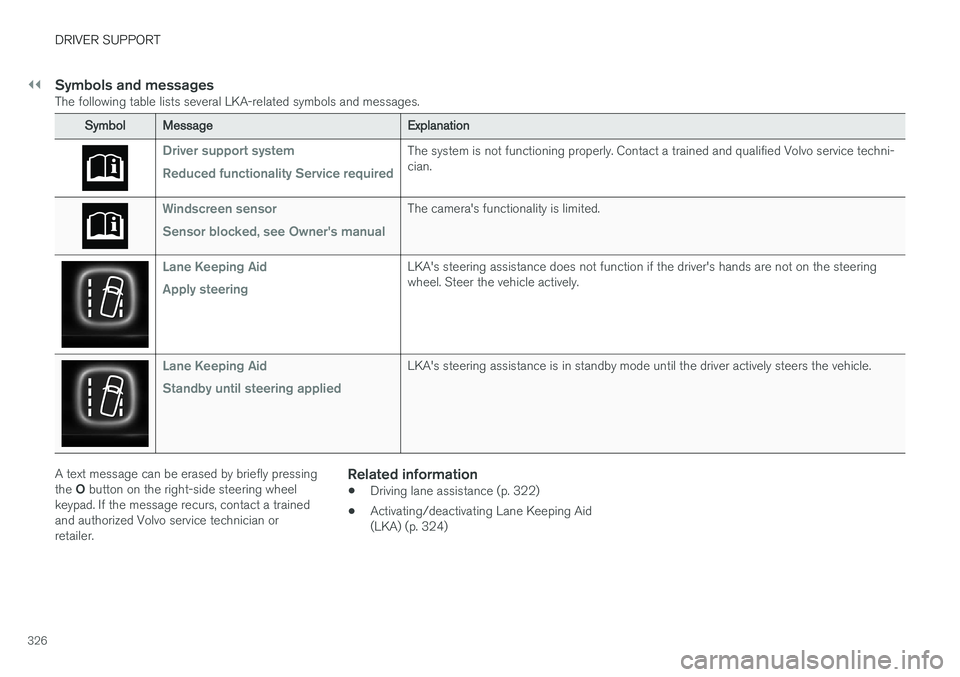
Symbols and messagesThe following table lists several LKA-related symbols and messages.
SymbolMessage Explanation
Driver support system Reduced functionality Service requiredThe system is not functioning properly. Contact a trained and qualified Volvo service techni- cian.
Windscreen sensor Sensor blocked, see Owner's manualThe camera's functionality is limited.
Lane Keeping Aid Apply steeringLKA's steering assistance does not function if the driver's hands are not on the steering wheel. Steer the vehicle actively.
Lane Keeping Aid Standby until steering appliedLKA's steering assistance is in standby mode until the driver actively steers the vehicle.
A text message can be erased by briefly pressing the O button on the right-side steering wheel
keypad. If the message recurs, contact a trained and authorized Volvo service technician orretailer.Related information
• Driving lane assistance (p. 322)
• Activating/deactivating Lane Keeping Aid(LKA) (p. 324)
Page 331 of 552
DRIVER SUPPORT
* Option/accessory.329
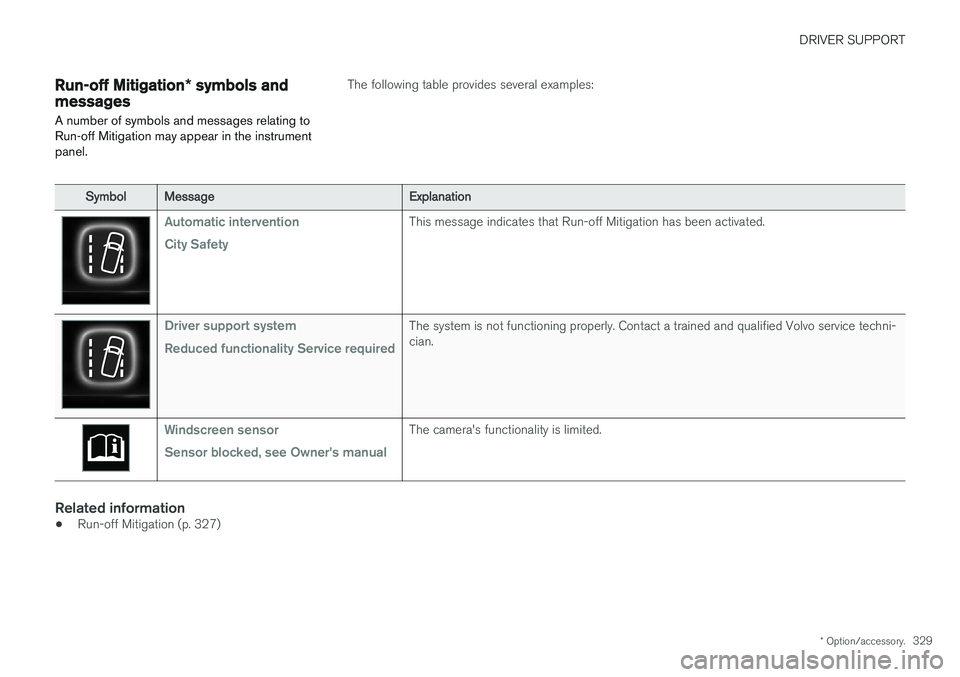
Run-off Mitigation * symbols and
messages
A number of symbols and messages relating to Run-off Mitigation may appear in the instrumentpanel.The following table provides several examples:
Symbol Message Explanation
Automatic intervention City SafetyThis message indicates that Run-off Mitigation has been activated.
Driver support system Reduced functionality Service requiredThe system is not functioning properly. Contact a trained and qualified Volvo service techni- cian.
Windscreen sensor Sensor blocked, see Owner's manualThe camera's functionality is limited.
Related information
•Run-off Mitigation (p. 327)
Page 335 of 552
DRIVER SUPPORT
* Option/accessory.333
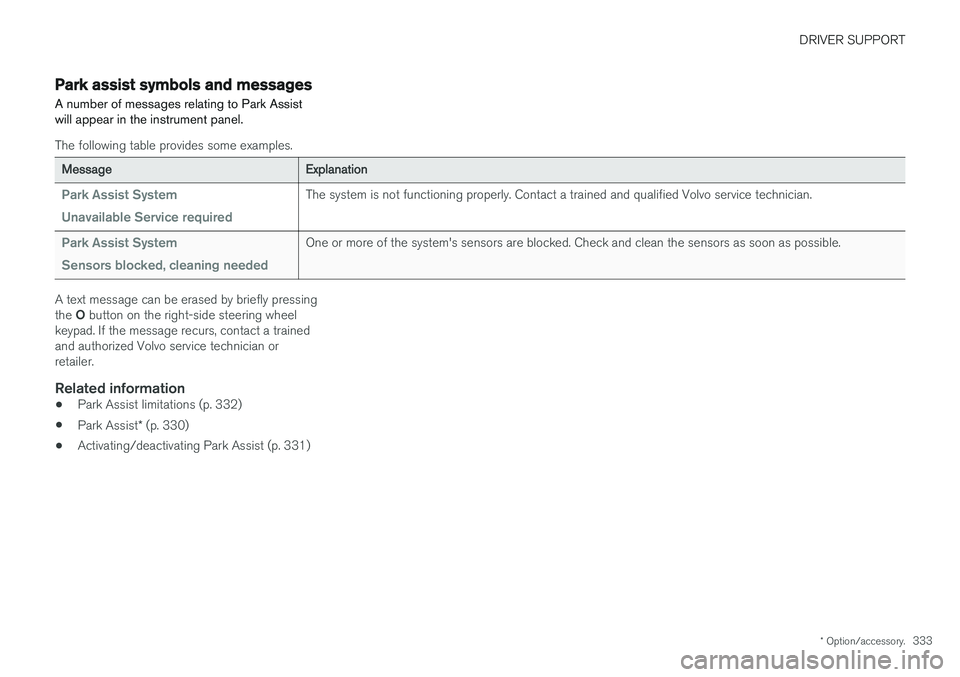
Park assist symbols and messages
A number of messages relating to Park Assist will appear in the instrument panel.
The following table provides some examples.
Message Explanation
Park Assist System Unavailable Service requiredThe system is not functioning properly. Contact a trained and qualified Volvo service technician.
Park Assist System Sensors blocked, cleaning neededOne or more of the system's sensors are blocked. Check and clean the sensors as soon as possible.
A text message can be erased by briefly pressing the O button on the right-side steering wheel
keypad. If the message recurs, contact a trained and authorized Volvo service technician orretailer.
Related information
• Park Assist limitations (p. 332)
• Park Assist
* (p. 330)
• Activating/deactivating Park Assist (p. 331)