lock VOLVO V90 CROSS COUNTRY 2017 Owner´s Manual
[x] Cancel search | Manufacturer: VOLVO, Model Year: 2017, Model line: V90 CROSS COUNTRY, Model: VOLVO V90 CROSS COUNTRY 2017Pages: 552, PDF Size: 13.6 MB
Page 238 of 552
||
LOCKS AND ALARM
* Option/accessory.
236
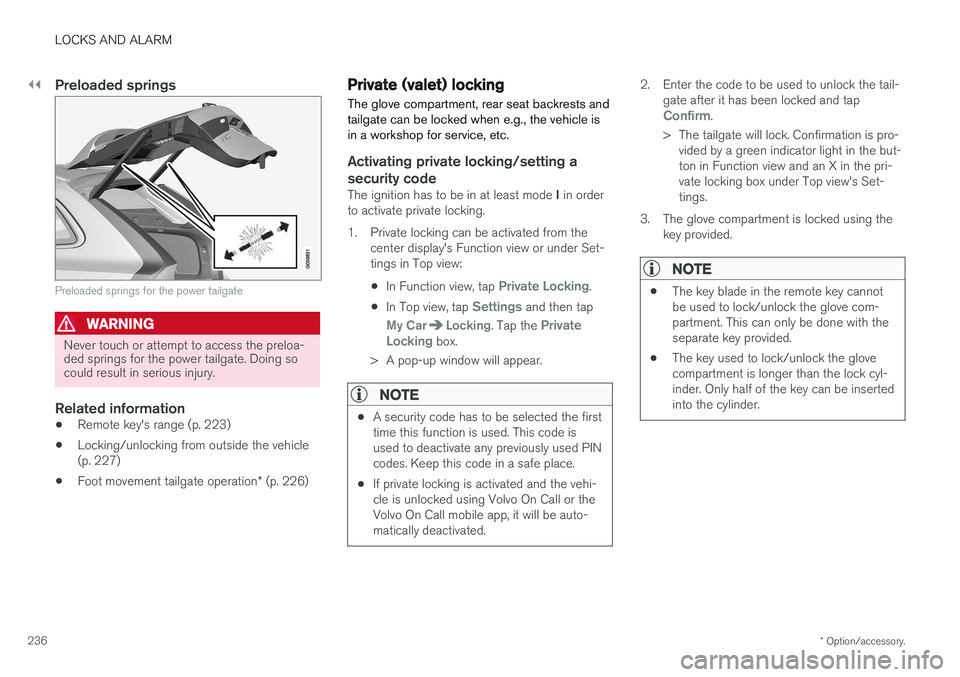
Preloaded springs
Preloaded springs for the power tailgate
WARNING
Never touch or attempt to access the preloa- ded springs for the power tailgate. Doing socould result in serious injury.
Related information
• Remote key's range (p. 223)
• Locking/unlocking from outside the vehicle (p. 227)
• Foot movement tailgate operation
* (p. 226)
Private (valet) locking
The glove compartment, rear seat backrests and tailgate can be locked when e.g., the vehicle isin a workshop for service, etc.
Activating private locking/setting a security code
The ignition has to be in at least mode I in order
to activate private locking.
1. Private locking can be activated from the center display's Function view or under Set- tings in Top view:
• In Function view, tap
Private Locking.
• In Top view, tap
Settings and then tap
My CarLocking. Tap the Private
Locking box.
> A pop-up window will appear.
NOTE
• A security code has to be selected the first time this function is used. This code isused to deactivate any previously used PINcodes. Keep this code in a safe place.
• If private locking is activated and the vehi-cle is unlocked using Volvo On Call or theVolvo On Call mobile app, it will be auto-matically deactivated.
2. Enter the code to be used to unlock the tail-
gate after it has been locked and tap
Confirm.
> The tailgate will lock. Confirmation is pro- vided by a green indicator light in the but- ton in Function view and an X in the pri-vate locking box under Top view's Set-tings.
3. The glove compartment is locked using the key provided.
NOTE
• The key blade in the remote key cannot be used to lock/unlock the glove com-partment. This can only be done with theseparate key provided.
• The key used to lock/unlock the glovecompartment is longer than the lock cyl-inder. Only half of the key can be insertedinto the cylinder.
Page 239 of 552
LOCKS AND ALARM
}}
237
Deactivating private locking1. This function can be deactivated from thecenter display's Function view or under Set- tings in Top view:
• In Function view, tap
Private Locking.
• In Top view, tap
Settings and then tap
My CarLocking. Tap (deselect) thePrivate Locking box.
> A pop-up window will appear.
2. Enter the code used for locking and tap
Confirm.
> The tailgate will unlock. Confirmation is provided when the green indicator light in the button in Function view goes out andthe X in the private locking box under Topview's Settings disappears.
3. The glove compartment is unlocked using the key provided.
Related information
• Locking/unlocking the tailgate (p. 232)
• Using the glove compartment (p. 205)
• Navigating in the center display's views(p. 38)
Locking/unlocking with the detachable key blade
The detachable key blade can be used to e.g., unlock the driver's door from the outside if, forexample, the remote key's battery is weak.
Unlocking
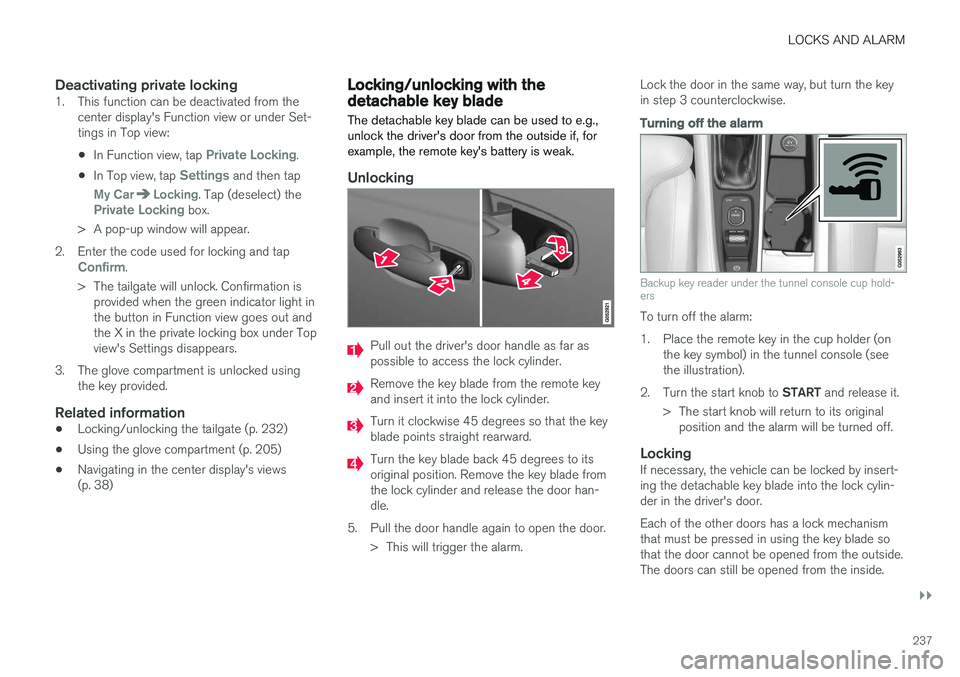
Pull out the driver's door handle as far as possible to access the lock cylinder.
Remove the key blade from the remote key and insert it into the lock cylinder.
Turn it clockwise 45 degrees so that the key blade points straight rearward.
Turn the key blade back 45 degrees to its original position. Remove the key blade fromthe lock cylinder and release the door han-dle.
5. Pull the door handle again to open the door. > This will trigger the alarm. Lock the door in the same way, but turn the keyin step 3 counterclockwise.
Turning off the alarm
Backup key reader under the tunnel console cup hold- ers
To turn off the alarm:
1. Place the remote key in the cup holder (on
the key symbol) in the tunnel console (see the illustration).
2. Turn the start knob to START and release it.
> The start knob will return to its original position and the alarm will be turned off.
LockingIf necessary, the vehicle can be locked by insert-ing the detachable key blade into the lock cylin-der in the driver's door. Each of the other doors has a lock mechanism that must be pressed in using the key blade sothat the door cannot be opened from the outside.The doors can still be opened from the inside.
Page 240 of 552
||
LOCKS AND ALARM
238
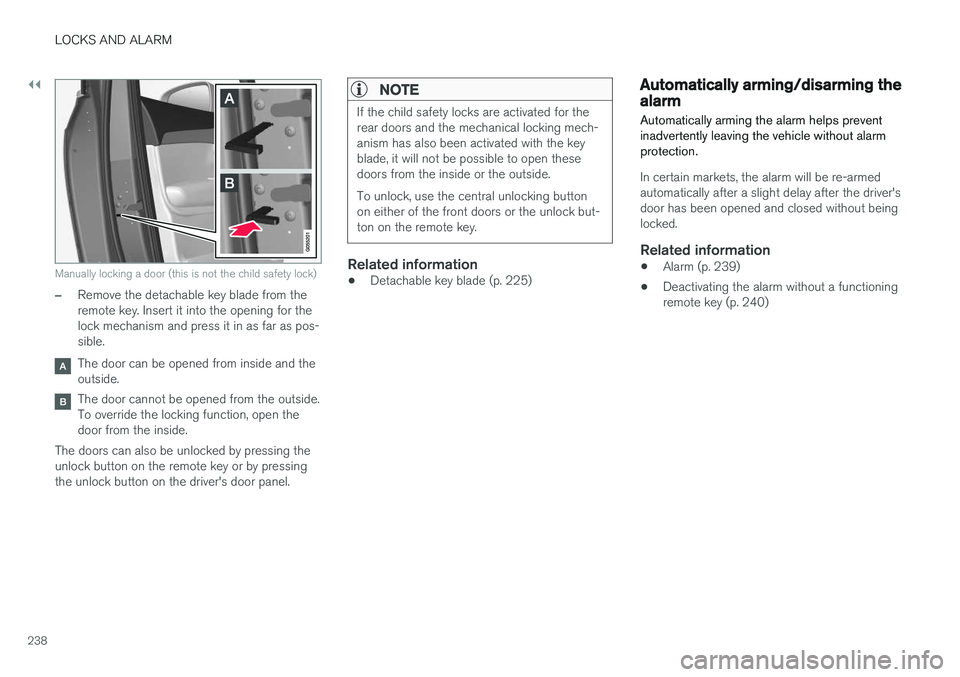
Manually locking a door (this is not the child safety lock)
–Remove the detachable key blade from the remote key. Insert it into the opening for thelock mechanism and press it in as far as pos-sible.
The door can be opened from inside and the outside.
The door cannot be opened from the outside. To override the locking function, open thedoor from the inside.
The doors can also be unlocked by pressing theunlock button on the remote key or by pressingthe unlock button on the driver's door panel.
NOTE
If the child safety locks are activated for the rear doors and the mechanical locking mech-anism has also been activated with the keyblade, it will not be possible to open thesedoors from the inside or the outside. To unlock, use the central unlocking button on either of the front doors or the unlock but-ton on the remote key.
Related information
• Detachable key blade (p. 225)
Automatically arming/disarming the alarm
Automatically arming the alarm helps prevent inadvertently leaving the vehicle without alarmprotection.
In certain markets, the alarm will be re-armed automatically after a slight delay after the driver'sdoor has been opened and closed without beinglocked.
Related information
• Alarm (p. 239)
• Deactivating the alarm without a functioningremote key (p. 240)
Page 241 of 552
LOCKS AND ALARM
}}
* Option/accessory.239
Alarm
The alarm system provides a warning if an attempt is made to break into the vehicle.
The following conditions will trigger the alarm:
• a door/hood/tailgate are opened
• the battery is disconnected
• the alarm siren is disconnected
If a problem is detected in the alarm system, this symbol and
Alarm
system failure Service required will
be displayed in the instrument panel.
Do not attempt to repair any of the components in the alarm system yourself; this could affect theinsurance policy on the vehicle. Contact a trainedand qualified Volvo service technician.
NOTE
One of the alarm sensors, which is sensitive to metallic objects, is located under the tunnelconsole cup holders. Avoid leaving coins,keys, etc., in the cup holders because theymay inadvertently trigger the alarm.
Arming the alarm
–Lock the vehicle by pressing the remote key's lock button. On models with theoptional Passive Entry system, the vehiclecan also be locked by pressing the outerindentation for locking on one of the doorhandles or by pressing the tailgate's rubber-ized pressure plate. If the vehicle is equipped with a power tail- gate *, the button on the lower edge of the
tailgate can also be used to lock the vehicle and arm the alarm.
Disarming the alarmThe alarm can be disarmed by: • Unlock the vehicle by pressing the remote key's unlock button
• Pressing the pressure-sensitive area on theinside of one of the door handles on modelswith the optional Passive Entry system.
• Pressing the tailgate's rubberized pressureplate on models with the optional PassiveEntry system.
Turning off a triggered (sounding)
alarm
–Press the remote key's unlock button or put the ignition in mode I by turning the start
knob to START and releasing it.
Alarm signalsThe following occurs if the alarm has been trig- gered:
• A siren will sound for 30 seconds or until thealarm is turned off
• All turn signals flash for 5 minutes or untilthe alarm is turned off
If the door that triggered the alarm is left open,
the alarm cycle will be repeated 10 times.
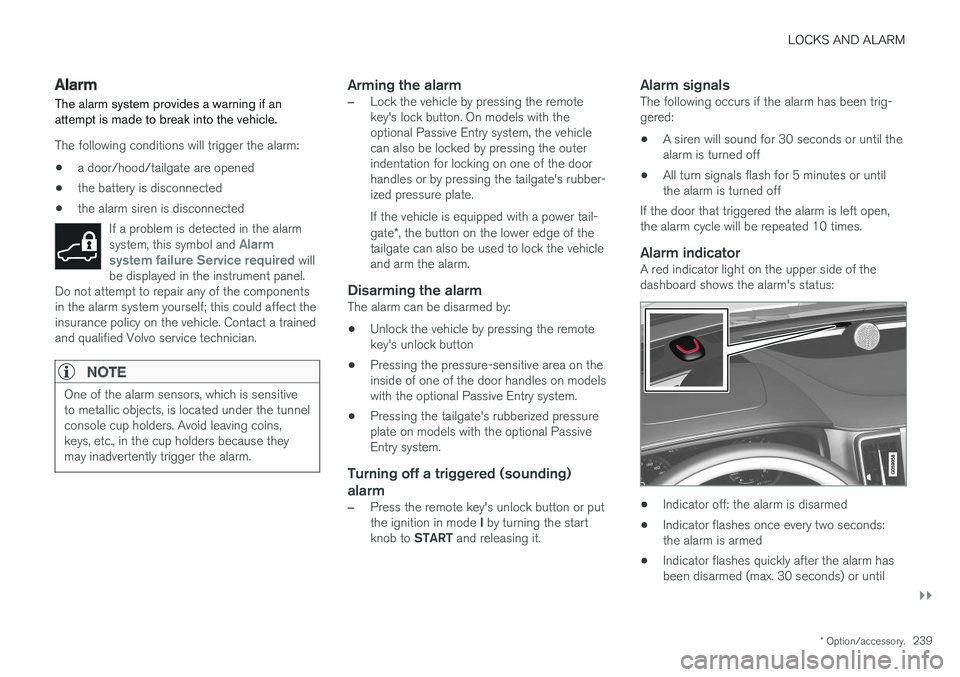
Alarm indicatorA red indicator light on the upper side of thedashboard shows the alarm's status:
• Indicator off: the alarm is disarmed
• Indicator flashes once every two seconds: the alarm is armed
• Indicator flashes quickly after the alarm hasbeen disarmed (max. 30 seconds) or until
Page 242 of 552
||
LOCKS AND ALARM
* Option/accessory.
240 the ignition has been put in mode
I (turn the
start knob to START and release it): the
alarm has been triggered
Related information
• Automatically arming/disarming the alarm (p. 238)
• Deactivating the alarm without a functioningremote key (p. 240)
Deactivating the alarm without a functioning remote key
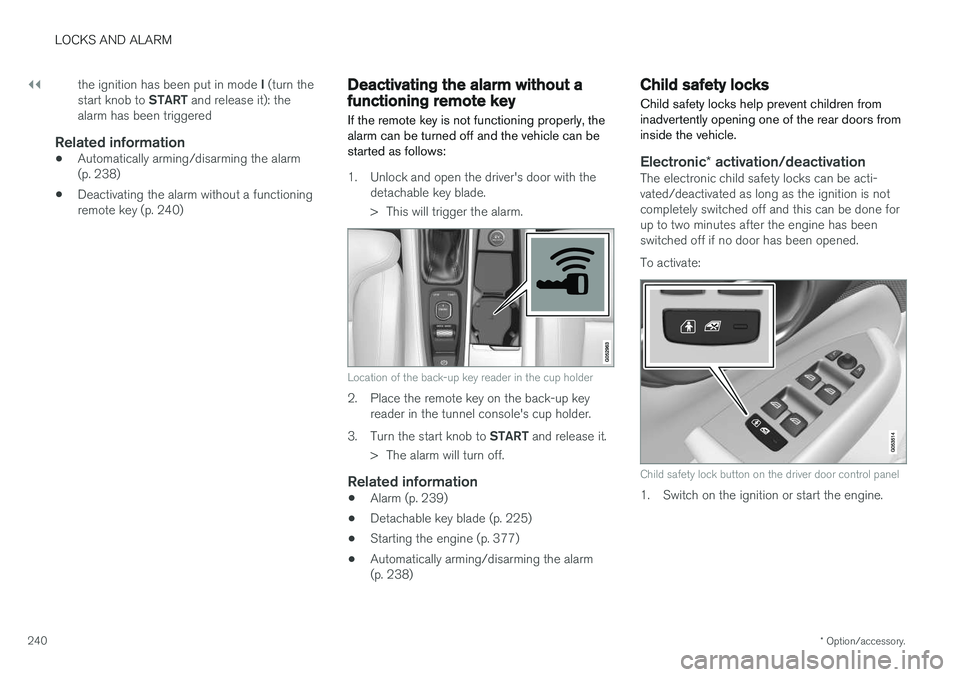
If the remote key is not functioning properly, the alarm can be turned off and the vehicle can bestarted as follows:
1. Unlock and open the driver's door with the detachable key blade.
> This will trigger the alarm.
Location of the back-up key reader in the cup holder
2. Place the remote key on the back-up keyreader in the tunnel console's cup holder.
3. Turn the start knob to START and release it.
> The alarm will turn off.
Related information
• Alarm (p. 239)
• Detachable key blade (p. 225)
• Starting the engine (p. 377)
• Automatically arming/disarming the alarm (p. 238)
Child safety locks
Child safety locks help prevent children from inadvertently opening one of the rear doors frominside the vehicle.
Electronic * activation/deactivationThe electronic child safety locks can be acti- vated/deactivated as long as the ignition is notcompletely switched off and this can be done forup to two minutes after the engine has beenswitched off if no door has been opened. To activate:
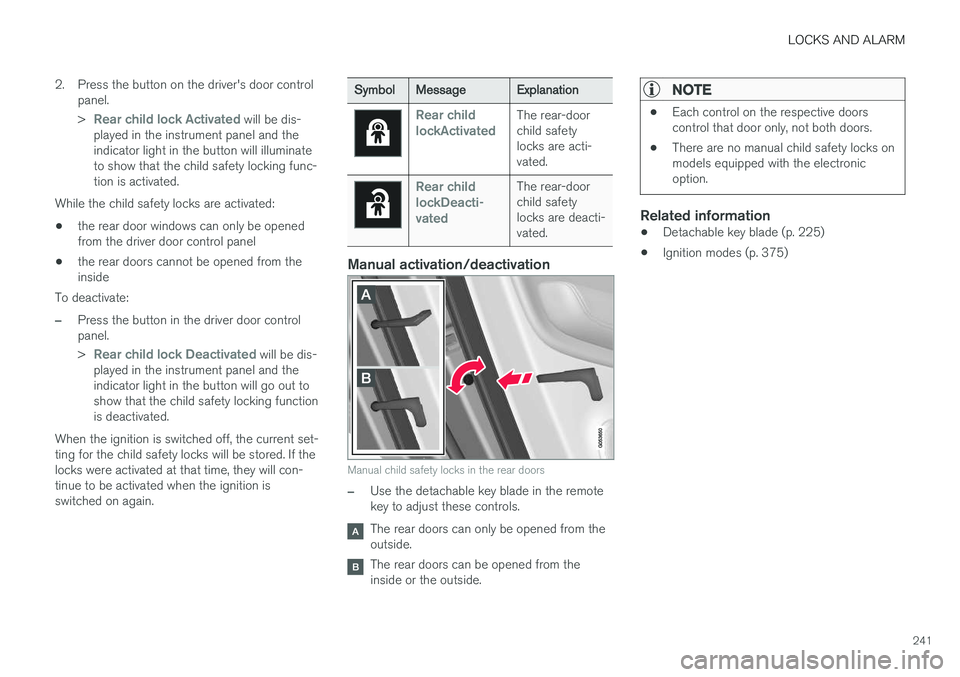
Child safety lock button on the driver door control panel
1. Switch on the ignition or start the engine.
Page 243 of 552
LOCKS AND ALARM
241
2. Press the button on the driver's door control
panel. >
Rear child lock Activated will be dis-
played in the instrument panel and the indicator light in the button will illuminateto show that the child safety locking func-tion is activated.
While the child safety locks are activated:
• the rear door windows can only be openedfrom the driver door control panel
• the rear doors cannot be opened from theinside
To deactivate:
–Press the button in the driver door control panel. >
Rear child lock Deactivated will be dis-
played in the instrument panel and the indicator light in the button will go out toshow that the child safety locking functionis deactivated.
When the ignition is switched off, the current set-ting for the child safety locks will be stored. If thelocks were activated at that time, they will con-tinue to be activated when the ignition isswitched on again.
Symbol Message Explanation
Rear child lockActivatedThe rear-door child safetylocks are acti-vated.
Rear child lockDeacti-vatedThe rear-door child safetylocks are deacti-vated.
Manual activation/deactivation
Manual child safety locks in the rear doors
–Use the detachable key blade in the remote key to adjust these controls.
The rear doors can only be opened from the outside.
The rear doors can be opened from the inside or the outside.
NOTE
•Each control on the respective doors control that door only, not both doors.
• There are no manual child safety locks onmodels equipped with the electronicoption.
Related information
• Detachable key blade (p. 225)
• Ignition modes (p. 375)
Page 244 of 552
LOCKS AND ALARM
* Option/accessory.
242
Start and lock system type designations
The following information contains type designa- tions for the start and lock system.
Alarm systemUSA FCC ID: MAYDA 5823(3) This device complies with part 15 of the FCC rules. Operation is subject to the following condi-tions: (1) This device may not cause harmfulinterference, and (2) this device must accept anyinterference received, including interference thatmay cause undesired operation. Canada IC: 4405A-DA 5823(3)This device is subject to the following conditions: (1) this device may not cause interference, and(2) this device must accept any interference,including interference that may cause undesiredoperation of the device.
Remote keys (Passive entry/Passive start *)
USA Volvo Standard Key FCC ID: YGOHUF8423 Volvo Tag ID FCC ID: YGOHUF8432This device complies with Part 15 of the FCC Rules. Operation is subject to the following twoconditions: (1) This device may not cause harmful interfer- ence, and (2) this device must accept any interferencereceived, including interference that may causeundesired operation. Any changes or modification not expressly approved by the party responsible for compliancecould void the user
Page 247 of 552
DRIVER SUPPORT
}}
* Option/accessory.245
Related information
•Driver support systems (p. 244)
• Drive modes
* (p. 379)
Electronic Stability Control (ESC)
Electronic Stability Control (ESC) helps reduce wheel spin, counteract skidding and to generallyhelp improve directional stability.
A pulsating sound will be audi- ble when the system is activelyoperating and is normal. Accel-eration may also be slightlyslower than normal.
WARNING
ESC is a supplementary aid and cannot deal with all situations or road conditions. The driver is always responsible for operating the vehicle in a safe manner in accordancewith current traffic regulations.
ESC consists of the following functions: • Traction control
• Spin control
• Active Yaw Control
• Engine Drag Control
• Trailer Stability Assist
Traction controlThis function is designed to help reduce wheel spin by transferring power from a drive wheel that begins to lose traction to the wheel on the oppo-site side of the vehicle (on the same axle).
Spin controlThis function is designed to help prevent thedrive wheels from spinning while the vehicle isaccelerating.
Active Yaw ControlAt low speeds, this function helps maintain direc-tional stability by braking one or more of thewheels if the vehicle shows a tendency to skid orslide laterally.
Engine Drag Control EDCEDC helps keep the engine running if the wheelsshow a tendency to lock, e.g., when shifting downin the manual shifting mode or while using theengine's braking function on a slippery surface. Ifthe wheels were to lock, the vehicle wouldbecome more difficult to steer.
Trailer Stability Assist
*1TSA helps stabilize a vehicle that is towing atrailer when the vehicle and trailer have begun tosway. This system is automatically deactivated if the driver selects
Sport mode.
1
This function is included if the vehicle is equipped with a Volvo original trailer hitch.
Page 275 of 552
DRIVER SUPPORT
* Option/accessory.273
Adaptive Cruise Control (ACC) - troubleshooting
If this symbol is displayed in the instru- ment panel and the message
Windscreen sensor Sensor
blocked, see Owner's manual
appears, the ACC radar sensor is blocked and cannot detect vehicles ahead.
This message also indicates that the following systems may have reduced functionality:
• Distance Alert
• City Safety
• Driver Alert Control
• Pilot Assist
• Lane Keeping Aid (LKA) •
Road Sign Information (RSI)
The following table lists possible causes for this message being displayed and suitable actions:
Cause Action
The windshield in front of the radar is dirty or covered with snow/ice. Clean/clear the windshield in front of the radar.
Heavy rain or snow is interfering with the radar signals. No action possible. Heavy precipitation may affect the function of the radar.Swirling water or snow from the surface of the road may interfere with the radar signals. No action possible. A very wet or snow-covered road surface may affect thefunction of the radar.
The windshield in front of the radar is clean but the message remains in thedisplay. Wait a short time. It may take several minutes for the radar to detect that it isno longer obstructed.
A text message can be erased by briefly pressing the
O button on the right-side steering wheel
keypad. If the message recurs, contact a trained and authorized Volvo service technician orretailer.
Related information
• Adaptive Cruise Control (ACC)
* (p. 263)
Page 278 of 552
||
DRIVER SUPPORT
* Option/accessory.
276
Symbol Message Explanation
Adaptive cruise Service requiredThe system is not functioning properly. Contact a trained and qualified Volvo Service tech- nician.
Windscreen sensor Sensor blocked, see
Owner's manualClean the windshield in front of the camera/radar sensor.
A text message can be erased by briefly pressing the O button on the right-side steering wheel
keypad. If the message recurs, contact a trained and authorized Volvo service technician orretailer.
Related information
• Adaptive Cruise Control (ACC)
* (p. 263)
• Road Sign Information (RSI)
* (p. 318)