check engine light VOLVO V90 CROSS COUNTRY 2018 Owner´s Manual
[x] Cancel search | Manufacturer: VOLVO, Model Year: 2018, Model line: V90 CROSS COUNTRY, Model: VOLVO V90 CROSS COUNTRY 2018Pages: 662, PDF Size: 11.93 MB
Page 450 of 662
||
STARTING AND DRIVING
* Option/accessory.
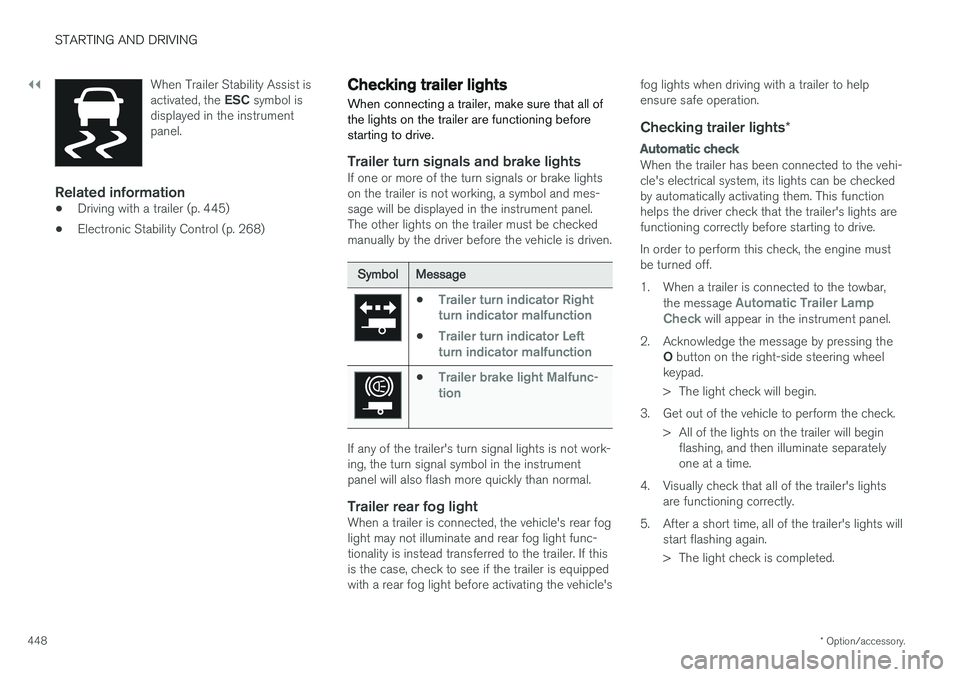
448 When Trailer Stability Assist is activated, the
ESC symbol is
displayed in the instrument panel.
Related information
• Driving with a trailer (p. 445)
• Electronic Stability Control (p. 268)
Checking trailer lights
When connecting a trailer, make sure that all of the lights on the trailer are functioning beforestarting to drive.
Trailer turn signals and brake lightsIf one or more of the turn signals or brake lights on the trailer is not working, a symbol and mes-sage will be displayed in the instrument panel.The other lights on the trailer must be checkedmanually by the driver before the vehicle is driven.
SymbolMessage
•Trailer turn indicator Right
turn indicator malfunction
•Trailer turn indicator Left
turn indicator malfunction
•Trailer brake light Malfunc-
tion
If any of the trailer's turn signal lights is not work- ing, the turn signal symbol in the instrumentpanel will also flash more quickly than normal.
Trailer rear fog lightWhen a trailer is connected, the vehicle's rear foglight may not illuminate and rear fog light func-tionality is instead transferred to the trailer. If thisis the case, check to see if the trailer is equippedwith a rear fog light before activating the vehicle's fog lights when driving with a trailer to helpensure safe operation.
Checking trailer lights
*
Automatic check
When the trailer has been connected to the vehi- cle's electrical system, its lights can be checkedby automatically activating them. This functionhelps the driver check that the trailer's lights arefunctioning correctly before starting to drive. In order to perform this check, the engine must be turned off.
1. When a trailer is connected to the towbar,
the message
Automatic Trailer Lamp
Check will appear in the instrument panel.
2. Acknowledge the message by pressing the O button on the right-side steering wheel
keypad.
> The light check will begin.
3. Get out of the vehicle to perform the check. > All of the lights on the trailer will beginflashing, and then illuminate separately one at a time.
4. Visually check that all of the trailer's lights are functioning correctly.
5. After a short time, all of the trailer's lights will start flashing again.
> The light check is completed.
Page 451 of 662
STARTING AND DRIVING
}}
449
Disabling the automatic check
The automatic light check can be disabled in the center display. 1.Tap
Settings in the Top view.
2. Tap
My CarLights and Lighting.
3. Deselect
Automatic Trailer Lamp Check.
Manual check
If the automatic check has been disabled, the check can be started manually. 1.Tap
Settings in the Top view.
2. Tap
My CarLights and Lighting.
3. Select
Manual Trailer Lamp Check.
> The light check will begin. Get out of the vehicle to perform the check.
Related information
• Driving with a trailer (p. 445)
Towing using a towline
This section refers to one vehicle being towed behind another using a towline.
Before towing another vehicle, check applicable speed limit regulations.
Preparations and towing
CAUTION
Note that the vehicle must always be towed with the wheels rolling forward.
• Do not tow a vehicle with automatictransmission at a speed greater than80 km/h (50 mph) or for a distancegreater than 80 km (50 miles).
WARNING
•
Ignition mode
II must be active – all air-
bags are deactivated in ignition mode I.
• Always have the remote key in the vehicle when it is towed.
WARNING
The brake and steering servos do not work when the engine is off – it takesabout 5 times more pressure on the brakepedal and steering requires much more effortthan normal. 1. Turn on the hazard warning flashers.
2. Attach the towline to the towing eyelet.3.
Put the vehicle in ignition mode II – without
pressing the brake pedal, turn the start knob clockwise and hold it there for about4 seconds. Release the knob, which willautomatically return to its original position.
4. Move the gear selector to neutral ( N) and
release the parking brake. If the battery charge level is too low, it may not be possible to release the parking brake.Connect an auxiliary battery to the vehicle ifthe battery is discharged.
> The towing vehicle can now start driving.
5. Keep the towline taut when the towing vehi- cle slows down by applying light pressure to the brake pedal. This will help avoid jarringmovements.
6. Be prepared to apply the brakes to stop the vehicle.
Jump startingDo not tow the vehicle to start the engine. Use anauxiliary battery if the start battery's charge levelis so low that the engine cannot be started.
Page 538 of 662
||
WHEELS AND TIRES
* Option/accessory.
536
NOTE
Always remember to calibrate the Tire Pres- sure Monitoring System when the wheelshave been changed or the tire inflation pres-sure has been corrected according to the tirepressure decal or tire inflation pressure table. If correct reference values have not been set, the system cannot issue low tire pressurealerts correctly. The vehicle must be stationary with the engine running to access the calibration but-ton and to start the calibration process.
WARNING
The exhaust gases contain carbon monoxide, which is invisible and odorless but very poi-sonous. For this reason, always perform thecalibration procedure outdoors or in a work-shop with exhaust gas evacuation equipment.
Related information
• Recommended tire pressure (p. 533)
• Adjusting tire pressure (p. 532)
• Viewing tire pressure status in the center display
* (p. 536)
• Action when warned of low tire pressure (p. 537)
• Tire pressure monitoring system
* (p. 533)
Viewing tire pressure status in the
center display *
With the system for tire pressure monitoring, Tyre Pressure Monitoring System (TPMS), tirepressure status can be viewed in the center dis-play.
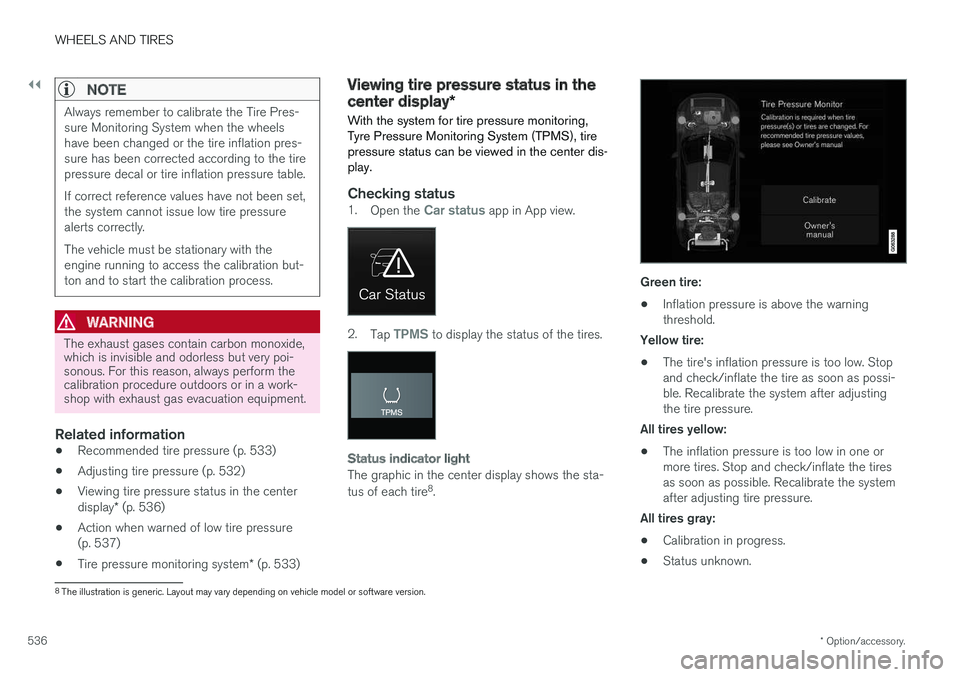
Checking status1. Open the Car status app in App view.
2.Tap TPMS to display the status of the tires.
Status indicator light
The graphic in the center display shows the sta- tus of each tire 8
.
Green tire:
• Inflation pressure is above the warning threshold.
Yellow tire:
• The tire's inflation pressure is too low. Stopand check/inflate the tire as soon as possi-ble. Recalibrate the system after adjustingthe tire pressure.
All tires yellow:
• The inflation pressure is too low in one ormore tires. Stop and check/inflate the tiresas soon as possible. Recalibrate the systemafter adjusting tire pressure.
All tires gray: • Calibration in progress.
• Status unknown.
8
The illustration is generic. Layout may vary depending on vehicle model or software version.
Page 574 of 662
MAINTENANCE AND SERVICE
572
Volvo's service program
To keep the vehicle as safe and reliable as pos- sible, follow the Volvo service schedule speci-fied in the Warranty and Maintenance RecordsInformation booklet.
Volvo recommends having an authorized Volvo workshop perform service and maintenance.Volvo workshops have the staff, service literatureand special tools to guarantee the highest qualityof service.
CAUTION
To ensure the Volvo warranty is not invalida- ted, check and follow the Service and War-ranty Booklet.
IntroductionThe maintenance services contain several checks that require special instruments and tools andtherefore must be performed by a qualified tech-nician. To keep your Volvo in top condition, spec-ify time-tested and proven Genuine Volvo Partsand Accessories.
The Federal Clean Air Act - U.S.
The Federal Clean Air Act requires vehicle manu- facturers to furnish written instructions to the ulti-mate purchaser to assure the proper servicingand function of the components that controlemissions. These services, which are listed in the"Warranty and Service Records Information" booklet, are not covered by the warranty. You willbe required to pay for labor and material used.
Maintenance
Your Volvo passed several major inspections before it was delivered to you, in accordance withVolvo specifications. The maintenance proce-dures outlined in the Warranty and ServiceRecords Information booklet, many of which willpositively affect your vehicle's emissions, shouldbe performed as indicated. It is recommendedthat receipts for vehicle emission maintenance beretained in case questions arise concerningmaintenance. Inspection and maintenance shouldalso be performed anytime a malfunction isobserved or suspected.
Applicable warranties - U.S./Canada
In accordance with applicable U.S. and Canadian regulations, the following list of warranties is pro-vided.
• New Vehicle Limited Warranty
• Parts and Accessories Limited Warranty
• Corrosion Protection Limited Warranty
• Seat Belt and Supplemental Restraint Sys-tems Limited Warranty
• Emission Design and Defect Warranty
• Emission Performance Warranty
These are federal warranties. Other warrantiesare provided as required by state/provincial law.Refer to your separate Warranty and Service Records Information booklet for detailed informa-tion concerning each of the warranties.
Periodic maintenance helps minimize
emissions
NOTE
•
Refer to your Service and Warranty Book- let for a comprehensive service and main-tenance schedule up to 240,000 km(150,000 miles). This program containsinspections and services necessary forthe proper function of your vehicle andincludes components that affect vehicleemissions.
• The Warranty and Service Records Infor-mation booklet also contains detailedinformation concerning the warrantiesthat apply to your vehicle.
On-board Diagnostic SystemOBD II is part of your vehicle's computerized engine management system. It stores diagnosticinformation about your vehicle's emission con-trols. It can light the Check Engine light (MIL) if itdetects an emission control "fault." A "fault" is acomponent or system that is not performingwithin an expected range. A fault may be perma-nent or temporary. OBD II will store a messageabout any fault.
Page 575 of 662
MAINTENANCE AND SERVICE
}}
573
Emission inspection readiness
How do states use OBD II for emission
inspections?
Many states connect a computer directly to a vehicle's OBD II system. The inspector can thenread "faults." In some states, this type of inspec-tion has replaced the tailpipe emission test.
How can my vehicle fail OBD II emission
inspection?
Your vehicle can fail OBD II emission inspection for any of the following reasons:
• If your Check Engine (MIL) light is lit, yourvehicle may fail inspection.
• If your vehicle's Check Engine light was lit,but went out without any action on your part,OBD II will still have a recorded fault. Yourvehicle may pass or fail, depending on theinspection practices in your area.
• If you had recent service that required dis-connecting the battery, OBD II diagnosticinformation may be incomplete and "notready" for inspection. A vehicle that is notready may fail inspection.
How can I prepare for my next OBD II
emission inspection?
• If your Check Engine (MIL) light is lit - or was lit but went out without service, have your vehicle diagnosed and, if necessary, servicedby a qualified Volvo technician.
• If you recently had service for a lit CheckEngine light, or if you had service thatrequired disconnecting the battery, a periodof driving is necessary to bring the OBD IIsystem to "ready" for inspection. Two half-hour trips of mixed stop-and-go/highwaydriving are typically needed to allow OBD II toreach readiness. Your Volvo retailer can pro-vide you with more information on planning atrip.
• Maintain your vehicle in accordance with yourvehicle's maintenance schedule.
Owner maintenancePeriodic maintenance requirements and intervalsare described in your vehicle's Warranty andService Records Information booklet. The following points can be carried out between the normally scheduled maintenance services.
Each time the car is refueled:
•Check the engine oil level.
• Clean the windshield, windshield wipers, headlights, and taillights.
Monthly:
• Check cold tire pressure in all tires. Inspect the tires for wear.
• Check that engine coolant and other fluidlevels are between the indicated "min" and"max" markings.
• Clean interior glass surfaces with a glasscleaner and soft paper towels.
• Wipe driver information displays with a softcloth.
• Visually inspect battery terminals for corro-sion. Corrosion may indicate a loose terminalconnector, or a battery near the end of itsuseful service life. Consult your Volvo retailerfor additional information.
As needed:
Wash the car, including the undercarriage, to reduce wear that can be caused by a buildup ofdirt, and corrosion that can be caused by salt res-idues. Clean leaves and twigs from air intake vents at the base of the windshield, and from other placeswhere they may collect.
NOTE
Complete service information for qualified technicians is available online for purchase orsubscription at www.volvotechinfo.com.
Page 648 of 662
INDEX
646
B
Backrestfront seat, adjusting 188, 189, 192, 193 , 194
rear seat, folding 196
Battery jump-start 442
Maintenance 595
start 595
support 598
symbols on the battery 599
warning symbols 599
BLIS 342, 343, 344, 345 Blower adjusting 225, 226
air distribution 208
air vents 209
Bluetooth connect 487
connecting vehicle to Internet 505
phone 494
settings 503
Book service and repair 576
Booster cushions 71Brake assist after collision 413
Brake fluidgrade 641
Brake functions 404
Brake light 163
Brakes 405 anti-lock brakes, ABS 405
automatic when stationary 411
Brake Assist System, BAS 406
brake lights 163
brake system 404
emergency brake lights 163
handbrake 407
Maintenance 407
on salted roads 407
on wet roads 406
brake system fluid 641
C
Camera sensor 338
Camera unit 325
Capacity weight 552, 637
Cargo compartment 561
attachment points 563
cargo net 568
electrical outlet 556, 558
Lighting 166
Cargo compartment cover 564, 565
cargo net 568
Car wash 617, 618, 620, 621, 622, 623
Catalytic converter 440 recovery 449
CD player 485
Cell phone, see Phone 495
Center console 555Center display change appearance 133
cleaning 612
climate controls 214
Function view 124
keyboard 128
messages 142, 143, 144
operation 114, 117, 121, 126
overview 111
settings 134, 135, 136
switch off and change volume 133
symbols in status bar 126
views 117
Central locking 251
Change of owner 136
Changing a wheel 538
Checking engine oil level 585
Page 652 of 662
INDEX
650
H
Handbrake 407, 408
Hand wash 618Hard diskspace 512
Hazard warning flashers 164
HDC 431
HD radio 468
Head restraint 198
Head-up display 144 activate and deactivate 146
cleaning 613
replacing windshield 582
settings 146
Heated washer nozzles 181 Heating Seats 216, 217
steering wheel 219, 220
windows 223, 224
high beams 158, 159
High engine temperature 440
Hill Descent Control 431, 432 activate with function button 432
Hill Start Assist 412 Hill Start Assist (HSA) 412
Hoisting the vehicle 579
HomeLink ® 452
programming 453
use 454
HomeLink ® remote control
programmable 452
Home safe lighting 164
Honk 199
Hood, opening 581
Horn 199
I
IAQS (Interior Air Quality System) 206
IC (Inflatable Curtain) 60
ID, Volvo 26
Identification number 38
Ignition mode 403, 404
Immobilizer 246 Electronic immobilizer 246
Indicator symbols 95
Individual drive mode 419
Infant seats 67
Inflatable curtain 60
Inflatable Curtain 60
Inflating tires 551
Inflation pressure adjusting 532
Checking 531
recommended 533
Inflation pressure monitoring 533 action 537
Status 536
Inflation pressure table 643
Information display 84, 88
Infotainment (Audio and media) 460
Instrument cluster 84 settings 88
Instrument illumination 167
Instrument lighting 167 Instrument panel App menu 104, 105
messages 106
Instruments and controls 82 Instruments overview left-hand drive vehicle 82
Integrated booster cushion 75 folding down 78
folding up 77
IntelliSafe driver support 28
Interior Air Quality System 206
Intermittent wiping 180