towing VOLVO V90 CROSS COUNTRY 2018 Owner´s Manual
[x] Cancel search | Manufacturer: VOLVO, Model Year: 2018, Model line: V90 CROSS COUNTRY, Model: VOLVO V90 CROSS COUNTRY 2018Pages: 662, PDF Size: 11.93 MB
Page 12 of 662
10
Economical driving433
Preparing for a long trip 434
Winter driving 435
Driving through standing water 435
Opening/closing the fuel filler door 436
Refueling 436
Fuel 437
Octane rating 438
Emission controls 440
Overheating of engine and transmission 440
Battery drain 441
Jump starting using another battery 442
Retractable towbar *
443
Driving with a trailer 445
Trailer Stability Assist *
447
Checking trailer lights 448
Towing using a towline 449
Attaching and removing the towing eyelet 450
Recovery 452
HomeLink ®
* 452
Programming HomeLink ®
* 453
Using HomeLink 454
Type approval for HomeLink ®
* 455
Compass 456
Activating and deactivating the compass456
Calibrating the compass 456
AUDIO, MEDIA AND INTERNET
Audio, media and Internet460
Sound settings 460
Apps 461
Download apps 462
Updating apps 463
Deleting apps 464
Radio 464
Starting the radio 465
Changing waveband and radio station 465
Searching for a radio station 466
Storing radio favorites 467
Radio settings 467
RBDS 468
HD Radio ™
468
Activating and deactivating the HD Radio ™ 470
HD Radio ™ sub-channels
470
HD Radio ™ limitations
471
SiriusXM ®
Satellite radio * 472
Using SiriusXM ®
Satellite radio *473
Settings for SiriusXM ®
Satellite radio *474
SiriusXM Travel Link ®
* 476
SiriusXM Travel Link ®
* - Weather 477
SiriusXM Travel Link ®
* - Notifications 478
Page 16 of 662
14
SPECIFICATIONS
Type designations632
Dimensions 635
Weights 637
Towing capacity and tongue weight 638
Engine specifications 639
Engine oil specifications 640
Coolant specifications 641
Transmission fluid specifications 641
Brake fluid specifications 641
Fuel tank volume 642
Air conditioning specifications 642
Approved tire pressure 643
INDEX
Index 645
Page 54 of 662
||
SAFETY
52
Rear seat
The rear seat belt reminder has two functions:• To indicate which seat belts are buckled in the rear seats. This will also be displayed inan instrument panel graphic.
• To provide audio and visual reminders if anyseat belt in the rear seat is removed whilethe vehicle is in motion. The reminder willstop when the seat belt has been rebuckled.
Door/hood/tailgate and fuel filler door
reminder
If the hood, tailgate, fuel filler door or any door isnot properly closed, this will be indicated by agraphic in the instrument panel. Stop the vehiclesafely and close the open door, hood, etc.
If the vehicle is moving at a speedunder approx. 10 km/h (6 mph), theinformation symbol will illuminate in theinstrument panel.
If the vehicle is moving at a speed above approx. 10 km/h (6 mph), thewarning symbol will illuminate in theinstrument panel.
Related information
•Seat belts (p. 47)
• Buckling and unbuckling seat belts (p. 48)
Airbags
The vehicle is equipped with airbags and inflat- able curtains for the driver and passengers.
WARNING
• If the airbag warning light stays on after the engine has started or if it illuminateswhile you are driving, have the vehicleinspected by a trained and qualified Volvoservice technician as soon as possible.
• Never attempt to alter or repair any of thevehicle's safety systems yourself. Incor-rectly performed repairs to any systemcould impair function and lead to seriousinjury. All work on these systems shouldbe performed by a trained and qualifiedVolvo service technician.
WARNING
If your vehicle has become water-damaged in any way (e.g., soaked floor mats/standingwater on the floor of the vehicle), do notattempt to start the engine. This may causeairbag deployment, which could result in seri-ous injury. Volvo recommends towing thevehicle directly to an authorized Volvo work-shop. Before attempting to tow the vehicle:
1. Switch off the ignition for at least 10
minutes and disconnect the battery.
2. Follow the instructions for manually over- riding the shiftlock system.
Deployed airbags
WARNING
If any of the airbags have deployed:
• Do not attempt to drive the vehicle. Have it towed to an authorized workshop.
• If necessary, seek medical attention.
Related information
•
Safety (p. 42)
• Driver/passenger-side airbags (p. 53)
• Side airbags (p. 59)
• Inflatable curtain (p. 60)
Page 63 of 662
SAFETY
61
Related information
•Airbags (p. 52)
Safety mode Safety mode is a feature that is triggered after a collision if there is potential damage to an impor-tant function in the vehicle, such as the fuellines, sensors for one of the safety systems, thebrake system, etc.
If the vehicle has been involved in a collision, the text Safety mode See Owner's manual may
appear in the instrument panel along with the warning symbol if the panel is undamaged andthe vehicle's electrical system is intact. The mes-sage indicates that one or more of the vehicle'sfunctions may be reduced.
WARNING
Never attempt to restart the vehicle if you smell fuel fumes when the message Safety
mode See Owner's manual is displayed in
the instrument panel. Leave the vehicle imme- diately.
If safety mode has been set, it may be possible to reset the system in order to start and move thevehicle a short distance, for example, if it is block-ing traffic.
WARNING
Never attempt to perform repairs or reset electrical components on your own after thevehicle has been in safety mode. This couldresult in injury or prevent the vehicle fromfunctioning properly. Volvo recommends hav-ing the vehicle inspected and reset to normaloperating status by an authorized Volvo work- shop after
Safety mode See Owner's
manual has been displayed.
WARNING
When the vehicle is in safety mode, it should not be towed behind another vehicle. It shouldbe towed from the site on a tow truck. Volvorecommends towing the vehicle directly to anauthorized Volvo workshop.
Related information
• Safety (p. 42)
• Starting and moving the vehicle when it is in safety mode (p. 62)
• Recovery (p. 452)
Page 64 of 662
SAFETY
62
Starting and moving the vehiclewhen it is in safety mode If safety mode has been set, it may be possible to reset the system in order to start and movethe vehicle a short distance, for example, if it isblocking traffic.
Starting the vehicle when it is in safety mode
1. Check the vehicle for damage, particularly forfuel leakage. Make sure you do not detect any gasoline fumes. If the damage to the vehicle is minor and there is no fuel leakage/fumes, you mayattempt to start the engine.
WARNING
Never attempt to restart the vehicle if you smell fuel fumes when the message Safety
mode See Owner's manual is displayed in
the instrument panel. Leave the vehicle imme- diately.
2. Switch off the ignition. 3. Then try to start the vehicle.
> The vehicle's electrical system will per-form a system check and then attempt to reset to normal operating mode.
CAUTION
If the message Safety mode See Owner's
manual is still displayed, the vehicle should
not be driven or towed behind another vehi- cle. If the vehicle needs to be moved, it mustbe towed on a tow truck. Even if no damageis apparent, there may be hidden damage thatcould make the vehicle impossible to control.
Moving the vehicle when it is in safety mode
1. If the message Normal mode The vehicle
is now in normal mode is displayed after
attempting to start the engine, the vehicle may be moved carefully from its presentposition if, for example, it is blocking traffic.
2. Do not move the vehicle farther than abso- lutely necessary.
WARNING
When the vehicle is in safety mode, it should not be towed behind another vehicle. It shouldbe towed from the site on a tow truck. Volvorecommends towing the vehicle directly to anauthorized Volvo workshop.
Related information
• Safety mode (p. 61)
• Starting the vehicle (p. 400)
• Recovery (p. 452)
Page 270 of 662
DRIVER SUPPORT
* Option/accessory.
268
Electronic Stability Control
The Electronic Stability Control (ESC 2
) function
helps the driver avoid skidding and improves the vehicle's directional stability.
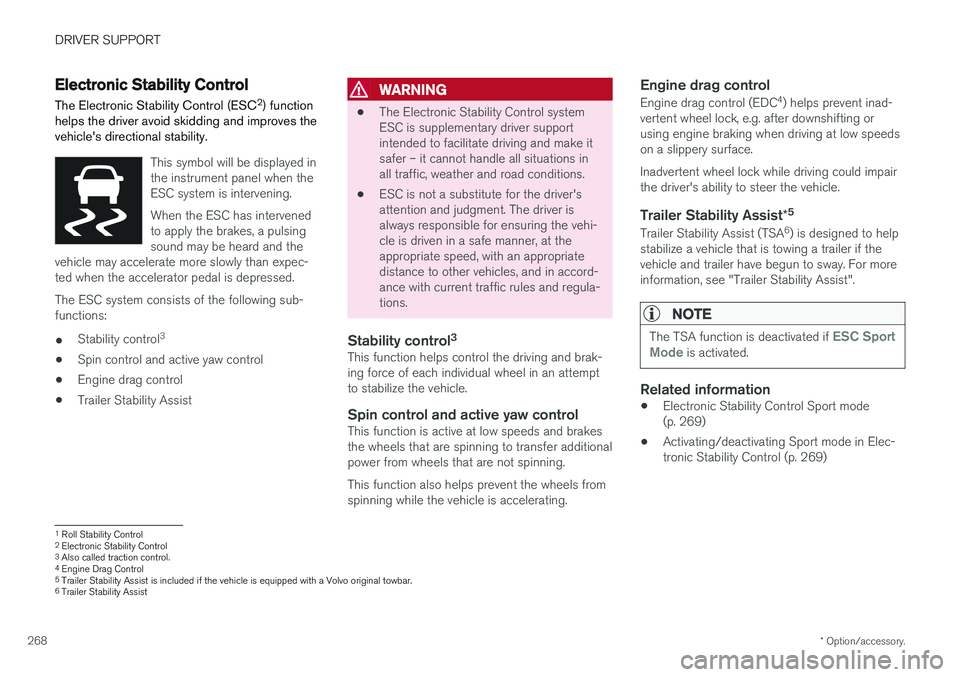
This symbol will be displayed in the instrument panel when theESC system is intervening. When the ESC has intervened to apply the brakes, a pulsingsound may be heard and the
vehicle may accelerate more slowly than expec-ted when the accelerator pedal is depressed.
The ESC system consists of the following sub- functions: • Stability control 3
• Spin control and active yaw control
• Engine drag control
• Trailer Stability Assist
WARNING
•The Electronic Stability Control system ESC is supplementary driver supportintended to facilitate driving and make itsafer – it cannot handle all situations inall traffic, weather and road conditions.
• ESC is not a substitute for the driver'sattention and judgment. The driver isalways responsible for ensuring the vehi-cle is driven in a safe manner, at theappropriate speed, with an appropriatedistance to other vehicles, and in accord-ance with current traffic rules and regula-tions.
Stability control 3This function helps control the driving and brak-ing force of each individual wheel in an attemptto stabilize the vehicle.
Spin control and active yaw controlThis function is active at low speeds and brakesthe wheels that are spinning to transfer additionalpower from wheels that are not spinning. This function also helps prevent the wheels from spinning while the vehicle is accelerating.
Engine drag control
Engine drag control (EDC
4
) helps prevent inad-
vertent wheel lock, e.g. after downshifting orusing engine braking when driving at low speedson a slippery surface. Inadvertent wheel lock while driving could impair the driver's ability to steer the vehicle.
Trailer Stability Assist *5
Trailer Stability Assist (TSA
6
) is designed to help
stabilize a vehicle that is towing a trailer if thevehicle and trailer have begun to sway. For moreinformation, see "Trailer Stability Assist".
NOTE
The TSA function is deactivated if ESC Sport
Mode is activated.
Related information
• Electronic Stability Control Sport mode (p. 269)
• Activating/deactivating Sport mode in Elec-tronic Stability Control (p. 269)
1
Roll Stability Control
2 Electronic Stability Control
3 Also called traction control.
4 Engine Drag Control
5Trailer Stability Assist is included if the vehicle is equipped with a Volvo original towbar.6
Trailer Stability Assist
Page 302 of 662
||
DRIVER SUPPORT
* Option/accessory.
300
NOTE
ACC can keep the vehicle stationary for no more than 5 minutes – after that time theparking brake is applied and Adaptive CruiseControl is deactivated. The parking brake must be released before Adaptive Cruise Control can be reactivated.
Deactivation of the Auto-hold brake function
In certain situations, Auto-hold will be deactivated when the vehicle is at a standstill and AdaptiveCruise Control will go into standby mode. Thismeans that the brakes will be released and thevehicle could begin to roll. The driver mustactively apply the brakes to keep the vehicle sta-tionary. This can occur if:
• the driver depresses the brake pedal
• the parking brake is applied
• the gear selector is moved to the
P
, N
or R
positions
• the driver puts Adaptive Cruise Control in standby mode.
Auto Activate Parking BrakeIn certain situations, the parking brake will beapplied to keep the vehicle at a standstill. This occurs if Adaptive Cruise Control is keepingthe vehicle stationary using the brakes and:
• the driver opens the door or unbuckleshis/her seat belt
• ACC has kept the vehicle at a standstill formore than approx. 5 minutes
• the brakes overheat
• the driver switches off the engine manually.
Related information
•
Adaptive Cruise Control
* (p. 289)
Adaptive Cruise Control limitations
Adaptive Cruise Control (ACC 55
) may have lim-
ited functionality in certain situations.
Steep roads and/or heavy loadsAdaptive Cruise Control is primarily intended to be driven on flat roads. The function may not beable to maintain the correct time interval to thevehicle ahead when driving down steep hills. Thedriver should be extra attentive and prepared toapply the brakes.
• Do not use Adaptive Cruise Control if thevehicle is carrying a heavy load or towing atrailer.
Other limitations
•
The Off Road drive mode cannot be
selected if Adaptive Cruise Control is acti- vated.
NOTE
The function uses the vehicle's camera unit, which has some general limitations – see thesection "Camera unit limitations".
NOTE
The function uses the vehicle's radar unit, which has some general limitations – see thesection "Radar unit limitations".
55 Adaptive Cruise Control
Page 320 of 662

||
DRIVER SUPPORT
* Option/accessory.
318
The driver is responsible for ensuring that the vehicle maintains a suitable distancefrom such obstacles.
• The camera and radar sensors do nothave the capacity to detect all oncomingobjects and obstacles in traffic environ-ments, e.g. potholes, stationary obstaclesor objects that completely or partiallyblock the route.
• Pilot Assist does not "see" pedestrians,animals, etc.
• The recommended steering input is lim-ited in force, which means that it cannotalways help the driver to steer and keepthe vehicle within the lane.
• Pilot Assist is switched off if the powersteering is working with reduced power -e.g. during cooling due to overheating(see section "Speed-dependent steeringforce").
The driver can always correct or adjust steeringassistance provided by Pilot Assist by turning thesteering wheel to the desired position.
Steep roads and/or heavy loadsPilot Assist is primarily intended to be driven onflat roads. The function may not be able to main-tain the correct time interval to the vehicle aheadwhen driving down steep hills. The driver should be extra attentive and prepared to apply thebrakes.
• Do not use Pilot Assist if the vehicle is carry-ing a heavy load or towing a trailer.
NOTE
Pilot Assist cannot be activated if a trailer, bike carrier or similar is connected to thevehicle electrical system.
Other limitations
•
The Off Road drive mode cannot be
selected when Pilot Assist is activated.
NOTE
The function uses the vehicle's camera unit, which has some general limitations – see thesection "Camera unit limitations".
NOTE
The function uses the vehicle's radar unit, which has some general limitations – see thesection "Radar unit limitations".
Related information
• Pilot Assist (p. 305)
• Speed-dependent steering wheel resistance (p. 266)
Pilot Assist
* symbols and messages
A number of symbols and messages relating to Pilot Assist may be displayed in the instrument panel and/or the head-up display *.
Page 324 of 662
||
DRIVER SUPPORT
322
CauseAction
Water or snow is spraying/swirling up and blocking the radar signals or the camera's range of visibility. No action. Very wet or snow-covered roads may sometimes prevent the cam-era/radar sensor from functioning.
There is dirt between the inside of the windshield and the camera/radarsensor. Consult a workshop to have the area of the windshield on the inside of the cam-era's casing cleaned. An authorized Volvo workshop is recommended.
NOTE
Keep the windshield in front of the camera and radar unit clean.
Vehicle speedThe radar sensor's ability to detect a vehicle ahead is significantly reduced if:
• the speed of the vehicle ahead differs greatlyfrom your vehicle's speed
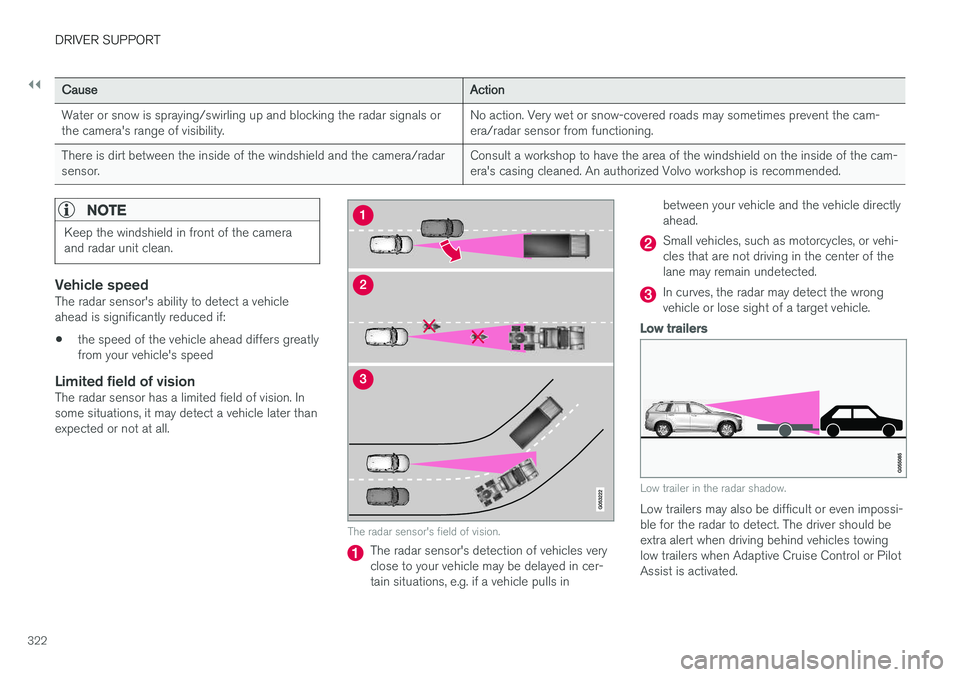
Limited field of visionThe radar sensor has a limited field of vision. Insome situations, it may detect a vehicle later thanexpected or not at all.
The radar sensor's field of vision.
The radar sensor's detection of vehicles very close to your vehicle may be delayed in cer-tain situations, e.g. if a vehicle pulls in between your vehicle and the vehicle directlyahead.
Small vehicles, such as motorcycles, or vehi- cles that are not driving in the center of thelane may remain undetected.
In curves, the radar may detect the wrong vehicle or lose sight of a target vehicle.
Low trailers
Low trailer in the radar shadow.
Low trailers may also be difficult or even impossi- ble for the radar to detect. The driver should beextra alert when driving behind vehicles towing low trailers when Adaptive Cruise Control or Pilot Assist is activated.
Page 432 of 662
STARTING AND DRIVING
* Option/accessory.
430
Leveling control settings *
Turn off leveling control before lifting the vehicle with a jack to help avoid problems with thepneumatic suspension.
Center display settings
Disable Leveling Control
In certain situations, this function must be turned off, e.g. before the vehicle is raised using a jack *.
The level difference caused by raising the vehicle with a jack could cause problems with the pneu-matic suspension. Turning off the function in the center display:1. Tap
Settings in the Top view.
2. Tap
My CarParking Brake and
Suspension.
3. Select
Disable Leveling Control.
Related information
• Leveling control
* and suspension (p. 428)
• Loading recommendations (p. 561)
Low Speed Control The low-speed function, Low Speed Control (LSC), facilitates and improves control and trac-tion on rough roads and slippery surfaces, e.g.when towing a trailer on grass or up boat ramps. In vehicles equipped with drive mode control
*,
the function is included in the Off Road drive mode.
Low Speed Control is designed for driving on rough roads and when towing trailers at lowspeeds, up to approximately 40 km/h (25 mph). When driving at low speeds, LSC prioritizes low gears and all-wheel drive to help avoid wheel spinand improve traction on all wheels. The accelera-tor pedal will be less responsive to improve trac-tion and speed control at low speeds. The function is activated together with Hill Descent Control (HDC), which makes it possibleto control speed going down steep hills using theaccelerator pedal and reduces the need to usethe brake pedal. The system makes it possible tomaintain a low and uniform speed when drivingdown steep hills.
NOTE
When LSC with HDC is activated, the feel of the accelerator pedal and engine responsewill change.
NOTE
This drive mode is not designed to be used for normal street driving.
NOTE
The function is deactivated when driving at high speeds and must be reactivated at lowerspeeds if so desired.
Related information
• Activating and deactivating Low Speed Con- trol using the function button (p. 431)
• Changing drive mode
* (p. 421)
• Hill Descent Control (p. 431)
• All Wheel Drive (AWD) (p. 419)