parking brake VOLVO XC60 2009 Owner´s Manual
[x] Cancel search | Manufacturer: VOLVO, Model Year: 2009, Model line: XC60, Model: VOLVO XC60 2009Pages: 297, PDF Size: 21.16 MB
Page 114 of 297
03 Your driving environmentBrakes 03
112 Brake system
The brake system is a hydraulic system con-
sisting of two separate brake circuits. If a prob-
lem should occur in one of these circuits, it is
still possible to stop the vehicle with the other
brake circuit.
If the brake pedal must be depressed farther
than normal and requires greater foot pressure,
the stopping distance will be longer.
A warning light in the instrument panel will light
up to warn the driver that a fault has occurred.
If this light comes on while driving or braking,
stop immediately and check the brake fluid
level in the reservoir.
NOTE
Press the brake pedal hard and maintain
pressure on the pedal – do not pump the
brakes.
WARNING
If the fluid level is below the MIN mark in the
reservoir or if a brake system message is
shown in the information display:
DO NOT
DRIVE. Have the vehicle towed to a trained
and qualified Volvo service technician and
have the brake system inspected.
Power brakes function only when the
engine is running
The power brakes utilize vacuum pressure
which is only created when the engine is run-
ning. Never let the vehicle roll to a stop with the
engine switched off.
If the power brakes are not working, the brake
pedal must be pressed approximately five
times harder than usual to make up for the lack
of power assistance. This can happen for
example when towing your vehicle or if the
engine is switched off when the vehicle is roll-
ing. The brake pedal feels harder than usual.
Water on brake discs and brake pads
affects braking
Driving in rain and slush or passing through an
automatic car wash can cause water to collect
on the brake discs and pads. This will cause a
delay in braking effect when the pedal is
depressed. To avoid such a delay when the
brakes are needed, depress the pedal occa-
sionally when driving through rain, slush, etc.
This will remove the water from the brakes.
Check that brake application feels normal. This
should also be done after washing or starting
in very damp or cold weather.
Severe strain on the brake systemThe brakes will be subject to severe strain
when driving in mountains or hilly areas, or
when towing a trailer. Vehicle speed is usually slower, which means that the cooling of the
brakes is less efficient than when driving on
level roads. To reduce the strain on the brakes,
shift into a lower gear and let the engine help
with the braking. Do not forget that if you are
towing a trailer, the brakes will be subjected to
a greater than normal load.
Anti-lock braking systemThe Anti-lock Braking System (ABS) helps to
improve vehicle control (stopping and steering)
during severe braking conditions by limiting
brake lockup. When the system "senses"
impending lockup, braking pressure is auto-
matically modulated in order to help prevent
lockup that could lead to a skid.
The system performs a brief self-diagnostic
test when the engine has been started and
driver releases the brake pedal. Another auto-
matic test may be performed when the vehicle
first reaches a speed of approximately 25 mph
(40 km/h
). The brake pedal will pulsate several
times and a sound may be audible from the
ABS control module. This is normal.
Cleaning the brake discsCoatings of dirt and water on the brake discs
may result in delayed brake function. This delay
is minimized by cleaning the brake linings.
Cleaning the brake pads is advisable in wet
weather, prior to long-term parking, and after
the vehicle has been washed. Do this by brak-
Page 118 of 297
03 Your driving environmentParking brake 03
116 Electric parking brake
An electric parking brake has the same func-
tion as a manual parking brake.
NOTE
\b
A faint sound from the parking brake\fs
electric motor can be heard when the
parking brake is being applied. This
sound can also be heard during the
automatic function check of the parking
brake.
\b The brake pedal will move slightly when
the electric parking brake is applied or
released.
Low battery voltageIf the battery voltage is too low, the parking
brake cannot be applied or released. Connect
an auxiliary battery if the battery voltage is too
low, see page 107.
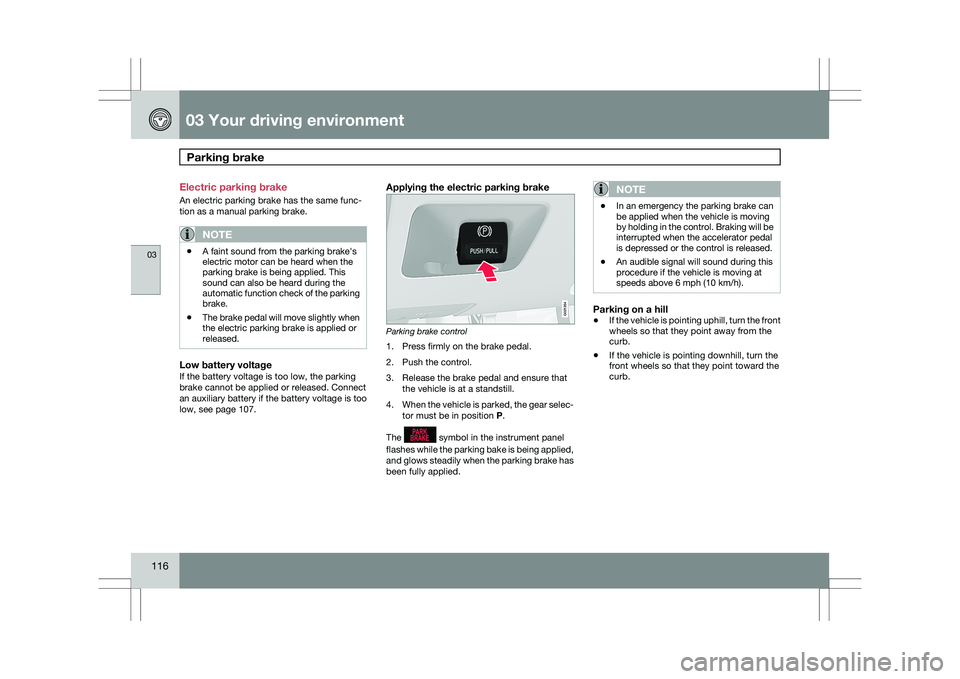
Applying the electric parking brake Parking brake control
1. Press firmly on the brake pedal.
2. Push the control.
3. Release the brake pedal and ensure that
the vehicle is at a standstill.
4. When the vehicle is parked, the gear selec-
tor must be in position P.
The symbol in the instrument panel
flashes while the parking bake is being applied,
and glows steadily when the parking brake has
been fully applied.NOTE \b
In an emergency the parking brake can
be applied when the vehicle is moving
by holding in the control. Braking will be
interrupted when the accelerator pedal
is depressed or the control is released.
\b An audible signal will sound during this
procedure if the vehicle is moving at
speeds above 6 mph (10 km/h).
Parking on a hill
\b
If the vehicle is pointing uphill, turn the front
wheels so that they point away from the
curb.
\b If the vehicle is pointing downhill, turn the
front wheels so that they point toward the
curb. G021354
Page 119 of 297
03 Your driving environment
Parking brake03
}}
* Option/accessory, for more information, see Introduction. 117
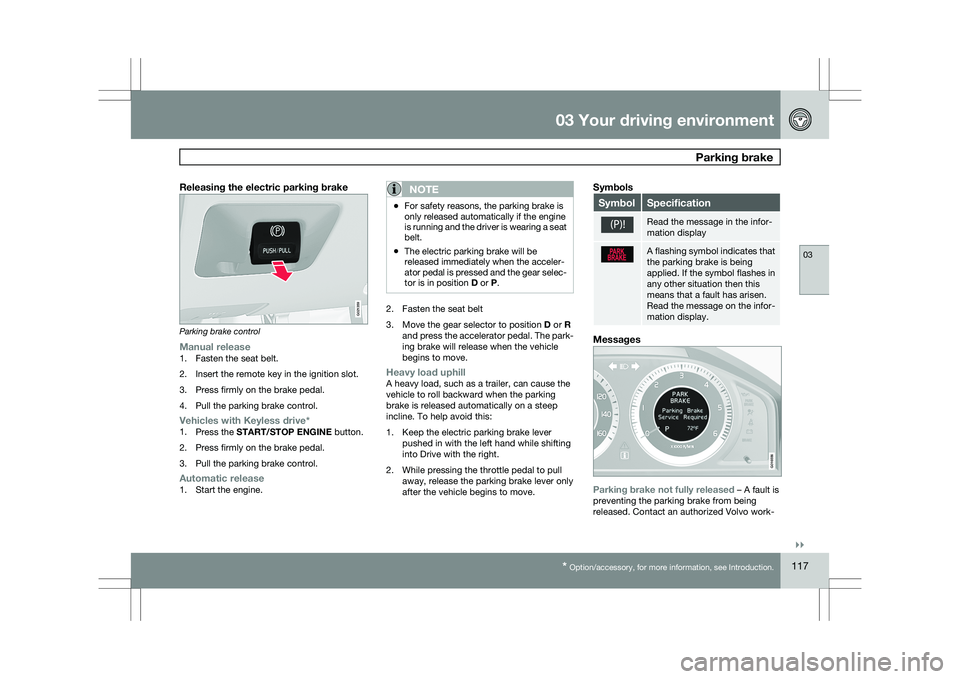
Releasing the electric parking brakeParking brake control
Manual release1. Fasten the seat belt.
2. Insert the remote key in the ignition slot.
3. Press firmly on the brake pedal.
4. Pull the parking brake control.
Vehicles with Keyless drive*1.
Press the START/STOP ENGINE button.
2. Press firmly on the brake pedal.
3. Pull the parking brake control.
Automatic release1. Start the engine.
NOTE \b
For safety reasons, the parking brake is
only released automatically if the engine
is running and the driver is wearing a seat
belt.
\b The electric parking brake will be
released immediately when the acceler-
ator pedal is pressed and the gear selec-
tor is in position
D or P. 2. Fasten the seat belt
3.
Move the gear selector to position D or R
and press the accelerator pedal. The park-
ing brake will release when the vehicle
begins to move.
Heavy load uphillA heavy load, such as a trailer, can cause the
vehicle to roll backward when the parking
brake is released automatically on a steep
incline. To help avoid this:
1. Keep the electric parking brake lever pushed in with the left hand while shifting
into Drive with the right.
2. While pressing the throttle pedal to pull away, release the parking brake lever only
after the vehicle begins to move.
Symbols Symbol Specification
Read the message in the infor-
mation display
A flashing symbol indicates that
the parking brake is being
applied. If the symbol flashes in
any other situation then this
means that a fault has arisen.
Read the message on the infor-
mation display.
Messages
Parking brake not fully released – A fault is
preventing the parking brake from being
released. Contact an authorized Volvo work- G021359 G016556
Page 120 of 297
03 Your driving environmentParking brake 03
118 shop. If you drive off with this error message
showing, a warning signal sounds.
Parking brake not applied – A fault is pre-
venting the parking brake from being applied.
Try to apply and release. Contact a Volvo work-
shop if the message remains.
Parking brake Service required – A fault has
arisen. Contact a Volvo workshop if the fault
remains.
WARNING
If the vehicle must be parked before the fault
has been corrected, always put the gear
selector in
P and turn the wheels so that
they point away from the curb if the vehicle
is pointing uphill or toward the curb if it is
pointing downhill.
Page 168 of 297
04 Comfort and driving pleasureCity Safety™ 04
166 Introduction
City Safety™
1
is a support system designed to
help the driver avoid low speed collisions when
driving in slow-moving, stop-and-go traffic.
City Safety™ is not active if your vehicle’s
speed is below approximately 2 mph (4 km/h).
This means that City Safety™ will not react if
your vehicle approaches another vehicle at
very low speed, for example, when parking.
The function is active at speeds ranging from
approximately 2-18 mph (4-30 km/h) and
assists the driver by applying the brakes auto-
matically, thereby avoiding or helping to
reduce the effects of a collision.
City Safety™ is designed to intervene as late
as possible to help avoid unnecessary activa-
tion.
City Safety™ triggers brief, forceful braking if a
low-speed collision is imminent. However, the
system will not intervene in situations where
the driver actively steers the vehicle or applies
the brakes, even if a collision cannot be avoi-
ded. This is done in order to always give the
driver’s actions highest priority.
City Safety™ activates in situations where the
driver has not applied the brakes in time, which means that the system cannot help the driver
in all situations.
City Safety™ should not be used to alter the
way in which the driver operates the vehicle.
The driver should never rely solely on this sys-
tem to safely stop the vehicle.
Normally, the occupants of the vehicle will not
be aware of City Safety™ except when the
system intervenes when a low-speed collision
is imminent.
If the vehicle is also equipped with the optional
Collision Warning with Auto-brake system, the
two systems interact. For more information
about the Collision Warning with Auto-brake
system, see page 160.
WARNING \b
City Safety™ is a supplemental aid to
the driver. It can never replace the
driver’s attention to traffic conditions or
his/her responsibility for operating the
vehicle in a safe manner.
\b City Safety™ does not function in all
driving situations or in all traffic, weather
or road conditions.
\b City Safety™ only reacts to vehicles
traveling in the same direction as your
vehicle and does not react to small vehi-
cles, bicycles or motorcycles or to peo-
ple or animals.
\b City Safety™ is not activated when your
vehicle is backing up.
\b City Safety™
functions at speeds up to
18 mph (30 km/h). This system can help
prevent a collision if the difference in
speed between your vehicle and the
vehicle ahead is less than 9 mph
(15 km/h). If the difference in speed is
greater, a collision cannot be avoided
but the speed at which the collision
occurs can be reduced. The driver must
apply the vehicle’s brakes for full brak-
ing effect.
\b Never wait for City Safety™ to intervene
in a potential collision situation. The 1
City Safety is a registered trademark of the Volvo Car Corporation
Page 189 of 297
04 Comfort and driving pleasure
Park assist*04
}}
* Option/accessory, for more information, see Introduction. 187
Introduction
The park assist system is designed to assist
you when driving into parking spaces, garages,
etc. It utilizes four ultrasound sensors located
in one or both bumpers to measure the dis-
tance to a vehicle, object, or a person who may
be close to the front or rear of your vehicle.
This system is available in the rear bumper
only, or in both the front and rear bumpers.
Park assist utilizes four ultrasound sensors in
the bumper(s) to measure the distance to a
vehicle, object, or a person who may be close
to the front or rear of your vehicle. An audible
signal and symbols in the audio system’s dis-
play indicate the distance to the object
WARNING
Park Assist is an information system, NOT a
safety system. This system is designed to
be a supplementary aid when parking the
vehicle. It is not, however, intended to
replace the driver\fs attention and judge-
ment. Function
Park assist button
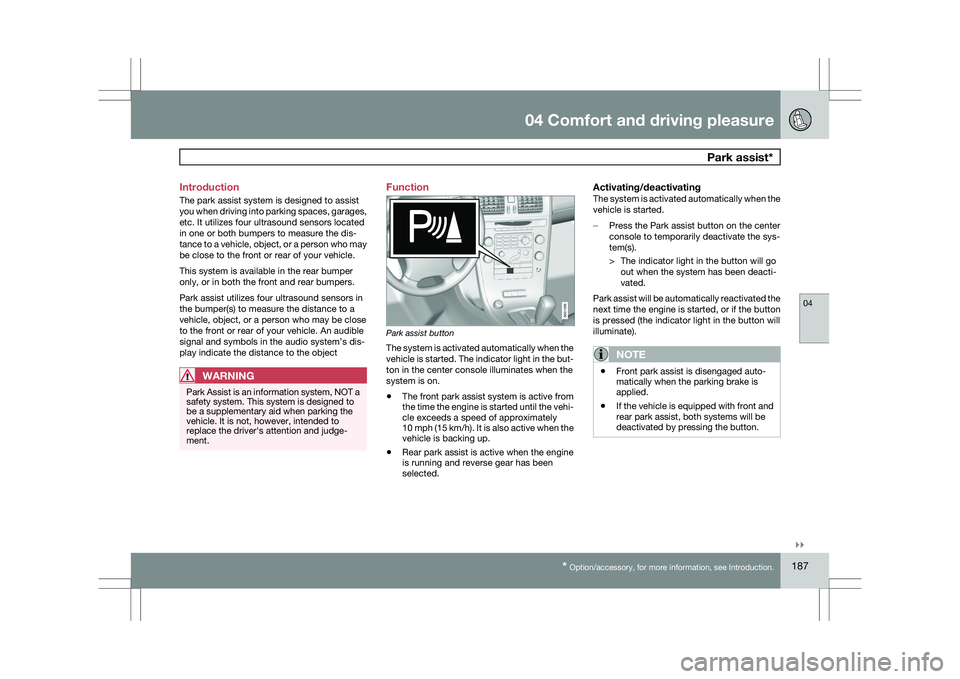
The system is activated automatically when the
vehicle is started. The indicator light in the but-
ton in the center console illuminates when the
system is on.
\b
The front park assist system is active from
the time the engine is started until the vehi-
cle exceeds a speed of approximately
10 mph (15 km/h). It is also active when the
vehicle is backing up.
\b Rear park assist is active when the engine
is running and reverse gear has been
selected.
Activating/deactivatingThe system is activated automatically when the
vehicle is started.
–
Press the Park assist button on the center
console to temporarily deactivate the sys-
tem(s).
> The indicator light in the button will go
out when the system has been deacti-
vated.
Park assist will be automatically reactivated the
next time the engine is started, or if the button
is pressed (the indicator light in the button will
illuminate).
NOTE \b
Front park assist is disengaged auto-
matically when the parking brake is
applied.
\b If the vehicle is equipped with front and
rear park assist, both systems will be
deactivated by pressing the button. G031399
Page 212 of 297
05 During your tripLoading 05
210
* Option/accessory, for more information, see Introduction.
Introduction
The load carrying capacity of your vehicle is
determined by factors such as the number of
passengers, the amount of cargo, the weight
of any accessories that may be installed, etc.
To increase loading space, the rear seat backr-
ests can be folded down, see page 83.
When loading the cargo area, keep the follow-
ing in mind:
\b
Load objects in the cargo area against the
backrest whenever possible.
\b Unstable loads can be secured to the load
anchoring eyelets with straps or web lash-
ings to help keep them from shifting.
\b Stop the engine and apply the parking
brake when loading or unloading long
objects. The gear selector can be knocked
out of position by long loads, which could
set the vehicle in motion.
WARNING \b
Stop the engine, put the gear selector in
P, and apply the parking brake when
loading or unloading long objects.
\b The vehicle\fs driving characteristics
may change depending on the weight
and distribution of the load.
\b A 44-pound (20 kg) object produces a
force of 2,200 pounds (1,000 kg) in a
headon collision at 30 mph (50 km/h).
\b The cargo area and rear seat should not
be loaded to a level higher than 2 in.
(5 cm) below the upper edge of the rear
side windows. Objects placed higher
than this level could impede the func-
tion of the Volvo Inflatable Curtain. Load anchoring eyelets
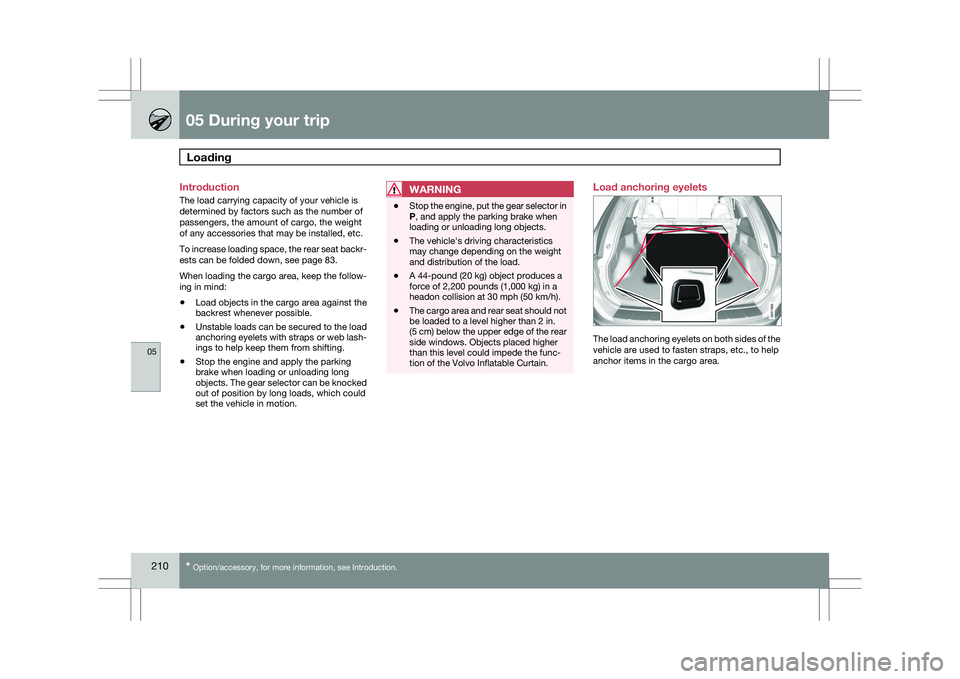
The load anchoring eyelets on both sides of the
vehicle are used to fasten straps, etc., to help
anchor items in the cargo area. G031966
Page 213 of 297
05 During your trip
Loading05
}}
211
WARNING\b
Cover sharp edges on long loads to help
prevent injury to occupants. Secure the
load to help prevent shifting during sud-
den stops.
\b Always secure large and heavy objects
with a seat belt or cargo retaining
straps.
\b Always secure the load to help prevent
it from moving in the event of sudden
stops.
\b Switch off the engine, apply the parking
brake and put the gear selector in P
when loading and unloading the vehicle. Grocery bag holder*
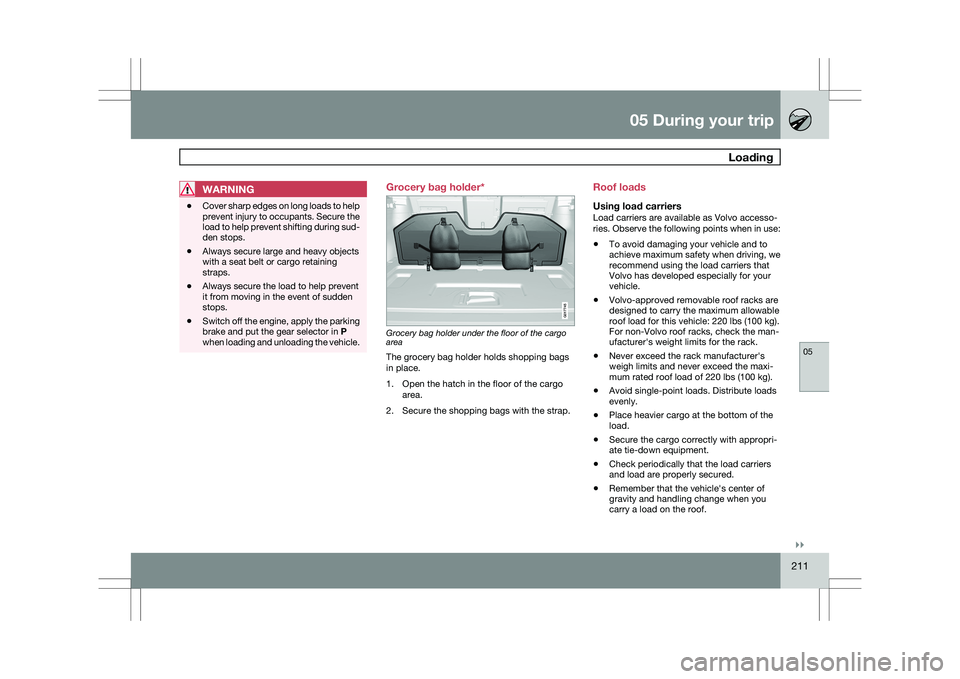
Grocery bag holder under the floor of the cargo
area
The grocery bag holder holds shopping bags
in place.
1. Open the hatch in the floor of the cargo
area.
2. Secure the shopping bags with the strap. Roof loads
Using load carriersLoad carriers are available as Volvo accesso-
ries. Observe the following points when in use:
\b
To avoid damaging your vehicle and to
achieve maximum safety when driving, we
recommend using the load carriers that
Volvo has developed especially for your
vehicle.
\b Volvo-approved removable roof racks are
designed to carry the maximum allowable
roof load for this vehicle: 220 lbs (100 kg).
For non-Volvo roof racks, check the man-
ufacturer\fs weight limits for the rack.
\b Never exceed the rack manufacturer\fs
weigh limits and never exceed the maxi-
mum rated roof load of 220 lbs (100 kg).
\b Avoid single-point loads. Distribute loads
evenly.
\b Place heavier cargo at the bottom of the
load.
\b Secure the cargo correctly with appropri-
ate tie-down equipment.
\b Check periodically that the load carriers
and load are properly secured.
\b Remember that the vehicle\fs center of
gravity and handling change when you
carry a load on the roof. G017745
Page 220 of 297
05 During your tripTowing a trailer 05
218
NOTE \b
When parking the vehicle with a trailer
on a hill, apply the parking brake before
putting the gear selector in
P. Always
follow the trailer manufacturer\fs recom-
mendations for wheel chocking.
\b When starting on a hill, put the gear
selector in
D before releasing the park-
ing brake. See page 116 for more
detailed information about starting off
on a hill while towing a trailer.
\b If you use the manual (Geartronic) shift
positions while towing a trailer, make
sure the gear you select does not put
too much strain on the engine (using too
high a gear).
\b The drawbar assembly/trailer hitch may
be rated for trailers heavier than the
vehicle is designed to tow. Please
adhere to Volvo\fs recommended trailer
weights.
\b Avoid driving with a trailer on inclines of
more than 15 %.
Trailer cableAn adapter is required if the vehicle\fs trailer
hitch has a 13-pin connector and the trailer has
7 pins. Use an adapter cable approved by
Volvo. Make sure the cable does not drag on
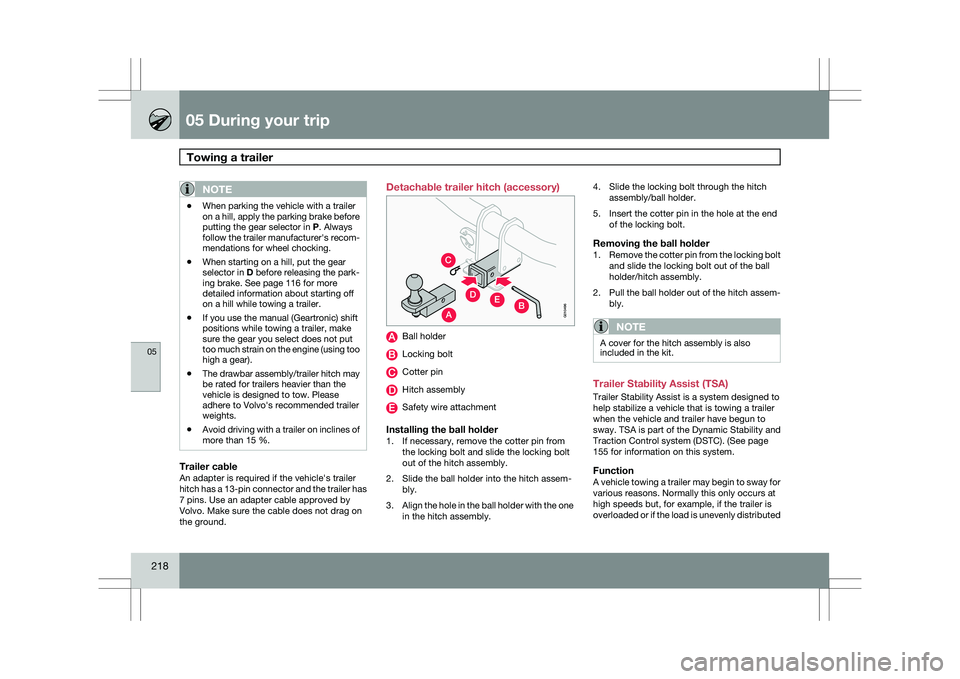
the ground. Detachable trailer hitch (accessory)
Ball holder
Locking bolt
Cotter pin
Hitch assembly
Safety wire attachment
Installing the ball holder1. If necessary, remove the cotter pin from
the locking bolt and slide the locking bolt
out of the hitch assembly.
2. Slide the ball holder into the hitch assem- bly.
3. Align the hole in the ball holder with the one
in the hitch assembly. 4. Slide the locking bolt through the hitch
assembly/ball holder.
5. Insert the cotter pin in the hole at the end of the locking bolt.
Removing the ball holder1.Remove the cotter pin from the locking bolt
and slide the locking bolt out of the ball
holder/hitch assembly.
2. Pull the ball holder out of the hitch assem-
bly.
NOTE A cover for the hitch assembly is also
included in the kit.
Trailer Stability Assist (TSA)
Trailer Stability Assist is a system designed to
help stabilize a vehicle that is towing a trailer
when the vehicle and trailer have begun to
sway.
TSA is part of the Dynamic Stability and
Traction Control system (DSTC). (See page
155 for information on this system.
FunctionA vehicle towing a trailer may begin to sway for
various reasons. Normally this only occurs at
high speeds but, for example, if the trailer is
overloaded or if the load is unevenly distributed
A
C
EDB
G010496
Page 222 of 297
05 During your tripEmergency towing 05
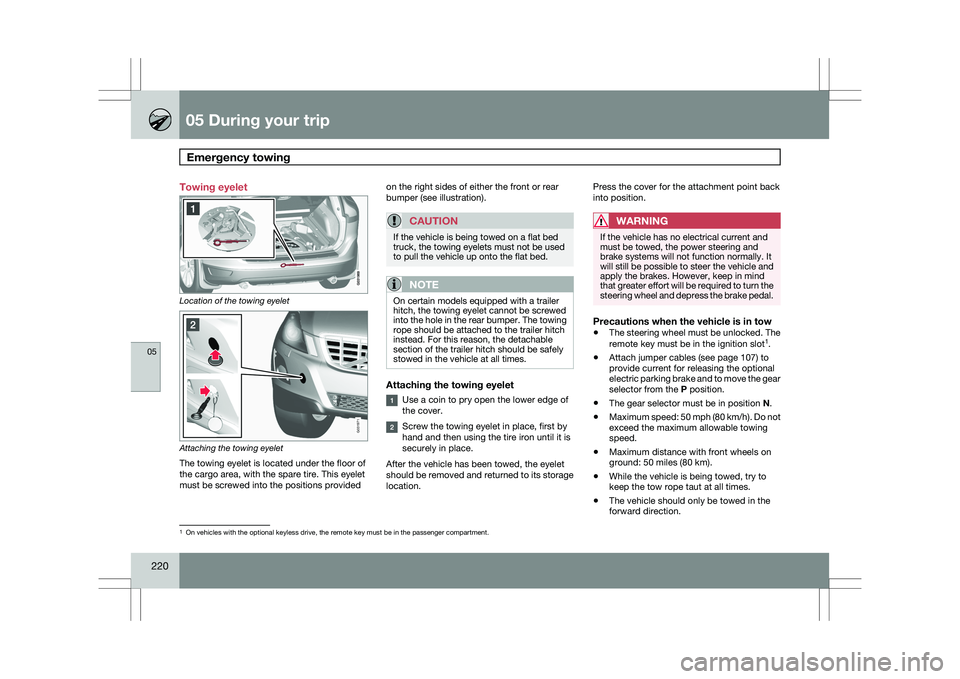
220 Towing eyelet
Location of the towing eyelet
Attaching the towing eyelet
The towing eyelet is located under the floor of
the cargo area, with the spare tire. This eyelet
must be screwed into the positions provided on the right sides of either the front or rear
bumper (see illustration).
CAUTION If the vehicle is being towed on a flat bed
truck, the towing eyelets must not be used
to pull the vehicle up onto the flat bed.
NOTE
On certain models equipped with a trailer
hitch, the towing eyelet cannot be screwed
into the hole in the rear bumper. The towing
rope should be attached to the trailer hitch
instead. For this reason, the detachable
section of the trailer hitch should be safely
stowed in the vehicle at all times.
Attaching the towing eyelet
Use a coin to pry open the lower edge of
the cover.
Screw the towing eyelet in place, first by
hand and then using the tire iron until it is
securely in place.
After the vehicle has been towed, the eyelet
should be removed and returned to its storage
location. Press the cover for the attachment point back
into position.
WARNING If the vehicle has no electrical current and
must be towed, the power steering and
brake systems will not function normally. It
will still be possible to steer the vehicle and
apply the brakes. However, keep in mind
that greater effort will be required to turn the
steering wheel and depress the brake pedal.
Precautions when the vehicle is in tow
\b
The steering wheel must be unlocked. The
remote key must be in the ignition slot 1
.
\b Attach jumper cables (see page 107) to
provide current for releasing the optional
electric parking brake and to move the gear
selector from the
P position.
\b The gear selector must be in position
N.
\b Maximum speed: 50 mph (80 km/h). Do not
exceed the maximum allowable towing
speed.
\b Maximum distance with front wheels on
ground: 50 miles (80 km).
\b While the vehicle is being towed, try to
keep the tow rope taut at all times.
\b The vehicle should only be towed in the
forward direction. 1
On vehicles with the optional keyless drive, the remote key must be in t\
he passenger compartment. G031971