engine VOLVO XC60 2009 Owner´s Manual
[x] Cancel search | Manufacturer: VOLVO, Model Year: 2009, Model line: XC60, Model: VOLVO XC60 2009Pages: 297, PDF Size: 21.16 MB
Page 100 of 297
03 Your driving environmentMirrors 03
98
* Option/accessory, for more information, see Introduction.
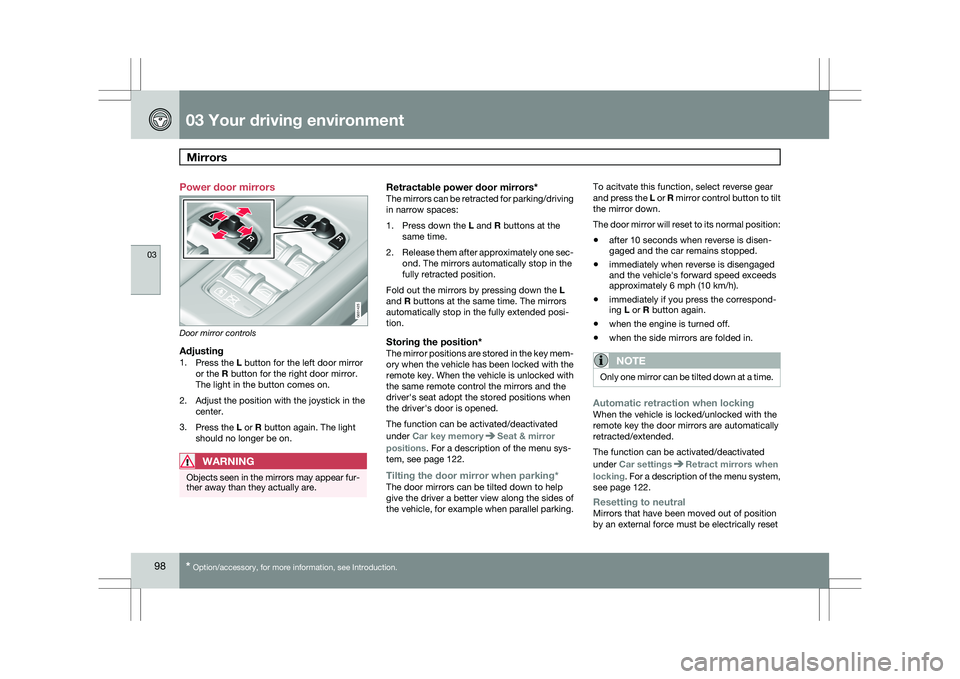
Power door mirrors
Door mirror controls
Adjusting1.
Press the L button for the left door mirror
or the R button for the right door mirror.
The light in the button comes on.
2. Adjust the position with the joystick in the center.
3. Press the L or R button again. The light
should no longer be on.
WARNING Objects seen in the mirrors may appear fur-
ther away than they actually are.
Retractable power door mirrors*The mirrors can be retracted for parking/driving
in narrow spaces:
1.
Press down the L and R buttons at the
same time.
2. Release them after approximately one sec-
ond. The mirrors automatically stop in the
fully retracted position.
Fold out the mirrors by pressing down the L
and R buttons at the same time. The mirrors
automatically stop in the fully extended posi-
tion.
Storing the position*The mirror positions are stored in the key mem-
ory when the vehicle has been locked with the
remote key. When the vehicle is unlocked with
the same remote control the mirrors and the
driver\fs seat adopt the stored positions when
the driver\fs door is opened.
The function can be activated/deactivated
under Car key memory Seat & mirror
positions. For a description of the menu sys-
tem, see page 122.
Tilting the door mirror when parking*The door mirrors can be tilted down to help
give the driver a better view along the sides of
the vehicle, for example when parallel parking. To acitvate this function, select reverse gear
and press the L or R mirror control button to tilt
the mirror down.
The door mirror will reset to its normal position:
\b
after 10 seconds when reverse is disen-
gaged and the car remains stopped.
\b immediately when reverse is disengaged
and the vehicle\fs forward speed exceeds
approximately 6 mph (10 km/h).
\b immediately if you press the correspond-
ing L or R button again.
\b when the engine is turned off.
\b when the side mirrors are folded in.
NOTE Only one mirror can be tilted down at a time.
Automatic retraction when lockingWhen the vehicle is locked/unlocked with the
remote key the door mirrors are automatically
retracted/extended.
The function can be activated/deactivated
under Car settings
Retract mirrors when
locking. For a description of the menu system,
see page 122.
Resetting to neutralMirrors that have been moved out of position
by an external force must be electrically reset G031425
Page 107 of 297
03 Your driving environment
Starting the engine03
}}
105
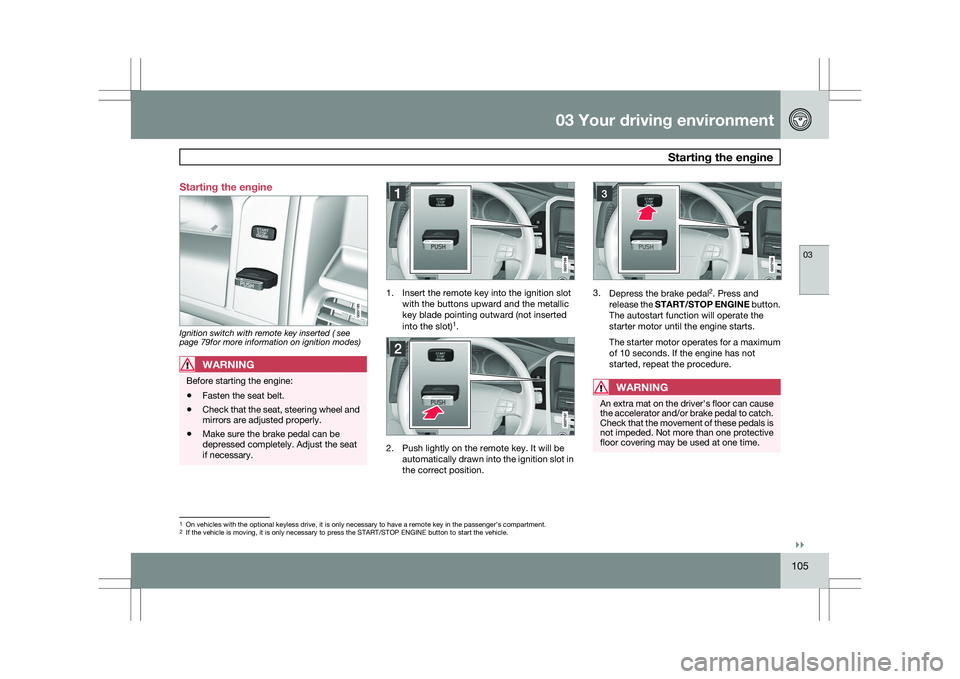
Starting the engine
Ignition switch with remote key inserted ( see
page 79for more information on ignition modes)
WARNING
Before starting the engine:
\b
Fasten the seat belt.
\b Check that the seat, steering wheel and
mirrors are adjusted properly.
\b Make sure the brake pedal can be
depressed completely. Adjust the seat
if necessary. 1. Insert the remote key into the ignition slot
with the buttons upward and the metallic
key blade pointing outward (not inserted
into the slot) 1
. 2. Push lightly on the remote key. It will be
automatically drawn into the ignition slot in
the correct position. 3.
Depress the brake pedal 2
. Press and
release the START/STOP ENGINE button.
The autostart function will operate the
starter motor until the engine starts.
The starter motor operates for a maximum
of 10 seconds. If the engine has not
started, repeat the procedure.
WARNING An extra mat on the driver\fs floor can cause
the accelerator and/or brake pedal to catch.
Check that the movement of these pedals is
not impeded. Not more than one protective
floor covering may be used at one time.
1
On vehicles with the optional keyless drive, it is only necessary to hav\
e a remote key in the passenger’s compartment.
2 If the vehicle is moving, it is only necessary to press the START/STOP E\
NGINE button to start the vehicle.
Page 108 of 297
03 Your driving environmentStarting the engine 03
106
* Option/accessory, for more information, see Introduction.
WARNING \b
Always remove the remote key from the
ignition slot when leaving the vehicle,
especially if there are children in the
vehicle.
\b Never remove the remote key from the
ignition slot while driving or when the
vehicle is being towed. The steering
lock could otherwise be activated, mak-
ing it impossible to steer the vehicle. On
vehicles with the optional keyless drive,
never remove the remote key from the
vehicle while driving or during towing.
\b Always place the gear selector in Park
and apply the parking brake before
leaving the vehicle. Never leave the
vehicle unattended with the engine run-
ning.
\b Always open garage doors fully before
starting the engine inside a garage to
ensure adequate ventilation. The
exhaust gases contain carbon monox-
ide, which is invisible and odorless but
very poisonous.NOTE \b
The idling speed can be noticeably
higher than normal during cold starts.
This is to enable emission control sys-
tem can reach normal operating tem-
perature as quickly as possible, which
helps reduce exhaust emissions 3
.
\b Keylock: Your vehicle is equipped with
a keylock system. When the engine is
switched off, the gear selector must be
in the Park position before the key can
be removed 4
from the ignition slot.CAUTION \b
When starting in cold weather, the auto-
matic transmission may shift up at
slightly higher engine speeds than nor-
mal until the automatic transmission
fluid reaches normal operating tem-
perature.
\b Do not race a cold engine immediately
after starting. Oil flow may not reach
some lubrication points fast enough to
prevent engine damage.
\b The engine should be idling when you
move the gear selector. Never acceler-
ate until after you feel the transmission
engage. Accelerating immediately after
selecting a gear will cause harsh
engagement and premature transmis-
sion wear.
\b Selecting
P or N when idling at a stand-
still for prolonged periods of time will
help prevent overheating of the auto-
matic transmission fluid.
Keyless drive*Follow steps 3 – 4 for starting the engine. 3
If the gear selector is in the D or R positions and the car is not moving, engine speed (rpm) will be lower\
and it will take longer for the engine to reach normal operating temper\
ature.
4 Does not apply to vehicles with the optional keyless drive.
Page 109 of 297
03 Your driving environment
Starting the engine03
}}
107
NOTEFor the vehicle to start, one of the vehicle\fs
remote keys must be in the passenger com-
partment.
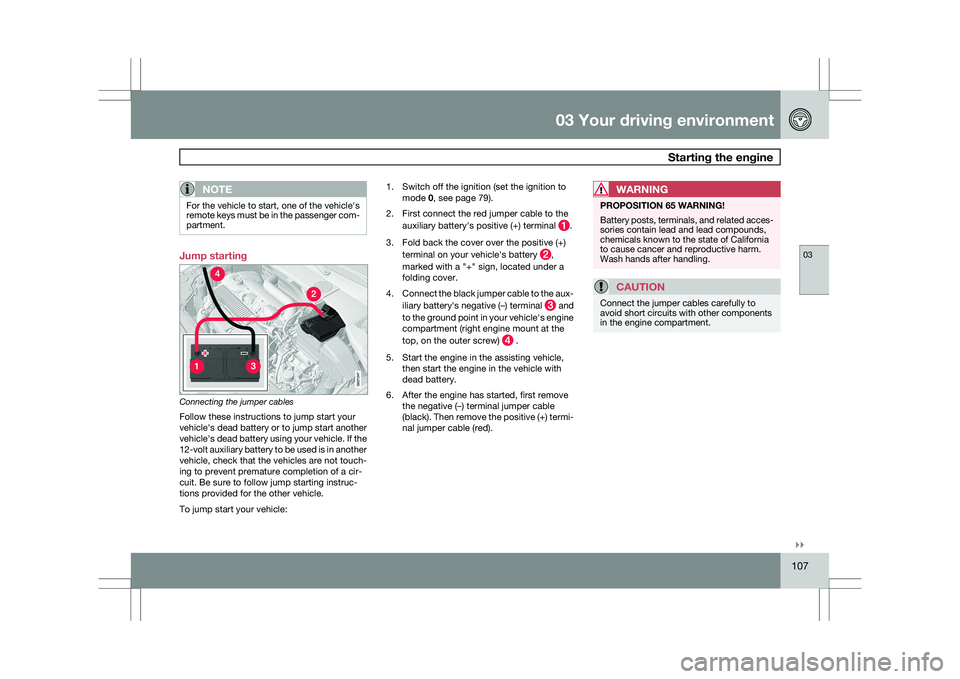
Jump starting
Connecting the jumper cables
Follow these instructions to jump start your
vehicle\fs dead battery or to jump start another
vehicle\fs dead battery using your vehicle. If the
12-volt auxiliary battery to be used is in another
vehicle, check that the vehicles are not touch-
ing to prevent premature completion of a cir-
cuit. Be sure to follow jump starting instruc-
tions provided for the other vehicle.
To jump start your vehicle: 1. Switch off the ignition (set the ignition to
mode 0, see page 79).
2. First connect the red jumper cable to the auxiliary battery\fs positive (+) terminal .
3. Fold back the cover over the positive (+) terminal on your vehicle\fs battery ,
marked with a "+" sign, located under a
folding cover.
4. Connect the black jumper cable to the aux-
iliary battery\fs negative (–) terminal and
to the ground point in your vehicle\fs engine
compartment (right engine mount at the
top, on the outer screw) .
5. Start the engine in the assisting vehicle, then start the engine in the vehicle with
dead battery.
6. After the engine has started, first remove the negative (–) terminal jumper cable
(black). Then remove the positive (+) termi-
nal jumper cable (red).WARNING PROPOSITION 65 WARNING!
Battery posts, terminals, and related acces-
sories contain lead and lead compounds,
chemicals known to the state of California
to cause cancer and reproductive harm.
Wash hands after handling.
CAUTION
Connect the jumper cables carefully to
avoid short circuits with other components
in the engine compartment. G02134
7
Page 110 of 297
03 Your driving environmentStarting the engine 03
108
WARNING \b
Do not connect the jumper cable to any
part of the fuel system or to any moving
parts. Avoid touching hot manifolds.
\b Batteries generate hydrogen gas, which
is flammable and explosive.
\b Battery fluid contains sulfuric acid. Do
not allow battery fluid to contact eyes,
skin, fabrics or painted surfaces. If con-
tact occurs, flush the affected area
immediately with water. Obtain medical
help immediately if eyes are affected.
\b Never expose the battery to open flame
or electric spark.
\b Do not smoke near the battery.
\b Failure to follow the instructions for
jump starting can lead to injury.
Page 111 of 297
03 Your driving environment
Transmission03
}}
109
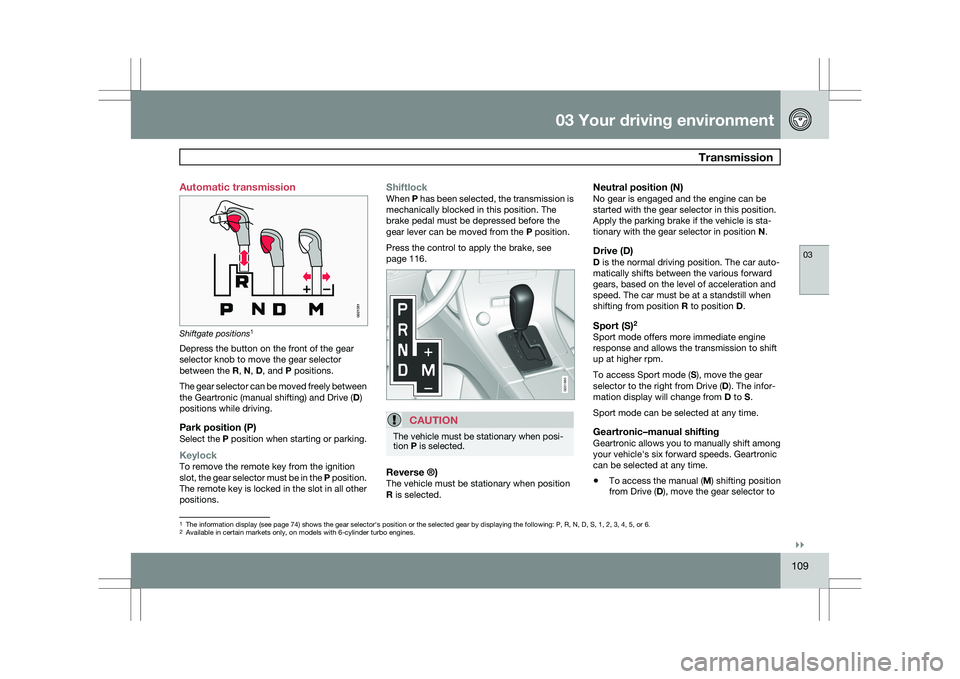
Automatic transmission
Shiftgate positions
1
Depress the button on the front of the gear
selector knob to move the gear selector
between the R, N, D, and P positions.
The gear selector can be moved freely between
the Geartronic (manual shifting) and Drive ( D)
positions while driving.
Park position (P)Select the P position when starting or parking.
KeylockTo remove the remote key from the ignition
slot, the gear selector must be in the P position.
The remote key is locked in the slot in all other
positions.
ShiftlockWhen P has been selected, the transmission is
mechanically blocked in this position. The
brake pedal must be depressed before the
gear lever can be moved from the P position.
Press the control to apply the brake, see
page 116.
CAUTION The vehicle must be stationary when posi-
tion P is selected.
Reverse ®)The vehicle must be stationary when position
R is selected.
Neutral position (N)No gear is engaged and the engine can be
started with the gear selector in this position.
Apply the parking brake if the vehicle is sta-
tionary with the gear selector in position
N.
Drive (D)D is the normal driving position. The car auto-
matically shifts between the various forward
gears, based on the level of acceleration and
speed. The car must be at a standstill when
shifting from position R to position D.
Sport (S)2Sport mode offers more immediate engine
response and allows the transmission to shift
up at higher rpm.
To access Sport mode (S), move the gear
selector to the right from Drive (
D). The infor-
mation display will change from D to S.
Sport mode can be selected at any time.
Geartronic–manual shiftingGeartronic allows you to manually shift among
your vehicle\fs six forward speeds. Geartronic
can be selected at any time.
\b To access the manual (
M) shifting position
from Drive (D), move the gear selector to 1
The information display (see page 74) shows the gear selector\fs position or the selected gear by displayin\
g the following: P, R, N, D, S, 1, 2, 3, 4, 5, or 6.
2Available in certain markets only, on models with 6-cylinder turbo engin\
es.
G021351 G031963
Page 112 of 297
03 Your driving environmentTransmission 03
110 the right to M (or to S on models equipped
with Sport mode).
\b To return to the D position from M or S,
move the gear selector to the left.
NOTE On models equipped with Sport mode, the
transmission will not switch to manual shift-
ing mode until the gear selector is moved
forward or rearward. The selected gear will
then be shown in the information display
(see page 73).
While driving
\b
If you select the M position while driving,
the gear that was being used in the Drive
position will also initially be selected in the
M position.
\b Move the gear selector forward (toward
"+") to shift to a higher gear or rearward
(toward "–") to shift to a lower gear.
\b If you hold the gear selector toward "–", the
transmission will downshift one gear at a
time and will utilize the braking power of
the engine. If the current speed is too high
for using a lower gear, the downshift will
not occur until the speed has decreased
enough to allow the lower gear to be used. \b
If you slow to a very low speed, the trans-
mission will automatically shift down.
Shiftlock – Neutral (N)If the gear selector is in the
N position and the
vehicle has been stationary for at least 3 sec-
onds (irrespective of whether the engine is run-
ning) then the gear selector is locked.
To be able to move the gear selector from N to
another gear position, the brake pedal must be
depressed and the ignition must be in posi-
tion II, see page 79.
Geartronic–starting on slippery surfacesSelecting 3rd gear in Geartronic’s manual shift-
ing mode can help provide better traction when
starting off on slippery surfaces. To do so:
1. Depress the brake pedal and move the
gear selector to the right from the D posi-
tion to M. The text in the instrument panel
display will change from D to 1.
2. Press the gear selector forward and release it (this selects 2nd gear). Press the
selector forward again and release it to
select 3rd gear.
3. Release the brake pedal and press gently on the accelerator pedal.
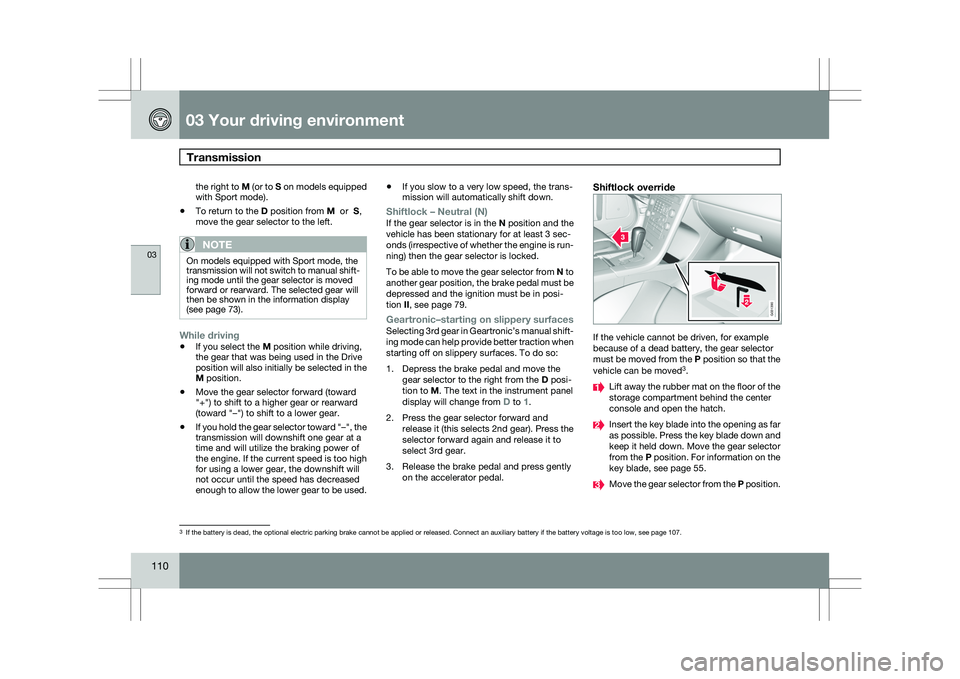
Shiftlock override If the vehicle cannot be driven, for example
because of a dead battery, the gear selector
must be moved from the P position so that the
vehicle can be moved
3
. Lift away the rubber mat on the floor of the
storage compartment behind the center
console and open the hatch.
Insert the key blade into the opening as far
as possible. Press the key blade down and
keep it held down. Move the gear selector
from the P position. For information on the
key blade, see page 55.
Move the gear selector from the
P position.3
If the battery is dead, the optional electric parking brake cannot be ap\
plied or released. Connect an auxiliary battery if the battery voltage i\
s too low, see page 107. G031390
Page 113 of 297
03 Your driving environment
Transmission03
111
All Wheel Drive – AWD
4Your Volvo can be equipped with permanent
All Wheel Drive, which means that power is
distributed automatically between the front
and rear wheels. Under normal driving condi-
tions, most of the engine\fs power is directed to
the front wheels. However, if there is any ten-
dency for the front wheels to spin, an electron-
ically controlled coupling distributes power to
the wheels that have the best traction.
NOTEThe message
AWD disabled Service
required will be appear in the information
display if an electrical fault should occur in
the AWD system. A warning light will also
illuminate in the instrument panel. If this
occurs, have the system checked by a
trained and qualified Volvo service techni-
cian.
4 Standard on certain models.
Page 114 of 297
03 Your driving environmentBrakes 03
112 Brake system
The brake system is a hydraulic system con-
sisting of two separate brake circuits. If a prob-
lem should occur in one of these circuits, it is
still possible to stop the vehicle with the other
brake circuit.
If the brake pedal must be depressed farther
than normal and requires greater foot pressure,
the stopping distance will be longer.
A warning light in the instrument panel will light
up to warn the driver that a fault has occurred.
If this light comes on while driving or braking,
stop immediately and check the brake fluid
level in the reservoir.
NOTE
Press the brake pedal hard and maintain
pressure on the pedal – do not pump the
brakes.
WARNING
If the fluid level is below the MIN mark in the
reservoir or if a brake system message is
shown in the information display:
DO NOT
DRIVE. Have the vehicle towed to a trained
and qualified Volvo service technician and
have the brake system inspected.
Power brakes function only when the
engine is running
The power brakes utilize vacuum pressure
which is only created when the engine is run-
ning. Never let the vehicle roll to a stop with the
engine switched off.
If the power brakes are not working, the brake
pedal must be pressed approximately five
times harder than usual to make up for the lack
of power assistance. This can happen for
example when towing your vehicle or if the
engine is switched off when the vehicle is roll-
ing. The brake pedal feels harder than usual.
Water on brake discs and brake pads
affects braking
Driving in rain and slush or passing through an
automatic car wash can cause water to collect
on the brake discs and pads. This will cause a
delay in braking effect when the pedal is
depressed. To avoid such a delay when the
brakes are needed, depress the pedal occa-
sionally when driving through rain, slush, etc.
This will remove the water from the brakes.
Check that brake application feels normal. This
should also be done after washing or starting
in very damp or cold weather.
Severe strain on the brake systemThe brakes will be subject to severe strain
when driving in mountains or hilly areas, or
when towing a trailer. Vehicle speed is usually slower, which means that the cooling of the
brakes is less efficient than when driving on
level roads. To reduce the strain on the brakes,
shift into a lower gear and let the engine help
with the braking. Do not forget that if you are
towing a trailer, the brakes will be subjected to
a greater than normal load.
Anti-lock braking systemThe Anti-lock Braking System (ABS) helps to
improve vehicle control (stopping and steering)
during severe braking conditions by limiting
brake lockup. When the system "senses"
impending lockup, braking pressure is auto-
matically modulated in order to help prevent
lockup that could lead to a skid.
The system performs a brief self-diagnostic
test when the engine has been started and
driver releases the brake pedal. Another auto-
matic test may be performed when the vehicle
first reaches a speed of approximately 25 mph
(40 km/h
). The brake pedal will pulsate several
times and a sound may be audible from the
ABS control module. This is normal.
Cleaning the brake discsCoatings of dirt and water on the brake discs
may result in delayed brake function. This delay
is minimized by cleaning the brake linings.
Cleaning the brake pads is advisable in wet
weather, prior to long-term parking, and after
the vehicle has been washed. Do this by brak-
Page 115 of 297
03 Your driving environment
Brakes03
113
ing gently for a short period while the vehicle is
moving.
Emergency Brake AssistanceEBA is designed to provide full brake effect
immediately in the event of sudden, hard brak-
ing. The system is activated by the speed with
which the brake pedal is depressed.
When the EBA system is activated, the brake
pedal will go down and pressure in the brake
system immediately increases to the maximum
level. Maintain full pressure on the brake pedal
in order to utilize the system completely. EBA
is automatically deactivated when the brake
pedal is released.
NOTE
\b
When the EBA system is activated, the
brake pedal will go down and pressure
in the brake system immediately increa-
ses to the maximum level. You must
maintain full pressure on the brake
pedal in order to utilize the system com-
pletely. There will be no braking effect if
the pedal is released. EBA is automati-
cally deactivated when the brake pedal
is released.
\b When the vehicle has been parked for
some time, the brake pedal may sink
more than usual when the engine is
started. This is normal and the pedal will
return to its usual position when it is
released.Symbols in the instrument panel Symbol Specification
Steady glow – Check the brake
fluid level. If the level is low, fill
with brake fluid and check for
the cause of the brake fluid
loss.
Steady glow for two seconds
when the engine is started –
There was a fault in the brake
system\fs ABS function when
the engine was last running.
WARNING
If and come on at the same time
and the brake level is below the MIN mark
in the reservoir or if a brake system-related
message is shown in the information dis-
play: DO NOT DRIVE. Have the vehicle
towed to a trained and qualified Volvo serv-
ice technician and have the brake system
inspected.