key battery VOLVO XC60 2009 Owner´s Manual
[x] Cancel search | Manufacturer: VOLVO, Model Year: 2009, Model line: XC60, Model: VOLVO XC60 2009Pages: 297, PDF Size: 21.16 MB
Page 19 of 297
01 Safety
Supplemental Restraint System (SRS)01
}}
17
General information
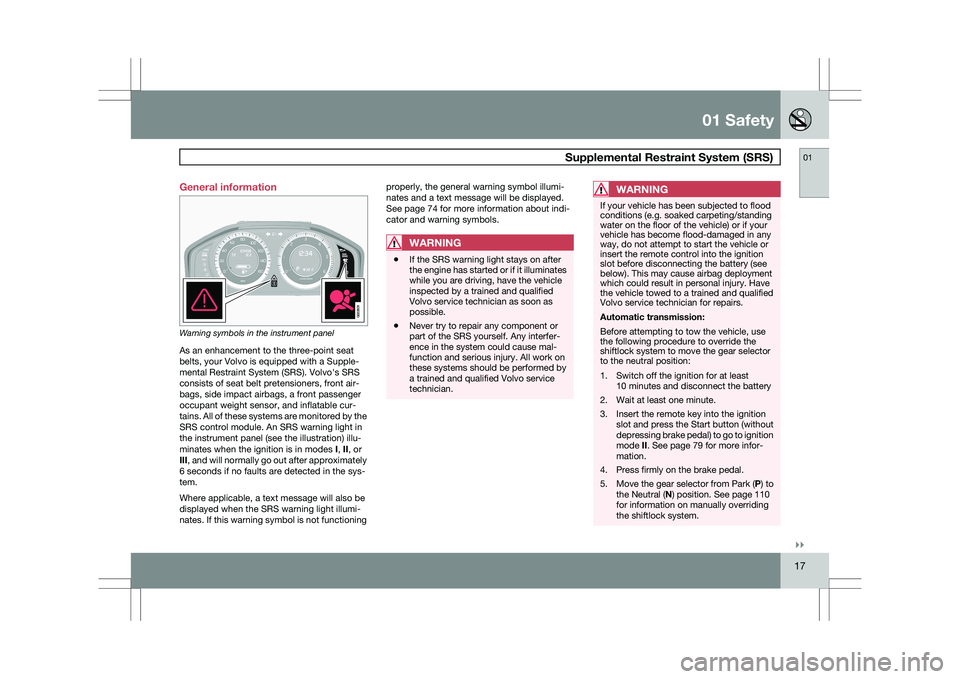
Warning symbols in the instrument panel
As an enhancement to the three-point seat
belts, your Volvo is equipped with a Supple-
mental Restraint System (SRS). Volvo\fs SRS
consists of seat belt pretensioners, front air-
bags, side impact airbags, a front passenger
occupant weight sensor, and inflatable cur-
tains. All of these systems are monitored by the
SRS control module. An SRS warning light in
the instrument panel (see the illustration) illu-
minates when the ignition is in modes
I, II, or
III, and will normally go out after approximately
6 seconds if no faults are detected in the sys-
tem.
Where applicable, a text message will also be
displayed when the SRS warning light illumi-
nates. If this warning symbol is not functioning properly, the general warning symbol illumi-
nates and a text message will be displayed.
See page 74 for more information about indi-
cator and warning symbols.
WARNING
\b
If the SRS warning light stays on after
the engine has started or if it illuminates
while you are driving, have the vehicle
inspected by a trained and qualified
Volvo service technician as soon as
possible.
\b Never try to repair any component or
part of the SRS yourself. Any interfer-
ence in the system could cause mal-
function and serious injury. All work on
these systems should be performed by
a trained and qualified Volvo service
technician.
WARNING If your vehicle has been subjected to flood
conditions (e.g. soaked carpeting/standing
water on the floor of the vehicle) or if your
vehicle has become flood-damaged in any
way, do not attempt to start the vehicle or
insert the remote control into the ignition
slot before disconnecting the battery (see
below). This may cause airbag deployment
which could result in personal injury. Have
the vehicle towed to a trained and qualified
Volvo service technician for repairs.
Automatic transmission:
Before attempting to tow the vehicle, use
the following procedure to override the
shiftlock system to move the gear selector
to the neutral position:
1. Switch off the ignition for at least
10 minutes and disconnect the battery
2. Wait at least one minute.
3. Insert the remote key into the ignition slot and press the Start button (without
depressing brake pedal) to go to ignition
mode II. See page 79 for more infor-
mation.
4. Press firmly on the brake pedal.
5. Move the gear selector from Park ( P) to
the Neutral (N) position. See page 110
for information on manually overriding
the shiftlock system. G022831
Page 54 of 297
02 Locks and alarmRemote key and key blade 02
52
* Option/accessory, for more information, see Introduction.
Canada–IC: 3659A-WFS125VO
Operation is subject to the following condi-
tions: (1) this device may not cause interfer-
ence, and (2) this device must accept any inter-
ference, including interference that may cause
undesired operation of the device.
See page 105 for information on starting the
vehicle.
Replacing the battery in the remote keyThe batteries should be replaced if:
\b
The information symbol illuminates and
Replace car key battery is shown in the
display and/or
\b if the locks do not react after several
attempts to unlock or lock the vehicle.
NOTE The remote key\fs range is normally approx-
imately 60 ft (20 m) from the vehicle.
See page 56 for information on replacing the
battery. Common functions – Remote key/
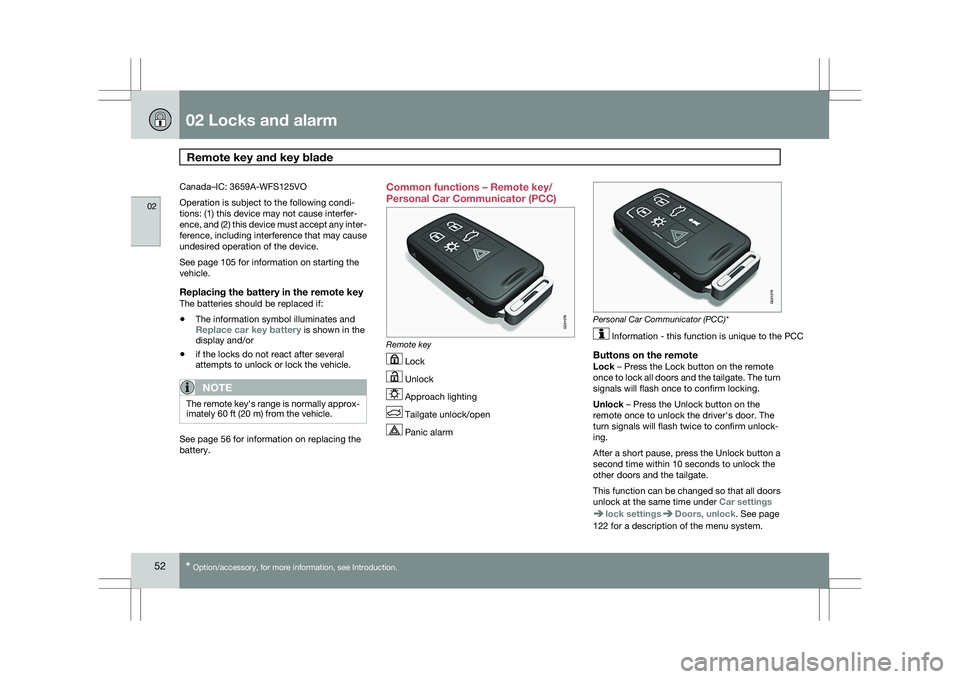
Personal Car Communicator (PCC)
Remote key
Lock
Unlock
Approach lighting
Tailgate unlock/open
Panic alarm Personal Car Communicator (PCC)*
Information - this function is unique to the PCC
Buttons on the remoteLock – Press the Lock button on the remote
once to lock all doors and the tailgate. The turn
signals will flash once to confirm locking.
Unlock – Press the Unlock button on the
remote once to unlock the driver\fs door. The
turn signals will flash twice to confirm unlock-
ing.
After a short pause, press the Unlock button a
second time within 10 seconds to unlock the
other doors and the tailgate.
This function can be changed so that all doors
unlock at the same time under
Car settings lock settings Doors, unlock. See page
122 for a description of the menu system. G021078 G02107
9
Page 58 of 297
02 Locks and alarmRemote key and key blade 02
56 Replacing batteries in the remote key/
PCC
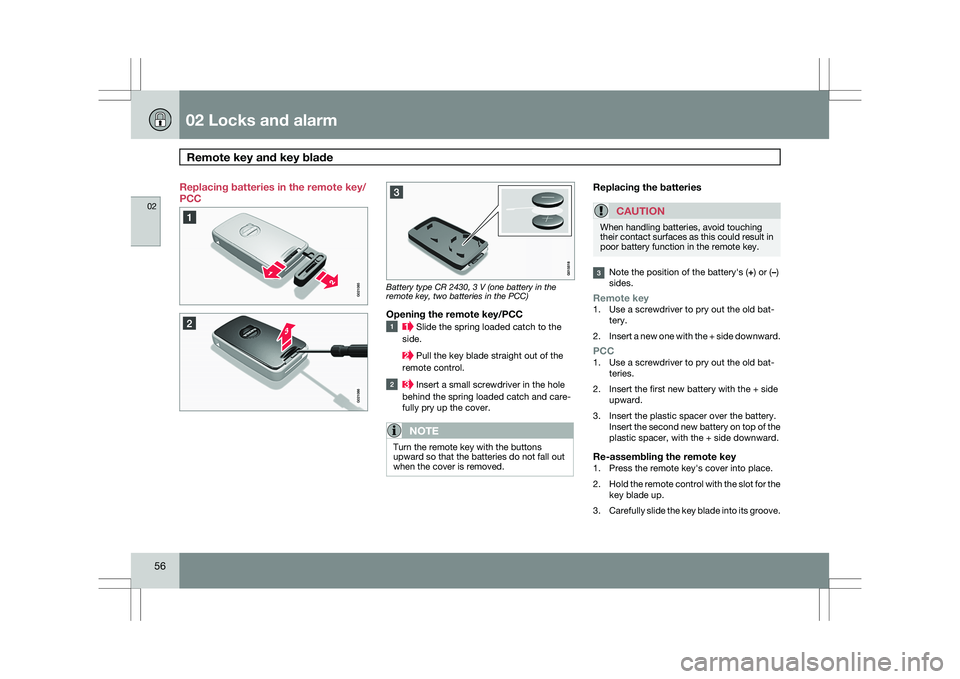
Battery type CR 2430, 3 V (one battery in the
remote key, two batteries in the PCC)
Opening the remote key/PCC
Slide the spring loaded catch to the
side. Pull the key blade straight out of the
remote control. Insert a small screwdriver in the hole
behind the spring loaded catch and care-
fully pry up the cover.
NOTE Turn the remote key with the buttons
upward so that the batteries do not fall out
when the cover is removed.
Replacing the batteries
CAUTION When handling batteries, avoid touching
their contact surfaces as this could result in
poor battery function in the remote key.
Note the position of the battery\fs (+) or (
–)
sides.
Remote key1. Use a screwdriver to pry out the old bat- tery.
2. Insert a new one with the + side downward.
PCC1. Use a screwdriver to pry out the old bat-
teries.
2. Insert the first new battery with the + side upward.
3. Insert the plastic spacer over the battery. Insert the second new battery on top of the
plastic spacer, with the + side downward.
Re-assembling the remote key1. Press the remote key\fs cover into place.
2.Hold the remote control with the slot for the
key blade up.
3. Carefully slide the key blade into its groove.
Page 60 of 297
02 Locks and alarmKeyless drive 02
58 Keyless drive (models with Personal
Car Communicator only)
Keyless locking and unlocking
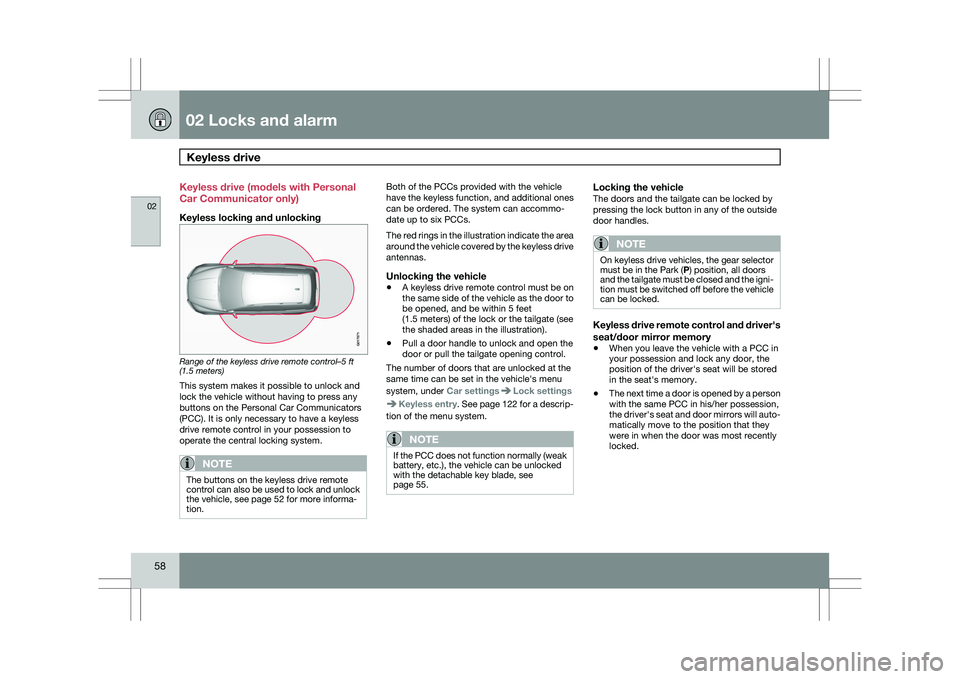
Range of the keyless drive remote control–5 ft
(1.5 meters)
This system makes it possible to unlock and
lock the vehicle without having to press any
buttons on the Personal Car Communicators
(PCC). It is only necessary to have a keyless
drive remote control in your possession to
operate the central locking system.
NOTE
The buttons on the keyless drive remote
control can also be used to lock and unlock
the vehicle, see page 52 for more informa-
tion. Both of the PCCs provided with the vehicle
have the keyless function, and additional ones
can be ordered. The system can accommo-
date up to six PCCs.
The red rings in the illustration indicate the area
around the vehicle covered by the keyless drive
antennas.
Unlocking the vehicle
\b
A keyless drive remote control must be on
the same side of the vehicle as the door to
be opened, and be within 5 feet
(1.5 meters) of the lock or the tailgate (see
the shaded areas in the illustration).
\b Pull a door handle to unlock and open the
door or pull the tailgate opening control.
The number of doors that are unlocked at the
same time can be set in the vehicle\fs menu
system, under Car settings Lock settings
Keyless entry. See page 122 for a descrip-
tion of the menu system.
NOTE If the PCC does not function normally (weak
battery, etc.), the vehicle can be unlocked
with the detachable key blade, see
page 55.
Locking the vehicleThe doors and the tailgate can be locked by
pressing the lock button in any of the outside
door handles.
NOTE On keyless drive vehicles, the gear selector
must be in the Park (P) position, all doors
and the tailgate must be closed and the igni-
tion must be switched off before the vehicle
can be locked.
Keyless drive remote control and driver\fs
seat/door mirror memory
\b
When you leave the vehicle with a PCC in
your possession and lock any door, the
position of the driver\fs seat will be stored
in the seat\fs memory.
\b The next time a door is opened by a person
with the same PCC in his/her possession,
the driver\fs seat and door mirrors will auto-
matically move to the position that they
were in when the door was most recently
locked. G017871
Page 68 of 297
02 Locks and alarmAlarm 02
66 The alarm system
The alarm is automatically armed whenever the
vehicle is locked with the remote key or
optional Personal Car Communicator.
USA FCC ID: NWD5481
This device complies with part 15 of the FCC
rules. Operation is subject to the following con-
ditions: (1) This device may not cause harmful
interference, and (2) this device must accept
any interference received, including interfer-
ence that may cause undesired operation.
When armed, the alarm continuously monitors
a number of points on the vehicle. The follow-
ing conditions will trigger the alarm:
\b
The hood is forced open.
\b The tailgate is forced open.
\b A door is forced open.
\b The ignition slot is tampered with.
\b An attempt is made to start the vehicle with
a non-approved key (a key not coded to
the car\fs ignition).
\b If there is movement in the passenger com-
partment (if the vehicle is equipped with
the accessory movement sensor).
\b The vehicle is lifted or towed (if the vehicle
is equipped with the accessory inclination
sensor). \b
The battery is disconnected (while the
alarm is armed).
\b The siren is disconnected when the alarm
is disarmed.
A message will appear in the information dis-
play if a fault should occur in the alarm system.
Contact an authorized Volvo service techni-
cian.
NOTE Do not attempt to repair any of the compo-
nents in the alarm system yourself. This
could affect the insurance policy on the
vehicle.
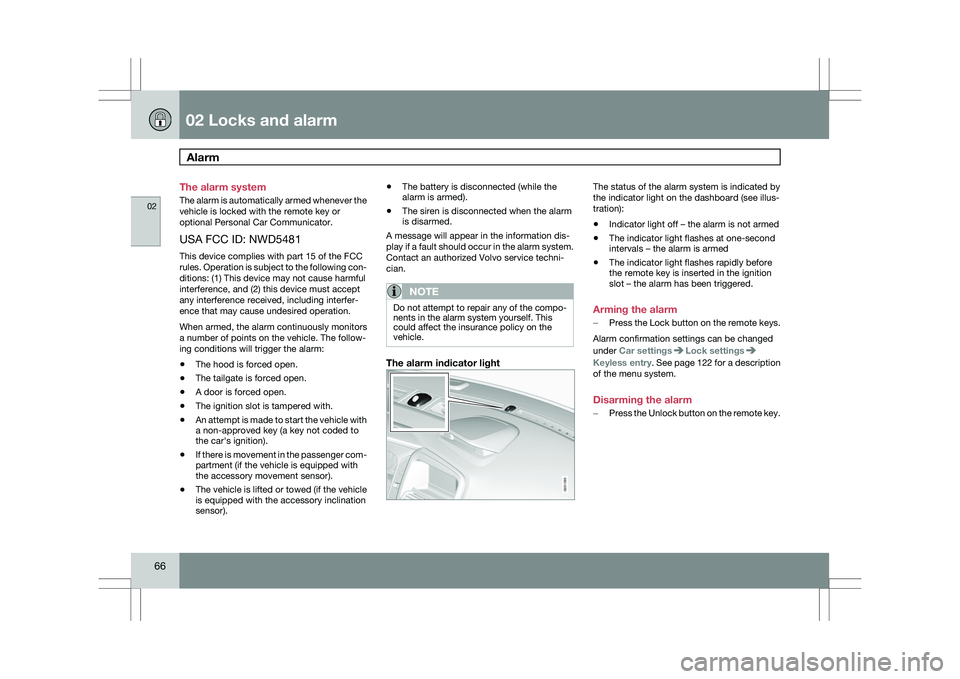
The alarm indicator light The status of the alarm system is indicated by
the indicator light on the dashboard (see illus-
tration):
\b
Indicator light off – the alarm is not armed
\b The indicator light flashes at one-second
intervals – the alarm is armed
\b The indicator light flashes rapidly before
the remote key is inserted in the ignition
slot – the alarm has been triggered.
Arming the alarm
– Press the Lock button on the remote keys.
Alarm confirmation settings can be changed
under Car settings Lock settings
Keyless entry
. See page 122 for a description
of the menu system.
Disarming the alarm
– Press the Unlock button on the remote key. G031385
Page 98 of 297
03 Your driving environmentPower windows 03
96
* Option/accessory, for more information, see Introduction.
Power windows
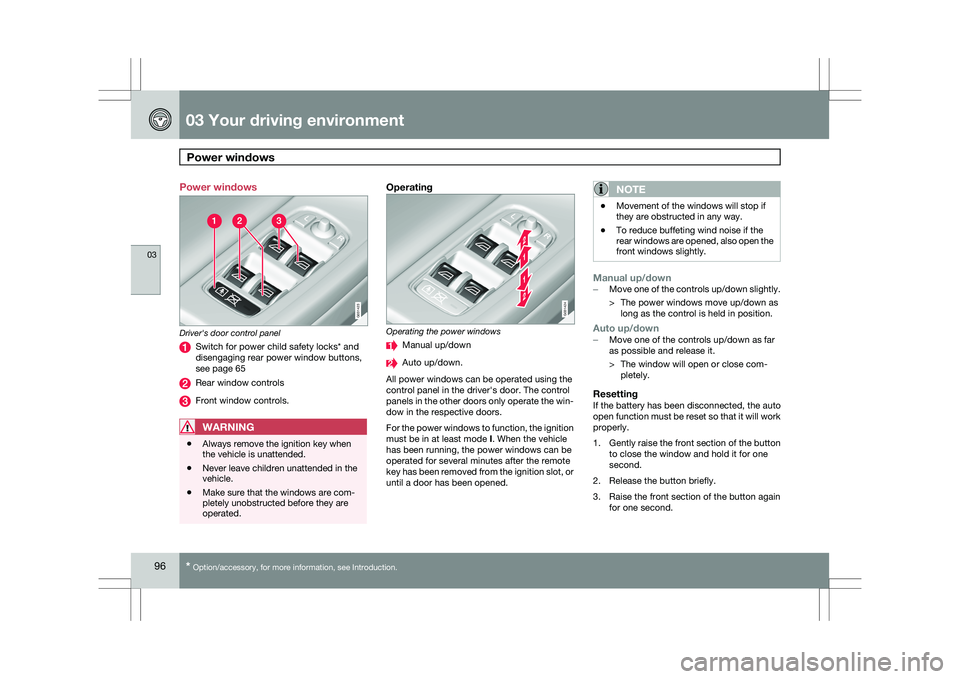
Driver's door control panel
Switch for power child safety locks* and
disengaging rear power window buttons,
see page 65
Rear window controls
Front window controls.
WARNING
\b
Always remove the ignition key when
the vehicle is unattended.
\b Never leave children unattended in the
vehicle.
\b Make sure that the windows are com-
pletely unobstructed before they are
operated.
Operating Operating the power windows
Manual up/down
Auto up/down.
All power windows can be operated using the
control panel in the driver\fs door. The control
panels in the other doors only operate the win-
dow in the respective doors.
For the power windows to function, the ignition
must be in at least mode I. When the vehicle
has been running, the power windows can be
operated for several minutes after the remote
key has been removed from the ignition slot, or
until a door has been opened.NOTE \b
Movement of the windows will stop if
they are obstructed in any way.
\b To reduce buffeting wind noise if the
rear windows are opened, also open the
front windows slightly.
Manual up/down–
Move one of the controls up/down slightly.
> The power windows move up/down as
long as the control is held in position.
Auto up/down– Move one of the controls up/down as far
as possible and release it.
> The window will open or close com-
pletely.
ResettingIf the battery has been disconnected, the auto
open function must be reset so that it will work
properly.
1. Gently raise the front section of the button
to close the window and hold it for one
second.
2. Release the button briefly.
3. Raise the front section of the button again for one second. G031423 G031424
Page 109 of 297
03 Your driving environment
Starting the engine03
}}
107
NOTEFor the vehicle to start, one of the vehicle\fs
remote keys must be in the passenger com-
partment.
Jump starting
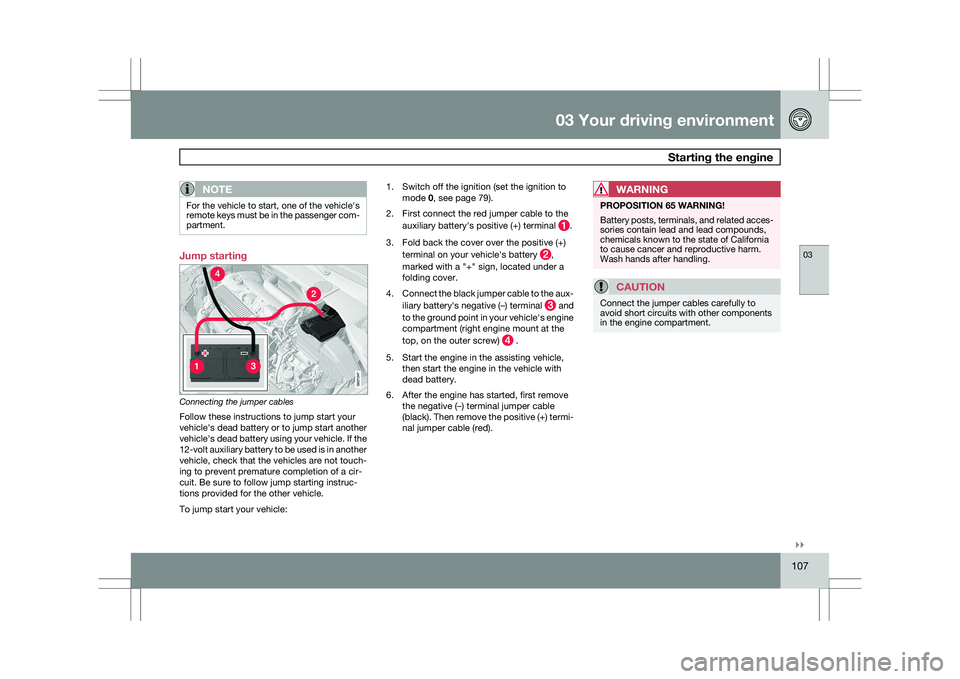
Connecting the jumper cables
Follow these instructions to jump start your
vehicle\fs dead battery or to jump start another
vehicle\fs dead battery using your vehicle. If the
12-volt auxiliary battery to be used is in another
vehicle, check that the vehicles are not touch-
ing to prevent premature completion of a cir-
cuit. Be sure to follow jump starting instruc-
tions provided for the other vehicle.
To jump start your vehicle: 1. Switch off the ignition (set the ignition to
mode 0, see page 79).
2. First connect the red jumper cable to the auxiliary battery\fs positive (+) terminal .
3. Fold back the cover over the positive (+) terminal on your vehicle\fs battery ,
marked with a "+" sign, located under a
folding cover.
4. Connect the black jumper cable to the aux-
iliary battery\fs negative (–) terminal and
to the ground point in your vehicle\fs engine
compartment (right engine mount at the
top, on the outer screw) .
5. Start the engine in the assisting vehicle, then start the engine in the vehicle with
dead battery.
6. After the engine has started, first remove the negative (–) terminal jumper cable
(black). Then remove the positive (+) termi-
nal jumper cable (red).WARNING PROPOSITION 65 WARNING!
Battery posts, terminals, and related acces-
sories contain lead and lead compounds,
chemicals known to the state of California
to cause cancer and reproductive harm.
Wash hands after handling.
CAUTION
Connect the jumper cables carefully to
avoid short circuits with other components
in the engine compartment. G02134
7
Page 112 of 297
03 Your driving environmentTransmission 03
110 the right to M (or to S on models equipped
with Sport mode).
\b To return to the D position from M or S,
move the gear selector to the left.
NOTE On models equipped with Sport mode, the
transmission will not switch to manual shift-
ing mode until the gear selector is moved
forward or rearward. The selected gear will
then be shown in the information display
(see page 73).
While driving
\b
If you select the M position while driving,
the gear that was being used in the Drive
position will also initially be selected in the
M position.
\b Move the gear selector forward (toward
"+") to shift to a higher gear or rearward
(toward "–") to shift to a lower gear.
\b If you hold the gear selector toward "–", the
transmission will downshift one gear at a
time and will utilize the braking power of
the engine. If the current speed is too high
for using a lower gear, the downshift will
not occur until the speed has decreased
enough to allow the lower gear to be used. \b
If you slow to a very low speed, the trans-
mission will automatically shift down.
Shiftlock – Neutral (N)If the gear selector is in the
N position and the
vehicle has been stationary for at least 3 sec-
onds (irrespective of whether the engine is run-
ning) then the gear selector is locked.
To be able to move the gear selector from N to
another gear position, the brake pedal must be
depressed and the ignition must be in posi-
tion II, see page 79.
Geartronic–starting on slippery surfacesSelecting 3rd gear in Geartronic’s manual shift-
ing mode can help provide better traction when
starting off on slippery surfaces. To do so:
1. Depress the brake pedal and move the
gear selector to the right from the D posi-
tion to M. The text in the instrument panel
display will change from D to 1.
2. Press the gear selector forward and release it (this selects 2nd gear). Press the
selector forward again and release it to
select 3rd gear.
3. Release the brake pedal and press gently on the accelerator pedal.
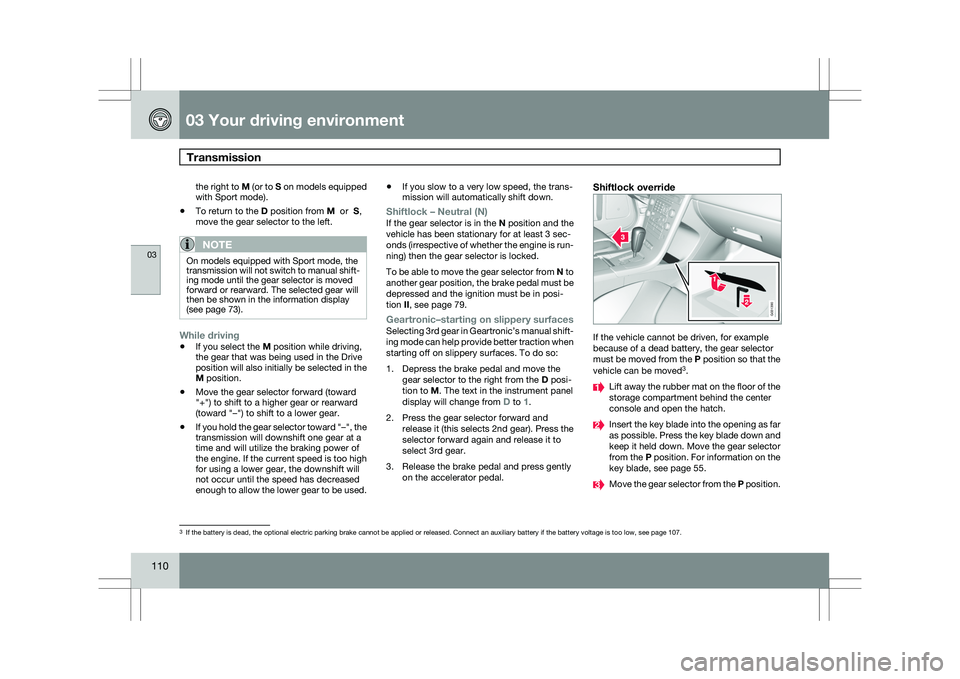
Shiftlock override If the vehicle cannot be driven, for example
because of a dead battery, the gear selector
must be moved from the P position so that the
vehicle can be moved
3
. Lift away the rubber mat on the floor of the
storage compartment behind the center
console and open the hatch.
Insert the key blade into the opening as far
as possible. Press the key blade down and
keep it held down. Move the gear selector
from the P position. For information on the
key blade, see page 55.
Move the gear selector from the
P position.3
If the battery is dead, the optional electric parking brake cannot be ap\
plied or released. Connect an auxiliary battery if the battery voltage i\
s too low, see page 107. G031390
Page 135 of 297
04 Comfort and driving pleasure
Audio system04
}}
* Option/accessory, for more information, see Introduction. 133
Introduction
The audio system is available in two versions:
High Performance and Premium Sound. The
system version is shown in the display when
the audio system is switched on.
If the audio system is on when the ignition is
switched off, it will come on automatically the
next time the ignition is put in mode
I or higher.
The audio system can be operated without a
key in the ignition slot for 15 minutes at a time
by pressing the POWER button (the driver\fs
door must be closed on vehicles with the
optional keyless drive).
Some functions are controlled from the menu
system in the center console. For more infor-
mation on menus, see page 122.
Dolby Surround Pro Logic II and the sym-
bol are trademarks of Dolby Laboratories
Licensing Corporation. The Dolby Surround
Pro Logic II System is manufactured under
license from Dolby Laboratories Licensing Cor-
poration.
Remote key and ignition modesThe audio system can be used for 15 minutes
at a time if the remote key is not inserted in the
ignition slot.
NOTE To prevent unnecessary drain on the vehi-
cle\fs battery, remove the remote key from
the ignition slot if the audio system is used
when the engine is not running.
If the audio system is playing when the engine
is switched off, it will be on when the engine is
restarted.
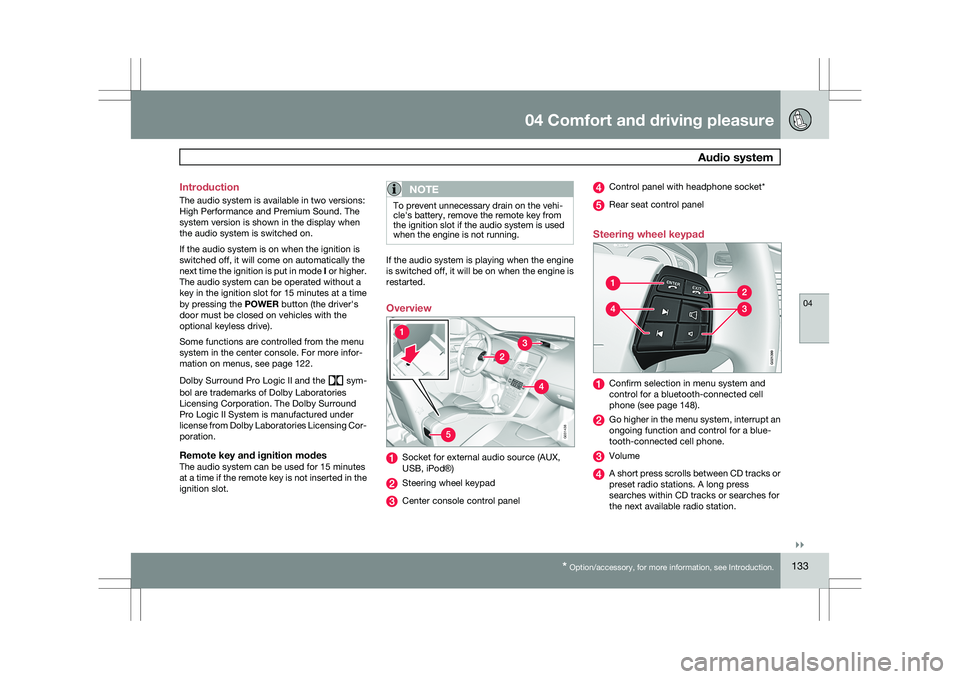
Overview
Socket for external audio source (AUX,
USB, iPod®)
Steering wheel keypad
Center console control panel Control panel with headphone socket*
Rear seat control panel
Steering wheel keypad Confirm selection in menu system and
control for a bluetooth-connected cell
phone (see page 148).
Go higher in the menu system, interrupt an
ongoing function and control for a blue-
tooth-connected cell phone.
Volume
A short press scrolls between CD tracks or
preset radio stations. A long press
searches within CD tracks or searches for
the next available radio station. 5G031438 G02139
9
Page 137 of 297
04 Comfort and driving pleasure
Audio system04
}}
* Option/accessory, for more information, see Introduction. 135
tem must be set to USB Removable device/
Mass Storage Device.
iPodAn iPod receives current and its battery is
charged through the connecting cord. How-
ever, if the iPod\fs battery is completely
drained, it should be recharged before the iPod
is connected to the audio system.
NOTE
When an iPod® is used as a sound source,
the vehicle\fs audio system has a menu
structure similar to the one in the iPod
®. See
the iPod\fs manual for detailed information. For further information, refer to the accessory
manual USB/iPod Music Interface.
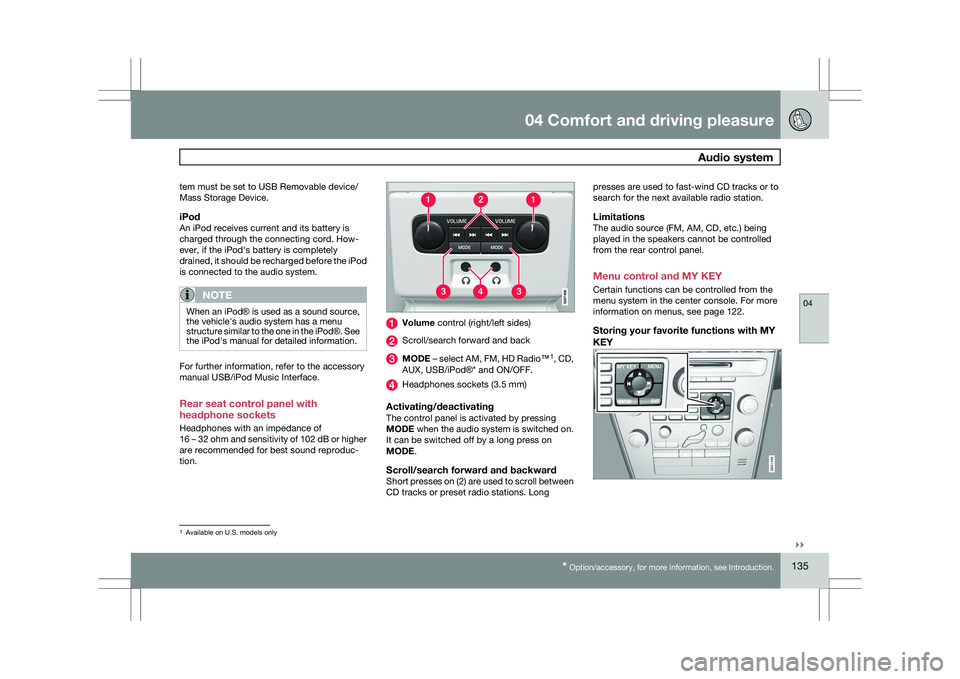
Rear seat control panel with
headphone sockets
Headphones with an impedance of
16 – 32 ohm and sensitivity of 102 dB or higher
are recommended for best sound reproduc-
tion. Volume control (right/left sides)
Scroll/search forward and back
MODE – select AM, FM, HD Radio™
1
, CD,
AUX, USB/iPod®* and ON/OFF. Headphones sockets (3.5 mm)
Activating/deactivatingThe control panel is activated by pressing
MODE when the audio system is switched on.
It can be switched off by a long press on
MODE.
Scroll/search forward and backwardShort presses on (2) are used to scroll between
CD tracks or preset radio stations. Longpresses are used to fast-wind CD tracks or to
search for the next available radio station.
LimitationsThe audio source (FM, AM, CD, etc.) being
played in the speakers cannot be controlled
from the rear control panel.
Menu control and MY KEY
Certain functions can be controlled from the
menu system in the center console. For more
information on menus, see page 122.
Storing your favorite functions with MY
KEY
1
Available on U.S. models only G031439