mirror VOLVO XC60 2009 Owner´s Manual
[x] Cancel search | Manufacturer: VOLVO, Model Year: 2009, Model line: XC60, Model: VOLVO XC60 2009Pages: 297, PDF Size: 21.16 MB
Page 128 of 297
04 Comfort and driving pleasureClimate system 04
126
* Option/accessory, for more information, see Introduction.
Introduction
Air conditioningThe vehicle is equipped with Electronic Climate
Control (ECC). The climate control system
cools, heats or dehumidifies the air in the pas-
senger compartment.
NOTE
\b
The air conditioning can be switched
off, but to ensure the best possible cli-
mate comfort in the passenger com-
partment and to prevent the windows
from misting, it should always be on.
\b In warm weather, a small amount of
water may accumulate under the car
when it has been parked. This water is
condensation from the A/C system and
is normal.
Sensor location
\b
The sunlight sensor is located on the top
side of the dashboard.
NOTE The sunlight sensor monitors which side of
the car that is most exposed to sunlight.
This can mean that the temperature may
differ between the right and left-side air
vents, even if the temperatures set for both
sides of the passenger compartment are the
same.
\b
The temperature sensor for the passenger
compartment is located below the climate
control panel.
\b The outside temperature sensor is located
on the door mirror.
\b The humidity sensor
* is located in the inte-
rior rearview mirror.
NOTE Do not cover or block the sensors with
clothing or other objects.
Side windows and moonroofTo ensure that the air conditioning works opti-
mally, the side windows, and the optional
moonroof should be closed.
Fog on the inside of the windowsThe defroster function should be used to
remove fog or mist from the inside of the win-
dows. Keeping the windows clean with a com-mercially available window washing spray will
also help prevent fogging or misting.
Temporary shut-off of the air
conditioning
The air conditioning is momentarily disen-
gaged during full-throttle acceleration or when
driving uphill with a trailer. This may result in a
temporary increase in cabin temperature.
Ice and snowAlways keep the air intake grille at the base of
the windshield free of snow.
Climate system maintenanceSpecial tools and equipment are required to
maintain and carry out repairs on the climate
system. Work of this type should only be done
by a trained and qualified Volvo service tech-
nician.
RefrigerantVolvo cares about the environment. The air
conditioning system in your car contains a
CFC-free refrigerant – R134a. This substance
will not deplete the ozone layer. The air condi-
tioning system contains 1.8 lbs (800 g) of
R134a. The systems uses PAG oil.
Passenger compartment filterReplace the cabin air filter with a new one at
the recommended intervals. Please refer to
Page 130 of 297
04 Comfort and driving pleasureClimate system 04
128
* Option/accessory, for more information, see Introduction.
Air vents in the door pillars Closed
Open
Horizontal airflow
Vertical airflow
Direct the outer air vents toward the side win-
dows to defrost.
Direct the vents into the passenger compart-
ment to maintain a comfortable climate in the
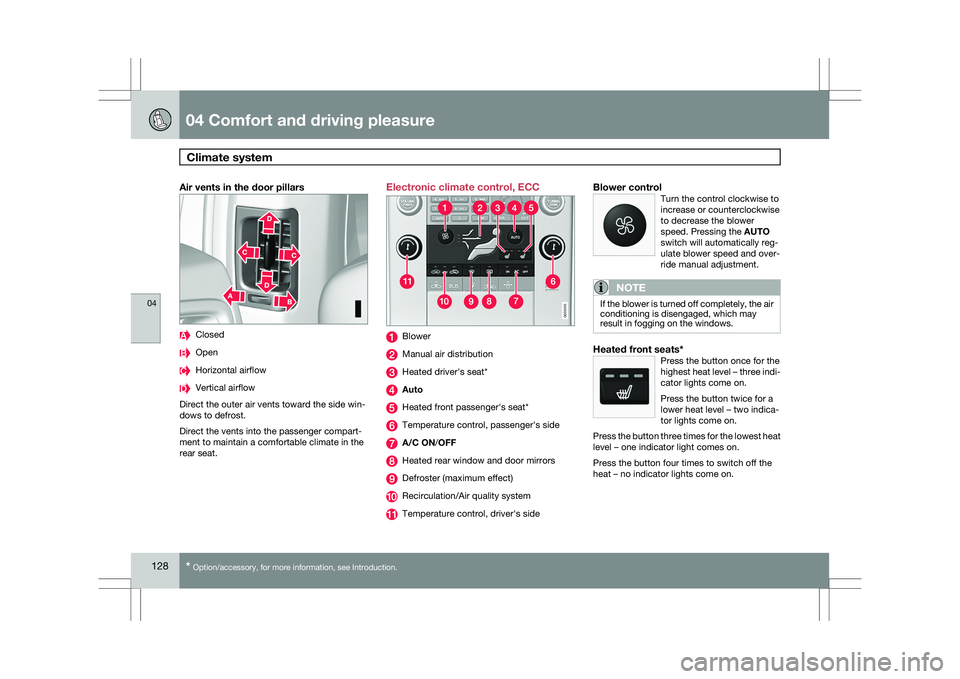
rear seat. Electronic climate control, ECC
Blower
Manual air distribution
Heated driver\fs seat*
Auto
Heated front passenger\fs seat*
Temperature control, passenger\fs side
A/C ON/OFF
Heated rear window and door mirrors
Defroster (maximum effect)
Recirculation/Air quality system
Temperature control, driver\fs sideBlower controlTurn the control clockwise to
increase or counterclockwise
to decrease the blower
speed. Pressing the AUTO
switch will automatically reg-
ulate blower speed and over-
ride manual adjustment.
NOTE If the blower is turned off completely, the air
conditioning is disengaged, which may
result in fogging on the windows.
Heated front seats*Press the button once for the
highest heat level – three indi-
cator lights come on.
Press the button twice for a
lower heat level – two indica-
tor lights come on.
Press the button three times for the lowest heat
level – one indicator light comes on.
Press the button four times to switch off the
heat – no indicator lights come on. G033202 G033203
Page 138 of 297
04 Comfort and driving pleasureAudio system 04
136
* Option/accessory, for more information, see Introduction.
1. Select the function in the menu to be
stored. Only certain functions can be
stored.
2. Press and hold MY KEY for more than two
seconds.
Activate the stored function by pressing MY
KEY briefly.
The following functions can be pro-
grammed using MY KEY:
FM
Radio text on/off
Audio settings Sound stage (front/driver/rear)
Auto. volume control (off/low/medium/
high)
Sirius satellite radio* Add song to memory
Direct channel entry
Song seek (on/off)
Sirius settings – Song memory (show
memory list)
CD/CD changer Random (CD changer)
Disc text (on/off) Track information (on/off)
Car settings Fold mirror when locking
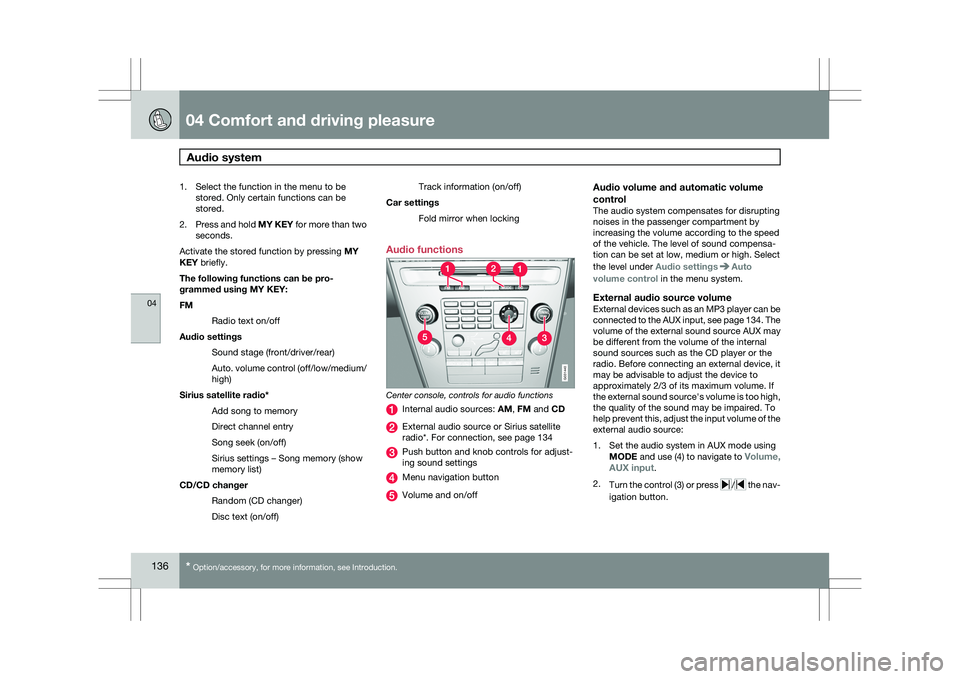
Audio functions Center console, controls for audio functions
Internal audio sources:
AM, FM and CD External audio source or Sirius satellite
radio*. For connection, see page 134
Push button and knob controls for adjust-
ing sound settings
Menu navigation button
Volume and on/off
Audio volume and automatic volume
control
The audio system compensates for disrupting
noises in the passenger compartment by
increasing the volume according to the speed
of the vehicle. The level of sound compensa-
tion can be set at low, medium or high. Select
the level under Audio settings Auto
volume control in the menu system.
External audio source volumeExternal devices such as an MP3 player can be
connected to the AUX input, see page 134. The
volume of the external sound source AUX may
be different from the volume of the internal
sound sources such as the CD player or the
radio. Before connecting an external device, it
may be advisable to adjust the device to
approximately 2/3 of its maximum volume. If
the external sound source\fs volume is too high,
the quality of the sound may be impaired. To
help prevent this, adjust the input volume of the
external audio source:
1. Set the audio system in AUX mode using MODE and use (4) to navigate to Volume,
AUX input.
2. Turn the control (3) or press / the nav-
igation button. G031440
Page 156 of 297
04 Comfort and driving pleasureCompass 04
154 Operation
Rearview mirror with compass.
The rearview mirror has an integrated display
that shows the compass direction in which the
vehicle is pointing. Eight different directions
are shown with the abbreviations: N (north),
NE (north east), E (east), SE (southeast), S
(south), SW (southwest), W (west) and NW
(northwest).
The compass is displayed automatically when
the vehicle is started or in ignition mode II. To
switch the compass on/off use a pen or similar
object and press in the button on the rear side
of the mirror.
CalibrationThe compass may need to be calibrated if, for
example, the vehicle is driven into a new mag-
netic zone. 1.
Stop the vehicle in a large open area, safely
out of traffic and away from steel structures
and high-tension electrical wires.
2. Start the vehicle.
NOTE For best results from calibration, switch off
all electrical equipment in the vehicle (cli-
mate system, windshield wipers, audio sys-
tem, etc.) and make sure that all doors are
closed.
3. Using a pen or similar object, press and
hold the button on the rear side of mirror
until C is shown again in the mirror(after
approx. 6 seconds).
4. Drive as usual. C disappears from the dis-
play when calibration is complete.
Alternative calibration method:
Drive slowly in a circle at a speed of no
more than 5 mph (8 km/h) until C disap-
pears from the display when calibration is
complete.
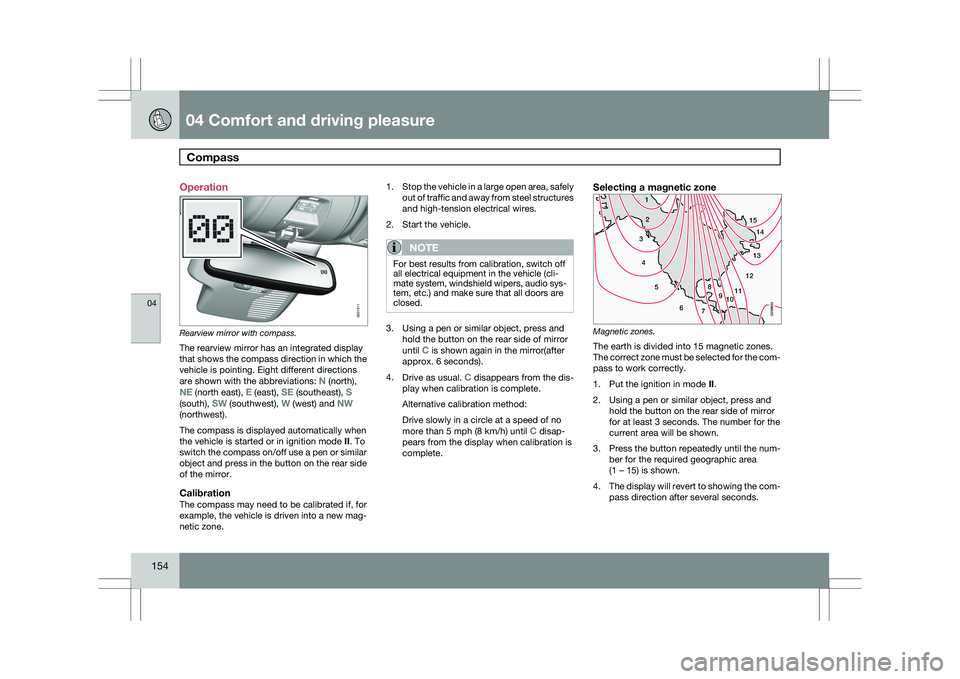
Selecting a magnetic zone Magnetic zones.
The earth is divided into 15 magnetic zones.
The correct zone must be selected for the com-
pass to work correctly.
1.
Put the ignition in mode II.
2. Using a pen or similar object, press and hold the button on the rear side of mirror
for at least 3 seconds. The number for the
current area will be shown.
3. Press the button repeatedly until the num-
ber for the required geographic area
(1 – 15) is shown.
4. The display will revert to showing the com-
pass direction after several seconds. G031611
15
14
13
12
1198
76
5
4
3
2
1
10
G018632
Page 193 of 297
04 Comfort and driving pleasure
Park Assist Camera (PAC)*04
}}
* Option/accessory, for more information, see Introduction. 191
DeactivationMove the gear selector from
R to another posi-
tion. There is a slight delay in the PAC system,
which means that the view from behind the
vehicle will remain on the screen for approxi-
mately 15 seconds after the gear selector has
been moved from the R position or until the
vehicle reaches a forward speed of 6 mph
(10 km/h). The screen will then revert to the
mode that it was in before R was selected and
will, for example, display navigation system
information.
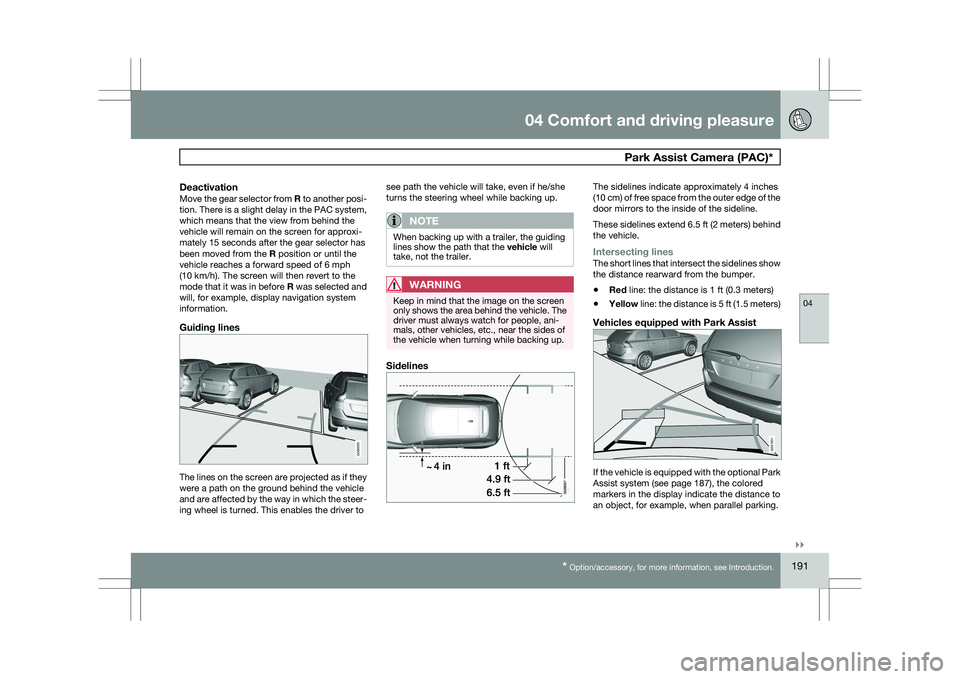
Guiding lines The lines on the screen are projected as if they
were a path on the ground behind the vehicle
and are affected by the way in which the steer-
ing wheel is turned. This enables the driver to see path the vehicle will take, even if he/she
turns the steering wheel while backing up.
NOTE When backing up with a trailer, the guiding
lines show the path that the vehicle will
take, not the trailer.
WARNING
Keep in mind that the image on the screen
only shows the area behind the vehicle. The
driver must always watch for people, ani-
mals, other vehicles, etc., near the sides of
the vehicle when turning while backing up.
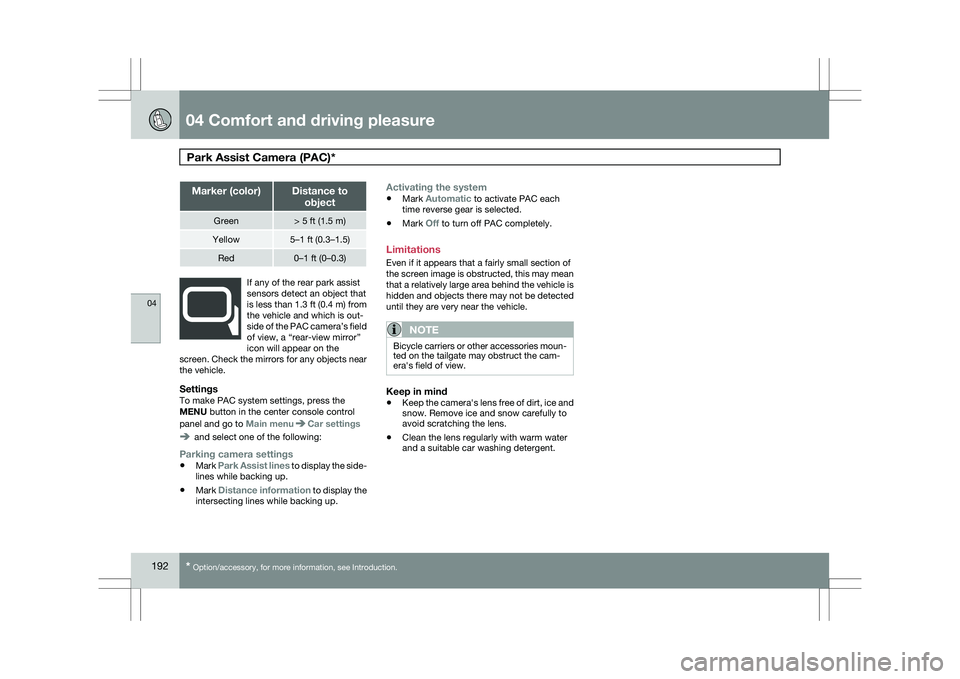
Sidelines The sidelines indicate approximately 4 inches
(10 cm) of free space from the outer edge of the
door mirrors to the inside of the sideline.
These sidelines extend 6.5 ft (2 meters) behind
the vehicle.
Intersecting linesThe short lines that intersect the sidelines show
the distance rearward from the bumper.
\b
Red line: the distance is 1 ft (0.3 meters)
\b Yellow line: the distance is 5 ft (1.5 meters)
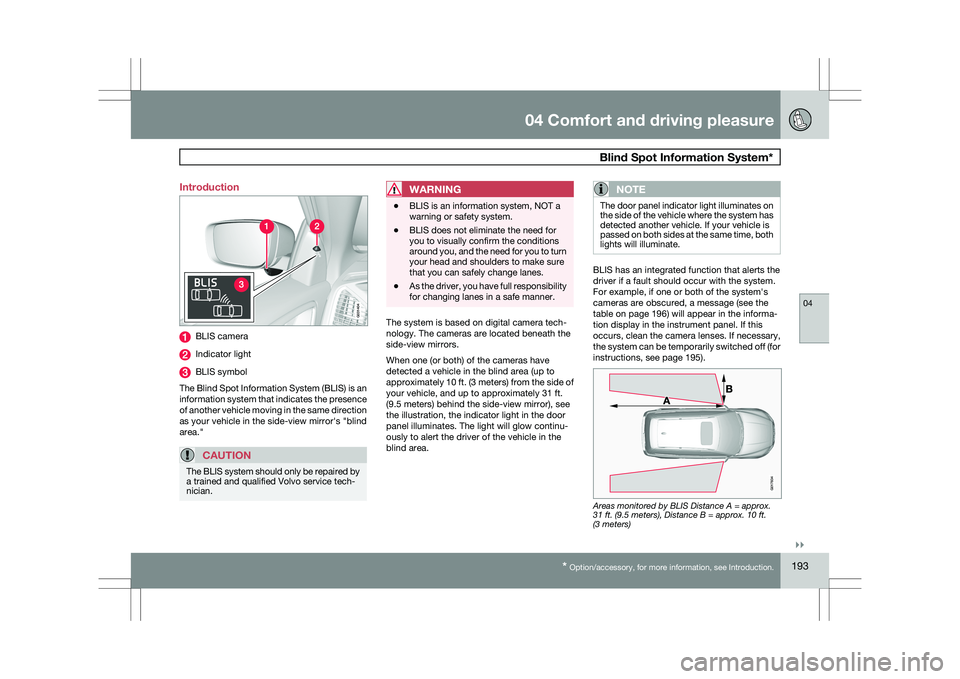
Vehicles equipped with Park Assist If the vehicle is equipped with the optional Park
Assist system (see page 187), the colored
markers in the display indicate the distance to
an object, for example, when parallel parking. G000000 G031931
Page 194 of 297
04 Comfort and driving pleasurePark Assist Camera (PAC)* 04
192
* Option/accessory, for more information, see Introduction. Marker (color) Distance to
object Green > 5 ft (1.5 m)
Yellow 5–1 ft (0.3–1.5)
Red 0–1 ft (0–0.3)
If any of the rear park assist
sensors detect an object that
is less than 1.3 ft (0.4 m) from
the vehicle and which is out-
side of the PAC camera’s field
of view, a “rear-view mirror”
icon will appear on the
screen. Check the mirrors for any objects near
the vehicle.
SettingsTo make PAC system settings, press the
MENU button in the center console control
panel and go to Main menu Car settings
and select one of the following:
Parking camera settings
\b
Mark Park Assist lines to display the side-
lines while backing up.
\b Mark Distance information to display the
intersecting lines while backing up.
Activating the system
\bMark Automatic to activate PAC each
time reverse gear is selected.
\b Mark Off to turn off PAC completely.
Limitations
Even if it appears that a fairly small section of
the screen image is obstructed, this may mean
that a relatively large area behind the vehicle is
hidden and objects there may not be detected
until they are very near the vehicle.
NOTE Bicycle carriers or other accessories moun-
ted on the tailgate may obstruct the cam-
era\fs field of view.
Keep in mind
\b
Keep the camera\fs lens free of dirt, ice and
snow. Remove ice and snow carefully to
avoid scratching the lens.
\b Clean the lens regularly with warm water
and a suitable car washing detergent.
Page 195 of 297
04 Comfort and driving pleasure
Blind Spot Information System*04
}}
* Option/accessory, for more information, see Introduction. 193
Introduction
BLIS camera
Indicator light
BLIS symbol
The Blind Spot Information System (BLIS) is an
information system that indicates the presence
of another vehicle moving in the same direction
as your vehicle in the side-view mirror\fs "blind
area."
CAUTION The BLIS system should only be repaired by
a trained and qualified Volvo service tech-
nician.
WARNING \b
BLIS is an information system, NOT a
warning or safety system.
\b BLIS does not eliminate the need for
you to visually confirm the conditions
around you, and the need for you to turn
your head and shoulders to make sure
that you can safely change lanes.
\b As the driver, you have full responsibility
for changing lanes in a safe manner. The system is based on digital camera tech-
nology. The cameras are located beneath the
side-view mirrors.
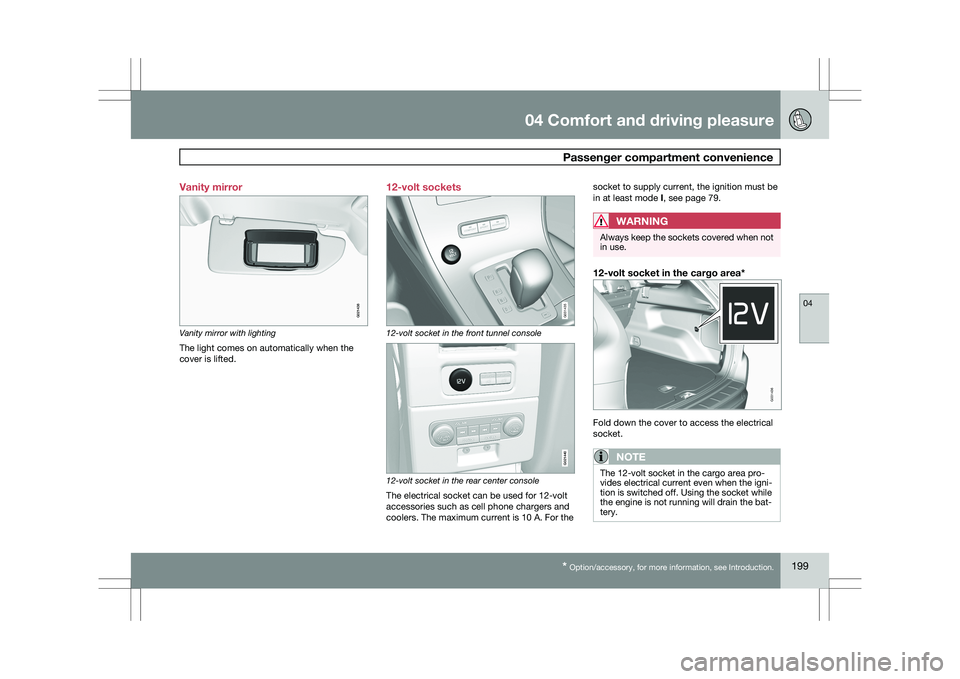
When one (or both) of the cameras have
detected a vehicle in the blind area (up to
approximately 10 ft. (3 meters) from the side of
your vehicle, and up to approximately 31 ft.
(9.5 meters) behind the side-view mirror), see
the illustration, the indicator light in the door
panel illuminates. The light will glow continu-
ously to alert the driver of the vehicle in the
blind area.NOTE The door panel indicator light illuminates on
the side of the vehicle where the system has
detected another vehicle. If your vehicle is
passed on both sides at the same time, both
lights will illuminate.
BLIS has an integrated function that alerts the
driver if a fault should occur with the system.
For example, if one or both of the system\fs
cameras are obscured, a message (see the
table on page 196) will appear in the informa-
tion display in the instrument panel. If this
occurs, clean the camera lenses. If necessary,
the system can be temporarily switched off (for
instructions, see page 195).
Areas monitored by BLIS Distance A = approx.
31 ft. (9.5 meters), Distance B = approx. 10 ft.
(3 meters) G031404 G01783
4
Page 201 of 297
04 Comfort and driving pleasure
Passenger compartment convenience04
* Option/accessory, for more information, see Introduction. 199
Vanity mirror
Vanity mirror with lighting
The light comes on automatically when the
cover is lifted.
12-volt sockets 12-volt socket in the front tunnel console
12-volt socket in the rear center console
The electrical socket can be used for 12-volt
accessories such as cell phone chargers and
coolers. The maximum current is 10 A. For thesocket to supply current, the ignition must be
in at least mode I, see page 79.
WARNING Always keep the sockets covered when not
in use.
12-volt socket in the cargo area*
Fold down the cover to access the electrical
socket.
NOTE
The 12-volt socket in the cargo area pro-
vides electrical current even when the igni-
tion is switched off. Using the socket while
the engine is not running will drain the bat-
tery. G021438 G031435 G021440 G031436
Page 234 of 297
06 Maintenance and specificationsReplacing bulbs 06
232
* Option/accessory, for more information, see Introduction.
Introduction
All bulb specifications are listed on page 238.
The following bulbs should only be replaced by
a trained and qualified Volvo service techni-
cian:
\b
Dome lighting
\b Reading lights
\b Glove compartment lighting
\b Turn signals in the door mirrors
\b Approach lighting in the door mirror
\b Parking lights
\b Rear side parking lights
\b Active Dual Xenon and LED bulbs
NOTE For information regarding any other bulbs
not mentioned in this section, please con-
tact your Volvo retailer or a trained and
authorized Volvo service technician.
WARNING \b
Active Dual Xenon headlights* – due to
the high voltage used by these head-
lights, these bulbs should only be
replaced by a trained and qualified
Volvo service technician.
\b Turn off the lights and remove the
remote key from the ignition before
changing any bulbs. Headlight housing
WARNING
\b
The engine should not be running when
changing bulbs.
\b When changing in the headlight hous-
ing, if the engine has been running just
prior to replacing bulbs, please be
aware that components in the engine
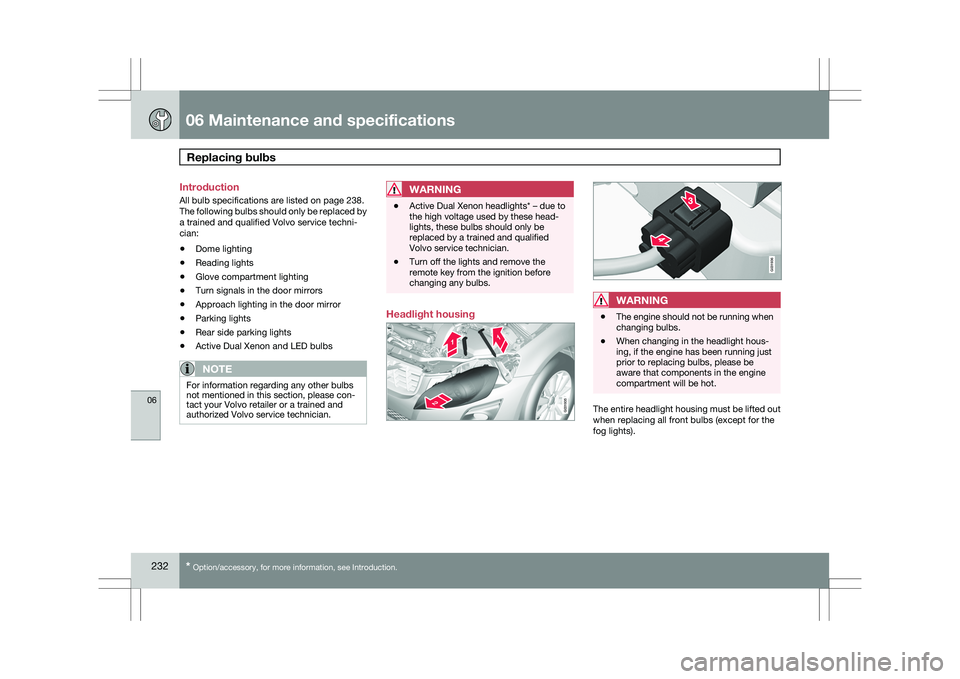
compartment will be hot. The entire headlight housing must be lifted out
when replacing all front bulbs (except for the
fog lights). G031935 G031936
Page 240 of 297
06 Maintenance and specificationsReplacing bulbs 06
238 Cargo area lighting
NOTE
Before starting to replace a bulb, see the
general information on page 232.
1. Insert a screwdriver and turn it gently so
that the bulb housing comes loose.
2. Replace the bulb.
3. Check that the bulb illuminates and press it back into the bulb housing. Vanity mirror lighting
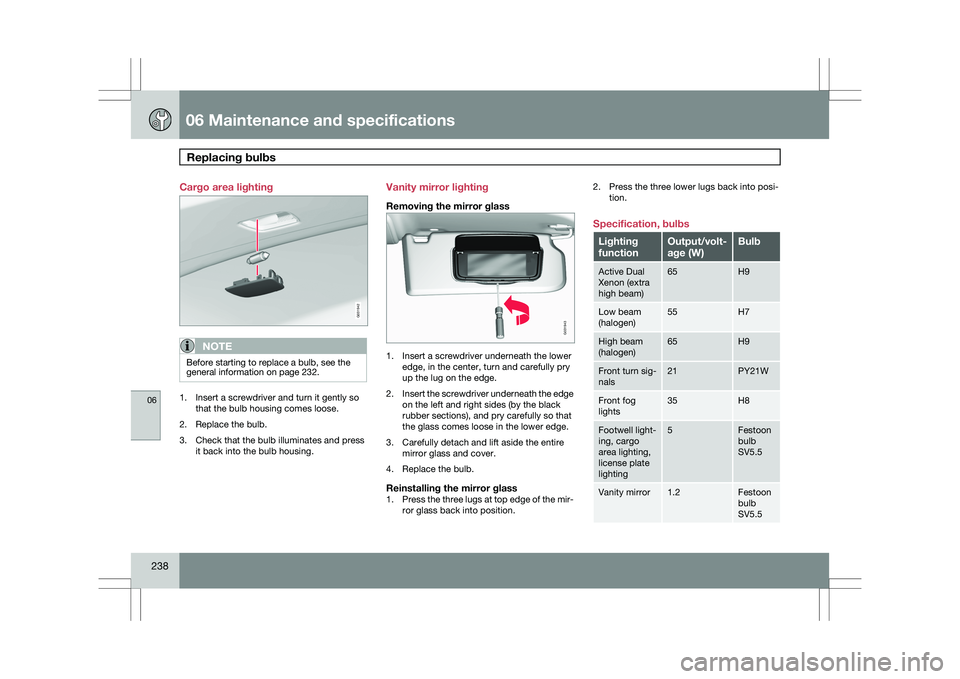
Removing the mirror glass
1. Insert a screwdriver underneath the lower
edge, in the center, turn and carefully pry
up the lug on the edge.
2. Insert the screwdriver underneath the edge
on the left and right sides (by the black
rubber sections), and pry carefully so that
the glass comes loose in the lower edge.
3. Carefully detach and lift aside the entire mirror glass and cover.
4. Replace the bulb.
Reinstalling the mirror glass1. Press the three lugs at top edge of the mir-
ror glass back into position. 2. Press the three lower lugs back into posi-
tion.
Specification, bulbs Lighting
function Output/volt-
age (W) Bulb
Active Dual
Xenon (extra
high beam) 65 H9
Low beam
(halogen) 55 H7
High beam
(halogen) 65 H9
Front turn sig-
nals 21 PY21W
Front fog
lights 35 H8
Footwell light-
ing, cargo
area lighting,
license plate
lighting 5 Festoon
bulb
SV5.5
Vanity mirror 1.2 Festoon
bulb
SV5.5 G031942 G031943