ignition VOLVO XC60 2009 Owner´s Manual
[x] Cancel search | Manufacturer: VOLVO, Model Year: 2009, Model line: XC60, Model: VOLVO XC60 2009Pages: 297, PDF Size: 21.16 MB
Page 109 of 297
03 Your driving environment
Starting the engine03
}}
107
NOTEFor the vehicle to start, one of the vehicle\fs
remote keys must be in the passenger com-
partment.
Jump starting
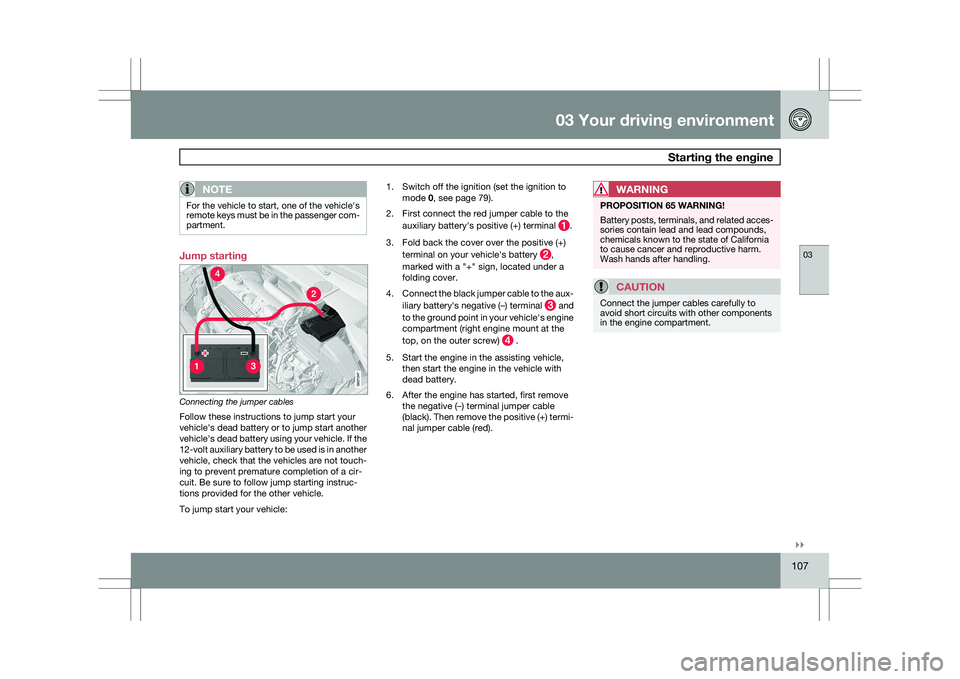
Connecting the jumper cables
Follow these instructions to jump start your
vehicle\fs dead battery or to jump start another
vehicle\fs dead battery using your vehicle. If the
12-volt auxiliary battery to be used is in another
vehicle, check that the vehicles are not touch-
ing to prevent premature completion of a cir-
cuit. Be sure to follow jump starting instruc-
tions provided for the other vehicle.
To jump start your vehicle: 1. Switch off the ignition (set the ignition to
mode 0, see page 79).
2. First connect the red jumper cable to the auxiliary battery\fs positive (+) terminal .
3. Fold back the cover over the positive (+) terminal on your vehicle\fs battery ,
marked with a "+" sign, located under a
folding cover.
4. Connect the black jumper cable to the aux-
iliary battery\fs negative (–) terminal and
to the ground point in your vehicle\fs engine
compartment (right engine mount at the
top, on the outer screw) .
5. Start the engine in the assisting vehicle, then start the engine in the vehicle with
dead battery.
6. After the engine has started, first remove the negative (–) terminal jumper cable
(black). Then remove the positive (+) termi-
nal jumper cable (red).WARNING PROPOSITION 65 WARNING!
Battery posts, terminals, and related acces-
sories contain lead and lead compounds,
chemicals known to the state of California
to cause cancer and reproductive harm.
Wash hands after handling.
CAUTION
Connect the jumper cables carefully to
avoid short circuits with other components
in the engine compartment. G02134
7
Page 111 of 297
03 Your driving environment
Transmission03
}}
109
Automatic transmission
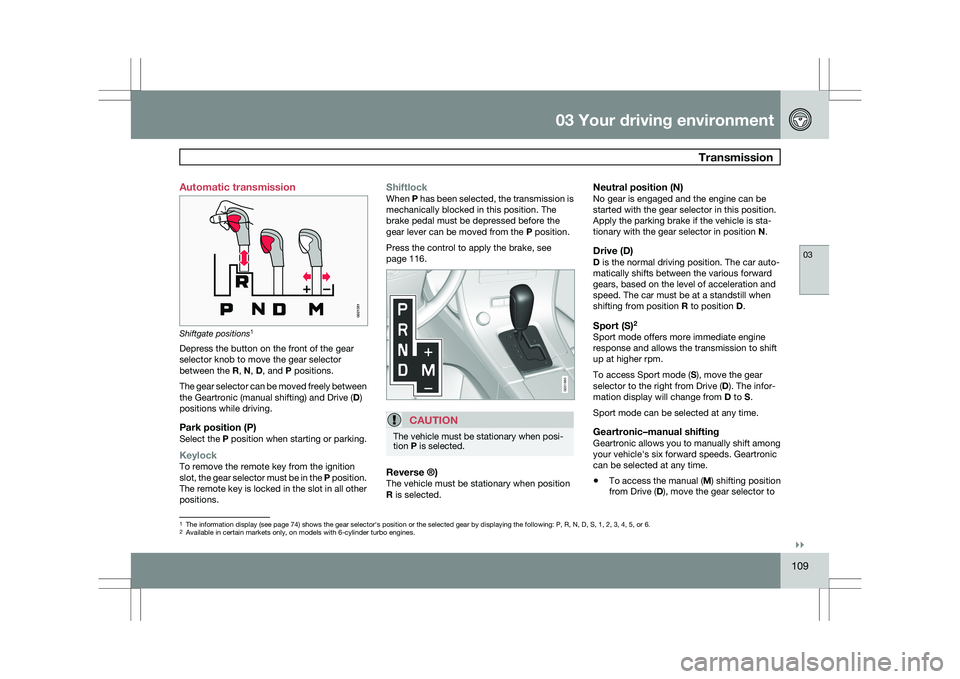
Shiftgate positions
1
Depress the button on the front of the gear
selector knob to move the gear selector
between the R, N, D, and P positions.
The gear selector can be moved freely between
the Geartronic (manual shifting) and Drive ( D)
positions while driving.
Park position (P)Select the P position when starting or parking.
KeylockTo remove the remote key from the ignition
slot, the gear selector must be in the P position.
The remote key is locked in the slot in all other
positions.
ShiftlockWhen P has been selected, the transmission is
mechanically blocked in this position. The
brake pedal must be depressed before the
gear lever can be moved from the P position.
Press the control to apply the brake, see
page 116.
CAUTION The vehicle must be stationary when posi-
tion P is selected.
Reverse ®)The vehicle must be stationary when position
R is selected.
Neutral position (N)No gear is engaged and the engine can be
started with the gear selector in this position.
Apply the parking brake if the vehicle is sta-
tionary with the gear selector in position
N.
Drive (D)D is the normal driving position. The car auto-
matically shifts between the various forward
gears, based on the level of acceleration and
speed. The car must be at a standstill when
shifting from position R to position D.
Sport (S)2Sport mode offers more immediate engine
response and allows the transmission to shift
up at higher rpm.
To access Sport mode (S), move the gear
selector to the right from Drive (
D). The infor-
mation display will change from D to S.
Sport mode can be selected at any time.
Geartronic–manual shiftingGeartronic allows you to manually shift among
your vehicle\fs six forward speeds. Geartronic
can be selected at any time.
\b To access the manual (
M) shifting position
from Drive (D), move the gear selector to 1
The information display (see page 74) shows the gear selector\fs position or the selected gear by displayin\
g the following: P, R, N, D, S, 1, 2, 3, 4, 5, or 6.
2Available in certain markets only, on models with 6-cylinder turbo engin\
es.
G021351 G031963
Page 112 of 297
03 Your driving environmentTransmission 03
110 the right to M (or to S on models equipped
with Sport mode).
\b To return to the D position from M or S,
move the gear selector to the left.
NOTE On models equipped with Sport mode, the
transmission will not switch to manual shift-
ing mode until the gear selector is moved
forward or rearward. The selected gear will
then be shown in the information display
(see page 73).
While driving
\b
If you select the M position while driving,
the gear that was being used in the Drive
position will also initially be selected in the
M position.
\b Move the gear selector forward (toward
"+") to shift to a higher gear or rearward
(toward "–") to shift to a lower gear.
\b If you hold the gear selector toward "–", the
transmission will downshift one gear at a
time and will utilize the braking power of
the engine. If the current speed is too high
for using a lower gear, the downshift will
not occur until the speed has decreased
enough to allow the lower gear to be used. \b
If you slow to a very low speed, the trans-
mission will automatically shift down.
Shiftlock – Neutral (N)If the gear selector is in the
N position and the
vehicle has been stationary for at least 3 sec-
onds (irrespective of whether the engine is run-
ning) then the gear selector is locked.
To be able to move the gear selector from N to
another gear position, the brake pedal must be
depressed and the ignition must be in posi-
tion II, see page 79.
Geartronic–starting on slippery surfacesSelecting 3rd gear in Geartronic’s manual shift-
ing mode can help provide better traction when
starting off on slippery surfaces. To do so:
1. Depress the brake pedal and move the
gear selector to the right from the D posi-
tion to M. The text in the instrument panel
display will change from D to 1.
2. Press the gear selector forward and release it (this selects 2nd gear). Press the
selector forward again and release it to
select 3rd gear.
3. Release the brake pedal and press gently on the accelerator pedal.
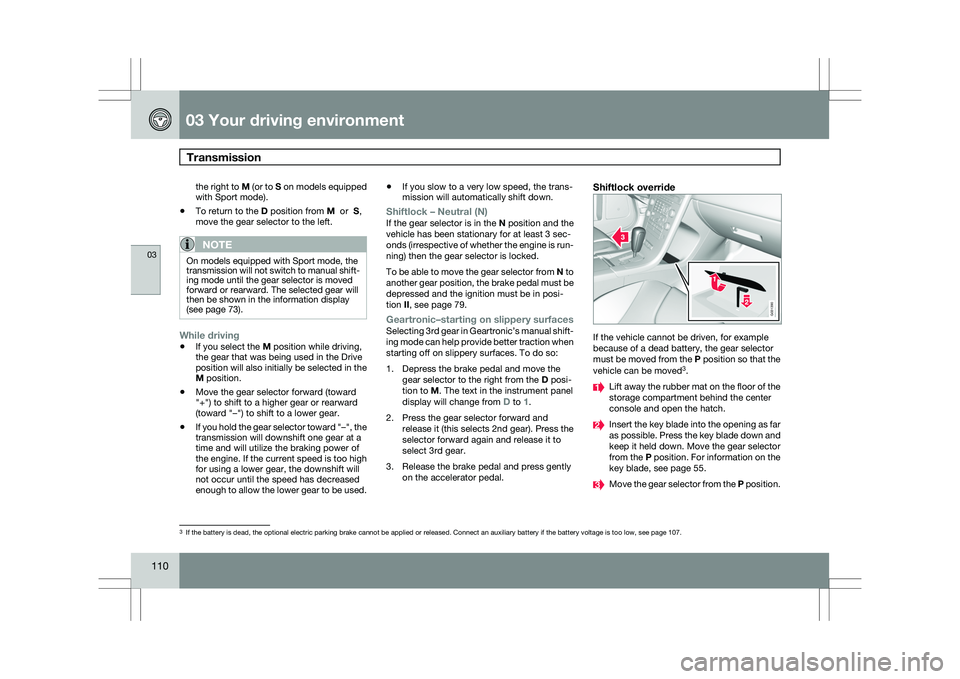
Shiftlock override If the vehicle cannot be driven, for example
because of a dead battery, the gear selector
must be moved from the P position so that the
vehicle can be moved
3
. Lift away the rubber mat on the floor of the
storage compartment behind the center
console and open the hatch.
Insert the key blade into the opening as far
as possible. Press the key blade down and
keep it held down. Move the gear selector
from the P position. For information on the
key blade, see page 55.
Move the gear selector from the
P position.3
If the battery is dead, the optional electric parking brake cannot be ap\
plied or released. Connect an auxiliary battery if the battery voltage i\
s too low, see page 107. G031390
Page 119 of 297
03 Your driving environment
Parking brake03
}}
* Option/accessory, for more information, see Introduction. 117
Releasing the electric parking brakeParking brake control
Manual release1. Fasten the seat belt.
2. Insert the remote key in the ignition slot.
3. Press firmly on the brake pedal.
4. Pull the parking brake control.
Vehicles with Keyless drive*1.
Press the START/STOP ENGINE button.
2. Press firmly on the brake pedal.
3. Pull the parking brake control.
Automatic release1. Start the engine.
NOTE \b
For safety reasons, the parking brake is
only released automatically if the engine
is running and the driver is wearing a seat
belt.
\b The electric parking brake will be
released immediately when the acceler-
ator pedal is pressed and the gear selec-
tor is in position
D or P. 2. Fasten the seat belt
3.
Move the gear selector to position D or R
and press the accelerator pedal. The park-
ing brake will release when the vehicle
begins to move.
Heavy load uphillA heavy load, such as a trailer, can cause the
vehicle to roll backward when the parking
brake is released automatically on a steep
incline. To help avoid this:
1. Keep the electric parking brake lever pushed in with the left hand while shifting
into Drive with the right.
2. While pressing the throttle pedal to pull away, release the parking brake lever only
after the vehicle begins to move.
Symbols Symbol Specification
Read the message in the infor-
mation display
A flashing symbol indicates that
the parking brake is being
applied. If the symbol flashes in
any other situation then this
means that a fault has arisen.
Read the message on the infor-
mation display.
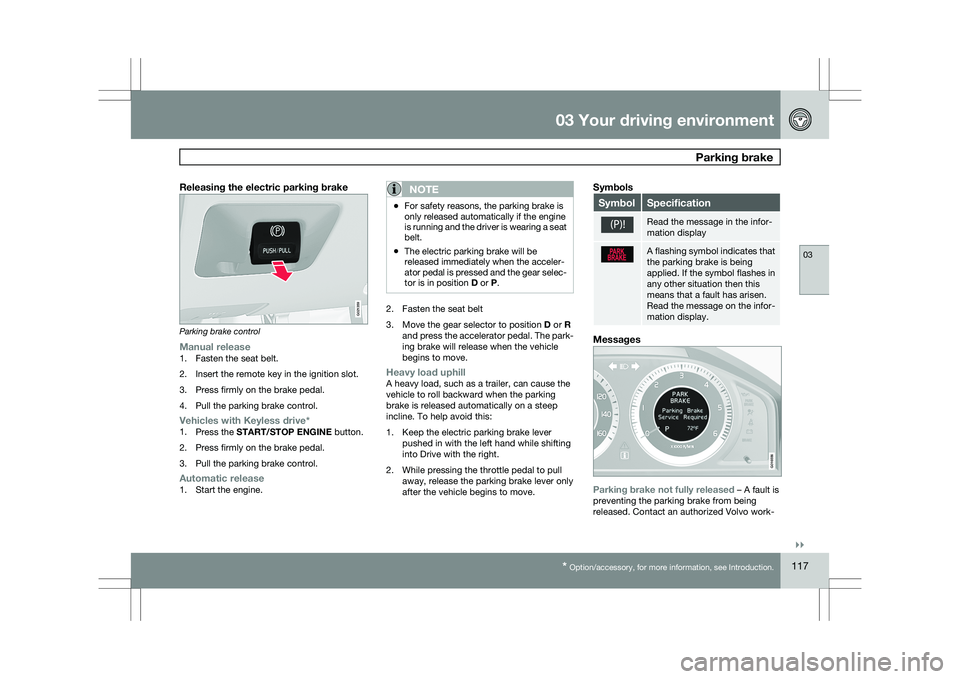
Messages
Parking brake not fully released – A fault is
preventing the parking brake from being
released. Contact an authorized Volvo work- G021359 G016556
Page 125 of 297
04 Comfort and driving pleasure
Menus and messages04
}}
* Option/accessory, for more information, see Introduction. 123
City Safety
Light settings
Lock settings
Reduced guard
1
Parking camera settings*
Steering force level*
Information
Climate settings Automatic blower adjust
Recirculation timer
Auto. rear defroster
Reset climate settings
Main menu AM
Audio settings 2
Sound stage
Equalizer, front
Equalizer, rear
Auto. volume control
Resets all audio settings.
Main menu FMFM settings Radio text
Advanced radio settings
Audio settings
Main menu CDRandom Off
Folder
Disc
Single disc
All discs
CD settings Disc text*
Audio settings
Main menu AUXVolume, AUX input
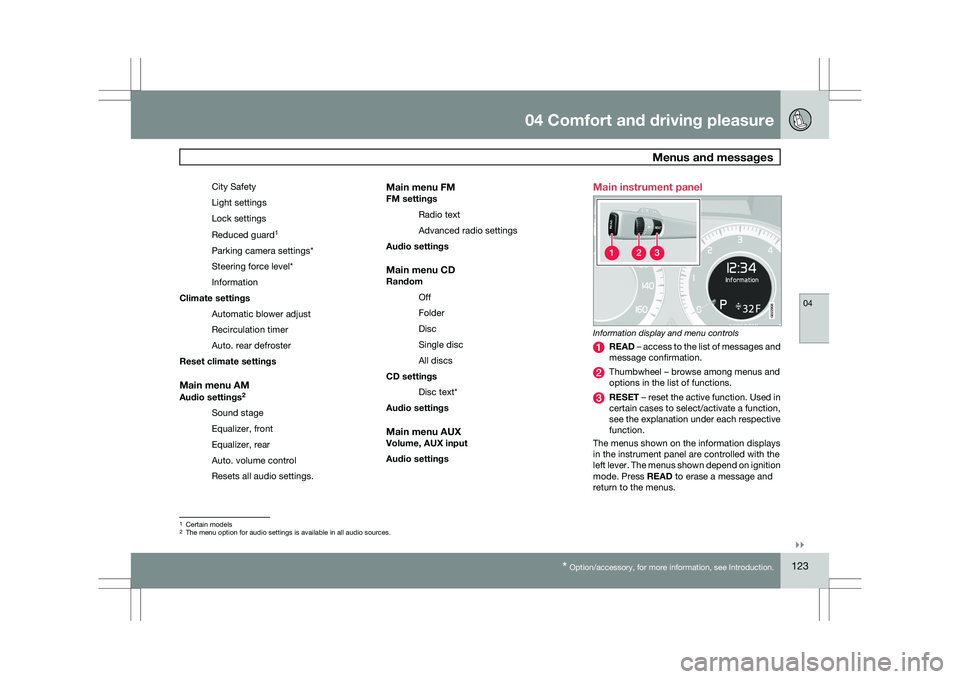
Audio settings Main instrument panel
Information display and menu controls
READ – access to the list of messages and
message confirmation.
Thumbwheel – browse among menus and
options in the list of functions.
RESET – reset the active function. Used in
certain cases to select/activate a function,
see the explanation under each respective
function.
The menus shown on the information displays
in the instrument panel are controlled with the
left lever. The menus shown depend on ignition
mode. Press READ to erase a message and
return to the menus. 1
Certain models
2 The menu option for audio settings is available in all audio sources. G022908
Page 135 of 297
04 Comfort and driving pleasure
Audio system04
}}
* Option/accessory, for more information, see Introduction. 133
Introduction
The audio system is available in two versions:
High Performance and Premium Sound. The
system version is shown in the display when
the audio system is switched on.
If the audio system is on when the ignition is
switched off, it will come on automatically the
next time the ignition is put in mode
I or higher.
The audio system can be operated without a
key in the ignition slot for 15 minutes at a time
by pressing the POWER button (the driver\fs
door must be closed on vehicles with the
optional keyless drive).
Some functions are controlled from the menu
system in the center console. For more infor-
mation on menus, see page 122.
Dolby Surround Pro Logic II and the sym-
bol are trademarks of Dolby Laboratories
Licensing Corporation. The Dolby Surround
Pro Logic II System is manufactured under
license from Dolby Laboratories Licensing Cor-
poration.
Remote key and ignition modesThe audio system can be used for 15 minutes
at a time if the remote key is not inserted in the
ignition slot.
NOTE To prevent unnecessary drain on the vehi-
cle\fs battery, remove the remote key from
the ignition slot if the audio system is used
when the engine is not running.
If the audio system is playing when the engine
is switched off, it will be on when the engine is
restarted.
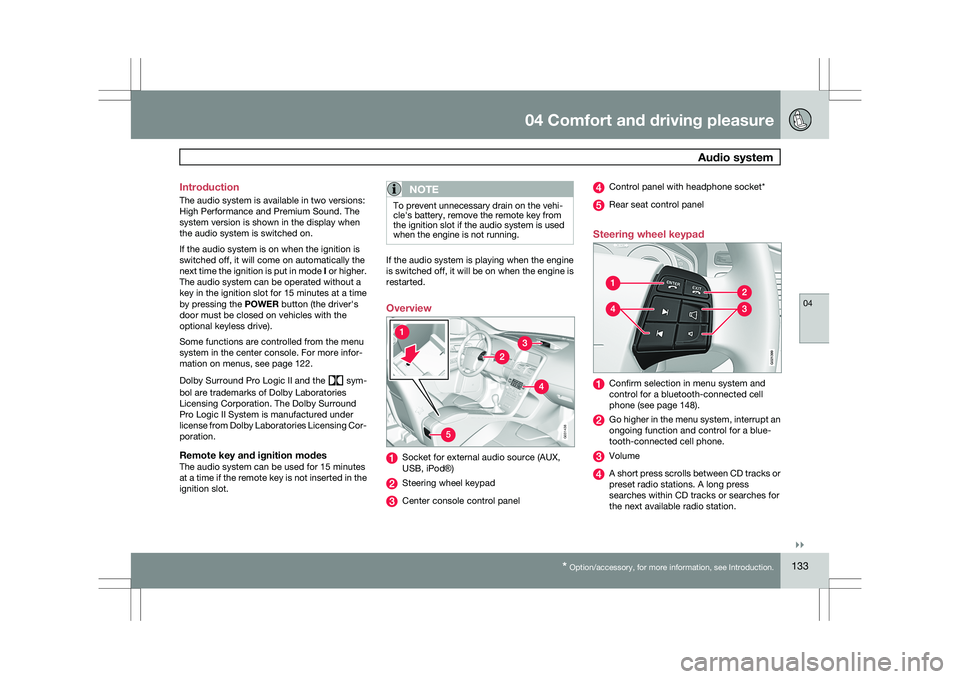
Overview
Socket for external audio source (AUX,
USB, iPod®)
Steering wheel keypad
Center console control panel Control panel with headphone socket*
Rear seat control panel
Steering wheel keypad Confirm selection in menu system and
control for a bluetooth-connected cell
phone (see page 148).
Go higher in the menu system, interrupt an
ongoing function and control for a blue-
tooth-connected cell phone.
Volume
A short press scrolls between CD tracks or
preset radio stations. A long press
searches within CD tracks or searches for
the next available radio station. 5G031438 G02139
9
Page 145 of 297
04 Comfort and driving pleasure
Audio system04
}}
143
If a new song is selected when the memory is
full, you will be prompted to press
ENTER to
delete the last song on the list.
NOTE The remaining songs in the list will move
down one position, and the newly added
song will be placed at the top of the list.
Song seekWhen a satellite radio channel plays one of the
songs stored in the song memory, the listener
will be alerted by a text message and an audi-
ble signal.
Press ENTER to listen to the song or
EXIT to
cancel.
To activate/deactivate the song seek function:
1. Press MENU
2. Scroll to Song seek
3. Press ENTER to activate or deactivate the
function.
NOTE When the song has ended, the radio will
remain tuned to the channel on which the
song was played.
Radio textThe text that is displayed about the song that
is currently playing can be changed. Use the
AUTO button or the menu to display the Artist,
Title, Composer, or switch radio text off.
Advanced settings
This menu function enables you to make set-
tings on certain Sirius satellite radio functions.
To access this menu:
1.
Press MENU.
2. Scroll to the Sirius menu.
3. Select Advanced Sirius settings.
WARNING Settings should be made when the vehicle
is at a standstill.
The following settings can be made in the Sir-
ius menu:
\b
The list of saved songs can be displayed
\b Channel skip settings can be made
\b Channel lock settings can be made
\b The channel access code can be displayed
or changed
\b Your Sirius ID can be displayed
Skip optionsThis function is used to remove a channel from
the list of available channels.
Skipping a channel1.
Select CHANNEL SKIP LIST and press
ENTER.
2. Select a category in the list and press ENTER.
3. Skip channels in the list presented by pressing ENTER or right arrow key.
Unskip all channelsThis permanently removes all channels from
the skip list and makes them available for
selection.
Temp. unskip all ch.This function will temporarily unskip all chan-
nels and make them available for selection. The
channels remain on the skip list and will again
be skipped the next time the ignition is
switched on.
Channel lockAccess to specific channels can be restricted
(locked). A locked channel will not provide
audio, song titles, or artist information.
NOTE All channels are initially unlocked.
Page 146 of 297
04 Comfort and driving pleasureAudio system 04
144
Locking a channel:1.
Select Sirius ID in the menu and select
LOCK OPTIONS and press ENTER.
2. Select CHANNEL LOCK LIST and press
ENTER
3. Enter the channel access code 8
and press
ENTER.
4. Select a category in the list and press ENTER.
5. Lock channels in the list presented by pressing ENTER or right arrow.
The channel is now locked and a checked box
will be displayed to indicate this. It will be nec-
essary to enter the channel access code 8
in
order to listen to a locked channel.
Unlocking a channel
A channel\fs access code 8
is required to unlock
a channel.
Unlock all channelsThis permanently removes all channels from
the locked list and makes them available for
selection.
Temp. unlock all ch.This function will temporarily unlock all chan-
nels and make them available for selection. The channels remain on the locked list and will
again be locked the next time the ignition is
switched on.
CHANGE CODEThis function makes it possible to change the
channel access code. The default code is
0000.
To change the code:
1.
Select CHANGE CODE and press
ENTER.
2. Enter the current code and press ENTER.
3. Enter the new code and press ENTER.
4. Confirm the new code and press ENTER.
If an incorrect code is entered, the text
WRONG CODE! is displayed.
If you have forgotten the access code:1. Select SIRIUS ID in the Sirius settings
menu and press ENTER.
2. Press and hold the ENTER button for
2 seconds.
3. The current code will be displayed.
Your Volvo retailer can also provide you with
assistance.
SIRIUS IDThis function displays the 12-digit Sirius acti-
vation ID.
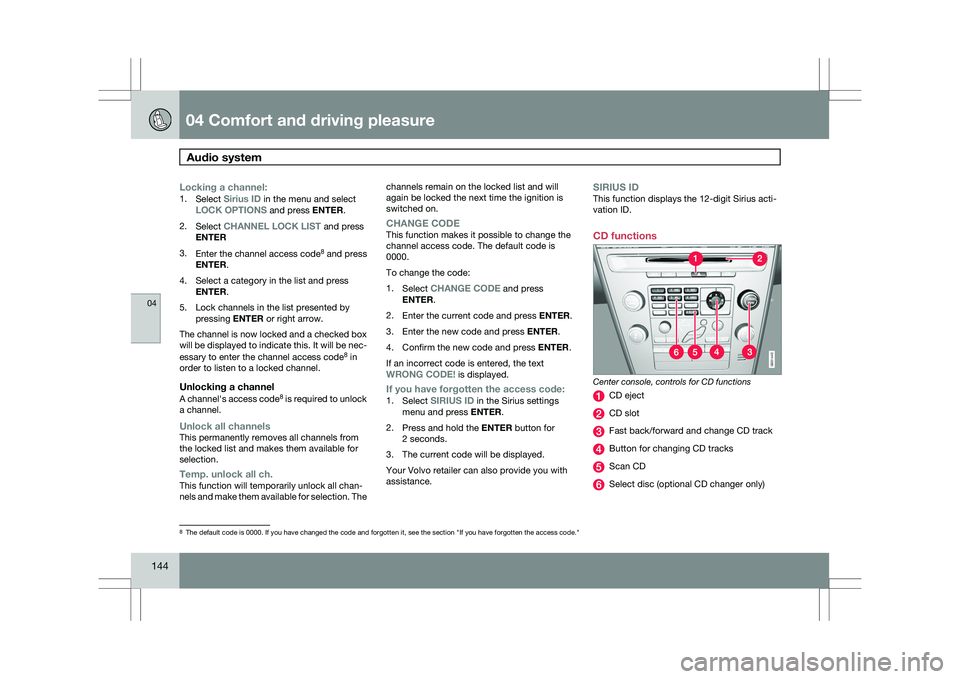
CD functions Center console, controls for CD functions
CD eject
CD slot
Fast back/forward and change CD track
Button for changing CD tracks
Scan CD
Select disc (optional CD changer only)
8
The default code is 0000. If you have changed the code and forgotten it,\
see the section "If you have forgotten the access code." G031443
Page 151 of 297
04 Comfort and driving pleasure
Bluetooth® hands-free connection04
}}
149
3.
Press ENTER.
End the call by pressing EXIT.
Disconnecting the cell phoneThe cell phone is automatically disconnected
from the audio system if it is moved out of
range. For more information about connec-
tions, see page 148.
The cell phone can be manually disconnected
from the hands-free system by pressing
PHONE. The hands-free system is also deac-
tivated when the ignition is switched off (or if
the driver’s door is opened on vehicles equip-
ped with the optional keyless drive).
When the cell phone is disconnected from the
hands-free system, a call in progress can be
continued using the cell phone’s own speaker
and microphone.
NOTE Certain cell phones may require confirma-
tion from the phone’s keypad when a call is
transferred from hands-free to the cell
phone. Handling calls
Incoming callsPress ENTER to answer a call, even if the audio
system is currently in e.g., CD or FM mode.
Press EXIT to defer a call.
Automatic answerThis function means that incoming calls will be
answered automatically. Activate or deactivate
the function in the menu system under Phone
settings Call options Automatic
answer.
Call settingsWhile a call is in progress, press MENU or
ENTER on the center console to access the
following functions:
\b Microphone off–mute the audio system’s
microphone.
\b Transfer call to mobile–transfer the call
from hands-free to the cell phone.
\b Phone book–this feature enables you to
search for a stored telephone number.
NOTE \b
On certain cell phones, the connection
is broken when the mute function is
used, which is normal. If this happens,
the hands-free system will prompt you
to reconnect.
\b A new call cannot be initiated while
another call is in progress. Sound settings
Call volumeCall volume can be adjusted when the hands-
free system is activated. Use the buttons in the
steering wheel keypad or the audio system’s
volume control.
Audio system volumeWhile a phone call is in progress, volume for
the audio system can be adjusted in the normal
way with the audio system\fs volume control. In
order to adjust volume during a phone call, the
audio system must be switched to one of the
other modes (FM, CD, etc).
Audio system sound can be automatically
muted when a phone call is received in
Phone
settings Sounds and volume Mute
radio and adjust the volume with the /
keys on the center console.
Page 156 of 297
04 Comfort and driving pleasureCompass 04
154 Operation
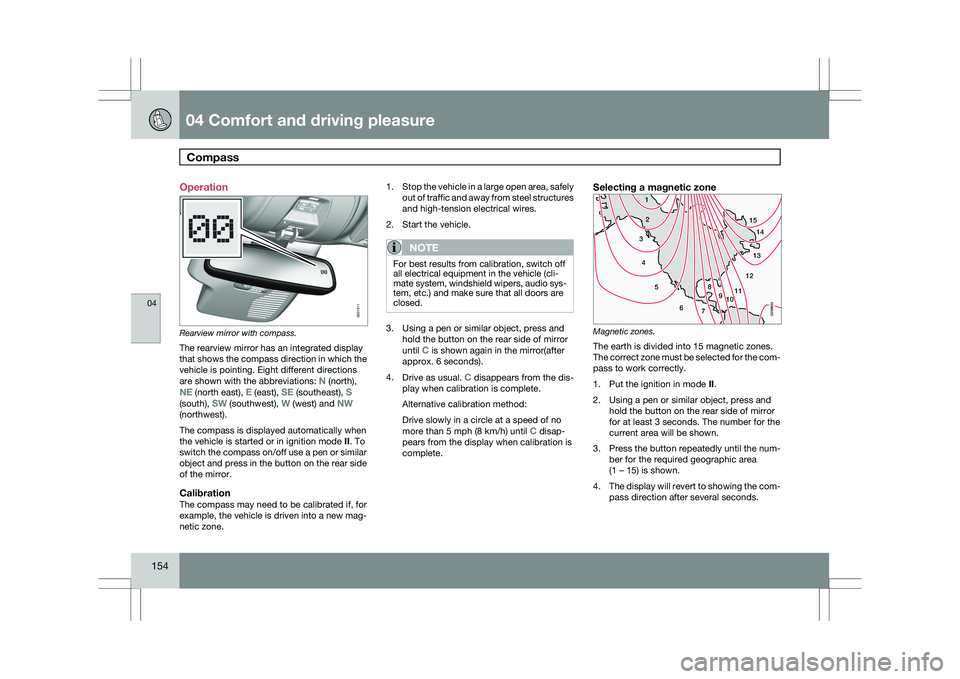
Rearview mirror with compass.
The rearview mirror has an integrated display
that shows the compass direction in which the
vehicle is pointing. Eight different directions
are shown with the abbreviations: N (north),
NE (north east), E (east), SE (southeast), S
(south), SW (southwest), W (west) and NW
(northwest).
The compass is displayed automatically when
the vehicle is started or in ignition mode II. To
switch the compass on/off use a pen or similar
object and press in the button on the rear side
of the mirror.
CalibrationThe compass may need to be calibrated if, for
example, the vehicle is driven into a new mag-
netic zone. 1.
Stop the vehicle in a large open area, safely
out of traffic and away from steel structures
and high-tension electrical wires.
2. Start the vehicle.
NOTE For best results from calibration, switch off
all electrical equipment in the vehicle (cli-
mate system, windshield wipers, audio sys-
tem, etc.) and make sure that all doors are
closed.
3. Using a pen or similar object, press and
hold the button on the rear side of mirror
until C is shown again in the mirror(after
approx. 6 seconds).
4. Drive as usual. C disappears from the dis-
play when calibration is complete.
Alternative calibration method:
Drive slowly in a circle at a speed of no
more than 5 mph (8 km/h) until C disap-
pears from the display when calibration is
complete.
Selecting a magnetic zone Magnetic zones.
The earth is divided into 15 magnetic zones.
The correct zone must be selected for the com-
pass to work correctly.
1.
Put the ignition in mode II.
2. Using a pen or similar object, press and hold the button on the rear side of mirror
for at least 3 seconds. The number for the
current area will be shown.
3. Press the button repeatedly until the num-
ber for the required geographic area
(1 – 15) is shown.
4. The display will revert to showing the com-
pass direction after several seconds. G031611
15
14
13
12
1198
76
5
4
3
2
1
10
G018632