change key battery VOLVO XC60 2009 Owner´s Manual
[x] Cancel search | Manufacturer: VOLVO, Model Year: 2009, Model line: XC60, Model: VOLVO XC60 2009Pages: 297, PDF Size: 21.16 MB
Page 54 of 297
02 Locks and alarmRemote key and key blade 02
52
* Option/accessory, for more information, see Introduction.
Canada–IC: 3659A-WFS125VO
Operation is subject to the following condi-
tions: (1) this device may not cause interfer-
ence, and (2) this device must accept any inter-
ference, including interference that may cause
undesired operation of the device.
See page 105 for information on starting the
vehicle.
Replacing the battery in the remote keyThe batteries should be replaced if:
\b
The information symbol illuminates and
Replace car key battery is shown in the
display and/or
\b if the locks do not react after several
attempts to unlock or lock the vehicle.
NOTE The remote key\fs range is normally approx-
imately 60 ft (20 m) from the vehicle.
See page 56 for information on replacing the
battery. Common functions – Remote key/
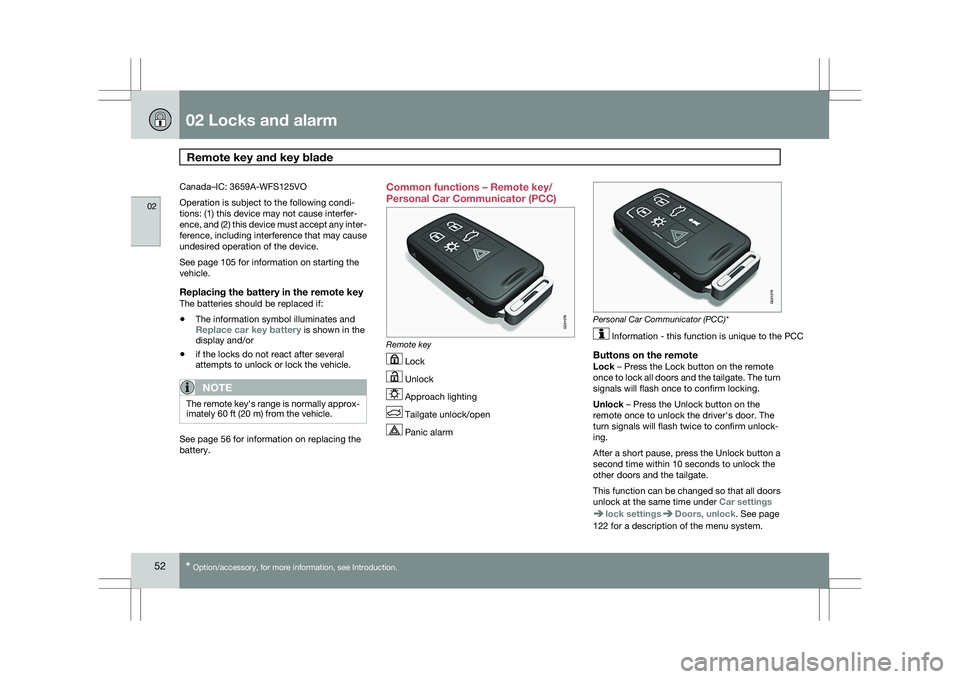
Personal Car Communicator (PCC)
Remote key
Lock
Unlock
Approach lighting
Tailgate unlock/open
Panic alarm Personal Car Communicator (PCC)*
Information - this function is unique to the PCC
Buttons on the remoteLock – Press the Lock button on the remote
once to lock all doors and the tailgate. The turn
signals will flash once to confirm locking.
Unlock – Press the Unlock button on the
remote once to unlock the driver\fs door. The
turn signals will flash twice to confirm unlock-
ing.
After a short pause, press the Unlock button a
second time within 10 seconds to unlock the
other doors and the tailgate.
This function can be changed so that all doors
unlock at the same time under
Car settings lock settings Doors, unlock. See page
122 for a description of the menu system. G021078 G02107
9
Page 68 of 297
02 Locks and alarmAlarm 02
66 The alarm system
The alarm is automatically armed whenever the
vehicle is locked with the remote key or
optional Personal Car Communicator.
USA FCC ID: NWD5481
This device complies with part 15 of the FCC
rules. Operation is subject to the following con-
ditions: (1) This device may not cause harmful
interference, and (2) this device must accept
any interference received, including interfer-
ence that may cause undesired operation.
When armed, the alarm continuously monitors
a number of points on the vehicle. The follow-
ing conditions will trigger the alarm:
\b
The hood is forced open.
\b The tailgate is forced open.
\b A door is forced open.
\b The ignition slot is tampered with.
\b An attempt is made to start the vehicle with
a non-approved key (a key not coded to
the car\fs ignition).
\b If there is movement in the passenger com-
partment (if the vehicle is equipped with
the accessory movement sensor).
\b The vehicle is lifted or towed (if the vehicle
is equipped with the accessory inclination
sensor). \b
The battery is disconnected (while the
alarm is armed).
\b The siren is disconnected when the alarm
is disarmed.
A message will appear in the information dis-
play if a fault should occur in the alarm system.
Contact an authorized Volvo service techni-
cian.
NOTE Do not attempt to repair any of the compo-
nents in the alarm system yourself. This
could affect the insurance policy on the
vehicle.
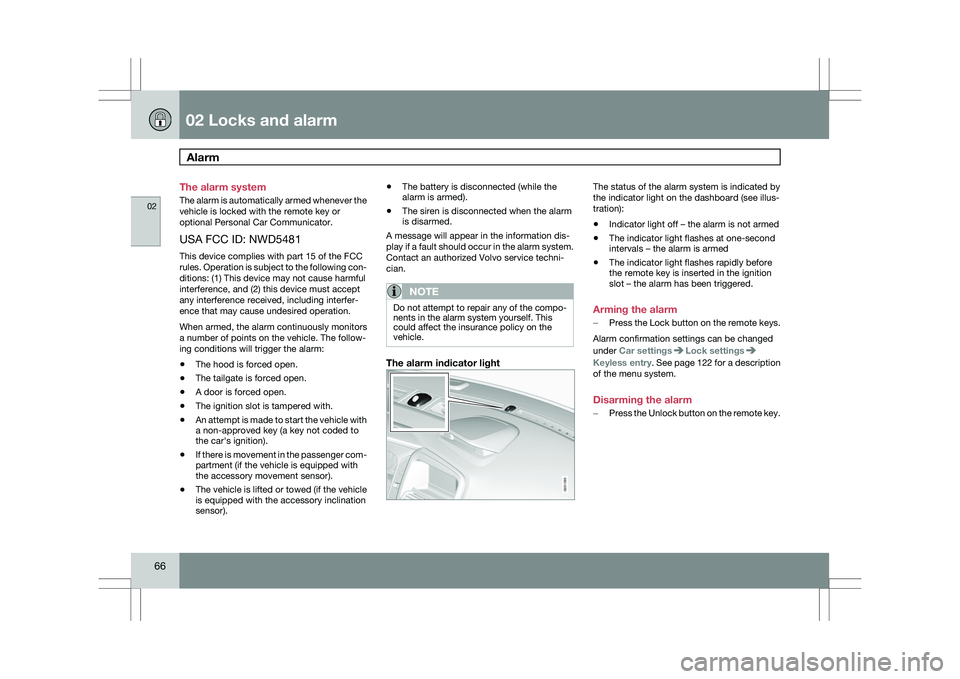
The alarm indicator light The status of the alarm system is indicated by
the indicator light on the dashboard (see illus-
tration):
\b
Indicator light off – the alarm is not armed
\b The indicator light flashes at one-second
intervals – the alarm is armed
\b The indicator light flashes rapidly before
the remote key is inserted in the ignition
slot – the alarm has been triggered.
Arming the alarm
– Press the Lock button on the remote keys.
Alarm confirmation settings can be changed
under Car settings Lock settings
Keyless entry
. See page 122 for a description
of the menu system.
Disarming the alarm
– Press the Unlock button on the remote key. G031385
Page 112 of 297
03 Your driving environmentTransmission 03
110 the right to M (or to S on models equipped
with Sport mode).
\b To return to the D position from M or S,
move the gear selector to the left.
NOTE On models equipped with Sport mode, the
transmission will not switch to manual shift-
ing mode until the gear selector is moved
forward or rearward. The selected gear will
then be shown in the information display
(see page 73).
While driving
\b
If you select the M position while driving,
the gear that was being used in the Drive
position will also initially be selected in the
M position.
\b Move the gear selector forward (toward
"+") to shift to a higher gear or rearward
(toward "–") to shift to a lower gear.
\b If you hold the gear selector toward "–", the
transmission will downshift one gear at a
time and will utilize the braking power of
the engine. If the current speed is too high
for using a lower gear, the downshift will
not occur until the speed has decreased
enough to allow the lower gear to be used. \b
If you slow to a very low speed, the trans-
mission will automatically shift down.
Shiftlock – Neutral (N)If the gear selector is in the
N position and the
vehicle has been stationary for at least 3 sec-
onds (irrespective of whether the engine is run-
ning) then the gear selector is locked.
To be able to move the gear selector from N to
another gear position, the brake pedal must be
depressed and the ignition must be in posi-
tion II, see page 79.
Geartronic–starting on slippery surfacesSelecting 3rd gear in Geartronic’s manual shift-
ing mode can help provide better traction when
starting off on slippery surfaces. To do so:
1. Depress the brake pedal and move the
gear selector to the right from the D posi-
tion to M. The text in the instrument panel
display will change from D to 1.
2. Press the gear selector forward and release it (this selects 2nd gear). Press the
selector forward again and release it to
select 3rd gear.
3. Release the brake pedal and press gently on the accelerator pedal.
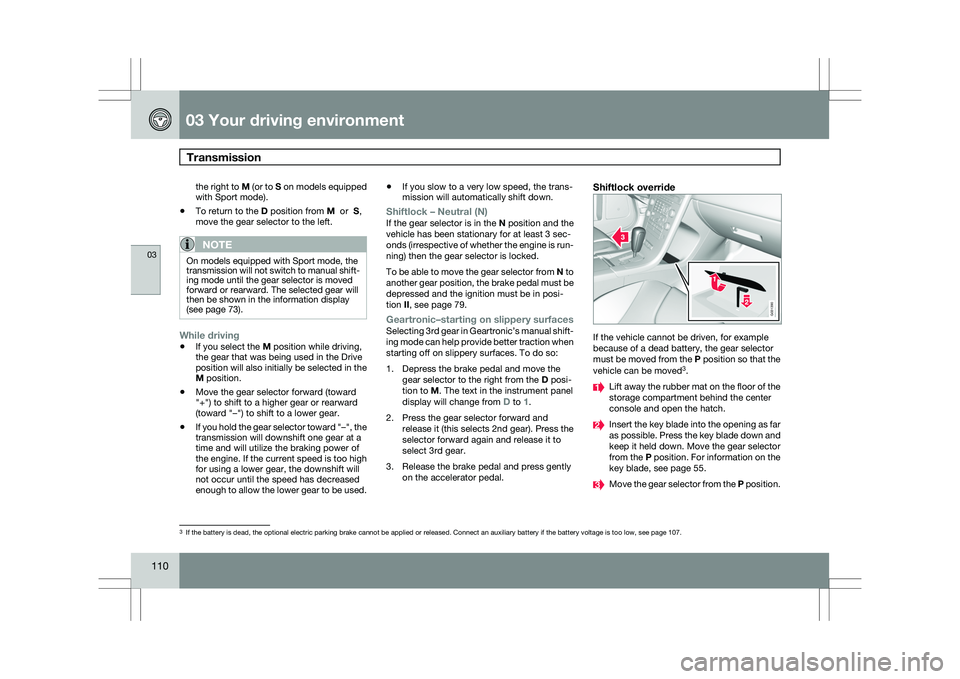
Shiftlock override If the vehicle cannot be driven, for example
because of a dead battery, the gear selector
must be moved from the P position so that the
vehicle can be moved
3
. Lift away the rubber mat on the floor of the
storage compartment behind the center
console and open the hatch.
Insert the key blade into the opening as far
as possible. Press the key blade down and
keep it held down. Move the gear selector
from the P position. For information on the
key blade, see page 55.
Move the gear selector from the
P position.3
If the battery is dead, the optional electric parking brake cannot be ap\
plied or released. Connect an auxiliary battery if the battery voltage i\
s too low, see page 107. G031390
Page 290 of 297
07 Index07
288 1, 2, 3 ...
12-volt sockets
........................................ 199
A Accessory installation warning
.................... 8
Active chassis system .............................157
Active yaw control ................................... 155
Adaptive cruise control ....172, 173, 174, 175
Airbags disconnecting the front passenger’s
side................................................. 22, 23
front.......................................... 18, 19, 20
inflatable curtain ................................... 28
side impact........................................... 26
Air conditioning ........................................ 129
Air distribution..........................................
127
Air distribution table................................. 131
Air vents................................................... 127
All Wheel Drive ......................................... 111
Anti-freeze ....................................... 204, 230
Anti-lock brake system ............................112
warning light ......................................... 74Approach lighting................................. 52, 92
Audio system
audio functions ................................... 136
CD player/changer
...................... 144, 145
Digital Audio Broadcasting (DAB) .......140
HD digital radio ................................... 139
menu control....................................... 135
overview.............................................. 133
radio functions .................................... 138
Sirius satellite radio ............141, 143, 144
sound settings .................................... 136
steering wheel keypad ........................133
USB/iPod® connector ........................134
Auto-dim rearview mirror ...........................99
Automatic locking retractor .......................34
Automatic transmission Geartronic ................................... 109, 110
general description .....................109, 110
oil ........................................................ 285
shiftlock override ................................ 110
Axle weight .............................................. 261B Battery
changing ..................................... 242, 243
maintenance ....................................... 242
remote control, replacing .....................56
specifications ...................................... 286
warning symbols.................................
242
Black box............................................. 7, 224
Blind Spot Information System
(BLIS)....................................... 193, 194, 195
Booster cushion, integrated ......................45
Booster cushions ....................................... 41
Brake lights ................................................ 88
emergency brake lights ........................88
Brake system checking fluid level ............................. 230
emergency brake assistance ..............113
fluid..................................................... 285
general information ............................. 112
Hill Descent Control ............................114
warning light ......................................... 76
Bulbs cargo area lighting .............................. 237
footwell lighting................................... 237
headlights ................................... 232, 234