wheel VOLVO XC60 2009 Owner´s Manual
[x] Cancel search | Manufacturer: VOLVO, Model Year: 2009, Model line: XC60, Model: VOLVO XC60 2009Pages: 297, PDF Size: 21.16 MB
Page 187 of 297
04 Comfort and driving pleasure
Driver Alert System*04
}}
* Option/accessory, for more information, see Introduction. 185
Lane Departure Warning (LDW)–
general information
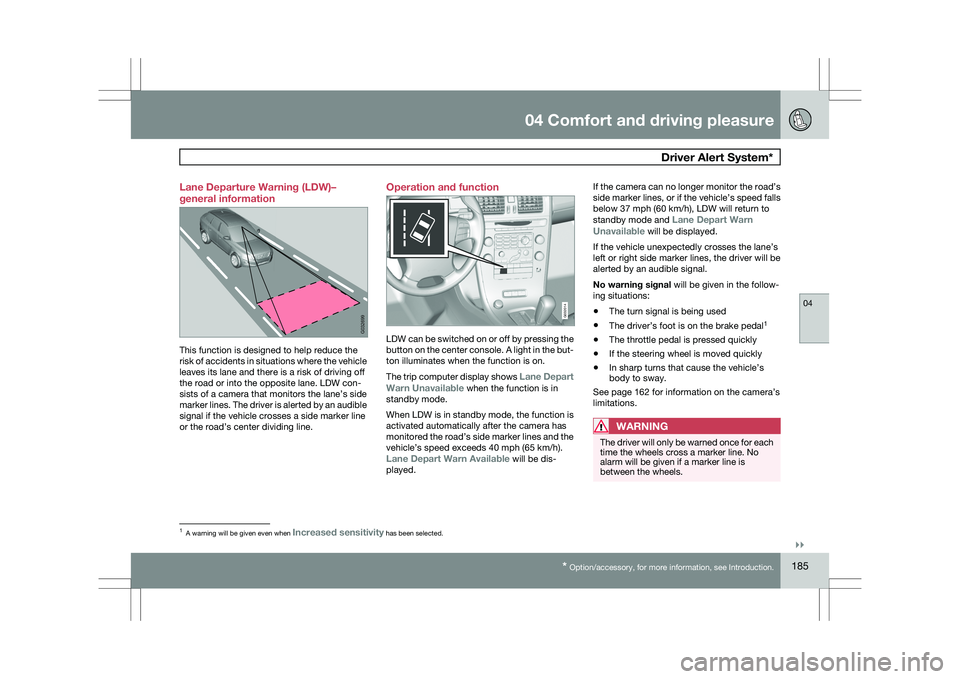
This function is designed to help reduce the
risk of accidents in situations where the vehicle
leaves its lane and there is a risk of driving off
the road or into the opposite lane. LDW con-
sists of a camera that monitors the lane’s side
marker lines. The driver is alerted by an audible
signal if the vehicle crosses a side marker line
or the road’s center dividing line. Operation and function
LDW can be switched on or off by pressing the
button on the center console. A light in the but-
ton illuminates when the function is on.
The trip computer display shows Lane Depart
Warn Unavailable when the function is in
standby mode.
When LDW is in standby mode, the function is
activated automatically after the camera has
monitored the road’s side marker lines and the
vehicle’s speed exceeds 40 mph (65 km/h).
Lane Depart Warn Available will be dis-
played.If the camera can no longer monitor the road’s
side marker lines, or if the vehicle’s speed falls
below 37 mph (60 km/h), LDW will return to
standby mode and
Lane Depart Warn
Unavailable will be displayed.
If the vehicle unexpectedly crosses the lane’s
left or right side marker lines, the driver will be
alerted by an audible signal.
No warning signal will be given in the follow-
ing situations:
\b The turn signal is being used
\b The driver’s foot is on the brake pedal 1
\b The throttle pedal is pressed quickly
\b If the steering wheel is moved quickly
\b In sharp turns that cause the vehicle’s
body to sway.
See page 162 for information on the camera’s
limitations.
WARNING The driver will only be warned once for each
time the wheels cross a marker line. No
alarm will be given if a marker line is
between the wheels.
1
A warning will be given even when Increased sensitivity has been selected. G032699 G032014
Page 192 of 297
04 Comfort and driving pleasurePark Assist Camera (PAC)* 04
190
* Option/accessory, for more information, see Introduction.
Introduction
The Park Assist Camera uses the display on the
dashboard to show the area behind the car
while you are backing up.
PAC also shows guiding lines in the on-screen
image to indicate the direction that the vehicle
will take as it moves rearward, which helps
simplify parallel parking, backing into a tight
space or when attaching a trailer to the vehicle.
NOTE
PAC can only be installed on vehicles equip-
ped with the Volvo’s own navigation system
VNS.
WARNING
\b
PAC is designed to be a supplementary
aid when parking the vehicle. It is not,
however, intended to replace the
driver’s attention and judgment.
\b The camera has blind spots where it
cannot detect objects or people behind
the vehicle.
\b Pay particular attention to people or ani-
mals that are close to the vehicle. Function
The driver sees what is behind the vehicle and
if a person or animal should suddenly appear
from the side.
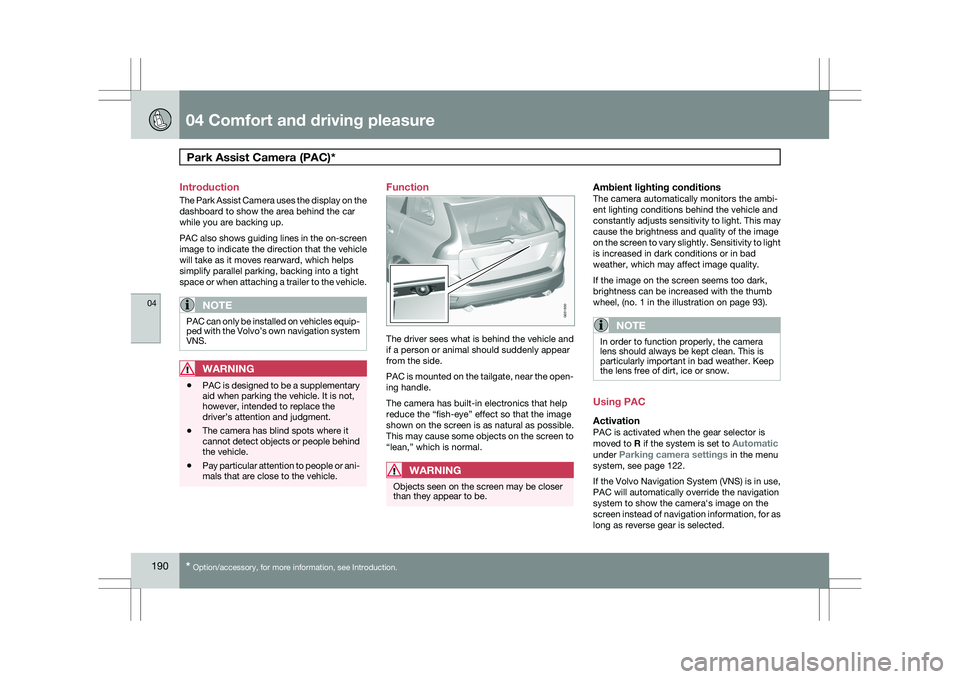
PAC is mounted on the tailgate, near the open-
ing handle.
The camera has built-in electronics that help
reduce the “fish-eye” effect so that the image
shown on the screen is as natural as possible.
This may cause some objects on the screen to
“lean,” which is normal.
WARNING
Objects seen on the screen may be closer
than they appear to be.
Ambient lighting conditionsThe camera automatically monitors the ambi-
ent lighting conditions behind the vehicle and
constantly adjusts sensitivity to light. This may
cause the brightness and quality of the image
on the screen to vary slightly. Sensitivity to light
is increased in dark conditions or in bad
weather, which may affect image quality.
If the image on the screen seems too dark,
brightness can be increased with the thumb
wheel, (no. 1 in the illustration on page 93).
NOTE In order to function properly, the camera
lens should always be kept clean. This is
particularly important in bad weather. Keep
the lens free of dirt, ice or snow.
Using PAC
ActivationPAC is activated when the gear selector is
moved to R if the system is set to Automatic
under Parking camera settings in the menu
system, see page 122.
If the Volvo Navigation System (VNS) is in use,
PAC will automatically override the navigation
system to show the camera\fs image on the
screen instead of navigation information, for as
long as reverse gear is selected. G031930
Page 193 of 297
04 Comfort and driving pleasure
Park Assist Camera (PAC)*04
}}
* Option/accessory, for more information, see Introduction. 191
DeactivationMove the gear selector from
R to another posi-
tion. There is a slight delay in the PAC system,
which means that the view from behind the
vehicle will remain on the screen for approxi-
mately 15 seconds after the gear selector has
been moved from the R position or until the
vehicle reaches a forward speed of 6 mph
(10 km/h). The screen will then revert to the
mode that it was in before R was selected and
will, for example, display navigation system
information.
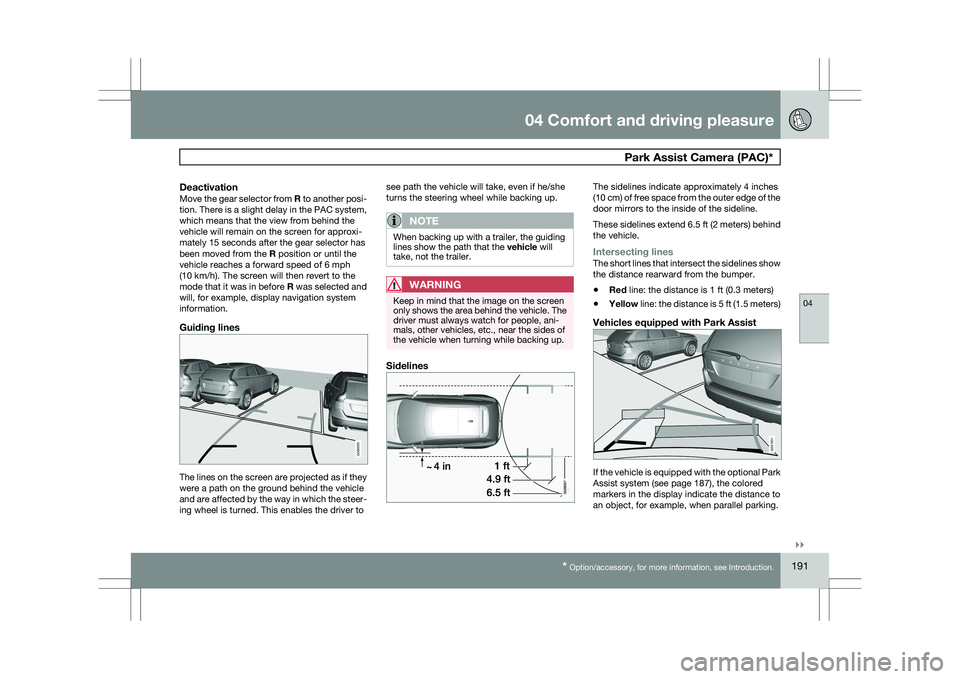
Guiding lines The lines on the screen are projected as if they
were a path on the ground behind the vehicle
and are affected by the way in which the steer-
ing wheel is turned. This enables the driver to see path the vehicle will take, even if he/she
turns the steering wheel while backing up.
NOTE When backing up with a trailer, the guiding
lines show the path that the vehicle will
take, not the trailer.
WARNING
Keep in mind that the image on the screen
only shows the area behind the vehicle. The
driver must always watch for people, ani-
mals, other vehicles, etc., near the sides of
the vehicle when turning while backing up.
Sidelines The sidelines indicate approximately 4 inches
(10 cm) of free space from the outer edge of the
door mirrors to the inside of the sideline.
These sidelines extend 6.5 ft (2 meters) behind
the vehicle.
Intersecting linesThe short lines that intersect the sidelines show
the distance rearward from the bumper.
\b
Red line: the distance is 1 ft (0.3 meters)
\b Yellow line: the distance is 5 ft (1.5 meters)
Vehicles equipped with Park Assist If the vehicle is equipped with the optional Park
Assist system (see page 187), the colored
markers in the display indicate the distance to
an object, for example, when parallel parking. G000000 G031931
Page 204 of 297
05 During your tripDriving recommendations 05
202 General information
Economical driving conserves natural
resources
Better driving economy may be obtained by
thinking ahead, avoiding rapid starts and stops
and adjusting the speed of your vehicle to
immediate traffic conditions.
Observe the following rules:
\b
Bring the engine to normal operating tem-
perature as soon as possible by driving
with a light foot on the accelerator pedal for
the first few minutes of operation. A cold
engine uses more fuel and is subject to
increased wear.
\b Whenever possible, avoid using the vehicle
for driving short distances. This does not
allow the engine to reach normal operating
temperature.
\b Drive carefully and avoid rapid acceleration
and hard braking.
\b Use the transmission\fs Drive (
D) position
as often as possible and avoid using kick-
down.
\b Do not exceed posted speed limits.
\b Avoid carrying unnecessary items (extra
load) in the vehicle.
\b Maintain correct tire pressure. Check tire
pressure regularly (when tires are cold). \b
Remove snow tires when threat of snow or
ice has ended.
\b Note that roof racks, ski racks, etc,
increase air resistance and also fuel con-
sumption.
\b At highway driving speeds, fuel consump-
tion will be lower with the air conditioning
on and the windows closed than with the
air conditioning off and the windows open.
\b Using the onboard trip computer\fs fuel
consumption modes can help you learn
how to drive more economically.
Other factors that decrease gas mileage
are:
\b Dirty air cleaner
\b Dirty engine oil and clogged oil filter
\b Dragging brakes
\b Incorrect front end alignment
Some of the above mentioned items and others
are checked at the standard maintenance
intervals.
WARNING Driving with the tailgate open: Driving with
the tailgate open could lead to poisonous
exhaust gases entering the passenger com-
partment. If the tailgate must be kept open
for any reason, proceed as follows:
\b
Close the windows
\b Set the ventilation system control to air
flow to floor, windshield and side win-
dows and the blower control to its high-
est setting.
Weight distribution affects handlingAt the specified curb weight your vehicle has a
tendency to understeer, which means that the
steering wheel has to be turned more than
might seem appropriate for the curvature of a
bend. This ensures good stability and reduces
the risk of rear wheel skid. Remember that
these properties can alter with the vehicle load.
The heavier the load in the cargo area, the less
the tendency to understeer.
Handling, roadholdingVehicle load, tire design and inflation pressure
all affect vehicle handling. Therefore, check
that the tires are inflated to the recommended
pressure according to the vehicle load. See the
"Tire pressure" section. Loads should be dis-
tributed so that capacity weight or maximum
permissible axle loads are not exceeded.
Page 206 of 297
05 During your tripDriving recommendations 05
204
Before a long distance tripIt is always worthwhile to have your vehicle
checked by a trained and qualified Volvo serv-
ice technician before driving long distances.
Your retailer will also be able to supply you with
bulbs, fuses, spark plugs and wiper blades for
your use in the event that problems occur.
As a minimum, the following items should be
checked before any long trip:
\b
Check that engine runs smoothly and that
fuel consumption is normal.
\b Check for fuel, oil, and fluid leakage
\b Have the transmission oil level checked.
\b Check condition of drive belts.
\b Check state of the battery\fs charge.
\b Examine tires carefully (the spare tire as
well), and replace those that are worn.
Check tire pressures.
\b The brakes, front wheel alignment, and
steering gear should be checked by a
trained and qualified Volvo service techni-
cian only.
\b Check all lights, including high beams.
\b Reflective warning triangles are legally
required in some states/provinces.
\b Have a word with a trained and qualified
Volvo service technician if you intend to
drive in countries where it may be difficult
to obtain the correct fuel. \b
Consider your destination. If you will be
driving through an area where snow or ice
are likely to occur, consider snow tires.
Cold weather precautionsIf you wish to check your vehicle before the
approach of cold weather, the following advice
is worth noting:
\bMake sure that the engine coolant contains
50 percent antifreeze. Any other mixture
will reduce freeze protection. This gives
protection against freezing down to
–31 °F (–35 °C). The use of "recycled" anti-
freeze is not approved by Volvo. Different
types of antifreeze must not be mixed.
\b Volvo recommends using only genuine
Volvo antifreeze in your vehicle\fs radiator.
\b Try to keep the fuel tank well filled – this
helps prevent the formation of condensa-
tion in the tank. In addition, in extremely
cold weather conditions it is worthwhile to
add fuel line de-icer before refueling.
\b The viscosity of the engine oil is important.
Oil with low viscosity (thinner oil) improves
cold-weather starting as well as decreas-
ing fuel consumption while the engine is
warming up. For winter use, 5W-30 oil, par-
ticularly the synthetic type, is recom-
mended. Be sure to use good quality oil but
do not use cold-weather oil for hard driving
or in warm weather, see page 283 for more
information on engine oil.
NOTE Synthetic oil is not used when the oil is
changed at the normal maintenance inter-
vals except at owner request and at addi-
tional charge.
\b
The load placed on the battery is greater
during the winter since the windshield wip-
ers, lighting, etc. are used more often.
Moreover, the capacity of the battery
decreases as the temperature drops. In
very cold weather, a poorly charged bat-
tery can freeze and be damaged. It is there-
fore advisable to check the state of charge
more frequently and spray an anti-rust oil
on the battery posts.
\b Volvo recommends the use of snow tires
on all four wheels for winter driving, see
page 262.
\b To prevent the washer fluid reservoir from
freezing, add washer solvents containing
antifreeze. This is important since dirt is
often splashed on the windshield during
winter driving, requiring the frequent use of
the washers and wipers. Volvo Washer
Solvent should be diluted as follows: Down
to 14 °F (–10 °C): 1 part washer solvent and
4 parts water Down to 5 °F (–15 °C): 1 part
washer solvent and 3 parts water Down to
0 °F (–18 °C): 1 part washer solvent and
Page 220 of 297
05 During your tripTowing a trailer 05
218
NOTE \b
When parking the vehicle with a trailer
on a hill, apply the parking brake before
putting the gear selector in
P. Always
follow the trailer manufacturer\fs recom-
mendations for wheel chocking.
\b When starting on a hill, put the gear
selector in
D before releasing the park-
ing brake. See page 116 for more
detailed information about starting off
on a hill while towing a trailer.
\b If you use the manual (Geartronic) shift
positions while towing a trailer, make
sure the gear you select does not put
too much strain on the engine (using too
high a gear).
\b The drawbar assembly/trailer hitch may
be rated for trailers heavier than the
vehicle is designed to tow. Please
adhere to Volvo\fs recommended trailer
weights.
\b Avoid driving with a trailer on inclines of
more than 15 %.
Trailer cableAn adapter is required if the vehicle\fs trailer
hitch has a 13-pin connector and the trailer has
7 pins. Use an adapter cable approved by
Volvo. Make sure the cable does not drag on
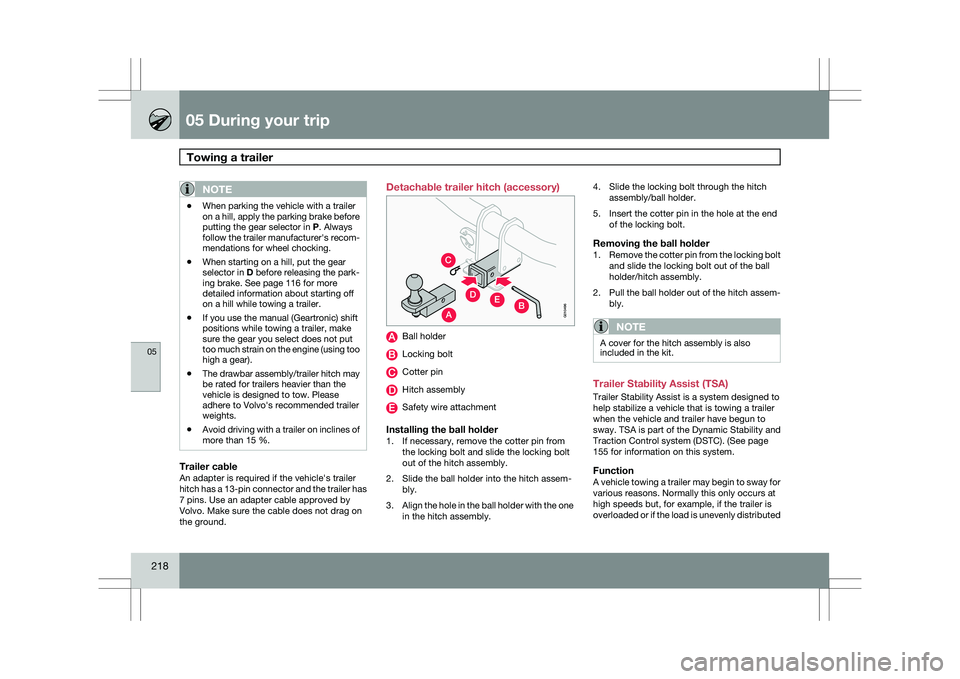
the ground. Detachable trailer hitch (accessory)
Ball holder
Locking bolt
Cotter pin
Hitch assembly
Safety wire attachment
Installing the ball holder1. If necessary, remove the cotter pin from
the locking bolt and slide the locking bolt
out of the hitch assembly.
2. Slide the ball holder into the hitch assem- bly.
3. Align the hole in the ball holder with the one
in the hitch assembly. 4. Slide the locking bolt through the hitch
assembly/ball holder.
5. Insert the cotter pin in the hole at the end of the locking bolt.
Removing the ball holder1.Remove the cotter pin from the locking bolt
and slide the locking bolt out of the ball
holder/hitch assembly.
2. Pull the ball holder out of the hitch assem-
bly.
NOTE A cover for the hitch assembly is also
included in the kit.
Trailer Stability Assist (TSA)
Trailer Stability Assist is a system designed to
help stabilize a vehicle that is towing a trailer
when the vehicle and trailer have begun to
sway.
TSA is part of the Dynamic Stability and
Traction Control system (DSTC). (See page
155 for information on this system.
FunctionA vehicle towing a trailer may begin to sway for
various reasons. Normally this only occurs at
high speeds but, for example, if the trailer is
overloaded or if the load is unevenly distributed
A
C
EDB
G010496
Page 221 of 297
05 During your trip
Towing a trailer05
219
in the trailer, there is risk of swaying at speeds
between approximately 45-55 mph
(70-90 km/h).
NOTE
\b
The TSA system intervenes at speeds
above approximately 40 mph
(60 km/h).
\b The DSTC symbol ( ) in the instru-
ment panel will flash when TSA is work-
ing.
\b If the driver switches off the
DSTC sys-
tem\fs Spin Control function (see
page 155), TSA will also be switched off.
\b TSA may not intervene when the vehicle
and trailer begin to sway if the driver
tries to compensate for the swaying
motion by moving the steering wheel
rapidly. Swaying may be caused by one of the following
factors:
\b
The vehicle and trailer are hit by a sudden,
strong crosswind
\b The vehicle and trailer are traveling on an
uneven road surface or drive over a bump
\b Sudden movements of the steering wheel
How TSA worksOnce swaying has begun, it can be very diffi-
cult to stop, which makes it difficult to control
the vehicle and trailer.
The TSA system continuously monitors the
vehicle\fs movements, particularly lateral
movement. If the system detects a tendency to
sway, the brakes are applied individually on the
front wheels, which has a stabilizing effect on
the vehicle and trailer. This is often enough to
enable the driver to regain control of the vehi-
cle.
If this is not adequate to stop the swaying
motion, the brakes are applied to all of the
wheels on the vehicle and on the trailer if it is
equipped with brakes, and engine power is
temporarily reduced. As the swaying motion
begins to decrease and the vehicle-trailer have
once again become stable, TSA will no stop
regulating the brakes/engine power and the
driver regains control of the vehicle.
Page 222 of 297
05 During your tripEmergency towing 05
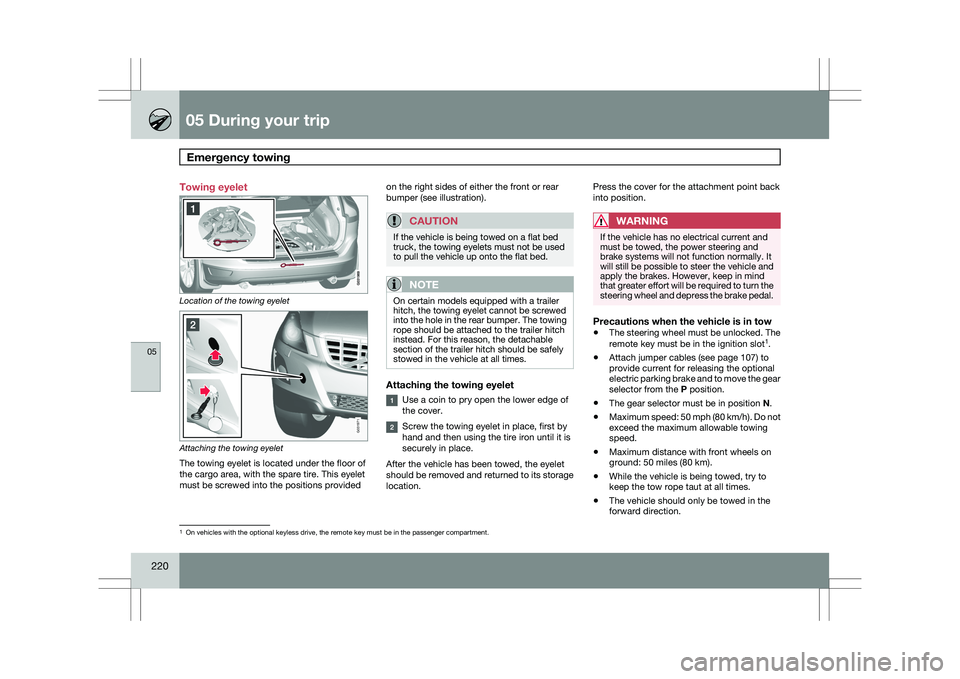
220 Towing eyelet
Location of the towing eyelet
Attaching the towing eyelet
The towing eyelet is located under the floor of
the cargo area, with the spare tire. This eyelet
must be screwed into the positions provided on the right sides of either the front or rear
bumper (see illustration).
CAUTION If the vehicle is being towed on a flat bed
truck, the towing eyelets must not be used
to pull the vehicle up onto the flat bed.
NOTE
On certain models equipped with a trailer
hitch, the towing eyelet cannot be screwed
into the hole in the rear bumper. The towing
rope should be attached to the trailer hitch
instead. For this reason, the detachable
section of the trailer hitch should be safely
stowed in the vehicle at all times.
Attaching the towing eyelet
Use a coin to pry open the lower edge of
the cover.
Screw the towing eyelet in place, first by
hand and then using the tire iron until it is
securely in place.
After the vehicle has been towed, the eyelet
should be removed and returned to its storage
location. Press the cover for the attachment point back
into position.
WARNING If the vehicle has no electrical current and
must be towed, the power steering and
brake systems will not function normally. It
will still be possible to steer the vehicle and
apply the brakes. However, keep in mind
that greater effort will be required to turn the
steering wheel and depress the brake pedal.
Precautions when the vehicle is in tow
\b
The steering wheel must be unlocked. The
remote key must be in the ignition slot 1
.
\b Attach jumper cables (see page 107) to
provide current for releasing the optional
electric parking brake and to move the gear
selector from the
P position.
\b The gear selector must be in position
N.
\b Maximum speed: 50 mph (80 km/h). Do not
exceed the maximum allowable towing
speed.
\b Maximum distance with front wheels on
ground: 50 miles (80 km).
\b While the vehicle is being towed, try to
keep the tow rope taut at all times.
\b The vehicle should only be towed in the
forward direction. 1
On vehicles with the optional keyless drive, the remote key must be in t\
he passenger compartment. G031971
Page 223 of 297
05 During your trip
Emergency towing05
221
NOTEDuring towing, ignition mode
II should be
used so that the lighting can be switched on.
CAUTION Vehicles with AWD (All Wheel Drive) with the
front wheels off the ground should not be
towed at speeds above 50 mph (70 km/h) or
for distances longer than 30 miles (50 km).
CAUTION
\b
Please check with state and local
authorities before attempting this type
of towing, as vehicles being towed are
subject to regulations regarding maxi-
mum towing speed, length and type of
towing device, lighting, etc.
\b If the vehicle\fs battery is dead, do not
attempt to start the vehicle by pushing
or pulling it as this will damage the
three-way catalytic converter(s). The
engine must be jump started using an
auxiliary battery (see page 107).
\b If the vehicle is being towed on a flat bed
truck, the towing eyelets must not be
used to pull the vehicle up onto the flat
bed or to secure the vehicle on the flat
bed. Consult the tow truck operator.
Towing vehicles with front wheel drive/
All Wheel Drive
Volvo recommends the use of flat bed equip-
ment.
\b
If wheel lift equipment must be used,
please use extreme caution to help avoid
damage to the vehicle.
In this case, the
vehicle should be towed with the rear
wheels on the ground if at all possible.
\b If it is absolutely necessary to tow the vehi-
cle with the front wheels on the ground,
please refer to the towing information on
page 220.
CAUTION \b
Sling-type equipment applied at the
front will damage radiator and air con-
ditioning lines.
\b It is equally important not to use sling-
type equipment at the rear or apply lift-
ing equipment inside the rear wheels;
serious damage to the rear axle may
result.
\b If the vehicle is being towed on a flat bed
truck, the towing eyelets must not be
used to secure the vehicle on the flat
bed. Consult the tow truck operator.
Page 224 of 297

222 Volvo maintenance
........................................................................\
........ 224
Maintaining your car ........................................................................\
...... 225
Hood and engine compartment ............................................................ 227
Engine oil........................................................................\
....................... 228
Fluids........................................................................\
............................. 230
Replacing bulbs ........................................................................\
............ 232
Wiper blades and washer fluid .............................................................. 240
Battery........................................................................\
........................... 242
Fuses........................................................................\
............................. 245
Wheels and tires........................................................\
............................ 253
Vehicle care ........................................................................\
................... 274
Label information ........................................................................\
.......... 279
Specifications..........................................................\
.............................. 281
Volvo programs ........................................................................\
............. 287
G02092
2