fog light VOLVO XC60 2009 Owner´s Manual
[x] Cancel search | Manufacturer: VOLVO, Model Year: 2009, Model line: XC60, Model: VOLVO XC60 2009Pages: 297, PDF Size: 21.16 MB
Page 76 of 297
03 Your driving environmentInstruments and controls 03
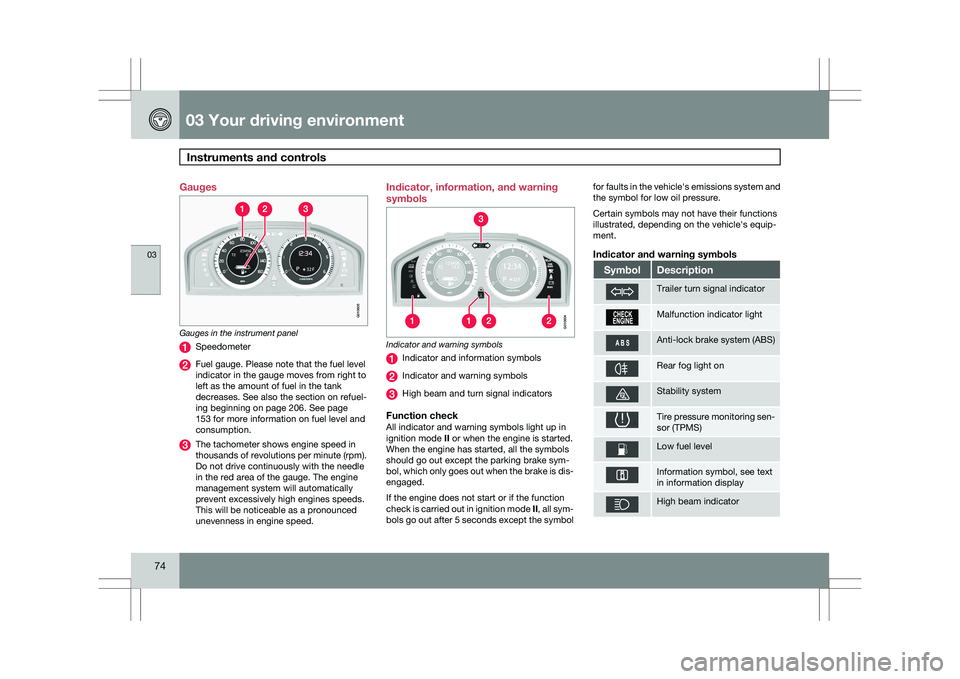
74 Gauges
Gauges in the instrument panel
Speedometer
Fuel gauge. Please note that the fuel level
indicator in the gauge moves from right to
left as the amount of fuel in the tank
decreases. See also the section on refuel-
ing beginning on page 206. See page
153 for more information on fuel level and
consumption.
The tachometer shows engine speed in
thousands of revolutions per minute (rpm).
Do not drive continuously with the needle
in the red area of the gauge. The engine
management system will automatically
prevent excessively high engines speeds.
This will be noticeable as a pronounced
unevenness in engine speed. Indicator, information, and warning
symbols
Indicator and warning symbols
Indicator and information symbols
Indicator and warning symbols
High beam and turn signal indicators
Function checkAll indicator and warning symbols light up in
ignition mode
II or when the engine is started.
When the engine has started, all the symbols
should go out except the parking brake sym-
bol, which only goes out when the brake is dis-
engaged.
If the engine does not start or if the function
check is carried out in ignition mode II, all sym-
bols go out after 5 seconds except the symbol for faults in the vehicle\fs emissions system and
the symbol for low oil pressure.
Certain symbols may not have their functions
illustrated, depending on the vehicle\fs equip-
ment.
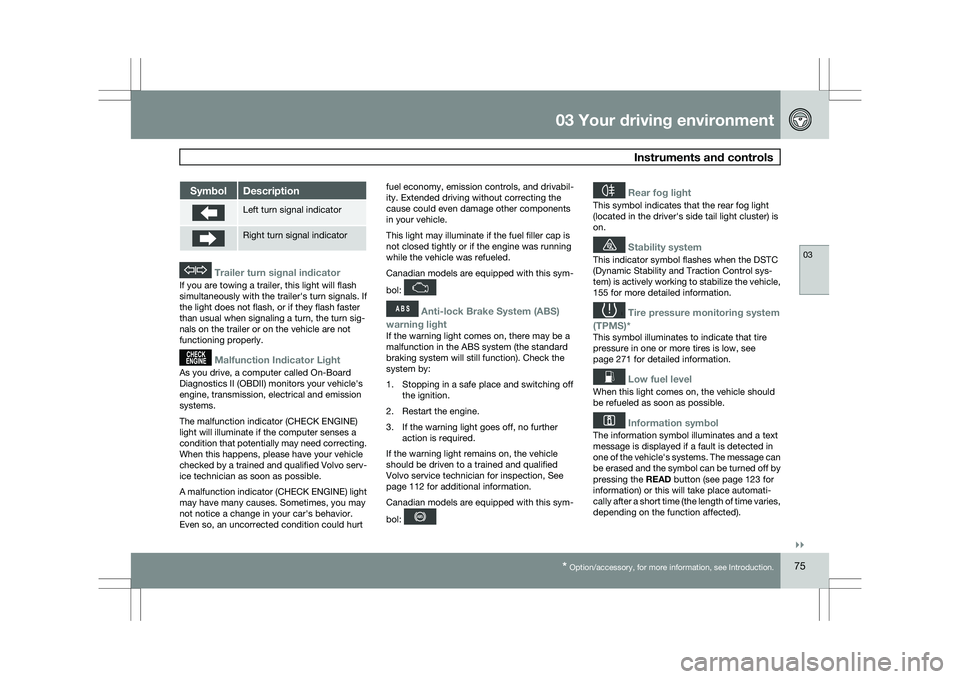
Indicator and warning symbols
Symbol Description
Trailer turn signal indicator
Malfunction indicator light
Anti-lock brake system (ABS)
Rear fog light on
Stability system
Tire pressure monitoring sen-
sor (TPMS)
Low fuel level
Information symbol, see text
in information display
High beam indicator G010605 G010604
Page 77 of 297
03 Your driving environment
Instruments and controls03
}}
* Option/accessory, for more information, see Introduction. 75Symbol Description
Left turn signal indicator
Right turn signal indicator
Trailer turn signal indicator
If you are towing a trailer, this light will flash
simultaneously with the trailer\fs turn signals. If
the light does not flash, or if they flash faster
than usual when signaling a turn, the turn sig-
nals on the trailer or on the vehicle are not
functioning properly.
Malfunction Indicator Light
As you drive, a computer called On-Board
Diagnostics II (OBDII) monitors your vehicle\fs
engine, transmission, electrical and emission
systems.
The malfunction indicator (CHECK ENGINE)
light will illuminate if the computer senses a
condition that potentially may need correcting.
When this happens, please have your vehicle
checked by a trained and qualified Volvo serv-
ice technician as soon as possible.
A malfunction indicator (CHECK ENGINE) light
may have many causes. Sometimes, you may
not notice a change in your car\fs behavior.
Even so, an uncorrected condition could hurt
fuel economy, emission controls, and drivabil-
ity. Extended driving without correcting the
cause could even damage other components
in your vehicle.
This light may illuminate if the fuel filler cap is
not closed tightly or if the engine was running
while the vehicle was refueled.
Canadian models are equipped with this sym-
bol:
Anti-lock Brake System (ABS)
warning light
If the warning light comes on, there may be a
malfunction in the ABS system (the standard
braking system will still function). Check the
system by:
1. Stopping in a safe place and switching off the ignition.
2. Restart the engine.
3. If the warning light goes off, no further action is required.
If the warning light remains on, the vehicle
should be driven to a trained and qualified
Volvo service technician for inspection,
See
page 112 for additional information.
Canadian models are equipped with this sym-
bol:
Rear fog light
This symbol indicates that the rear fog light
(located in the driver\fs side tail light cluster) is
on.
Stability system
This indicator symbol flashes when the DSTC
(Dynamic Stability and Traction Control sys-
tem) is actively working to stabilize the vehicle,
155 for more detailed information.
Tire pressure monitoring system
(TPMS)*
This symbol illuminates to indicate that tire
pressure in one or more tires is low, see
page 271 for detailed information.
Low fuel level
When this light comes on, the vehicle should
be refueled as soon as possible.
Information symbol
The information symbol illuminates and a text
message is displayed if a fault is detected in
one of the vehicle\fs systems. The message can
be erased and the symbol can be turned off by
pressing the READ button (see page 123 for
information) or this will take place automati-
cally after a short time (the length of time varies,
depending on the function affected).
Page 89 of 297
03 Your driving environment
Lighting03
}}
87
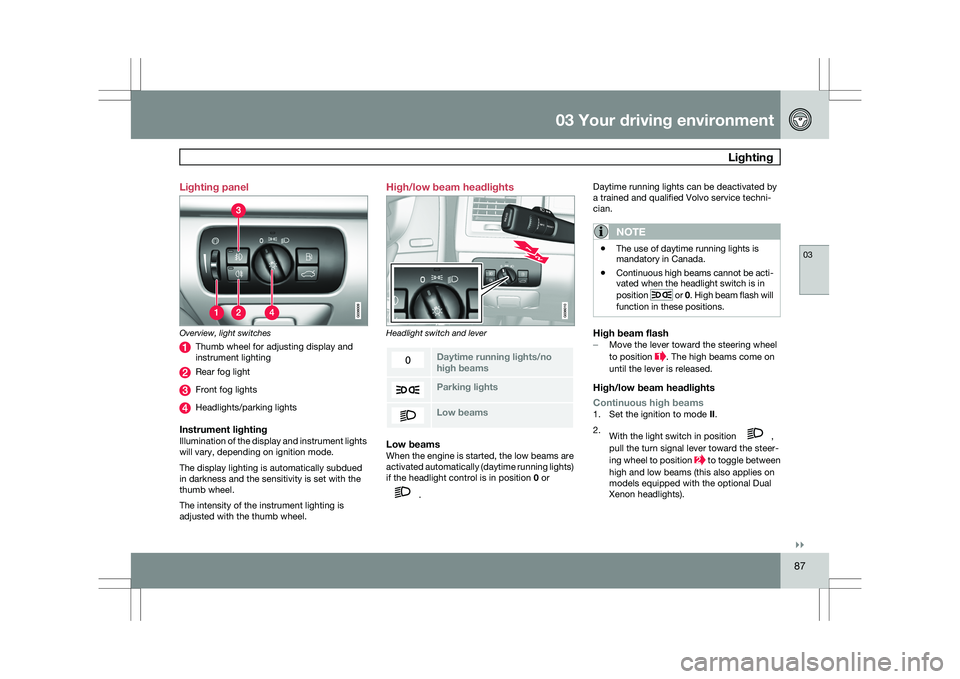
Lighting panel
Overview, light switches
Thumb wheel for adjusting display and
instrument lighting
Rear fog light
Front fog lights
Headlights/parking lights
Instrument lightingIllumination of the display and instrument lights
will vary, depending on ignition mode.
The display lighting is automatically subdued
in darkness and the sensitivity is set with the
thumb wheel.
The intensity of the instrument lighting is
adjusted with the thumb wheel. High/low beam headlights
Headlight switch and lever
Daytime running lights/no
high beams
Parking lights
Low beamsLow beamsWhen the engine is started, the low beams are
activated automatically (daytime running lights)
if the headlight control is in position
0 or .Daytime running lights can be deactivated by
a trained and qualified Volvo service techni-
cian.
NOTE \b
The use of daytime running lights is
mandatory in Canada.
\b Continuous high beams cannot be acti-
vated when the headlight switch is in
position or 0. High beam flash will
function in these positions.
High beam flash– Move the lever toward the steering wheel
to position . The high beams come on
until the lever is released.
High/low beam headlights
Continuous high beams
1. Set the ignition to mode II.
2. With the light switch in position ,
pull the turn signal lever toward the steer-
ing wheel to position to toggle between
high and low beams (this also applies on
models equipped with the optional Dual
Xenon headlights).
Page 91 of 297
03 Your driving environment
Lighting03
}}
89
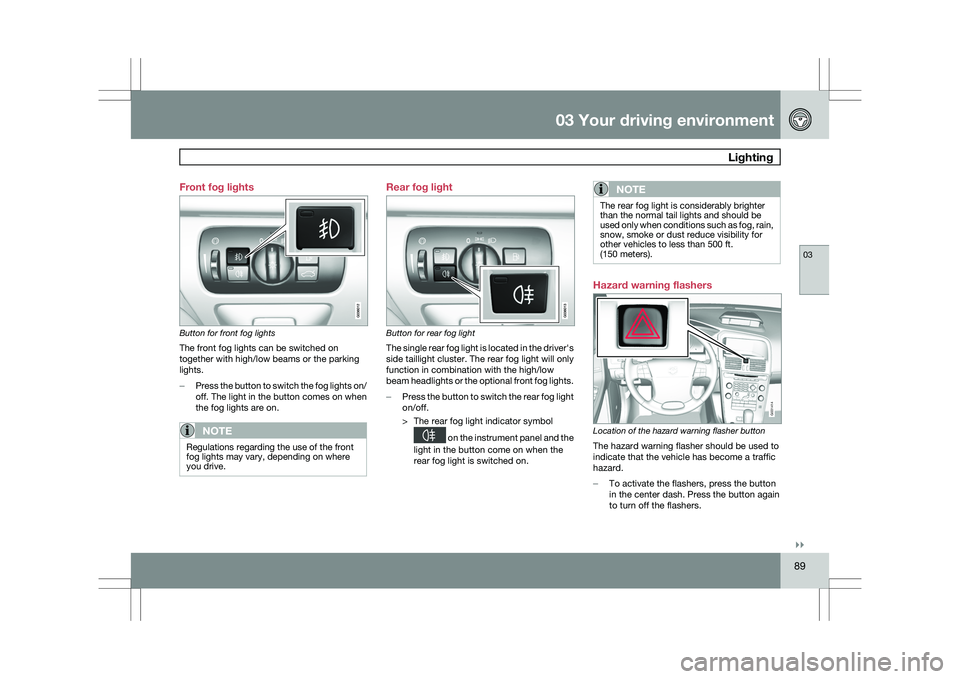
Front fog lights
Button for front fog lights
The front fog lights can be switched on
together with high/low beams or the parking
lights.
–
Press the button to switch the fog lights on/
off. The light in the button comes on when
the fog lights are on.
NOTE Regulations regarding the use of the front
fog lights may vary, depending on where
you drive. Rear fog light
Button for rear fog light
The single rear fog light is located in the driver\fs
side taillight cluster. The rear fog light will only
function in combination with the high/low
beam headlights or the optional front fog lights.
–
Press the button to switch the rear fog light
on/off.
> The rear fog light indicator symbol on the instrument panel and the
light in the button come on when the
rear fog light is switched on.
NOTE The rear fog light is considerably brighter
than the normal tail lights and should be
used only when conditions such as fog, rain,
snow, smoke or dust reduce visibility for
other vehicles to less than 500 ft.
(150 meters).
Hazard warning flashers
Location of the hazard warning flasher button
The hazard warning flasher should be used to
indicate that the vehicle has become a traffic
hazard.
–
To activate the flashers, press the button
in the center dash. Press the button again
to turn off the flashers. G031414
Page 128 of 297
04 Comfort and driving pleasureClimate system 04
126
* Option/accessory, for more information, see Introduction.
Introduction
Air conditioningThe vehicle is equipped with Electronic Climate
Control (ECC). The climate control system
cools, heats or dehumidifies the air in the pas-
senger compartment.
NOTE
\b
The air conditioning can be switched
off, but to ensure the best possible cli-
mate comfort in the passenger com-
partment and to prevent the windows
from misting, it should always be on.
\b In warm weather, a small amount of
water may accumulate under the car
when it has been parked. This water is
condensation from the A/C system and
is normal.
Sensor location
\b
The sunlight sensor is located on the top
side of the dashboard.
NOTE The sunlight sensor monitors which side of
the car that is most exposed to sunlight.
This can mean that the temperature may
differ between the right and left-side air
vents, even if the temperatures set for both
sides of the passenger compartment are the
same.
\b
The temperature sensor for the passenger
compartment is located below the climate
control panel.
\b The outside temperature sensor is located
on the door mirror.
\b The humidity sensor
* is located in the inte-
rior rearview mirror.
NOTE Do not cover or block the sensors with
clothing or other objects.
Side windows and moonroofTo ensure that the air conditioning works opti-
mally, the side windows, and the optional
moonroof should be closed.
Fog on the inside of the windowsThe defroster function should be used to
remove fog or mist from the inside of the win-
dows. Keeping the windows clean with a com-mercially available window washing spray will
also help prevent fogging or misting.
Temporary shut-off of the air
conditioning
The air conditioning is momentarily disen-
gaged during full-throttle acceleration or when
driving uphill with a trailer. This may result in a
temporary increase in cabin temperature.
Ice and snowAlways keep the air intake grille at the base of
the windshield free of snow.
Climate system maintenanceSpecial tools and equipment are required to
maintain and carry out repairs on the climate
system. Work of this type should only be done
by a trained and qualified Volvo service tech-
nician.
RefrigerantVolvo cares about the environment. The air
conditioning system in your car contains a
CFC-free refrigerant – R134a. This substance
will not deplete the ozone layer. The air condi-
tioning system contains 1.8 lbs (800 g) of
R134a. The systems uses PAG oil.
Passenger compartment filterReplace the cabin air filter with a new one at
the recommended intervals. Please refer to
Page 130 of 297
04 Comfort and driving pleasureClimate system 04
128
* Option/accessory, for more information, see Introduction.
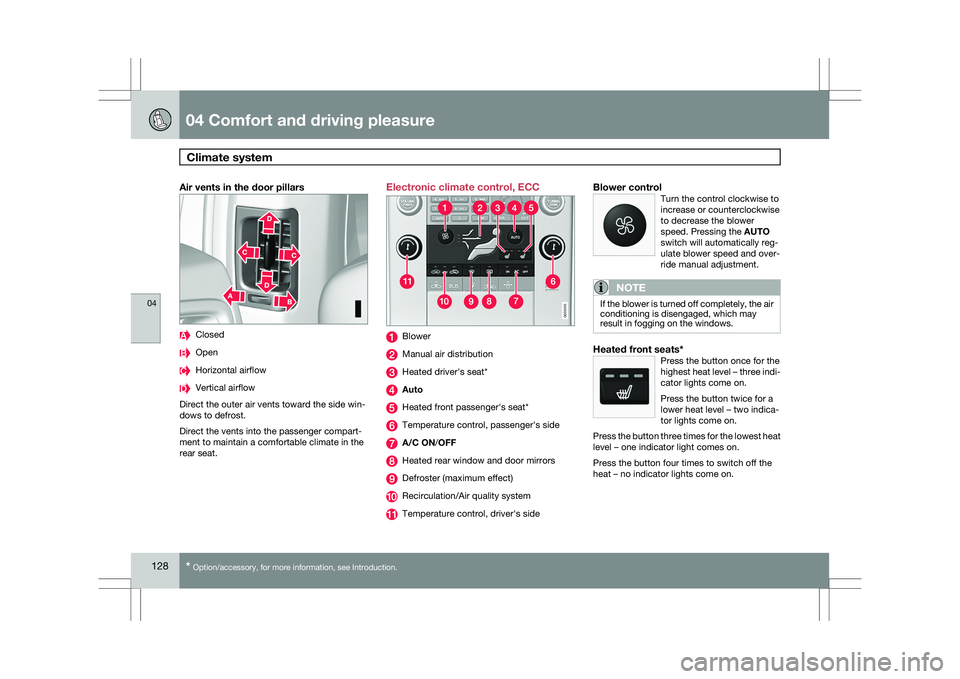
Air vents in the door pillars Closed
Open
Horizontal airflow
Vertical airflow
Direct the outer air vents toward the side win-
dows to defrost.
Direct the vents into the passenger compart-
ment to maintain a comfortable climate in the
rear seat. Electronic climate control, ECC
Blower
Manual air distribution
Heated driver\fs seat*
Auto
Heated front passenger\fs seat*
Temperature control, passenger\fs side
A/C ON/OFF
Heated rear window and door mirrors
Defroster (maximum effect)
Recirculation/Air quality system
Temperature control, driver\fs sideBlower controlTurn the control clockwise to
increase or counterclockwise
to decrease the blower
speed. Pressing the AUTO
switch will automatically reg-
ulate blower speed and over-
ride manual adjustment.
NOTE If the blower is turned off completely, the air
conditioning is disengaged, which may
result in fogging on the windows.
Heated front seats*Press the button once for the
highest heat level – three indi-
cator lights come on.
Press the button twice for a
lower heat level – two indica-
tor lights come on.
Press the button three times for the lowest heat
level – one indicator light comes on.
Press the button four times to switch off the
heat – no indicator lights come on. G033202 G033203
Page 131 of 297
04 Comfort and driving pleasure
Climate system04
}}
* Option/accessory, for more information, see Introduction. 129
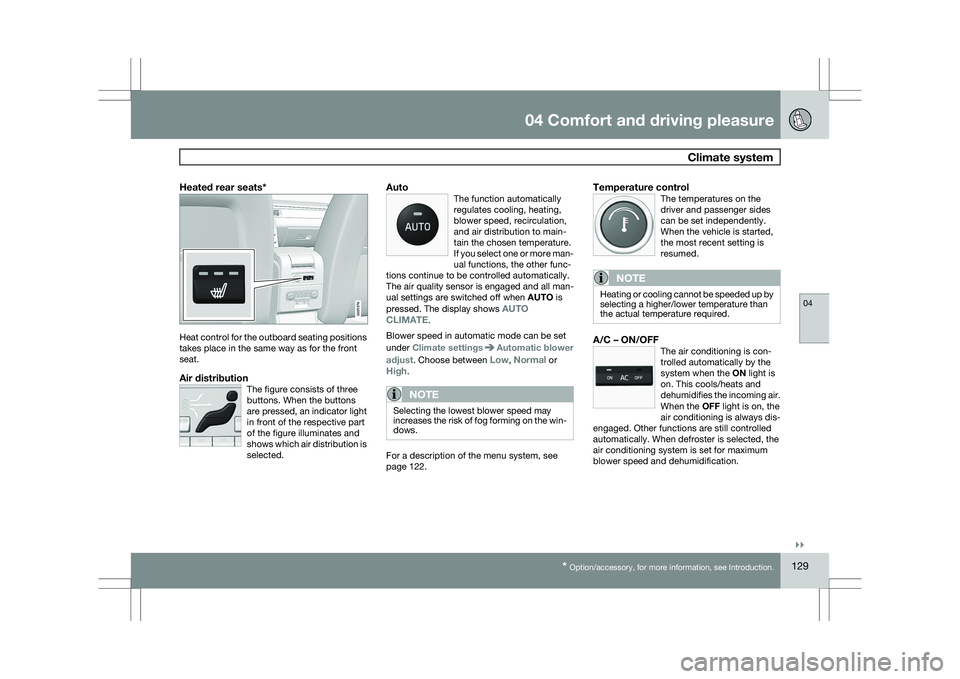
Heated rear seats*Heat control for the outboard seating positions
takes place in the same way as for the front
seat.
Air distributionThe figure consists of three
buttons. When the buttons
are pressed, an indicator light
in front of the respective part
of the figure illuminates and
shows which air distribution is
selected.
AutoThe function automatically
regulates cooling, heating,
blower speed, recirculation,
and air distribution to main-
tain the chosen temperature.
If you select one or more man-
ual functions, the other func-
tions continue to be controlled automatically.
The air quality sensor is engaged and all man-
ual settings are switched off when AUTO is
pressed. The display shows AUTO
CLIMATE.
Blower speed in automatic mode can be set
under Climate settings Automatic blower
adjust. Choose between Low, Normal or
High.
NOTE Selecting the lowest blower speed may
increases the risk of fog forming on the win-
dows.
For a description of the menu system, see
page 122.
Temperature controlThe temperatures on the
driver and passenger sides
can be set independently.
When the vehicle is started,
the most recent setting is
resumed.
NOTE Heating or cooling cannot be speeded up by
selecting a higher/lower temperature than
the actual temperature required.
A/C – ON/OFFThe air conditioning is con-
trolled automatically by the
system when the ON light is
on. This cools/heats and
dehumidifies the incoming air.
When the OFF light is on, the
air conditioning is always dis-
engaged. Other functions are still controlled
automatically. When defroster is selected, the
air conditioning system is set for maximum
blower speed and dehumidification. G021376
Page 132 of 297
04 Comfort and driving pleasureClimate system 04
130
* Option/accessory, for more information, see Introduction.
DefrosterThis function defrosts/de-ices
the windshield and front side
windows. The indicator light
in the defroster button lights
when the function is active.\b
Blower speed increases automatically and
the air conditioning will switch on (if not
already on and if the passenger compart-
ment blower is not turned off) to dehumid-
ify the air in the passenger compartment.
Air conditioning can be switched off by
pressing the AC button.
\b Recirculation will not function while defrost
is engaged.
The climate system will return to its previous
settings when the defroster function is
switched off.Recirculation/air quality system
Recirculation
This function can be used to
shut out exhaust fumes,
smoke, etc from the passen-
ger compartment. The air in
the passenger compartment
is then recirculated, i.e., no air
from outside the car is taken
into the car when this function is activated. The
indicator light in the button will illuminate when
recirculation is selected.
If the air in the car recirculates for too long,
there is a risk of condensation forming on the
insides of the windows, especially in winter.
TimerThe timer function minimizes the risk of fog-
ging, or stale air when the recirculation function
is selected by automatically switching off the
function after a certain length of time, depend-
ing on the ambient temperature. Activate/
deactivate the function under Climate control
settings Recirculation timer. For a
description of the menu system, see
page 122.
NOTE When Defroster is selected, recirculation is
always deactivated.
Interior Air Quality System–IAQS*This system consists of a mul-
tifilter and an air quality sen-
sor. The filter helps remove
gases and particles from the
incoming air, thereby reduc-
ing the amounts of odors and
contaminants entering the
vehicle. The air quality sensor detects
increased levels of contaminants in the outside
air. When the air quality sensor detects conta-
minated outside air, the air intake closes and
the air inside the passenger compartment is
recirculated, i.e., no outside air enters the vehi-
cle. The filter also cleans recirculated passen-
ger compartment air. When the AUTO button
is depressed the air quality sensor is always
engaged.
Activating the air quality sensorSwitch between the three
functions by pressing the but-
ton repeatedly.
Page 133 of 297
04 Comfort and driving pleasure
Climate system04
}}
131
\b
The left orange light comes on – the air
quality sensor is disengaged.
\b The center green light comes on – recircu-
lation not engaged, providing it is not
required for cooling in hot weather.
\b The right orange light comes on – recircu-
lation is engaged.
NOTE \b
The air quality sensor should always be
engaged in order to obtain the best air
in the passenger compartment.
\b Recirculation is limited in cold weather
to avoid fogging. \b
If the insides of the windows start fog-
ging, disengage the air quality sensor.
Use the defroster function to increase
airflow to the front, side, and rear win-
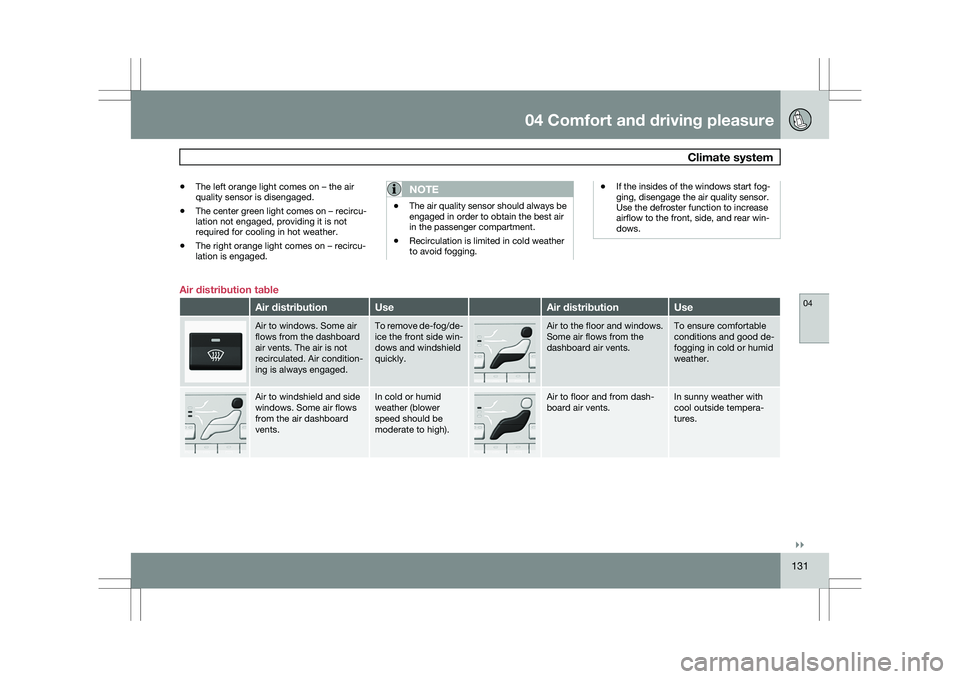
dows. Air distribution table
Air distribution Use Air distribution Use
Air to windows. Some air
flows from the dashboard
air vents. The air is not
recirculated. Air condition-
ing is always engaged. To remove de-fog/de-
ice the front side win-
dows and windshield
quickly. Air to the floor and windows.
Some air flows from the
dashboard air vents. To ensure comfortable
conditions and good de-
fogging in cold or humid
weather.
Air to windshield and side
windows. Some air flows
from the air dashboard
vents. In cold or humid
weather (blower
speed should be
moderate to high). Air to floor and from dash-
board air vents. In sunny weather with
cool outside tempera-
tures.
Page 165 of 297
04 Comfort and driving pleasure
Collision warning with Auto-brake*04
}}
* Option/accessory, for more information, see Introduction. 163
WARNING\b
The camera has the same limitations as
the human eye. In other words, its
“vision is impaired” by adverse weather
conditions such as heavy snowfall,
dense fog, etc. These conditions may
reduce the function of systems that
depend on the camera or cause these
systems to temporarily stop function-
ing.
\b Never place any objects, decals, etc.,
on the windshield in front of the camera.
This could reduce or block the camera’s
function, and could cause one or more
of the systems that utilize the camera to
stop functioning.
\b Strong sunlight, reflections from the
road surface, ice or snow covering the
road, a dirty road surface, or unclear
lane marker lines may drastically reduce
the camera’s capacity to detect the side
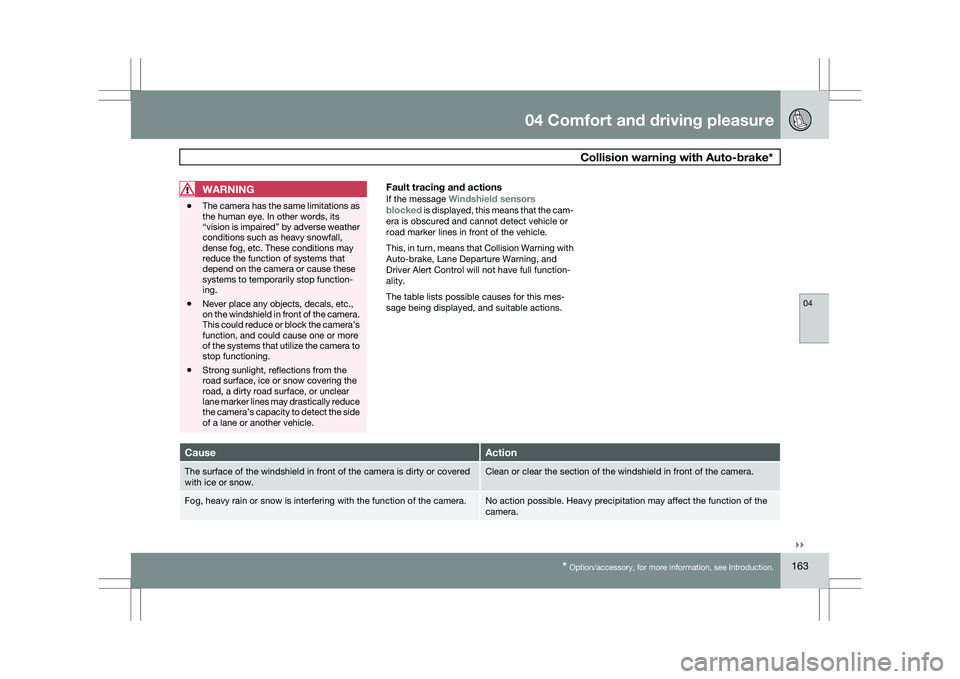
of a lane or another vehicle.Fault tracing and actions
If the message Windshield sensors
blocked is displayed, this means that the cam-
era is obscured and cannot detect vehicle or
road marker lines in front of the vehicle.
This, in turn, means that Collision Warning with
Auto-brake, Lane Departure Warning, and
Driver Alert Control will not have full function-
ality.
The table lists possible causes for this mes-
sage being displayed, and suitable actions. Cause Action
The surface of the windshield in front of the camera is dirty or covered\
with ice or snow. Clean or clear the section of the windshield in front of the camera.
Fog, heavy rain or snow is interfering with the function of the camera. No action possible. Heavy precipitation may affect the function of the
camera.