headlights VOLVO XC60 2009 Owner´s Manual
[x] Cancel search | Manufacturer: VOLVO, Model Year: 2009, Model line: XC60, Model: VOLVO XC60 2009Pages: 297, PDF Size: 21.16 MB
Page 14 of 297
01 SafetyOccupant safety 01
12 Volvo\fs concern for safety
Safety is Volvo\fs cornerstone. Our concern
dates back to 1927 when the first Volvo rolled
off the production line. Three-point seat belts
(a Volvo invention), safety cages, and energy-
absorbing impact zones were designed into
Volvo vehicles long before it was fashionable
or required by government regulation.
We will not compromize our commitment to
safety. We continue to seek out new safety
features and to refine those already in our vehi-
cles. You can help. We would appreciate hear-
ing your suggestions about improving automo-
bile safety. We also want to know if you ever
have a safety concern with your vehicle. Call us
in the U.S. at: 1-800-458-1552 or in Canada at:
1-800-663-8255.
Occupant safety remindersHow safely you drive doesn\ft depend on how
old you are but rather on:
\b
How well you see.
\b Your ability to concentrate.
\b How quickly you make decisions under
stress to avoid an accident.
The following suggestions are intended to help
you cope with the ever changing traffic envi-
ronment. \b
Never drink and drive.
\b If you are taking any medication, consult
your physician about its potential effects
on your driving abilities.
\b Take a driver-retraining course.
\b Have your eyes checked regularly.
\b Keep your windshield and headlights
clean.
\b Replace wiper blades when they start to
leave streaks.
\b Take into account the traffic, road, and
weather conditions, particularly with
regard to stopping distance.
Page 78 of 297
03 Your driving environmentInstruments and controls 03
76 The information symbol may also illuminate
together with other symbols.
High beam indicator
This symbol illuminates when the high beam
headlights are on, or if the high beam flash
function is used.
Left turn signal indicator
Right turn signal indicator
NOTE
\b
Both turn signal indicators will flash
when the hazard warning flashers are
used.
\b If either of these indicators flash faster
than normal, the direction indicators are
not functioning properly.
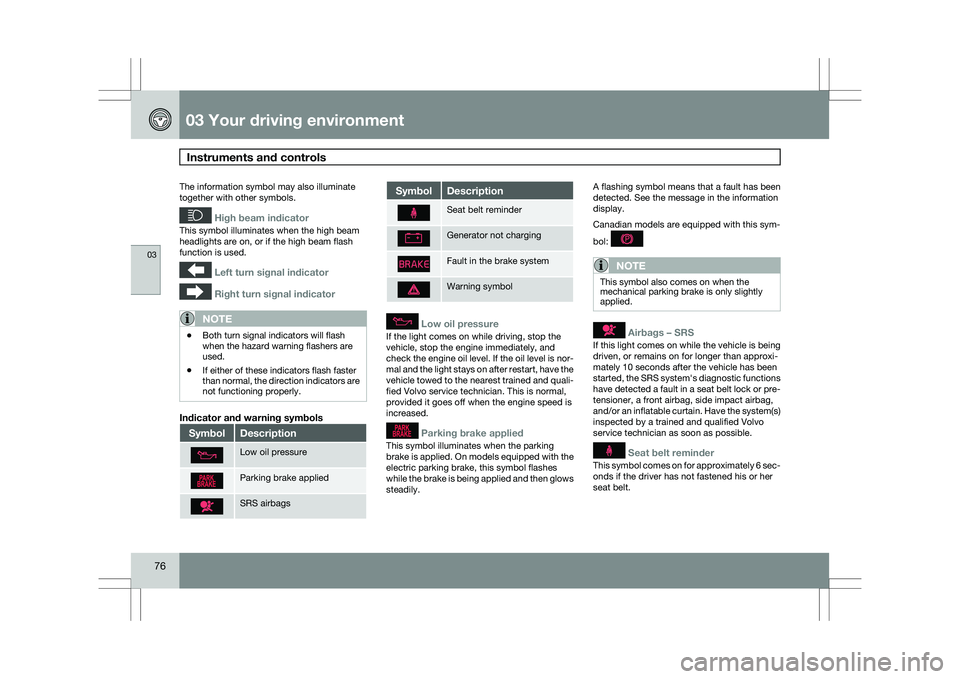
Indicator and warning symbols Symbol Description
Low oil pressure
Parking brake applied
SRS airbags Symbol Description
Seat belt reminder
Generator not charging
Fault in the brake system
Warning symbol
Low oil pressure
If the light comes on while driving, stop the
vehicle, stop the engine immediately, and
check the engine oil level. If the oil level is nor-
mal and the light stays on after restart, have the
vehicle towed to the nearest trained and quali-
fied Volvo service technician. This is normal,
provided it goes off when the engine speed is
increased.
Parking brake applied
This symbol illuminates when the parking
brake is applied. On models equipped with the
electric parking brake, this symbol flashes
while the brake is being applied and then glows
steadily.A flashing symbol means that a fault has been
detected. See the message in the information
display.
Canadian models are equipped with this sym-
bol:
NOTE
This symbol also comes on when the
mechanical parking brake is only slightly
applied.
Airbags – SRS
If this light comes on while the vehicle is being
driven, or remains on for longer than approxi-
mately 10 seconds after the vehicle has been
started, the SRS system\fs diagnostic functions
have detected a fault in a seat belt lock or pre-
tensioner, a front airbag, side impact airbag,
and/or an inflatable curtain. Have the system(s)
inspected by a trained and qualified Volvo
service technician as soon as possible.
Seat belt reminder
This symbol comes on for approximately 6 sec-
onds if the driver has not fastened his or her
seat belt.
Page 81 of 297
03 Your driving environment
Ignition modes03
}}
79
Functions
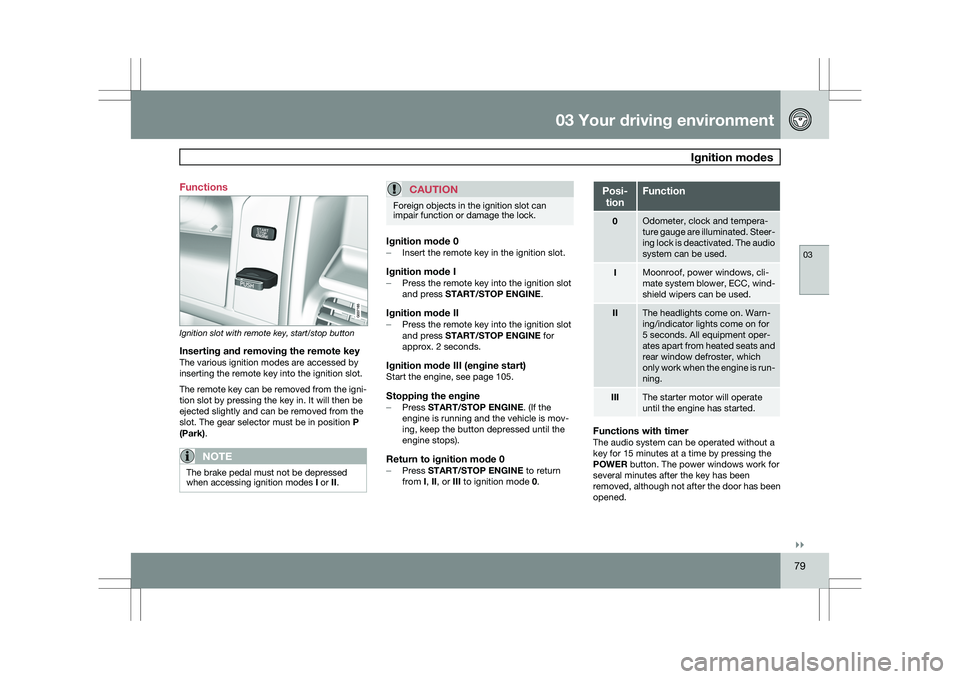
Ignition slot with remote key, start/stop button
Inserting and removing the remote keyThe various ignition modes are accessed by
inserting the remote key into the ignition slot.
The remote key can be removed from the igni-
tion slot by pressing the key in. It will then be
ejected slightly and can be removed from the
slot. The gear selector must be in position
P
(Park).
NOTE The brake pedal must not be depressed
when accessing ignition modes
I or II.
CAUTION Foreign objects in the ignition slot can
impair function or damage the lock.
Ignition mode 0–
Insert the remote key in the ignition slot.
Ignition mode I–Press the remote key into the ignition slot
and press START/STOP ENGINE.
Ignition mode II–Press the remote key into the ignition slot
and press START/STOP ENGINE for
approx. 2 seconds.
Ignition mode III (engine start)Start the engine, see page 105.
Stopping the engine–
Press START/STOP ENGINE. (If the
engine is running and the vehicle is mov-
ing, keep the button depressed until the
engine stops).
Return to ignition mode 0–Press START/STOP ENGINE to return
from I, II, or III to ignition mode 0. Posi-
tion Function
0 Odometer, clock and tempera-
ture gauge are illuminated. Steer-
ing lock is deactivated. The audio
system can be used.
I Moonroof, power windows, cli-
mate system blower, ECC, wind-
shield wipers can be used.
II The headlights come on. Warn-
ing/indicator lights come on for
5 seconds. All equipment oper-
ates apart from heated seats and
rear window defroster, which
only work when the engine is run-
ning.
III The starter motor will operate
until the engine has started.
Functions with timerThe audio system can be operated without a
key for 15 minutes at a time by pressing the
POWER button. The power windows work for
several minutes after the key has been
removed, although not after the door has been
opened.
Page 89 of 297
03 Your driving environment
Lighting03
}}
87
Lighting panel
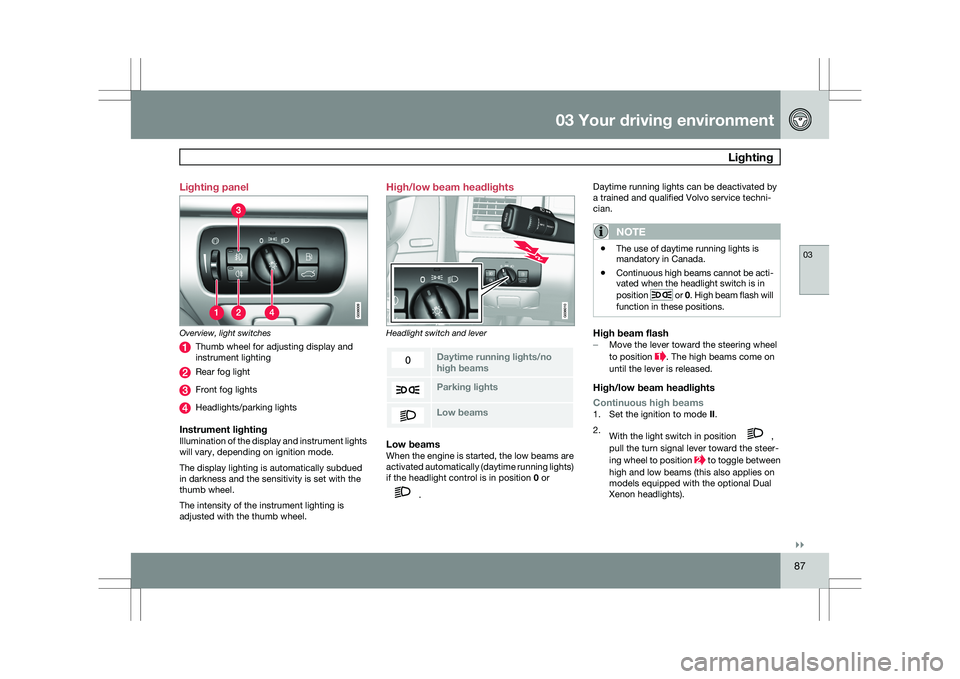
Overview, light switches
Thumb wheel for adjusting display and
instrument lighting
Rear fog light
Front fog lights
Headlights/parking lights
Instrument lightingIllumination of the display and instrument lights
will vary, depending on ignition mode.
The display lighting is automatically subdued
in darkness and the sensitivity is set with the
thumb wheel.
The intensity of the instrument lighting is
adjusted with the thumb wheel. High/low beam headlights
Headlight switch and lever
Daytime running lights/no
high beams
Parking lights
Low beamsLow beamsWhen the engine is started, the low beams are
activated automatically (daytime running lights)
if the headlight control is in position
0 or .Daytime running lights can be deactivated by
a trained and qualified Volvo service techni-
cian.
NOTE \b
The use of daytime running lights is
mandatory in Canada.
\b Continuous high beams cannot be acti-
vated when the headlight switch is in
position or 0. High beam flash will
function in these positions.
High beam flash– Move the lever toward the steering wheel
to position . The high beams come on
until the lever is released.
High/low beam headlights
Continuous high beams
1. Set the ignition to mode II.
2. With the light switch in position ,
pull the turn signal lever toward the steer-
ing wheel to position to toggle between
high and low beams (this also applies on
models equipped with the optional Dual
Xenon headlights).
Page 91 of 297
03 Your driving environment
Lighting03
}}
89
Front fog lights
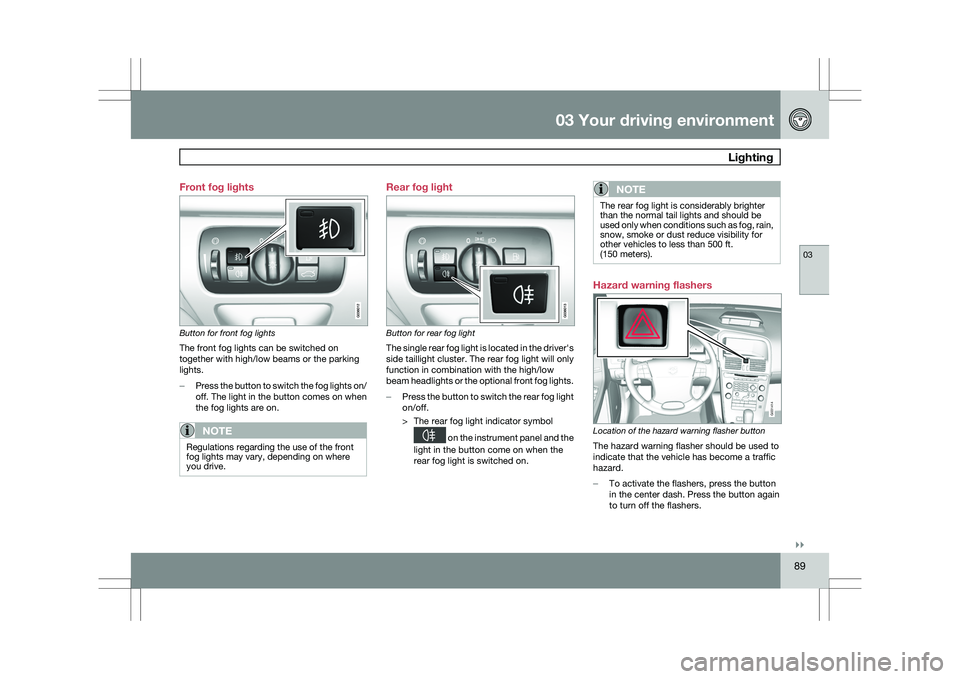
Button for front fog lights
The front fog lights can be switched on
together with high/low beams or the parking
lights.
–
Press the button to switch the fog lights on/
off. The light in the button comes on when
the fog lights are on.
NOTE Regulations regarding the use of the front
fog lights may vary, depending on where
you drive. Rear fog light
Button for rear fog light
The single rear fog light is located in the driver\fs
side taillight cluster. The rear fog light will only
function in combination with the high/low
beam headlights or the optional front fog lights.
–
Press the button to switch the rear fog light
on/off.
> The rear fog light indicator symbol on the instrument panel and the
light in the button come on when the
rear fog light is switched on.
NOTE The rear fog light is considerably brighter
than the normal tail lights and should be
used only when conditions such as fog, rain,
snow, smoke or dust reduce visibility for
other vehicles to less than 500 ft.
(150 meters).
Hazard warning flashers
Location of the hazard warning flasher button
The hazard warning flasher should be used to
indicate that the vehicle has become a traffic
hazard.
–
To activate the flashers, press the button
in the center dash. Press the button again
to turn off the flashers. G031414
Page 93 of 297
03 Your driving environment
Lighting03
}}
* Option/accessory, for more information, see Introduction. 91
Interior lighting, rear
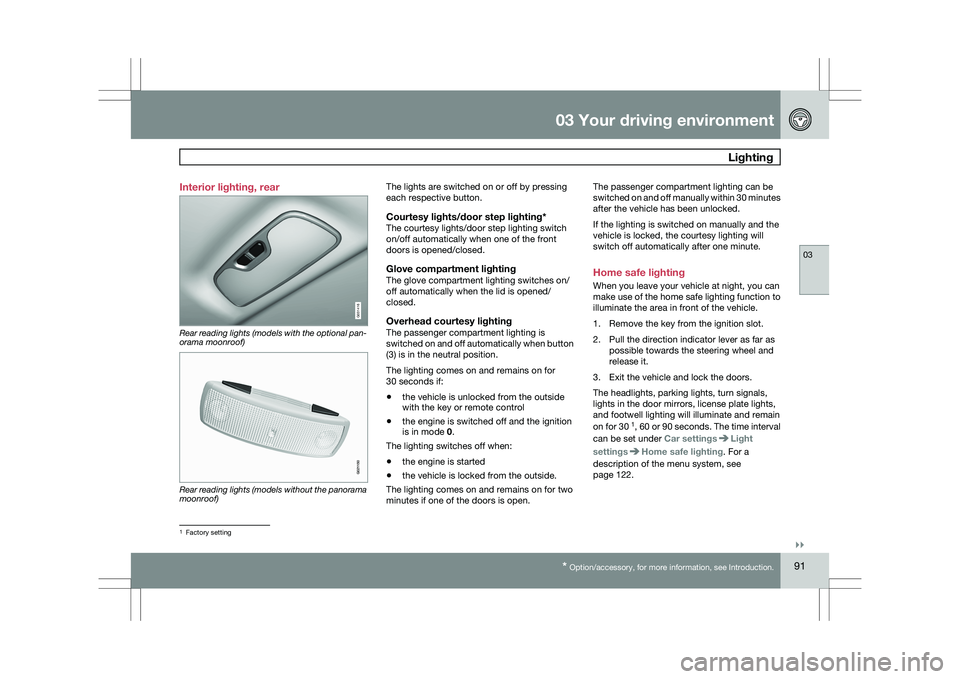
Rear reading lights (models with the optional pan-
orama moonroof)
Rear reading lights (models without the panorama
moonroof) The lights are switched on or off by pressing
each respective button.
Courtesy lights/door step lighting*The courtesy lights/door step lighting switch
on/off automatically when one of the front
doors is opened/closed.
Glove compartment lightingThe glove compartment lighting switches on/
off automatically when the lid is opened/
closed.
Overhead courtesy lightingThe passenger compartment lighting is
switched on and off automatically when button
(3) is in the neutral position.
The lighting comes on and remains on for
30 seconds if:
\b
the vehicle is unlocked from the outside
with the key or remote control
\b the engine is switched off and the ignition
is in mode 0.
The lighting switches off when:
\b the engine is started
\b the vehicle is locked from the outside.
The lighting comes on and remains on for two
minutes if one of the doors is open. The passenger compartment lighting can be
switched on and off manually within 30 minutes
after the vehicle has been unlocked.
If the lighting is switched on manually and the
vehicle is locked, the courtesy lighting will
switch off automatically after one minute.
Home safe lighting
When you leave your vehicle at night, you can
make use of the home safe lighting function to
illuminate the area in front of the vehicle.
1. Remove the key from the ignition slot.
2. Pull the direction indicator lever as far as
possible towards the steering wheel and
release it.
3. Exit the vehicle and lock the doors.
The headlights, parking lights, turn signals,
lights in the door mirrors, license plate lights,
and footwell lighting will illuminate and remain
on for 30 1
, 60 or 90 seconds. The time interval
can be set under Car settings Light
settings Home safe lighting. For a
description of the menu system, see
page 122. 1
Factory setting G031416 G021150
Page 96 of 297
03 Your driving environmentWipers and washers 03
94
* Option/accessory, for more information, see Introduction.
CAUTION The rain sensor should be deactivated when
washing the car in an automatic car wash,
etc. If the rain sensor function is left on, the
wipers will start inadvertently in the car
wash and could be damaged.
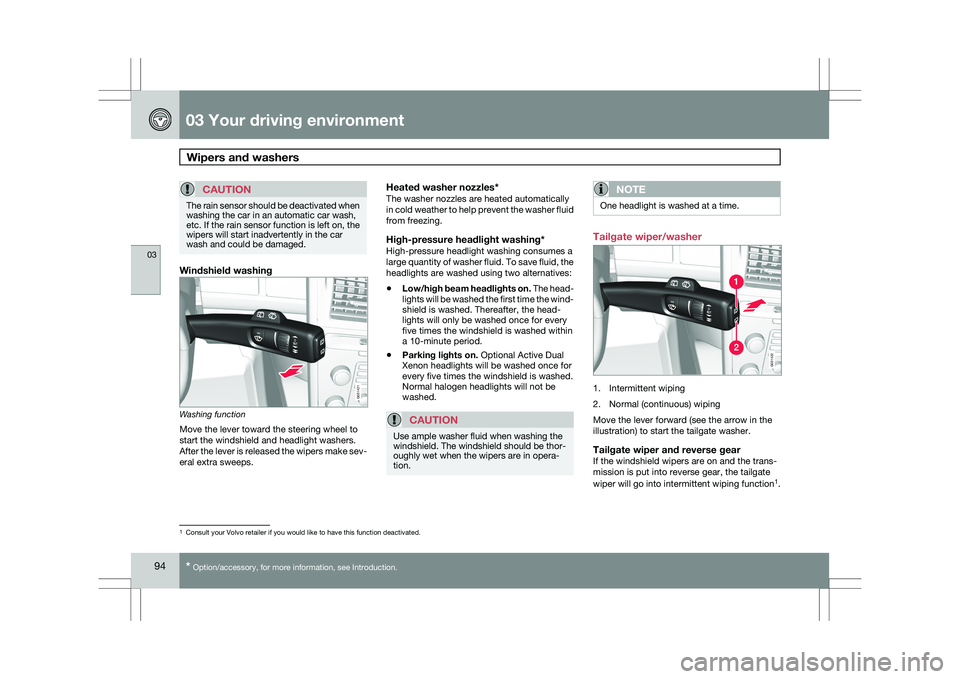
Windshield washing
Washing function
Move the lever toward the steering wheel to
start the windshield and headlight washers.
After the lever is released the wipers make sev-
eral extra sweeps.
Heated washer nozzles*The washer nozzles are heated automatically
in cold weather to help prevent the washer fluid
from freezing.
High-pressure headlight washing*High-pressure headlight washing consumes a
large quantity of washer fluid. To save fluid, the
headlights are washed using two alternatives:
\b
Low/high beam headlights on. The head-
lights will be washed the first time the wind-
shield is washed. Thereafter, the head-
lights will only be washed once for every
five times the windshield is washed within
a 10-minute period.
\b Parking lights on. Optional Active Dual
Xenon headlights will be washed once for
every five times the windshield is washed.
Normal halogen headlights will not be
washed.
CAUTION Use ample washer fluid when washing the
windshield. The windshield should be thor-
oughly wet when the wipers are in opera-
tion.
NOTE One headlight is washed at a time.
Tailgate wiper/washer
1. Intermittent wiping
2. Normal (continuous) wiping
Move the lever forward (see the arrow in the
illustration) to start the tailgate washer.
Tailgate wiper and reverse gearIf the windshield wipers are on and the trans-
mission is put into reverse gear, the tailgate
wiper will go into intermittent wiping function
1
. 1
Consult your Volvo retailer if you would like to have this function deac\
tivated. G031420G031421 G031420G031422
Page 101 of 297
03 Your driving environment
Mirrors03
99
to the neutral position for electric retracting/
extending to work.
\b
Retract the mirrors with the L and R but-
tons.
\b Fold them out again with the
L and R but-
tons.
The mirrors are now reset in neutral position.
Home safe and approach lightingThe light on the door mirrors comes on when
approach lighting or home safe lighting is
selected, see page 91.
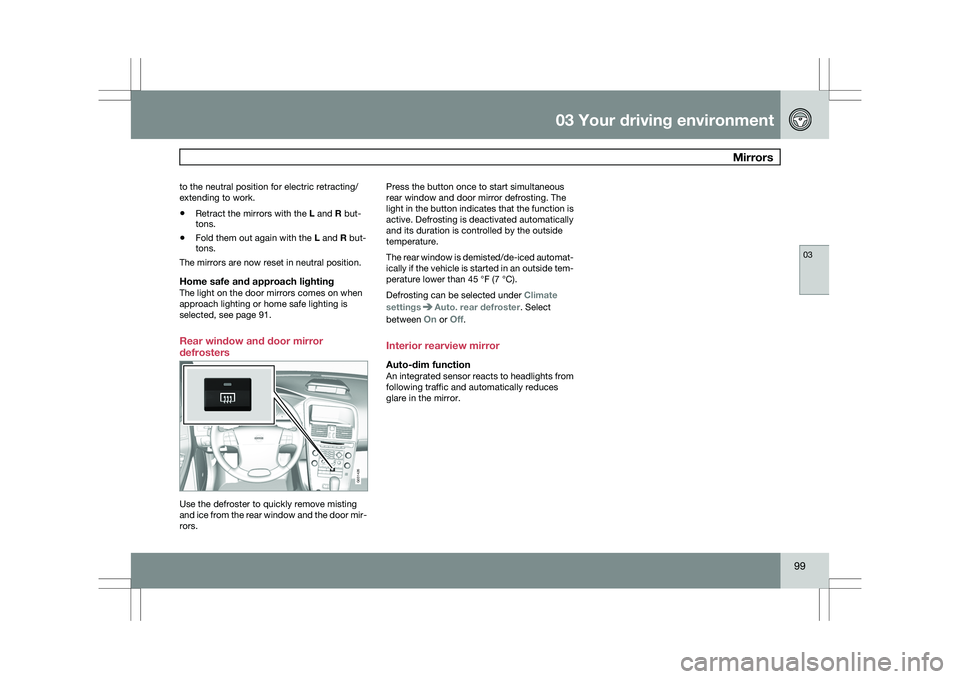
Rear window and door mirror
defrosters Use the defroster to quickly remove misting
and ice from the rear window and the door mir-
rors. Press the button once to start simultaneous
rear window and door mirror defrosting. The
light in the button indicates that the function is
active. Defrosting is deactivated automatically
and its duration is controlled by the outside
temperature.
The rear window is demisted/de-iced automat-
ically if the vehicle is started in an outside tem-
perature lower than 45 °F (7 °C).
Defrosting can be selected under
Climate
settings Auto. rear defroster. Select
between On or Off.
Interior rearview mirror
Auto-dim functionAn integrated sensor reacts to headlights from
following traffic and automatically reduces
glare in the mirror. G031426
Page 177 of 297
04 Comfort and driving pleasure
Adaptive Cruise Control (ACC)*04
}}
* Option/accessory, for more information, see Introduction. 175
WARNING\b
Only use a time interval that is suitable
in current traffic conditions.
\b A short time interval gives the driver lim-
ited reaction time if an unexpected sit-
uation occurs in traffic. The number of bars indicating the selected
time interval are shown while the setting is
being made and for several seconds afterward.
A smaller version of the symbol is then shown
to the right in the display. The same symbol is
also displayed when Distance Alert is acti-
vated, see page 179 .
Deactivating and resuming settingsCruise control is deactivated, either with a
short press on
, or by action taken by the
driver, such as braking, etc. The set speed, for
example 55 mph, is then shown in parenthe-
ses. Speed and time interval are resumed by
pressing .
WARNING
There may be a significant increase in speed
after the
button has been pressed.
A short press on in standby mode or a long
press in active mode deactivates cruise con- trol. The set speed is then cleared and cannot
be resumed.
When ACC is activated, the vehicle’s speed
increases by approximately 1 mph (1 km/h)
each additional time is pressed.
Deactivation due to action by the driverACC is deactivated:
\b
when the brakes are applied
\b if the gear selector is moved to
N
\b if the accelerator pedal is depressed for an
extended period.
NOTE If the accelerator pedal is only depressed for
a short time, such as when passing another
vehicle, ACC is deactivated temporarily and
is reactivated when the pedal is released.
Automatic deactivationAdaptive cruise control is linked to other sys-
tems such as ABS, the stability and traction
control system (DSTC), and the Distance Alert
System. If any of these systems are not func-
tioning properly, adaptive cruise control is
automatically deactivated.
In the event of automatic deactivation a signal
will sound and the message
Cruise Control
Canceled is shown in the display. The driver must then intervene and adapt the vehicle\fs
speed to the surrounding traffic.
Automatic deactivation may be caused if:
\b
the vehicle\fs speed falls below 20 mph
(30 km/h)
\b the wheels lose traction or if the anti-lock
brake system (ABS) is activated
\b brake temperature is high
\b engine speed (rpm) is too low
\b the radar sensor is obstructed by, for
example, wet snow or rain.
The radar sensor and its limitations
The radar sensor is used by both Adaptive
Cruise Control and the Collision Warning Sys-
tem with Auto-brake. It is designed to detect
cars or larger vehicles driving in the same
direction as your vehicle.WARNING Accessories or other objects, such as extra
headlights, must not be installed in front of
the grille.
Modification of the radar sensor could make
its use illegal.
The radar sensor\fs capacity to detect vehicles
ahead is impeded:
Page 191 of 297
04 Comfort and driving pleasure
Park assist*04
* Option/accessory, for more information, see Introduction. 189
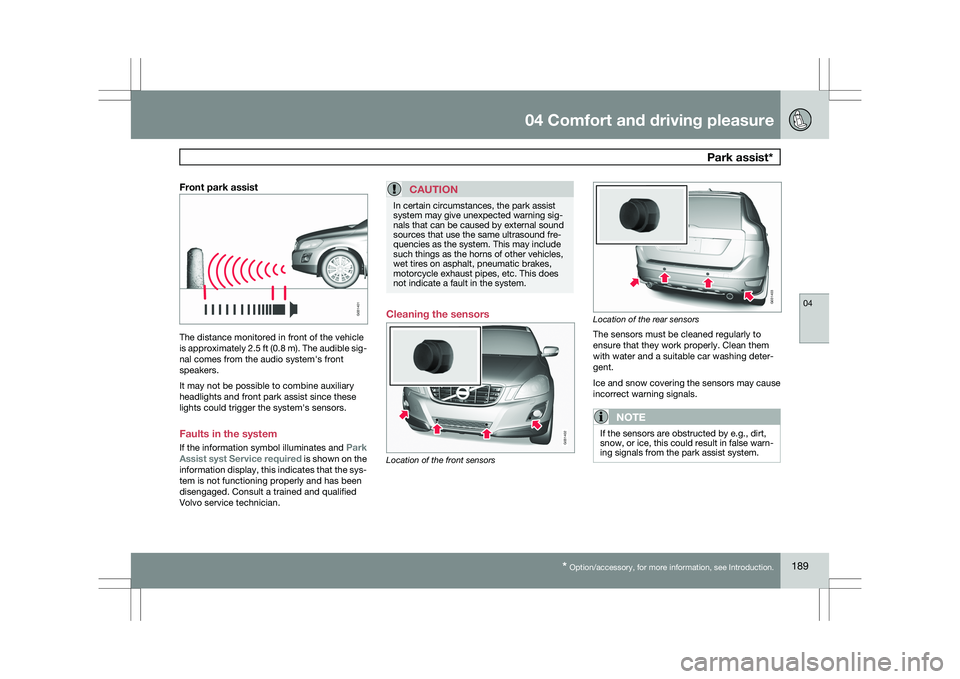
Front park assistThe distance monitored in front of the vehicle
is approximately 2.5 ft (0.8 m). The audible sig-
nal comes from the audio system\fs front
speakers.
It may not be possible to combine auxiliary
headlights and front park assist since these
lights could trigger the system\fs sensors.
Faults in the system
If the information symbol illuminates and
Park
Assist syst Service required is shown on the
information display, this indicates that the sys-
tem is not functioning properly and has been
disengaged. Consult a trained and qualified
Volvo service technician.CAUTION In certain circumstances, the park assist
system may give unexpected warning sig-
nals that can be caused by external sound
sources that use the same ultrasound fre-
quencies as the system. This may include
such things as the horns of other vehicles,
wet tires on asphalt, pneumatic brakes,
motorcycle exhaust pipes, etc. This does
not indicate a fault in the system.
Cleaning the sensors
Location of the front sensors Location of the rear sensors
The sensors must be cleaned regularly to
ensure that they work properly. Clean them
with water and a suitable car washing deter-
gent.
Ice and snow covering the sensors may cause
incorrect warning signals.
NOTE
If the sensors are obstructed by e.g., dirt,
snow, or ice, this could result in false warn-
ing signals from the park assist system. G031401 G031402 G031403