trip computer VOLVO XC60 2009 Owner´s Manual
[x] Cancel search | Manufacturer: VOLVO, Model Year: 2009, Model line: XC60, Model: VOLVO XC60 2009Pages: 297, PDF Size: 21.16 MB
Page 5 of 297
Contents* Option/accessory, for more information, see Introduction. 3
03
03
Your driving environment
Instruments and controls ..........................72
Ignition modes .......................................... 79
Seats......................................................... 81
Steering wheel .......................................... 86
Lighting ..................................................... 87
Wipers and washers................................. 93
Power windows......................................... 96
Mirrors....................................................... 98
Power panorama moonroof*................... 100
HomeLink® Wireless Control System* ...102
Starting the engine .................................. 105
Transmission ........................................... 109
Brakes..................................................... 112
Hill Descent Control (HDC) .....................114
Parking brake .......................................... 116
04
04Comfort and driving pleasure
Menus and messages .............................122
Climate system ....................................... 126
Audio system.......................................... 133
Bluetooth ® hands-free connection......... 147
Trip computer......................................... 153
Compass................................................. 154
Stability system....................................... 155
Active chassis system–Four C ................157
Cruise control.......................................... 158
Collision warning with Auto-brake*......... 160
City Safety™ .......................................... 166
Adaptive Cruise Control (ACC)* ..............172
Distance alert ......................................... 179
Driver Alert System*................................ 182
Park assist*............................................. 187
Park Assist Camera (PAC)* .................... 190
Blind Spot Information System*.............. 193
Passenger compartment convenience ...197
05
05 During your trip
Driving recommendations .......................202
Refueling ................................................. 206
Loading ................................................... 210
Cargo area .............................................. 213
Towing a trailer ....................................... 217
Emergency towing .................................. 220
Page 75 of 297
03 Your driving environment
Instruments and controls03
}}
* Option/accessory, for more information, see Introduction. 73Function Page
Menus and mes-
sages, turn signals,
high/low beams,
trip computer 122 , 90,
87, 153
Cruise control 158
Horn, airbag 86, 17
Main instrument
panel 73
Menu system,
audio, Bluetooth
hands-free controls 152
START/STOP
ENGINE button 79
Ignition slot 79
Information display 89
Door handle –
In-door control pan-
els (power win-
dows, mirrors,
power child safety
locks, central lock-
ing button) 122 , 96,
98, 65, 61 Function Page
Hazard warning
flashers 122 , 136
Audio system con-
trols 126
Climate system
controls 109
Gear selector 157
Controls for active
chassis (Four-C)* 93
Wipers and washers 86
Steering wheel
adjustment 227
Hood opening con-
trol 116
Parking brake 81
Power seat* adjust-
ment controls 87, 208
Lighting panel, con-
trols for opening
fuel filler door/tail-
gate 87, 208,
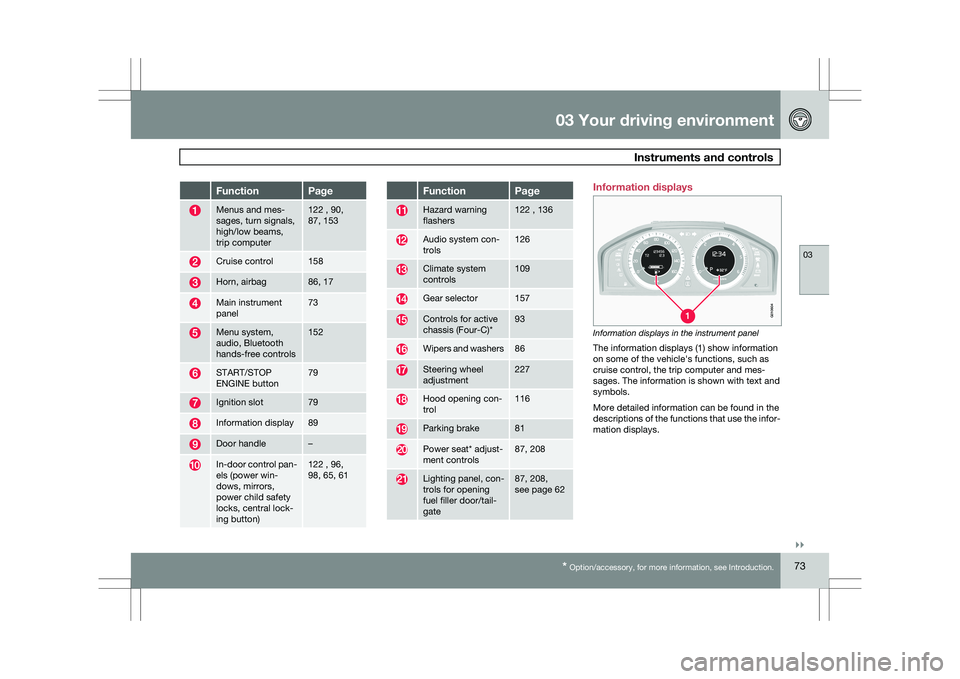
see page 62 Information displays
Information displays in the instrument panel
The information displays (1) show information
on some of the vehicle\fs functions, such as
cruise control, the trip computer and mes-
sages. The information is shown with text and
symbols.
More detailed information can be found in the
descriptions of the functions that use the infor-
mation displays. G01060
4
Page 122 of 297

120
* Option/accessory, for more information, see Introduction. Menus and messages
........................................................................\
... 122
Climate system ........................................................................\
............. 126
Audio system........................................................................\
................ 133
Bluetooth ® hands-free connection ....................................................... 147
Trip computer...........................................................\
.............................
153
Compass........................................................................\
....................... 154
Stability system........................................................................\
............. 155
Active chassis system–Four C .............................................................. 157
Cruise control ........................................................................\
................ 158
Collision warning with Auto-brake*....................................................... 160
City Safety™ ........................................................................\
................ 166
Adaptive Cruise Control (ACC)* ............................................................ 172
Distance alert ........................................................................\
............... 179
Driver Alert System*........................................................................\
...... 182
Park assist*........................................................................\
................... 187
Park Assist Camera (PAC)* .................................................................. 190
Blind Spot Information System*............................................................ 193
Passenger compartment convenience .................................................197
G02090
8
Page 126 of 297
04 Comfort and driving pleasureMenus and messages 04
124
Menu overviewDriving distance on current fuel reserve
Average
Instantaneous:
Average speed
Current speed in mph (Canadian models
only)
DSTC
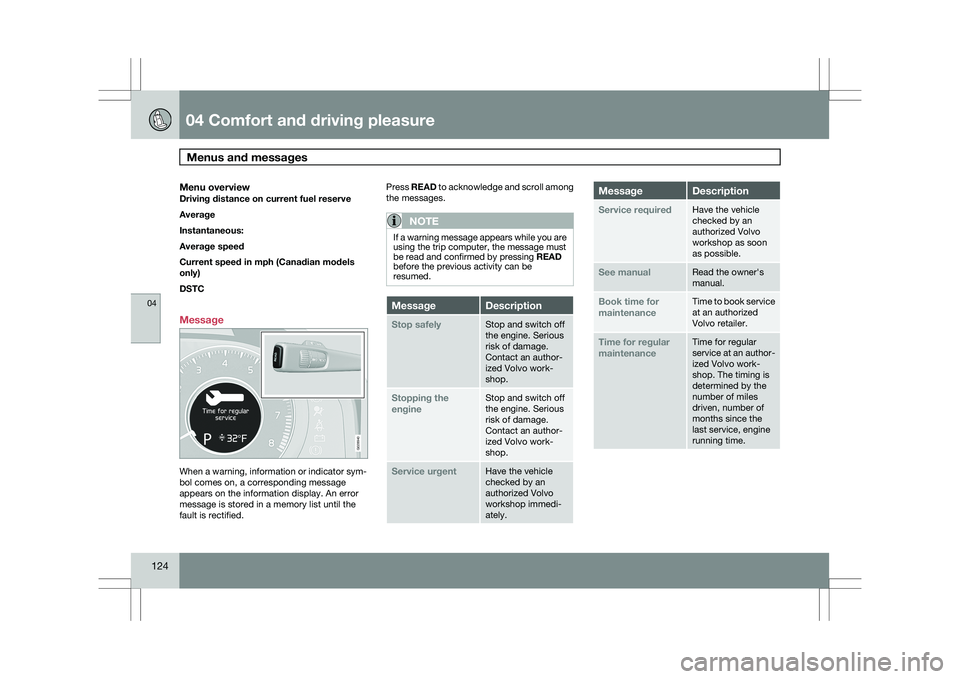
Message When a warning, information or indicator sym-
bol comes on, a corresponding message
appears on the information display. An error
message is stored in a memory list until the
fault is rectified. Press READ to acknowledge and scroll among
the messages.
NOTE If a warning message appears while you are
using the trip computer, the message must
be read and confirmed by pressing READ
before the previous activity can be
resumed.
Message Description
Stop safely Stop and switch off
the engine. Serious
risk of damage.
Contact an author-
ized Volvo work-
shop.
Stopping the
engine Stop and switch off
the engine. Serious
risk of damage.
Contact an author-
ized Volvo work-
shop.
Service urgent Have the vehicle
checked by an
authorized Volvo
workshop immedi-
ately. Message Description
Service required Have the vehicle
checked by an
authorized Volvo
workshop as soon
as possible.
See manual Read the owner\fs
manual.
Book time for
maintenance Time to book service
at an authorized
Volvo retailer.
Time for regular
maintenance Time for regular
service at an author-
ized Volvo work-
shop. The timing is
determined by the
number of miles
driven, number of
months since the
last service, engine
running time. G028940
Page 155 of 297
04 Comfort and driving pleasure
Trip computer04
153
Introduction
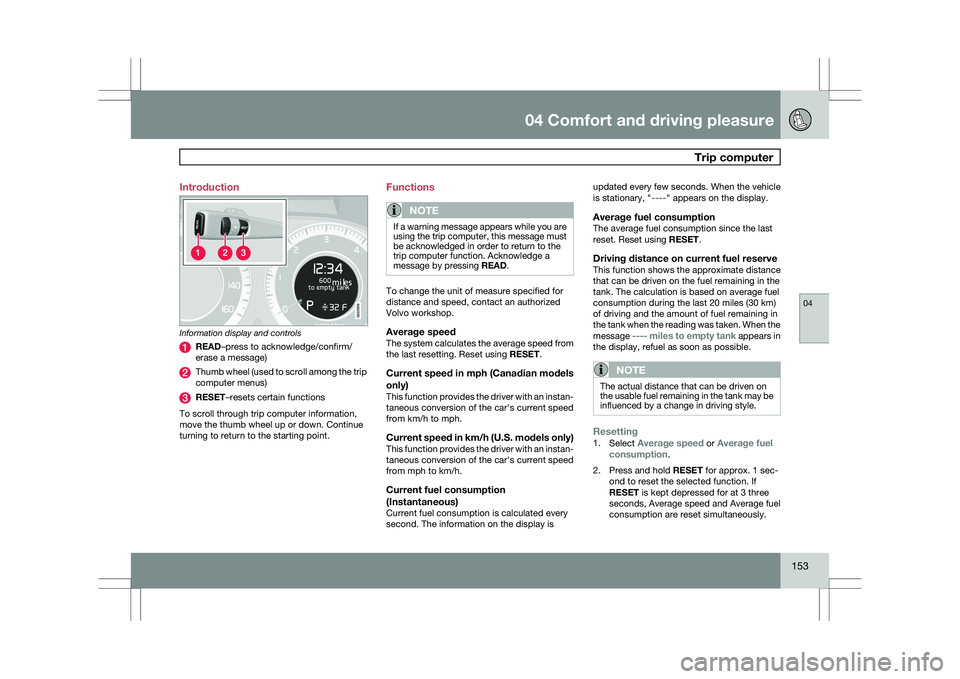
Information display and controls
READ–press to acknowledge/confirm/
erase a message)
Thumb wheel (used to scroll among the trip
computer menus)
RESET–resets certain functions
To scroll through trip computer information,
move the thumb wheel up or down. Continue
turning to return to the starting point. Functions
NOTE If a warning message appears while you are
using the trip computer, this message must
be acknowledged in order to return to the
trip computer function. Acknowledge a
message by pressing READ.
To change the unit of measure specified for
distance and speed, contact an authorized
Volvo workshop.
Average speedThe system calculates the average speed from
the last resetting. Reset using
RESET.
Current speed in mph (Canadian models
only)
This function provides the driver with an instan-
taneous conversion of the car\fs current speed
from km/h to mph.
Current speed in km/h (U.S. models only)This function provides the driver with an instan-
taneous conversion of the car\fs current speed
from mph to km/h.
Current fuel consumption
(Instantaneous)
Current fuel consumption is calculated every
second. The information on the display is updated every few seconds. When the vehicle
is stationary, "----" appears on the display.
Average fuel consumptionThe average fuel consumption since the last
reset. Reset using RESET.
Driving distance on current fuel reserveThis function shows the approximate distance
that can be driven on the fuel remaining in the
tank. The calculation is based on average fuel
consumption during the last 20 miles (30 km)
of driving and the amount of fuel remaining in
the tank when the reading was taken. When the
message ---- miles to empty tank appears in
the display, refuel as soon as possible.
NOTE The actual distance that can be driven on
the usable fuel remaining in the tank may be
influenced by a change in driving style.
Resetting1.
Select Average speed or Average fuel
consumption.
2. Press and hold RESET for approx. 1 sec-
ond to reset the selected function. If
RESET is kept depressed for at 3 three
seconds, Average speed and Average fuel
consumption are reset simultaneously. G022909
Page 185 of 297
04 Comfort and driving pleasure
Driver Alert System*04
}}
* Option/accessory, for more information, see Introduction. 183
Operating DAC
Certain settings can be made from the menu
system controlled from the center instrument
panel, see page 122 for more information on
the menu system.
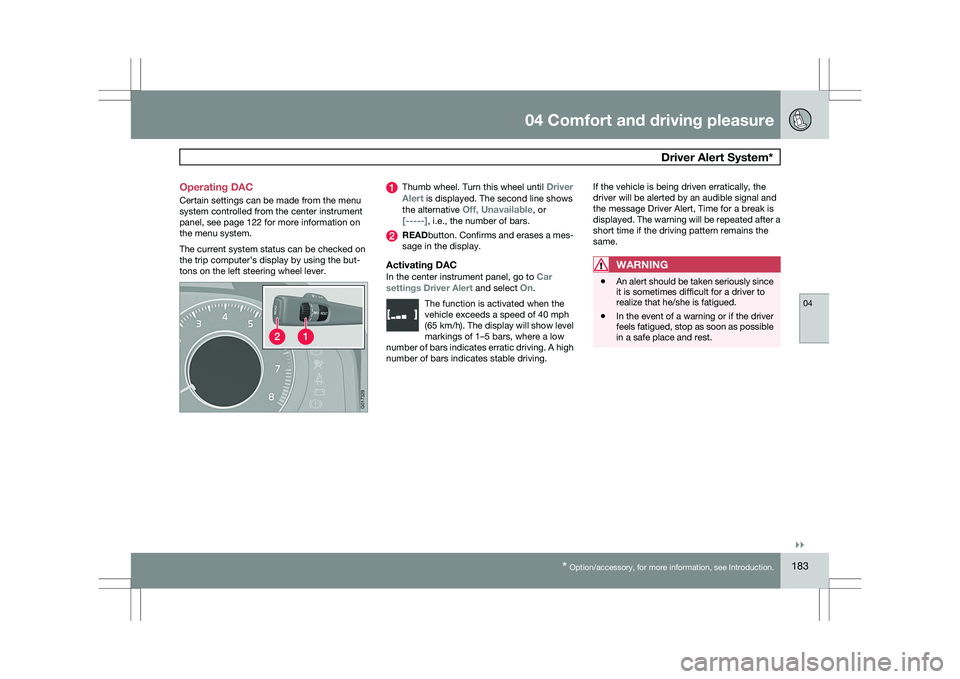
The current system status can be checked on
the trip computer’s display by using the but-
tons on the left steering wheel lever. Thumb wheel. Turn this wheel until
Driver
Alert is displayed. The second line shows
the alternative Off, Unavailable, or
[-----], i.e., the number of bars. READbutton. Confirms and erases a mes-
sage in the display.
Activating DACIn the center instrument panel, go to
Car
settings Driver Alert and select On.
The function is activated when the
vehicle exceeds a speed of 40 mph
(65 km/h). The display will show level
markings of 1–5 bars, where a low
number of bars indicates erratic driving. A high
number of bars indicates stable driving. If the vehicle is being driven erratically, the
driver will be alerted by an audible signal and
the message Driver Alert, Time for a break is
displayed. The warning will be repeated after a
short time if the driving pattern remains the
same.WARNING
\b
An alert should be taken seriously since
it is sometimes difficult for a driver to
realize that he/she is fatigued.
\b In the event of a warning or if the driver
feels fatigued, stop as soon as possible
in a safe place and rest. G01732
9
Page 187 of 297
04 Comfort and driving pleasure
Driver Alert System*04
}}
* Option/accessory, for more information, see Introduction. 185
Lane Departure Warning (LDW)–
general information
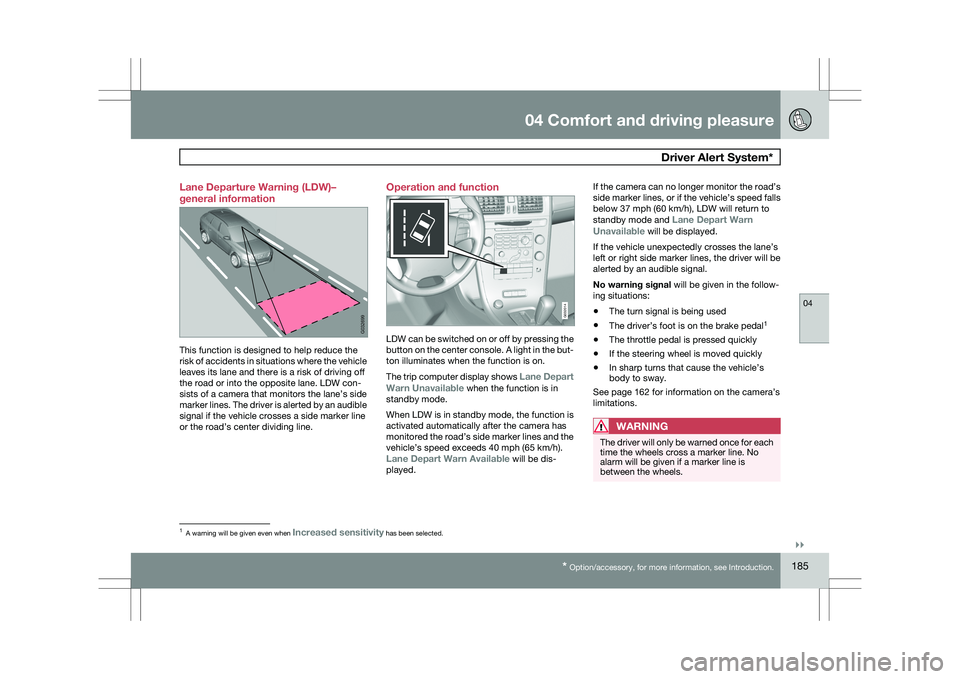
This function is designed to help reduce the
risk of accidents in situations where the vehicle
leaves its lane and there is a risk of driving off
the road or into the opposite lane. LDW con-
sists of a camera that monitors the lane’s side
marker lines. The driver is alerted by an audible
signal if the vehicle crosses a side marker line
or the road’s center dividing line. Operation and function
LDW can be switched on or off by pressing the
button on the center console. A light in the but-
ton illuminates when the function is on.
The trip computer display shows Lane Depart
Warn Unavailable when the function is in
standby mode.
When LDW is in standby mode, the function is
activated automatically after the camera has
monitored the road’s side marker lines and the
vehicle’s speed exceeds 40 mph (65 km/h).
Lane Depart Warn Available will be dis-
played.If the camera can no longer monitor the road’s
side marker lines, or if the vehicle’s speed falls
below 37 mph (60 km/h), LDW will return to
standby mode and
Lane Depart Warn
Unavailable will be displayed.
If the vehicle unexpectedly crosses the lane’s
left or right side marker lines, the driver will be
alerted by an audible signal.
No warning signal will be given in the follow-
ing situations:
\b The turn signal is being used
\b The driver’s foot is on the brake pedal 1
\b The throttle pedal is pressed quickly
\b If the steering wheel is moved quickly
\b In sharp turns that cause the vehicle’s
body to sway.
See page 162 for information on the camera’s
limitations.
WARNING The driver will only be warned once for each
time the wheels cross a marker line. No
alarm will be given if a marker line is
between the wheels.
1
A warning will be given even when Increased sensitivity has been selected. G032699 G032014
Page 204 of 297
05 During your tripDriving recommendations 05
202 General information
Economical driving conserves natural
resources
Better driving economy may be obtained by
thinking ahead, avoiding rapid starts and stops
and adjusting the speed of your vehicle to
immediate traffic conditions.
Observe the following rules:
\b
Bring the engine to normal operating tem-
perature as soon as possible by driving
with a light foot on the accelerator pedal for
the first few minutes of operation. A cold
engine uses more fuel and is subject to
increased wear.
\b Whenever possible, avoid using the vehicle
for driving short distances. This does not
allow the engine to reach normal operating
temperature.
\b Drive carefully and avoid rapid acceleration
and hard braking.
\b Use the transmission\fs Drive (
D) position
as often as possible and avoid using kick-
down.
\b Do not exceed posted speed limits.
\b Avoid carrying unnecessary items (extra
load) in the vehicle.
\b Maintain correct tire pressure. Check tire
pressure regularly (when tires are cold). \b
Remove snow tires when threat of snow or
ice has ended.
\b Note that roof racks, ski racks, etc,
increase air resistance and also fuel con-
sumption.
\b At highway driving speeds, fuel consump-
tion will be lower with the air conditioning
on and the windows closed than with the
air conditioning off and the windows open.
\b Using the onboard trip computer\fs fuel
consumption modes can help you learn
how to drive more economically.
Other factors that decrease gas mileage
are:
\b Dirty air cleaner
\b Dirty engine oil and clogged oil filter
\b Dragging brakes
\b Incorrect front end alignment
Some of the above mentioned items and others
are checked at the standard maintenance
intervals.
WARNING Driving with the tailgate open: Driving with
the tailgate open could lead to poisonous
exhaust gases entering the passenger com-
partment. If the tailgate must be kept open
for any reason, proceed as follows:
\b
Close the windows
\b Set the ventilation system control to air
flow to floor, windshield and side win-
dows and the blower control to its high-
est setting.
Weight distribution affects handlingAt the specified curb weight your vehicle has a
tendency to understeer, which means that the
steering wheel has to be turned more than
might seem appropriate for the curvature of a
bend. This ensures good stability and reduces
the risk of rear wheel skid. Remember that
these properties can alter with the vehicle load.
The heavier the load in the cargo area, the less
the tendency to understeer.
Handling, roadholdingVehicle load, tire design and inflation pressure
all affect vehicle handling. Therefore, check
that the tires are inflated to the recommended
pressure according to the vehicle load. See the
"Tire pressure" section. Loads should be dis-
tributed so that capacity weight or maximum
permissible axle loads are not exceeded.
Page 296 of 297
07 Index07
294 Stability system........................................ 155
indicator light ........................................ 75
Starting the engine
................................... 105
with keyless drive............................... 106
Starting the vehicle after a crash (crash mode).................... 32
Start inhibitor (immobilizer) ........................50
Steel grid in cargo area............................ 213
Steering wheel adjusting ............................................... 86
horn....................................................... 86
keypad.................................. 86, 122, 133
Stone chips, touching up .........................277
Storage spaces........................................ 197
Studded tires........................................... 262
Sunroof (moonroof) .................................. 100
Supplemental restraint system ..................17
warning light ......................................... 76T Tailgate
driving with it open............................. 202
power operated.................................... 63
wiper/washer........................................ 94
Tailgate wipers ......................................... 241
Taillights, changing bulbs ........................236
Temporary spare tire............................... 264
Three-way catalytic converter .................208
Tire designations ..................................... 259
Tire Pressure Monitoring System ....271, 272
indicator light ........................................ 75
Tires......................................................... 253
age...................................................... 253
changing from summer to winter
........ 254
glossary of terms ................................ 260
improving economy ............................253
inflation pressure ........................255, 256
inflation pressure tables .....................258
rotation ............................................... 254
snow................................................... 262
spare................................................... 264
specifications ...................................... 257
storing ................................................. 254
studded............................................... 262 tire pressure monitoring system
.........271
tread wear indicator............................ 255
uniform tire quality grading .................262
Top tether anchors (child restraint sys-
tems).......................................................... 43
Touching up paint .................................... 277
Towing a trailer ................................ 217, 218
trailer hitch .......................................... 218
Trailer Stability Assist .........................218
Towing the vehicle ...........................220, 221
Traction control
........................................ 155
Trailer Stability Assist (TSA)..................... 218
Trailer towing ................................... 217, 218
trailer hitch .......................................... 218
Trailer Stability Assist .........................218
Transmission general description .....................109, 110
oil ........................................................ 285
shiftlock override ................................ 110
Tread wear indicator ................................ 255
Trip computer.......................................... 153
Trip odometers.......................................... 78
Trips, long distance ................................. 203