ESP VOLVO XC60 2013 Owner´s Manual
[x] Cancel search | Manufacturer: VOLVO, Model Year: 2013, Model line: XC60, Model: VOLVO XC60 2013Pages: 382, PDF Size: 7.08 MB
Page 107 of 382
03 Your driving environment
Power windows
03
* Option/accessory, for more information, see Introduction.105 Power windows
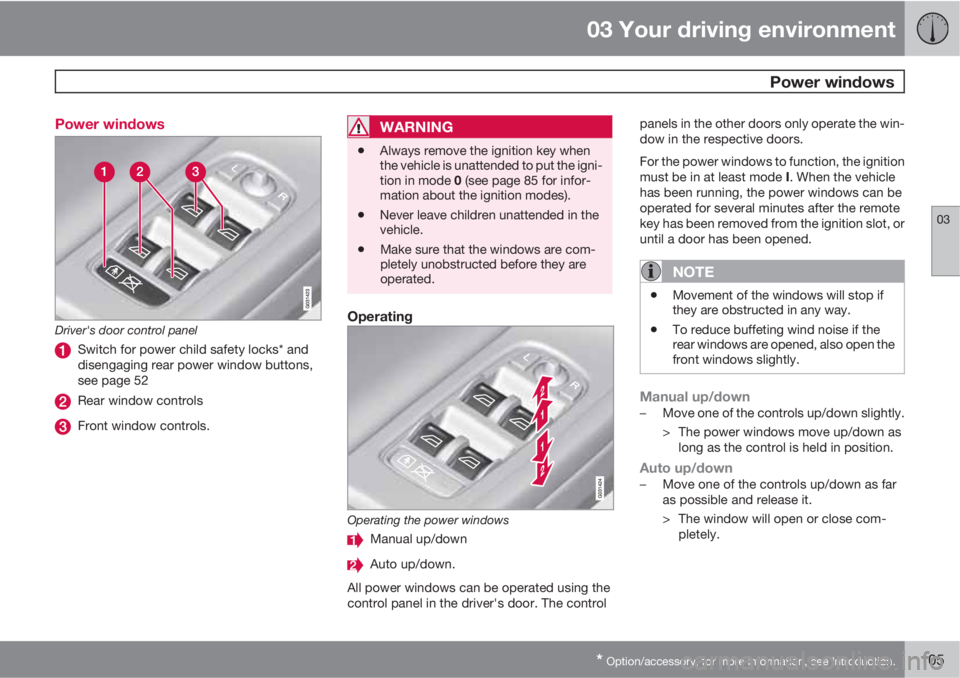
Driver's door control panel
Switch for power child safety locks* and
disengaging rear power window buttons,
see page 52
Rear window controls
Front window controls.
WARNING
•Always remove the ignition key when
the vehicle is unattended to put the igni-
tion in mode 0 (see page 85 for infor-
mation about the ignition modes).
•Never leave children unattended in the
vehicle.
•Make sure that the windows are com-
pletely unobstructed before they are
operated.
Operating
Operating the power windows
Manual up/down
Auto up/down.
All power windows can be operated using the
control panel in the driver's door. The controlpanels in the other doors only operate the win-
dow in the respective doors.
For the power windows to function, the ignition
must be in at least mode I. When the vehicle
has been running, the power windows can be
operated for several minutes after the remote
key has been removed from the ignition slot, or
until a door has been opened.
NOTE
•Movement of the windows will stop if
they are obstructed in any way.
•To reduce buffeting wind noise if the
rear windows are opened, also open the
front windows slightly.
Manual up/down–Move one of the controls up/down slightly.
> The power windows move up/down as
long as the control is held in position.
Auto up/down–Move one of the controls up/down as far
as possible and release it.
> The window will open or close com-
pletely.
Page 109 of 382
03 Your driving environment
Mirrors
03
* Option/accessory, for more information, see Introduction.107 Power door mirrors
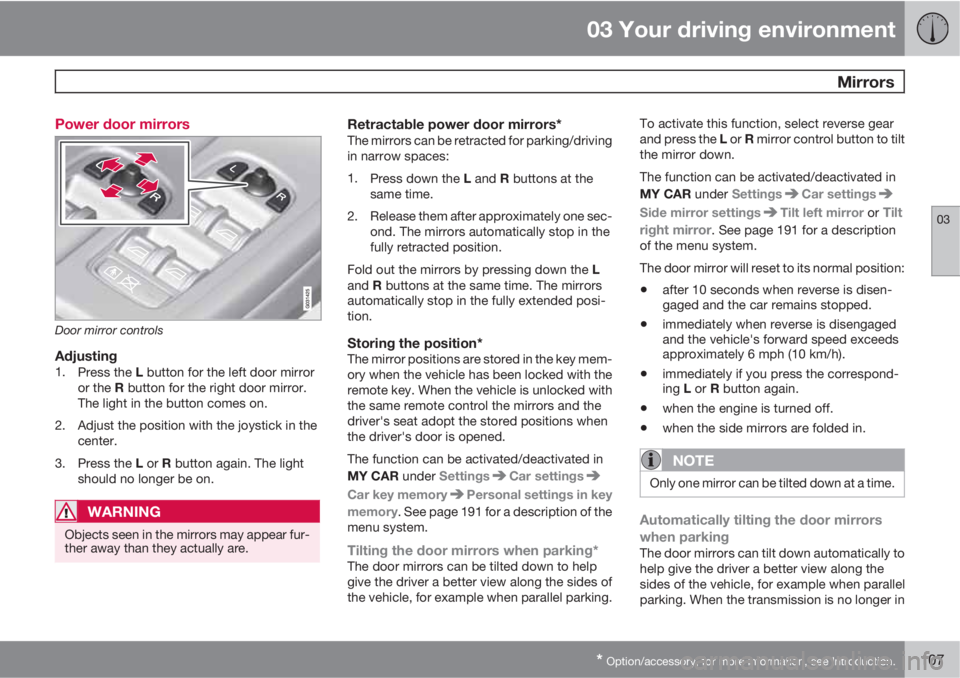
Door mirror controls
Adjusting1.
Press the L button for the left door mirror
or the R button for the right door mirror.
The light in the button comes on.
2. Adjust the position with the joystick in the
center.
3.
Press the L or R button again. The light
should no longer be on.
WARNING
Objects seen in the mirrors may appear fur-
ther away than they actually are.
Retractable power door mirrors*The mirrors can be retracted for parking/driving
in narrow spaces:
1.
Press down the L and R buttons at the
same time.
2. Release them after approximately one sec-
ond. The mirrors automatically stop in the
fully retracted position.
Fold out the mirrors by pressing down the L
and R buttons at the same time. The mirrors
automatically stop in the fully extended posi-
tion.
Storing the position*The mirror positions are stored in the key mem-
ory when the vehicle has been locked with the
remote key. When the vehicle is unlocked with
the same remote control the mirrors and the
driver's seat adopt the stored positions when
the driver's door is opened.
The function can be activated/deactivated in
MY CAR under Settings
Car settings
Car key memoryPersonal settings in key
memory. See page 191 for a description of the
menu system.
Tilting the door mirrors when parking*The door mirrors can be tilted down to help
give the driver a better view along the sides of
the vehicle, for example when parallel parking.To activate this function, select reverse gear
and press the L or R mirror control button to tilt
the mirror down.
The function can be activated/deactivated in
MY CAR under Settings
Car settings
Side mirror settingsTilt left mirror or Tilt
right mirror
. See page 191 for a description
of the menu system.
The door mirror will reset to its normal position:
•after 10 seconds when reverse is disen-
gaged and the car remains stopped.
•immediately when reverse is disengaged
and the vehicle's forward speed exceeds
approximately 6 mph (10 km/h).
•immediately if you press the correspond-
ing L or R button again.
•when the engine is turned off.
•when the side mirrors are folded in.
NOTE
Only one mirror can be tilted down at a time.
Automatically tilting the door mirrors
when parking
The door mirrors can tilt down automatically to
help give the driver a better view along the
sides of the vehicle, for example when parallel
parking. When the transmission is no longer in
Page 117 of 382
03 Your driving environment
HomeLink® Wireless Control System*
03
* Option/accessory, for more information, see Introduction.115
NOTE
If the ignition is switched off, HomeLink will
function for 30 minutes after the driver's
door has been opened.
Resetting HomeLink Buttons
Use the following procedure to reset (erase
programming) from the three HomeLink but-
tons (individual buttons cannot be reset but
can be “reprogrammed” as outlined in the fol-
lowing section):
1. Press and hold the two outer HomeLink
buttons until the indicator light begins to
flash.
2. Release both buttons.
> HomeLink is now in the training (or
learning) mode and can be programmed
at any time beginning with “Program-
ming” - step 1.
Reprogramming a Single HomeLink
Button
To program a device to HomeLink using a
HomeLink button previously trained, follow
these steps:
1. Press and hold the desired HomeLink but-
ton. DO NOT release the button.
2. The indicator light will begin to flash after
20 seconds. Without releasing the Home-
Link button, proceed with “Programming”
- step 1.
For questions or comments, contact HomeLink
at: www.homelink.com or phone 1–800–355–
3515.
This device complies with FCC rules part 15
and Industry Canada (IC) RSS-210. Operation
is subject to the following two conditions: (1)
This device may not cause harmful interfer-
ence, and (2) This device must accept any
interference that may be received including
interference that may cause undesired opera-
tion.
NOTE
The transmitter has been tested and com-
plies with FCC and IC rules. Changes or
modifications not expressly approved by
the party responsible for compliance could
void the user’s authority to operate the
device.
2
2The term “IC:” before the certification/registration number only signifies that Industry Canada technical specifications were met.
Page 119 of 382
03 Your driving environment
Starting the engine
03
117
WARNING
•Always remove the remote key from the
ignition slot when leaving the vehicle
and ensure that the ignition in mode 0
(see page 85 for information about the
ignition modes), especially if there are
children in the vehicle.
•On vehicles with th optional keyless
drive, never remove the remote key
from the vehicle while it is being driven
or towed.
•Always place the gear selector in Park
and apply the parking brake before
leaving the vehicle. Never leave the
vehicle unattended with the engine run-
ning.
•Always open garage doors fully before
starting the engine inside a garage to
ensure adequate ventilation. The
exhaust gases contain carbon monox-
ide, which is invisible and odorless but
very poisonous.
NOTE
•After a cold start, idle speed may be
noticeably higher than normal for a
short period. This is done to help bring
components in the emission control
system to their normal operating tem-
perature as quickly as possible, which
enables them to control emissions and
help reduce the vehicle's impact on the
environment
3.
CAUTION
•When starting in cold weather, the auto-
matic transmission may shift up at
slightly higher engine speeds than nor-
mal until the automatic transmission
fluid reaches normal operating tem-
perature.
•Do not race a cold engine immediately
after starting. Oil flow may not reach
some lubrication points fast enough to
prevent engine damage.
•The engine should be idling when you
move the gear selector. Never acceler-
ate until after you feel the transmission
engage. Accelerating immediately after
selecting a gear will cause harsh
engagement and premature transmis-
sion wear.
•Selecting P or N when idling at a stand-
still for prolonged periods of time will
help prevent overheating of the auto-
matic transmission fluid.
3If the gear selector is in the D or R positions and the car is not moving, engine speed (rpm) will be lower and it will take longer for the engine to reach normal operating temperature.
Page 124 of 382
03 Your driving environment
Transmission
03
122
gears, based on the level of acceleration and
speed. The car must be at a standstill when
shifting from position R to position D.
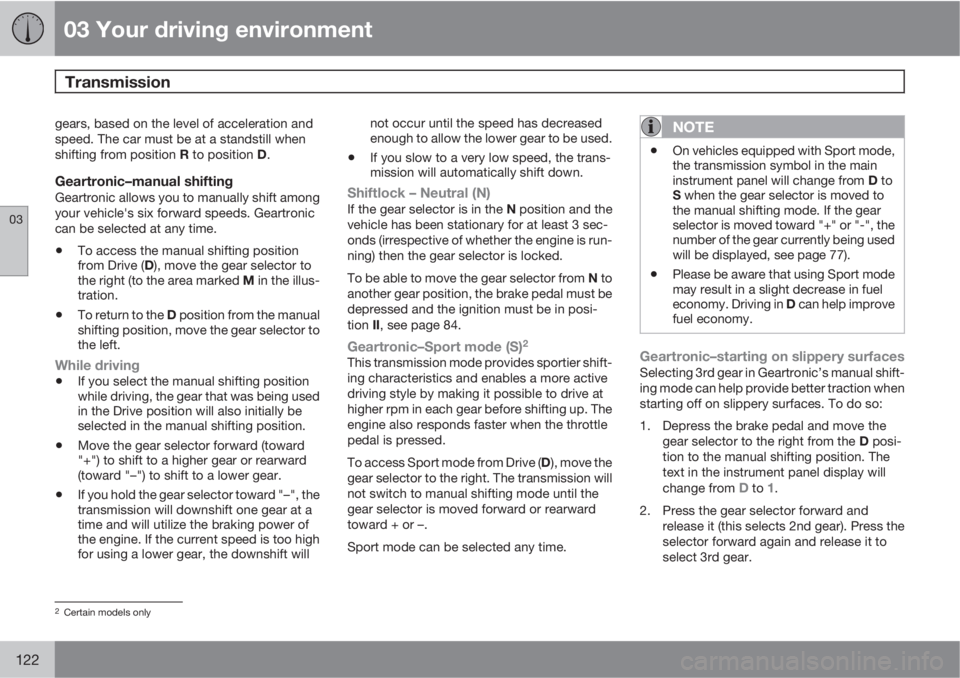
Geartronic–manual shiftingGeartronic allows you to manually shift among
your vehicle's six forward speeds. Geartronic
can be selected at any time.
•To access the manual shifting position
from Drive (D), move the gear selector to
the right (to the area marked M in the illus-
tration.
•To return to the D position from the manual
shifting position, move the gear selector to
the left.
While driving
•If you select the manual shifting position
while driving, the gear that was being used
in the Drive position will also initially be
selected in the manual shifting position.
•Move the gear selector forward (toward
"+") to shift to a higher gear or rearward
(toward "–") to shift to a lower gear.
•If you hold the gear selector toward "–", the
transmission will downshift one gear at a
time and will utilize the braking power of
the engine. If the current speed is too high
for using a lower gear, the downshift willnot occur until the speed has decreased
enough to allow the lower gear to be used.
•If you slow to a very low speed, the trans-
mission will automatically shift down.
Shiftlock – Neutral (N)If the gear selector is in the N position and the
vehicle has been stationary for at least 3 sec-
onds (irrespective of whether the engine is run-
ning) then the gear selector is locked.
To be able to move the gear selector from N to
another gear position, the brake pedal must be
depressed and the ignition must be in posi-
tion II, see page 84.
Geartronic–Sport mode (S)2
This transmission mode provides sportier shift-
ing characteristics and enables a more active
driving style by making it possible to drive at
higher rpm in each gear before shifting up. The
engine also responds faster when the throttle
pedal is pressed.
To access Sport mode from Drive (D), move the
gear selector to the right. The transmission will
not switch to manual shifting mode until the
gear selector is moved forward or rearward
toward + or –.
Sport mode can be selected any time.
NOTE
•On vehicles equipped with Sport mode,
the transmission symbol in the main
instrument panel will change from D to
S when the gear selector is moved to
the manual shifting mode. If the gear
selector is moved toward "+" or "-", the
number of the gear currently being used
will be displayed, see page 77).
•Please be aware that using Sport mode
may result in a slight decrease in fuel
economy. Driving in D can help improve
fuel economy.
Geartronic–starting on slippery surfacesSelecting 3rd gear in Geartronic’s manual shift-
ing mode can help provide better traction when
starting off on slippery surfaces. To do so:
1. Depress the brake pedal and move the
gear selector to the right from the D posi-
tion to the manual shifting position. The
text in the instrument panel display will
change from
D to 1.
2. Press the gear selector forward and
release it (this selects 2nd gear). Press the
selector forward again and release it to
select 3rd gear.
2Certain models only
Page 132 of 382
03 Your driving environment
Hill Descent Control (HDC)*
03
130* Option/accessory, for more information, see Introduction.
Introduction
Normally, when the accelerator pedal is
released while driving down hills, the vehicle's
speed slows as the engine runs at lower rpm
(the normal engine braking effect). However, if
the downhill gradient becomes steeper and if
the vehicle is carrying a load, speed increases
despite the engine braking effect. In this situa-
tion, the brakes must be applied to reduce the
vehicle's speed.
HDC is a type of automatic engine brake and
makes it possible to increase or decrease the
vehicle's speed on downhill gradients using
only the accelerator pedal, without applying
the brakes. The brake system functions auto-
matically to maintain a low and steady speed.
HDC is particularly useful when driving down
steep hills with rough surfaces, and where the
road may have slippery patches.
WARNING
HDC does not function in all situations, and
is a supplementary braking aid. The driver
has full responsibility for driving in a safe
manner.
Function
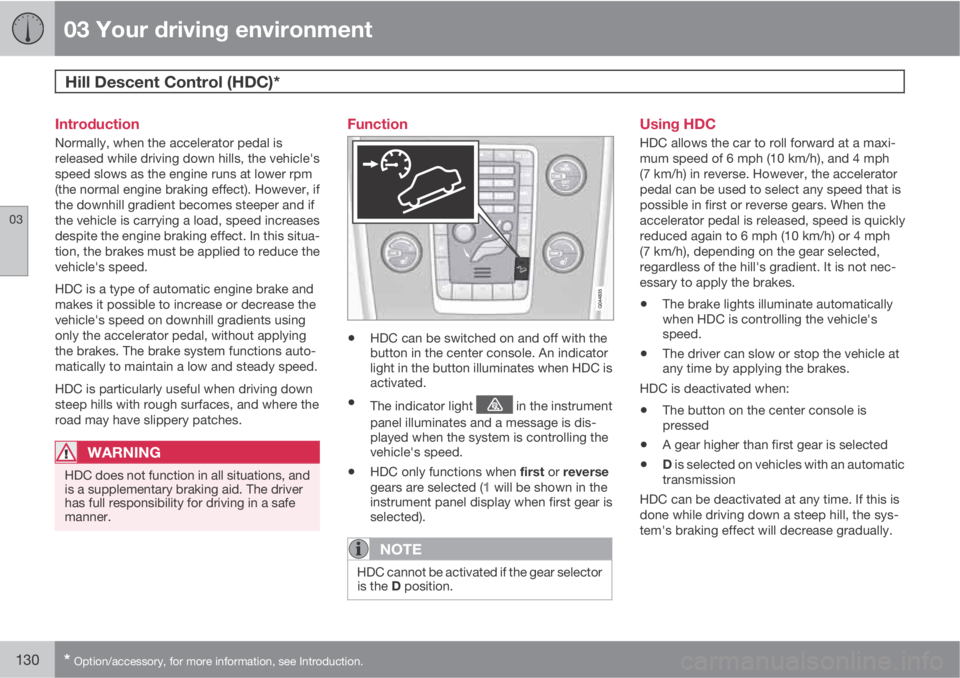
•HDC can be switched on and off with the
button in the center console. An indicator
light in the button illuminates when HDC is
activated.
•The indicator light in the instrument
panel illuminates and a message is dis-
played when the system is controlling the
vehicle's speed.
•HDC only functions when first or reverse
gears are selected (1 will be shown in the
instrument panel display when first gear is
selected).
NOTE
HDC cannot be activated if the gear selector
is the D position.
Using HDC
HDC allows the car to roll forward at a maxi-
mum speed of 6 mph (10 km/h), and 4 mph
(7 km/h) in reverse. However, the accelerator
pedal can be used to select any speed that is
possible in first or reverse gears. When the
accelerator pedal is released, speed is quickly
reduced again to 6 mph (10 km/h) or 4 mph
(7 km/h), depending on the gear selected,
regardless of the hill's gradient. It is not nec-
essary to apply the brakes.
•The brake lights illuminate automatically
when HDC is controlling the vehicle's
speed.
•The driver can slow or stop the vehicle at
any time by applying the brakes.
HDC is deactivated when:
•The button on the center console is
pressed
•A gear higher than first gear is selected
•D is selected on vehicles with an automatic
transmission
HDC can be deactivated at any time. If this is
done while driving down a steep hill, the sys-
tem's braking effect will decrease gradually.
Page 133 of 382
03 Your driving environment
Hill Descent Control (HDC)*
03
* Option/accessory, for more information, see Introduction.131
NOTE
Engine response to pressure on the accel-
erator pedal may be slightly slower than
normal when HDC is activated.
Page 137 of 382
04 Driver support
Stability system
04
135
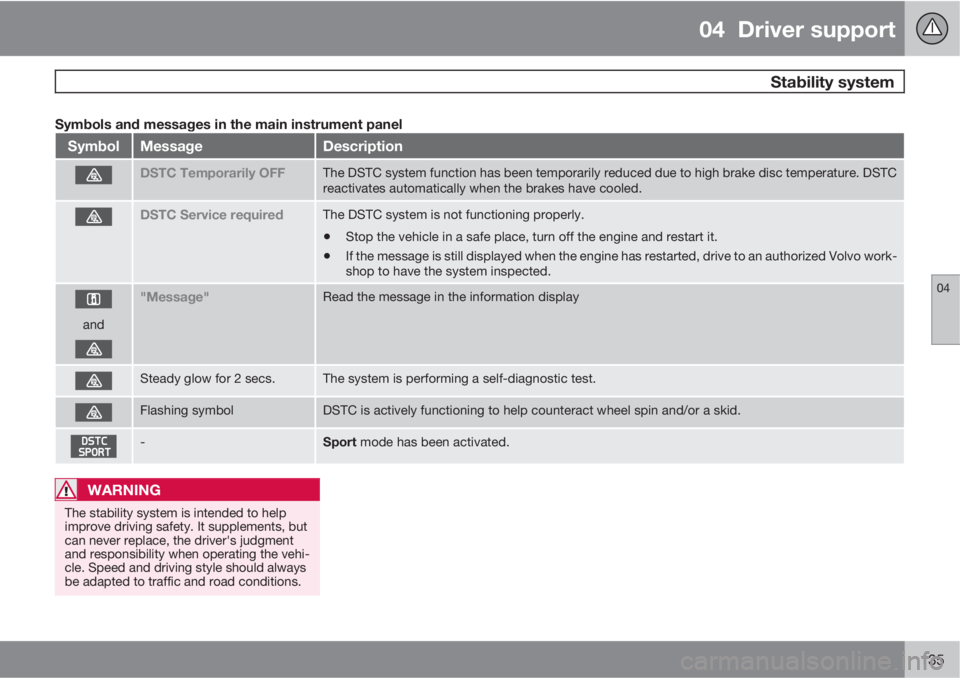
Symbols and messages in the main instrument panel
SymbolMessageDescription
DSTC Temporarily OFFThe DSTC system function has been temporarily reduced due to high brake disc temperature. DSTC
reactivates automatically when the brakes have cooled.
DSTC Service requiredThe DSTC system is not functioning properly.
•Stop the vehicle in a safe place, turn off the engine and restart it.
•If the message is still displayed when the engine has restarted, drive to an authorized Volvo work-
shop to have the system inspected.
and
"Message"Read the message in the information display
Steady glow for 2 secs.The system is performing a self-diagnostic test.
Flashing symbolDSTC is actively functioning to help counteract wheel spin and/or a skid.
-Sport mode has been activated.
WARNING
The stability system is intended to help
improve driving safety. It supplements, but
can never replace, the driver's judgment
and responsibility when operating the vehi-
cle. Speed and driving style should always
be adapted to traffic and road conditions.
Page 138 of 382
04 Driver support
Road sign information (RSI)
04
136
Introduction
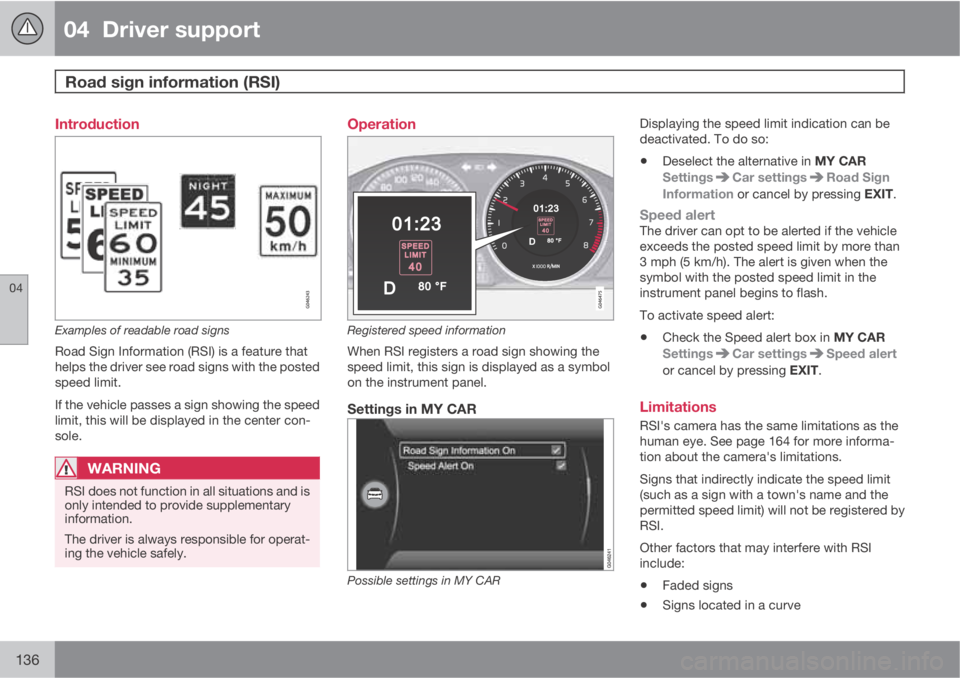
Examples of readable road signs
Road Sign Information (RSI) is a feature that
helps the driver see road signs with the posted
speed limit.
If the vehicle passes a sign showing the speed
limit, this will be displayed in the center con-
sole.
WARNING
RSI does not function in all situations and is
only intended to provide supplementary
information.
The driver is always responsible for operat-
ing the vehicle safely.
Operation
Registered speed information
When RSI registers a road sign showing the
speed limit, this sign is displayed as a symbol
on the instrument panel.
Settings in MY CAR
Possible settings in MY CAR
Displaying the speed limit indication can be
deactivated. To do so:
•Deselect the alternative in MY CAR
Settings
Car settingsRoad Sign
Information or cancel by pressing EXIT.
Speed alertThe driver can opt to be alerted if the vehicle
exceeds the posted speed limit by more than
3 mph (5 km/h). The alert is given when the
symbol with the posted speed limit in the
instrument panel begins to flash.
To activate speed alert:
•Check the Speed alert box in MY CAR
Settings
Car settingsSpeed alert
or cancel by pressing EXIT.
Limitations
RSI's camera has the same limitations as the
human eye. See page 164 for more informa-
tion about the camera's limitations.
Signs that indirectly indicate the speed limit
(such as a sign with a town's name and the
permitted speed limit) will not be registered by
RSI.
Other factors that may interfere with RSI
include:
•Faded signs
•Signs located in a curve
Page 142 of 382
04 Driver support
Adaptive Cruise Control (ACC)*
04
140* Option/accessory, for more information, see Introduction.
Introduction
Adaptive Cruise Control (ACC) is an optional
system designed to assist the driver by main-
taining a set speed or a set time interval to the
vehicle ahead. It is primarily intended for use
on long straight roads in steady traffic, such as
on highways and other main roads.
When the driver has set the desired speed and
the time interval to the vehicle ahead, ACC
functions as follows:
•If there are no other vehicles in the lane
ahead of you, your vehicle will travel at the
set speed.
•If ACC's radar sensor detects a slower
moving vehicle in the lane ahead, the sys-
tem will adapt your vehicle's speed to help
maintain the set time interval to the vehicle
ahead. When there are no longer slower
moving vehicles ahead, your vehicle will
accelerate to resume the set speed.
If ACC is switched off completely or in standby
mode and your vehicle comes too close to
another vehicle ahead, the driver will be
warned by the Distance Alert system (see
page 151).
WARNING
•Adaptive Cruise Control cannot cover
all driving situations and traffic, weather
and road conditions. The "Function"
section provides information about lim-
itations that the driver must be aware of
before using this feature.
•This system is designed to be a supple-
mentary driving aid. It is not, however,
intended to replace the driver's atten-
tion and judgement. The driver is
responsible for maintaining a safe dis-
tance and speed and must intervene if
Adaptive Cruise Control does not main-
tain a suitable speed or suitable dis-
tance to the vehicle ahead.
•Maintenance of ACC components may
only be performed by a trained and
qualified Volvo technician.
Function
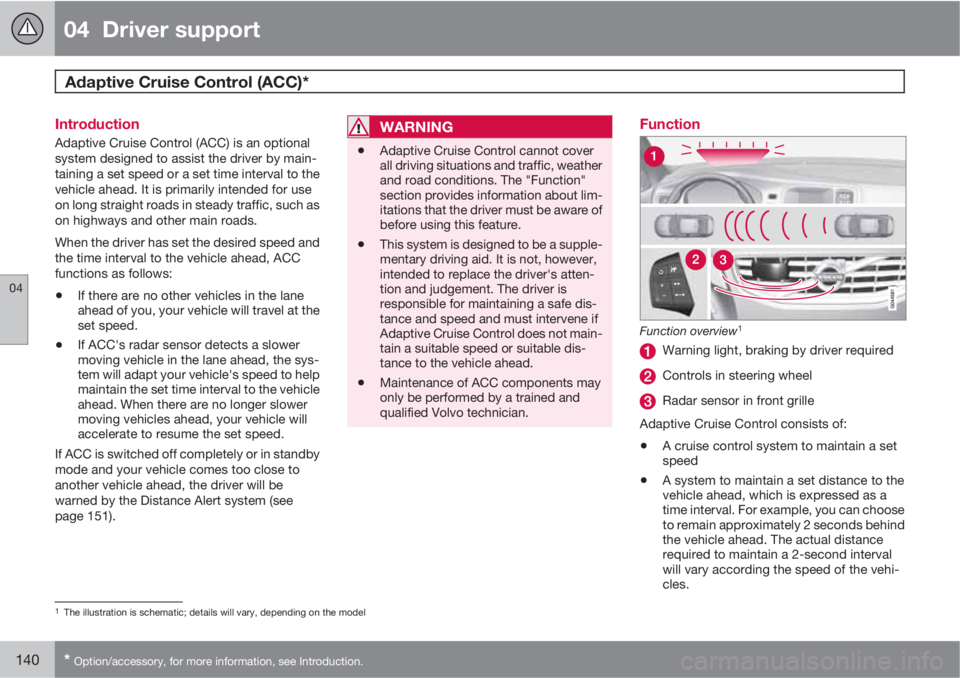
Function overview1
Warning light, braking by driver required
Controls in steering wheel
Radar sensor in front grille
Adaptive Cruise Control consists of:
•A cruise control system to maintain a set
speed
•A system to maintain a set distance to the
vehicle ahead, which is expressed as a
time interval. For example, you can choose
to remain approximately 2 seconds behind
the vehicle ahead. The actual distance
required to maintain a 2-second interval
will vary according the speed of the vehi-
cles.
1The illustration is schematic; details will vary, depending on the model