ESP VOLVO XC60 2013 Owner´s Manual
[x] Cancel search | Manufacturer: VOLVO, Model Year: 2013, Model line: XC60, Model: VOLVO XC60 2013Pages: 382, PDF Size: 7.08 MB
Page 143 of 382
04 Driver support
Adaptive Cruise Control (ACC)*
04
* Option/accessory, for more information, see Introduction.141
WARNING
•Adaptive Cruise Control is not a colli-
sion avoidance system. The driver is
always responsible for applying the
brakes if the system does not detect
another vehicle.
•Adaptive Cruise Control does not react
to people or animals, or small vehicles
such as bicycles and motorcycles. It
also does not react to slow moving,
parked or approaching vehicles, or sta-
tionary objects.
•Do not use Adaptive Cruise Control in
demanding driving conditions such as
city driving or other heavy traffic situa-
tions, in slippery conditions, when there
is a great deal of water or slush on the
road, during heavy rain or snow, in poor
visibility, on winding roads or on high-
way on- or off-ramps.
The distance to the vehicle ahead (in the same
lane) is monitored by a radar sensor. Your vehi-
cle's speed is regulated by accelerating and
braking. The brakes may emit a sound when
they are being modulated by the adaptive
cruise control system. This is normal.
WARNING
The brake pedal moves when the adaptive
cruise control system modulates the
brakes. Do not rest your foot under the
brake pedal.
The ACC system is designed to smoothly reg-
ulate speed. However, the driver must apply
the brakes in situations that require immediate
braking. This applies when there are great dif-
ferences in speed between vehicles, or if the
vehicle ahead brakes suddenly.
WARNING
Due to limitations in the radar sensor, brak-
ing may occur unexpectedly or not at all,
see page 146.
Adaptive Cruise Control can be put in active
mode at any permitted speed. However, if the
vehicle's speed falls below 18 mph (30 km/h)
or if engine speed (rpm) becomes too low, ACC
disengages (goes into standby mode) and will
no longer modulate the brakes
2. The driver will
then have to maintain a safe distance to the
vehicle ahead.
WARNING
When Adaptive Cruise Control is in standby
mode or is switched off completely, the
brakes will not be modulated automatically.
The driver must assume full control over the
vehicle.
Warning light—driver braking requiredAdaptive Cruise Control can exert brake force
that is equivalent to approximately 40% of the
vehicle's total braking capacity. In situations
requiring more brake force than ACC can pro-
vide and if the driver does not apply the brakes,
an audible signal from the Collision Warning
system will sound and warning light will illumi-
nate (see page 161) in the windshield to alert
the driver to react.
NOTE
Strong sunlight, reflections, extreme light
contrasts, the use of sunglasses, or if the
driver is not looking straight ahead may
make the visual warning signal in the wind-
shield difficult to see.
2Does not apply to vehicles with the optional Queue Assist. See page 144 for more information.
Page 149 of 382
04 Driver support
Adaptive Cruise Control (ACC)*
04
* Option/accessory, for more information, see Introduction.147
Situations where ACC may not function
optimally
WARNING
•The radar sensor has a limited field of
vision. In some situations it may detect
a vehicle later than expected or not
detect other vehicles at all.
•If ACC is not functioning properly,
cruise control will also be disabled.
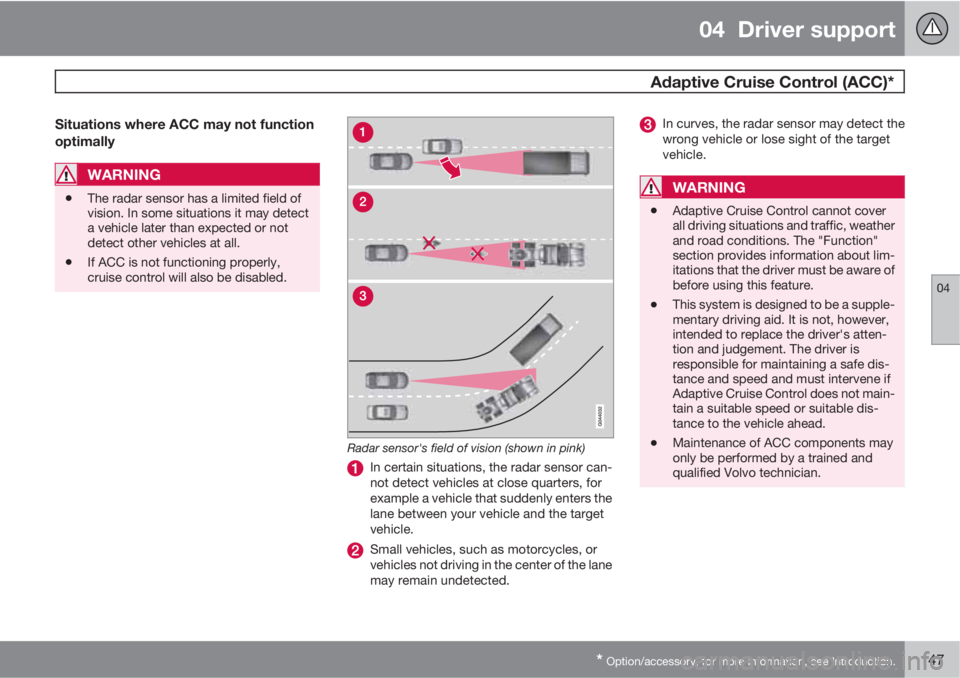
Radar sensor's field of vision (shown in pink)
In certain situations, the radar sensor can-
not detect vehicles at close quarters, for
example a vehicle that suddenly enters the
lane between your vehicle and the target
vehicle.
Small vehicles, such as motorcycles, or
vehicles not driving in the center of the lane
may remain undetected.
In curves, the radar sensor may detect the
wrong vehicle or lose sight of the target
vehicle.
WARNING
•Adaptive Cruise Control cannot cover
all driving situations and traffic, weather
and road conditions. The "Function"
section provides information about lim-
itations that the driver must be aware of
before using this feature.
•This system is designed to be a supple-
mentary driving aid. It is not, however,
intended to replace the driver's atten-
tion and judgement. The driver is
responsible for maintaining a safe dis-
tance and speed and must intervene if
Adaptive Cruise Control does not main-
tain a suitable speed or suitable dis-
tance to the vehicle ahead.
•Maintenance of ACC components may
only be performed by a trained and
qualified Volvo technician.
Page 150 of 382
04 Driver support
Adaptive Cruise Control (ACC)*
04
148* Option/accessory, for more information, see Introduction.
WARNING
•Adaptive Cruise Control is not a colli-
sion avoidance system. The driver is
always responsible for applying the
brakes if the system does not detect
another vehicle.
•Adaptive Cruise Control does not react
to people or animals, or small vehicles
such as bicycles and motorcycles. It
also does not react to slow moving,
parked or approaching vehicles, or sta-
tionary objects.
•Do not use Adaptive Cruise Control in
demanding driving conditions such as
city driving or other heavy traffic situa-
tions, in slippery conditions, when there
is a great deal of water or slush on the
road, during heavy rain or snow, in poor
visibility, on winding roads or on high-
way on- or off-ramps.
Fault tracing and actions
If the message Radar blocked See manual is
displayed, this means that the radar signals
from the sensor have been obstructed and that
a vehicle ahead cannot be detected.
This, in turn, means that the functions of the
ACC, Distance Alert, and Collision Warning
System with Auto-brake and Pedestrian
Detection will not function.
The table lists possible causes for this mes-
sage being displayed, and suitable actions.
CauseAction
The surface of the radar in the grille is dirty or obstructed in some way.Clean the radar surface, or remove the object causing the obstruction.
Heavy rain or snow is interfering with the radar signals.No action possible. Heavy precipitation may affect the function of the
radar.
Page 156 of 382
04 Driver support
City Safety™
04
154
Introduction
City Safety™1 is a support system designed to
help the driver avoid low speed collisions when
driving in slow-moving, stop-and-go traffic.
City Safety™ is not active if your vehicle’s
speed is below approximately 2 mph (4 km/h).
This means that City Safety™ will not react if
your vehicle approaches another vehicle at
very low speed, for example, when parking.
The function is active at speeds up to approx-
imately 30 mph (50 km/h) and assists the driver
by applying the brakes automatically, thereby
avoiding or helping to reduce the effects of a
collision.
City Safety™ is designed to intervene as late
as possible to help avoid unnecessary activa-
tion.
City Safety™ triggers brief, forceful braking if a
low-speed collision is imminent. However, the
system will not intervene in situations where
the driver actively steers the vehicle or applies
the brakes, even if a collision cannot be avoi-
ded. This is done in order to always give the
driver’s actions highest priority.
City Safety™ activates in situations where the
driver has not applied the brakes in time, whichmeans that the system cannot help the driver
in all situations.
City Safety™ should not be used to alter the
way in which the driver operates the vehicle.
The driver should never rely solely on this sys-
tem to safely stop the vehicle.
Normally, the occupants of the vehicle will not
be aware of City Safety™ except when the
system intervenes when a low-speed collision
is imminent.
If the vehicle is also equipped with the optional
Collision Warning with Full Auto-brake and
Pedestrian Detection system, the two systems
interact. For more information about the Colli-
sion Warning with Auto-brake system, see
page 160.
WARNING
•City Safety™ is a supplemental aid to
the driver. It can never replace the
driver’s attention to traffic conditions or
his/her responsibility for operating the
vehicle in a safe manner.
•City Safety™ does not function in all
driving situations or in all traffic, weather
or road conditions.
WARNING
•City Safety™ only reacts to vehicles
traveling in the same direction as your
vehicle and does not react to small vehi-
cles, bicycles or motorcycles or to peo-
ple or animals.
•City Safety™ is not activated when your
vehicle is backing up.
•City Safety™ functions at speeds up to
30 mph (50 km/h). This system can help
prevent a collision if the difference in
speed between your vehicle and the
vehicle ahead is less than 9 mph
(15 km/h). If the difference in speed is
greater, a collision cannot be avoided
but the speed at which the collision
occurs can be reduced. The driver must
apply the vehicle’s brakes for full brak-
ing effect.
•City Safety™ will not intervene in a
potential collision situation if the vehicle
is being driven actively. The driver is
always responsible for maintaining a
safe distance to a vehicle or object
ahead.
1City Safety is a registered trademark of the Volvo Car Corporation
Page 163 of 382
04 Driver support
Collision warning with Full Auto-brake and Pedestrian Detection*
04
* Option/accessory, for more information, see Introduction.161
WARNING
•Collision Warning will not provide a
warning or brake the vehicle for pedes-
trians in darkness or in tunnels, even if
there is street lighting in the area.
•The auto-brake function can help pre-
vent a collision or reduce the speed at
impact but the driver should always
apply the brakes for the best possible
braking effect, even if auto-brake is
actively applying the brakes.
•Never wait for a collision warning. This
system is designed to be a supplemen-
tary driving aid. It is not, however,
intended to replace the driver's atten-
tion and judgement. The driver is
responsible for maintaining a safe dis-
tance and speed, even when the colli-
sion warning system is in use.
•Maintenance of the Collision Warning
system's components must only be
performed by a trained and qualified
Volvo technician.
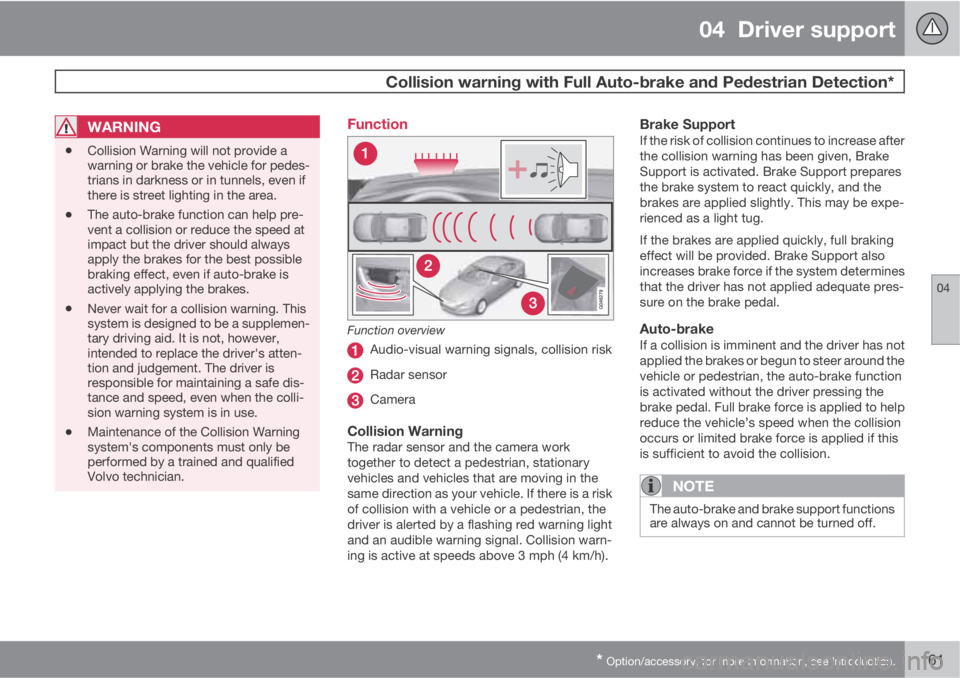
Function
Function overview
Audio-visual warning signals, collision risk
Radar sensor
Camera
Collision WarningThe radar sensor and the camera work
together to detect a pedestrian, stationary
vehicles and vehicles that are moving in the
same direction as your vehicle. If there is a risk
of collision with a vehicle or a pedestrian, the
driver is alerted by a flashing red warning light
and an audible warning signal. Collision warn-
ing is active at speeds above 3 mph (4 km/h).
Brake SupportIf the risk of collision continues to increase after
the collision warning has been given, Brake
Support is activated. Brake Support prepares
the brake system to react quickly, and the
brakes are applied slightly. This may be expe-
rienced as a light tug.
If the brakes are applied quickly, full braking
effect will be provided. Brake Support also
increases brake force if the system determines
that the driver has not applied adequate pres-
sure on the brake pedal.
Auto-brakeIf a collision is imminent and the driver has not
applied the brakes or begun to steer around the
vehicle or pedestrian, the auto-brake function
is activated without the driver pressing the
brake pedal. Full brake force is applied to help
reduce the vehicle’s speed when the collision
occurs or limited brake force is applied if this
is sufficient to avoid the collision.
NOTE
The auto-brake and brake support functions
are always on and cannot be turned off.
Page 167 of 382
04 Driver support
Collision warning with Full Auto-brake and Pedestrian Detection*
04
* Option/accessory, for more information, see Introduction.165
body and the person must be at least
32 in. (80 cm) tall.
•The system cannot detect a pedestrian
carrying a large object.
•The camera's capacity to see a pedestrian
at dawn or dusk is limited, much as it is for
the human eye.
•The camera's function is deactivated and
will not detect a pedestrian in darkness or
in tunnels, even if there is street lighting in
the area.
WARNING
•Collision Warning with Full Auto-brake
and Pedestrian Detection is designed to
be a supplementary driving aid. It is not,
however, intended to replace the driv-
er's attention and judgement. The driver
is always responsible for operating the
vehicle in a safe manner.
•The system cannot detect all pedes-
trians in all situations, such as in dark-
ness/at night and cannot detect parti-
ally hidden pedestrians, people who are
less than approx. 32 in. (80 cm) tall, or
people wearing clothing that obscures
the contours of their bodies.
Fault tracing and actions
If the message Windscreen Sensors
blocked is displayed, this means that the cam-
era is obscured and cannot detect pedestrians,
vehicles or road marker lines in front of the
vehicle.
This, in turn, means that Collision Warning with
Full Auto-brake and Pedestrian Detection,
Lane Departure Warning, and Driver Alert Con-
trol will not have full functionality.
The table lists possible causes for this mes-
sage being displayed, and suitable actions.
Page 184 of 382
04 Driver support
Blind Spot Information System*
04
182* Option/accessory, for more information, see Introduction.
Introduction
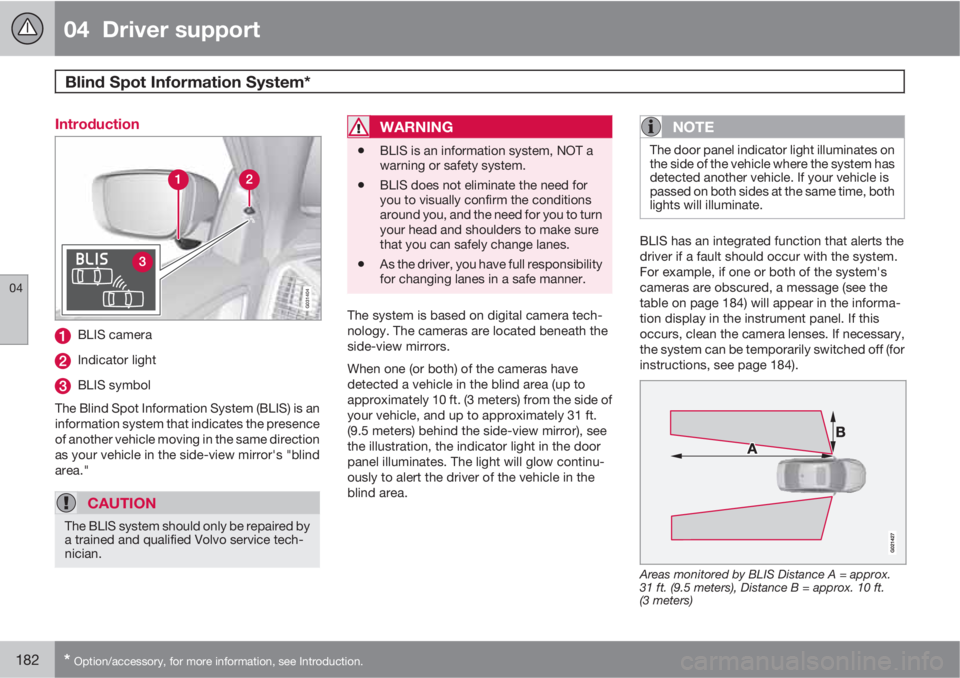
G031404
BLIS camera
Indicator light
BLIS symbol
The Blind Spot Information System (BLIS) is an
information system that indicates the presence
of another vehicle moving in the same direction
as your vehicle in the side-view mirror's "blind
area."
CAUTION
The BLIS system should only be repaired by
a trained and qualified Volvo service tech-
nician.
WARNING
•BLIS is an information system, NOT a
warning or safety system.
•BLIS does not eliminate the need for
you to visually confirm the conditions
around you, and the need for you to turn
your head and shoulders to make sure
that you can safely change lanes.
•As the driver, you have full responsibility
for changing lanes in a safe manner.
The system is based on digital camera tech-
nology. The cameras are located beneath the
side-view mirrors.
When one (or both) of the cameras have
detected a vehicle in the blind area (up to
approximately 10 ft. (3 meters) from the side of
your vehicle, and up to approximately 31 ft.
(9.5 meters) behind the side-view mirror), see
the illustration, the indicator light in the door
panel illuminates. The light will glow continu-
ously to alert the driver of the vehicle in the
blind area.
NOTE
The door panel indicator light illuminates on
the side of the vehicle where the system has
detected another vehicle. If your vehicle is
passed on both sides at the same time, both
lights will illuminate.
BLIS has an integrated function that alerts the
driver if a fault should occur with the system.
For example, if one or both of the system's
cameras are obscured, a message (see the
table on page 184) will appear in the informa-
tion display in the instrument panel. If this
occurs, clean the camera lenses. If necessary,
the system can be temporarily switched off (for
instructions, see page 184).
Areas monitored by BLIS Distance A = approx.
31 ft. (9.5 meters), Distance B = approx. 10 ft.
(3 meters)
Page 190 of 382
05 Comfort and driving pleasure
Volvo Sensus
05
188* Option/accessory, for more information, see Introduction.
Introduction
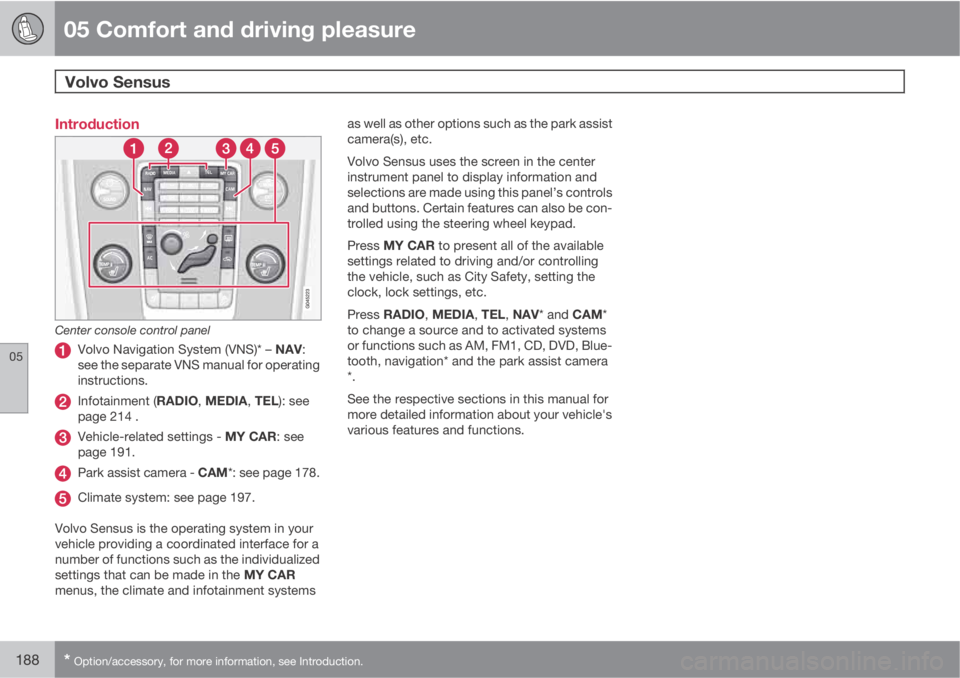
Center console control panel
Volvo Navigation System (VNS)* – NAV:
see the separate VNS manual for operating
instructions.
Infotainment (RADIO, MEDIA, TEL): see
page 214 .
Vehicle-related settings - MY CAR: see
page 191.
Park assist camera - CAM*: see page 178.
Climate system: see page 197.
Volvo Sensus is the operating system in your
vehicle providing a coordinated interface for a
number of functions such as the individualized
settings that can be made in the MY CAR
menus, the climate and infotainment systemsas well as other options such as the park assist
camera(s), etc.
Volvo Sensus uses the screen in the center
instrument panel to display information and
selections are made using this panel’s controls
and buttons. Certain features can also be con-
trolled using the steering wheel keypad.
Press MY CAR to present all of the available
settings related to driving and/or controlling
the vehicle, such as City Safety, setting the
clock, lock settings, etc.
Press RADIO, MEDIA, TEL, NAV* and CAM*
to change a source and to activated systems
or functions such as AM, FM1, CD, DVD, Blue-
tooth, navigation* and the park assist camera
*.
See the respective sections in this manual for
more detailed information about your vehicle's
various features and functions.
Page 191 of 382
05 Comfort and driving pleasure
Menus and messages
05
* Option/accessory, for more information, see Introduction.189 Main instrument panel
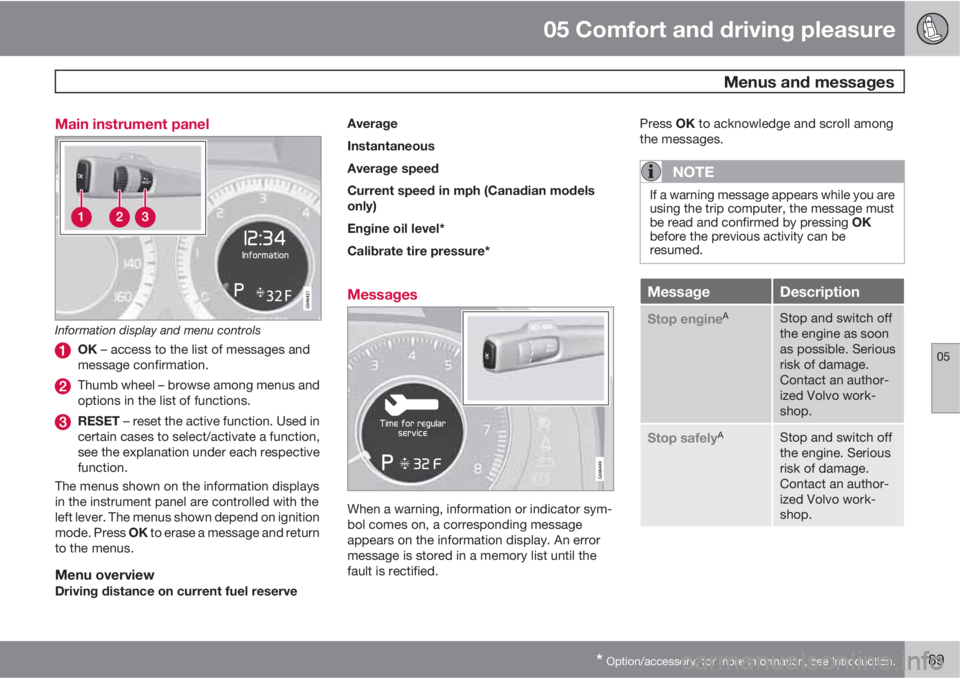
Information display and menu controls
OK – access to the list of messages and
message confirmation.
Thumb wheel – browse among menus and
options in the list of functions.
RESET – reset the active function. Used in
certain cases to select/activate a function,
see the explanation under each respective
function.
The menus shown on the information displays
in the instrument panel are controlled with the
left lever. The menus shown depend on ignition
mode. Press OK to erase a message and return
to the menus.
Menu overviewDriving distance on current fuel reserveAverage
Instantaneous
Average speed
Current speed in mph (Canadian models
only)
Engine oil level*
Calibrate tire pressure*
Messages
When a warning, information or indicator sym-
bol comes on, a corresponding message
appears on the information display. An error
message is stored in a memory list until the
fault is rectified.Press OK to acknowledge and scroll among
the messages.
NOTE
If a warning message appears while you are
using the trip computer, the message must
be read and confirmed by pressing OK
before the previous activity can be
resumed.
MessageDescription
Stop engineAStop and switch off
the engine as soon
as possible. Serious
risk of damage.
Contact an author-
ized Volvo work-
shop.
Stop safelyAStop and switch off
the engine. Serious
risk of damage.
Contact an author-
ized Volvo work-
shop.
Page 199 of 382
05 Comfort and driving pleasure
Climate system
05
* Option/accessory, for more information, see Introduction.197 Introduction
Air conditioningThe vehicle is equipped with Electronic Climate
Control (ECC). The climate control system
cools, heats or dehumidifies the air in the pas-
senger compartment.
NOTE
•The air conditioning can be switched
off, but to ensure the best possible cli-
mate comfort in the passenger com-
partment and to prevent the windows
from misting, it should always be on.
•In warm weather, a small amount of
water may accumulate under the car
when it has been parked. This water is
condensation from the A/C system and
is normal.
Sensor location
•The sunlight sensor is located on the top
side of the dashboard.
NOTE
The sunlight sensor monitors which side of
the car that is most exposed to sunlight.
This can mean that the temperature may
differ between the right and left-side air
vents, even if the temperatures set for both
sides of the passenger compartment are the
same.
•The temperature sensor for the passenger
compartment is located below the climate
control panel.
•The outside (ambient) temperature sensor
is located on the door mirror.
•The humidity sensor* is located in the inte-
rior rearview mirror.
NOTE
Do not cover or block the sensors with
clothing or other objects.
Side windows and laminated panoramic
roof
To ensure that the air conditioning works opti-
mally, the side windows, and the laminated
panoramic roof should be closed.
Fog on the inside of the windowsThe defroster function should be used to
remove fog or mist from the inside of the win-
dows. Keeping the windows clean with a com-mercially available window washing spray will
also help prevent fogging or misting.
Temporary shut-off of the air
conditioning
The air conditioning is momentarily disen-
gaged during full-throttle acceleration or when
driving uphill with a trailer. This may result in a
temporary increase in cabin temperature.
Ice and snowAlways keep the air intake grille at the base of
the windshield free of snow.
Climate system maintenanceSpecial tools and equipment are required to
maintain and carry out repairs on the climate
system. Work of this type should only be done
by a trained and qualified Volvo service tech-
nician.
RefrigerantVolvo cares about the environment. The air
conditioning system in your car contains a
CFC-free refrigerant – R134a. This substance
will not deplete the ozone layer. The air condi-
tioning system contains 1.8 lbs (820 g) of
R134a. The systems uses PAG oil.
Passenger compartment filterReplace the cabin air filter with a new one at
the recommended intervals. Please refer to