high beam VOLVO XC60 2015 Owner´s Manual
[x] Cancel search | Manufacturer: VOLVO, Model Year: 2015, Model line: XC60, Model: VOLVO XC60 2015Pages: 406, PDF Size: 11.03 MB
Page 286 of 406
07 During your trip
Driving recommendations
07
284
WARNING
The cooling fan may start or continue to operate (for up to 6 minutes) after theengine has been switched off.
•Remove any auxiliary lights from in front of the grille when driving in hot weatherconditions.
• Do not exceed engine speeds of4500 rpm if driving with a trailer in hillyterrain. The oil temperature could becometoo high.
Conserving electrical currentKeep the following in mind to help minimize battery drain:
• When the engine is not running, avoid using ignition mode
II. Many electrical
systems (the audio system, the optionalnavigation system, power windows, etc)will function in ignition modes 0 and I.
These modes reduce drain on the battery.
• Please keep in mind that using systems,accessories, etc., that consume a greatdeal of current when the engine is notrunning could result in the battery beingcompletely drained. Driving or having theengine running for approximately15 minutes will help keep the batterycharged. •
The optional 12-volt socket in the cargoarea provides electrical current even withthe ignition switched off, which drains thebattery.
Before a long distance tripIt is always worthwhile to have your vehicle checked by a trained and qualified Volvoservice technician before driving long dis-tances. Your retailer will also be able to sup-ply you with bulbs, fuses, spark plugs andwiper blades for your use in the event thatproblems occur. As a minimum, the following items should be checked before any long trip:
• Check that engine runs smoothly and that fuel consumption is normal.
• Check for fuel, oil, and fluid leakage.
• Have the transmission oil level checked.
• Check condition of drive belts.
• Check state of the battery's charge.
• Examine tires carefully (the spare tire aswell), and replace those that are worn.Check tire pressures.
• The brakes, front wheel alignment, andsteering gear should be checked by atrained and qualified Volvo service techni-cian only.
• Check all lights, including high beams. •
Reflective warning triangles are legallyrequired in some states/provinces.
• Have a word with a trained and qualifiedVolvo service technician if you intend todrive in countries where it may be difficultto obtain the correct fuel.
• Consider your destination. If you will bedriving through an area where snow or iceare likely to occur, consider snow tires.
Cold weather precautionsIf you wish to check your vehicle before the approach of cold weather, the followingadvice is worth noting:
• Make sure that the engine coolant con- tains 50 percent antifreeze. Any othermixture will reduce freeze protection. Thisgives protection against freezing down to–31 °F (–35 °C). The use of "recycled"antifreeze is not approved by Volvo. Dif-ferent types of antifreeze must not bemixed.
• Volvo recommends using only genuineVolvo antifreeze in your vehicle's radiator.
• Try to keep the fuel tank well filled – thishelps prevent the formation of condensa-tion in the tank. In addition, in extremelycold weather conditions it is worthwhileto add fuel line de-icer before refueling.
• The viscosity of the engine oil is impor-tant. Oil with low viscosity (thinner oil)
Page 352 of 406
09 Maintenance and specifications
Replacing bulbs 09
350
NOTE
Before starting to replace a bulb, see page 348.
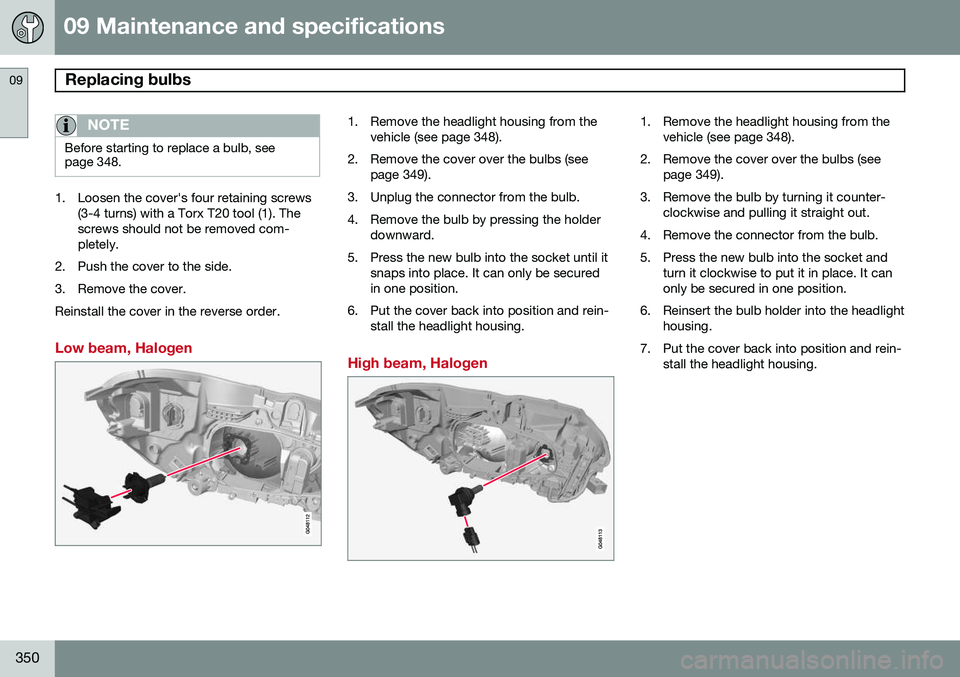
1. Loosen the cover's four retaining screws(3-4 turns) with a Torx T20 tool (1). The screws should not be removed com-pletely.
2. Push the cover to the side.
3. Remove the cover.Reinstall the cover in the reverse order.
Low beam, Halogen
1. Remove the headlight housing from the vehicle (see page 348).
2. Remove the cover over the bulbs (see page 349).
3. Unplug the connector from the bulb.
4. Remove the bulb by pressing the holder downward.
5. Press the new bulb into the socket until it snaps into place. It can only be secured in one position.
6. Put the cover back into position and rein- stall the headlight housing.
High beam, Halogen
1. Remove the headlight housing from the vehicle (see page 348).
2. Remove the cover over the bulbs (see page 349).
3. Remove the bulb by turning it counter- clockwise and pulling it straight out.
4. Remove the connector from the bulb.
5. Press the new bulb into the socket and turn it clockwise to put it in place. It can only be secured in one position.
6. Reinsert the bulb holder into the headlight housing.
7. Put the cover back into position and rein- stall the headlight housing.
Page 353 of 406
09 Maintenance and specifications
Replacing bulbs09
}}
351
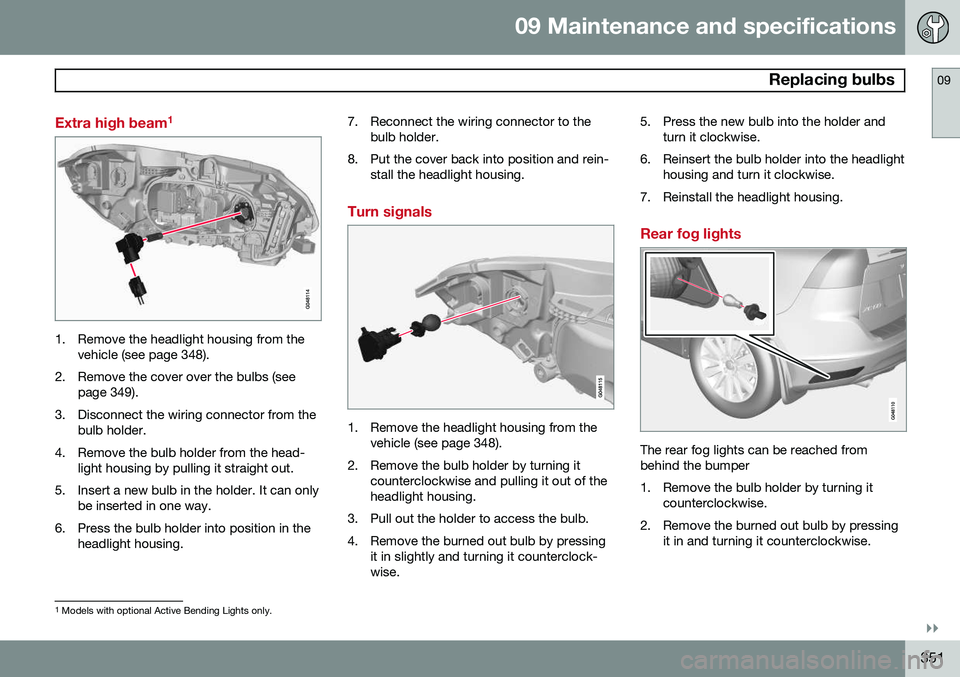
Extra high beam1
1. Remove the headlight housing from the
vehicle (see page 348).
2. Remove the cover over the bulbs (see page 349).
3. Disconnect the wiring connector from the bulb holder.
4. Remove the bulb holder from the head- light housing by pulling it straight out.
5. Insert a new bulb in the holder. It can only be inserted in one way.
6. Press the bulb holder into position in the headlight housing. 7. Reconnect the wiring connector to the
bulb holder.
8. Put the cover back into position and rein- stall the headlight housing.
Turn signals
1. Remove the headlight housing from thevehicle (see page 348).
2. Remove the bulb holder by turning it counterclockwise and pulling it out of the headlight housing.
3. Pull out the holder to access the bulb.
4. Remove the burned out bulb by pressing it in slightly and turning it counterclock- wise. 5. Press the new bulb into the holder and
turn it clockwise.
6. Reinsert the bulb holder into the headlight housing and turn it clockwise.
7. Reinstall the headlight housing.
Rear fog lights
The rear fog lights can be reached from behind the bumper
1. Remove the bulb holder by turning it counterclockwise.
2. Remove the burned out bulb by pressing it in and turning it counterclockwise.
1Models with optional Active Bending Lights only.
Page 355 of 406
09 Maintenance and specifications
Replacing bulbs09
}}}}
* Option/accessory, for more information, see Introduction.353
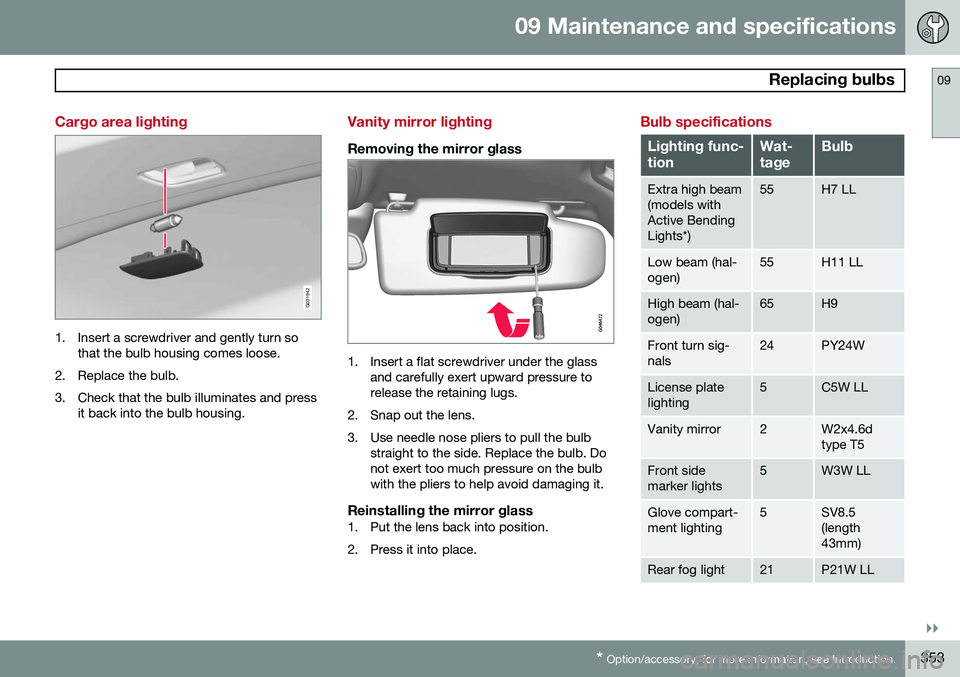
Cargo area lighting
G031942
1. Insert a screwdriver and gently turn so
that the bulb housing comes loose.
2. Replace the bulb.
3. Check that the bulb illuminates and press it back into the bulb housing.
Vanity mirror lighting
Removing the mirror glass
1. Insert a flat screwdriver under the glassand carefully exert upward pressure to release the retaining lugs.
2. Snap out the lens.
3. Use needle nose pliers to pull the bulb straight to the side. Replace the bulb. Do not exert too much pressure on the bulbwith the pliers to help avoid damaging it.
Reinstalling the mirror glass1. Put the lens back into position.
2. Press it into place.
Bulb specifications
Lighting func- tionWat- tageBulb
Extra high beam (models withActive BendingLights*)55H7 LL
Low beam (hal- ogen)55H11 LL
High beam (hal- ogen)65H9
Front turn sig- nals24PY24W
License plate lighting5C5W LL
Vanity mirror2W2x4.6d type T5
Front side marker lights5W3W LL
Glove compart- ment lighting5SV8.5 (length43mm)
Rear fog light21P21W LL
Page 391 of 406
10 Specifications
Overview of information and warning symbols
10
}}
* Option/accessory, for more information, see Introduction.389
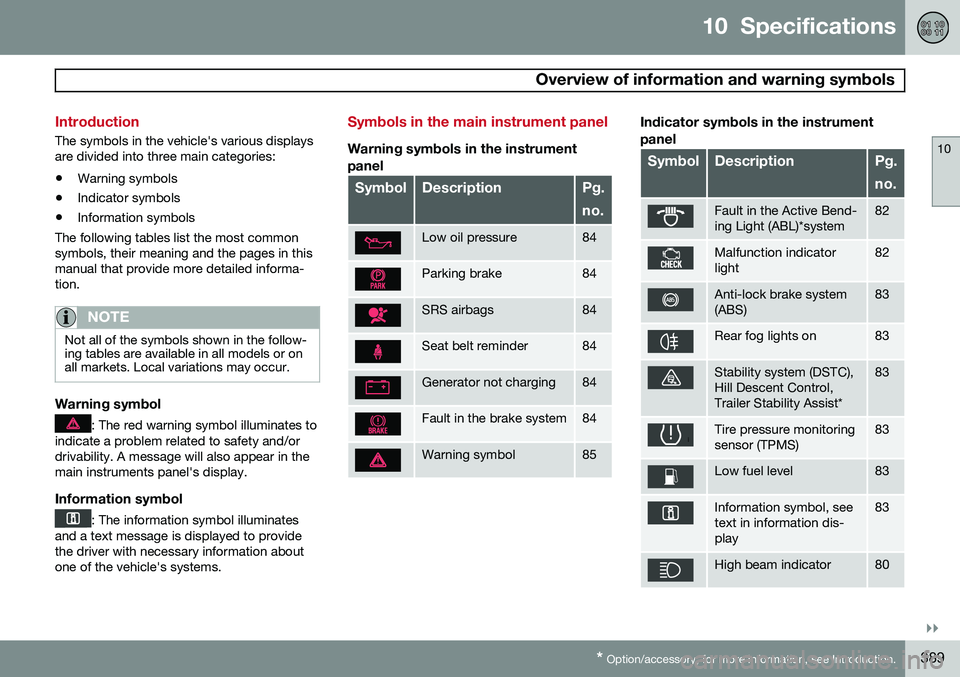
Introduction
The symbols in the vehicle's various displays are divided into three main categories:
• Warning symbols
• Indicator symbols
• Information symbols
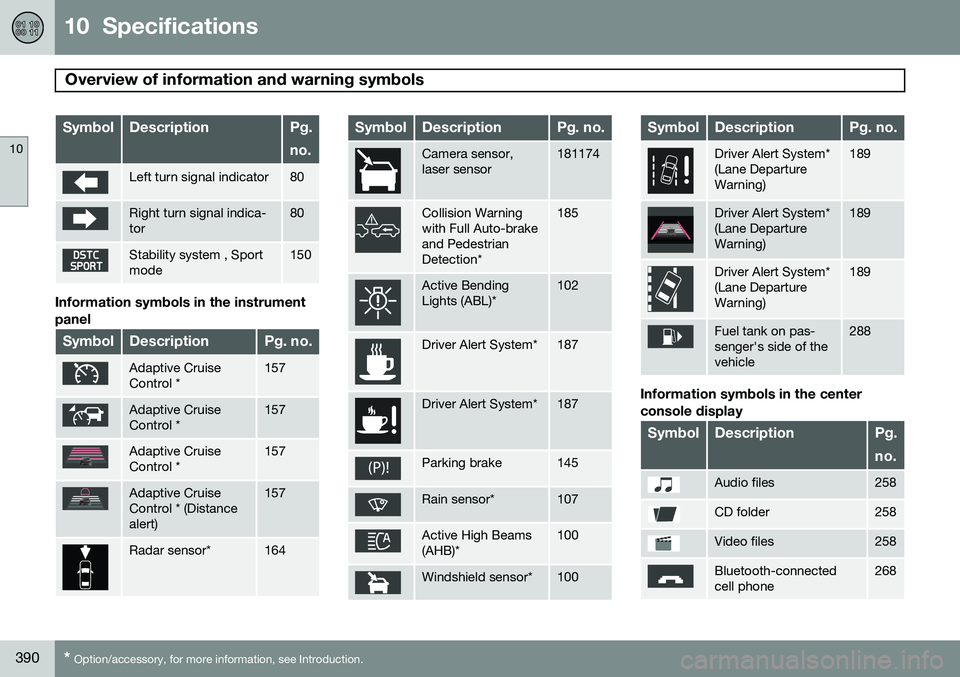
The following tables list the most commonsymbols, their meaning and the pages in thismanual that provide more detailed informa-tion.
NOTE
Not all of the symbols shown in the follow- ing tables are available in all models or onall markets. Local variations may occur.
Warning symbol
: The red warning symbol illuminates to
indicate a problem related to safety and/or drivability. A message will also appear in themain instruments panel's display.
Information symbol
: The information symbol illuminates
and a text message is displayed to provide the driver with necessary information aboutone of the vehicle's systems.
Symbols in the main instrument panel
Warning symbols in the instrument
panel
SymbolDescriptionPg. no.
Low oil pressure84
Parking brake84
SRS airbags84
Seat belt reminder84
Generator not charging84
Fault in the brake system84
Warning symbol85
Indicator symbols in the instrument panel
SymbolDescriptionPg. no.
Fault in the Active Bend- ing Light (ABL)*system82
Malfunction indicator light82
Anti-lock brake system (ABS)83
Rear fog lights on83
Stability system (DSTC), Hill Descent Control,Trailer Stability Assist*83
Tire pressure monitoring sensor (TPMS)83
Low fuel level83
Information symbol, see text in information dis-play83
High beam indicator80
Page 392 of 406
10 Specifications
Overview of information and warning symbols
10
390* Option/accessory, for more information, see Introduction.
SymbolDescriptionPg. no.
Left turn signal indicator80
Right turn signal indica- tor80
Stability system , Sport mode150
Information symbols in the instrument panel
SymbolDescriptionPg. no.
Adaptive Cruise Control *157
Adaptive Cruise Control *157
Adaptive Cruise Control *157
Adaptive Cruise Control * (Distancealert)157
Radar sensor*164
SymbolDescriptionPg. no.
Camera sensor, laser sensor181174
Collision Warning with Full Auto-brakeand PedestrianDetection*185
Active Bending Lights (ABL)*102
Driver Alert System*187
Driver Alert System*187
Parking brake145
Rain sensor*107
Active High Beams (AHB)*100
Windshield sensor*100
SymbolDescriptionPg. no.
Driver Alert System* (Lane DepartureWarning)189
Driver Alert System* (Lane DepartureWarning)189
Driver Alert System* (Lane DepartureWarning)189
Fuel tank on pas- senger's side of thevehicle288
Information symbols in the center console display
SymbolDescriptionPg. no.
Audio files258
CD folder258
Video files258
Bluetooth-connected cell phone268
Page 396 of 406
11 Index
11
394
1, 2, 3 ...
12-volt sockets........................................ 234
A
ABS (anti-lock brake system).................. 143
Accessory installation warning.................. 13
Active chassis system............................. 231
Active high beams................................... 100Active yaw control................................... 150
Adaptive brake lights............................... 142
Adaptive cruise control.................... 157, 159 queue assist........................................ 162
Airbags disconnecting the front passenger’s
side................................................. 26, 27
front...................................................... 22
inflatable curtain................................... 32
side impact........................................... 30
Air conditioning........................................ 220
Air distribution.......................................... 216
Air distribution table................................. 223
Air vents................................................... 217 All Wheel Drive......................................... 131
Ambient temperature sensor..................... 85
Anti-freeze....................................... 284, 346Anti-lock brake system
warning light......................................... 83
Anti-lock Brake System (ABS)................. 143
Approach lighting.............................. 61, 106Audio system AUX/USB sockets............................... 262 Bluetooth ®
devices............................. 265
Bluetooth ®
hands-free system........... 267
Bluetooth streaming audio................. 265
getting started.................................... 239
HD digital radio................................... 250
introduction......................................... 238
media player....................................... 257
overview.............................................. 238
radio functions.................................... 248SiriusXM ™ satellite radio.................... 252
sound settings.................................... 243
steering wheel keypad........................ 239
voice control....................................... 276
Auto-dim rearview mirror......................... 113
Automatic locking retractor....................... 39 Automatic transmission
Eco (driving function).......................... 135
Geartronic........................................... 129
general description..................... 128, 129
oil........................................................ 386
shiftlock override................................ 131
Axle weight.............................................. 316
B
Battery maintenance....................................... 359
remote key, replacing........................... 65
replacing..................................... 359, 360
specifications...................................... 387
warning symbols................................. 358
Blind Spot Information System (BLIS)..... 200
Bluetooth cell phone connection............. 267
Booster cushion, integrated...................... 52
Booster cushions....................................... 48
Brake lights.............................................. 142Brake system ABS..................................................... 143
Brake pad inspection.......................... 142
checking fluid level............................. 346
Page 399 of 406
11 Index
11
397
G
Garage door openerHomeLink ®
Wireless Control System. 120
Gasoline requirements............................. 287
Gas tank volume...................................... 386
Gauges...................................................... 79
Geartronic................................................ 129
Geartronic automatic transmission.......... 129
Generator warning light............................. 84
Glossary of tire terminology..................... 315
Grocery bag holder.................................. 293
Gross vehicle weight............................... 316
H
Hazard warning flashers.......................... 104
HD digital radio........................................ 250Headlights Active Bending Lights......................... 102
active high beams............................... 100
changing bulbs........................... 349, 350
daytime running lights.......................... 99
high/low beams.................................. 100 high beam flash.................................. 100
tunnel detection.................................. 102
Headlight washers................................... 108
Head restraints, rear seat.......................... 94
Heated oxygen sensors........................... 290
Heated rear seats.................................... 219
Heated steering wheel............................... 98
Heated windshield........................... 113, 221
High beams.............................................. 100 active.................................................. 100
Hill Start Assist (HSA).............................. 128
Hoisting the vehicle................................. 340 HomeLink ®
Wireless Control System...... 120
Home safe lighting................................... 105
Hood, opening/closing............................ 342
Horn........................................................... 97
I
Ignition modes........................................... 88
Immobilizer................................................ 60
Important information.................................. 6
Indicator lights............................... 79, 81, 83 Infant seats................................................ 43
Inflatable Curtain........................................ 32
Inflation pressure..................................... 309
Inflation pressure table............................ 312Information and warning symbols, table
of.............................................................. 389
Information lights........................... 79, 81, 83Infotainment
Menu navigation................................. 241
Infotainment system................................ 238 AUX/USB sockets............................... 262 Bluetooth ®
devices............................. 265
Bluetooth ®
hands-free system........... 267
getting started.................................... 239
media player....................................... 257
menus......................................... 239, 241
radio functions.................................... 248
sound settings.................................... 243
voice control....................................... 276
Inspection readiness................................ 340
Instrument lighting................................... 102 "theater" lighting................................. 102
Instrument overview............................ 78, 79
Instrument panel................................ 79, 207
Integrated two-stage booster cushion...... 52