ECO mode VOLVO XC60 2015 Owner´s Manual
[x] Cancel search | Manufacturer: VOLVO, Model Year: 2015, Model line: XC60, Model: VOLVO XC60 2015Pages: 406, PDF Size: 11.03 MB
Page 252 of 406
06 Infotainment
Radio
06
250
Radio textSome stations transmit information on pro- gram content, artists, etc. This informationcan be shown on the display. Activate/deactivate in FM mode under
Show
radio text.
HD Radio™ reception (U.S. models
only)
Introduction
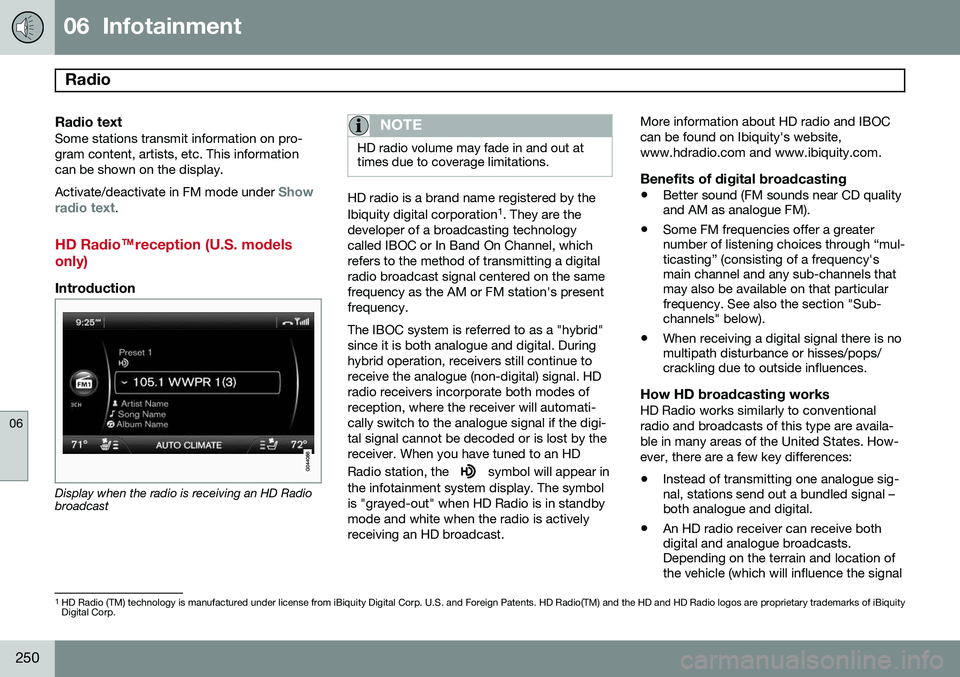
Display when the radio is receiving an HD Radio broadcast
NOTE
HD radio volume may fade in and out at times due to coverage limitations.
HD radio is a brand name registered by the Ibiquity digital corporation 1
. They are the
developer of a broadcasting technology called IBOC or In Band On Channel, whichrefers to the method of transmitting a digitalradio broadcast signal centered on the samefrequency as the AM or FM station's presentfrequency. The IBOC system is referred to as a "hybrid" since it is both analogue and digital. Duringhybrid operation, receivers still continue toreceive the analogue (non-digital) signal. HDradio receivers incorporate both modes ofreception, where the receiver will automati-cally switch to the analogue signal if the digi-tal signal cannot be decoded or is lost by thereceiver. When you have tuned to an HD Radio station, the
symbol will appear in
the infotainment system display. The symbol is "grayed-out" when HD Radio is in standbymode and white when the radio is activelyreceiving an HD broadcast. More information about HD radio and IBOCcan be found on Ibiquity's website,www.hdradio.com and www.ibiquity.com.
Benefits of digital broadcasting
•
Better sound (FM sounds near CD quality and AM as analogue FM).
• Some FM frequencies offer a greaternumber of listening choices through “mul-ticasting” (consisting of a frequency'smain channel and any sub-channels thatmay also be available on that particularfrequency. See also the section "Sub-channels" below).
• When receiving a digital signal there is nomultipath disturbance or hisses/pops/crackling due to outside influences.
How HD broadcasting worksHD Radio works similarly to conventional radio and broadcasts of this type are availa-ble in many areas of the United States. How-ever, there are a few key differences:
• Instead of transmitting one analogue sig- nal, stations send out a bundled signal –both analogue and digital.
• An HD radio receiver can receive bothdigital and analogue broadcasts.Depending on the terrain and location ofthe vehicle (which will influence the signal
1
HD Radio (TM) technology is manufactured under license from iBiquity Digital Corp. U.S. and Foreign Patents. HD Radio(TM) and the HD and HD Radio logos are proprietary trademarks of iBiquity Digital Corp.
Page 253 of 406
06 Infotainment
Radio
06
}}
251
strength), the receiver will determine which signal to receive.
Limitations
•
Main channel vs. sub-channels (FM only)
: The main channel is the only chan-
nel that can receive in hybrid mode (both digital and analogue). If a frequency hassub-channels, they are broadcast in digi-tal mode only. The main FM channel willbe displayed as, for example, 93.9 WNYC(Volvo uses the symbol ">" to indicatethere are sub-channels available) Thesub-FM channels will be displayed as93.9 – 2 WNYC, 93.9 - 3 WNYC, etc.
• Reception coverage area
: Due to cur-
rent IBOC transmitter power limitations,the reception coverage area in digitalmode is somewhat more limited than thestation's analogue coverage area. Pleasebe aware that as with any radio broadcasttechnology, terrain, time of day, foliagelevel and building location can have posi-tive or negative effects on radio recep-tion.
• Analogue to digital/digital to analogue blending
: Analogue to digital blending
will occur as the signal strength reaches a preset threshold in the receiver. This willbe noticeable in fringe areas (areas withweak reception) and is normal.
NOTE
There may be a noticeable difference in sound quality when a change from ana-logue to digital or digital to analogueoccurs, such as:
• Volume increase or decrease
• Equalizer settings, i.e., Bass/ Mid- range/Treble cut or boost
• Time alignment (Digital program mate-rial in extreme cases can be as muchas 8 seconds behind the analogue).This will noticeable as a "stuttering"effect.
The above items are dependant on the broadcaster's equipment settings and do not indicate a fault in the vehicle's radio receiver or antenna systems .
Switching HD on or offThe factory setting for HD radio is off. If acti-
vated when driving through areas with weak HD signals (fringe areas), you may experiencethat the radio repeatedly switches betweenanalogue/digital and digital/analogue recep-tion. If this happens, it may be desirable toswitch HD off. To do so: 1. Be sure the infotainment system is
switched on and in one of the AM or FM modes.
2. Press OK/MENU in the center console
control panel.
3. Turn TUNE and move the marker to
HD
Radio.
4. Press OK/MENU to turn HD off (the X will
disappear from the box on the display screen).
This will disable the radio's capability to receive digital broadcasts but it will continueto function as a conventional (analogue)AM/FM receiver. Please note that when HD isswitched off, it will not be possible to tune tosub-channels (see the following section for amore detailed explanation of sub-channels). Repeat steps 2-4 above to reactivate HD (an X will appear in the box on the displayscreen). Please note that this will only switchHD on or off for the selected waveband (AM,FM1, etc.).
Page 254 of 406
06 Infotainment
Radio
06
252* Option/accessory, for more information, see Introduction.
Sub-channels
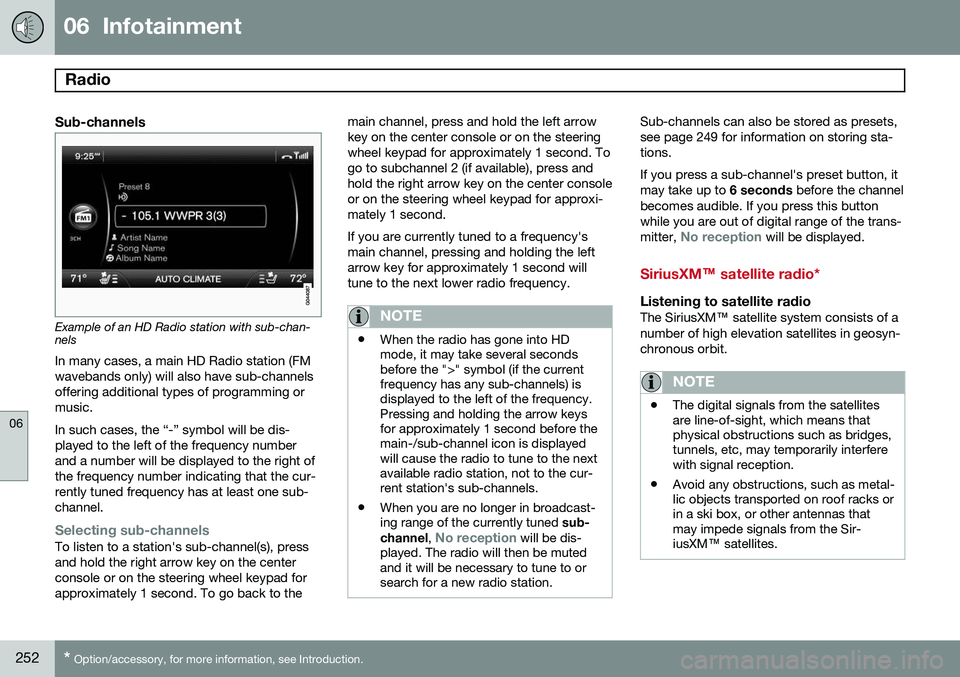
Example of an HD Radio station with sub-chan- nels
In many cases, a main HD Radio station (FM wavebands only) will also have sub-channelsoffering additional types of programming ormusic. In such cases, the “-” symbol will be dis- played to the left of the frequency numberand a number will be displayed to the right ofthe frequency number indicating that the cur-rently tuned frequency has at least one sub-channel.
Selecting sub-channelsTo listen to a station's sub-channel(s), press and hold the right arrow key on the centerconsole or on the steering wheel keypad forapproximately 1 second. To go back to the main channel, press and hold the left arrowkey on the center console or on the steeringwheel keypad for approximately 1 second. Togo to subchannel 2 (if available), press andhold the right arrow key on the center consoleor on the steering wheel keypad for approxi-mately 1 second. If you are currently tuned to a frequency's main channel, pressing and holding the leftarrow key for approximately 1 second willtune to the next lower radio frequency.
NOTE
•
When the radio has gone into HD mode, it may take several secondsbefore the ">" symbol (if the currentfrequency has any sub-channels) isdisplayed to the left of the frequency.Pressing and holding the arrow keysfor approximately 1 second before themain-/sub-channel icon is displayedwill cause the radio to tune to the nextavailable radio station, not to the cur-rent station's sub-channels.
• When you are no longer in broadcast-ing range of the currently tuned
sub-
channel ,
No reception will be dis-
played. The radio will then be muted and it will be necessary to tune to orsearch for a new radio station.
Sub-channels can also be stored as presets, see page 249 for information on storing sta-tions. If you press a sub-channel's preset button, it may take up to 6 seconds before the channel
becomes audible. If you press this buttonwhile you are out of digital range of the trans- mitter,
No reception will be displayed.
SiriusXM™ satellite radio*
Listening to satellite radioThe SiriusXM ™ satellite system consists of a
number of high elevation satellites in geosyn- chronous orbit.
NOTE
• The digital signals from the satellites are line-of-sight, which means thatphysical obstructions such as bridges,tunnels, etc, may temporarily interferewith signal reception.
• Avoid any obstructions, such as metal-lic objects transported on roof racks orin a ski box, or other antennas thatmay impede signals from the Sir-iusXM
™ satellites.
Page 259 of 406
06 Infotainment
Media player
06
}}
257
CD/DVD1
functions
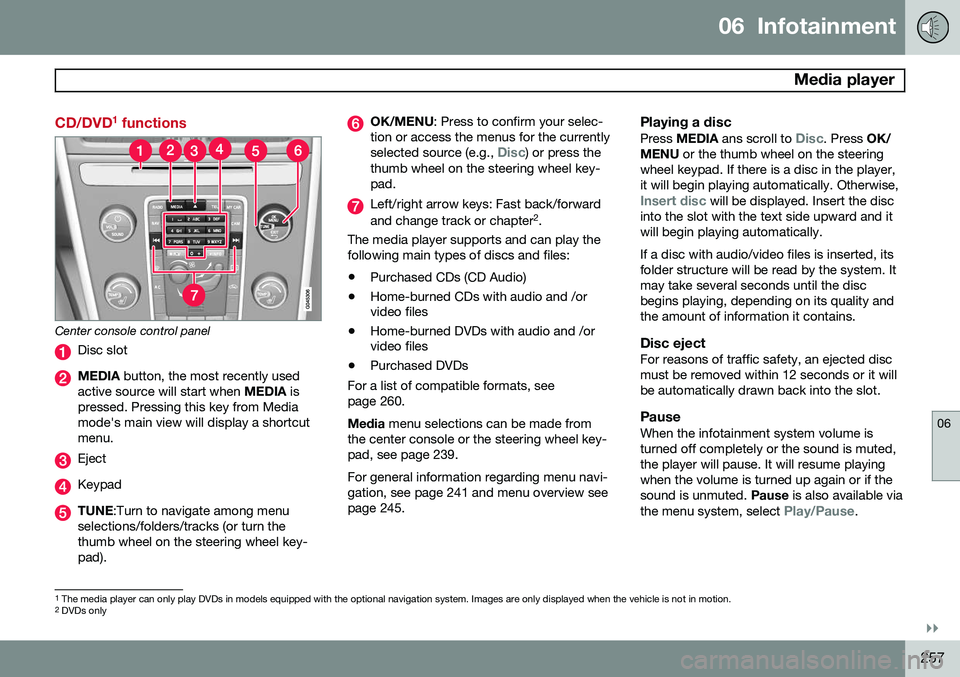
Center console control panel
Disc slot
MEDIA button, the most recently used
active source will start when MEDIA is
pressed. Pressing this key from Media mode's main view will display a shortcutmenu.
Eject
Keypad
TUNE :Turn to navigate among menu
selections/folders/tracks (or turn the thumb wheel on the steering wheel key-pad).
OK/MENU : Press to confirm your selec-
tion or access the menus for the currently selected source (e.g.,
Disc) or press the
thumb wheel on the steering wheel key- pad.
Left/right arrow keys: Fast back/forward and change track or chapter 2
.
The media player supports and can play the following main types of discs and files:
• Purchased CDs (CD Audio)
• Home-burned CDs with audio and /or video files
• Home-burned DVDs with audio and /orvideo files
• Purchased DVDs
For a list of compatible formats, see page 260. Media menu selections can be made from
the center console or the steering wheel key- pad, see page 239. For general information regarding menu navi- gation, see page 241 and menu overview seepage 245.
Playing a disc
Press MEDIA ans scroll to Disc. Press OK/
MENU or the thumb wheel on the steering
wheel keypad. If there is a disc in the player, it will begin playing automatically. Otherwise,
Insert disc will be displayed. Insert the disc
into the slot with the text side upward and it will begin playing automatically. If a disc with audio/video files is inserted, its folder structure will be read by the system. Itmay take several seconds until the discbegins playing, depending on its quality andthe amount of information it contains.
Disc ejectFor reasons of traffic safety, an ejected discmust be removed within 12 seconds or it willbe automatically drawn back into the slot.
PauseWhen the infotainment system volume isturned off completely or the sound is muted,the player will pause. It will resume playingwhen the volume is turned up again or if thesound is unmuted. Pause is also available via
the menu system, select
Play/Pause.
1 The media player can only play DVDs in models equipped with the optional navigation system. Images are only displayed when the vehicle is not in motion.
2 DVDs only
Page 268 of 406
06 Infotainment
Bluetooth® media
06
266
Switching to another device
It is possible to switch among paired Bluetooth ®
devices that are in the vehicle. To
do so: 1. Press MEDIA ,scroll to
Bluetooth and
press the thumb wheel on the steering wheel keypad or OK/MENU.
2. Be sure the Bluetooth ®
device is discov-
erable (refer to its user manual if neces-sary).
3. Press the thumb wheel or OK/MENU.
4. Turn the thumb wheel or TUNE to
Change device and confirm by pressing
the thumb wheel or OK/MENU.
> After several seconds, the names of any paired external devices will be dis- played.
5. Scroll to the device to be connected and press the thumb wheel or OK/MENU.
> The device will be connected.
Audio files can now be selected using the
/ buttons in the center console or on
the steering wheel keypad.
Disconnecting an external device
The external device is automatically discon- nected from the infotainment system if it ismoved out of range.
Removing a paired device
1. In Bluetooth mode, press OK/MENU.
2. Scroll to
Remove Bluetooth device and
press the thumb wheel or OK/MENU.
3. Scroll to the device to be removed by turning the thumb wheel or TUNE and
confirm by pressing the thumb wheel or OK/MENU .
> A question asking if you would like to remove the device will be displayed.
4. Press the thumb wheel or OK/MENU to
confirm or EXIT to cancel.
Random 1
This function plays the audio files on the external device in random order (shuffle). Thisfunction can be activated/deactivated under:
Bluetooth menuRandom
Press the / buttons on the center
console or steering wheel keypad to change tracks.
Scanning audio files on an external device 1
This function plays the first ten seconds of each audio file. This function can be acti- vated/deactivated under:
Bluetooth menuScan. Scanning can be canceled by pressing
EXIT.
Bluetooth® version information
This feature offers information about the Bluetooth ®
version installed in the vehicle's
infotainment system. This information can be found under
Bluetooth menuBluetooth
software version in car.
1 Function is not supported on all cell phones.
Page 271 of 406
06 Infotainment
Bluetooth® hands-free connection
06
}}
269
4. With the cell phone in discoverable mode,
press OK/MENU .
> The infotainment system will search for cell phones or devices that are in range, which takes approximately 30seconds. Any phones detected will be displayed using their Bluetooth ®
names. The hands-free system’sBluetooth ®
name will appear in the cell
phone’s display as My Volvo Car.
5. Turn the thumb wheel or TUNE to select
one of the cell phones shown in the cen- ter console display and press the thumbwheel or OK/MENU .
6. Using the cell phone’s keypad, enter the digits (PIN code) shown in the center con-sole display and press the button on thecell phone used to confirm a choice.
The external device is now paired and can becontrolled from the infotainment system. If the connection failed: Press EXIT and con-
nect with method 2 below.Method 2: Search for the vehicle using the
external device’s Bluetooth ®
function.
1. Press TEL. If a phone or external device
is already connected, disconnect it. > The Bluetooth ®
function will search for
previously paired devices. 2. Make the vehicle discoverable by press-
ing the thumb wheel or OK/MENU and
selecting
Phone settingsDiscoverable.
3. Search for the vehicle using the phone or external device's Bluetooth ®
function.
Refer to its user manual if necessary.
4. Select
My Volvo Car on the phone or
external device’s screen and follow the directions provided.
5. Enter a PIN code of your choice in the external device and press its button topair the device. When prompted, enterthe same PIN code in the vehicle usingthe center console keypad.
6. Pair
My Volvo Car from the external
device.
When the external device has been paired, its Bluetooth ®
name appear in the center con-
sole display. This device can now be con- trolled from the infotainment system.
Connect automaticallyWhen the hands-free system is active and the most recently connected cell phone is withinrange, it will be connected automatically. Ifthis phone is not within range, the hands-freesystem will attempt to connect one of theother paired cell phones. When the infotain-ment system searches for the most recently connected phone, its name appears in thedisplay.
Connect manuallyTo connect a phone other than the one that was most recently connected or to switchbetween cell phones that are already pairedwith the hands-free system, go to
Phone
menu
Change phone.
Changing phones or devicesMore than one device can be used in the vehicle as long as this device has beenpaired. To do so, see page 268. Changing devices:
1. Check that the external device is discov- erable.
2. Press TEL and select
Change phone.
> The infotainment system will search for previously paired devices. Those that are detected will be displayed on thescreen.
3. Select the desired device by turning the thumb wheel or TUNE and confirm by
pressing the thumb wheel or OK/MENU.
> The device will be connected.
Page 272 of 406
06 Infotainment
Bluetooth® hands-free connection
06
270
Making a call1. Ensure that is shown at the top of
the center console display and that the hands-free function is in telephone mode.
2. Dial the desired phone number using the center console keypad or use the speeddial function (see page 274). In normalview (see page see page 239 for informa-tion about the various display views), it isalso possible to turn TUNE clockwise to
access the phone book and then counter-clockwise for the call list. See page 275for more information about the phonebook.
3. Press the thumb wheel or OK/MENU.
End or reject a call by pressing EXIT.
Disconnecting the cell phoneThe cell phone is automatically disconnectedfrom the infotainment system if it is movedout of range. The cell phone can be manually disconnected from the hands-free system by pressing andholding TEL or in phone mode, going to
Phone menuDisconnect phone. See also
page 271 for more information about con- nections. The hands-free system is also deactivatedwhen the ignition is switched off (or if thedriver’s door is opened). When the cell phone is disconnected from the hands-free system, a call in progress can becontinued using the cell phone’s own speakerand microphone. Even if the cell phone has been disconnected manually, some phones may reconnect auto-matically, for example when a new call is initi-ated.
Removing a paired deviceA paired phone or device can be removedfrom the list. To do so:
1. Press
TEL.
2. Select
Phone menuRemove
Bluetooth device.
Handling calls
Incoming calls–Press OK/MENU (or the thumb wheel on
the steering wheel keypad) to answer a call, even if the infotainment system is currently in another mode (e.g.,
RADIO orMEDIA).
Press EXIT to reject a call.
Auto answerThis function means that incoming calls will be answered automatically. Activate or deac-tivate the function in the menu system under
Phone menuCall optionsAuto
answer.
Call settingsWhile a call is in progress, press OK/MENU
or the thumb wheel on the steering wheel keypad to access the following functions:
•
Mute: mute the infotainment system’s
microphone.
•
Mobile phone: transfer the call from
hands-free to the cell phone. On certain cell phones, the connection will be bro-ken, which is normal. The hands-freefunction will ask if you would like toreconnect.
•
Dial number: dial a third party during an
ongoing call using the keypad (the current call will be put on hold).
Call listsCall lists are copied to the hands-free func- tion each time a cell phone is connected andthe lists are updated while the phone is con-nected. In normal view, turn TUNE counter-
clockwise to see the
All calls list.
Page 275 of 406
06 Infotainment
Bluetooth® hands-free connection
06
}}
273
ButtonFunction
+ 0 p w
# *
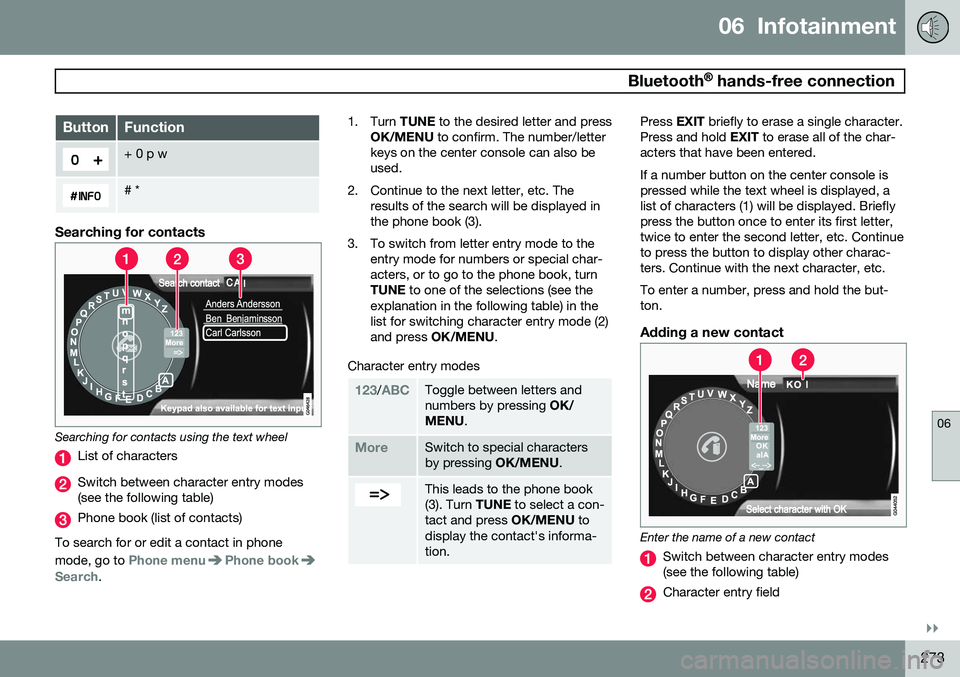
Searching for contacts
Searching for contacts using the text wheel
List of characters
Switch between character entry modes (see the following table)
Phone book (list of contacts)
To search for or edit a contact in phone mode, go to
Phone menuPhone bookSearch. 1. Turn
TUNE to the desired letter and press
OK/MENU to confirm. The number/letter
keys on the center console can also be used.
2. Continue to the next letter, etc. The results of the search will be displayed inthe phone book (3).
3. To switch from letter entry mode to the entry mode for numbers or special char-acters, or to go to the phone book, turnTUNE to one of the selections (see the
explanation in the following table) in thelist for switching character entry mode (2)and press OK/MENU .
Character entry modes
123/ABCToggle between letters and numbers by pressing OK/
MENU .
MoreSwitch to special characters by pressing OK/MENU.
This leads to the phone book (3). Turn TUNE to select a con-
tact and press OK/MENU to
display the contact's informa-tion.
Press EXIT briefly to erase a single character.
Press and hold EXIT to erase all of the char-
acters that have been entered. If a number button on the center console is pressed while the text wheel is displayed, alist of characters (1) will be displayed. Brieflypress the button once to enter its first letter,twice to enter the second letter, etc. Continueto press the button to display other charac-ters. Continue with the next character, etc. To enter a number, press and hold the but- ton.
Adding a new contact
Enter the name of a new contact
Switch between character entry modes (see the following table)
Character entry field
Page 276 of 406
06 Infotainment
Bluetooth® hands-free connection
06
274
New contacts can be added in phone mode in
Phone menuPhone bookNew
contact.
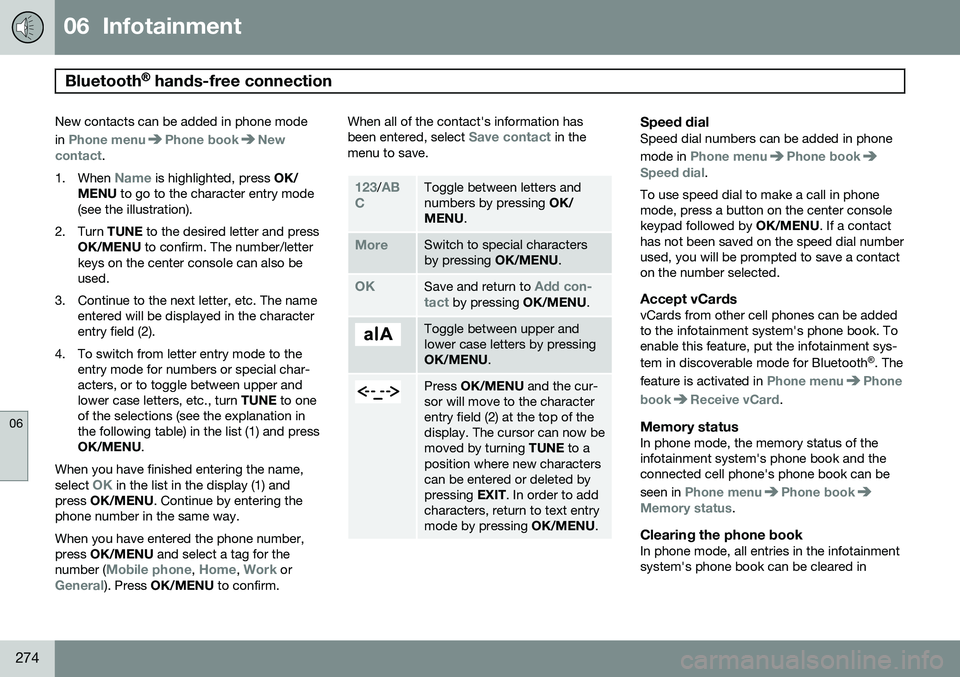
1. When
Name is highlighted, press OK/
MENU to go to the character entry mode
(see the illustration).
2. Turn TUNE to the desired letter and press
OK/MENU to confirm. The number/letter
keys on the center console can also be used.
3. Continue to the next letter, etc. The name entered will be displayed in the characterentry field (2).
4. To switch from letter entry mode to the entry mode for numbers or special char-acters, or to toggle between upper andlower case letters, etc., turn TUNE to one
of the selections (see the explanation inthe following table) in the list (1) and pressOK/MENU .
When you have finished entering the name, select
OK in the list in the display (1) and
press OK/MENU . Continue by entering the
phone number in the same way. When you have entered the phone number, press OK/MENU and select a tag for the
number (
Mobile phone, Home, Work orGeneral). Press OK/MENU to confirm. When all of the contact's information has been entered, select
Save contact in the
menu to save.
123/AB
CToggle between letters and numbers by pressing OK/
MENU .
MoreSwitch to special characters by pressing OK/MENU.
OKSave and return to Add con-
tact by pressing OK/MENU.
Toggle between upper and lower case letters by pressingOK/MENU.
Press OK/MENU and the cur-
sor will move to the character entry field (2) at the top of thedisplay. The cursor can now bemoved by turning TUNE to a
position where new characterscan be entered or deleted bypressing EXIT. In order to add
characters, return to text entrymode by pressing OK/MENU.
Speed dialSpeed dial numbers can be added in phone mode in
Phone menuPhone bookSpeed dial.
To use speed dial to make a call in phone mode, press a button on the center consolekeypad followed by OK/MENU. If a contact
has not been saved on the speed dial numberused, you will be prompted to save a contacton the number selected.
Accept vCardsvCards from other cell phones can be addedto the infotainment system's phone book. Toenable this feature, put the infotainment sys- tem in discoverable mode for Bluetooth ®
. The
feature is activated in
Phone menuPhone
book
Receive vCard.
Memory statusIn phone mode, the memory status of the infotainment system's phone book and theconnected cell phone's phone book can be seen in
Phone menuPhone bookMemory status.
Clearing the phone bookIn phone mode, all entries in the infotainment system's phone book can be cleared in
Page 284 of 406
07 During your trip
Driving recommendations
07
282
General information
Economical driving conserves natural
resources
Better driving economy may be obtained by thinking ahead, avoiding rapid starts andstops and adjusting the speed of your vehicleto immediate traffic conditions. Observe the following rules:
• Bring the engine to normal operating tem- perature as soon as possible by drivingwith a light foot on the accelerator pedalfor the first few minutes of operation. Acold engine uses more fuel and is subjectto increased wear.
• Whenever possible, avoid using the vehi-cle for driving short distances. This doesnot allow the engine to reach normaloperating temperature.
• Drive carefully and avoid rapid accelera-tion and hard braking.
• Use the transmission's Drive (
D) position
as often as possible and avoid using kick-down.
• Using the engine's optional Eco function 1
can help improve fuel economy. Seepage 135 for additional information. •
Using the transmission's Sport mode 2
may increase fuel consumption some-what. Use the transmission's Drive ( D)
position as often as possible. See page130 for additional information about Sportmode.
• Do not exceed posted speed limits.
• Avoid carrying unnecessary items (extraload) in the vehicle.
• Maintain correct tire pressure. Check tirepressure regularly (when tires are cold).
• Remove snow tires when threat of snowor ice has ended.
• Note that roof racks, ski racks, etc,increase air resistance and also fuel con-sumption.
• At highway driving speeds, fuel consump-tion will be lower with the air conditioningon and the windows closed than with theair conditioning off and the windowsopen.
• Using the onboard trip computer's fuelconsumption modes can help you learnhow to drive more economically.
Other factors that decrease gas mileage are: •
Dirty air cleaner
• Dirty engine oil and clogged oil filter
• Dragging brakes
• Incorrect front end alignment
Some of the above mentioned items and oth-ers are checked at the standard maintenanceintervals.
WARNING
Driving with the tailgate open: Driving
with the tailgate open could lead to poi- sonous exhaust gases entering the pas-senger compartment. If the tailgate mustbe kept open for any reason, proceed asfollows: • Close the windows
• Set the ventilation system control to air flow to floor, windshield and side win-dows and the blower control to itshighest setting.
Weight distribution affects handlingAt the specified curb weight your vehicle has a tendency to understeer, which means thatthe steering wheel has to be turned morethan might seem appropriate for the curva-ture of a bend. This ensures good stabilityand reduces the risk of rear wheel skid.
1
Available on certain 4-cyl. engines
2 Models with the T6 turbo engine only.