lock VOLVO XC60 2015 Owner´s Manual
[x] Cancel search | Manufacturer: VOLVO, Model Year: 2015, Model line: XC60, Model: VOLVO XC60 2015Pages: 406, PDF Size: 11.03 MB
Page 103 of 406
03 Your driving environment
Lighting
03
}}
101
Models with an analog instrument panel When AHB is activated, the
symbol
will illuminate in the instrument panel. The high beam indicator (
) in the instrument
panel will also illuminate when the high beams are on. Models with a digital instrument panel When AHB is activated,
will illuminate
as a white symbol in the instrument panel.
When the high beams are on, the symbol will change to blue.
NOTE
•Keep the windshield in front of the camera free of ice, snow, dirt, etc.
• Do not mount or in any way attachanything on the windshield that couldobstruct the camera.
If Active high beam Temporary
unavailable Switch manually is displayed in
the instrument panel, switching between high and low beams will have to be done man-ually. However, the light switch can remain inthe AUTO position. The same applies if
Windscreen Sensors blocked is displayed
and the
symbol is displayed. The
symbol will go out when these mes-
sages are displayed. AHB may be temporarily unavailable (e.g., in heavy fog or rain). When AHB becomes activeagain or if the sensors in the windshield areno longer obscured, the messages will disap- pear and the
symbol will illuminate.
CAUTION
In the following situations, it may be nec- essary to switch between high and lowbeams manually:
• In heavy fog or rain
• In blowing snow or slush
• In bright moonlight
• In freezing rain
• In areas with dim street lighting
• When oncoming vehicles have dim front lighting
• If there are pedestrians on or near theroad
• If there are reflective objects, such assigns, near the road
• When oncoming vehicles' lights areobscured by e.g., fences, bushes, etc.
• When there are vehicles on connectingroads
• At the top of hills or in dips in the road
• In sharp curves
See page181 for more information about the camera's limitations.
Page 105 of 406
03 Your driving environment
Lighting
03
}}
103
The intensity of the instrument lighting is adjusted with the thumb wheel.
"Theater" lightingWhen the overhead courtesy lighting hasgone out and the engine is running, severalLEDs located near the roof console illuminateto provide faint lighting for the occupants ofthe front seats. This lighting goes out justafter the overhead courtesy lighting when thevehicle is locked.
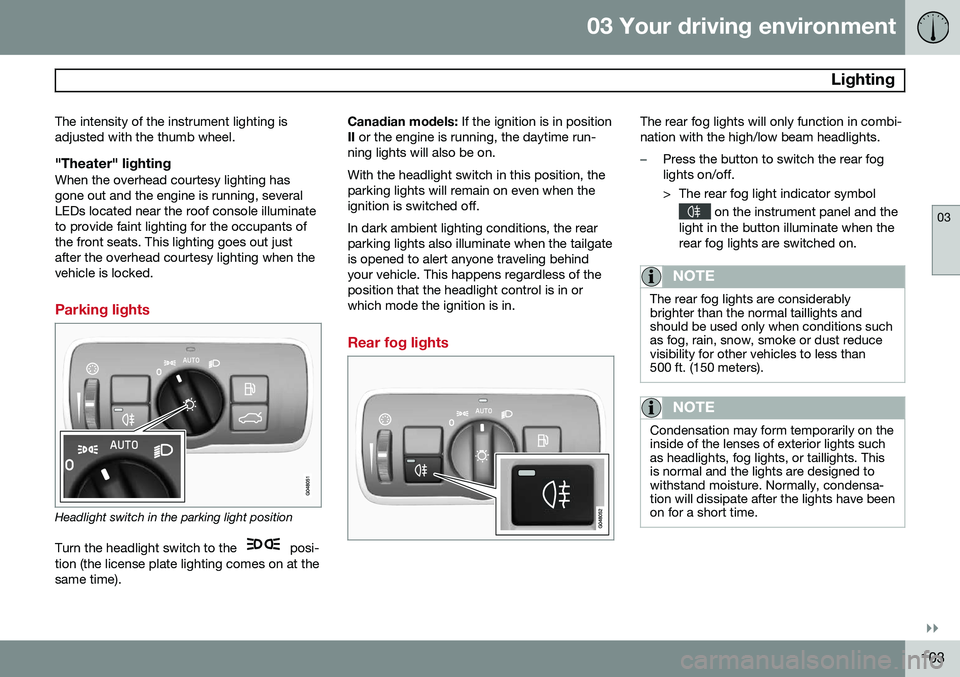
Parking lights
Headlight switch in the parking light position
Turn the headlight switch to the
posi-
tion (the license plate lighting comes on at the same time). Canadian models:
If the ignition is in position
II or the engine is running, the daytime run-
ning lights will also be on. With the headlight switch in this position, the parking lights will remain on even when theignition is switched off. In dark ambient lighting conditions, the rear parking lights also illuminate when the tailgateis opened to alert anyone traveling behindyour vehicle. This happens regardless of theposition that the headlight control is in orwhich mode the ignition is in.
Rear fog lights
The rear fog lights will only function in combi- nation with the high/low beam headlights.
–Press the button to switch the rear fog lights on/off.
> The rear fog light indicator symbol
on the instrument panel and the
light in the button illuminate when the rear fog lights are switched on.
NOTE
The rear fog lights are considerably brighter than the normal taillights andshould be used only when conditions suchas fog, rain, snow, smoke or dust reducevisibility for other vehicles to less than500 ft. (150 meters).
NOTE
Condensation may form temporarily on the inside of the lenses of exterior lights suchas headlights, fog lights, or taillights. Thisis normal and the lights are designed towithstand moisture. Normally, condensa-tion will dissipate after the lights have beenon for a short time.
Page 107 of 406
03 Your driving environment
Lighting
03
}}
* Option/accessory, for more information, see Introduction.105
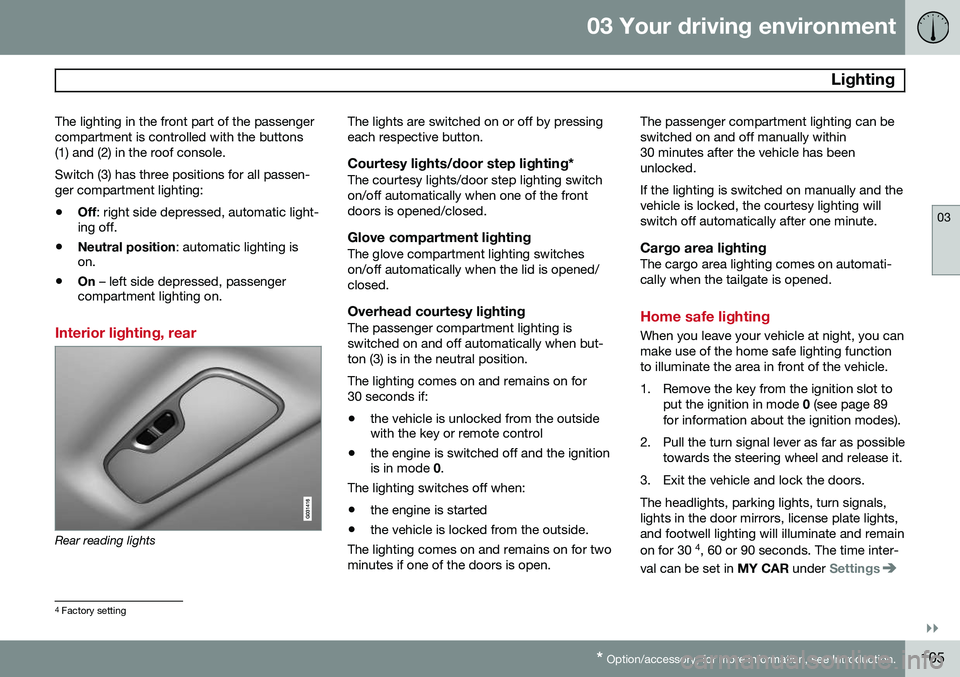
The lighting in the front part of the passenger compartment is controlled with the buttons(1) and (2) in the roof console. Switch (3) has three positions for all passen- ger compartment lighting:
• Off
: right side depressed, automatic light-
ing off.
• Neutral position
: automatic lighting is
on.
• On
– left side depressed, passenger
compartment lighting on.
Interior lighting, rear
Rear reading lights The lights are switched on or off by pressing each respective button.
Courtesy lights/door step lighting*The courtesy lights/door step lighting switchon/off automatically when one of the frontdoors is opened/closed.
Glove compartment lightingThe glove compartment lighting switcheson/off automatically when the lid is opened/closed.
Overhead courtesy lightingThe passenger compartment lighting isswitched on and off automatically when but-ton (3) is in the neutral position. The lighting comes on and remains on for 30 seconds if:
• the vehicle is unlocked from the outside with the key or remote control
• the engine is switched off and the ignitionis in mode
0.
The lighting switches off when:
• the engine is started
• the vehicle is locked from the outside.
The lighting comes on and remains on for two minutes if one of the doors is open. The passenger compartment lighting can beswitched on and off manually within30 minutes after the vehicle has beenunlocked. If the lighting is switched on manually and the vehicle is locked, the courtesy lighting willswitch off automatically after one minute.
Cargo area lightingThe cargo area lighting comes on automati-cally when the tailgate is opened.
Home safe lighting
When you leave your vehicle at night, you can make use of the home safe lighting functionto illuminate the area in front of the vehicle.
1. Remove the key from the ignition slot to
put the ignition in mode 0 (see page 89
for information about the ignition modes).
2. Pull the turn signal lever as far as possible towards the steering wheel and release it.
3. Exit the vehicle and lock the doors.The headlights, parking lights, turn signals, lights in the door mirrors, license plate lights,and footwell lighting will illuminate and remain on for 30 4
, 60 or 90 seconds. The time inter-
val can be set in MY CAR under
Settings
4
Factory setting
Page 112 of 406
03 Your driving environment
Windows
03
110* Option/accessory, for more information, see Introduction.
Power windows
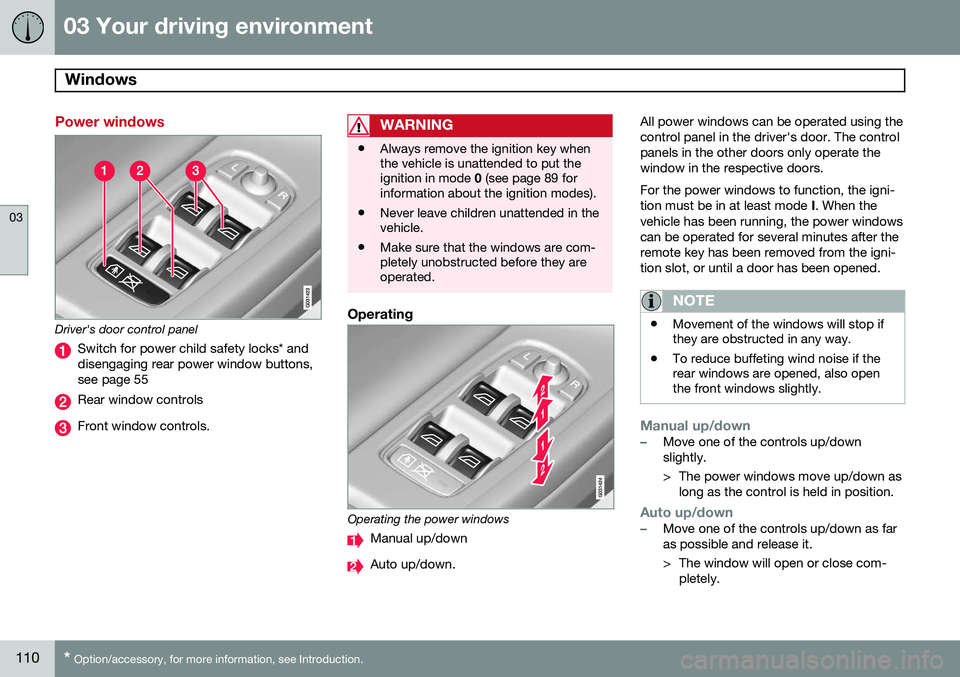
Driver's door control panel
Switch for power child safety locks* and disengaging rear power window buttons,see page 55
Rear window controls
Front window controls.
WARNING
• Always remove the ignition key when the vehicle is unattended to put theignition in mode
0 (see page 89 for
information about the ignition modes).
• Never leave children unattended in thevehicle.
• Make sure that the windows are com-pletely unobstructed before they areoperated.
Operating
Operating the power windows
Manual up/down
Auto up/down. All power windows can be operated using the control panel in the driver's door. The controlpanels in the other doors only operate thewindow in the respective doors. For the power windows to function, the igni- tion must be in at least mode
I. When the
vehicle has been running, the power windowscan be operated for several minutes after theremote key has been removed from the igni-tion slot, or until a door has been opened.
NOTE
• Movement of the windows will stop if they are obstructed in any way.
• To reduce buffeting wind noise if therear windows are opened, also openthe front windows slightly.
Manual up/down–Move one of the controls up/down slightly.
> The power windows move up/down as
long as the control is held in position.
Auto up/down–Move one of the controls up/down as far as possible and release it.
> The window will open or close com-pletely.
Page 114 of 406
03 Your driving environment
Mirrors
03
112* Option/accessory, for more information, see Introduction.
Power door mirrors
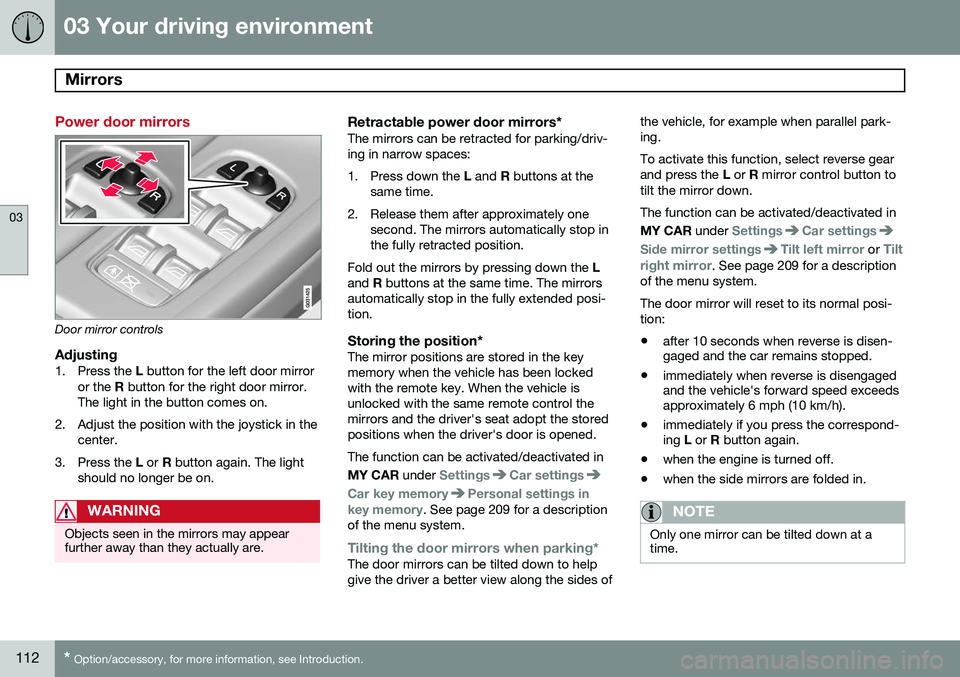
Door mirror controls
Adjusting1. Press the L button for the left door mirror
or the R button for the right door mirror.
The light in the button comes on.
2. Adjust the position with the joystick in the center.
3. Press the L or R button again. The light
should no longer be on.
WARNING
Objects seen in the mirrors may appear further away than they actually are.
Retractable power door mirrors*The mirrors can be retracted for parking/driv- ing in narrow spaces:
1. Press down the L and R buttons at the
same time.
2. Release them after approximately one second. The mirrors automatically stop in the fully retracted position.
Fold out the mirrors by pressing down the L
and R buttons at the same time. The mirrors
automatically stop in the fully extended posi-tion.
Storing the position*The mirror positions are stored in the keymemory when the vehicle has been lockedwith the remote key. When the vehicle isunlocked with the same remote control themirrors and the driver's seat adopt the storedpositions when the driver's door is opened. The function can be activated/deactivated in MY CAR under
SettingsCar settings
Car key memoryPersonal settings in
key memory. See page 209 for a description
of the menu system.
Tilting the door mirrors when parking*The door mirrors can be tilted down to help give the driver a better view along the sides of the vehicle, for example when parallel park-ing. To activate this function, select reverse gear and press the
L or R mirror control button to
tilt the mirror down. The function can be activated/deactivated in MY CAR under
SettingsCar settings
Side mirror settingsTilt left mirror or Tilt
right mirror
. See page 209 for a description
of the menu system. The door mirror will reset to its normal posi- tion: • after 10 seconds when reverse is disen- gaged and the car remains stopped.
• immediately when reverse is disengagedand the vehicle's forward speed exceedsapproximately 6 mph (10 km/h).
• immediately if you press the correspond-ing
L or R button again.
• when the engine is turned off.
• when the side mirrors are folded in.
NOTE
Only one mirror can be tilted down at a time.
Page 115 of 406
03 Your driving environment
Mirrors
03
}}
* Option/accessory, for more information, see Introduction.113
Automatically tilting the door mirrors when parking
The door mirrors can tilt down automatically to help give the driver a better view along thesides of the vehicle, for example when paral-lel parking. When the transmission is nolonger in reverse, the mirrors will automati-cally return to their original position. This function can be activated/deactivated in MY CAR under
SettingsCar settings
Side mirror settingsIn reverse gear tilt
left mirror
or In reverse gear tilt right
mirror. See page 209 for information about
the MY CAR menu system.
Automatic retraction when lockingWhen the vehicle is locked/unlocked with the remote key the door mirrors are automaticallyretracted/extended. The function can be activated/deactivated in MY CAR under
SettingsCar settings
Side mirror settingsRetract side mirrors
when locking. See page 209 for a descrip-
tion of the menu system.
Resetting to neutralMirrors that have been moved out of position by an external force must be electrically reset to the neutral position for electric retracting/extending to work. •
Retract the mirrors with the
L and R but-
tons.
• Fold them out again with the
L and R but-
tons.
The mirrors are now reset in neutral position.
Home safe and approach lightingThe light on the door mirrors comes on when approach lighting or home safe lighting isselected, see page 105.
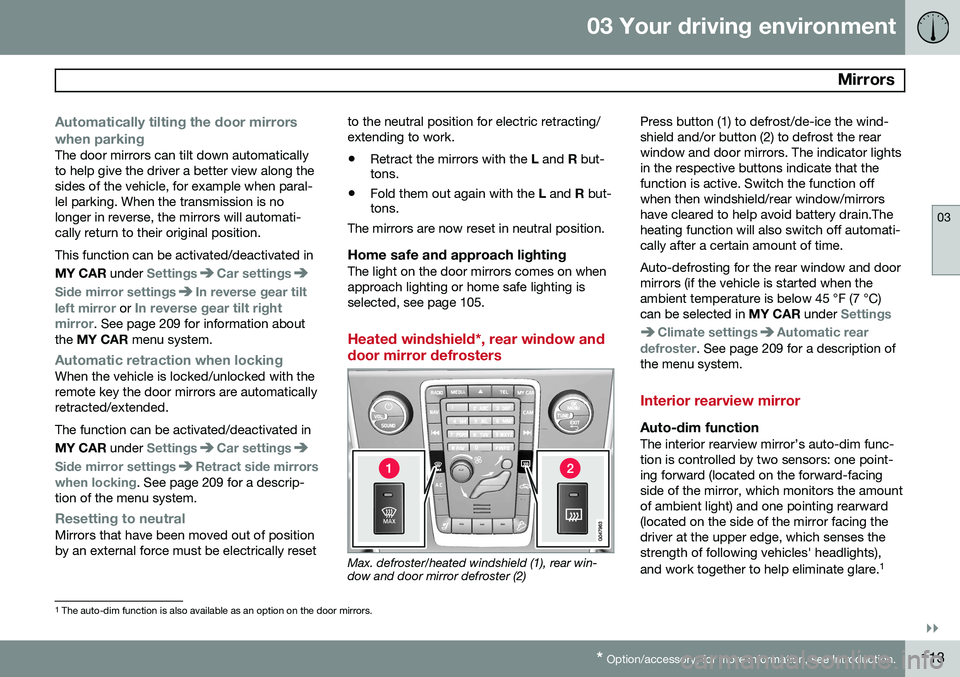
Heated windshield*, rear window and door mirror defrosters
Max. defroster/heated windshield (1), rear win- dow and door mirror defroster (2) Press button (1) to defrost/de-ice the wind- shield and/or button (2) to defrost the rearwindow and door mirrors. The indicator lightsin the respective buttons indicate that thefunction is active. Switch the function offwhen then windshield/rear window/mirrorshave cleared to help avoid battery drain.Theheating function will also switch off automati-cally after a certain amount of time. Auto-defrosting for the rear window and door mirrors (if the vehicle is started when theambient temperature is below 45 °F (7 °C)can be selected in
MY CAR under
Settings
Climate settingsAutomatic rear
defroster. See page 209 for a description of
the menu system.
Interior rearview mirror
Auto-dim functionThe interior rearview mirror’s auto-dim func- tion is controlled by two sensors: one point-ing forward (located on the forward-facingside of the mirror, which monitors the amountof ambient light) and one pointing rearward(located on the side of the mirror facing thedriver at the upper edge, which senses thestrength of following vehicles' headlights), and work together to help eliminate glare. 1
1
The auto-dim function is also available as an option on the door mirrors.
Page 121 of 406
03 Your driving environment
Laminated panoramic roof*
03
* Option/accessory, for more information, see Introduction.119
Tilt position
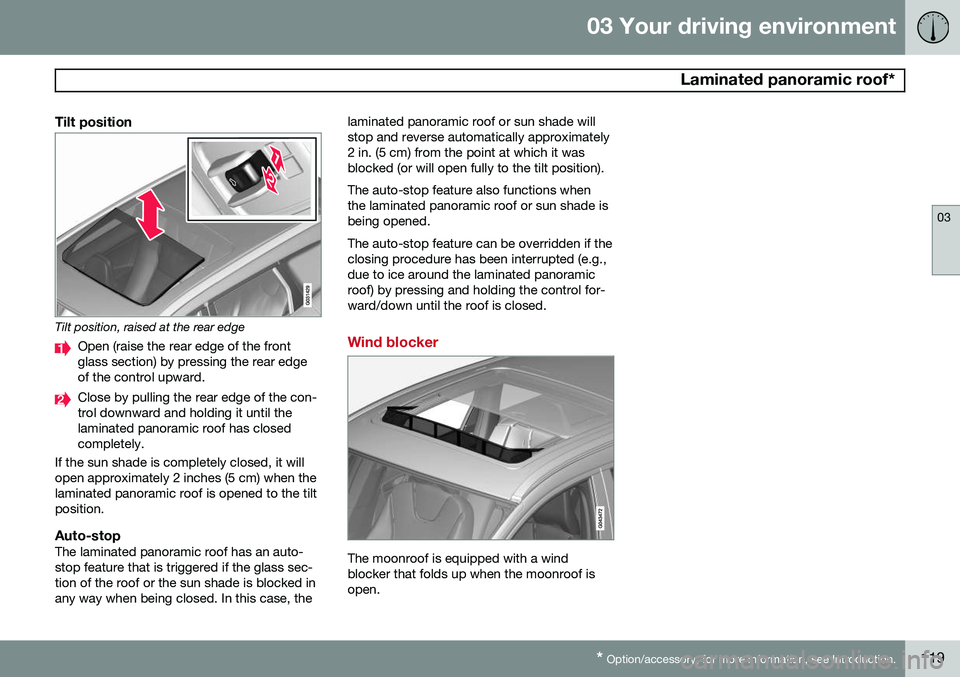
Tilt position, raised at the rear edge
Open (raise the rear edge of the front glass section) by pressing the rear edgeof the control upward.
Close by pulling the rear edge of the con- trol downward and holding it until thelaminated panoramic roof has closedcompletely.
If the sun shade is completely closed, it willopen approximately 2 inches (5 cm) when thelaminated panoramic roof is opened to the tiltposition.
Auto-stopThe laminated panoramic roof has an auto-stop feature that is triggered if the glass sec-tion of the roof or the sun shade is blocked inany way when being closed. In this case, the laminated panoramic roof or sun shade willstop and reverse automatically approximately2 in. (5 cm) from the point at which it wasblocked (or will open fully to the tilt position). The auto-stop feature also functions when the laminated panoramic roof or sun shade isbeing opened. The auto-stop feature can be overridden if the closing procedure has been interrupted (e.g.,due to ice around the laminated panoramicroof) by pressing and holding the control for-ward/down until the roof is closed.
Wind blocker
The moonroof is equipped with a wind blocker that folds up when the moonroof isopen.
Page 122 of 406
03 Your driving environment
HomeLink®
Wireless Control System*
03
120* Option/accessory, for more information, see Introduction.
Introduction
The HomeLink 1
Wireless Control System pro-
vides a convenient way to replace up to three hand-held radio-frequency (RF) transmittersused to activate devices such as gate opera-tors, garage door openers, entry door locks,security systems, even home lighting. Addi-tional HomeLink information can be found onthe Internet at www.homelink.com or byphoning the hotline at 1–800–355–3515.
WARNING
• If you use HomeLink to open a garage door or gate, be sure no one is nearthe gate or door while it is in motion.
• When programming a garage dooropener, it is advised to park outside ofthe garage.
• Do not use HomeLink with any garagedoor opener that lacks safety stop andreverse features as required by U.S.federal safety standards (this includesany garage door opener model manu-factured before April 1, 1982). Agarage door that cannot detect anobject - signaling the door to stop andreverse - does not meet current U.S.federal safety standards. For moreinformation, contact HomeLink at:www.homelink.com.
Retain the original transmitter of the RF device you are programming for use in othervehicles as well as for future HomeLink pro-gramming. It is also suggested that upon thesale of the vehicle, the programmed Home-Link buttons be erased for security purposes.Refer to “Resetting HomeLink Buttons” onpage 122.
Programming HomeLink
NOTE
Some vehicles may require the ignition to be switched on or be in the “accessories”position for programming and/or operationof HomeLink. It is also recommended thata new battery be placed in the hand-heldtransmitter of the device being pro-grammed to HomeLink for quicker trainingand accurate transmission of the radio-fre-quency signal. The HomeLink buttonsmust be reset first. When this has beencompleted, Homelink is in learning modeso that you can perform programming.
1. Position the end of your hand-held trans-
mitter 1–3 inches (5–14 cm) away from the HomeLink button you wish to pro-gram while keeping the indicator light inview.
1HomeLink and the HomeLink house are registered trademarks of Johnson Controls, Inc.
Page 124 of 406
03 Your driving environment
HomeLink®
Wireless Control System*
03
122* Option/accessory, for more information, see Introduction.
both the HomeLink and hand-held trans- mitter buttons.
Proceed with “Programming” step 3 to com- plete.
Using HomeLink
To operate, simply press and hold the pro- grammed HomeLink button until the traineddevice begins to operate (this may take sev-eral seconds). Activation will now occur forthe trained device (i.e., garage door opener,gate operator, security system, entry doorlock, home/office lighting, etc.). For conven-ience, the hand-held transmitter of the devicemay also be used at any time. In the eventthat there are still programming difficulties orquestions, contact HomeLink at:www.homelink.com or by phoning the hotlineat 1–800–355–3515.
NOTE
If the ignition is switched off, HomeLink will function for 30 minutes after the driv-er's door has been opened.
Resetting HomeLink Buttons
Use the following procedure to reset (erase programming) from the three HomeLink but-tons (individual buttons cannot be reset butcan be “reprogrammed” as outlined in the fol-lowing section):
1. Press and hold the two outer HomeLink buttons until the indicator light begins to flash.
2. Release both buttons. > HomeLink is now in the training (orlearning) mode and can be pro-grammed at any time beginning with“Programming” - step 1.
Reprogramming a Single HomeLink Button
To program a device to HomeLink using a HomeLink button previously trained, followthese steps:
1. Press and hold the desired HomeLink button. DO NOT release the button.
2. The indicator light will begin to flash after 20 seconds. Without releasing the Home- Link button, proceed with “Programming”- step 1. For questions or comments, contact Home-Link at: www.homelink.com or phone 1–800–355–3515. This device complies with FCC rules part 15 and Industry Canada (IC) RSS-210. Operationis subject to the following two conditions: (1)This device may not cause harmful interfer-ence, and (2) This device must accept anyinterference that may be received includinginterference that may cause undesired opera-tion.
NOTE
The transmitter has been tested and com- plies with FCC and IC rules. Changes ormodifications not expressly approved bythe party responsible for compliance couldvoid the user’s authority to operate the device.
2
2
The term “IC:” before the certification/registration number only signifies that Industry Canada technical specifications were met.
Page 127 of 406
03 Your driving environment
Starting the engine
03
}}
* Option/accessory, for more information, see Introduction.125
Engine Remote Start (ERS)*
IntroductionERS is a feature that makes it possible to remotely start the engine to cool or heat thepassenger compartment before driving. The climate control system will start using the same settings as when the engine wasswitched off. When the engine is started using ERS, it will run for a maximum of 15 minutes beforeautomatically switching off again. After 2 ERSstarts, the engine must be started in the nor-mal way before ERS can be used again.
NOTE
• Always adhere to applicable State, Province and/or Local laws regardingengine idling when using ERS.
• The service life of the remote key'sbattery is affected by ERS use. If thisfeature is used frequently, the batteryshould be replaced once a year, seepage 60).
WARNING
Keep the following in mind before using ERS
• The vehicle should be in view.
• The vehicle should be unoccupied.
• The vehicle must not be parked indoors or in an enclosed area.Exhaust fumes are harmful to thehealth.
Using ERS
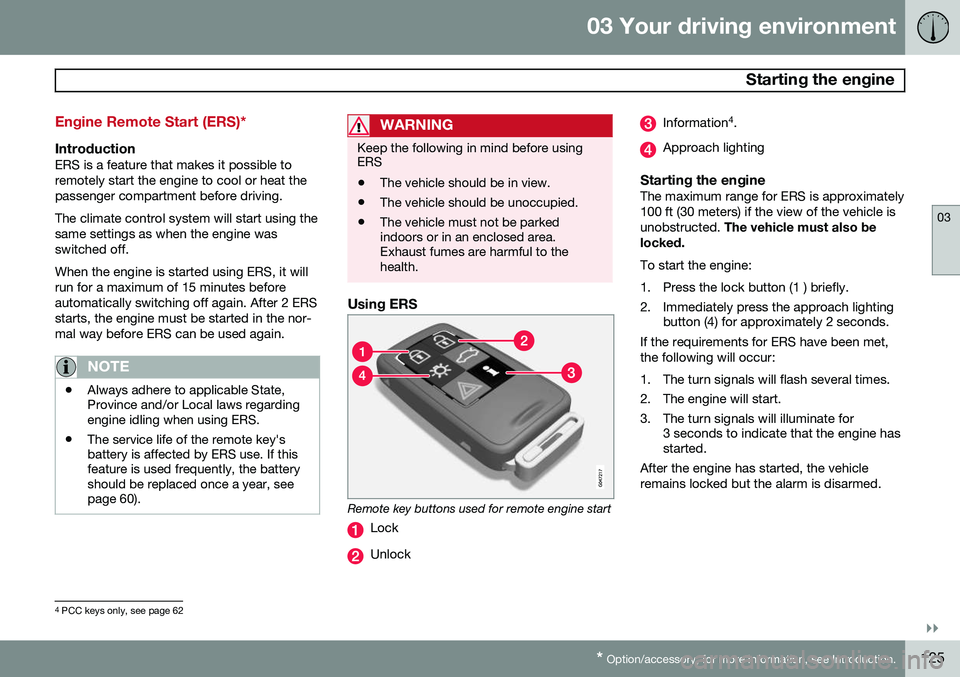
Remote key buttons used for remote engine start
Lock
Unlock
Information 4
.
Approach lighting
Starting the engineThe maximum range for ERS is approximately 100 ft (30 meters) if the view of the vehicle isunobstructed. The vehicle must also be
locked. To start the engine:
1. Press the lock button (1 ) briefly.
2. Immediately press the approach lighting button (4) for approximately 2 seconds.
If the requirements for ERS have been met, the following will occur:
1. The turn signals will flash several times.
2. The engine will start.
3. The turn signals will illuminate for 3 seconds to indicate that the engine has started.
After the engine has started, the vehicle remains locked but the alarm is disarmed.
4 PCC keys only, see page 62