brakes VOLVO XC60 2016 Owner´s Manual
[x] Cancel search | Manufacturer: VOLVO, Model Year: 2016, Model line: XC60, Model: VOLVO XC60 2016Pages: 398, PDF Size: 9.98 MB
Page 196 of 398
||
07 Driver support
07
194
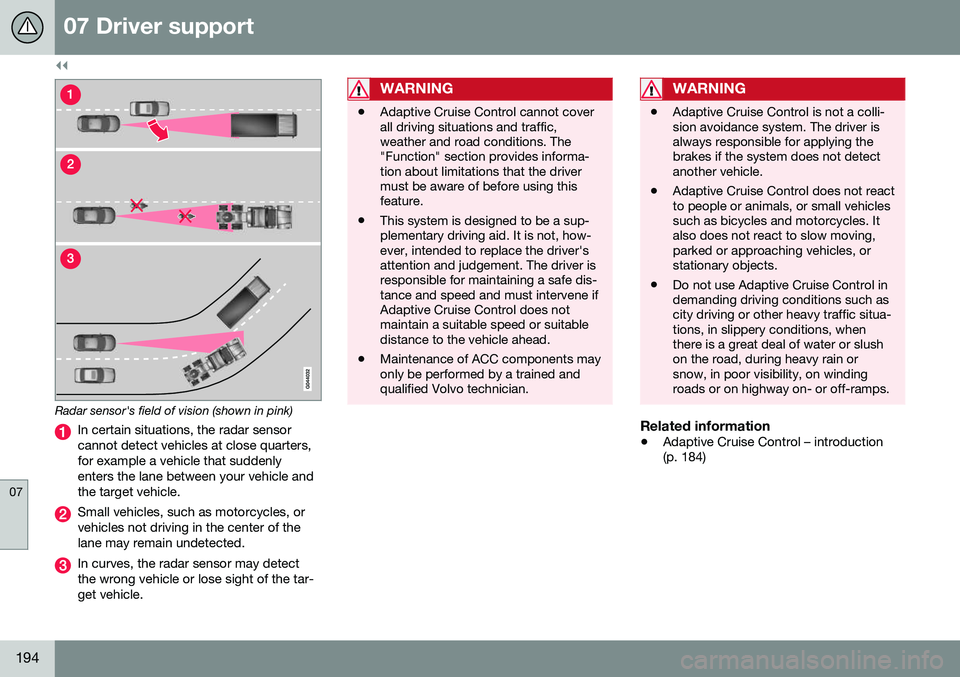
Radar sensor's field of vision (shown in pink)
In certain situations, the radar sensor cannot detect vehicles at close quarters,for example a vehicle that suddenlyenters the lane between your vehicle andthe target vehicle.
Small vehicles, such as motorcycles, or vehicles not driving in the center of thelane may remain undetected.
In curves, the radar sensor may detect the wrong vehicle or lose sight of the tar-get vehicle.
WARNING
•Adaptive Cruise Control cannot cover all driving situations and traffic,weather and road conditions. The"Function" section provides informa-tion about limitations that the drivermust be aware of before using thisfeature.
• This system is designed to be a sup-plementary driving aid. It is not, how-ever, intended to replace the driver'sattention and judgement. The driver isresponsible for maintaining a safe dis-tance and speed and must intervene ifAdaptive Cruise Control does notmaintain a suitable speed or suitabledistance to the vehicle ahead.
• Maintenance of ACC components mayonly be performed by a trained andqualified Volvo technician.
WARNING
• Adaptive Cruise Control is not a colli- sion avoidance system. The driver isalways responsible for applying thebrakes if the system does not detectanother vehicle.
• Adaptive Cruise Control does not reactto people or animals, or small vehiclessuch as bicycles and motorcycles. Italso does not react to slow moving,parked or approaching vehicles, orstationary objects.
• Do not use Adaptive Cruise Control indemanding driving conditions such ascity driving or other heavy traffic situa-tions, in slippery conditions, whenthere is a great deal of water or slushon the road, during heavy rain orsnow, in poor visibility, on windingroads or on highway on- or off-ramps.
Related information
•
Adaptive Cruise Control – introduction (p. 184)
Page 198 of 398
||
07 Driver support
07
196
SymbolMessageDescription
-Cruise control Service requiredACC is not functioning. Contact a trained and qualified Volvo service technician.
-Press Brake To hold +
an audible signalThe vehicle is at a standstill and ACC will release the brakes before the parking brake engages to keep the vehicle stopped but a problem with the parking brake means that the vehicle may begin to roll. The driver will have to apply the brakes. The message will remain in the display and the audible signal will continue until the driver applies the brakes or presses the accelerator pedal.
-Below 30 km/h Only followingThis is displayed if you try to activate ACC at speeds below approx. 18 mph (30 km/h) without a vehicle ahead within range (approx. 100 ft/30 meters).
Related information
• Adaptive Cruise Control – introduction (p. 184)
Page 204 of 398
07 Driver support
07
202
City Safety – introduction
City Safety™5
is a support system designed
to help the driver avoid low speed collisions when driving in slow-moving, stop-and-gotraffic. City Safety™ is not active if your vehicle’s speed is below approximately 2 mph(4 km/h). This means that City Safety™ willnot react if your vehicle approaches anothervehicle at very low speed, for example, whenparking. The function is active at speeds up to approximately 30 mph (50 km/h) and assiststhe driver by applying the brakes automati-cally, thereby avoiding or helping to reducethe effects of a collision. City Safety™ is designed to intervene as late as possible to help avoid unnecessary activa-tion. City Safety™ triggers brief, forceful braking if a low-speed collision is imminent. However,the system will not intervene in situationswhere the driver actively steers the vehicle orapplies the brakes, even if a collision cannotbe avoided. This is done in order to alwaysgive the driver’s actions highest priority. City Safety™ activates in situations where the driver has not applied the brakes in time, which means that the system cannot help thedriver in all situations. City Safety™ should not be used to alter the way in which the driver operates the vehicle.The driver should never rely solely on thissystem to safely stop the vehicle. Normally, the occupants of the vehicle will not be aware of City Safety™ except whenthe system intervenes when a low-speed col-lision is imminent. If the vehicle is also equipped with the optional Collision Warning with Full Auto-brake and Pedestrian Detection system, thetwo systems interact. For more informationabout the Collision Warning with Auto-brakesystem, see Collision warning – introduction(p. 209) .
WARNING
•
City Safety™ is a supplemental aid to the driver. It can never replace thedriver’s attention to traffic conditionsor his/her responsibility for operatingthe vehicle in a safe manner.
• City Safety™ does not function in alldriving situations or in all traffic,weather or road conditions.
WARNING
•
City Safety™ only reacts to vehicles traveling in the same direction as yourvehicle and does not react to smallvehicles or motorcycles or to people oranimals.
• City Safety™ is not activated whenyour vehicle is backing up.
• City Safety™ functions at speeds upto 30 mph (50 km/h). This system canhelp prevent a collision if the
differ-
ence in speed between your vehicle
and the vehicle ahead is less than9 mph (15 km/h). If the difference inspeed is greater, a collision cannot beavoided but the speed at which thecollision occurs can be reduced. Thedriver must apply the vehicle’s brakesfor full braking effect.
• City Safety™ will not intervene in apotential collision situation if the vehi-cle is being driven actively. The driveris always responsible for maintaining asafe distance to a vehicle or objectahead.
Related information
•
City Safety – function (p. 203)
• City Safety – operation (p. 204)
• City Safety – limitations (p. 204)
5
City Safety is a registered trademark of the Volvo Car Corporation
Page 205 of 398
07 Driver support
07
203
•
City Safety – troubleshooting (p. 205)
• City Safety – symbols and messages (p. 207)
• City Safety – Laser sensor (p. 208)
City Safety – function
Function
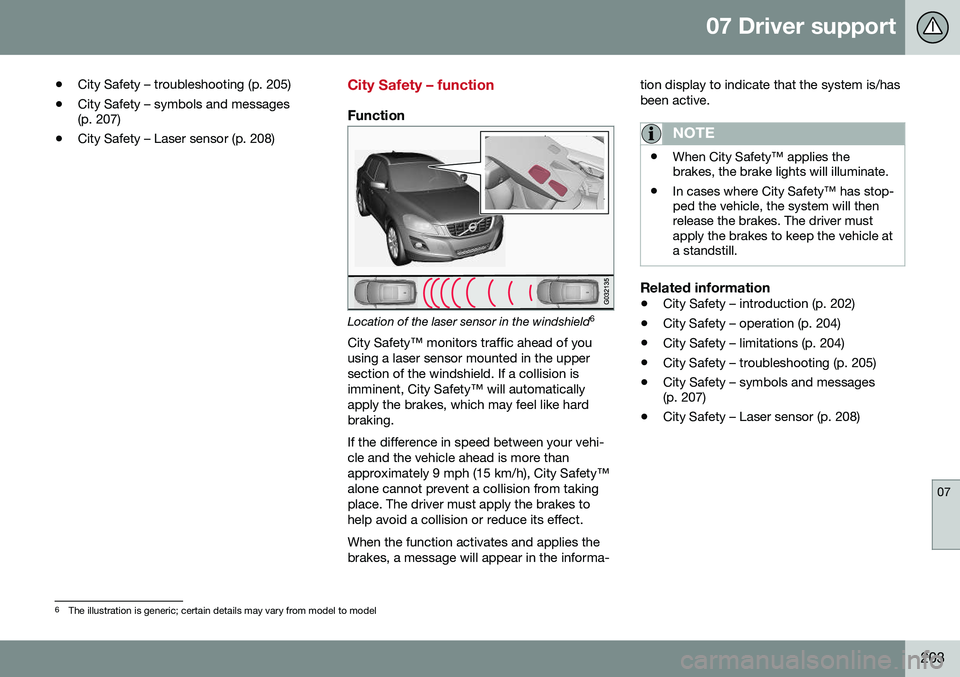
Location of the laser sensor in the windshield 6
City Safety™ monitors traffic ahead of you using a laser sensor mounted in the uppersection of the windshield. If a collision isimminent, City Safety™ will automaticallyapply the brakes, which may feel like hardbraking. If the difference in speed between your vehi- cle and the vehicle ahead is more thanapproximately 9 mph (15 km/h), City Safety™alone cannot prevent a collision from takingplace. The driver must apply the brakes tohelp avoid a collision or reduce its effect. When the function activates and applies the brakes, a message will appear in the informa- tion display to indicate that the system is/hasbeen active.
NOTE
•
When City Safety™ applies the brakes, the brake lights will illuminate.
• In cases where City Safety™ has stop-ped the vehicle, the system will thenrelease the brakes. The driver mustapply the brakes to keep the vehicle ata standstill.
Related information
•
City Safety – introduction (p. 202)
• City Safety – operation (p. 204)
• City Safety – limitations (p. 204)
• City Safety – troubleshooting (p. 205)
• City Safety – symbols and messages (p. 207)
• City Safety – Laser sensor (p. 208)
6
The illustration is generic; certain details may vary from model to model
Page 209 of 398
07 Driver support
07
207
City Safety – symbols and messages
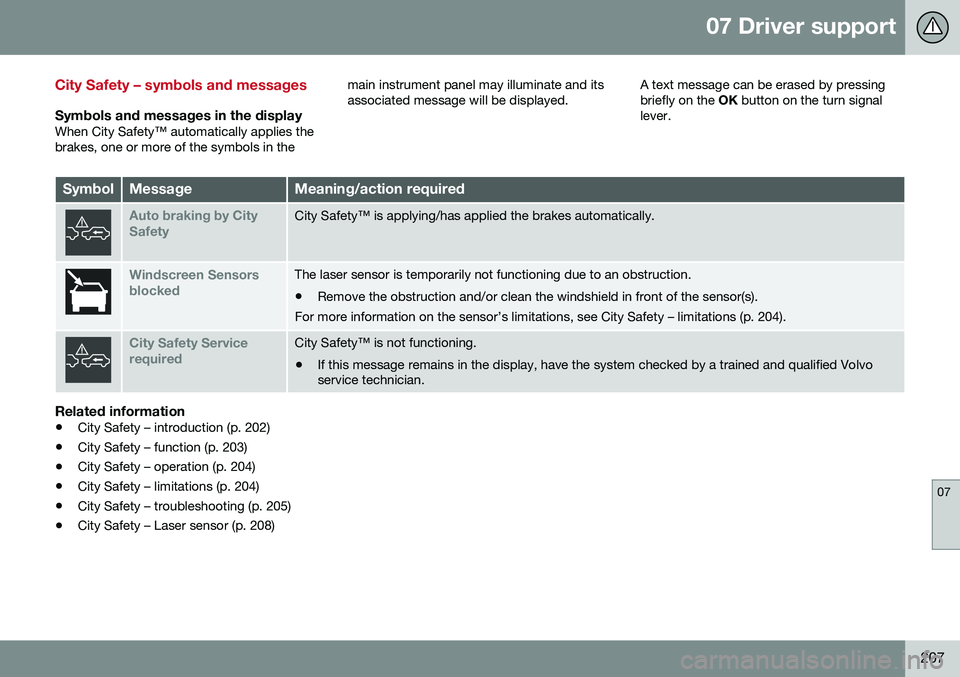
Symbols and messages in the displayWhen City Safety™ automatically applies the brakes, one or more of the symbols in themain instrument panel may illuminate and itsassociated message will be displayed.
A text message can be erased by pressingbriefly on the
OK button on the turn signal
lever.
SymbolMessageMeaning/action required
Auto braking by City SafetyCity Safety™ is applying/has applied the brakes automatically.
Windscreen Sensors blockedThe laser sensor is temporarily not functioning due to an obstruction.
• Remove the obstruction and/or clean the windshield in front of the sensor(s).
For more information on the sensor’s limitations, see City Safety – limitations (p. 204).
City Safety Service requiredCity Safety™ is not functioning.
• If this message remains in the display, have the system checked by a trained and qualified Volvo service technician.
Related information
• City Safety – introduction (p. 202)
• City Safety – function (p. 203)
• City Safety – operation (p. 204)
• City Safety – limitations (p. 204)
• City Safety – troubleshooting (p. 205)
• City Safety – Laser sensor (p. 208)
Page 211 of 398
07 Driver support
07
}}
209
•
City Safety – limitations (p. 204)
• City Safety – troubleshooting (p. 205)
• City Safety – symbols and messages (p. 207)
Collision warning – introduction
Pedestrian and Cyclist Detection with Full Auto Brake is designed to assist the driver ifthere is a risk of a collision with a pedestrian,a cyclist, a vehicle ahead that is at a standstillor one that is moving in the same direction asyour vehicle. This system consists of the following three functions: • Collision Warning
warns the driver of a
potential collision situation.
• Brake Support
helps the driver brake
efficiently in a critical situation.
• Auto-brake
brakes the vehicle automati-
cally if a collision with a pedestrian, a cyclist or another vehicle cannot be avoi-ded and the driver does not apply thebrakes in time or steer around the per-son/vehicle. Auto-brake can help preventa collision or reduce the speed at which acollision occurs.
Since Pedestrian and Cyclist Detection with Full Auto Brake is activated in circumstanceswhere the driver should have begun brakingmuch sooner, the system will not be able toassist the driver in all situations. This system is designed to activate as late as possible to help avoid unnecessary interven-tion. The system should not be used in such a way that the driver changes his/her way of operat- ing the vehicle. If the driver relies entirely onthe system, the chances of an accident even-tually occurring increase considerably. The Pedestrian and Cyclist Detection with Full Auto Brake and City Safety™ systems sup-plement each other. See City Safety – intro-duction (p. 202) for detailed information aboutCity Safety™.
WARNING
No automatic system can be guaranteed to function 100% correctly in all situations.For that reason, never test the Auto-brakesystem by driving toward a person orobject. This could result in serious injury ordeath.
Page 212 of 398
||
07 Driver support
07
210* Option/accessory, for more information, see Introduction.
WARNING
• Pedestrian and Cyclist Detection with Full Auto Brake does not work in alldriving, traffic, weather and road con-ditions. It does not react to vehiclesnot traveling in the same direction asyour vehicle.
• Pedestrian and Cyclist Detection withFull Auto Brake does not react to ani-mals.
• Warnings are only provided when therisk of collision is high. The "Function"section provides information aboutlimitations that the driver must beaware of before using Collision Warn-ing.
• Pedestrian and Cyclist Detection withFull Auto Brake will not provide awarning or brake the vehicle forpedestrians or cyclists at speedsabove 50 mph (80 km/h).
WARNING
•
Pedestrian and Cyclist Detection with Full Auto Brake will not provide awarning or brake the vehicle forpedestrians in darkness or in tunnels,even if there is street lighting in thearea.
• The auto-brake function can help pre-vent a collision or reduce the speed atimpact but the driver should alwaysapply the brakes for the best possiblebraking effect, even if auto-brake isactively applying the brakes.
• Never wait for a collision warning. Thissystem is designed to be a supple-mentary driving aid. It is not, however,intended to replace the driver's atten-tion and judgement. The driver isresponsible for maintaining a safe dis-tance and speed, even when the colli-sion warning system is in use.
• Maintenance of the Pedestrian andCyclist Detection with Full Auto Brakesystem's components must only beperformed by a trained and qualifiedVolvo technician.
Related information
•
Collision warning* – function (p. 211)
• Collision warning* – operation (p. 212)
• Collision warning* – Pedestrian detection (p. 214) •
Collision warning* – Cyclist detection(p. 213)
• Collision warning* – limitations (p. 215)
• The camera’s limitations (p. 217)
• The camera’s limitations (p. 217)
• Collision warning – troubleshooting(p. 218)
• Collision warning – symbols and mes-sages (p. 220)
Page 213 of 398
07 Driver support
07
* Option/accessory, for more information, see Introduction.211
Collision warning* – function
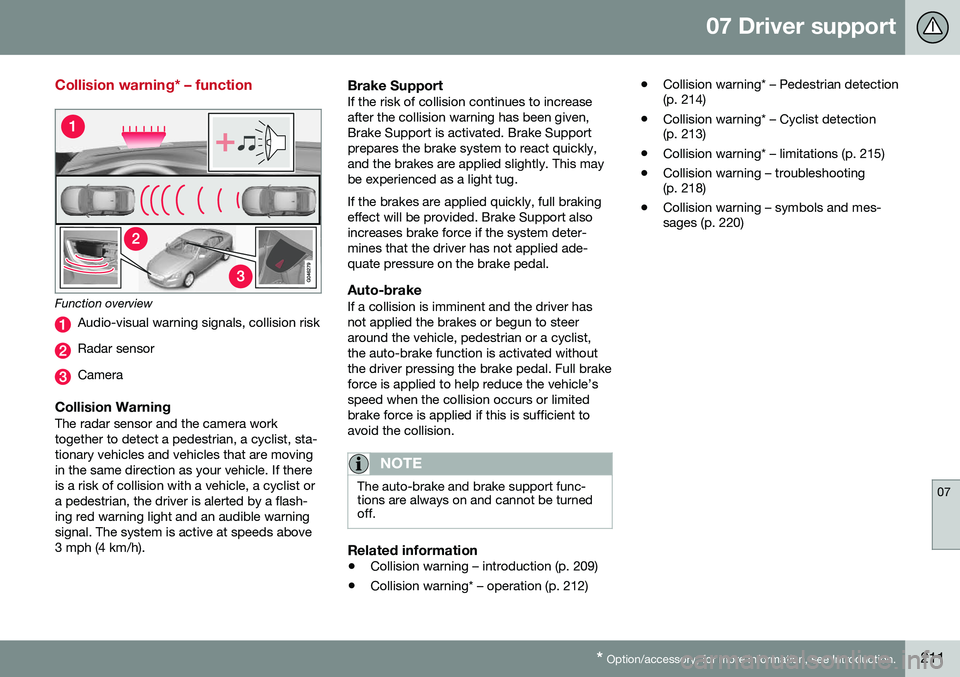
Function overview
Audio-visual warning signals, collision risk
Radar sensor
Camera
Collision WarningThe radar sensor and the camera work together to detect a pedestrian, a cyclist, sta-tionary vehicles and vehicles that are movingin the same direction as your vehicle. If thereis a risk of collision with a vehicle, a cyclist ora pedestrian, the driver is alerted by a flash-ing red warning light and an audible warningsignal. The system is active at speeds above3 mph (4 km/h).
Brake SupportIf the risk of collision continues to increaseafter the collision warning has been given,Brake Support is activated. Brake Supportprepares the brake system to react quickly,and the brakes are applied slightly. This maybe experienced as a light tug. If the brakes are applied quickly, full braking effect will be provided. Brake Support alsoincreases brake force if the system deter-mines that the driver has not applied ade-quate pressure on the brake pedal.
Auto-brakeIf a collision is imminent and the driver hasnot applied the brakes or begun to steeraround the vehicle, pedestrian or a cyclist,the auto-brake function is activated withoutthe driver pressing the brake pedal. Full brakeforce is applied to help reduce the vehicle’sspeed when the collision occurs or limitedbrake force is applied if this is sufficient toavoid the collision.
NOTE
The auto-brake and brake support func- tions are always on and cannot be turnedoff.
Related information
• Collision warning – introduction (p. 209)
• Collision warning* – operation (p. 212) •
Collision warning* – Pedestrian detection (p. 214)
• Collision warning* – Cyclist detection(p. 213)
• Collision warning* – limitations (p. 215)
• Collision warning – troubleshooting(p. 218)
• Collision warning – symbols and mes-sages (p. 220)
Page 214 of 398
07 Driver support
07
212* Option/accessory, for more information, see Introduction.
Collision warning* – operation
Settings are made by pressing MY CAR on
the center console control panel and using the menus displayed.
Activating/deactivating both warning
signals
To switch the system's audible and visual
signals on or off at the same time, press MY
CAR on the center console control panel and
go to
SettingsCar settingsDriver
support systems
Collision Warning. If
Pedestrian and Cyclist Detection with Full Auto Brake is on, the system will perform aself-test each time the engine is started bybriefly illuminating the warning light. See MyCar – introduction (p. 76) for a description ofthe menu system. When the engine is switched on, the system setting that was being used when it wasswitched off will be the default setting.
NOTE
The auto-brake and pedestrian/cyclist detection features are always on, even ifthe audible and visual warning signalshave been deactivated.
Activating/deactivating the audible warning signal only
The audible warning signal can be activated/ deactivated by pressing MY CAR on the cen- ter console control panel and going to
SettingsCar settingsDriver support
systems
Warning sound if risk of
collision.
Setting a warning distanceThis setting determines the distance at which the visual and audible warnings are triggered. Select
Long, Normal or Short by pressing
MY CAR on the center console control panel
and going to
SettingsCar settings
Driver support systemsCollision
Warning
Warning distance.
The warning distance determines the level of sensitivity used by the system. The warning distance
Long provides an earlier warning.
Begin by using Long and if the system gives
too many warnings, try changing to Normal.
WARNING
• The setting Short should only be used
in situations where traffic is light and moving at low speeds.
• Pedestrian and Cyclist Detection withFull Auto Brake alerts the driver to therisk of a collision but this function can-not reduce the driver’s reaction time.
• For the system to be as effective aspossible, it is recommended that Dis-tance Alert be set to 4 or 5, see Dis-tance Alert – operation (p. 198).
NOTE
•When Adaptive Cruise Control is used, the warning light and signal will beused by that function, even if thewarnings provided by Pedestrian andCyclist Detection with Full Auto Brakehave been deactivated by the driver.
• In situations where traffic is moving atconsiderably different speeds, or if thevehicle ahead brakes suddenly, warn-ings may be considered to be late, even if the setting
Long has been
selected.
Checking settingsThe current system settings can be checked by pressing MY CAR on the center console
control panel and going to
SettingsCar
settings
Driver support systemsCollision Warning.
Related information
• Collision warning – introduction (p. 209)
• Collision warning* – function (p. 211)
• Collision warning* – Pedestrian detection (p. 214)
• Collision warning* – Cyclist detection(p. 213)
• Collision warning* – limitations (p. 215)
• The camera’s limitations (p. 217)
Page 238 of 398
07 Driver support
07
236
Park assist – troubleshooting
Faults in the systemIf the information symbol illuminates andPark assist syst Service required is shown
on the information display, this indicates that the system is not functioning properly andhas been disengaged. Consult a trained andqualified Volvo service technician.
CAUTION
In certain circumstances, the park assist system may give unexpected warning sig-nals that can be caused by external soundsources that use the same ultrasound fre-quencies as the system. This may includesuch things as the horns of other vehicles,wet tires on asphalt, pneumatic brakes,motorcycle exhaust pipes, etc. This doesnot indicate a fault in the system.
Related information
• Park assist – introduction (p. 232)
• Park assist – limitations (p. 235)
• Park assist – function (p. 232)
• Park assist – operation (p. 234)
• Rear Park Assist Camera (PAC) – function (p. 237)
Rear Park Assist Camera (PAC) – introduction
The Park Assist Camera is designed to pro- vide the driver with a view of the area behindthe vehicle when backing up.
IntroductionPAC uses the display in the center console toshow the area behind the car while you arebacking up. PAC also shows guiding lines in the on- screen image to indicate the direction that thevehicle will take as it moves rearward, whichhelps simplify parallel parking, backing into atight space or when attaching a trailer to thevehicle. The images of vehicles in this section are generic and may not depict your specificmodel.
NOTE
A trailer hitch whose wiring is integrated with the vehicle's electrical system will beincluded in the measurement of the availa-ble space behind the vehicle.
WARNING
• PAC is designed to be a supplemen- tary aid when parking the vehicle. It isnot, however, intended to replace thedriver’s attention and judgment.
• The camera has blind spots where itcannot detect objects or peoplebehind the vehicle.
• Pay particular attention to people oranimals that are close to the vehicle.
• Objects seen on the screen may becloser than they appear to be.
Related information
•
Rear Park Assist Camera (PAC) – opera- tion (p. 237)
• Rear Park Assist Camera (PAC) – limita-tions (p. 240)