Tel VOLVO XC60 2016 Owner´s Manual
[x] Cancel search | Manufacturer: VOLVO, Model Year: 2016, Model line: XC60, Model: VOLVO XC60 2016Pages: 398, PDF Size: 9.98 MB
Page 103 of 398
03 Instruments and controls
03
* Option/accessory, for more information, see Introduction.101
WARNING
• Always remove the ignition key when the vehicle is unattended to put theignition in mode
0 (see Ignition modes
(p. 79) for information about the igni-tion modes).
• Never leave children unattended in thevehicle.
• Make sure that the windows are com-pletely unobstructed before they areoperated.
Operating
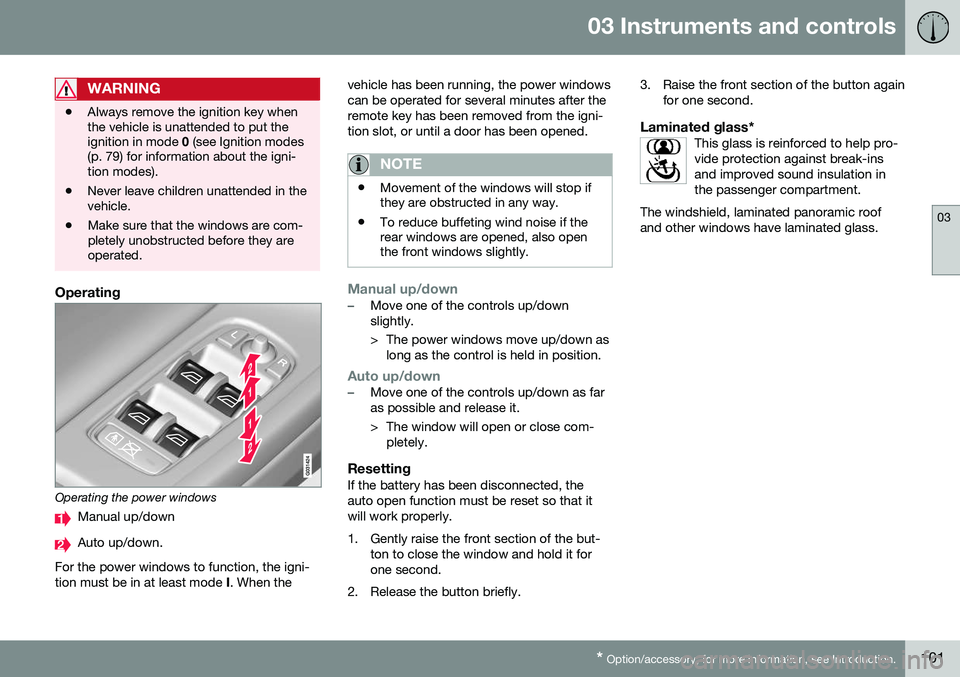
Operating the power windows
Manual up/down
Auto up/down.
For the power windows to function, the igni- tion must be in at least mode I. When the vehicle has been running, the power windowscan be operated for several minutes after theremote key has been removed from the igni-tion slot, or until a door has been opened.
NOTE
•
Movement of the windows will stop if they are obstructed in any way.
• To reduce buffeting wind noise if therear windows are opened, also openthe front windows slightly.
Manual up/down–Move one of the controls up/down slightly.
> The power windows move up/down as
long as the control is held in position.
Auto up/down–Move one of the controls up/down as far as possible and release it.
> The window will open or close com-pletely.
ResettingIf the battery has been disconnected, the auto open function must be reset so that itwill work properly.
1. Gently raise the front section of the but- ton to close the window and hold it for one second.
2. Release the button briefly. 3. Raise the front section of the button again
for one second.
Laminated glass*This glass is reinforced to help pro-vide protection against break-insand improved sound insulation inthe passenger compartment.
The windshield, laminated panoramic roofand other windows have laminated glass.
Page 104 of 398
03 Instruments and controls
03
102* Option/accessory, for more information, see Introduction.
Power door mirrors
The control on the driver's door is used to adjust the position of the door mirrors.
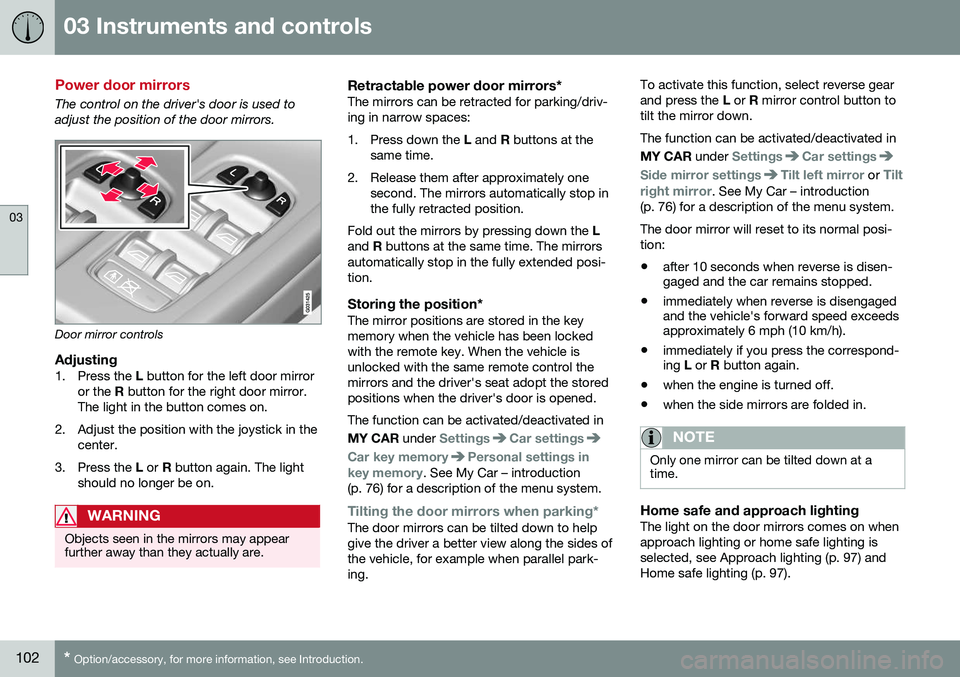
Door mirror controls
Adjusting1. Press the L button for the left door mirror
or the R button for the right door mirror.
The light in the button comes on.
2. Adjust the position with the joystick in the center.
3. Press the L or R button again. The light
should no longer be on.
WARNING
Objects seen in the mirrors may appear further away than they actually are.
Retractable power door mirrors*The mirrors can be retracted for parking/driv- ing in narrow spaces:
1. Press down the L and R buttons at the
same time.
2. Release them after approximately one second. The mirrors automatically stop in the fully retracted position.
Fold out the mirrors by pressing down the L
and R buttons at the same time. The mirrors
automatically stop in the fully extended posi-tion.
Storing the position*The mirror positions are stored in the keymemory when the vehicle has been lockedwith the remote key. When the vehicle isunlocked with the same remote control themirrors and the driver's seat adopt the storedpositions when the driver's door is opened. The function can be activated/deactivated in MY CAR under
SettingsCar settings
Car key memoryPersonal settings in
key memory. See My Car – introduction
(p. 76) for a description of the menu system.
Tilting the door mirrors when parking*The door mirrors can be tilted down to help give the driver a better view along the sides ofthe vehicle, for example when parallel park-ing. To activate this function, select reverse gearand press the
L or R mirror control button to
tilt the mirror down. The function can be activated/deactivated in MY CAR under
SettingsCar settings
Side mirror settingsTilt left mirror or Tilt
right mirror
. See My Car – introduction
(p. 76) for a description of the menu system. The door mirror will reset to its normal posi- tion: • after 10 seconds when reverse is disen- gaged and the car remains stopped.
• immediately when reverse is disengagedand the vehicle's forward speed exceedsapproximately 6 mph (10 km/h).
• immediately if you press the correspond-ing
L or R button again.
• when the engine is turned off.
• when the side mirrors are folded in.
NOTE
Only one mirror can be tilted down at a time.
Home safe and approach lightingThe light on the door mirrors comes on when approach lighting or home safe lighting isselected, see Approach lighting (p. 97) andHome safe lighting (p. 97).
Page 109 of 398
03 Instruments and controls
03
}}
* Option/accessory, for more information, see Introduction.107
Panoramic roof* – operation
The laminated panoramic roof is divided into two sections. The rear glass section is fixed inplace and cannot be moved but the frontglass section can be slid horizontally to theopen or closed positions or its rear edge canbe raised and lowered to allow ventilation.
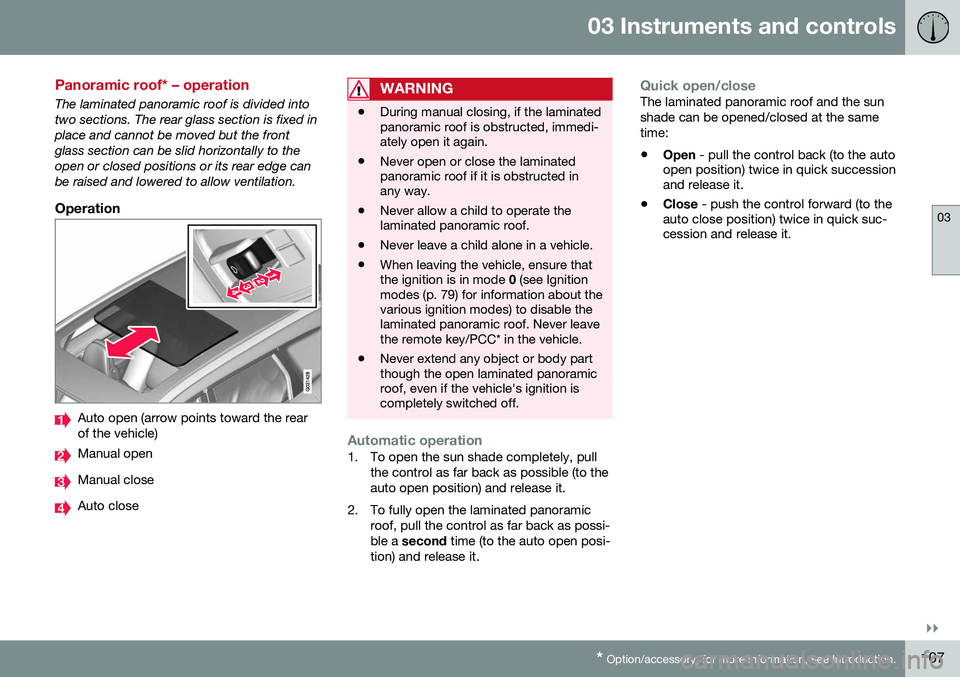
Operation
Auto open (arrow points toward the rear of the vehicle)
Manual open
Manual close
Auto close
WARNING
• During manual closing, if the laminated panoramic roof is obstructed, immedi-ately open it again.
• Never open or close the laminatedpanoramic roof if it is obstructed inany way.
• Never allow a child to operate thelaminated panoramic roof.
• Never leave a child alone in a vehicle.
• When leaving the vehicle, ensure thatthe ignition is in mode
0 (see Ignition
modes (p. 79) for information about thevarious ignition modes) to disable thelaminated panoramic roof. Never leavethe remote key/PCC* in the vehicle.
• Never extend any object or body partthough the open laminated panoramicroof, even if the vehicle's ignition iscompletely switched off.
Automatic operation1. To open the sun shade completely, pull
the control as far back as possible (to the auto open position) and release it.
2. To fully open the laminated panoramic roof, pull the control as far back as possi-ble a second time (to the auto open posi-
tion) and release it.
Quick open/closeThe laminated panoramic roof and the sun shade can be opened/closed at the sametime: • Open
- pull the control back (to the auto
open position) twice in quick succession and release it.
• Close
- push the control forward (to the
auto close position) twice in quick suc-cession and release it.
Page 110 of 398
||
03 Instruments and controls
03
108
Manual operation1.Opening the sun shade : Pull the control
back to the first stop (the manual open position) and hold it until the sun shadehas opened to the position of yourchoice.
2. Opening the rear edge of the laminated panoramic roof
: Pull the control back to
the first stop (the manual open position) a second time to open the rear edge of the
laminated panoramic roof.
3. Opening the front glass section : Pull
the control back to the first stop (themanual open position) a third time and
hold it until the laminated panoramic roofhas opened to the position of yourchoice.
Perform this procedure in reverse order toclose the laminated panoramic roof and/orsun shade.
NOTE
For manual opening, the sun shade must first be fully open before it will be possibleto open the laminated panoramic roof.When closing, the laminated panoramicroof must be fully closed before the sunshade can be closed.
Tilt position
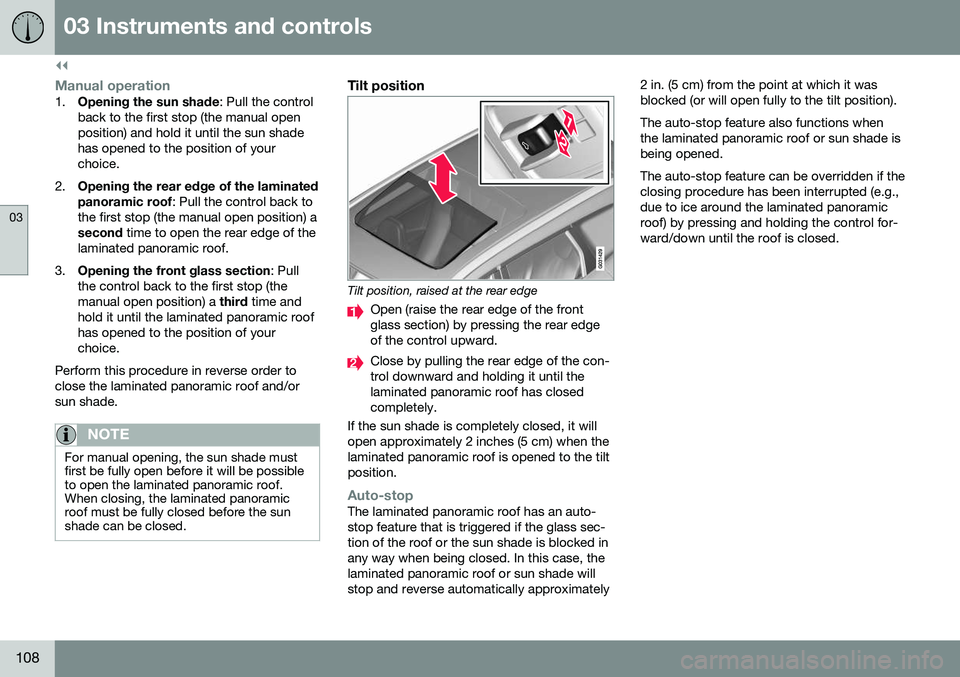
Tilt position, raised at the rear edge
Open (raise the rear edge of the front glass section) by pressing the rear edgeof the control upward.
Close by pulling the rear edge of the con- trol downward and holding it until thelaminated panoramic roof has closedcompletely.
If the sun shade is completely closed, it willopen approximately 2 inches (5 cm) when thelaminated panoramic roof is opened to the tiltposition.
Auto-stopThe laminated panoramic roof has an auto- stop feature that is triggered if the glass sec-tion of the roof or the sun shade is blocked inany way when being closed. In this case, thelaminated panoramic roof or sun shade willstop and reverse automatically approximately 2 in. (5 cm) from the point at which it wasblocked (or will open fully to the tilt position). The auto-stop feature also functions when the laminated panoramic roof or sun shade isbeing opened. The auto-stop feature can be overridden if the closing procedure has been interrupted (e.g.,due to ice around the laminated panoramicroof) by pressing and holding the control for-ward/down until the roof is closed.
Page 114 of 398
03 Instruments and controls
03
112* Option/accessory, for more information, see Introduction.
NOTE
The transmitter has been tested and com- plies with FCC and IC rules. Changes ormodifications not expressly approved bythe party responsible for compliance couldvoid the user’s authority to operate the device. 22
Volvo Sensus
Volvo Sensus is the core of the contact inter- face with your vehicle. Sensus provides infor-mation, entertainment and offers access tofunctions that make owning and operating aVolvo easier.
Volvo Sensus is the operating system in your vehicle and it enables you to interact intui-tively with the vehicle’s various features andfunctions, including accessing the Internet,when it suits you. Volvo Sensus uses the center console screen to display information and menus, and tooffer a user interface that enables you tomake personalized settings for e.g., vehicle,infotainment and climate system functions. The buttons on the center console or the steering wheel keypad are used to activate/deactivate functions and change numeroussettings. Pressing the
MY CAR button on the center
console displays all of the settings related todriving and operating the vehicle, such asCity Safety, lock and alarm functions, auto-matic blower speed, setting the clock, etc. Pressing the source buttons on the center console ( RADIO, MEDIA , TEL ,
, NAV * and
CAM *, etc.) make it possible to select e.g.,
AM or FM radio, play a CD or DVD, use the Bluetooth ®
hands-free feature, the navigation
system* or the park assist camera*. See your on-board owner’s manual or the separate printed supplements for detailedinformation about the functionality offered byVolvo Sensus.
22 The term “IC:” before the certification/registration number only signifies that Industry Canada technical specifications were met.
Page 115 of 398
03 Instruments and controls
03
* Option/accessory, for more information, see Introduction.113
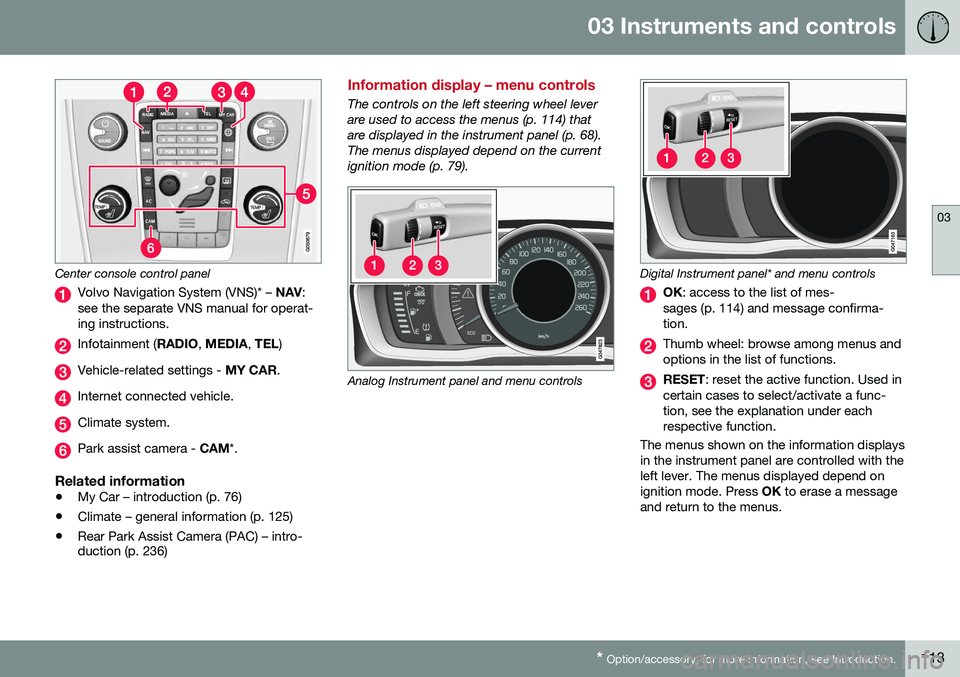
Center console control panel
Volvo Navigation System (VNS)* – NAV:
see the separate VNS manual for operat- ing instructions.
Infotainment ( RADIO, MEDIA , TEL )
Vehicle-related settings - MY CAR.
Internet connected vehicle.
Climate system.
Park assist camera - CAM*.
Related information
•My Car – introduction (p. 76)
• Climate – general information (p. 125)
• Rear Park Assist Camera (PAC) – intro- duction (p. 236)
Information display – menu controls
The controls on the left steering wheel lever are used to access the menus (p. 114) thatare displayed in the instrument panel (p. 68).The menus displayed depend on the currentignition mode (p. 79).
Analog Instrument panel and menu controls
Digital Instrument panel* and menu controls
OK
: access to the list of mes-
sages (p. 114) and message confirma- tion.
Thumb wheel: browse among menus and options in the list of functions.
RESET : reset the active function. Used in
certain cases to select/activate a func- tion, see the explanation under eachrespective function.
The menus shown on the information displaysin the instrument panel are controlled with theleft lever. The menus displayed depend onignition mode. Press OK to erase a message
and return to the menus.
Page 116 of 398
03 Instruments and controls
03
114* Option/accessory, for more information, see Introduction.
Information display – menu overview
The menus displayed depend on the current ignition mode (p. 79). The following menu alternatives may vary, depending on the equipment installed in thevehicle.
Analog instrument panelDigital speed Trip comp. opt.Service status
Messages (##) 23
Digital instrument panel*
Settings
Themes
Contrast mode /Color mode
Service status
Messages Trip computer reset
Related information
• Information displays – introduction (p. 68)
• Information display – menu controls (p. 113)
• Information display – messages (p. 114)
Information display – messages
The controls on the left steering wheel lever are used to scroll among messages displayedin the instrument panel and to confirm selec-tions. When information, indicator or warning sym- bols illuminate, an explanatory message willbe displayed in the instrument panel. When a warning (p. 74), information (p. 72) or indicator symbol (p. 72) comes on, a corres-ponding message appears in the informationpanel. An error message is stored in a mem-ory list until the fault is rectified. Press
OK to acknowledge and scroll among
the messages.
NOTE
If a warning message appears while you are using the trip computer, the messagemust be read and confirmed by pressingOK before the previous activity can be
resumed.
MessageDescription
Stop engineAStop and switch off the engine as soon as possi-ble. Serious risk of dam-age. Contact an author-ized Volvo workshop.
Stop safelyAStop and switch off the engine. Serious risk ofdamage. Contact anauthorized Volvo work-shop.
Service urgentAHave the vehicle checked by an authorized Volvoworkshop immediately.
Service requiredAHave the vehicle checked by an authorized Volvoworkshop as soon as pos-sible.
See man- ualARead the owner's manual.
Book time for mainte-nanceTime to book service at an authorized Volvo retailer.
23 Number of messages in parentheses
Page 124 of 398
03 Instruments and controls
03
122* Option/accessory, for more information, see Introduction.
Trip computer – Supplementary information
General information for both Analog and Digi- tal trip computer functions.
Average fuel consumptionFuel consumption since the last time thisfunction was reset.
Average speedThe vehicle's average speed since the lasttime this function was reset.
Current fuel consumptionCurrent fuel consumption is calculatedapproximately once a second. When the vehi-cle is moving at low speed, fuel consumptionis displayed per unit of time. At higherspeeds, it is displayed in terms of distance. Miles or kilometers can be displayed, see the heading "Changing units".
Distance to emptyThis function shows the approximate dis-tance that can be driven on the fuel remaining in the tank. When
Distance to empty shows
"----", there is very little useable fuel remain- ing in that tank; refuel as soon as possible.The calculation is based on average fuel con-sumption during the last 20 miles (30 km) ofdriving and the amount of fuel remaining inthe tank (the accuracy of this figure may varyif your driving style changes). An economical driving style will generally increase this dis-tance. See Economical driving (p. 280) for informa- tion about driving economically.
Digital speed display*Speed is expressed in the unit not used bythe instrument panel's speedometer e.g., ifthe normal speedometer is in mph, the tripcomputer will display in the speed in km/hand vice versa.
Resetting an analog instrument panel
Trip odometer(s) and average speed1. Display trip odometer T1 or T1, or Aver-
age speed.
2. Press and hold RESET until selected
function is reset.
Each trip computer heading must be reset individually.
Resetting a digital instrument panel
Trip odometer1. Turn the thumb wheel to select the com-
bination of headings containing the trip odometer to be reset.
2. Press and hold RESET until selected trip
odometer is reset.
Average speed and fuel consumption1. Select Trip computer reset and press
OK . 2. Select one of the following alternatives
using the thumb wheel and press OK:
• mpg
• mph
• Reset both
3. Finish by pressing RESET.
Changing unitsTo change the unit (miles/km) used to meas- ure distance and speed, go to
MY CAR
SettingsSystem optionsDistance
and fuel units.
NOTE
In addition to changing units in the trip computer, this also changes the units usedin the Volvo Navigation System (VNS)*.
Related information
• Trip computer – introduction (p. 115)
• Trip computer – functions, analog instru- ment panel (p. 117)
• Trip computer – functions, digital instru-ment panel (p. 120)
• Trip computer – Trip statistics (p. 123)
Page 131 of 398
04 Climate
04
* Option/accessory, for more information, see Introduction.129
Electronic climate control (ECC)
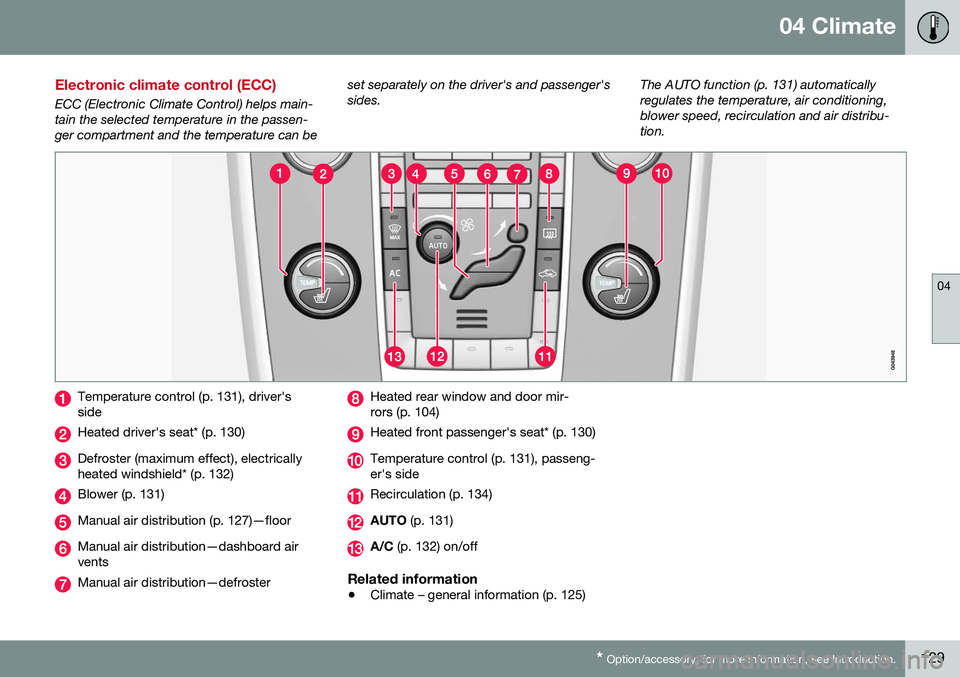
ECC (Electronic Climate Control) helps main- tain the selected temperature in the passen-ger compartment and the temperature can be set separately on the driver's and passenger'ssides.
The AUTO function (p. 131) automaticallyregulates the temperature, air conditioning,blower speed, recirculation and air distribu-tion.
Temperature control (p. 131), driver's side
Heated driver's seat* (p. 130)
Defroster (maximum effect), electrically heated windshield* (p. 132)
Blower (p. 131)
Manual air distribution (p. 127)—floor
Manual air distribution—dashboard air vents
Manual air distribution—defroster
Heated rear window and door mir- rors (p. 104)
Heated front passenger's seat* (p. 130)
Temperature control (p. 131), passeng- er's side
Recirculation (p. 134)
AUTO
(p. 131)
A/C (p. 132) on/off
Related information
•Climate – general information (p. 125)
Page 133 of 398
04 Climate
04
131
Temperature and blower control
When the vehicle is started, the most recent setting is resumed. The blower should always be activated to help avoid condensation and fogging on thewindows.
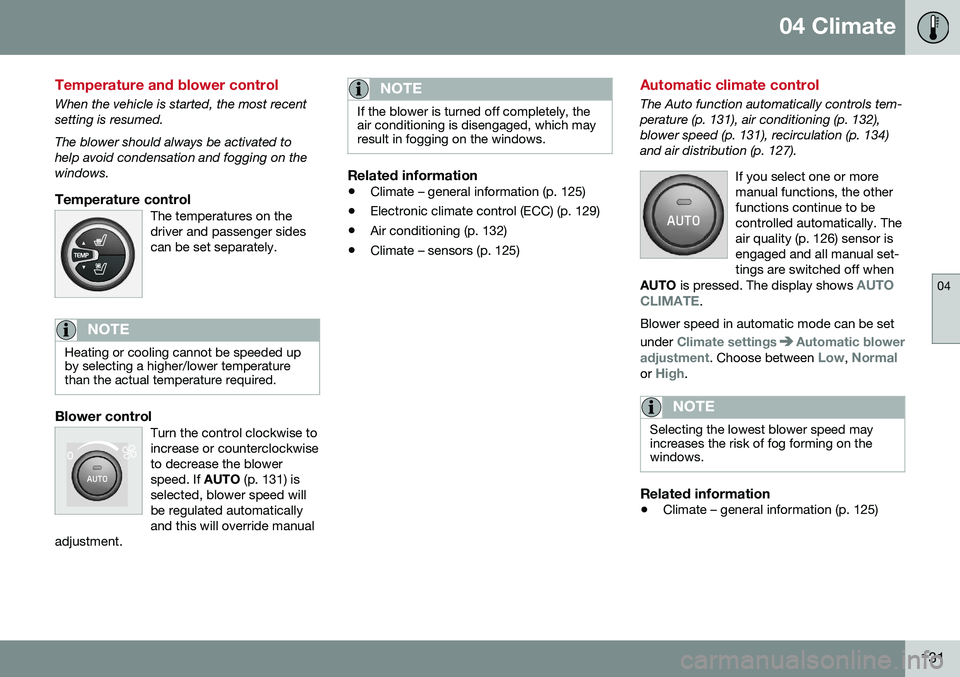
Temperature controlThe temperatures on thedriver and passenger sidescan be set separately.
NOTE
Heating or cooling cannot be speeded up by selecting a higher/lower temperaturethan the actual temperature required.
Blower controlTurn the control clockwise to increase or counterclockwiseto decrease the blowerspeed. If AUTO (p. 131) is
selected, blower speed willbe regulated automaticallyand this will override manual
adjustment.
NOTE
If the blower is turned off completely, the air conditioning is disengaged, which mayresult in fogging on the windows.
Related information
• Climate – general information (p. 125)
• Electronic climate control (ECC) (p. 129)
• Air conditioning (p. 132)
• Climate – sensors (p. 125)
Automatic climate control
The Auto function automatically controls tem- perature (p. 131), air conditioning (p. 132),blower speed (p. 131), recirculation (p. 134)and air distribution (p. 127).
If you select one or moremanual functions, the otherfunctions continue to becontrolled automatically. Theair quality (p. 126) sensor isengaged and all manual set-tings are switched off when
AUTO is pressed. The display shows
AUTO
CLIMATE.
Blower speed in automatic mode can be set under
Climate settingsAutomatic blower
adjustment
. Choose between Low, Normalor High.
NOTE
Selecting the lowest blower speed may increases the risk of fog forming on thewindows.
Related information
• Climate – general information (p. 125)