Tel VOLVO XC60 2016 Owner´s Manual
[x] Cancel search | Manufacturer: VOLVO, Model Year: 2016, Model line: XC60, Model: VOLVO XC60 2016Pages: 398, PDF Size: 9.98 MB
Page 205 of 398
07 Driver support
07
203
•
City Safety – troubleshooting (p. 205)
• City Safety – symbols and messages (p. 207)
• City Safety – Laser sensor (p. 208)
City Safety – function
Function
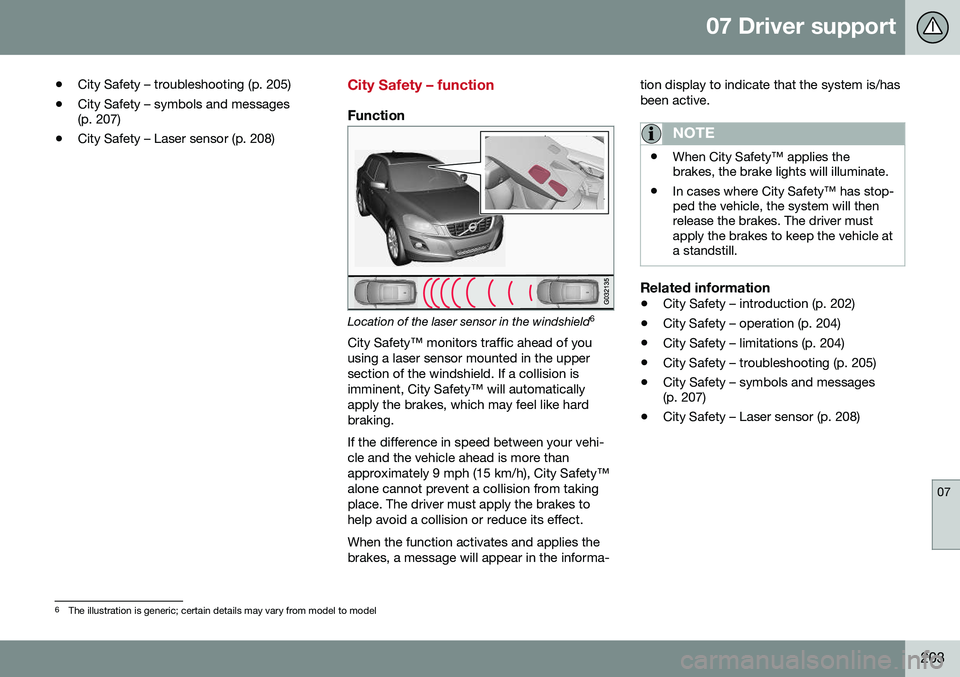
Location of the laser sensor in the windshield 6
City Safety™ monitors traffic ahead of you using a laser sensor mounted in the uppersection of the windshield. If a collision isimminent, City Safety™ will automaticallyapply the brakes, which may feel like hardbraking. If the difference in speed between your vehi- cle and the vehicle ahead is more thanapproximately 9 mph (15 km/h), City Safety™alone cannot prevent a collision from takingplace. The driver must apply the brakes tohelp avoid a collision or reduce its effect. When the function activates and applies the brakes, a message will appear in the informa- tion display to indicate that the system is/hasbeen active.
NOTE
•
When City Safety™ applies the brakes, the brake lights will illuminate.
• In cases where City Safety™ has stop-ped the vehicle, the system will thenrelease the brakes. The driver mustapply the brakes to keep the vehicle ata standstill.
Related information
•
City Safety – introduction (p. 202)
• City Safety – operation (p. 204)
• City Safety – limitations (p. 204)
• City Safety – troubleshooting (p. 205)
• City Safety – symbols and messages (p. 207)
• City Safety – Laser sensor (p. 208)
6
The illustration is generic; certain details may vary from model to model
Page 218 of 398
||
07 Driver support
07
216* Option/accessory, for more information, see Introduction.
WARNING
• In certain situations, the system can- not provide warnings or warnings maybe delayed if traffic conditions or otherexternal factors make it impossible forthe radar sensor or camera to detect apedestrian, a cyclist or a vehicleahead.
• Warnings may not be provided if thedistance to the vehicle ahead is short,or if movements of the steering wheel/brake pedal are great, such as duringactive driving.
• The sensor system has a limited rangefor pedestrians/cyclists and provideswarnings and braking effect mosteffectively at speeds up to 30 mph(50 km/h). For stationary or slow-mov-ing vehicles, the system functions bestif your vehicle’s speed is belowapproximately 45 mph (70 km/h).
• Warnings for stationary or slow-mov-ing vehicles may not be provided indark conditions or in poor visibility.
The Pedestrian and Cyclist Detection with Full Auto Brake system uses the same radar sen-sors as Adaptive Cruise Control. For moreinformation on the radar sensor and its limita-tions, see Adaptive Cruise Control – limita-tions (p. 193).
NOTE
If warnings are given too frequently, the warning distance can be reduced (see Col-lision warning* – operation (p. 212)). Thiscauses the system to provide later warn-ings, which decreases the total number ofwarnings provided.
WARNING
•The system is not activated at speeds under approx. 2 mph (4 km/h). There-fore, it will not brake your vehicle if youapproach a vehicle ahead at very lowspeed, such as when parking.
• The driver's actions always have high-est priority and override the Pedestrianand Cyclist Detection with Full AutoBrake system. This means that thesystem will not intervene in situationswhere the driver is actively steering,braking or pressing the acceleratorpedal, even if a collision is imminent.
• When Auto-brake has prevented a col-lision with a stationary object, yourvehicle will remain at a standstill forapprox. 1.5 seconds. If your vehiclehas been braked for a moving vehicleahead, your vehicle's speed will bereduced to the same speed as thatvehicle's.
Related information
•
Collision warning – introduction (p. 209)
• Collision warning* – operation (p. 212)
• Collision warning* – function (p. 211)
• Collision warning* – Pedestrian detection (p. 214)
• Collision warning* – Cyclist detection(p. 213)
• The camera’s limitations (p. 217)
• Collision warning – symbols and mes-sages (p. 220)
• Collision warning – troubleshooting(p. 218)
Page 219 of 398
07 Driver support
07
* Option/accessory, for more information, see Introduction.217
The camera’s limitations
The camera has the same limitations as the human eye. The camera is used by Pedestrian and Cyclist Detection with Full Auto Brake Collision warn-ing – introduction (p. 209), Active High Beams(Active high beams (AHB)* (p. 90)), Road SignInformation (Road Sign Information (RSI)* –introduction (p. 179)) and Driver Alert System(Driver Alert System (p. 222)) with LaneDeparture Warning or Lane Keeping Aid.
NOTE
• To help protect the camera in very hot conditions, it may be temporarilyswitched off for approximately 15minutes after the engine has beenstarted.
• Keep the section of the windshield infront of the camera clean and free ofice, snow, or condensation.
WARNING
•
The camera has the same type of limi- tations as the human eye, i.e., it can-not see as well in heavy snowfall orrain, thick fog or in heavy blowing dustor snow. In such conditions, systemsdepending on the camera may experi-ence greatly reduced functionality ormay be temporarily deactivated.
• Never place any objects, decals, etc.,on the windshield in front of the cam-era. This could reduce or block thecamera’s function, and could causeone or more of the systems that utilizethe camera to stop functioning.
• Strong sunlight, reflections from theroad surface, ice or snow covering theroad, a dirty road surface, or unclearlane marker lines may drasticallyreduce the camera’s capacity todetect the side of a lane, a pedestrian,a cyclist or another vehicle.
Related information
•
Collision warning – introduction (p. 209)
• Collision warning* – function (p. 211)
• Collision warning* – operation (p. 212)
• Collision warning* – Pedestrian detection (p. 214)
• Collision warning* – Cyclist detection(p. 213)
• Collision warning* – limitations (p. 215) •
Collision warning – troubleshooting(p. 218)
• Collision warning – symbols and mes-sages (p. 220)
• Road Sign Information (RSI)* – introduc-tion (p. 179)
• Driver Alert System (p. 222)
• Active high beams (AHB)* (p. 90)
Page 222 of 398
07 Driver support
07
220
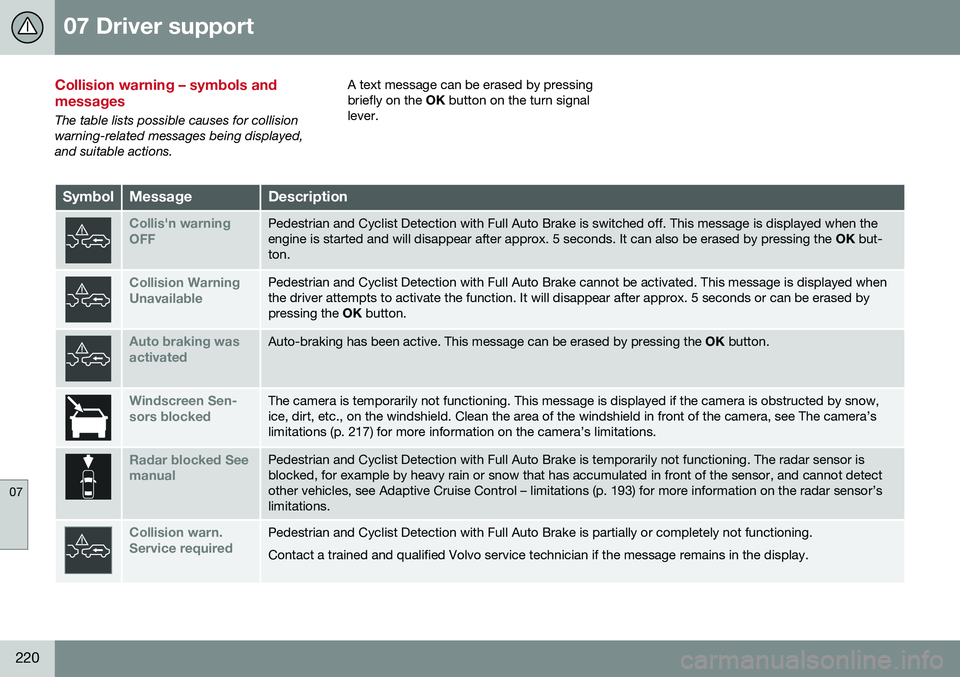
Collision warning – symbols and messages
The table lists possible causes for collision warning-related messages being displayed,and suitable actions.A text message can be erased by pressingbriefly on the
OK button on the turn signal
lever.
SymbolMessageDescription
Collis'n warning OFFPedestrian and Cyclist Detection with Full Auto Brake is switched off. This message is displayed when the engine is started and will disappear after approx. 5 seconds. It can also be erased by pressing the OK but-
ton.
Collision Warning UnavailablePedestrian and Cyclist Detection with Full Auto Brake cannot be activated. This message is displayed when the driver attempts to activate the function. It will disappear after approx. 5 seconds or can be erased bypressing the OK button.
Auto braking was activatedAuto-braking has been active. This message can be erased by pressing the OK button.
Windscreen Sen- sors blockedThe camera is temporarily not functioning. This message is displayed if the camera is obstructed by snow, ice, dirt, etc., on the windshield. Clean the area of the windshield in front of the camera, see The camera’slimitations (p. 217) for more information on the camera’s limitations.
Radar blocked See manualPedestrian and Cyclist Detection with Full Auto Brake is temporarily not functioning. The radar sensor is blocked, for example by heavy rain or snow that has accumulated in front of the sensor, and cannot detectother vehicles, see Adaptive Cruise Control – limitations (p. 193) for more information on the radar sensor’slimitations.
Collision warn. Service requiredPedestrian and Cyclist Detection with Full Auto Brake is partially or completely not functioning. Contact a trained and qualified Volvo service technician if the message remains in the display.
Page 224 of 398
07 Driver support
07
222
Driver Alert System
The Driver Alert System is designed to help a driver who may be becoming fatigued or whois inadvertently leaving the lane.
IntroductionThe Driver Alert System consists of two differ-ent functions that can be switched ontogether or separately.• Driver Alert Control (DAC)
, see Driver
Alert Control (DAC) – introduction (p. 222)
• Lane Departure Warning (LDW)
, see
Lane Departure Warning (LDW) – intro-duction (p. 227)
When one or both of the functions has been switched on, it is in standby mode and is acti-vated when the vehicle exceeds a speed of40 mph (65 km/h). The function deactivates if the vehicle's speed goes under 37 mph (60 km/h). Both functions use a camera that is depend- ent on the road/lane being clearly marked bypainted lines on each side.
WARNING
The Driver Alert System does not function in all situations and is designed to be asupplementary aid. It is not, however,intended to replace the driver’s attentionand judgement.
Driver Alert Control (DAC) – introduction
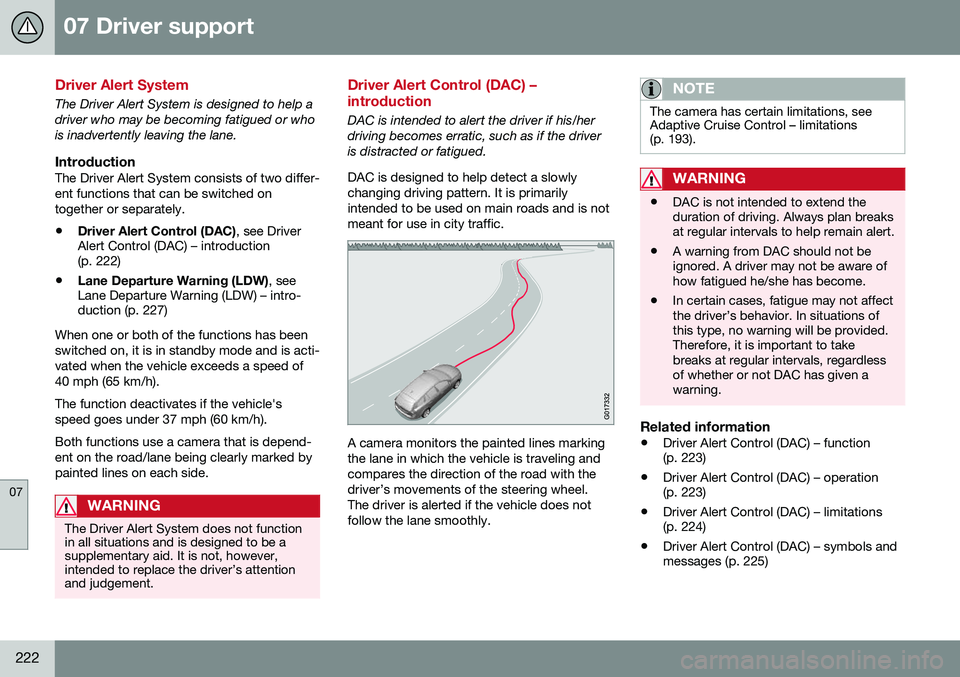
DAC is intended to alert the driver if his/her driving becomes erratic, such as if the driveris distracted or fatigued. DAC is designed to help detect a slowly changing driving pattern. It is primarilyintended to be used on main roads and is notmeant for use in city traffic.
A camera monitors the painted lines marking the lane in which the vehicle is traveling andcompares the direction of the road with thedriver’s movements of the steering wheel.The driver is alerted if the vehicle does notfollow the lane smoothly.
NOTE
The camera has certain limitations, see Adaptive Cruise Control – limitations(p. 193).
WARNING
• DAC is not intended to extend the duration of driving. Always plan breaksat regular intervals to help remain alert.
• A warning from DAC should not beignored. A driver may not be aware ofhow fatigued he/she has become.
• In certain cases, fatigue may not affectthe driver’s behavior. In situations ofthis type, no warning will be provided.Therefore, it is important to takebreaks at regular intervals, regardlessof whether or not DAC has given awarning.
Related information
•
Driver Alert Control (DAC) – function (p. 223)
• Driver Alert Control (DAC) – operation(p. 223)
• Driver Alert Control (DAC) – limitations(p. 224)
• Driver Alert Control (DAC) – symbols andmessages (p. 225)
Page 235 of 398
07 Driver support
07
}}
233
Audible signalThe Park Assist system uses an intermittent tone that pulses faster as you come close toan object, and becomes constant when youare within approximately 1 ft (30 cm) of anobject in front of or behind the vehicle. Ifthere are objects within this distance bothbehind and in front of the vehicle, the tonealternates between front and rear speakers.
NOTE
The level of the audible signal can be low- ered/raised with the infotainment volumecontrol. The level can also be set in the MYCAR menu system. See My Car – introduc-tion (p. 76) for a description of the menusystem.
If the volume of another source from the audio system is high, this will be automati-cally lowered.
Rear park assist
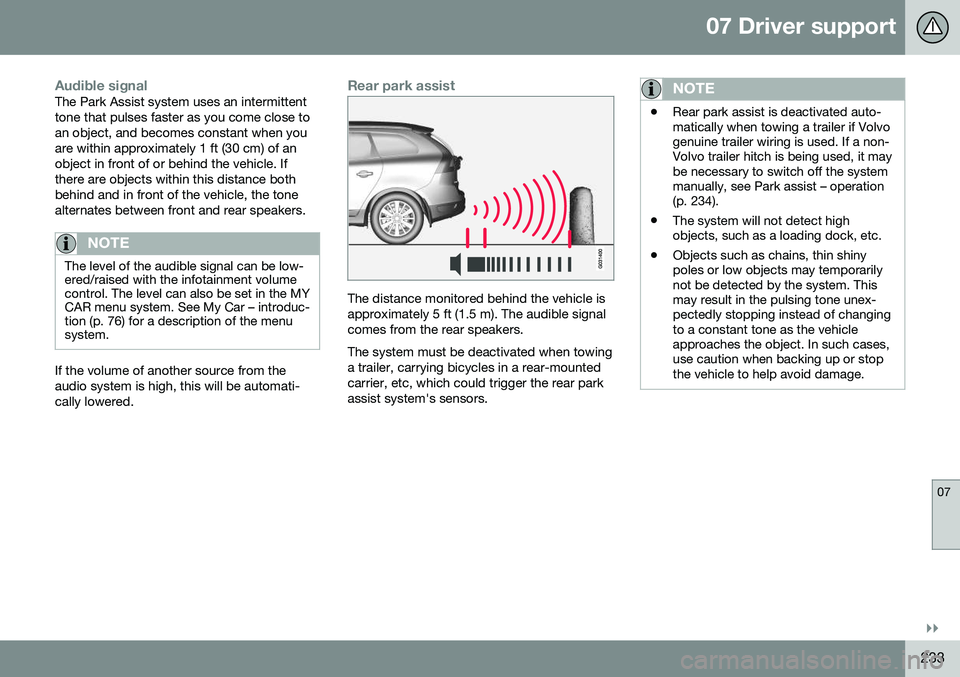
The distance monitored behind the vehicle is approximately 5 ft (1.5 m). The audible signalcomes from the rear speakers. The system must be deactivated when towing a trailer, carrying bicycles in a rear-mountedcarrier, etc, which could trigger the rear parkassist system's sensors.
NOTE
•Rear park assist is deactivated auto- matically when towing a trailer if Volvogenuine trailer wiring is used. If a non-Volvo trailer hitch is being used, it maybe necessary to switch off the systemmanually, see Park assist – operation(p. 234).
• The system will not detect highobjects, such as a loading dock, etc.
• Objects such as chains, thin shinypoles or low objects may temporarilynot be detected by the system. Thismay result in the pulsing tone unex-pectedly stopping instead of changingto a constant tone as the vehicleapproaches the object. In such cases,use caution when backing up or stopthe vehicle to help avoid damage.
Page 236 of 398
||
07 Driver support
07
234* Option/accessory, for more information, see Introduction.
Front park assist
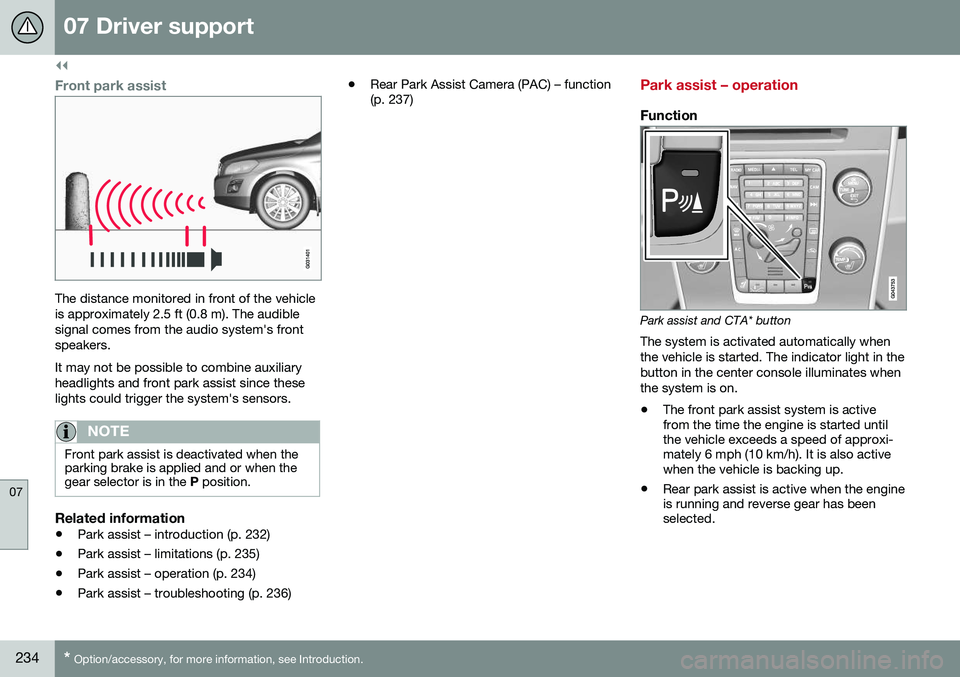
The distance monitored in front of the vehicle is approximately 2.5 ft (0.8 m). The audiblesignal comes from the audio system's frontspeakers. It may not be possible to combine auxiliary headlights and front park assist since theselights could trigger the system's sensors.
NOTE
Front park assist is deactivated when the parking brake is applied and or when thegear selector is in the P position.
Related information
• Park assist – introduction (p. 232)
• Park assist – limitations (p. 235)
• Park assist – operation (p. 234)
• Park assist – troubleshooting (p. 236) •
Rear Park Assist Camera (PAC) – function (p. 237)
Park assist – operation
Function
Park assist and CTA* button
The system is activated automatically when the vehicle is started. The indicator light in thebutton in the center console illuminates whenthe system is on.
• The front park assist system is active from the time the engine is started untilthe vehicle exceeds a speed of approxi-mately 6 mph (10 km/h). It is also activewhen the vehicle is backing up.
• Rear park assist is active when the engineis running and reverse gear has beenselected.
Page 241 of 398
07 Driver support
07
}}
239
Rear Park Assist Camera (PAC) – guiding and marker lines
Guiding lines
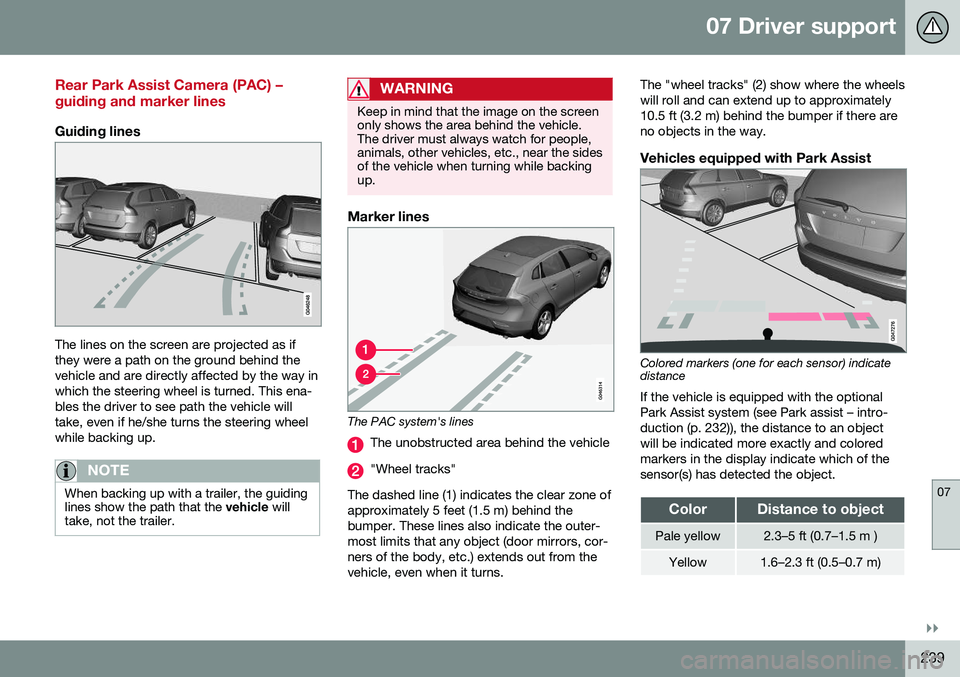
The lines on the screen are projected as if they were a path on the ground behind thevehicle and are directly affected by the way inwhich the steering wheel is turned. This ena-bles the driver to see path the vehicle willtake, even if he/she turns the steering wheelwhile backing up.
NOTE
When backing up with a trailer, the guiding lines show the path that the vehicle will
take, not the trailer.
WARNING
Keep in mind that the image on the screen only shows the area behind the vehicle.The driver must always watch for people,animals, other vehicles, etc., near the sidesof the vehicle when turning while backingup.
Marker lines
The PAC system's lines
The unobstructed area behind the vehicle
"Wheel tracks"
The dashed line (1) indicates the clear zone of approximately 5 feet (1.5 m) behind thebumper. These lines also indicate the outer-most limits that any object (door mirrors, cor-ners of the body, etc.) extends out from thevehicle, even when it turns. The "wheel tracks" (2) show where the wheelswill roll and can extend up to approximately10.5 ft (3.2 m) behind the bumper if there areno objects in the way.
Vehicles equipped with Park Assist
Colored markers (one for each sensor) indicate distance If the vehicle is equipped with the optional Park Assist system (see Park assist – intro-duction (p. 232)), the distance to an objectwill be indicated more exactly and coloredmarkers in the display indicate which of thesensor(s) has detected the object.
ColorDistance to object
Pale yellow2.3–5 ft (0.7–1.5 m )
Yellow1.6–2.3 ft (0.5–0.7 m)
Page 249 of 398
08 Starting and driving
08
}}
* Option/accessory, for more information, see Introduction.247
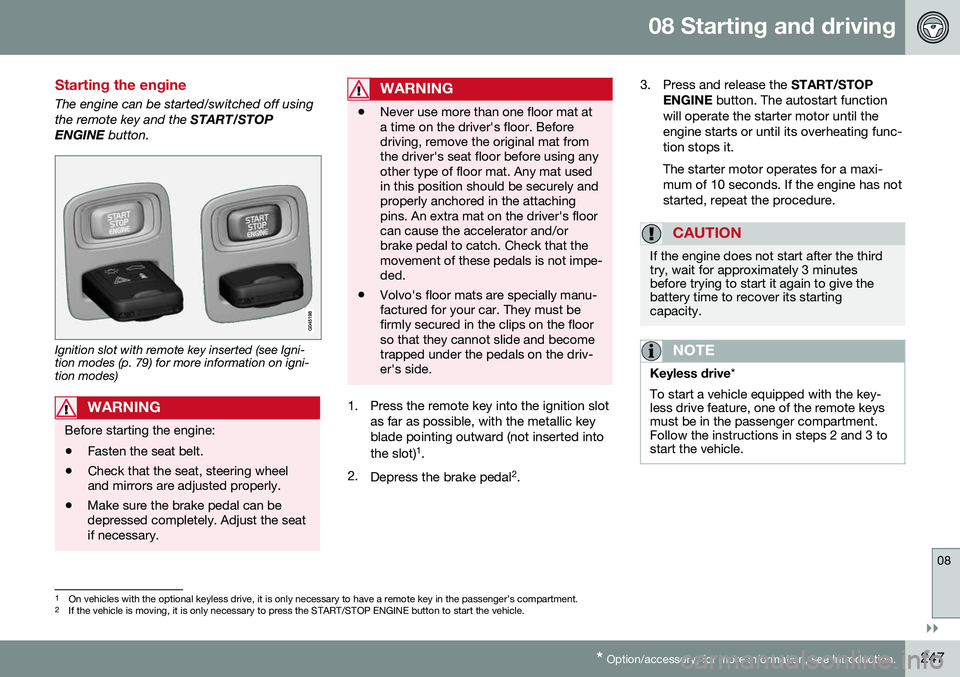
Starting the engine
The engine can be started/switched off using the remote key and the START/STOP
ENGINE button.
Ignition slot with remote key inserted (see Igni- tion modes (p. 79) for more information on igni-tion modes)
WARNING
Before starting the engine:
• Fasten the seat belt.
• Check that the seat, steering wheel and mirrors are adjusted properly.
• Make sure the brake pedal can bedepressed completely. Adjust the seatif necessary.
WARNING
•Never use more than one floor mat at a time on the driver's floor. Beforedriving, remove the original mat fromthe driver's seat floor before using anyother type of floor mat. Any mat usedin this position should be securely andproperly anchored in the attachingpins. An extra mat on the driver's floorcan cause the accelerator and/orbrake pedal to catch. Check that themovement of these pedals is not impe-ded.
• Volvo's floor mats are specially manu-factured for your car. They must befirmly secured in the clips on the floorso that they cannot slide and becometrapped under the pedals on the driv-er's side.
1. Press the remote key into the ignition slot
as far as possible, with the metallic key blade pointing outward (not inserted into the slot) 1
.
2. Depress the brake pedal 2
. 3. Press and release the
START/STOP
ENGINE button. The autostart function
will operate the starter motor until the engine starts or until its overheating func-tion stops it. The starter motor operates for a maxi- mum of 10 seconds. If the engine has notstarted, repeat the procedure.
CAUTION
If the engine does not start after the third try, wait for approximately 3 minutesbefore trying to start it again to give thebattery time to recover its startingcapacity.
NOTE
Keyless drive *
To start a vehicle equipped with the key- less drive feature, one of the remote keysmust be in the passenger compartment.Follow the instructions in steps 2 and 3 tostart the vehicle.
1 On vehicles with the optional keyless drive, it is only necessary to have a remote key in the passenger’s compartment.
2 If the vehicle is moving, it is only necessary to press the START/STOP ENGINE button to start the vehicle.
Page 250 of 398
||
08 Starting and driving
08
248
WARNING
•Always remove the remote key from the ignition slot when leaving the vehi-cle and ensure that the ignition inmode
0 (see Ignition modes (p. 79) for
information about the ignition modes).
• On vehicles with the optional keylessdrive, never remove the remote keyfrom the vehicle while it is being drivenor towed.
• Always place the gear selector in Parkand apply the parking brake beforeleaving the vehicle. Never leave thevehicle unattended with the enginerunning.
• Always open garage doors fully beforestarting the engine inside a garage toensure adequate ventilation. Theexhaust gases contain carbon monox-ide, which is invisible and odorless butvery poisonous.
NOTE
•
After a cold start, idle speed may be noticeably higher than normal for ashort period. This is done to help bringcomponents in the emission controlsystem to their normal operating tem-perature as quickly as possible, whichenables them to control emissions andhelp reduce the vehicle's impact on the environment 3
.
CAUTION
• When starting in cold weather, the automatic transmission may shift up atslightly higher engine speeds than nor-mal until the automatic transmissionfluid reaches normal operating tem-perature.
• Do not race a cold engine immediatelyafter starting. Oil flow may not reachsome lubrication points fast enough toprevent engine damage.
• The engine should be idling when youmove the gear selector. Never acceler-ate until after you feel the transmissionengage. Accelerating immediately afterselecting a gear will cause harshengagement and premature transmis-sion wear.
• Selecting
P or N when idling at a
standstill for prolonged periods of timewill help prevent overheating of theautomatic transmission fluid.
Related information
• Switching off the engine (p. 249)
3
If the gear selector is in the D or R positions and the car is not moving, engine speed (rpm) will be lower and it will take longer for the engine to reach normal operating temperature.