lights VOLVO XC60 2016 Owner´s Manual
[x] Cancel search | Manufacturer: VOLVO, Model Year: 2016, Model line: XC60, Model: VOLVO XC60 2016Pages: 398, PDF Size: 9.98 MB
Page 106 of 398
03 Instruments and controls
03
104* Option/accessory, for more information, see Introduction.
Heated windshield*, rear window and door mirror defrosters
The heating function is used to defrost/de-ice the windshield and/or the rear window anddoor mirrors.
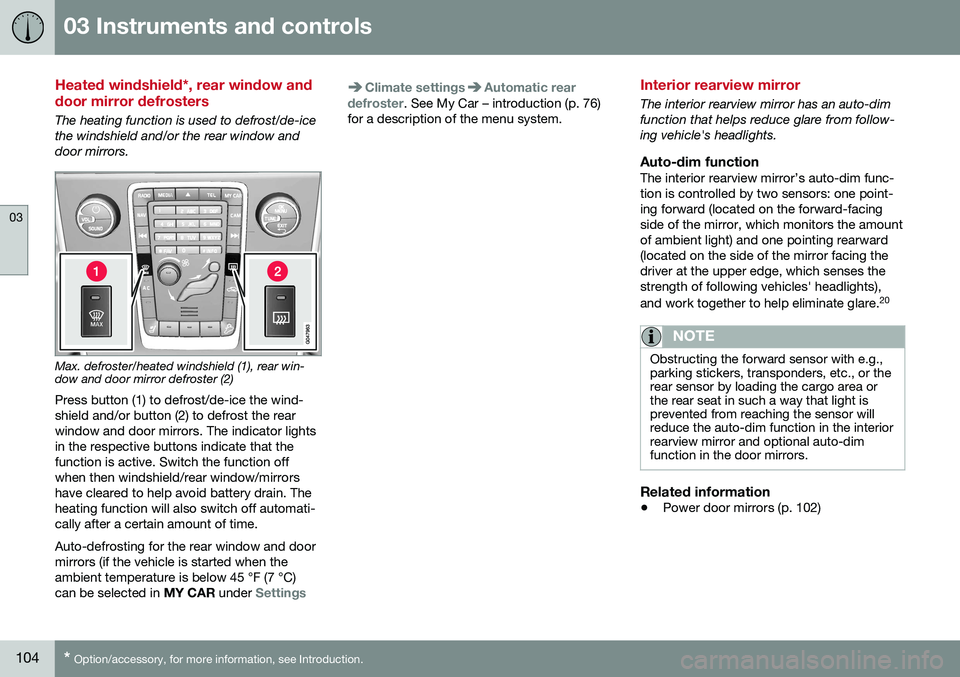
Max. defroster/heated windshield (1), rear win- dow and door mirror defroster (2)
Press button (1) to defrost/de-ice the wind- shield and/or button (2) to defrost the rearwindow and door mirrors. The indicator lightsin the respective buttons indicate that thefunction is active. Switch the function offwhen then windshield/rear window/mirrorshave cleared to help avoid battery drain. Theheating function will also switch off automati-cally after a certain amount of time. Auto-defrosting for the rear window and door mirrors (if the vehicle is started when theambient temperature is below 45 °F (7 °C)can be selected in MY CAR under
Settings
Climate settingsAutomatic rear
defroster. See My Car – introduction (p. 76)
for a description of the menu system.
Interior rearview mirror
The interior rearview mirror has an auto-dim function that helps reduce glare from follow-ing vehicle's headlights.
Auto-dim functionThe interior rearview mirror’s auto-dim func-tion is controlled by two sensors: one point-ing forward (located on the forward-facingside of the mirror, which monitors the amountof ambient light) and one pointing rearward(located on the side of the mirror facing thedriver at the upper edge, which senses thestrength of following vehicles' headlights), and work together to help eliminate glare. 20
NOTE
Obstructing the forward sensor with e.g., parking stickers, transponders, etc., or therear sensor by loading the cargo area orthe rear seat in such a way that light isprevented from reaching the sensor willreduce the auto-dim function in the interiorrearview mirror and optional auto-dimfunction in the door mirrors.
Related information
•
Power door mirrors (p. 102)
Page 132 of 398
04 Climate
04
130* Option/accessory, for more information, see Introduction.
Heated seats
The front seat heating has three levels to increase comfort for the driver and passengerin cold weather. The rear outboard seat heating has three lev- els to increase comfort for the passengers incold weather.
Heated front seats*
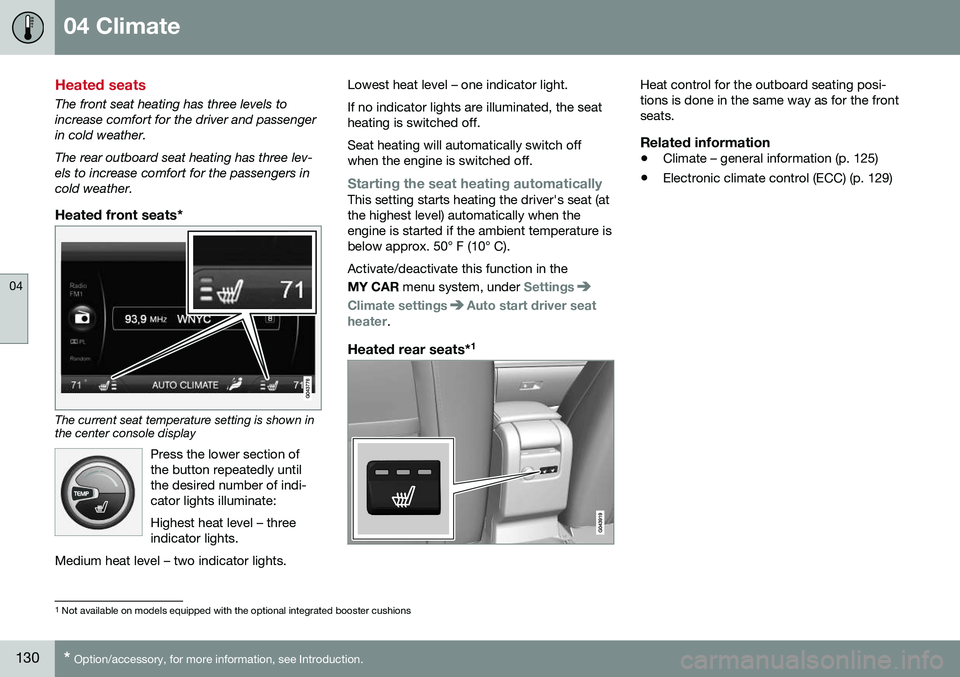
The current seat temperature setting is shown in the center console display
Press the lower section of the button repeatedly untilthe desired number of indi-cator lights illuminate: Highest heat level – three indicator lights.
Medium heat level – two indicator lights.
Lowest heat level – one indicator light. If no indicator lights are illuminated, the seat heating is switched off. Seat heating will automatically switch off when the engine is switched off.
Starting the seat heating automaticallyThis setting starts heating the driver's seat (at the highest level) automatically when theengine is started if the ambient temperature isbelow approx. 50° F (10° C). Activate/deactivate this function in the MY CAR menu system, under
Settings
Climate settingsAuto start driver seat
heater.
Heated rear seats* 1
Heat control for the outboard seating posi- tions is done in the same way as for the frontseats.
Related information
•
Climate – general information (p. 125)
• Electronic climate control (ECC) (p. 129)
1
Not available on models equipped with the optional integrated booster cushions
Page 156 of 398
||
06 Locks and alarm
06
154* Option/accessory, for more information, see Introduction.
After a short pause, press the Unlock button a second time within 10 seconds to unlockthe other doors and the tailgate. This function can be changed so that all doors unlock at the same time by pressing My Car and going to
SettingsCar
settings
Lock settingsChange doors
unlock setting. For a description of the menu
system, see My Car – introduction (p. 76).
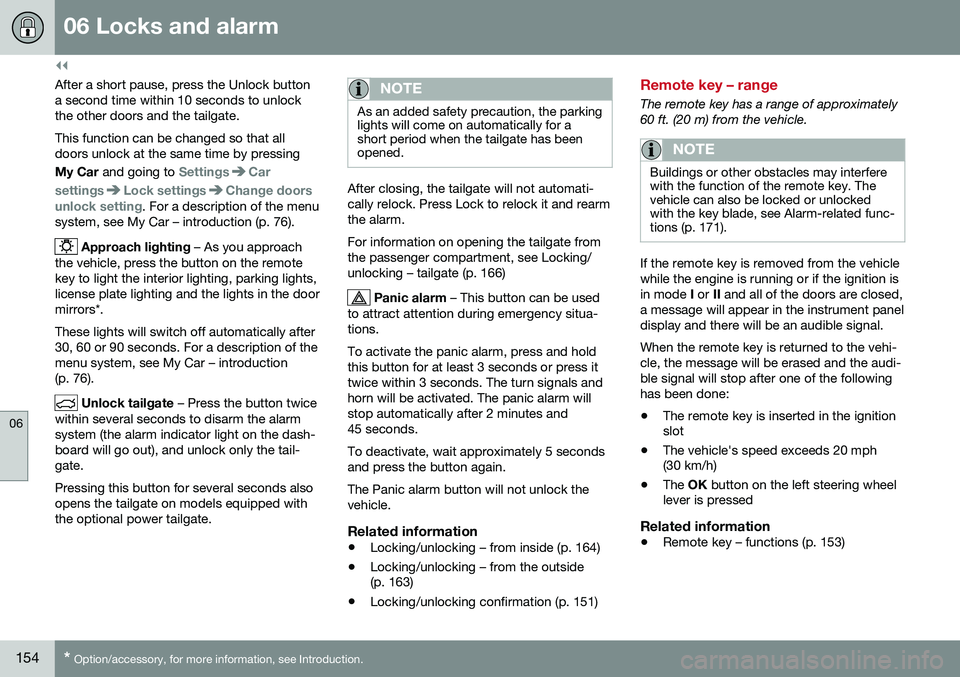
Approach lighting – As you approach
the vehicle, press the button on the remote key to light the interior lighting, parking lights,license plate lighting and the lights in the doormirrors*. These lights will switch off automatically after 30, 60 or 90 seconds. For a description of themenu system, see My Car – introduction(p. 76).
Unlock tailgate – Press the button twice
within several seconds to disarm the alarm system (the alarm indicator light on the dash-board will go out), and unlock only the tail-gate. Pressing this button for several seconds also opens the tailgate on models equipped withthe optional power tailgate.
NOTE
As an added safety precaution, the parking lights will come on automatically for ashort period when the tailgate has beenopened.
After closing, the tailgate will not automati- cally relock. Press Lock to relock it and rearmthe alarm. For information on opening the tailgate from the passenger compartment, see Locking/unlocking – tailgate (p. 166)
Panic alarm – This button can be used
to attract attention during emergency situa- tions. To activate the panic alarm, press and hold this button for at least 3 seconds or press ittwice within 3 seconds. The turn signals andhorn will be activated. The panic alarm willstop automatically after 2 minutes and45 seconds. To deactivate, wait approximately 5 seconds and press the button again. The Panic alarm button will not unlock the vehicle.
Related information
• Locking/unlocking – from inside (p. 164)
• Locking/unlocking – from the outside (p. 163)
• Locking/unlocking confirmation (p. 151)
Remote key – range
The remote key has a range of approximately 60 ft. (20 m) from the vehicle.
NOTE
Buildings or other obstacles may interfere with the function of the remote key. Thevehicle can also be locked or unlockedwith the key blade, see Alarm-related func-tions (p. 171).
If the remote key is removed from the vehicle while the engine is running or if the ignition isin mode
I or II and all of the doors are closed,
a message will appear in the instrument paneldisplay and there will be an audible signal. When the remote key is returned to the vehi- cle, the message will be erased and the audi-ble signal will stop after one of the followinghas been done: • The remote key is inserted in the ignition slot
• The vehicle's speed exceeds 20 mph(30 km/h)
• The
OK button on the left steering wheel
lever is pressed
Related information
• Remote key – functions (p. 153)
Page 168 of 398
06 Locks and alarm
06
166
Locking/unlocking – tailgate
The tailgate can be opened, locked and unlocked in several ways.
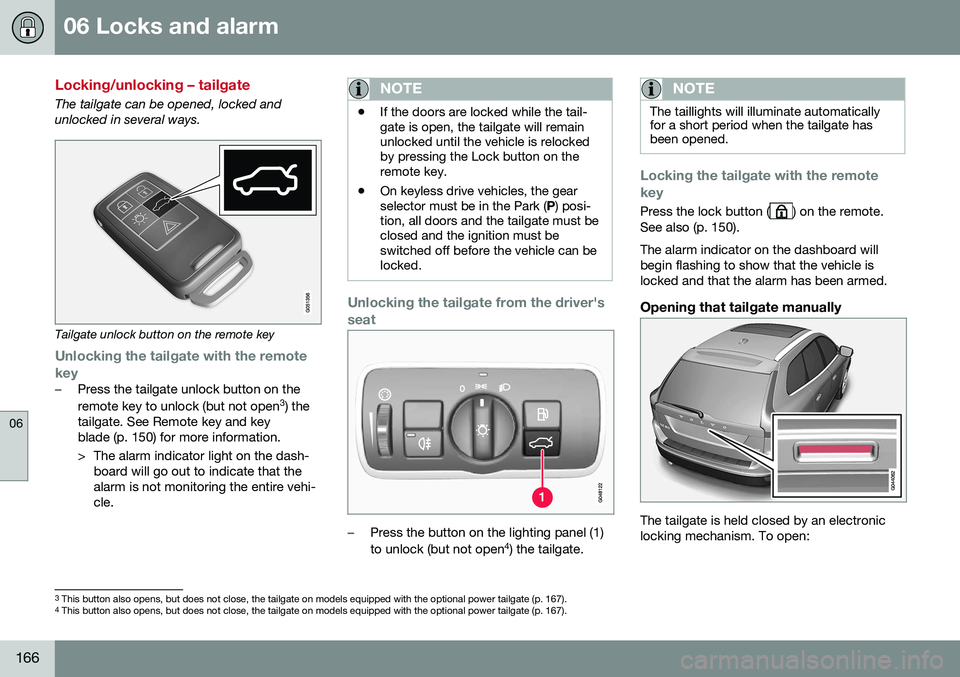
Tailgate unlock button on the remote key
Unlocking the tailgate with the remote
key
–Press the tailgate unlock button on the remote key to unlock (but not open 3
) the
tailgate. See Remote key and key blade (p. 150) for more information.
> The alarm indicator light on the dash- board will go out to indicate that the alarm is not monitoring the entire vehi-cle.
NOTE
• If the doors are locked while the tail- gate is open, the tailgate will remainunlocked until the vehicle is relockedby pressing the Lock button on theremote key.
• On keyless drive vehicles, the gearselector must be in the Park (
P) posi-
tion, all doors and the tailgate must beclosed and the ignition must beswitched off before the vehicle can belocked.
Unlocking the tailgate from the driver's seat
–Press the button on the lighting panel (1) to unlock (but not open 4
) the tailgate.
NOTE
The taillights will illuminate automatically for a short period when the tailgate hasbeen opened.
Locking the tailgate with the remote key
Press the lock button () on the remote.
See also (p. 150). The alarm indicator on the dashboard will begin flashing to show that the vehicle islocked and that the alarm has been armed.
Opening that tailgate manually
The tailgate is held closed by an electronic locking mechanism. To open:
3 This button also opens, but does not close, the tailgate on models equipped with the optional power tailgate (p. 167).
4 This button also opens, but does not close, the tailgate on models equipped with the optional power tailgate (p. 167).
Page 169 of 398
06 Locks and alarm
06
}}
167
1. Press lightly on the rubberized plate
under the handle to release the lock.
2. Lift the handle to open the tailgate.
CAUTION
• When pressing the rubberized plate, only light pressure is necessary torelease the tailgate's electronic lockingmechanism.
• When opening the tailgate, pull it upusing the handle. Too much pressureon the rubberized plate can damageits electrical connections.
Related information
•
Locking/unlocking – from inside (p. 164)
• Locking/unlocking – from the outside (p. 163)
Power tailgate – automatic opening/ closing
The power tailgate can be opened/closed using a button on the lighting panel or on theremote key.
Automatic openingThe power tailgate can be opened automati-cally in the three ways:
• By pressing and holding the
but-
ton on the lighting panel until the tailgate begins to open.
• By pressing and holding the
but-
ton on the remote key until the tailgate begins to open.
• By pressing the rubber-covered buttonunder the outer handle on the tailgate.
The taillights illuminate automatically when the automatic open function is used.
CAUTION
Be sure that there is adequate space above and behind the vehicle before open-ing the tailgate automatically. The vehicle should not be driven or moved with the tailgate in the open position. How-ever, if the vehicle is moved with the tail-gate in the open position, the automaticclosing function will be inoperative untilone of the following occurs:
• The tailgate is closed manually
• The ignition is switched off and the key is removed for approximately 10minutes (the tailgate will function againafter restart).
NOTE
If the tailgate has been opened and closed continuously too long, the automatic func-tion will be deactivated to avoid overload-ing the electrical system. The automaticfunction can be used again after approxi-mately 2 minutes. If the vehicle's battery has been dis- charged or disconnected, or if the tailgatehas been open for more than 24 hours, thetailgate must be opened and closed oncemanually to reset the system.
Page 195 of 398
07 Driver support
07
}}
193
Radar sensor
The radar sensor is designed to help detect cars or larger vehicles driving in the samedirection as your vehicle, in the same lane.
The radar sensor and its limitationsIn addition to being used by the AdaptiveCruise Control (ACC), the radar sensor is alsoused by Distance Alert (see Distance Alert –introduction (p. 198)) and Collision Warningwith Full Auto-brake and Pedestrian Detec-tion (see Collision warning – introduction(p. 209)).
WARNING
•If there is visible damage to the front grille or you suspect that the radarsensor may be damaged in any way,contact a trained and qualified Volvoservice technician as soon as possible.The radar sensor may only functionpartially (or not at all) if it is damagedor is not securely fastened in place.
• Accessories or other objects, such asextra headlights, must not be installedin front of the grille.
• Modification of the radar sensor couldmake its use illegal.
The radar sensor's capacity to detect vehi- cles ahead is impeded:
• if the radar sensor is obstructed and can- not detect other vehicles, for example in heavy rain, or if snow or other objects areobscuring the radar sensor.
NOTE
Keep the area in front of the radar sensor clean.
•
if the speed of vehicles ahead is signifi- cantly different from your own speed.
Related information
•Adaptive Cruise Control – introduction(p. 184)
• Collision warning – introduction (p. 209)
• Distance Alert – introduction (p. 198)
Adaptive Cruise Control – limitations
The ACC cannot cover all driving situations and traffic, weather and road conditions.
Situations where ACC may not function optimally
WARNING
• The radar sensor has a limited field of vision. In some situations it may detecta vehicle later than expected or notdetect other vehicles at all.
• If ACC is not functioning properly,cruise control will also be disabled.
Page 205 of 398
07 Driver support
07
203
•
City Safety – troubleshooting (p. 205)
• City Safety – symbols and messages (p. 207)
• City Safety – Laser sensor (p. 208)
City Safety – function
Function
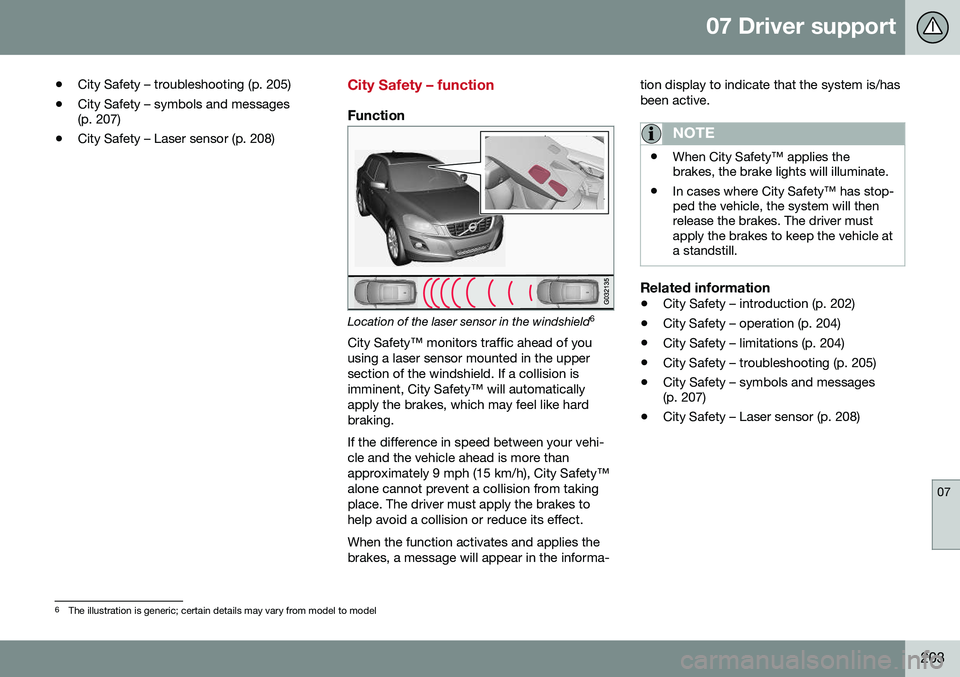
Location of the laser sensor in the windshield 6
City Safety™ monitors traffic ahead of you using a laser sensor mounted in the uppersection of the windshield. If a collision isimminent, City Safety™ will automaticallyapply the brakes, which may feel like hardbraking. If the difference in speed between your vehi- cle and the vehicle ahead is more thanapproximately 9 mph (15 km/h), City Safety™alone cannot prevent a collision from takingplace. The driver must apply the brakes tohelp avoid a collision or reduce its effect. When the function activates and applies the brakes, a message will appear in the informa- tion display to indicate that the system is/hasbeen active.
NOTE
•
When City Safety™ applies the brakes, the brake lights will illuminate.
• In cases where City Safety™ has stop-ped the vehicle, the system will thenrelease the brakes. The driver mustapply the brakes to keep the vehicle ata standstill.
Related information
•
City Safety – introduction (p. 202)
• City Safety – operation (p. 204)
• City Safety – limitations (p. 204)
• City Safety – troubleshooting (p. 205)
• City Safety – symbols and messages (p. 207)
• City Safety – Laser sensor (p. 208)
6
The illustration is generic; certain details may vary from model to model
Page 206 of 398
07 Driver support
07
204
City Safety – operation
Using City Safety™
NOTE
The City Safety™ function is activated automatically each time the engine hasbeen switched off and restarted.
On and OffIn certain situations, it may be desirable to switch City Safety™ off, such as when drivingin close quarters where leaves, branches, etc.may obscure the hood and windshield. When the engine is running, City Safety™ can be switched off as follows: Press My Car in the center console control
panel and go to
SettingsCar settings
Driver support systemsCity Safety.
Select
Off.
If the engine is switched off, City Safety™ will reactivate when the engine is restarted.
WARNING
The laser sensor emits light when the igni- tion is in mode II or higher, even if City
Safety™ has been switched off.
To switch City Safety™ on again:
• Follow the same procedure as for switch- ing City Safety™ off but select
On.
Related information
•City Safety – introduction (p. 202)
• City Safety – function (p. 203)
• City Safety – limitations (p. 204)
• City Safety – troubleshooting (p. 205)
• City Safety – symbols and messages (p. 207)
• City Safety – Laser sensor (p. 208)
• My Car – introduction (p. 76)
City Safety – limitations
Limitations
WARNING
The laser sensor has certain limitations and its function may be reduced (or it maynot function at all) in conditions such asheavy rain or snowfall, or by dense fog orthick, blowing dust or snow. Condensa-tion, dirt, ice or snow on the windshieldmay also interfere with the sensor’s func-tion.
The sensor used by City Safety™ is designed to detect cars and other larger motor vehiclesahead of your vehicle in both daylight anddarkness. Objects such as warning flags hanging from long objects on the roof or accessories suchas auxiliary lights or protective arches on thefront of the vehicle that are higher than thehood may also impede the sensor’s function. Braking distance to the vehicle ahead increa- ses on slippery road surfaces, which mayreduce City Safety’s capacity to avoid a colli-sion. In situations like this, the stability sys-tem (see Stability system – introduction(p. 174)) will help provide the best possiblebraking capacity and stability. City Safety™ emits a laser beam and meas- ures the way in which the light is reflected.
Page 236 of 398
||
07 Driver support
07
234* Option/accessory, for more information, see Introduction.
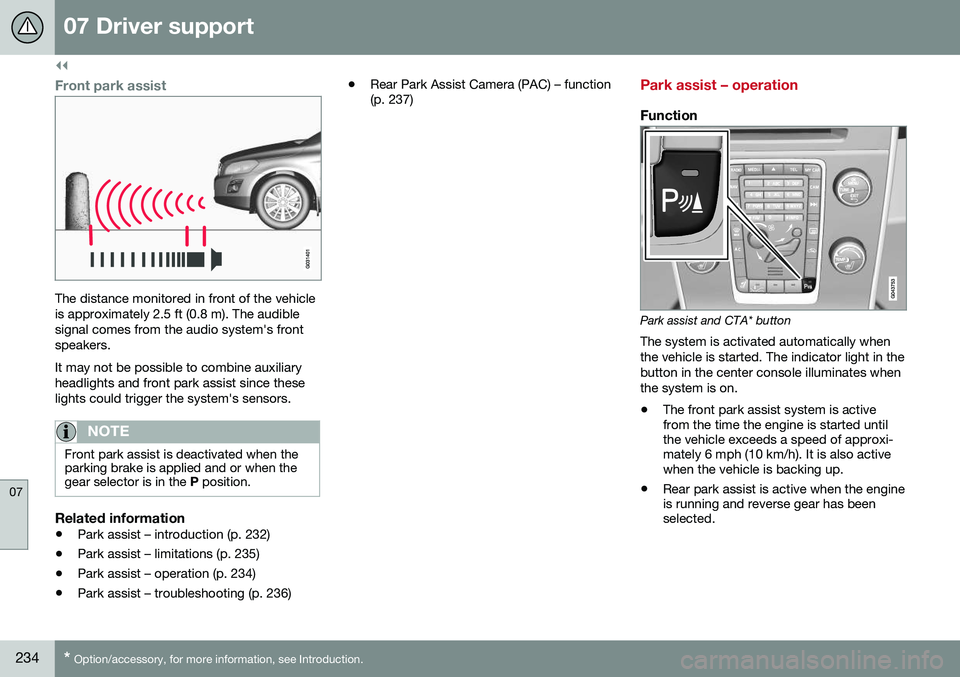
Front park assist
The distance monitored in front of the vehicle is approximately 2.5 ft (0.8 m). The audiblesignal comes from the audio system's frontspeakers. It may not be possible to combine auxiliary headlights and front park assist since theselights could trigger the system's sensors.
NOTE
Front park assist is deactivated when the parking brake is applied and or when thegear selector is in the P position.
Related information
• Park assist – introduction (p. 232)
• Park assist – limitations (p. 235)
• Park assist – operation (p. 234)
• Park assist – troubleshooting (p. 236) •
Rear Park Assist Camera (PAC) – function (p. 237)
Park assist – operation
Function
Park assist and CTA* button
The system is activated automatically when the vehicle is started. The indicator light in thebutton in the center console illuminates whenthe system is on.
• The front park assist system is active from the time the engine is started untilthe vehicle exceeds a speed of approxi-mately 6 mph (10 km/h). It is also activewhen the vehicle is backing up.
• Rear park assist is active when the engineis running and reverse gear has beenselected.
Page 242 of 398
||
07 Driver support
07
240* Option/accessory, for more information, see Introduction.
ColorDistance to object
Orange1–1.6 ft (0.3–0.5 m)
Red0–1 ft (0–0.3 m)
Related information
• Rear Park Assist Camera (PAC) – opera- tion (p. 237)
• Rear Park Assist Camera (PAC) – limita-tions (p. 240)
Rear Park Assist Camera (PAC) – limitations
LimitationsEven if a fairly small section of the screen image appears to be obstructed, this maymean that a relatively large area behind thevehicle is hidden and objects there may notbe detected until they are very near the vehi-cle.
NOTE
Bicycle carriers or other accessories mounted on the tailgate may obstruct thecamera's field of view.
Keep in mind
•Keep the camera's lens free of dirt, ice and snow. Remove ice and snow care-fully to avoid scratching the lens.
• Clean the lens regularly with warm waterand a suitable car washing detergent.
Related information
•Rear Park Assist Camera (PAC) – intro-duction (p. 236)
• Rear Park Assist Camera (PAC) – opera-tion (p. 237)
• Park assist – introduction (p. 232)
BLIS* – introduction
The Blind Spot Information System (BLIS) is an information system that indicates the pres-ence of another vehicle moving in the samedirection as your vehicle on roads with severallanes.
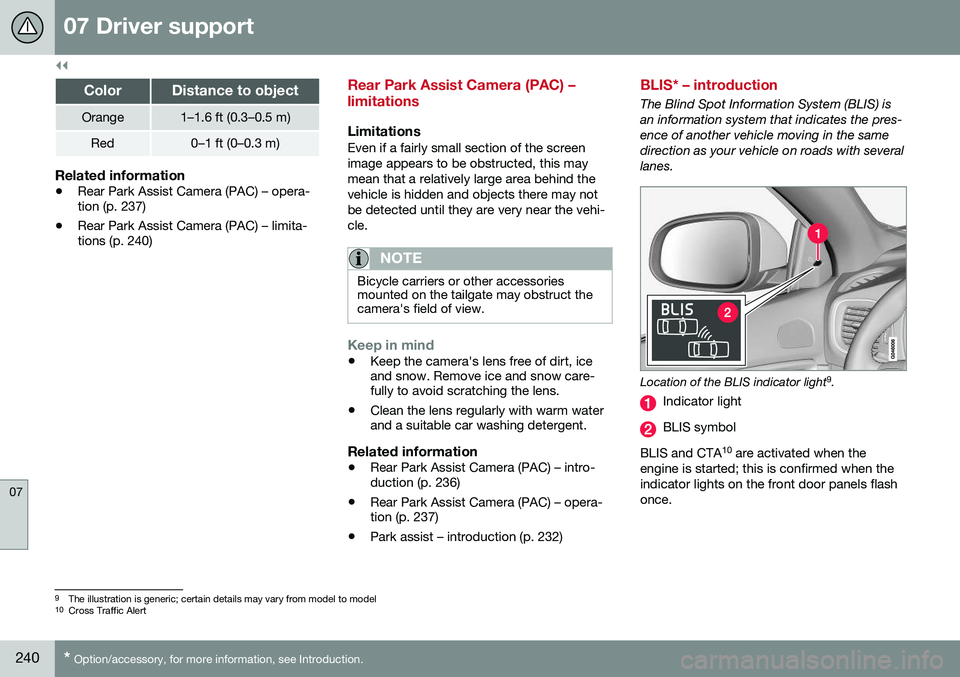
Location of the BLIS indicator light 9
.
Indicator light
BLIS symbol
BLIS and CTA 10
are activated when the
engine is started; this is confirmed when the indicator lights on the front door panels flashonce.
9 The illustration is generic; certain details may vary from model to model
10 Cross Traffic Alert