Seat VOLVO XC60 2016 Owner´s Manual
[x] Cancel search | Manufacturer: VOLVO, Model Year: 2016, Model line: XC60, Model: VOLVO XC60 2016Pages: 398, PDF Size: 9.98 MB
Page 95 of 398
03 Instruments and controls
03
* Option/accessory, for more information, see Introduction.93
Auxiliary lights*
If the vehicle is fitted with auxiliary lights, the driver can use the MY CAR menu system to
choose to deactivate and turn these lights onand off along with the high beam headlights. The auxiliary lights must be connected to the vehicle's electrical system, which should onlybe done by a trained and authorized Volvoservice technician. See My Car – introduction(p. 76) for more information about the menusystem.
Instrument and "theater" lighting
Instrument lightingIllumination of the display and instrument lights will vary, depending on ignition mode. The display lighting is automatically subdued in darkness and the sensitivity is set with thethumb wheel. The intensity of the instrument lighting is adjusted with the thumb wheel.
"Theater" lightingWhen the overhead courtesy lighting hasgone out and the engine is running, severalLEDs located near the roof console illuminateto provide faint lighting for the occupants ofthe front seats. This lighting goes out justafter the overhead courtesy lighting when thevehicle is locked.
Related information
• Lighting panel (p. 89)
• Front interior lighting (p. 96)
• Rear interior lighting (p. 97)
• Ignition modes (p. 79)
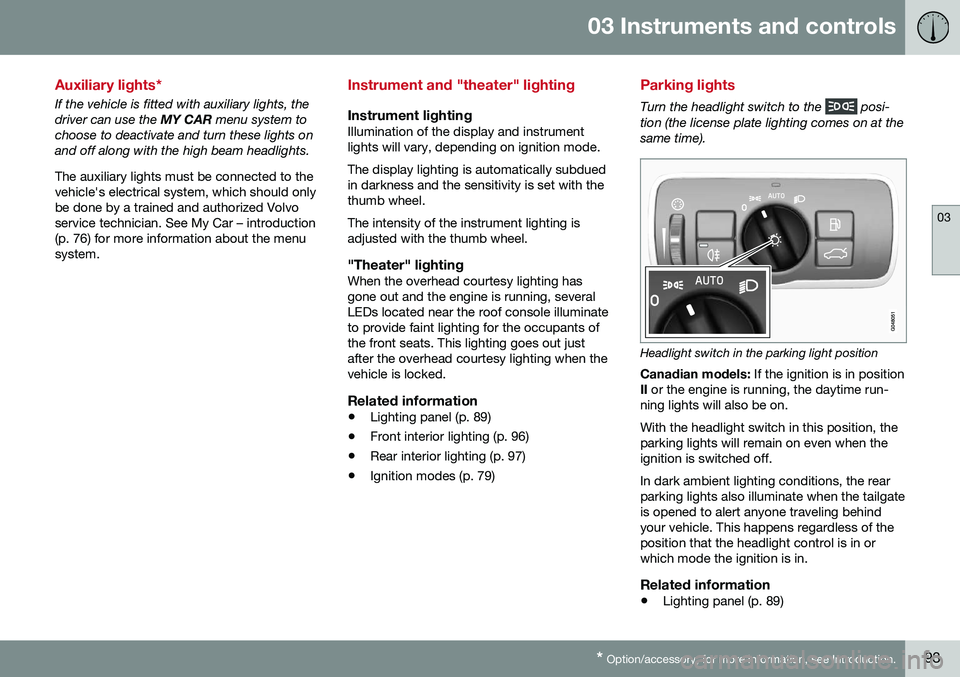
Parking lights
Turn the headlight switch to the posi-
tion (the license plate lighting comes on at the same time).
Headlight switch in the parking light position
Canadian models: If the ignition is in position
II or the engine is running, the daytime run-
ning lights will also be on. With the headlight switch in this position, the parking lights will remain on even when theignition is switched off. In dark ambient lighting conditions, the rear parking lights also illuminate when the tailgateis opened to alert anyone traveling behindyour vehicle. This happens regardless of theposition that the headlight control is in orwhich mode the ignition is in.
Related information
• Lighting panel (p. 89)
Page 104 of 398
03 Instruments and controls
03
102* Option/accessory, for more information, see Introduction.
Power door mirrors
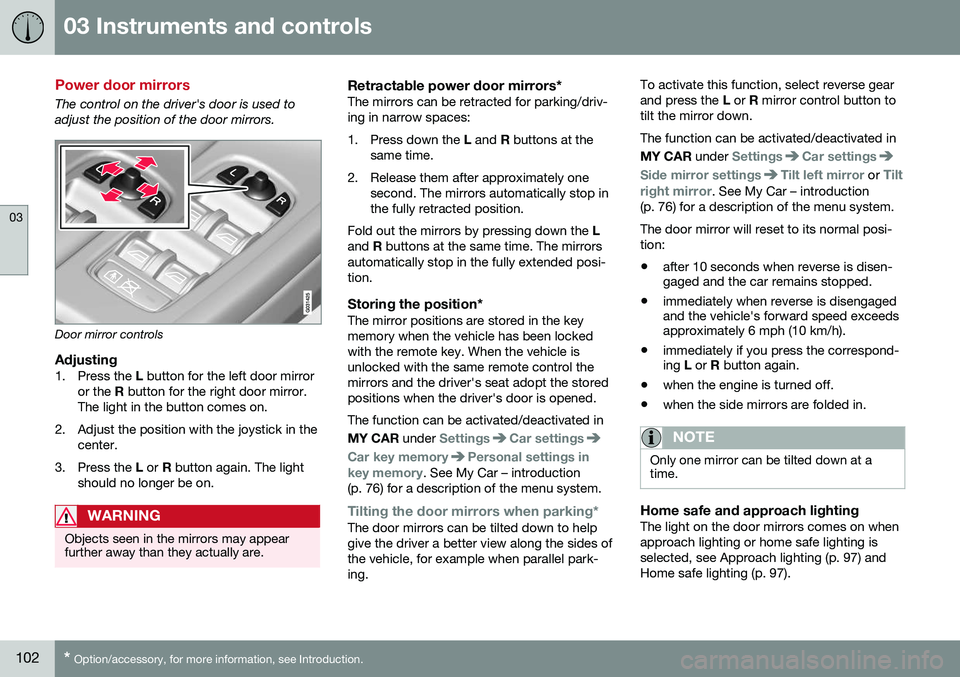
The control on the driver's door is used to adjust the position of the door mirrors.
Door mirror controls
Adjusting1. Press the L button for the left door mirror
or the R button for the right door mirror.
The light in the button comes on.
2. Adjust the position with the joystick in the center.
3. Press the L or R button again. The light
should no longer be on.
WARNING
Objects seen in the mirrors may appear further away than they actually are.
Retractable power door mirrors*The mirrors can be retracted for parking/driv- ing in narrow spaces:
1. Press down the L and R buttons at the
same time.
2. Release them after approximately one second. The mirrors automatically stop in the fully retracted position.
Fold out the mirrors by pressing down the L
and R buttons at the same time. The mirrors
automatically stop in the fully extended posi-tion.
Storing the position*The mirror positions are stored in the keymemory when the vehicle has been lockedwith the remote key. When the vehicle isunlocked with the same remote control themirrors and the driver's seat adopt the storedpositions when the driver's door is opened. The function can be activated/deactivated in MY CAR under
SettingsCar settings
Car key memoryPersonal settings in
key memory. See My Car – introduction
(p. 76) for a description of the menu system.
Tilting the door mirrors when parking*The door mirrors can be tilted down to help give the driver a better view along the sides ofthe vehicle, for example when parallel park-ing. To activate this function, select reverse gearand press the
L or R mirror control button to
tilt the mirror down. The function can be activated/deactivated in MY CAR under
SettingsCar settings
Side mirror settingsTilt left mirror or Tilt
right mirror
. See My Car – introduction
(p. 76) for a description of the menu system. The door mirror will reset to its normal posi- tion: • after 10 seconds when reverse is disen- gaged and the car remains stopped.
• immediately when reverse is disengagedand the vehicle's forward speed exceedsapproximately 6 mph (10 km/h).
• immediately if you press the correspond-ing
L or R button again.
• when the engine is turned off.
• when the side mirrors are folded in.
NOTE
Only one mirror can be tilted down at a time.
Home safe and approach lightingThe light on the door mirrors comes on when approach lighting or home safe lighting isselected, see Approach lighting (p. 97) andHome safe lighting (p. 97).
Page 106 of 398
03 Instruments and controls
03
104* Option/accessory, for more information, see Introduction.
Heated windshield*, rear window and door mirror defrosters
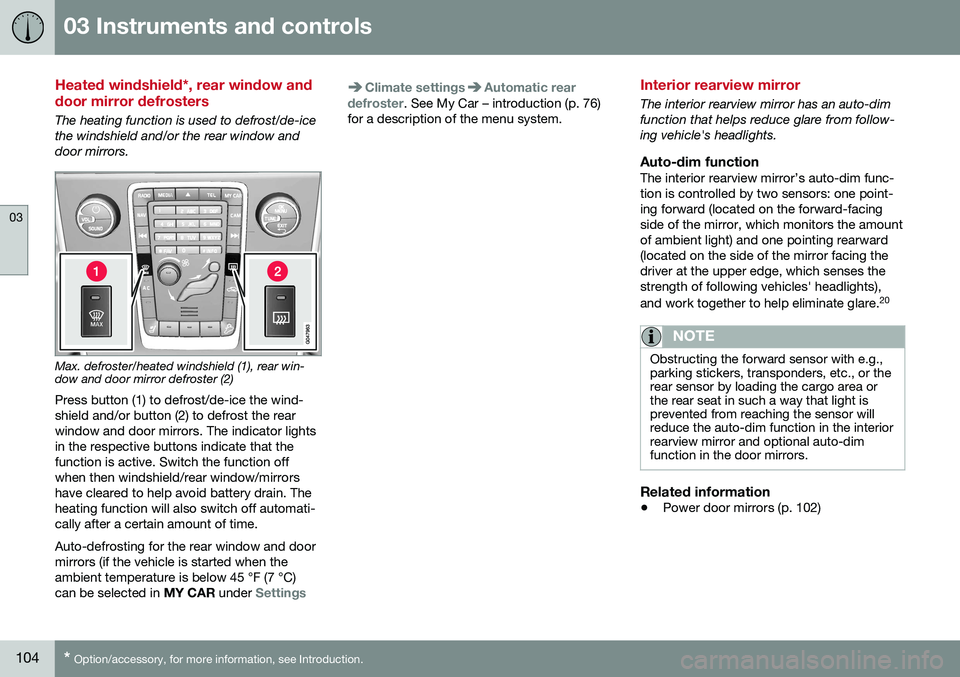
The heating function is used to defrost/de-ice the windshield and/or the rear window anddoor mirrors.
Max. defroster/heated windshield (1), rear win- dow and door mirror defroster (2)
Press button (1) to defrost/de-ice the wind- shield and/or button (2) to defrost the rearwindow and door mirrors. The indicator lightsin the respective buttons indicate that thefunction is active. Switch the function offwhen then windshield/rear window/mirrorshave cleared to help avoid battery drain. Theheating function will also switch off automati-cally after a certain amount of time. Auto-defrosting for the rear window and door mirrors (if the vehicle is started when theambient temperature is below 45 °F (7 °C)can be selected in MY CAR under
Settings
Climate settingsAutomatic rear
defroster. See My Car – introduction (p. 76)
for a description of the menu system.
Interior rearview mirror
The interior rearview mirror has an auto-dim function that helps reduce glare from follow-ing vehicle's headlights.
Auto-dim functionThe interior rearview mirror’s auto-dim func-tion is controlled by two sensors: one point-ing forward (located on the forward-facingside of the mirror, which monitors the amountof ambient light) and one pointing rearward(located on the side of the mirror facing thedriver at the upper edge, which senses thestrength of following vehicles' headlights), and work together to help eliminate glare. 20
NOTE
Obstructing the forward sensor with e.g., parking stickers, transponders, etc., or therear sensor by loading the cargo area orthe rear seat in such a way that light isprevented from reaching the sensor willreduce the auto-dim function in the interiorrearview mirror and optional auto-dimfunction in the door mirrors.
Related information
•
Power door mirrors (p. 102)
Page 130 of 398
||
04 Climate
04
128* Option/accessory, for more information, see Introduction.
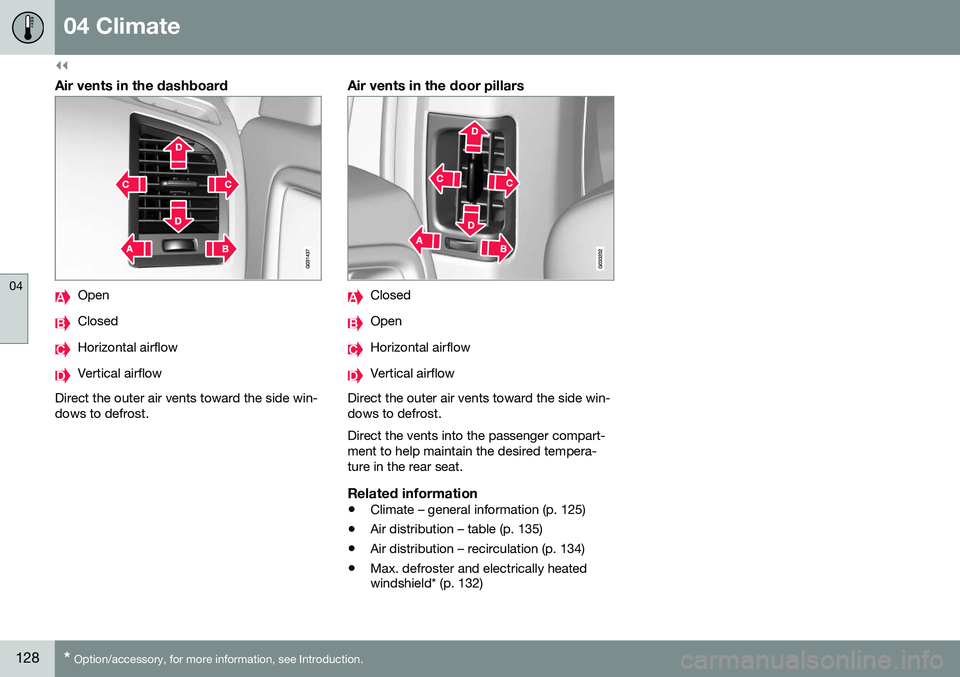
Air vents in the dashboard
Open
Closed
Horizontal airflow
Vertical airflow
Direct the outer air vents toward the side win- dows to defrost.
Air vents in the door pillars
Closed
Open
Horizontal airflow
Vertical airflow
Direct the outer air vents toward the side win- dows to defrost. Direct the vents into the passenger compart- ment to help maintain the desired tempera-ture in the rear seat.
Related information
• Climate – general information (p. 125)
• Air distribution – table (p. 135)
• Air distribution – recirculation (p. 134)
• Max. defroster and electrically heated windshield* (p. 132)
Page 131 of 398
04 Climate
04
* Option/accessory, for more information, see Introduction.129
Electronic climate control (ECC)
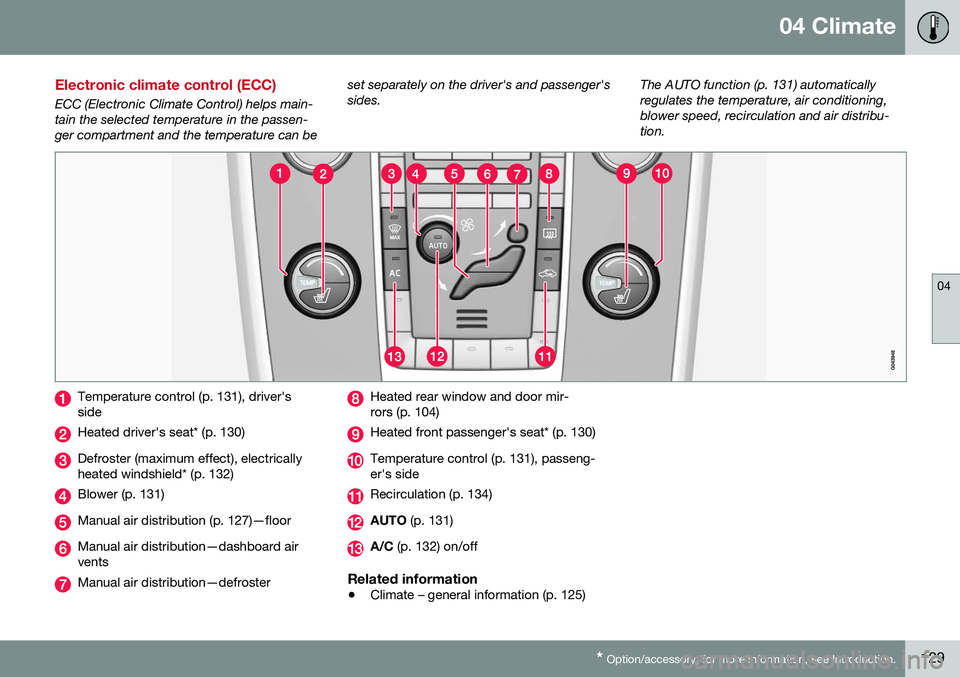
ECC (Electronic Climate Control) helps main- tain the selected temperature in the passen-ger compartment and the temperature can be set separately on the driver's and passenger'ssides.
The AUTO function (p. 131) automaticallyregulates the temperature, air conditioning,blower speed, recirculation and air distribu-tion.
Temperature control (p. 131), driver's side
Heated driver's seat* (p. 130)
Defroster (maximum effect), electrically heated windshield* (p. 132)
Blower (p. 131)
Manual air distribution (p. 127)—floor
Manual air distribution—dashboard air vents
Manual air distribution—defroster
Heated rear window and door mir- rors (p. 104)
Heated front passenger's seat* (p. 130)
Temperature control (p. 131), passeng- er's side
Recirculation (p. 134)
AUTO
(p. 131)
A/C (p. 132) on/off
Related information
•Climate – general information (p. 125)
Page 132 of 398
04 Climate
04
130* Option/accessory, for more information, see Introduction.
Heated seats
The front seat heating has three levels to increase comfort for the driver and passengerin cold weather. The rear outboard seat heating has three lev- els to increase comfort for the passengers incold weather.
Heated front seats*
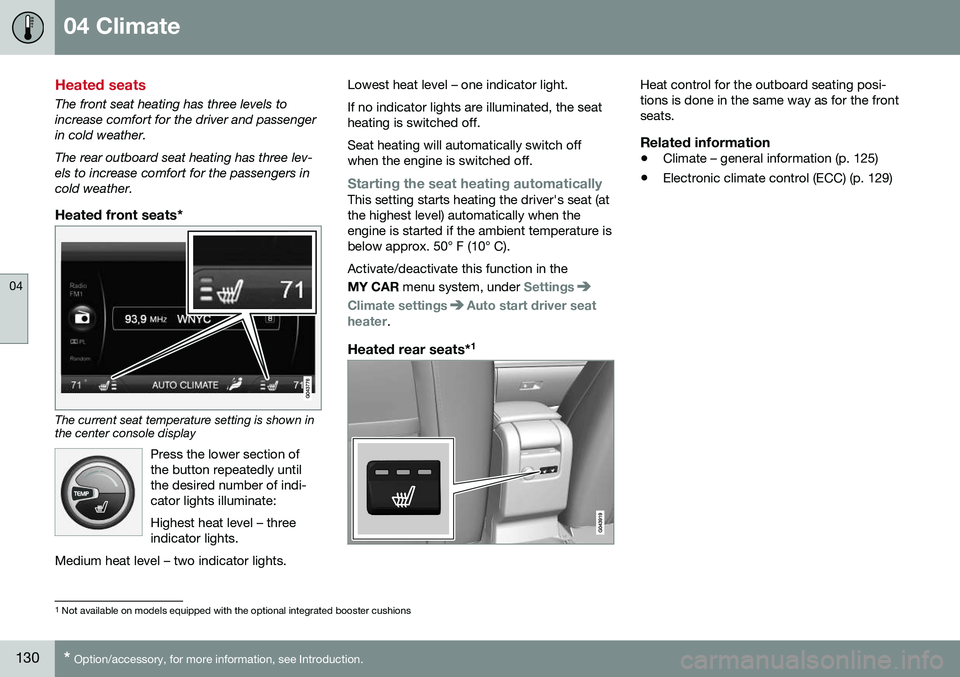
The current seat temperature setting is shown in the center console display
Press the lower section of the button repeatedly untilthe desired number of indi-cator lights illuminate: Highest heat level – three indicator lights.
Medium heat level – two indicator lights.
Lowest heat level – one indicator light. If no indicator lights are illuminated, the seat heating is switched off. Seat heating will automatically switch off when the engine is switched off.
Starting the seat heating automaticallyThis setting starts heating the driver's seat (at the highest level) automatically when theengine is started if the ambient temperature isbelow approx. 50° F (10° C). Activate/deactivate this function in the MY CAR menu system, under
Settings
Climate settingsAuto start driver seat
heater.
Heated rear seats* 1
Heat control for the outboard seating posi- tions is done in the same way as for the frontseats.
Related information
•
Climate – general information (p. 125)
• Electronic climate control (ECC) (p. 129)
1
Not available on models equipped with the optional integrated booster cushions
Page 141 of 398
05 Loading and storage
05
* Option/accessory, for more information, see Introduction.139
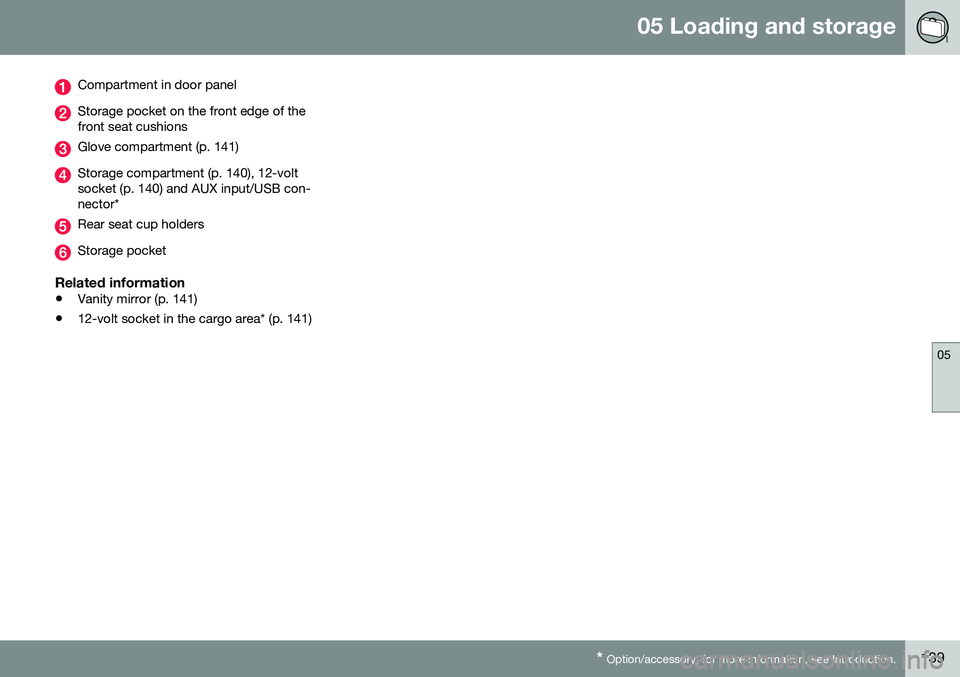
Compartment in door panel
Storage pocket on the front edge of the front seat cushions
Glove compartment (p. 141)
Storage compartment (p. 140), 12-volt socket (p. 140) and AUX input/USB con-nector*
Rear seat cup holders
Storage pocket
Related information
• Vanity mirror (p. 141)
• 12-volt socket in the cargo area* (p. 141)
Page 142 of 398
05 Loading and storage
05
140* Option/accessory, for more information, see Introduction.
Tunnel console
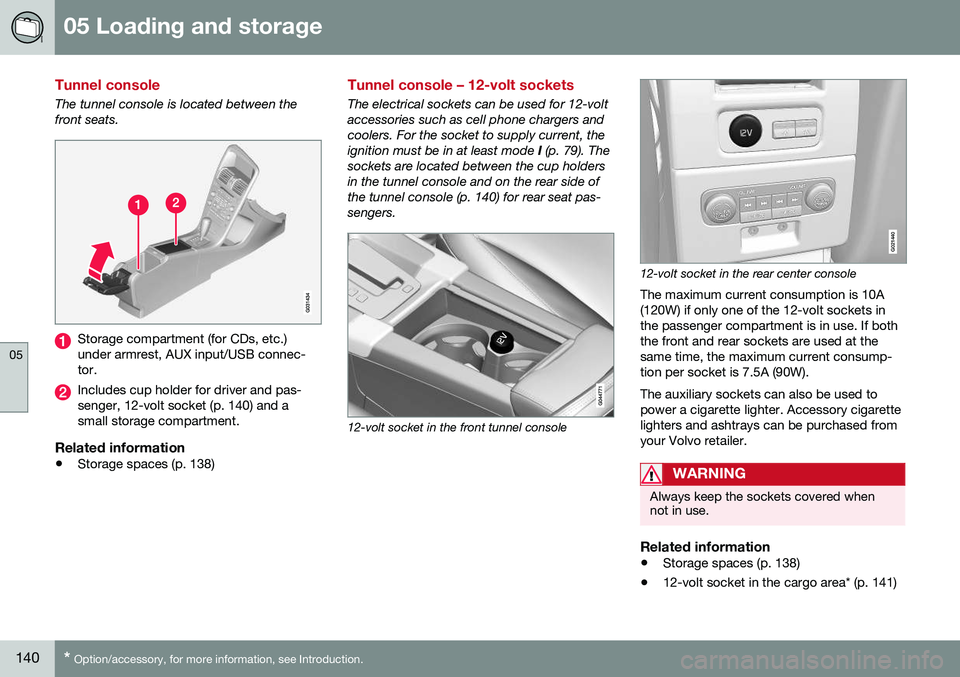
The tunnel console is located between the front seats.
Storage compartment (for CDs, etc.) under armrest, AUX input/USB connec-tor.
Includes cup holder for driver and pas- senger, 12-volt socket (p. 140) and asmall storage compartment.
Related information
• Storage spaces (p. 138)
Tunnel console – 12-volt sockets
The electrical sockets can be used for 12-volt accessories such as cell phone chargers andcoolers. For the socket to supply current, theignition must be in at least mode
I (p. 79). The
sockets are located between the cup holdersin the tunnel console and on the rear side ofthe tunnel console (p. 140) for rear seat pas-sengers.
12-volt socket in the front tunnel console
G021440
12-volt socket in the rear center console
The maximum current consumption is 10A (120W) if only one of the 12-volt sockets inthe passenger compartment is in use. If boththe front and rear sockets are used at thesame time, the maximum current consump-tion per socket is 7.5A (90W). The auxiliary sockets can also be used to power a cigarette lighter. Accessory cigarettelighters and ashtrays can be purchased fromyour Volvo retailer.
WARNING
Always keep the sockets covered when not in use.
Related information
• Storage spaces (p. 138)
• 12-volt socket in the cargo area* (p. 141)
Page 144 of 398
05 Loading and storage
05
142
Loading – general
The load carrying capacity of your vehicle is determined by factors such as the number ofpassengers, the amount of cargo, the weightof any accessories that may be installed, etc. To increase loading space, the rear seat backrests can be folded down, see Rearseats – folding backrest (p. 86). When loading the cargo area, keep the fol- lowing in mind:
• Load objects in the cargo area against the backrest whenever possible.
• Unstable loads can be secured to theload anchoring eyelets with straps or weblashings to help keep them from shifting.
• Stop the engine and apply the parkingbrake when loading or unloading longobjects. The gear selector can beknocked out of position by long loads,which could set the vehicle in motion.WARNING
•Stop the engine, put the gear selector in
P, and apply the parking brake
when loading or unloading longobjects.
• The vehicle's driving characteristicsmay change depending on the weightand distribution of the load.
• A 44-pound (20 kg) object produces aforce of 2,200 pounds (1,000 kg) in ahead-on collision at 30 mph (50 km/h).
• The cargo area and rear seat shouldnot be loaded to a level higher than2 in. (5 cm) below the upper edge ofthe rear side windows. Objects placedhigher than this level could impede thefunction of the Inflatable Curtain.
Related information
•
Load anchoring eyelets (p. 143)
• Steel cargo grid (p. 147)
• Loading – roof load carriers (p. 142)
Loading – roof load carriers
Using load carriersLoad carriers are available as Volvo accesso- ries. Observe the following points when inuse:
• To avoid damaging your vehicle and to achieve maximum safety when driving,we recommend using the load carriersthat Volvo has developed especially foryour vehicle.
• Volvo-approved removable roof racks aredesigned to carry the maximum allowableroof load for this vehicle: 220 lbs (100 kg).For non-Volvo roof racks, check the man-ufacturer's weight limits for the rack.
• Never exceed the rack manufacturer'sweigh limits and never exceed the maxi-mum rated roof load of 220 lbs (100 kg).
• Avoid single-point loads. Distribute loadsevenly.
• Place heavier cargo at the bottom of theload.
• Secure the cargo correctly with appropri-ate tie-down equipment.
• Check periodically that the load carriersand load are properly secured.
• Remember that the vehicle's center ofgravity and handling change when youcarry a load on the roof.
Page 145 of 398
05 Loading and storage
05
143
•
The vehicle's wind resistance and fuel consumption will increase with the size ofthe load.
• Drive smoothly. Avoid rapid starts, fastcornering and hard braking.
Related information
• Loading – general (p. 142)
• Load anchoring eyelets (p. 143)
Load anchoring eyelets
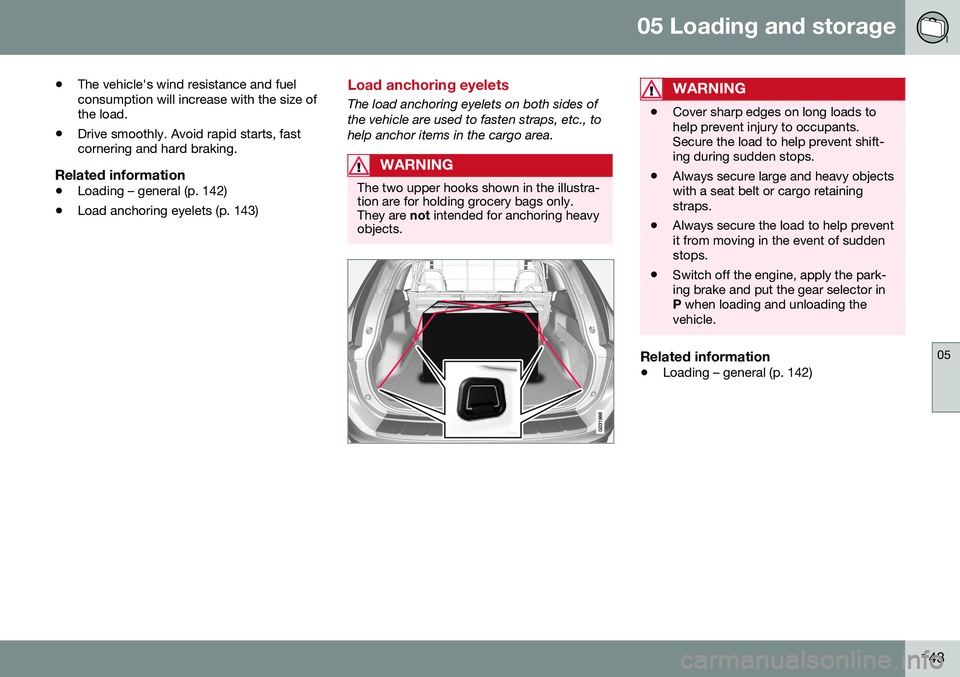
The load anchoring eyelets on both sides of the vehicle are used to fasten straps, etc., tohelp anchor items in the cargo area.
WARNING
The two upper hooks shown in the illustra- tion are for holding grocery bags only.They are
not intended for anchoring heavy
objects.
WARNING
• Cover sharp edges on long loads to help prevent injury to occupants.Secure the load to help prevent shift-ing during sudden stops.
• Always secure large and heavy objectswith a seat belt or cargo retainingstraps.
• Always secure the load to help preventit from moving in the event of suddenstops.
• Switch off the engine, apply the park-ing brake and put the gear selector inP
when loading and unloading the
vehicle.
Related information
• Loading – general (p. 142)