Seat VOLVO XC60 2016 Owner´s Manual
[x] Cancel search | Manufacturer: VOLVO, Model Year: 2016, Model line: XC60, Model: VOLVO XC60 2016Pages: 398, PDF Size: 9.98 MB
Page 146 of 398
05 Loading and storage
05
144
Grocery bag holder
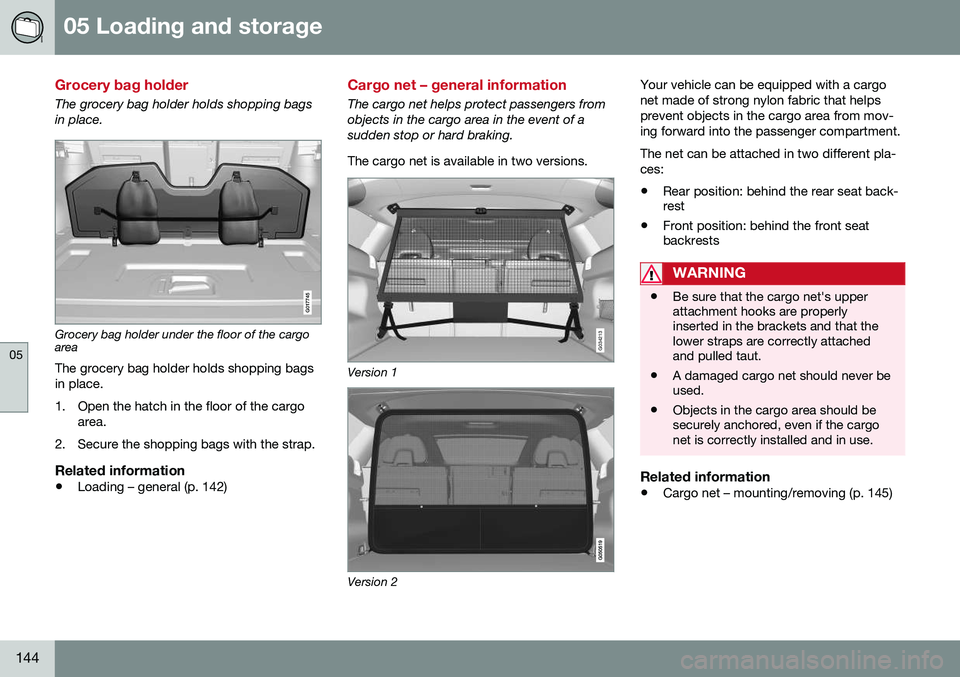
The grocery bag holder holds shopping bags in place.
G017745
Grocery bag holder under the floor of the cargo area
The grocery bag holder holds shopping bags in place.
1. Open the hatch in the floor of the cargo area.
2. Secure the shopping bags with the strap.
Related information
• Loading – general (p. 142)
Cargo net – general information
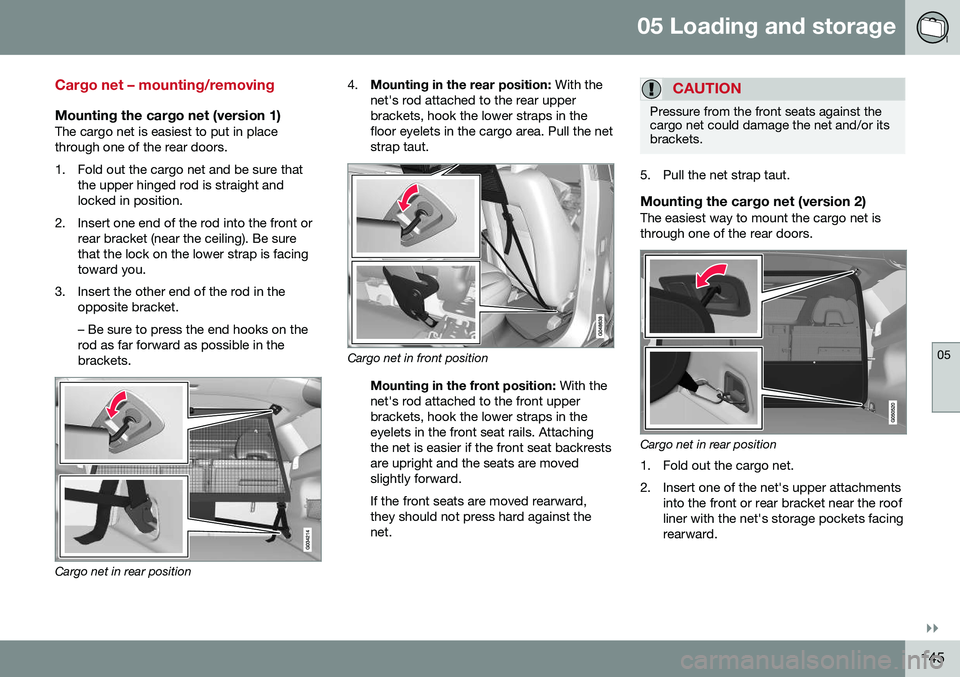
The cargo net helps protect passengers from objects in the cargo area in the event of asudden stop or hard braking. The cargo net is available in two versions.
G034213
Version 1
Version 2 Your vehicle can be equipped with a cargo net made of strong nylon fabric that helpsprevent objects in the cargo area from mov-ing forward into the passenger compartment. The net can be attached in two different pla- ces:
• Rear position: behind the rear seat back- rest
• Front position: behind the front seatbackrests
WARNING
• Be sure that the cargo net's upper attachment hooks are properlyinserted in the brackets and that thelower straps are correctly attachedand pulled taut.
• A damaged cargo net should never beused.
• Objects in the cargo area should besecurely anchored, even if the cargonet is correctly installed and in use.
Related information
•
Cargo net – mounting/removing (p. 145)
Page 147 of 398
05 Loading and storage
05
}}
145
Cargo net – mounting/removing
Mounting the cargo net (version 1)The cargo net is easiest to put in place through one of the rear doors.
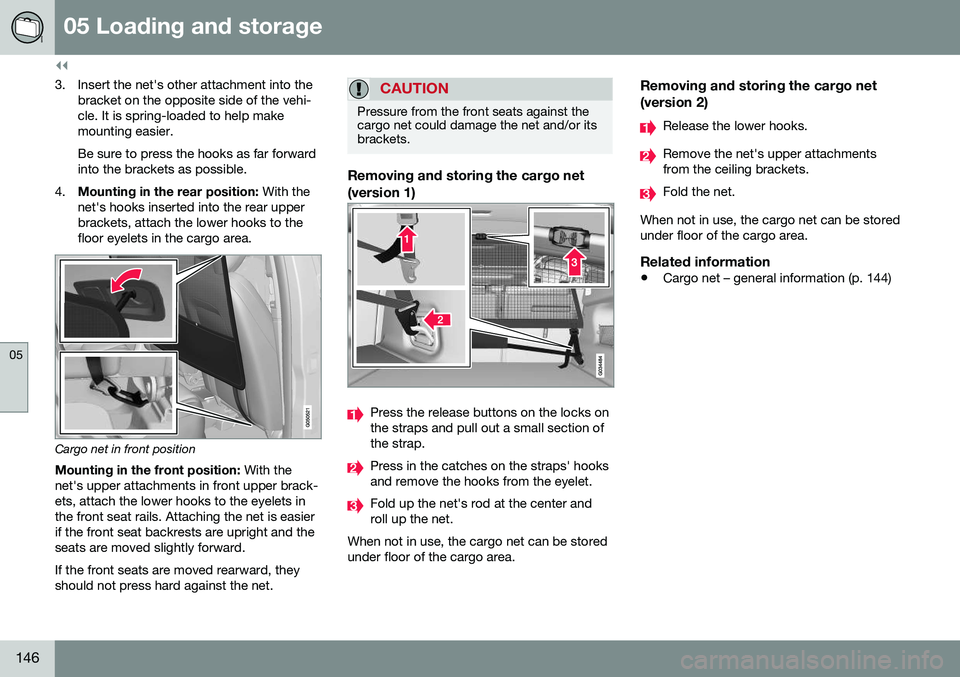
1. Fold out the cargo net and be sure thatthe upper hinged rod is straight and locked in position.
2. Insert one end of the rod into the front or rear bracket (near the ceiling). Be surethat the lock on the lower strap is facingtoward you.
3. Insert the other end of the rod in the opposite bracket. – Be sure to press the end hooks on the rod as far forward as possible in thebrackets.
Cargo net in rear position 4.
Mounting in the rear position: With the
net's rod attached to the rear upper brackets, hook the lower straps in thefloor eyelets in the cargo area. Pull the netstrap taut.
Cargo net in front position
Mounting in the front position: With the
net's rod attached to the front upper brackets, hook the lower straps in theeyelets in the front seat rails. Attachingthe net is easier if the front seat backrestsare upright and the seats are movedslightly forward. If the front seats are moved rearward, they should not press hard against thenet.
CAUTION
Pressure from the front seats against the cargo net could damage the net and/or itsbrackets.
5. Pull the net strap taut.
Mounting the cargo net (version 2)The easiest way to mount the cargo net is through one of the rear doors.
Cargo net in rear position
1. Fold out the cargo net.
2. Insert one of the net's upper attachments into the front or rear bracket near the roof liner with the net's storage pockets facingrearward.
Page 148 of 398
||
05 Loading and storage
05
146
3. Insert the net's other attachment into thebracket on the opposite side of the vehi- cle. It is spring-loaded to help makemounting easier. Be sure to press the hooks as far forward into the brackets as possible.
4. Mounting in the rear position: With the
net's hooks inserted into the rear upperbrackets, attach the lower hooks to thefloor eyelets in the cargo area.
Cargo net in front position
Mounting in the front position: With the
net's upper attachments in front upper brack- ets, attach the lower hooks to the eyelets inthe front seat rails. Attaching the net is easierif the front seat backrests are upright and theseats are moved slightly forward. If the front seats are moved rearward, they should not press hard against the net.
CAUTION
Pressure from the front seats against the cargo net could damage the net and/or itsbrackets.
Removing and storing the cargo net (version 1)
Press the release buttons on the locks on the straps and pull out a small section ofthe strap.
Press in the catches on the straps' hooks and remove the hooks from the eyelet.
Fold up the net's rod at the center and roll up the net.
When not in use, the cargo net can be storedunder floor of the cargo area.
Removing and storing the cargo net (version 2)
Release the lower hooks.
Remove the net's upper attachments from the ceiling brackets.
Fold the net.
When not in use, the cargo net can be stored under floor of the cargo area.
Related information
• Cargo net – general information (p. 144)
Page 149 of 398
05 Loading and storage
05
}}
147
Cargo area cover
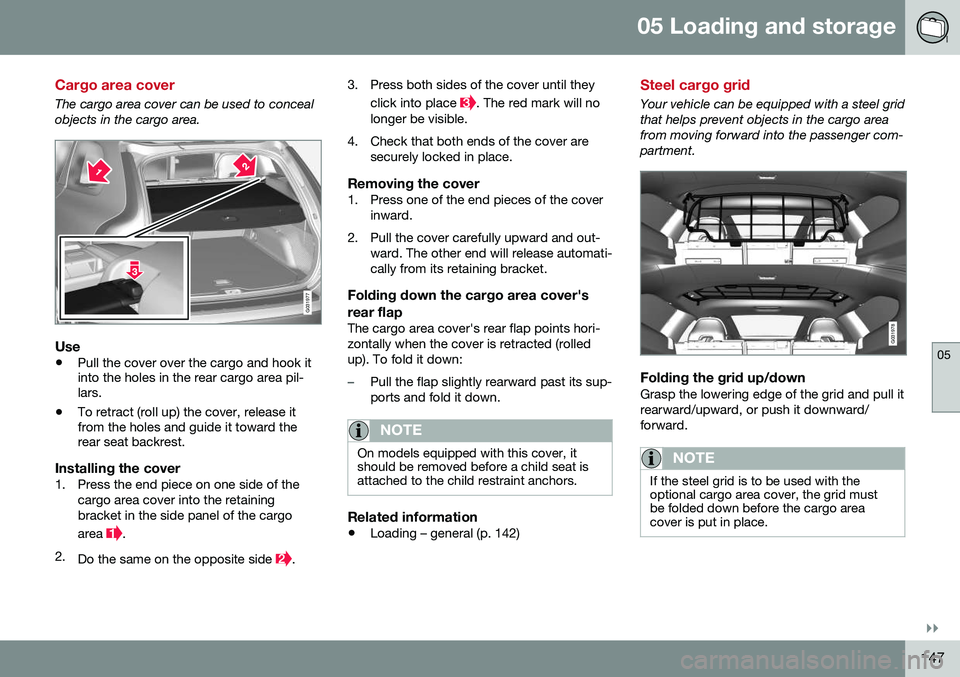
The cargo area cover can be used to conceal objects in the cargo area.
G031977
Use
•Pull the cover over the cargo and hook it into the holes in the rear cargo area pil-lars.
• To retract (roll up) the cover, release itfrom the holes and guide it toward therear seat backrest.
Installing the cover1. Press the end piece on one side of the
cargo area cover into the retaining bracket in the side panel of the cargo area
.
2. Do the same on the opposite side
. 3. Press both sides of the cover until they
click into place
. The red mark will no
longer be visible.
4. Check that both ends of the cover are securely locked in place.
Removing the cover1. Press one of the end pieces of the coverinward.
2. Pull the cover carefully upward and out- ward. The other end will release automati- cally from its retaining bracket.
Folding down the cargo area cover's rear flap
The cargo area cover's rear flap points hori- zontally when the cover is retracted (rolledup). To fold it down:
–Pull the flap slightly rearward past its sup- ports and fold it down.
NOTE
On models equipped with this cover, it should be removed before a child seat isattached to the child restraint anchors.
Related information
• Loading – general (p. 142)
Steel cargo grid
Your vehicle can be equipped with a steel grid that helps prevent objects in the cargo areafrom moving forward into the passenger com-partment.
G031978
Folding the grid up/downGrasp the lowering edge of the grid and pull it rearward/upward, or push it downward/forward.
NOTE
If the steel grid is to be used with the optional cargo area cover, the grid mustbe folded down before the cargo areacover is put in place.
Page 153 of 398
06 Locks and alarm
06
}}
* Option/accessory, for more information, see Introduction.151
Key memory
The memory in the remote key makes it possi- ble to store certain personal settings. The position of the side door mirrors, power driver's seat* and the selected instrument panel theme 1
are stored in the remote keys
when the vehicle is locked. The next time the
driver's door is unlocked with the same
remote key and the door is opened within 2 minutes , the power driver's seat and side
door mirrors will automatically move to theposition that they were in when the doorswere most recently locked with the sameremote key. If the seat/mirrors have not beenreadjusted since the vehicle was locked, theywill already be in the position stored in thatparticular remote key and will not move. Formore information on this feature, see Frontseats – power seat (p. 81). This feature can be activated or deactivated in the vehicle's menu by pressing MY CAR
and going into
SettingsCar settingsCar key memory. For a description of the
menu system, see My Car – introduction (p. 76).
NOTE
If the vehicle is locked with the remote key or is left unlocked for more than 30minutes, the key memory function will bedeactivated. To reactivate the key's memory: • Press the unlock button on the remote key.
For information regarding vehicles with the optional keyless drive, see Keyless drive*–locking/unlocking (p. 159).
Related information
•
Locking/unlocking confirmation (p. 151)
Locking/unlocking confirmation
Settings can be made in the menu system for audible and visual confirmation when thevehicle has been locked or unlocked. Withthese functions activated, the following willoccur when the vehicle is locked/unlocked:
Locking confirmation
•
The turn signals flash once, an audible signal sounds and the door mirrors willfold* in.
Confirmation will only be given when all doors and the tailgate are properly closed andlocked.
NOTE
If you do not receive confirmation when locking the vehicle, check whether a dooror the tailgate is ajar, or if this feature hasbeen turned off in the menu.
Unlocking confirmation
• The turn signals will flash twice and the door mirrors will fold* out.
1
Optional digital instrument panel only
Page 163 of 398
06 Locks and alarm
06
}}
* Option/accessory, for more information, see Introduction.161
position of the driver's seat
2
and door mirrors
will be stored in the remote key's memory. The next time a door is opened by a person with the same remote key in his/her posses-
sion, the driver's seat and door mirrors willautomatically move to the position that theywere in when the door was most recentlylocked.
NOTE
If several people carrying remote keys approach the vehicle at the same time, thedriver's seat and door mirrors will assumethe positions they were in for the personwho opens the driver's door.
See also power seats (p. 81) for information on adjusting and storing the seat's position inthe seat memory.
NOTE
If the vehicle is locked by pressing the but- ton on one of the door handles or bypressing the lock button on the remotekey, or if it is left unlocked for more than30 minutes, the key memory function willbe deactivated. To reactivate the key's memory: • Unlock the vehicle by pulling a door handle with the remote key in yourpossession or by pressing the unlockbutton on the remote key.
Related information
•
Keyless drive*– locking/unlocking (p. 159)
• Remote key – functions (p. 153)
Keyless drive* – messages
If all of the remote keys are removed from the vehicle while the engine is running or if theignition modes (p. 79) is in mode
II and all of
the doors are closed, a message will appearin the instrument panel display and an audiblesignal will sound. When at least one remote key has been returned to the car, the message will beerased in the display and the audible signalwill stop when:
• A door has been opened and closed
• The remote key has been inserted in the ignition slot
• The
OK button has been pressed. For the
location of this button, see Informationdisplay – menu controls (p. 113)
2 Power seats only
Page 164 of 398
06 Locks and alarm
06
162* Option/accessory, for more information, see Introduction.
CAUTION
• Keyless drive remote keys should never be left in the vehicle. In the eventof a break-in, a remote found in thevehicle could make it possible to startthe engine.
• Electromagnetic fields or metalobstructions can interfere with thekeyless drive system. The remote keyshould never be placed closer thanapproximately 4-6 in. (10-15 cm) tocell phones, metallic objects or e.g.,stored in a metal briefcase.
USA – FCC ID:KR55WK48952, KR55WK48964 NOTEThis device complies with part 15 of the FCC Rules. Operation is subject to the followingtwo conditions: (1) This device may not causeharmful interference, and (2) this device mustaccept interference received, including inter-ference that may cause undesired operation. CAUTIONChanges or modifications not expressly approved by the manufacturer could void theuser's authority to operate the equipment. Siemens VDO5WK48891Tested To Comply With FCC Standards For Automobile UseCanada – IC:267T-5WK48952, 267T-5WK48964, 267T-5WK48891 NOTEThis device complies with RSS -210 of Indus- try Canada. Operation is subject to the fol-lowing two conditions: (1) This device maynot cause harmful interference, and (2) thisdevice must accept interference received,including interference that may cause unde-sired operation. CAUTIONChanges or modifications not expressly approved by the manufacturer could void theuser's authority to operate the equipment.
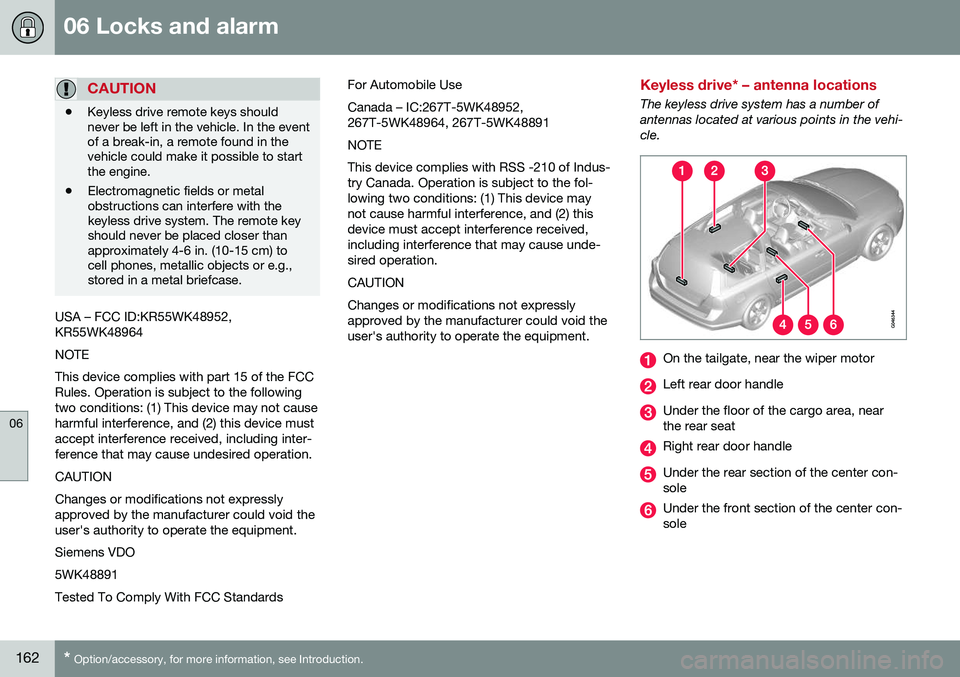
Keyless drive* – antenna locations
The keyless drive system has a number of antennas located at various points in the vehi-cle.
On the tailgate, near the wiper motor
Left rear door handle
Under the floor of the cargo area, near the rear seat
Right rear door handle
Under the rear section of the center con- sole
Under the front section of the center con- sole
Page 168 of 398
06 Locks and alarm
06
166
Locking/unlocking – tailgate
The tailgate can be opened, locked and unlocked in several ways.
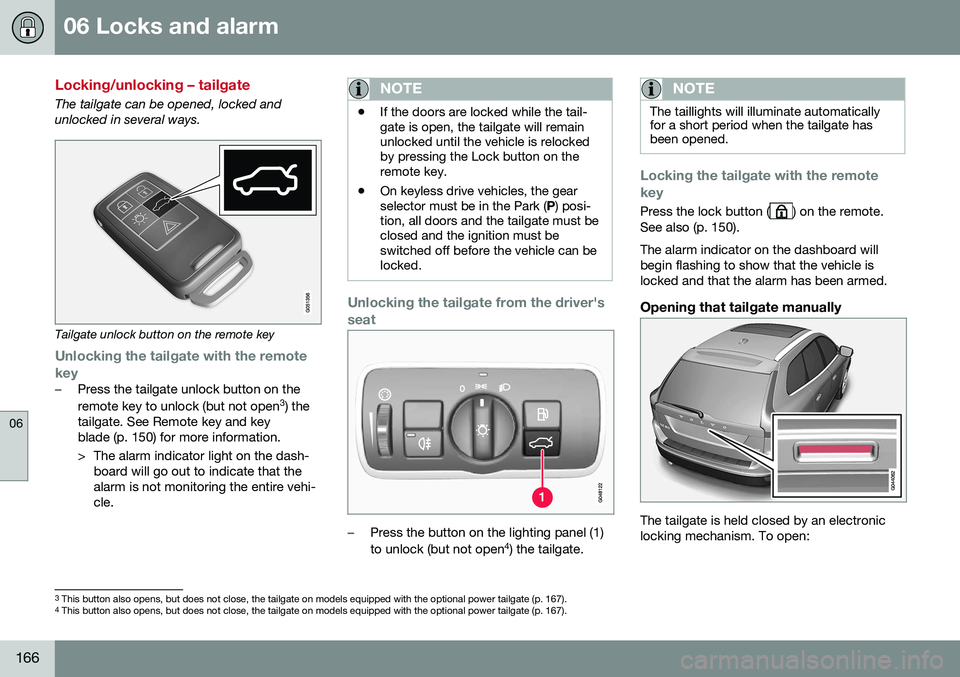
Tailgate unlock button on the remote key
Unlocking the tailgate with the remote
key
–Press the tailgate unlock button on the remote key to unlock (but not open 3
) the
tailgate. See Remote key and key blade (p. 150) for more information.
> The alarm indicator light on the dash- board will go out to indicate that the alarm is not monitoring the entire vehi-cle.
NOTE
• If the doors are locked while the tail- gate is open, the tailgate will remainunlocked until the vehicle is relockedby pressing the Lock button on theremote key.
• On keyless drive vehicles, the gearselector must be in the Park (
P) posi-
tion, all doors and the tailgate must beclosed and the ignition must beswitched off before the vehicle can belocked.
Unlocking the tailgate from the driver's seat
–Press the button on the lighting panel (1) to unlock (but not open 4
) the tailgate.
NOTE
The taillights will illuminate automatically for a short period when the tailgate hasbeen opened.
Locking the tailgate with the remote key
Press the lock button () on the remote.
See also (p. 150). The alarm indicator on the dashboard will begin flashing to show that the vehicle islocked and that the alarm has been armed.
Opening that tailgate manually
The tailgate is held closed by an electronic locking mechanism. To open:
3 This button also opens, but does not close, the tailgate on models equipped with the optional power tailgate (p. 167).
4 This button also opens, but does not close, the tailgate on models equipped with the optional power tailgate (p. 167).
Page 189 of 398
07 Driver support
07
187
WARNING
Adaptive Cruise Control only warns of vehicles detected by the radar sensor, seeAdaptive Cruise Control – limitations(p. 193). In some cases there may be nowarning or the warning may be delayed.The driver should always apply the brakeswhen necessary.
Steep inclines and/or heavy loadsACC is primarily intended for use on fairly level roads. The system may have difficultymaintaining the correct distance to a vehicleahead on steep inclines, if the vehicle is car-rying a heavy load or is towing a trailer. Inthese situations, the driver should always beprepared to apply the brakes if necessary.
Related information
•Adaptive Cruise Control – introduction (p. 184)
Adaptive Cruise Control – engaging
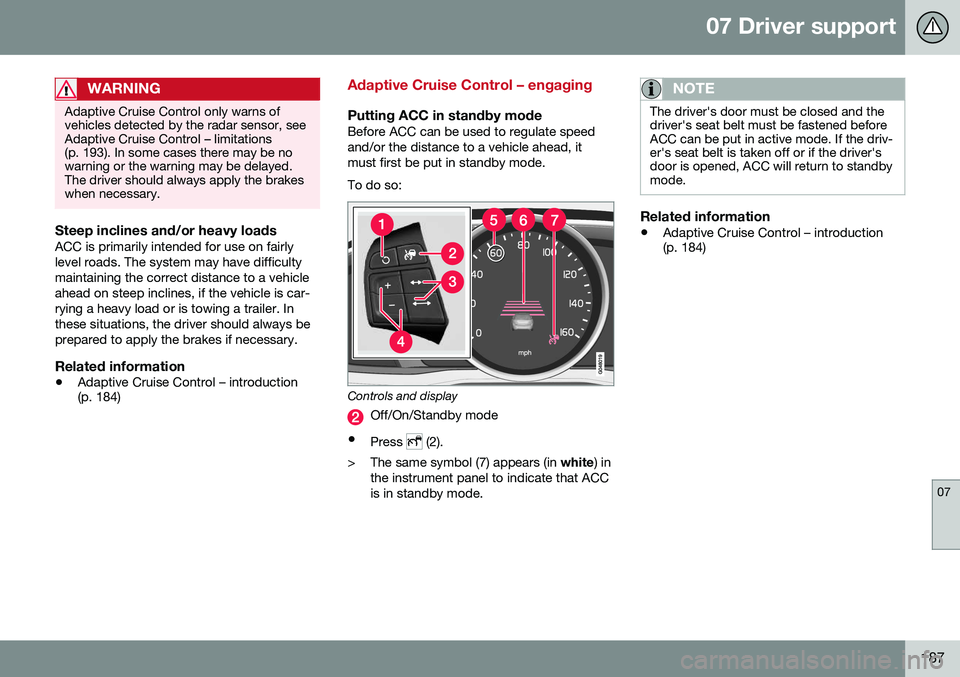
Putting ACC in standby modeBefore ACC can be used to regulate speed and/or the distance to a vehicle ahead, itmust first be put in standby mode. To do so:
Controls and display
Off/On/Standby mode
• Press
(2).
> The same symbol (7) appears (in white) in
the instrument panel to indicate that ACC is in standby mode.
NOTE
The driver's door must be closed and the driver's seat belt must be fastened beforeACC can be put in active mode. If the driv-er's seat belt is taken off or if the driver'sdoor is opened, ACC will return to standbymode.
Related information
• Adaptive Cruise Control – introduction (p. 184)
Page 192 of 398
||
07 Driver support
07
190
WARNING
The vehicle may accelerate quickly after
has been pressed if its current speed is
considerably lower than the set speed.
Standby mode due to action by the driver
ACC is temporarily deactivated and put in standby mode:
• if the brakes are applied
• if the gear selector is moved to
N
• if the driver drives faster than the set speed for more than
1 minute.
In this happens, the driver will have to regu- late the vehicle's speed.
NOTE
If the accelerator pedal is only depressed for a short time, such as when passinganother vehicle, ACC is deactivated tem-porarily and is reactivated when the pedalis released.
Automatic standby modeACC is linked to other systems such as the stability system. If this system is not function-ing properly, ACC will switch off automati-cally. In the event of automatic deactivation, an audible signal will sound and the message
Cruise control Cancelled is shown in the
instrument panel. The driver must then inter- vene and adapt the vehicle's speed to thesurrounding traffic and regulate the distanceto the vehicle ahead. An automatic switch to standby mode may be caused if:
• engine speed (rpm) is too high/low
• The driver's door is opened
• The driver unbuckles his/her seat belt
• the vehicle's speed goes below 18 mph (30 km/h)
• the wheels lose traction
• brake temperature is high
• the radar sensor is obstructed by, forexample, wet snow or rain.
Resuming the set speedIf ACC is in standby mode, it can be reactiva- ted by pressing the
button on the steering
wheel keypad. The vehicle will return to the most recently set speed.
WARNING
The vehicle may accelerate quickly after
has been pressed if its current speed is
considerably lower than the set speed.
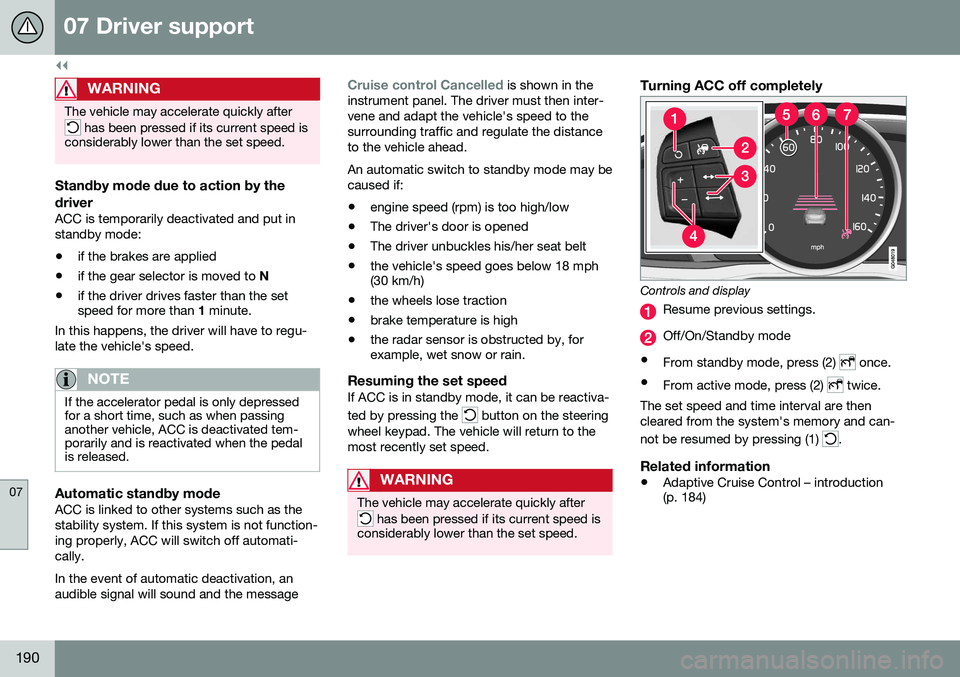
Turning ACC off completely
Controls and display
Resume previous settings.
Off/On/Standby mode
• From standby mode, press (2)
once.
• From active mode, press (2)
twice.
The set speed and time interval are then cleared from the system's memory and can- not be resumed by pressing (1)
.
Related information
• Adaptive Cruise Control – introduction (p. 184)