lock VOLVO XC60 2017 Owner´s Manual
[x] Cancel search | Manufacturer: VOLVO, Model Year: 2017, Model line: XC60, Model: VOLVO XC60 2017Pages: 398, PDF Size: 9.17 MB
Page 329 of 398
MAINTENANCE AND SERVICING
327
retailer can access or search for this information using your vehicle's VIN number. This numbercan be found in your warranty booklet or on thedashboard at the lower left corner of the wind-shield.
–Select Maintenance & repairSend
vehicle data.
Booking information and vehicle dataWhen you opt to book service from your vehicle, booking information and vehicle data will betransmitted. Vehicle data consists of a number ofparameters in the following areas:
• Service requirements
• Function status
• Fluid levels
• Odometer reading (mileage)
• Vehicle Identification Number (VIN)
• The vehicle's software version
Related information
•
Volvo ID (p. 22)
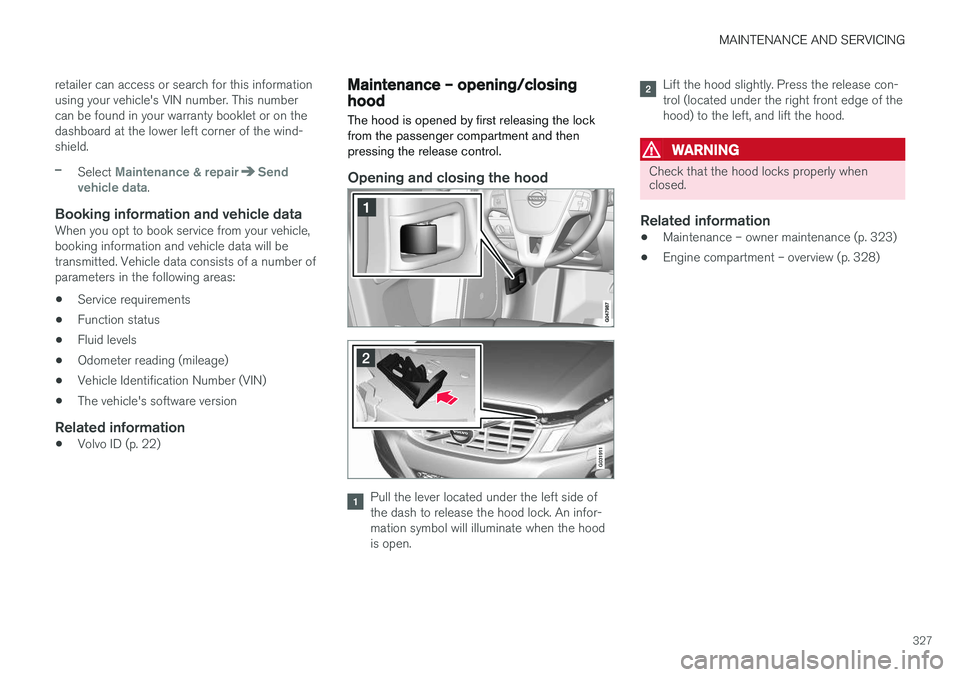
Maintenance – opening/closing hood The hood is opened by first releasing the lock from the passenger compartment and thenpressing the release control.
Opening and closing the hood
G031911
Pull the lever located under the left side of the dash to release the hood lock. An infor-mation symbol will illuminate when the hoodis open.
Lift the hood slightly. Press the release con- trol (located under the right front edge of thehood) to the left, and lift the hood.
WARNING
Check that the hood locks properly when closed.
Related information
•Maintenance – owner maintenance (p. 323)
• Engine compartment – overview (p. 328)
Page 337 of 398
MAINTENANCE AND SERVICING
}}
* Option/accessory, for more information, see Introduction.335
WARNING
•The engine should not be running when changing bulbs.
• If the engine has been running just priorto replacing bulbs in the headlight hous-ing, please keep in mind that componentsin the engine compartment will be hot.
WARNING
•
Active Bending Lights
* – due to the high
voltage used by these headlights, these bulbs should only be replaced by atrained and qualified Volvo service techni-cian.
• Turn off the lights and remove the remotekey from the ignition before changing anybulbs.
Related information
•Bulbs – headlight housing (p. 335)
• Bulbs – vanity mirror lighting (p. 341)
• Bulbs – cargo area lighting (p. 340)
• Bulbs – license plate lighting (p. 340)
Bulbs – headlight housing
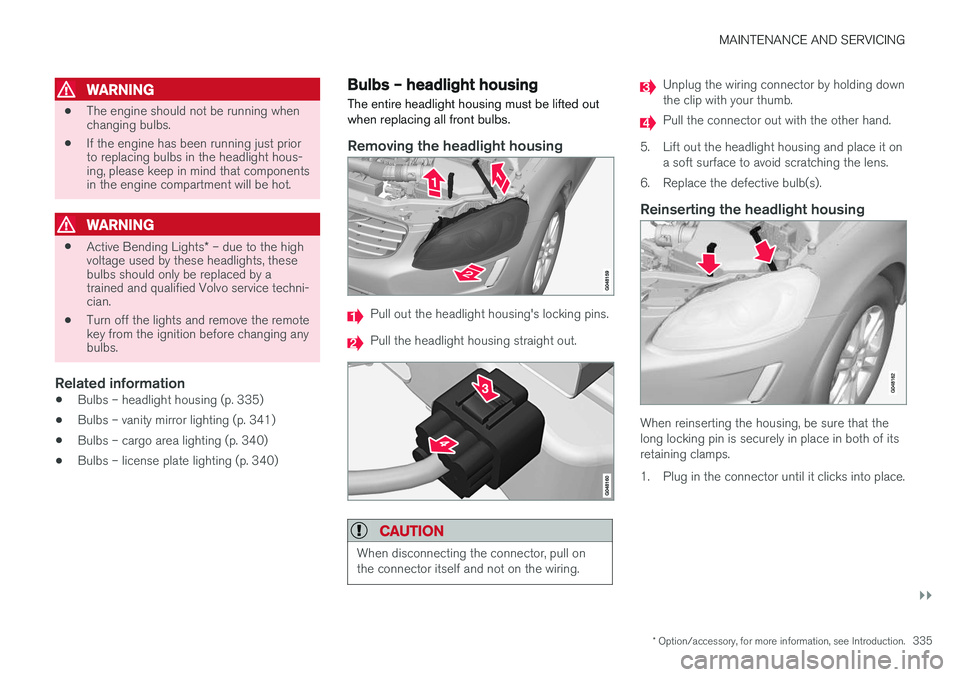
The entire headlight housing must be lifted out when replacing all front bulbs.
Removing the headlight housing
Pull out the headlight housing's locking pins.
Pull the headlight housing straight out.
CAUTION
When disconnecting the connector, pull on the connector itself and not on the wiring.
Unplug the wiring connector by holding down the clip with your thumb.
Pull the connector out with the other hand.
5. Lift out the headlight housing and place it on a soft surface to avoid scratching the lens.
6. Replace the defective bulb(s).
Reinserting the headlight housing
When reinserting the housing, be sure that the long locking pin is securely in place in both of itsretaining clamps.
1. Plug in the connector until it clicks into place.
Page 338 of 398
||
MAINTENANCE AND SERVICING
3362. Reinsert the headlight housing and locking
pins. Check that they are correctly inserted. The headlight housing must be properly in place and the wiring connector correctlyreconnected before the lighting is switchedon or the remote key is inserted into the igni-tion slot.
3. Check that the lights function properly.
Related information
• Bulbs – introduction (p. 334)
• Bulbs – cover (p. 336)
• Bulbs – specifications (p. 341)
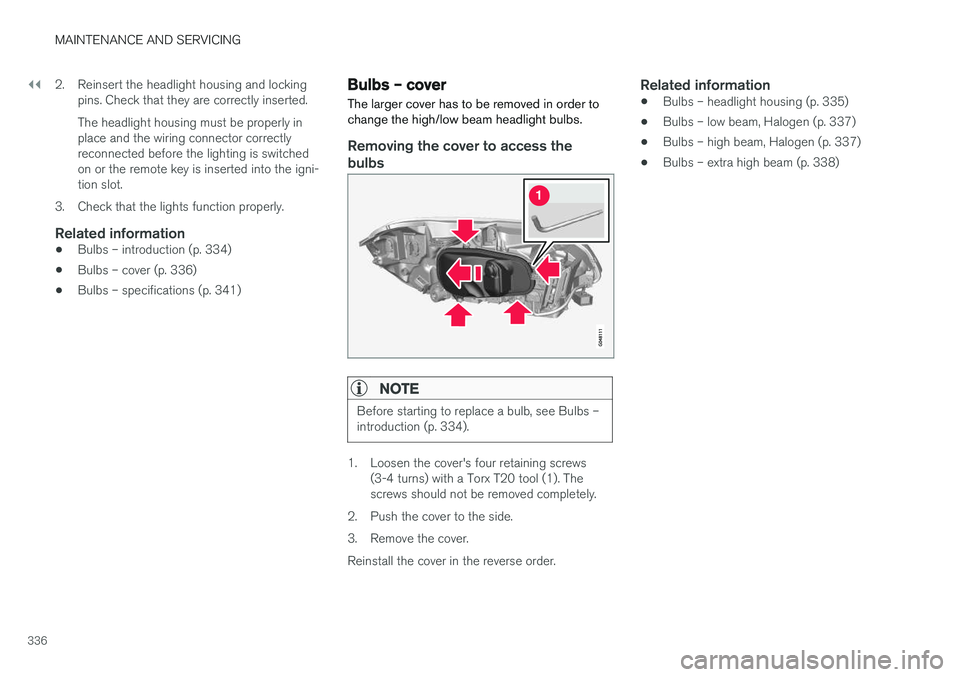
Bulbs – cover The larger cover has to be removed in order to change the high/low beam headlight bulbs.
Removing the cover to access the
bulbs
NOTE
Before starting to replace a bulb, see Bulbs – introduction (p. 334).
1. Loosen the cover's four retaining screws (3-4 turns) with a Torx T20 tool (1). The screws should not be removed completely.
2. Push the cover to the side.
3. Remove the cover.Reinstall the cover in the reverse order.
Related information
• Bulbs – headlight housing (p. 335)
• Bulbs – low beam, Halogen (p. 337)
• Bulbs – high beam, Halogen (p. 337)
• Bulbs – extra high beam (p. 338)
Page 339 of 398
MAINTENANCE AND SERVICING
337
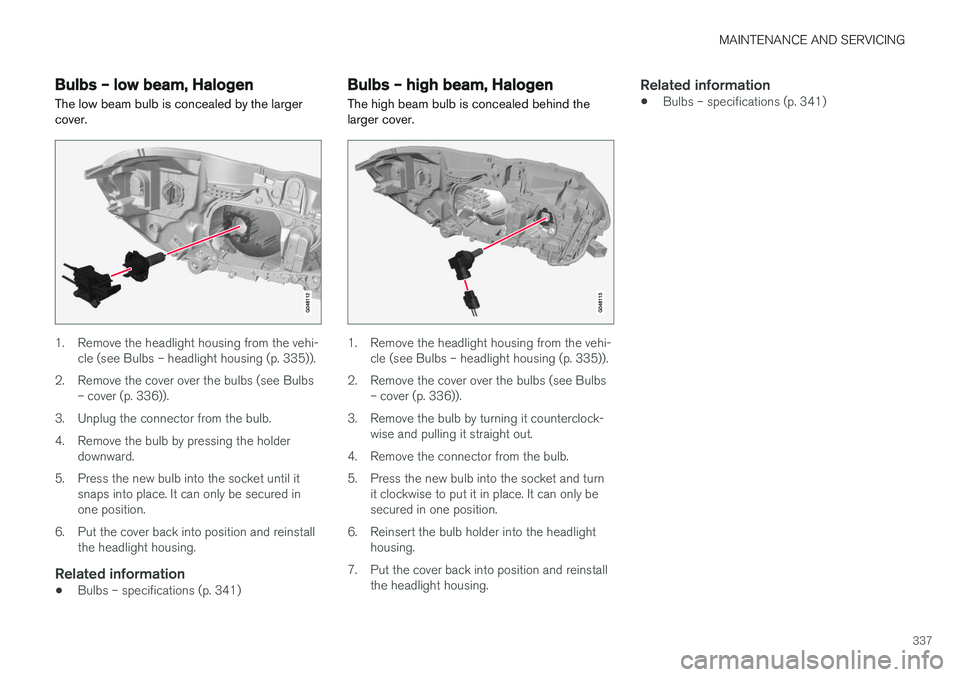
Bulbs – low beam, Halogen The low beam bulb is concealed by the larger cover.
1. Remove the headlight housing from the vehi-cle (see Bulbs – headlight housing (p. 335)).
2. Remove the cover over the bulbs (see Bulbs – cover (p. 336)).
3. Unplug the connector from the bulb.
4. Remove the bulb by pressing the holder downward.
5. Press the new bulb into the socket until it snaps into place. It can only be secured in one position.
6. Put the cover back into position and reinstall the headlight housing.
Related information
• Bulbs – specifications (p. 341)
Bulbs – high beam, Halogen
The high beam bulb is concealed behind the larger cover.
1. Remove the headlight housing from the vehi- cle (see Bulbs – headlight housing (p. 335)).
2. Remove the cover over the bulbs (see Bulbs – cover (p. 336)).
3. Remove the bulb by turning it counterclock- wise and pulling it straight out.
4. Remove the connector from the bulb.
5. Press the new bulb into the socket and turn it clockwise to put it in place. It can only be secured in one position.
6. Reinsert the bulb holder into the headlight housing.
7. Put the cover back into position and reinstall the headlight housing.
Related information
• Bulbs – specifications (p. 341)
Page 340 of 398
MAINTENANCE AND SERVICING
338
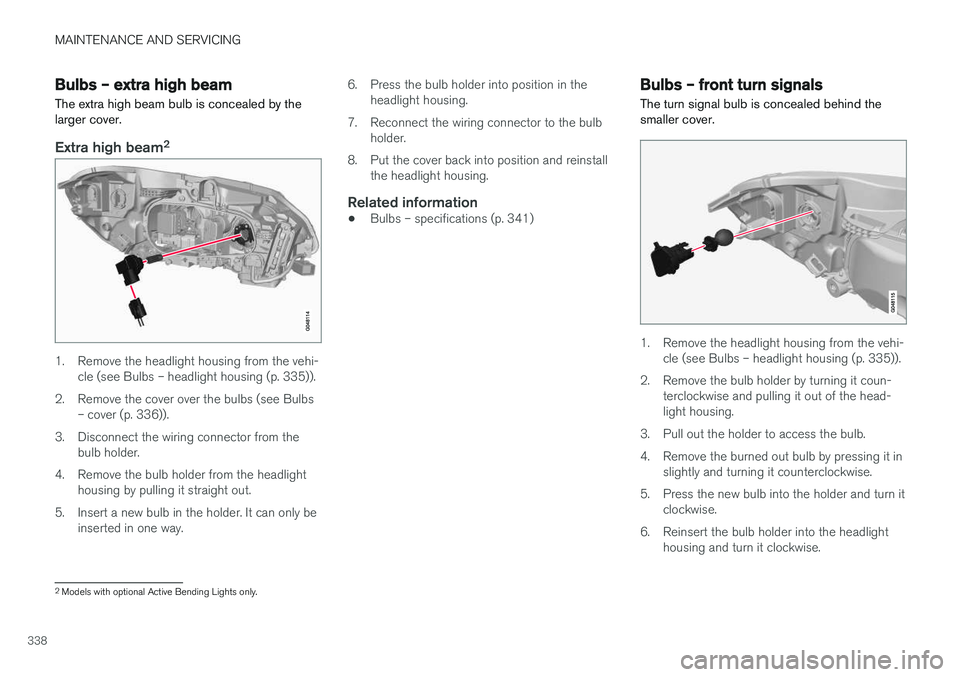
Bulbs – extra high beam The extra high beam bulb is concealed by the larger cover.
Extra high beam2
1. Remove the headlight housing from the vehi-
cle (see Bulbs – headlight housing (p. 335)).
2. Remove the cover over the bulbs (see Bulbs – cover (p. 336)).
3. Disconnect the wiring connector from the bulb holder.
4. Remove the bulb holder from the headlight housing by pulling it straight out.
5. Insert a new bulb in the holder. It can only be inserted in one way. 6. Press the bulb holder into position in the
headlight housing.
7. Reconnect the wiring connector to the bulb holder.
8. Put the cover back into position and reinstall the headlight housing.
Related information
• Bulbs – specifications (p. 341)
Bulbs – front turn signals The turn signal bulb is concealed behind the smaller cover.
1. Remove the headlight housing from the vehi-
cle (see Bulbs – headlight housing (p. 335)).
2. Remove the bulb holder by turning it coun- terclockwise and pulling it out of the head- light housing.
3. Pull out the holder to access the bulb.
4. Remove the burned out bulb by pressing it in slightly and turning it counterclockwise.
5. Press the new bulb into the holder and turn it clockwise.
6. Reinsert the bulb holder into the headlight housing and turn it clockwise.
2Models with optional Active Bending Lights only.
Page 341 of 398
MAINTENANCE AND SERVICING
339
7. Reinstall the headlight housing.
Related information
•
Bulbs – specifications (p. 341)
Bulbs – rear fog lights
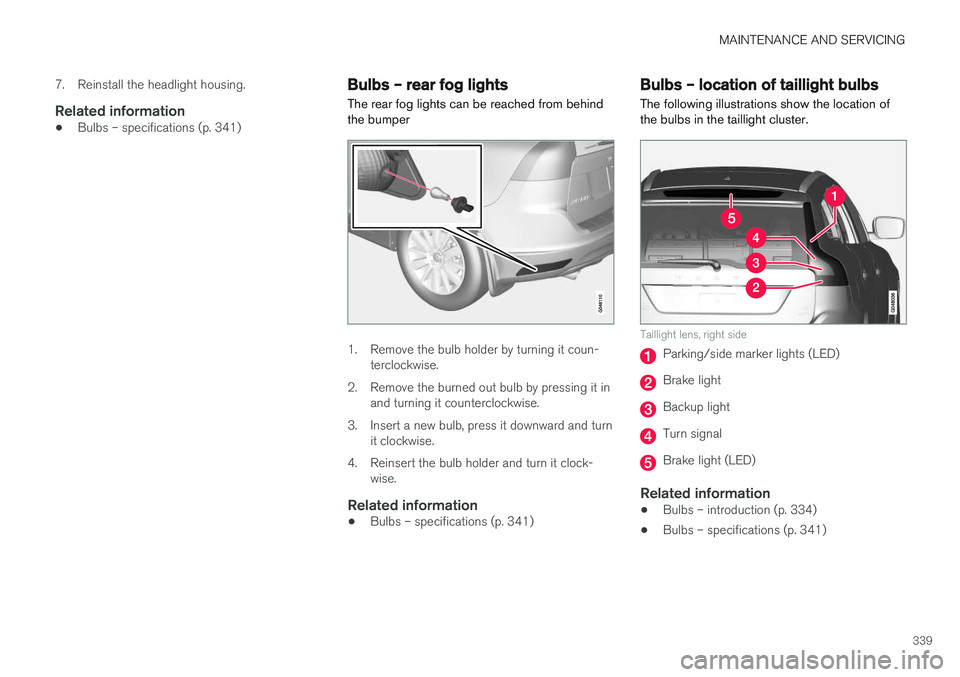
The rear fog lights can be reached from behind the bumper
1. Remove the bulb holder by turning it coun- terclockwise.
2. Remove the burned out bulb by pressing it in and turning it counterclockwise.
3. Insert a new bulb, press it downward and turn it clockwise.
4. Reinsert the bulb holder and turn it clock- wise.
Related information
• Bulbs – specifications (p. 341)
Bulbs – location of taillight bulbs
The following illustrations show the location of the bulbs in the taillight cluster.
Taillight lens, right side
Parking/side marker lights (LED)
Brake light
Backup light
Turn signal
Brake light (LED)
Related information
• Bulbs – introduction (p. 334)
• Bulbs – specifications (p. 341)
Page 342 of 398
MAINTENANCE AND SERVICING
340
Bulbs – brake lights and taillights
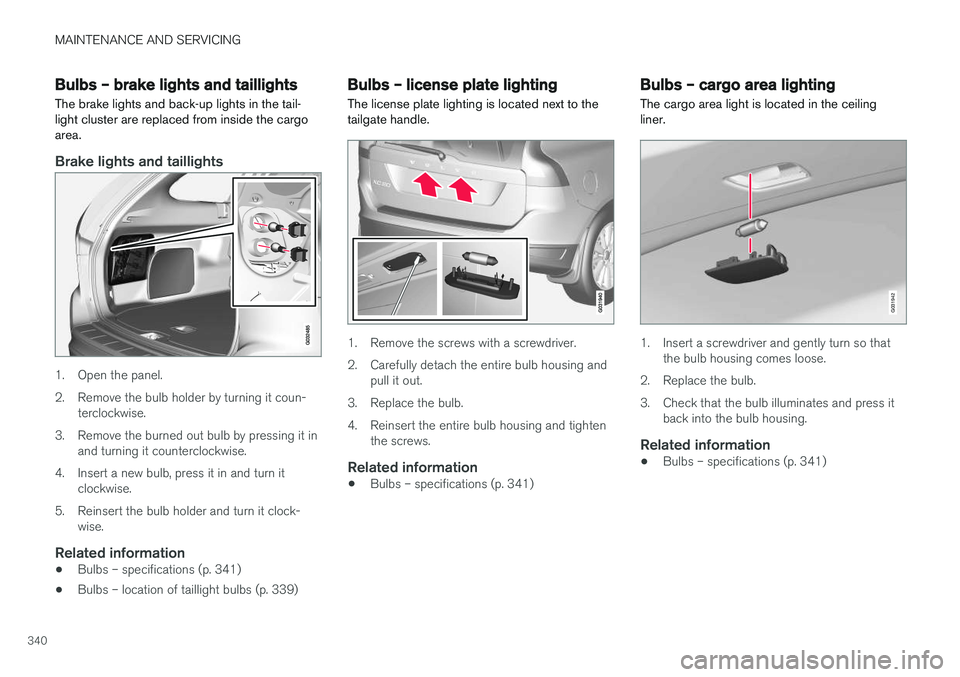
The brake lights and back-up lights in the tail- light cluster are replaced from inside the cargoarea.
Brake lights and taillights
1. Open the panel.
2. Remove the bulb holder by turning it coun- terclockwise.
3. Remove the burned out bulb by pressing it in and turning it counterclockwise.
4. Insert a new bulb, press it in and turn it clockwise.
5. Reinsert the bulb holder and turn it clock- wise.
Related information
• Bulbs – specifications (p. 341)
• Bulbs – location of taillight bulbs (p. 339)
Bulbs – license plate lighting
The license plate lighting is located next to the tailgate handle.
1. Remove the screws with a screwdriver.
2. Carefully detach the entire bulb housing and pull it out.
3. Replace the bulb.
4. Reinsert the entire bulb housing and tighten the screws.
Related information
• Bulbs – specifications (p. 341)
Bulbs – cargo area lighting
The cargo area light is located in the ceiling liner.
G031942
1. Insert a screwdriver and gently turn so that the bulb housing comes loose.
2. Replace the bulb.
3. Check that the bulb illuminates and press it back into the bulb housing.
Related information
• Bulbs – specifications (p. 341)
Page 345 of 398
MAINTENANCE AND SERVICING
}}
343
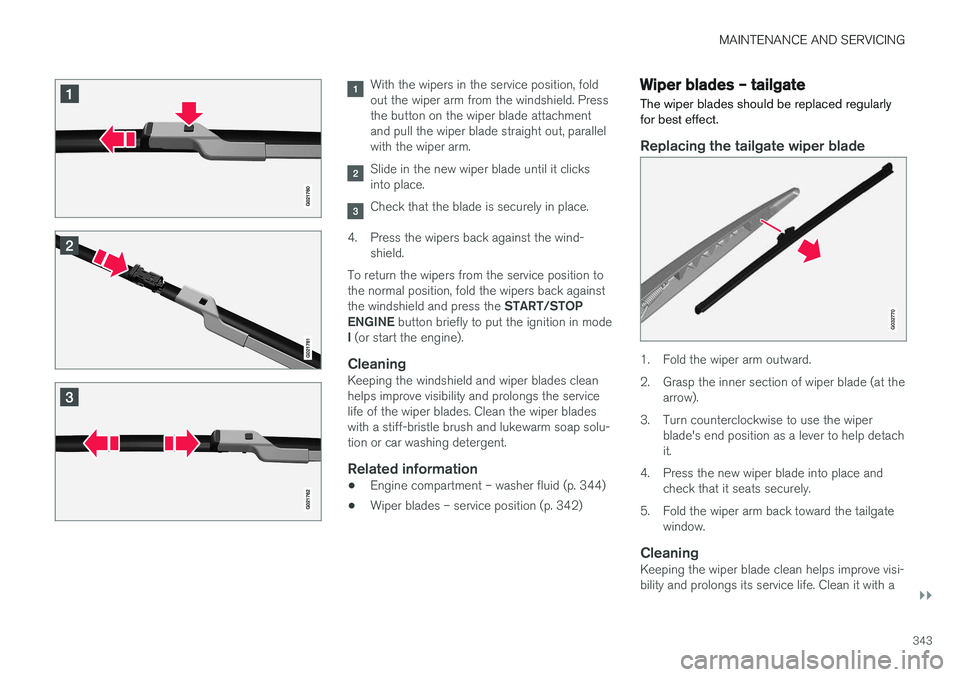
With the wipers in the service position, fold out the wiper arm from the windshield. Pressthe button on the wiper blade attachmentand pull the wiper blade straight out, parallelwith the wiper arm.
Slide in the new wiper blade until it clicks into place.
Check that the blade is securely in place.
4. Press the wipers back against the wind- shield.
To return the wipers from the service position to the normal position, fold the wipers back against the windshield and press the START/STOP
ENGINE button briefly to put the ignition in mode
I (or start the engine).
CleaningKeeping the windshield and wiper blades clean helps improve visibility and prolongs the servicelife of the wiper blades. Clean the wiper bladeswith a stiff-bristle brush and lukewarm soap solu-tion or car washing detergent.
Related information
• Engine compartment – washer fluid (p. 344)
• Wiper blades – service position (p. 342)
Wiper blades – tailgate
The wiper blades should be replaced regularly for best effect.
Replacing the tailgate wiper blade
G032770
1. Fold the wiper arm outward.
2. Grasp the inner section of wiper blade (at the arrow).
3. Turn counterclockwise to use the wiper blade's end position as a lever to help detach it.
4. Press the new wiper blade into place and check that it seats securely.
5. Fold the wiper arm back toward the tailgate window.
CleaningKeeping the wiper blade clean helps improve visi-bility and prolongs its service life. Clean it with a
Page 355 of 398
MAINTENANCE AND SERVICING
}}
353
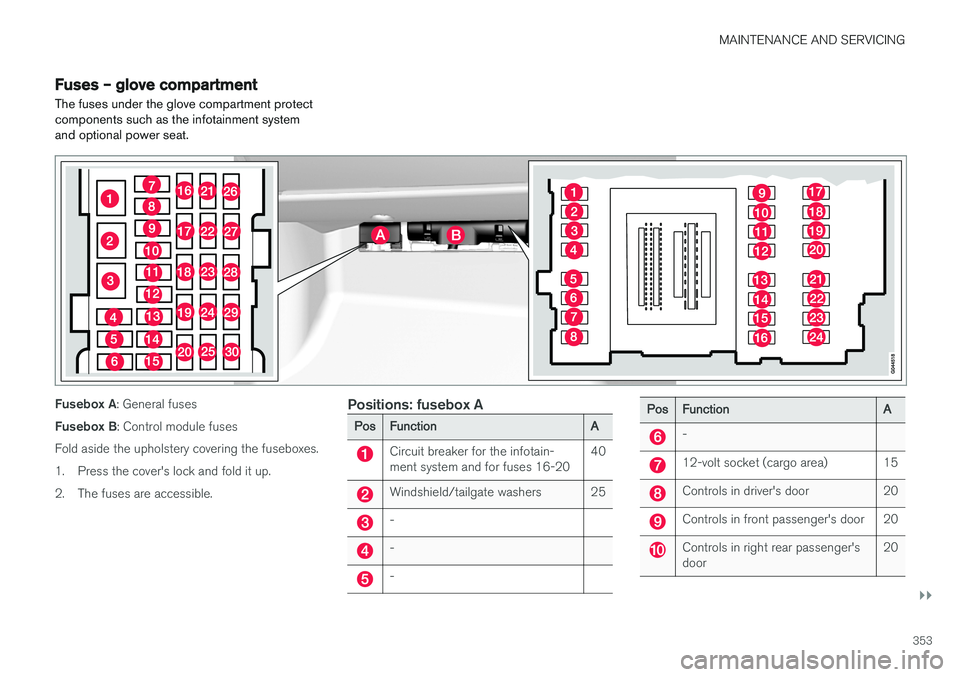
Fuses – glove compartment
The fuses under the glove compartment protect components such as the infotainment systemand optional power seat.
Fusebox A : General fuses
Fusebox B : Control module fuses
Fold aside the upholstery covering the fuseboxes.
1. Press the cover's lock and fold it up.
2. The fuses are accessible.Positions: fusebox A
PosFunctionA
Circuit breaker for the infotain- ment system and for fuses 16-2040
Windshield/tailgate washers25
-
-
-
PosFunctionA
-
12-volt socket (cargo area)15
Controls in driver's door20
Controls in front passenger's door20
Controls in right rear passenger's door20
Page 356 of 398
||
MAINTENANCE AND SERVICING
* Option/accessory, for more information, see Introduction.
354
PosFunctionA
Controls in left rear passenger's door20
Keyless drive *20
Power driver's seat *20
Power front passenger's seat *20
-
Infotainment system display5
Infotainment system: amplifier, Sir- iusXM™ satellite radio *10
Sensus control module15
Bluetooth hands-free system5
-
Laminated panoramic roof *
Courtesy lighting, climate system sensor5
12-volt sockets in tunnel console15
Heated rear seat * (passenger's
side)15
Heated rear seat * (driver's side)15
PosFunctionA
-
Heated front passenger's seat *15
Heated driver's seat*15
Park assist*
Blind Spot Information System (BLIS) *, park assist camera *5
All Wheel Drive* control module15
Active chassis system *10
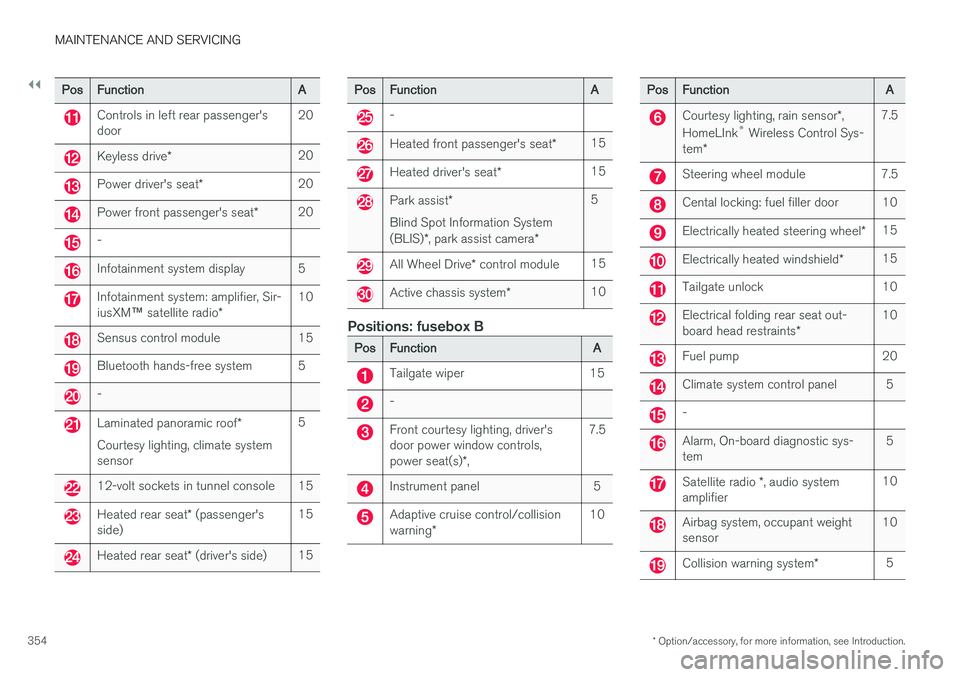
Positions: fusebox B
PosFunctionA
Tailgate wiper15
-
Front courtesy lighting, driver's door power window controls, power seat(s)*,7.5
Instrument panel5
Adaptive cruise control/collision warning *10
PosFunctionA
Courtesy lighting, rain sensor *,
HomeLInk ®
Wireless Control Sys-
tem *7.5
Steering wheel module7.5
Cental locking: fuel filler door10
Electrically heated steering wheel *15
Electrically heated windshield*15
Tailgate unlock10
Electrical folding rear seat out- board head restraints*10
Fuel pump20
Climate system control panel5
-
Alarm, On-board diagnostic sys- tem5
Satellite radio *, audio system
amplifier10
Airbag system, occupant weight sensor10
Collision warning system *5