light VOLVO XC60 2017 Owner´s Manual
[x] Cancel search | Manufacturer: VOLVO, Model Year: 2017, Model line: XC60, Model: VOLVO XC60 2017Pages: 398, PDF Size: 9.17 MB
Page 313 of 398
WHEELS AND TIRES
}}
311
NOTE
•The tire monitoring systems use a tem- perature compensated pressure value.This pressure value is dependent on tiretemperature and ambient temperature,which can differ from the recommendedcold tire pressure in the tire inflation tableand on the tire pressure placard locatedon the driver's side B-pillar (the structuralmember at the side of the vehicle, at therear of the driver's door opening). Thismeans that it may sometimes be neces-sary to inflate them slightly above therecommended cold pressure value(approx. 3-4 psi or 0.2-0.3 bar) in orderto reset a low tire pressure warning.
• To help avoid incorrect tire inflation pres-sure, if possible only inflate the tireswhen they are cold. The tires are consid-ered to be cold when they have the sametemperature as the surrounding (ambi-ent) air. This temperature is normallyreached after the vehicle has beenparked for at least 3 hours. After driving adistance of approximately 1 mile (1.6 km),the tires are considered to be hot.
CAUTION
•
After inflating the tires, always reinstall the valve cap to help avoid damage to thevalve from dirt, gravel, etc.
• Use plastic valve caps only. Metal capscould corrode and become difficult toremove.
WARNING
•Incorrect inflation pressure could lead to tire failure, resulting in a loss of control ofthe vehicle.
• Tire monitoring systems cannot indicatesudden tire damage caused by externalfactors (e.g., a blowout) in advance.
Related information
•Tire Pressure Monitoring System (TPMS) – general information (p. 308)
• Tire Pressure Monitoring System (TPMS) –recalibrating (p. 309)
• Tire Pressure Monitoring System (TPMS) –activating/deactivating (p. 310)
• Tire Pressure Monitoring System (TPMS) –changing wheels (p. 308)
• Tire pressure monitoring - overview (p. 304)
Self-supporting run flat tires (SST)
Self-supporting run flat tires are available as optional equipment on certain models.
The vehicle must be equipped with one of the tire pressure monitoring systems if tires of this typeare installed. Tires of this type have specially reinforced side- walls that make it possible to continue driving toa limited extent even though the tire has lostsome or all of its inflation pressure. These tiresare mounted on special rims (normal tires canalso be mounted on these rims). If an SST tire loses inflation pressure, the yellow TPMS symbol illuminates in the instrument paneland a text message is also displayed. If this hap-pens, reduce speed to not more than 50 mph(80 km/h). The tire should be replaced as soonas possible.
Page 325 of 398
MAINTENANCE AND SERVICING
323
Maintenance – owner maintenance
Periodic maintenance requirements and intervals are described in your vehicle's Warranty andService Records Information booklet. The following points can be carried out between the normally scheduled maintenance services.
Owner maintenance
Each time the car is refueled:
• Check the engine oil level.
• Clean the windshield, windshield wipers, headlights, and taillights.
Monthly:
• Check cold tire pressure in all tires. Inspect the tires for wear.
• Check that engine coolant and other fluidlevels are between the indicated "min" and"max" markings.
• Clean interior glass surfaces with a glasscleaner and soft paper towels.
• Wipe driver information displays with a softcloth.
• Visually inspect battery terminals for corro-sion. Corrosion may indicate a loose terminalconnector, or a battery near the end of itsuseful service life. Consult your Volvo retailerfor additional information.
As needed:
Wash the car, including the undercarriage, to reduce wear that can be caused by a buildup of dirt, and corrosion that can be caused by salt res-idues. Clean leaves and twigs from air intake vents at the base of the windshield, and from other placeswhere they may collect.
NOTE
Complete service information for qualified technicians is available online for purchase orsubscription at www.volvotechinfo.com.
Related information
•
Maintenance – opening/closing hood (p. 327)
• Engine compartment – overview (p. 328)
• Engine compartment – coolant (p. 331)
• Engine compartment – engine oil (p. 329)
• Engine compartment – power steering fluid(p. 333)
• Engine compartment – washer fluid (p. 344)
• Cleaning the interior (p. 361)
• Washing the car (p. 359)
• Tire inflation – checking pressure (p. 297)
• Tires – tread wear indicator (p. 290)
Page 327 of 398
MAINTENANCE AND SERVICING
}}
* Option/accessory, for more information, see Introduction.325
Onboard Diagnostic System OBD II is part of your vehicle's computerized engine management system. It stores diagnosticinformation about your vehicle's emission con-trols. It can light the Check Engine light (MIL) if itdetects an emission control "fault." A "fault" is acomponent or system that is not performingwithin an expected range. A fault may be perma-nent or temporary. OBD II will store a messageabout any fault.
Emission inspection readiness
How do states use OBD II for emission inspections?
Many states connect a computer directly to a vehicle's OBD II system. The inspector can thenread "faults." In some states, this type of inspec-tion has replaced the tailpipe emission test.
How can my vehicle fail OBD II emission inspection?
Your vehicle can fail OBD II emission inspection for any of the following reasons.
• If your Check Engine (MIL) light is lit, yourvehicle may fail inspection.
• If your vehicle's Check Engine light was lit,but went out without any action on your part,OBD II will still have a recorded fault. Yourvehicle may pass or fail, depending on theinspection practices in your area.
• If you had recent service that required dis-connecting the battery, OBD II diagnostic information may be incomplete and "notready" for inspection. A vehicle that is notready may fail inspection.
How can I prepare for my next OBD II
emission inspection?
• If your Check Engine (MIL) light is lit – or was lit but went out without service, have yourvehicle diagnosed and, if necessary, servicedby a qualified Volvo technician.
• If you recently had service for a lit CheckEngine light, or if you had service thatrequired disconnecting the battery, a periodof driving is necessary to bring the OBD IIsystem to "ready" for inspection. Two half-hour trips of mixed stop-and-go/highwaydriving are typically needed to allow OBD II toreach readiness. Your Volvo retailer can pro-vide you with more information on planning atrip.
• Maintain your vehicle in accordance with yourvehicle's maintenance schedule.
Booking service and repairs
Connected Service Booking (CSB) makes set- ting up a time for service, maintenance and/orrepairs directly from the vehicle quick and con-venient.
Prerequisites
• The owner (primary driver) must have a valid Volvo ID. See Volvo ID (p. 22) for additionalinformation.
• The vehicle must be connected to the Inter- net using a paired Bluetooth ®
cell phone.
See your Sensus Infotainment supplement for information on pairing a cell phone. On models equipped with Volvo On Call (VOC) *,
you can connect to the Internet using your separate VOC data plan. Refer to your sepa-rate Volvo On Call manual.
• By default, the retailer where you purchasedyour vehicle will be your preferred (primary)retailer/Volvo authorized workshop who willperform service and repairs on your vehicle.To change the preferred retailer, go to DealerLocator at volvocars.com and select aretailer, click on Service Scheduler and bookan appointment at the new preferred retailer.
• In order to be guided through the on-screen steps, the menu alternative
Display
notifications must be activated.
Page 328 of 398
||
MAINTENANCE AND SERVICING
326
CSB menu accessOnce the prerequisites have been established, all CSB-related menus can be accessed in MY CAR
by pressing OK/MENU and then selecting
Maintenance & repair.
Booking information and data from the
vehicle
If you request an appointment from your vehicle, with your consent, booking information and data about your vehicle 1
will be transmitted to your
preferred retailer.
Using the serviceOnce the prerequisites have been established, all CSB-related menus can be accessed in MY CAR
by pressing OK/MENU and then selecting
Maintenance & repair.
If the time for the next regularly scheduled serv- ice is approaching, if the vehicle requires certaintypes of repairs or if a system needs to bechecked, a message will be displayed. You willthen by guided through the steps required tobook service or repairs.
On-screen service messages
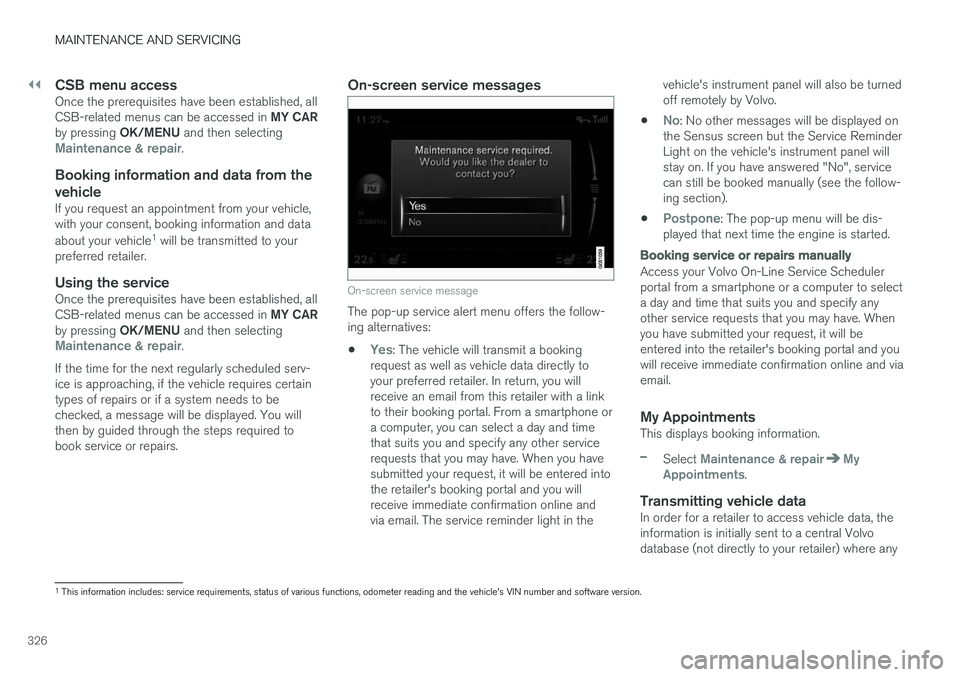
On-screen service message
The pop-up service alert menu offers the follow- ing alternatives:
•
Yes: The vehicle will transmit a booking
request as well as vehicle data directly to your preferred retailer. In return, you willreceive an email from this retailer with a linkto their booking portal. From a smartphone ora computer, you can select a day and timethat suits you and specify any other servicerequests that you may have. When you havesubmitted your request, it will be entered intothe retailer's booking portal and you willreceive immediate confirmation online andvia email. The service reminder light in the vehicle's instrument panel will also be turnedoff remotely by Volvo.
•
No: No other messages will be displayed on
the Sensus screen but the Service Reminder Light on the vehicle's instrument panel willstay on. If you have answered "No", servicecan still be booked manually (see the follow-ing section).
•
Postpone: The pop-up menu will be dis-
played that next time the engine is started.
Booking service or repairs manually
Access your Volvo On-Line Service Scheduler portal from a smartphone or a computer to selecta day and time that suits you and specify anyother service requests that you may have. Whenyou have submitted your request, it will beentered into the retailer's booking portal and youwill receive immediate confirmation online and viaemail.
My AppointmentsThis displays booking information.
–Select Maintenance & repairMy
Appointments.
Transmitting vehicle dataIn order for a retailer to access vehicle data, the information is initially sent to a central Volvodatabase (not directly to your retailer) where any
1 This information includes: service requirements, status of various functions, odometer reading and the vehicle's VIN number and software version.
Page 329 of 398
MAINTENANCE AND SERVICING
327
retailer can access or search for this information using your vehicle's VIN number. This numbercan be found in your warranty booklet or on thedashboard at the lower left corner of the wind-shield.
–Select Maintenance & repairSend
vehicle data.
Booking information and vehicle dataWhen you opt to book service from your vehicle, booking information and vehicle data will betransmitted. Vehicle data consists of a number ofparameters in the following areas:
• Service requirements
• Function status
• Fluid levels
• Odometer reading (mileage)
• Vehicle Identification Number (VIN)
• The vehicle's software version
Related information
•
Volvo ID (p. 22)
Maintenance – opening/closing hood The hood is opened by first releasing the lock from the passenger compartment and thenpressing the release control.
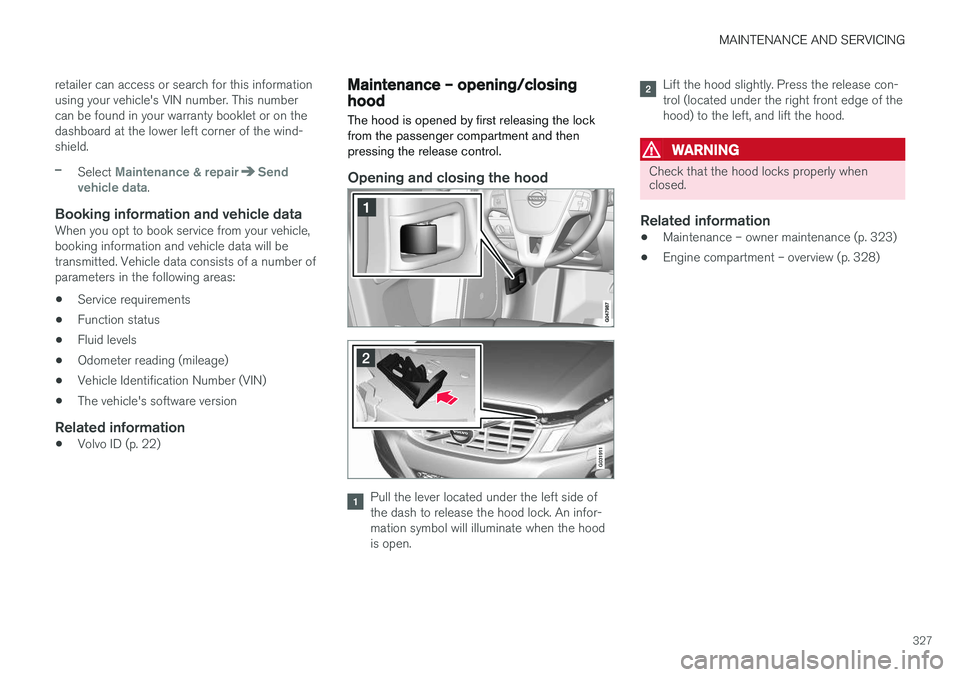
Opening and closing the hood
G031911
Pull the lever located under the left side of the dash to release the hood lock. An infor-mation symbol will illuminate when the hoodis open.
Lift the hood slightly. Press the release con- trol (located under the right front edge of thehood) to the left, and lift the hood.
WARNING
Check that the hood locks properly when closed.
Related information
•Maintenance – owner maintenance (p. 323)
• Engine compartment – overview (p. 328)
Page 336 of 398
MAINTENANCE AND SERVICING
334
CAUTION
Keep the area around the power steering fluid reservoir clean when checking.
Bulbs – introduction
Certain bulbs can be replaced by the vehicle's owner. However, the bulbs on the following listshould only be replaced by a trained and quali-fied Volvo service technician.
All bulb specifications are listed in Bulbs – speci-
fications (p. 341).
• Active Bending Lights
• Daytime running lights, front parking lights
• Front side marker lights
• Turn signals in the door mirrors
• Approach lighting in the door mirrors
• Interior lighting (except for the front footwelllighting)
• Rear parking lights
• Rear side marker lights
• Rear turn signals
• LED bulbs
NOTE
•
For information regarding any bulbs not mentioned in this section, please contactyour Volvo retailer or a trained andauthorized Volvo service technician.
• Always switch off the ignition before star-ting to replace a bulb.
• If an error message remains in the dis-play after a faulty bulb has been replaced,contact an authorized Volvo workshop.
• Condensation may form temporarily onthe inside of the lenses of exterior lightssuch as headlights, fog lights, or taillights.This is normal and the lights aredesigned to withstand moisture. Normally,condensation will dissipate after thelights have been on for a short time.
• The optional Active Bending Light bulbscontain trace amounts of mercury. Thesebulbs should always be disposed of by atrained and qualified Volvo service techni-cian.
CAUTION
Never touch the glass of bulbs with your fin- gers. Grease and oils from your fingers vapor-ize in the heat and will leave a deposit on thereflector, which will damage it.
Page 337 of 398
MAINTENANCE AND SERVICING
}}
* Option/accessory, for more information, see Introduction.335
WARNING
•The engine should not be running when changing bulbs.
• If the engine has been running just priorto replacing bulbs in the headlight hous-ing, please keep in mind that componentsin the engine compartment will be hot.
WARNING
•
Active Bending Lights
* – due to the high
voltage used by these headlights, these bulbs should only be replaced by atrained and qualified Volvo service techni-cian.
• Turn off the lights and remove the remotekey from the ignition before changing anybulbs.
Related information
•Bulbs – headlight housing (p. 335)
• Bulbs – vanity mirror lighting (p. 341)
• Bulbs – cargo area lighting (p. 340)
• Bulbs – license plate lighting (p. 340)
Bulbs – headlight housing
The entire headlight housing must be lifted out when replacing all front bulbs.
Removing the headlight housing
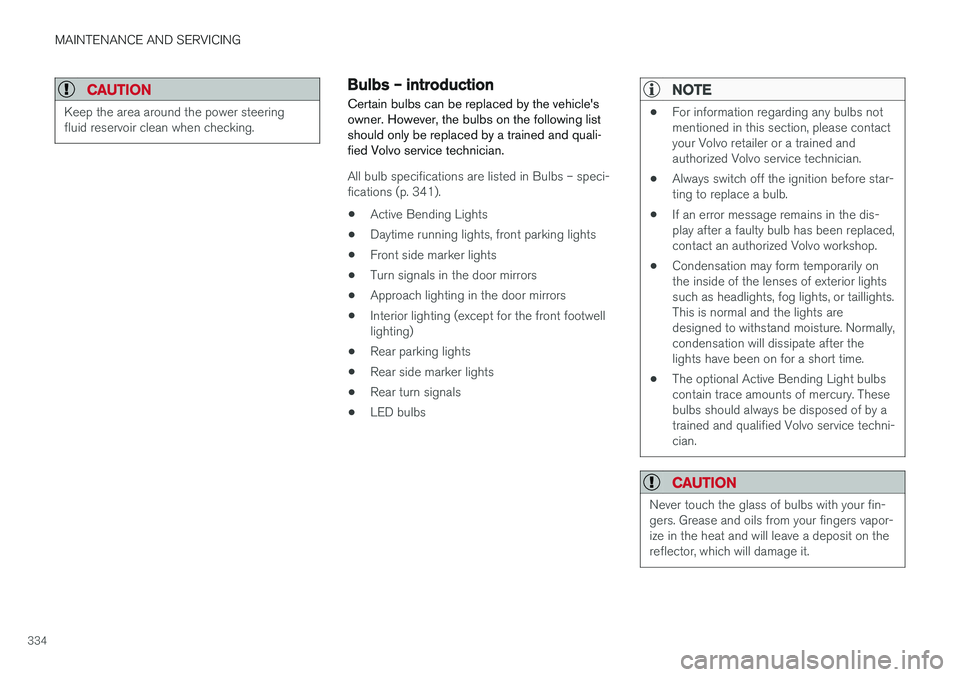
Pull out the headlight housing's locking pins.
Pull the headlight housing straight out.
CAUTION
When disconnecting the connector, pull on the connector itself and not on the wiring.
Unplug the wiring connector by holding down the clip with your thumb.
Pull the connector out with the other hand.
5. Lift out the headlight housing and place it on a soft surface to avoid scratching the lens.
6. Replace the defective bulb(s).
Reinserting the headlight housing
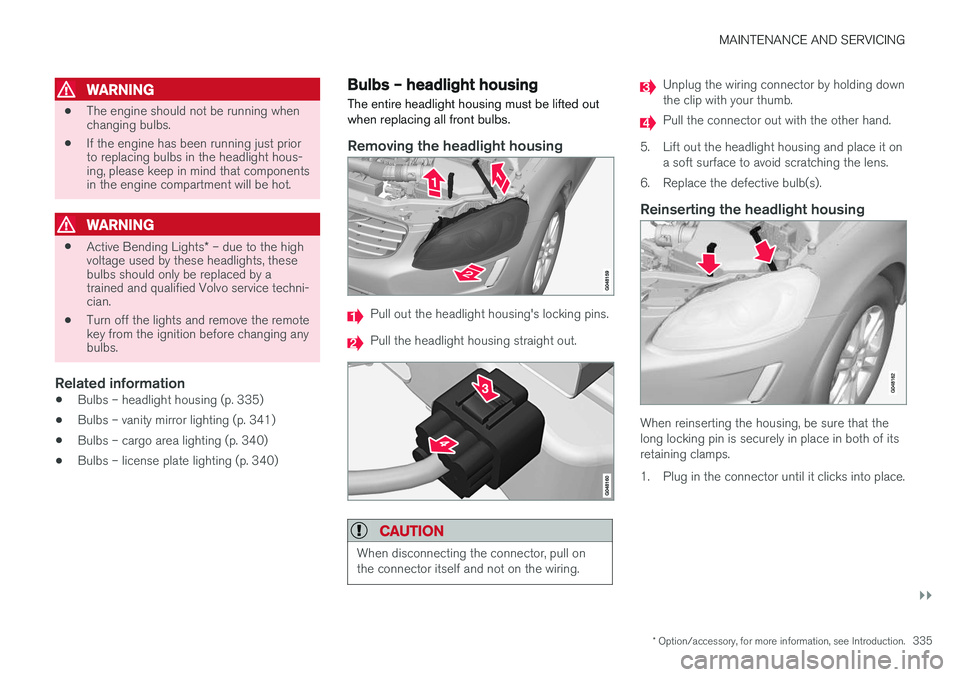
When reinserting the housing, be sure that the long locking pin is securely in place in both of itsretaining clamps.
1. Plug in the connector until it clicks into place.
Page 338 of 398
||
MAINTENANCE AND SERVICING
3362. Reinsert the headlight housing and locking
pins. Check that they are correctly inserted. The headlight housing must be properly in place and the wiring connector correctlyreconnected before the lighting is switchedon or the remote key is inserted into the igni-tion slot.
3. Check that the lights function properly.
Related information
• Bulbs – introduction (p. 334)
• Bulbs – cover (p. 336)
• Bulbs – specifications (p. 341)
Bulbs – cover The larger cover has to be removed in order to change the high/low beam headlight bulbs.
Removing the cover to access the
bulbs
NOTE
Before starting to replace a bulb, see Bulbs – introduction (p. 334).
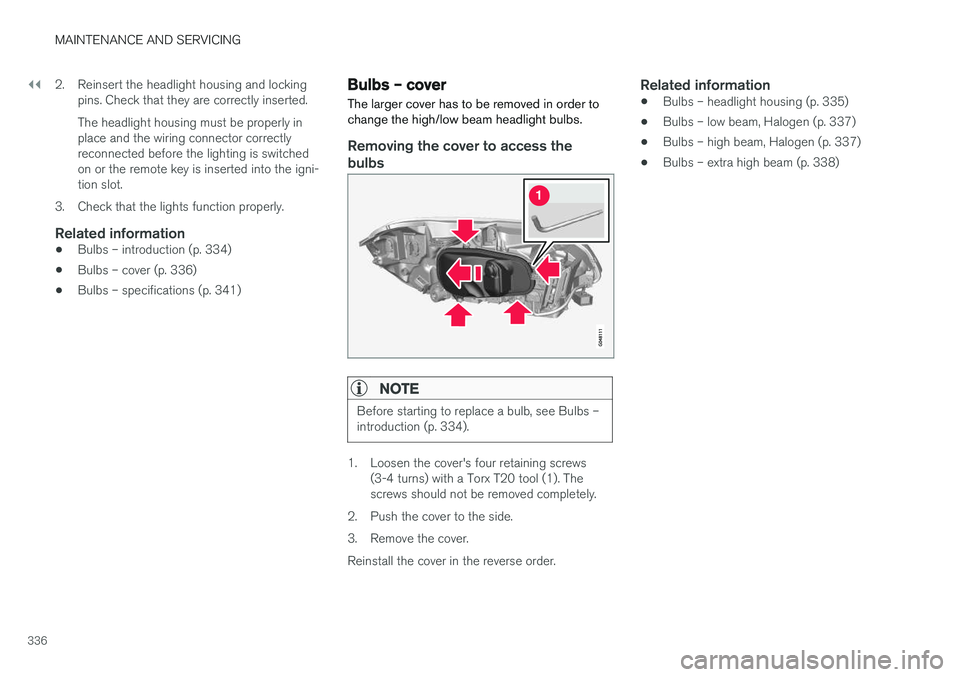
1. Loosen the cover's four retaining screws (3-4 turns) with a Torx T20 tool (1). The screws should not be removed completely.
2. Push the cover to the side.
3. Remove the cover.Reinstall the cover in the reverse order.
Related information
• Bulbs – headlight housing (p. 335)
• Bulbs – low beam, Halogen (p. 337)
• Bulbs – high beam, Halogen (p. 337)
• Bulbs – extra high beam (p. 338)
Page 339 of 398
MAINTENANCE AND SERVICING
337
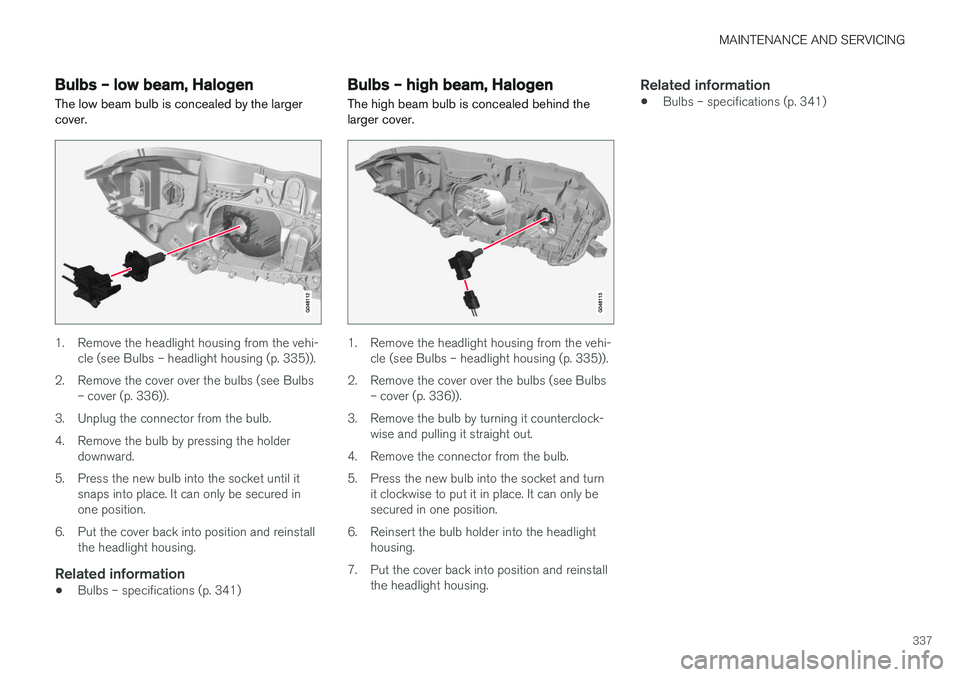
Bulbs – low beam, Halogen The low beam bulb is concealed by the larger cover.
1. Remove the headlight housing from the vehi-cle (see Bulbs – headlight housing (p. 335)).
2. Remove the cover over the bulbs (see Bulbs – cover (p. 336)).
3. Unplug the connector from the bulb.
4. Remove the bulb by pressing the holder downward.
5. Press the new bulb into the socket until it snaps into place. It can only be secured in one position.
6. Put the cover back into position and reinstall the headlight housing.
Related information
• Bulbs – specifications (p. 341)
Bulbs – high beam, Halogen
The high beam bulb is concealed behind the larger cover.
1. Remove the headlight housing from the vehi- cle (see Bulbs – headlight housing (p. 335)).
2. Remove the cover over the bulbs (see Bulbs – cover (p. 336)).
3. Remove the bulb by turning it counterclock- wise and pulling it straight out.
4. Remove the connector from the bulb.
5. Press the new bulb into the socket and turn it clockwise to put it in place. It can only be secured in one position.
6. Reinsert the bulb holder into the headlight housing.
7. Put the cover back into position and reinstall the headlight housing.
Related information
• Bulbs – specifications (p. 341)
Page 340 of 398
MAINTENANCE AND SERVICING
338
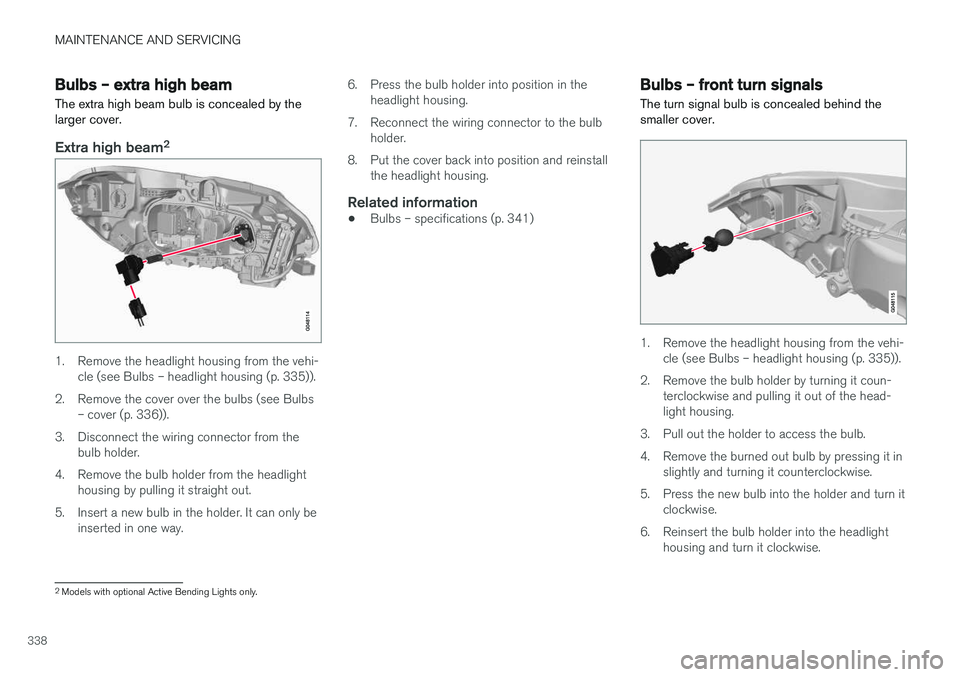
Bulbs – extra high beam The extra high beam bulb is concealed by the larger cover.
Extra high beam2
1. Remove the headlight housing from the vehi-
cle (see Bulbs – headlight housing (p. 335)).
2. Remove the cover over the bulbs (see Bulbs – cover (p. 336)).
3. Disconnect the wiring connector from the bulb holder.
4. Remove the bulb holder from the headlight housing by pulling it straight out.
5. Insert a new bulb in the holder. It can only be inserted in one way. 6. Press the bulb holder into position in the
headlight housing.
7. Reconnect the wiring connector to the bulb holder.
8. Put the cover back into position and reinstall the headlight housing.
Related information
• Bulbs – specifications (p. 341)
Bulbs – front turn signals The turn signal bulb is concealed behind the smaller cover.
1. Remove the headlight housing from the vehi-
cle (see Bulbs – headlight housing (p. 335)).
2. Remove the bulb holder by turning it coun- terclockwise and pulling it out of the head- light housing.
3. Pull out the holder to access the bulb.
4. Remove the burned out bulb by pressing it in slightly and turning it counterclockwise.
5. Press the new bulb into the holder and turn it clockwise.
6. Reinsert the bulb holder into the headlight housing and turn it clockwise.
2Models with optional Active Bending Lights only.