ABS VOLVO XC60 2017 Owner´s Manual
[x] Cancel search | Manufacturer: VOLVO, Model Year: 2017, Model line: XC60, Model: VOLVO XC60 2017Pages: 398, PDF Size: 9.17 MB
Page 267 of 398
STARTING AND DRIVING
265
Water on brake discs and brake pads affects braking
Driving in rain and slush or passing through an automatic car wash can cause water to collect onthe brake discs and pads. This will cause a delayin braking effect when the pedal is depressed. Toavoid such a delay when the brakes are needed,depress the pedal occasionally when drivingthrough rain, slush, etc. This will remove the waterfrom the brakes. Check that brake applicationfeels normal. This should also be done afterwashing or starting in very damp or cold weather.
Severe strain on the brake systemThe brakes will be subject to severe strain whendriving in mountains or hilly areas, or when towinga trailer. Vehicle speed is usually slower, whichmeans that the cooling of the brakes is less effi-cient than when driving on level roads. To reducethe strain on the brakes, shift into a lower gearand let the engine help with the braking. Do notforget that if you are towing a trailer, the brakeswill be subjected to a greater than normal load.
Cleaning the brake discsCoatings of dirt and water on the brake discsmay result in delayed brake function. This delay isminimized by cleaning the brake linings. Cleaning the brake pads is advisable in wet weather, prior to long-term parking, and after thevehicle has been washed. Do this by braking gen-tly for a short period while the vehicle is moving.
Related information
•Parking brake – general information (p. 267)
• Emergency Brake Assistance (EBA) (p. 266)
• Brakes – general (p. 264)
• Anti-lock braking system (ABS) (p. 266)
• Hill Descent Control (HDC) – introduction(p. 262)
Brakes – symbols
Symbols in the instrument panel
SymbolSpecification
Steady glow – Check the brake fluid level. If the level is low, fill withbrake fluid and check for the causeof the brake fluid loss.
Automatic function check: steady glow for two seconds when theengine is started.
WARNING
If and come on at the same
time and the brake level is below the MIN
mark in the reservoir or if a brake system-rela- ted message is shown in the information dis- play: DO NOT DRIVE . Have the vehicle towed
to a trained and qualified Volvo service techni- cian and have the brake system inspected.
Related information
• Brakes – general (p. 264)
• Parking brake – general information (p. 267)
Page 268 of 398
STARTING AND DRIVING
266
Anti-lock braking system (ABS) The ABS system helps to improve vehicle con- trol (stopping and steering) during severe brak-ing conditions by limiting brake lockup.
When the system "senses" impending lockup, braking pressure is automatically modulated inorder to help prevent lockup that could lead to askid. The system performs a brief self-diagnostic test when the engine has been started and driverreleases the brake pedal. Another automatic testmay be performed when the vehicle first reachesa speed of approximately 6 mph (10 km/h). Thebrake pedal will pulsate several times and asound may be audible from the ABS controlmodule, which is normal.
Related information
•Parking brake – general information (p. 267)
• Emergency Brake Assistance (EBA) (p. 266)
• Brakes – general (p. 264)
Brake lights The brake lights come on automatically when the brakes are applied.
Adaptive brake lights
The adaptive brake lights activate in the event of sudden braking or if the ABS system is activated.This function causes an additional taillight oneach side of the vehicle to illuminate to help alertvehicles traveling behind. The adaptive brake lights activate if:
• The ABS system activates for more than approximately a half second
• In the event of sudden braking while thevehicle is moving at speeds above approxi-mately 6 mph (10 km/h).
When the vehicle has come to a stop, the brakelights and additional taillights remain on for aslong as the brake pedal is depressed or untilbraking force on the vehicle is reduced.
Related information
• Brakes – general (p. 264)
• Parking brake – general information (p. 267)
Emergency Brake Assistance (EBA)
EBA is designed to provide full brake effect immediately in the event of sudden, hard brak-ing.
Emergency Brake AssistanceThe EBA system is activated by the speed with which the brake pedal is depressed. When the EBA system is activated, the brake pedal will go down and pressure in the brake sys-tem immediately increases to the maximum level.Maintain full pressure on the brake pedal in orderto utilize the system completely. EBA is automati-cally deactivated when the brake pedal isreleased.
Page 269 of 398
STARTING AND DRIVING
267
NOTE
•When the EBA system is activated, the brake pedal will go down and pressure inthe brake system immediately increasesto the maximum level. You must maintainfull pressure on the brake pedal in orderto utilize the system completely. Therewill be no braking effect if the pedal isreleased. EBA is automatically deacti-vated when the brake pedal is released.
• When the vehicle has been parked forsome time, the brake pedal may sinkmore than usual when the engine isstarted. This is normal and the pedal willreturn to its usual position when it isreleased.
Related information
• Parking brake – general information (p. 267)
• Brakes – general (p. 264)
• Anti-lock braking system (ABS) (p. 266)
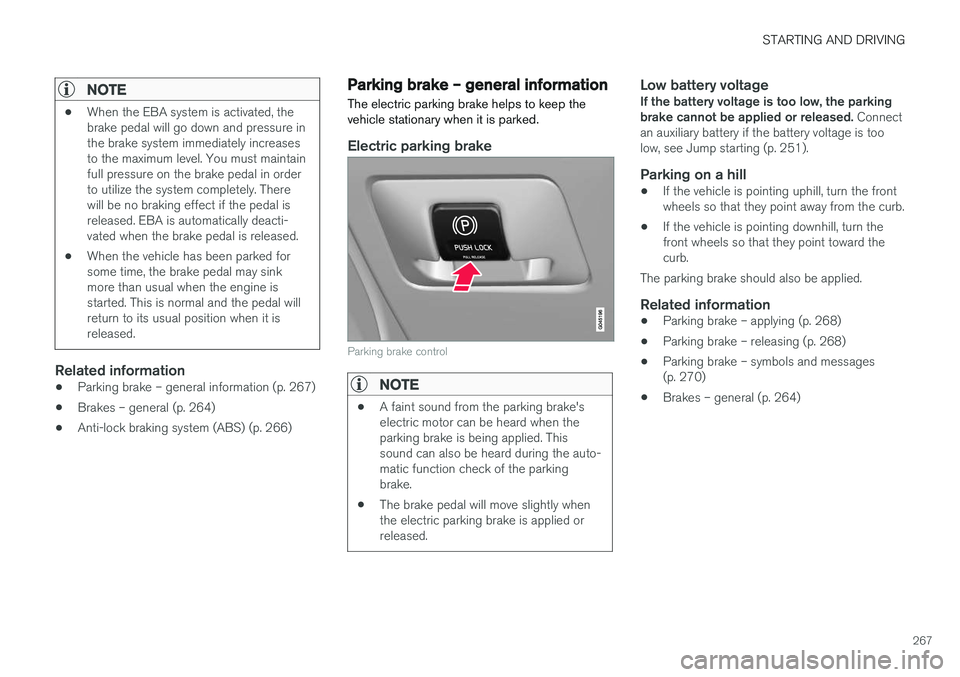
Parking brake – general information The electric parking brake helps to keep the vehicle stationary when it is parked.
Electric parking brake
Parking brake control
NOTE
•
A faint sound from the parking brake's electric motor can be heard when theparking brake is being applied. Thissound can also be heard during the auto-matic function check of the parkingbrake.
• The brake pedal will move slightly whenthe electric parking brake is applied orreleased.
Low battery voltageIf the battery voltage is too low, the parking brake cannot be applied or released.
Connect
an auxiliary battery if the battery voltage is toolow, see Jump starting (p. 251).
Parking on a hill
• If the vehicle is pointing uphill, turn the frontwheels so that they point away from the curb.
• If the vehicle is pointing downhill, turn thefront wheels so that they point toward thecurb.
The parking brake should also be applied.
Related information
• Parking brake – applying (p. 268)
• Parking brake – releasing (p. 268)
• Parking brake – symbols and messages(p. 270)
• Brakes – general (p. 264)
Page 273 of 398
STARTING AND DRIVING
271
Driving through water
The vehicle should be driven with extreme cau- tion if it is necessary to drive through standingwater.
The vehicle can be driven through water up to a depth of approximately 13 in. (35 cm) at walkingspeed to help prevent water from entering thedifferential and the transmission. Water reducesthe oil's lubricating capacity and may shorten theservice life of these components.
• Take particular care when driving throughflowing water.
• Clean the electrical connections for trailerwiring after driving in mud or water.
• When driving through water, maintain lowspeed and do not stop in the water.
WARNING
•Avoid driving through standing or rushing water. Doing so can be dangerous and itmay also be difficult to determine theactual depth of the water.
• If water cannot be avoided, after drivingthrough the water, press lightly on thebrake pedal to ensure that the brakes arefunctioning normally. Water or mud canmake the brake linings slippery, resultingin delayed braking effect.
CAUTION
•Engine damage will occur if water is drawn into the air cleaner.
• If the vehicle is driven through waterdeeper than approximately 13 in.(35 cm), water may enter the differentialand the transmission. This reduces theoil's lubricating capacity and may shortenthe service life of these components.
• Damage to any components, the engine,transmission, turbo-charger, differential orits internal components caused by flood-ing, vapor lock or insufficient oil is notcovered under warranty.
• Do not allow the vehicle to stand in waterup to the door sills longer than absolutelynecessary. This could result in electricalmalfunctions.
• If the engine has been stopped while thevehicle is in water, do not attempt torestart it. Have the vehicle towed out ofthe water.
Related information
•Towing the vehicle (p. 282)
• Towing by tow truck (p. 284)
Engine and cooling system
Under special conditions, for example when driv- ing in hilly terrain, extreme heat or with heavyloads, there is a risk that the engine and coolingsystem will overheat.
Proceed as follows to avoid overheating the engine.
• Maintain a low speed when driving with atrailer up long, steep hills. For information,see Towing a trailer (p. 279)
• Do not turn the engine off immediately whenstopping after a hard drive.
WARNING
The cooling fan may start or continue to oper- ate (for up to 6 minutes) after the engine hasbeen switched off.
• Remove any auxiliary lights from in front of the grille when driving in hot weather condi-tions.
• Do not exceed engine speeds of 4500 rpm ifdriving with a trailer in hilly terrain. The oiltemperature could become too high.
Page 281 of 398
STARTING AND DRIVING
}}
279
WARNING
Driving with the tailgate open: Driving with
the tailgate open could lead to poisonous exhaust gases entering the passenger com-partment. If the tailgate must be kept open forany reason, proceed as follows:
• Close the windows
• Set the ventilation system control to airflow to floor, windshield and side windowsand the blower control to its highest set-ting.
Handling and roadholdingAt the specified curb weight your vehicle has a tendency to understeer, which means that thesteering wheel has to be turned more than mightseem appropriate for the curvature of a bend.This ensures good stability and reduces the riskof rear wheel skid. Remember that these proper-ties can alter with the vehicle load. The heavierthe load in the cargo area, the less the tendencyto understeer.
• Vehicle load, tire design and inflation pres-sure all affect vehicle handling. Therefore,check that the tires are inflated to the rec-ommended pressure according to the vehicleload. Loads should be distributed so thatcapacity weight or maximum permissible axleloads are not exceeded.
• At the specified curb weight your vehicle hasa tendency to understeer, which means thatthe steering wheel has to be turned more than might seem appropriate for the curva-ture of a bend. This ensures good stabilityand reduces the risk of rear wheel skid.Remember that these properties can alterwith the vehicle load. The heavier the load inthe cargo compartment, the less the ten-dency to understeer.
Related information
•
Climate – general information (p. 126)
Towing a trailer When towing a trailer, always observe the legal requirements of the state/province.
NOTE
For the maximum trailer and tongue weights recommended by Volvo, see Weights (p. 372)
• All Volvo models are equipped with energy- absorbing shock-mounted bumpers. Trailerhitch installation should not interfere with theproper operation of this bumper system.
Trailer towing does not normally present any par-ticular problems, but take into consideration:
• Increase tire pressure to recommended fullpressure, see the tire inflation decal on thedriver's door opening.
• When your vehicle is new, avoid towing heavytrailers during the first 620 miles (1,000 km).
• Maximum speed when towing a trailer:50 mph (80 km/h).
• Engine and transmission are subject toincreased loads. Therefore, engine coolanttemperature should be closely watched whendriving in hot climates or hilly terrain. Use alower gear and turn off the air conditioner ifthe temperature gauge needle enters the redrange.
Page 307 of 398
WHEELS AND TIRES
305
prevent the tire pressure monitoring system from functioning properly. Always check the system's malfunction telltale after replacing one or more tires or wheels onyour vehicle to ensure that the replacement oralternate tires and wheels allow the system tocontinue to function properly.
NOTE
The system indicates low tire pressure but does not replace normal tire maintenance. Forinformation on correct tire pressure, pleaserefer to the tire inflation decal on the driver'sdoor opening or consult your Volvo retailer.
WARNING
Incorrect inflation pressure could lead to tire failure, resulting in a loss of control of thevehicle.
Related information
•
Tire Monitor - introduction (p. 305)
• Tire Pressure Monitoring System (TPMS) – general information (p. 308)
Tire Monitor - introduction Tire Monitor uses the rotational speed of the tires in combination with signal analysis of theABS sensor signals to determine if they areproperly inflated.
When a tire is under-inflated, its diameter (and consequently also its rotational speed) changes.By comparing the individual tires with each otherit is possible to determine if one or more tires areunder inflated. When low inflation pressure is detected or if the system is not functioning properly, Tire Monitorwill light up the tire pressure warning light (
) (also referred to as a telltale) in the
instrument panel and will display one of several messages in the text window, for example:
Tire
pressure low Check tires. Adjust the inflation
pressure and recalibrate if necessary.
NOTE
If a malfunction occurs in the system, the tire pressure warning light will flash for approxi-mately 1 minute and then remain illuminated.
Tire press. syst Service required will be
displayed.
NOTE
The system indicates low tire pressure but does not replace normal tire maintenance. Forinformation on correct tire pressure, pleaserefer to the tire inflation decal on the driver'sdoor opening or consult your Volvo retailer.
Related information
• Tire pressure monitoring - overview (p. 304)
• Calibrating Tire Monitor (p. 306)
Page 353 of 398

MAINTENANCE AND SERVICING
}}
* Option/accessory, for more information, see Introduction.351
Engine compartment, upper
Engine compartment, front
Engine compartment, lower
PositionsThese fuses are all located in the engine com- partment box. Fuses in C are located under A.
A decal on the inside of the cover shows the positions of the fuses. • Fuses 1 – 15, 34 and 42 – 44 are relays/ circuit breakers and should only be removedor replaced by a trained and qualified Volvoservice technician.
• Fuses 16 – 33 and 35 – 41 may be changedat any time when necessary.
There is a special fuse removal tool on the under-side of the cover.
PosFunctionA
Circuit breaker: central electrical module under the glove compartment A50
Circuit breaker: central electrical module underthe glove compartment50
PosFunctionA
Circuit breaker: central electrical module in the cargo compartmentA60
Circuit breaker: central electrical module under the glove compartment A60
Circuit breaker: central electrical module under the glove compartmentA60
–
–
Headed windshield
*, driv-
er's side40
Windshield wipers30
–
Climate system blower A40
Headed windshield
*, pas-
senger's side40
ABS pump40
ABS valves20
Headlight washers20
PosFunctionA
Active Bending Lights- headlight leveling *10
Central electrical module (under the glove compart-ment)20
ABS5
Adjustable steering force *5
Engine Control Module (ECM), transmission, SRS10
Heated washer nozzles*10
-
Lighting panel5
-
-
-
Relay coils5
Auxiliary lights*20
Horn15
Relay coils, Engine Control Module (ECM)10
Page 364 of 398
||
MAINTENANCE AND SERVICING
362
Leather care
Volvo's leather upholstery is manufactured with a protectant to repel soiling. Over time, sunlight,grease and dirt can break down the protection.Staining, cracking, scuffing, and fading can result. Volvo offers an easy-to-use, non-greasy leather care kit formulated to clean and beautify yourvehicle's leather, and to renew the protectivequalities of its finish. The cleaner removes dirtand oil buildup. The light cream protectantrestores a barrier against soil and sunlight. Volvo also offers a special leather softener that should be applied after the cleaner and protec-tant. It leaves leather soft and smooth, andreduces friction between leather and other fin-ishes in the vehicle. Volvo recommends cleaning, protecting and con- ditioning your vehicle's leather two to four times ayear. Ask your Volvo retailer about Leather CareKit 951 0251 and Leather Softener 943 7429.
Cleaning leather upholstery
1. Pour leather cleaner on a damp sponge andsqueeze it until the cleaner foams.
2. Apply the foam to the stain by moving the sponge with circular movements.
3. Dampen the stain thoroughly with the sponge. Let the sponge absorb the stain, do not rub.
4. Dry the stain with soft paper towels or a towel, and allow the leather to dry completely.
Protecting leather upholstery
1. Put a small amount of protectant cream on acloth and apply a thin coating of cream to the upholstery with light circular movements.
2. Allow the leather to dry for 20 minutes. This will help the leather resist staining and pro- tect against sunlight's harmful UV rays.
CAUTION
• Under no circumstances should gasoline, naphtha or similar cleaning agents beused on the plastic or the leather sincethese can cause damage.
• Take extra care when removing stainssuch as ink or lipstick since the coloringcan spread.
• Use solvents sparingly. Too much solventcan damage the seat padding.
• Start from the outside of the stain andwork toward the center.
• Sharp objects (e.g. pencils or pens in apocket) or Velcro fasteners on clothingmay damage the textile upholstery.
• Clothing that is not colorfast, such asnew jeans or suede garments, may stainthe upholstery.
Cleaning a leather-covered steering wheel
• Remove soil, dust, etc., with a damp sponge and a neutral soap solution.
• Leather should be allowed to breath. Nevercover the steering wheel with a plastic pro-tector.
• Volvo recommends cleaning, protecting andconditioning the steering wheel with Volvo'sLeather Care Kit 951 0251 and LeatherSoftener 943 7429.
If there are stains on the steering wheel: Type 1 (ink, wine, coffee, milk, sweat or blood)
–Use a soft cloth or sponge. Wipe the wheel with a solution with 5% ammonia. For bloodstains, mix approx. 1 cup (2 dl) of water andone ounce (25g) of salt and wipe the stain.
Type 2 (fat, oil, sauces, or chocolate)
1. Same procedure as for type I stains.
2. Finish by rubbing the wheel with absorbent paper or a towel.
Type 3 (dry soil or dust)
1. Remove the soil/dust with a soft brush.
2. Same procedure as for type I stains.
CAUTION
Sharp objects, such as rings, could damage the leather on the steering wheel.
Page 383 of 398
SPECIFICATIONS
* Option/accessory, for more information, see Introduction.381
Battery specifications If the battery is replaced, replace it with a battery of the same cold start capacity as the original(see the decal on the battery).
General information
WARNING
PROPOSITION 65 WARNING! Battery posts, terminals, and related accesso- ries contain lead and lead compounds, chemi-cals known to the state of California to causecancer and reproductive harm. Wash handsafter handling. 12 volt system with a voltage-regulated alterna- tor. Single pole system in which the chassis andengine block are used as conductors. The nega-tive terminal is connected to the chassis.
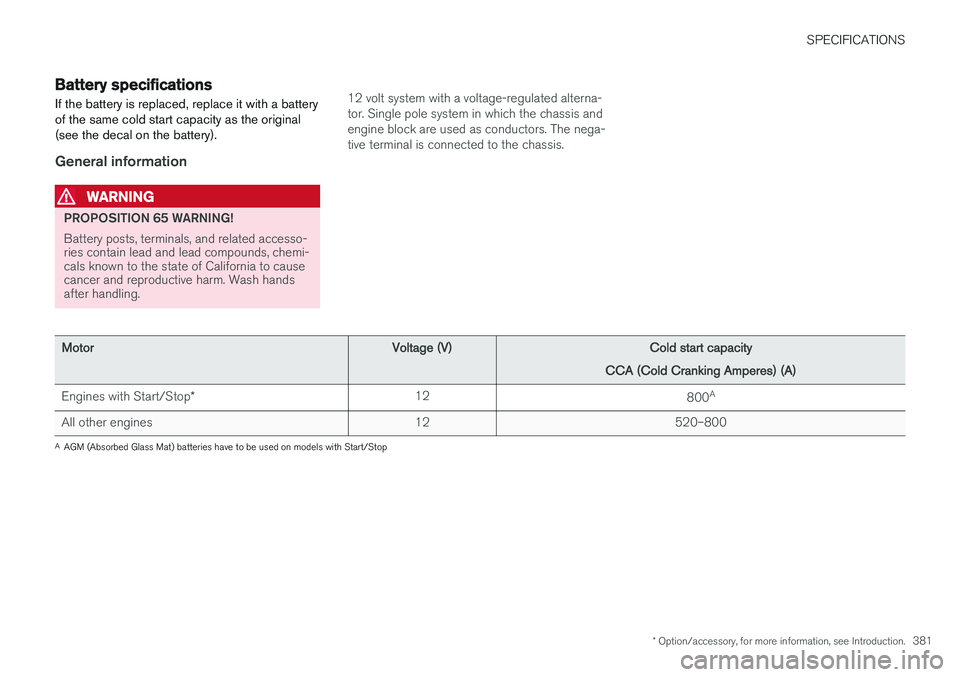
MotorVoltage (V)Cold start capacity
CCA (Cold Cranking Amperes) (A)
Engines with Start/Stop *12800A
All other engines12520–800
A
AGM (Absorbed Glass Mat) batteries have to be used on models with Start/Stop
Page 385 of 398
SPECIFICATIONS
* Option/accessory, for more information, see Introduction.383
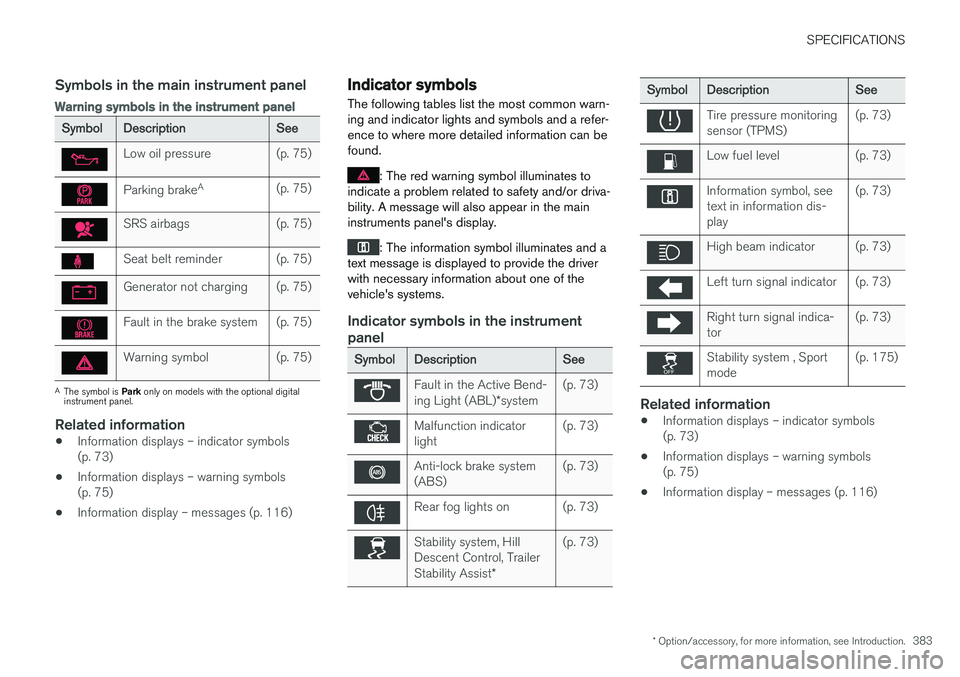
Symbols in the main instrument panel
Warning symbols in the instrument panel
SymbolDescriptionSee
Low oil pressure(p. 75)
Parking brakeA(p. 75)
SRS airbags(p. 75)
Seat belt reminder(p. 75)
Generator not charging(p. 75)
Fault in the brake system(p. 75)
Warning symbol(p. 75)
A
The symbol is Park only on models with the optional digital
instrument panel.
Related information
• Information displays – indicator symbols (p. 73)
• Information displays – warning symbols(p. 75)
• Information display – messages (p. 116)
Indicator symbols
The following tables list the most common warn- ing and indicator lights and symbols and a refer-ence to where more detailed information can befound.
: The red warning symbol illuminates to
indicate a problem related to safety and/or driva- bility. A message will also appear in the maininstruments panel's display.
: The information symbol illuminates and a
text message is displayed to provide the driver with necessary information about one of thevehicle's systems.
Indicator symbols in the instrument panel
SymbolDescriptionSee
Fault in the Active Bend- ing Light (ABL) *system(p. 73)
Malfunction indicator light(p. 73)
Anti-lock brake system (ABS)(p. 73)
Rear fog lights on(p. 73)
Stability system, Hill Descent Control, Trailer Stability Assist *(p. 73)
SymbolDescriptionSee
Tire pressure monitoring sensor (TPMS)(p. 73)
Low fuel level(p. 73)
Information symbol, see text in information dis-play(p. 73)
High beam indicator(p. 73)
Left turn signal indicator(p. 73)
Right turn signal indica- tor(p. 73)
Stability system , Sport mode(p. 175)
Related information
•Information displays – indicator symbols (p. 73)
• Information displays – warning symbols(p. 75)
• Information display – messages (p. 116)