ignition mode VOLVO XC60 2017 Owner´s Manual
[x] Cancel search | Manufacturer: VOLVO, Model Year: 2017, Model line: XC60, Model: VOLVO XC60 2017Pages: 398, PDF Size: 9.17 MB
Page 83 of 398
INSTRUMENTS AND CONTROLS
* Option/accessory, for more information, see Introduction.81
Ignition mode I
–With the remote key fully pressed into the ignition slot8
, press START/STOP ENGINE
briefly.
Ignition mode II
–With the remote key fully pressed into the ignition slot 8
, press START/STOP ENGINE
for approximately 2 seconds.
Returning to mode 0
To return to mode 0 from mode II or I, press
START/STOP ENGINE briefly.
Starting and stopping the engineSee Starting the engine (p. 248) and Switching off the engine (p. 249) for information on star-ting the engine and switching it off.
Emergency towingSee Towing the vehicle (p. 282) for importantinformation about the remote key when the vehi-cle is being towed.
Related information
•Inserting/removing remote key (p. 79)
Front seats
The front seats can be adjusted in a number of ways to help provide the most comfortable seat-ing position.
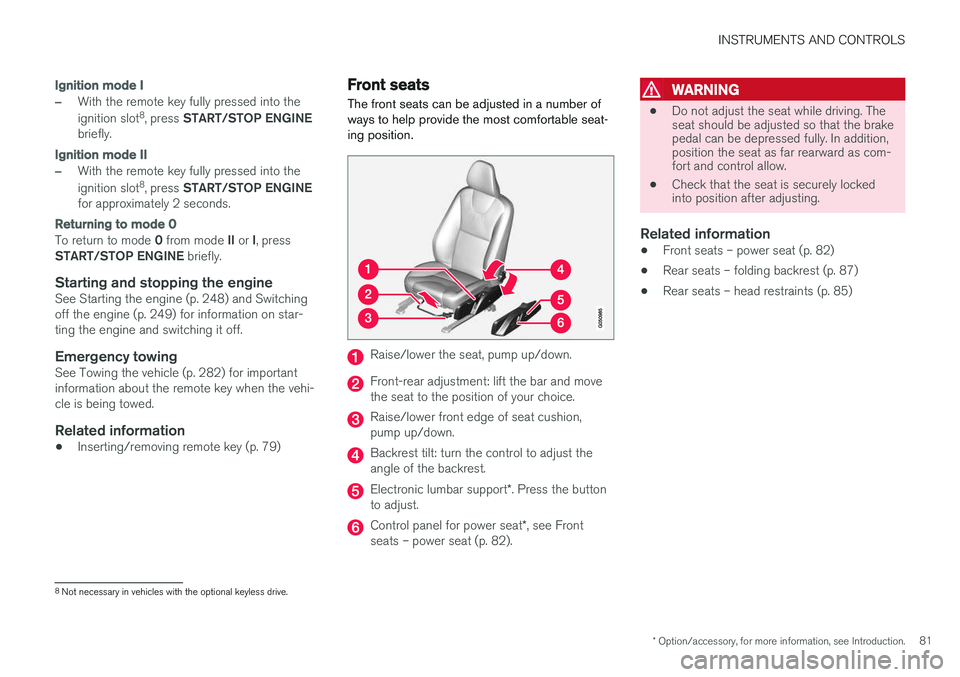
Raise/lower the seat, pump up/down.
Front-rear adjustment: lift the bar and move the seat to the position of your choice.
Raise/lower front edge of seat cushion, pump up/down.
Backrest tilt: turn the control to adjust the angle of the backrest.
Electronic lumbar support *. Press the button
to adjust.
Control panel for power seat *, see Front
seats – power seat (p. 82).
WARNING
• Do not adjust the seat while driving. The seat should be adjusted so that the brakepedal can be depressed fully. In addition,position the seat as far rearward as com-fort and control allow.
• Check that the seat is securely lockedinto position after adjusting.
Related information
• Front seats – power seat (p. 82)
• Rear seats – folding backrest (p. 87)
• Rear seats – head restraints (p. 85)
8
Not necessary in vehicles with the optional keyless drive.
Page 84 of 398
INSTRUMENTS AND CONTROLS
* Option/accessory, for more information, see Introduction.
82
Front seats – folding backrest *10
The front passenger's seat backrest can be folded down to make it easier to transport longobjects.
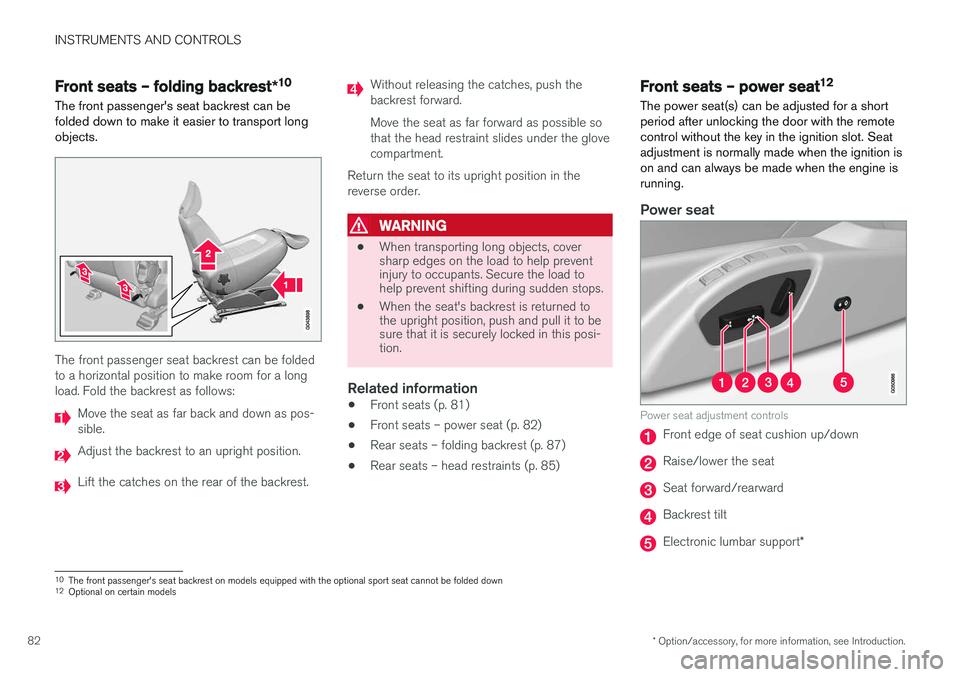
The front passenger seat backrest can be folded to a horizontal position to make room for a longload. Fold the backrest as follows:
Move the seat as far back and down as pos- sible.
Adjust the backrest to an upright position.
Lift the catches on the rear of the backrest.
Without releasing the catches, push the backrest forward. Move the seat as far forward as possible so that the head restraint slides under the glovecompartment.
Return the seat to its upright position in thereverse order.
WARNING
• When transporting long objects, cover sharp edges on the load to help preventinjury to occupants. Secure the load tohelp prevent shifting during sudden stops.
• When the seat's backrest is returned tothe upright position, push and pull it to besure that it is securely locked in this posi-tion.
Related information
•
Front seats (p. 81)
• Front seats – power seat (p. 82)
• Rear seats – folding backrest (p. 87)
• Rear seats – head restraints (p. 85)
Front seats – power seat 12
The power seat(s) can be adjusted for a short period after unlocking the door with the remotecontrol without the key in the ignition slot. Seatadjustment is normally made when the ignition ison and can always be made when the engine isrunning.
Power seat
Power seat adjustment controls
Front edge of seat cushion up/down
Raise/lower the seat
Seat forward/rearward
Backrest tilt
Electronic lumbar support *
10
The front passenger's seat backrest on models equipped with the optional sport seat cannot be folded down
12 Optional on certain models
Page 87 of 398
INSTRUMENTS AND CONTROLS
}}
85
Returning the seat/mirrors to the stored positions
To move the seat and door mirrors to the position stored in the remote key: 1.Unlock the driver's door with the same
remote key (the one used to lock the doors). For models equipped with the optional key-less drive, you must have the same remotekey in your possession.
2. Open the driver's door within 2 minutes. The driver's seat and door mirrors will automati- cally move to the position in which you left them(if the vehicle has been unlocked with one of theother keys and new seat/mirror adjustments havebeen made).
NOTE
• The seat will move to this position even if someone else has moved it to a different position and locked the vehicle with a
dif-
ferent remote key.
• This feature will work in the same way with all of the remote keys that you usewith your vehicle.
Emergency stop
WARNING
•
Because the driver's seat can be adjusted with the ignition off, children should neverbe left unattended in the vehicle.
• Movement of the seat can be STOPPEDat any time by pressing any button on thepower seat control panel.
• Do not adjust the seat while driving. Theseat should be adjusted so that the brakepedal can be depressed fully. In addition,position the seat as far rearward as com-fort and control allow.
• The seat rails on the floor must not beobstructed in any way when the seat is inmotion.
Related information
• Remote key – functions (p. 153)
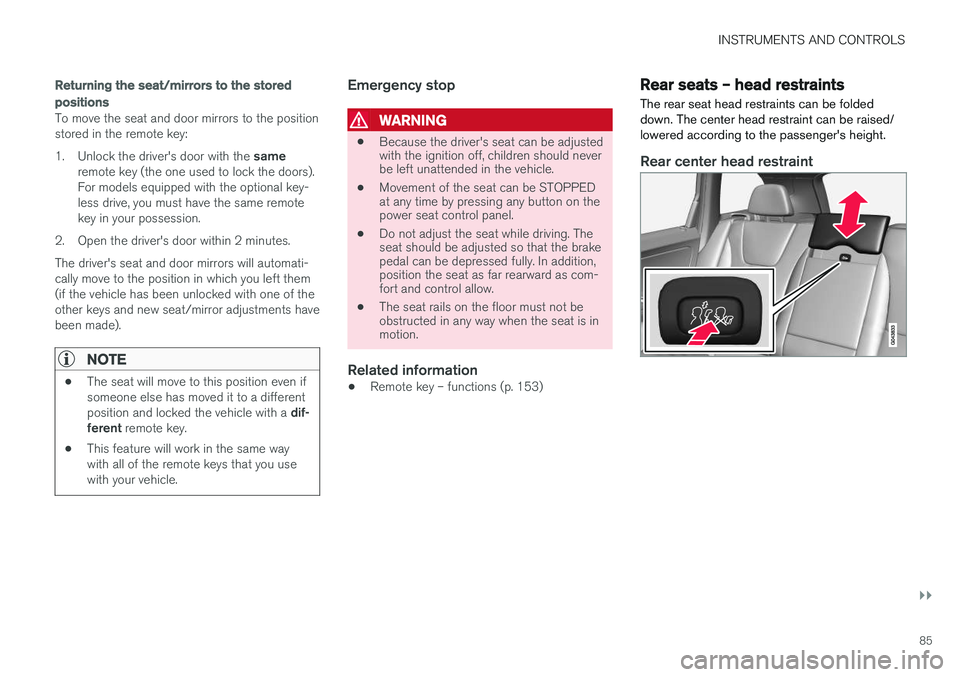
Rear seats – head restraints The rear seat head restraints can be folded down. The center head restraint can be raised/lowered according to the passenger's height.
Rear center head restraint
Page 92 of 398
INSTRUMENTS AND CONTROLS
* Option/accessory, for more information, see Introduction.
90
Electrically heated * steering wheel
The steering wheel can be heated electrically.
Button for steering wheel heating
With the engine running, press this button once to begin warming the steering wheel (press againto switch off). The indicator light in the button willilluminate when the function is active. This function can also be started automatically (the setting can be activated/deactivated in theMY CAR menu) if the vehicle is cold and theambient temperature is below approximately 50°F (10° C).
Lighting panel The lighting panel is used to control the daytime running lights, parking lights, etc., and to adjustthe instrument panel lighting and "theater" light-ing (p. 94).
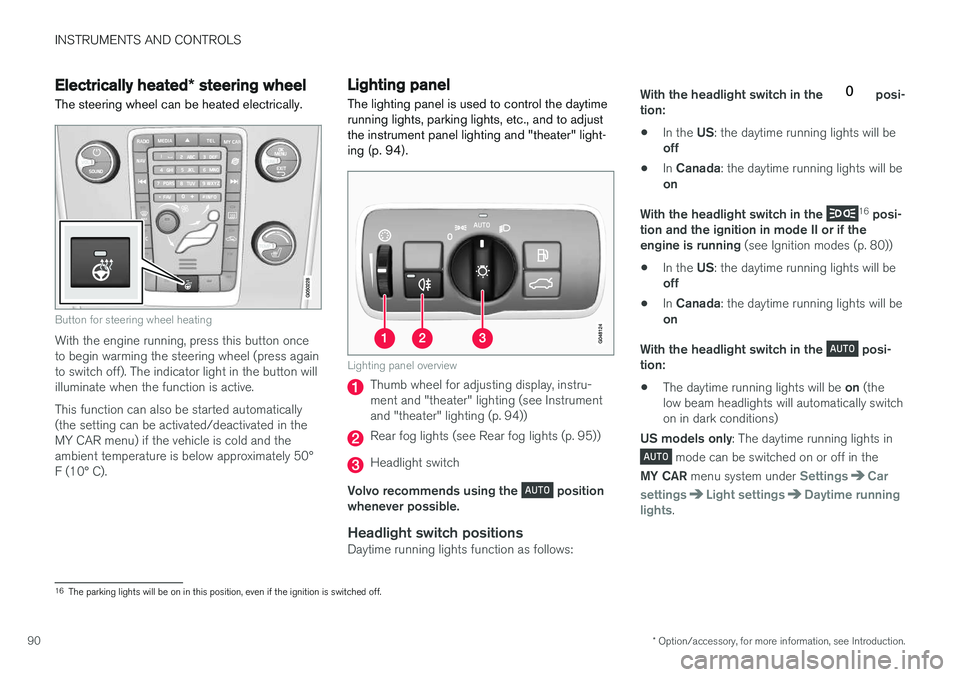
Lighting panel overview
Thumb wheel for adjusting display, instru- ment and "theater" lighting (see Instrumentand "theater" lighting (p. 94))
Rear fog lights (see Rear fog lights (p. 95))
Headlight switch
Volvo recommends using the
position
whenever possible.
Headlight switch positionsDaytime running lights function as follows: With the headlight switch in the
posi-
tion: • In the
US: the daytime running lights will be
off
• In
Canada : the daytime running lights will be
on
With the headlight switch in the
16
posi-
tion and the ignition in mode II or if the engine is running (see Ignition modes (p. 80))
• In the
US: the daytime running lights will be
off
• In
Canada : the daytime running lights will be
on
With the headlight switch in the
posi-
tion: • The daytime running lights will be
on (the
low beam headlights will automatically switch on in dark conditions)
US models only : The daytime running lights in
mode can be switched on or off in the
MY CAR menu system under
SettingsCar
settings
Light settingsDaytime running
lights.
16 The parking lights will be on in this position, even if the ignition is switched off.
Page 96 of 398
||
INSTRUMENTS AND CONTROLS
* Option/accessory, for more information, see Introduction.
94
NOTE
This function is only active in twilight or dark conditions, and only when the vehicle is inmotion.
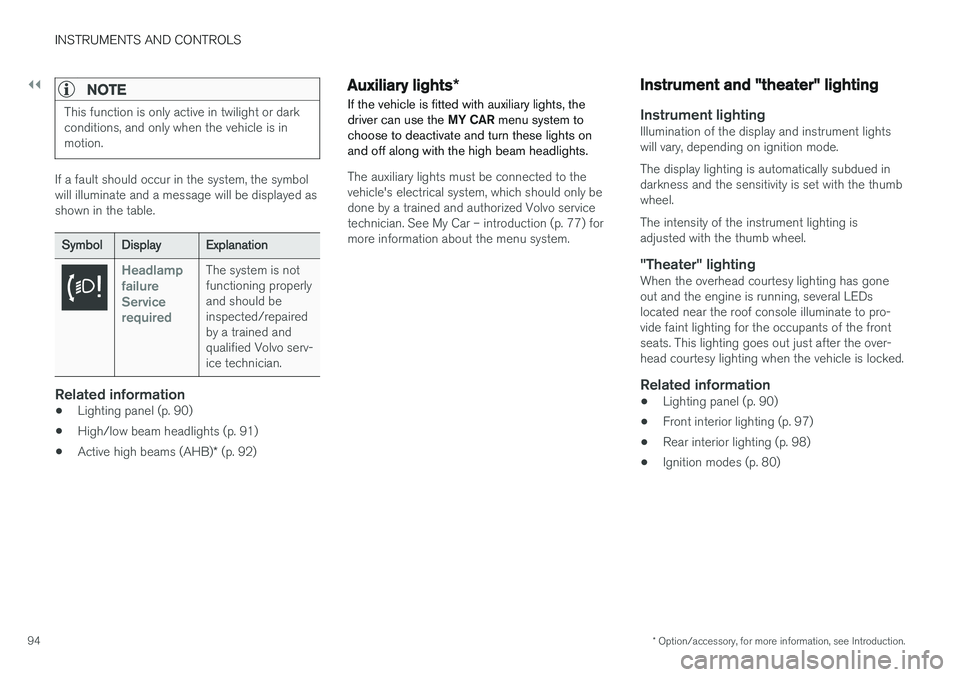
If a fault should occur in the system, the symbol will illuminate and a message will be displayed asshown in the table.
SymbolDisplayExplanation
Headlamp failureServicerequiredThe system is not functioning properlyand should beinspected/repairedby a trained andqualified Volvo serv-ice technician.
Related information
• Lighting panel (p. 90)
• High/low beam headlights (p. 91)
• Active high beams (AHB)
* (p. 92)
Auxiliary lights *
If the vehicle is fitted with auxiliary lights, the driver can use the MY CAR menu system to
choose to deactivate and turn these lights onand off along with the high beam headlights.
The auxiliary lights must be connected to the vehicle's electrical system, which should only bedone by a trained and authorized Volvo servicetechnician. See My Car – introduction (p. 77) formore information about the menu system.
Instrument and "theater" lighting
Instrument lightingIllumination of the display and instrument lights will vary, depending on ignition mode. The display lighting is automatically subdued in darkness and the sensitivity is set with the thumbwheel. The intensity of the instrument lighting is adjusted with the thumb wheel.
"Theater" lightingWhen the overhead courtesy lighting has goneout and the engine is running, several LEDslocated near the roof console illuminate to pro-vide faint lighting for the occupants of the frontseats. This lighting goes out just after the over-head courtesy lighting when the vehicle is locked.
Related information
• Lighting panel (p. 90)
• Front interior lighting (p. 97)
• Rear interior lighting (p. 98)
• Ignition modes (p. 80)
Page 97 of 398
INSTRUMENTS AND CONTROLS
}}
95
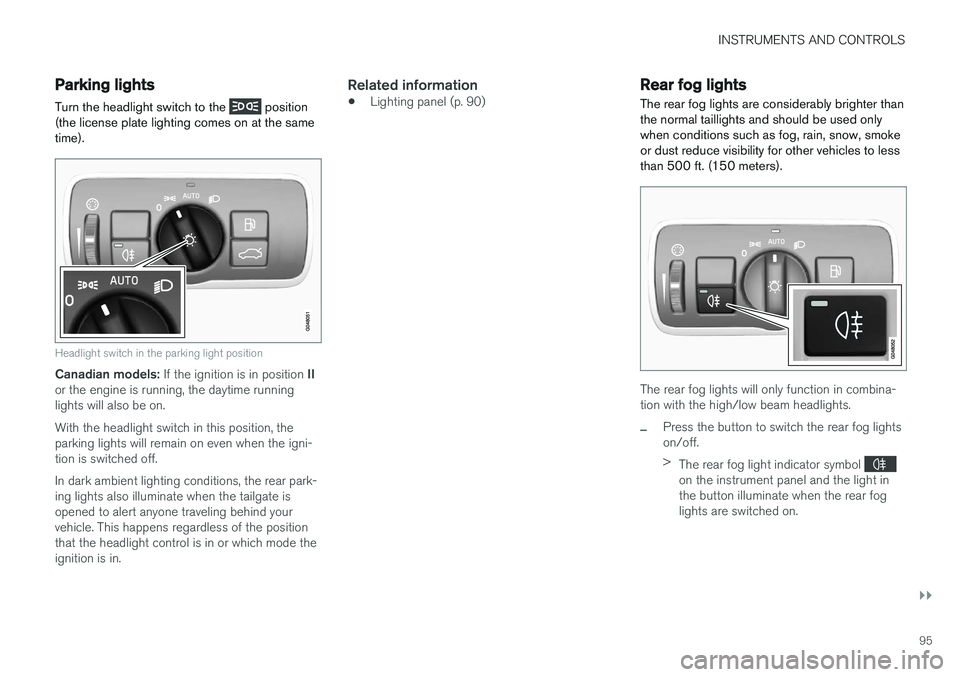
Parking lights Turn the headlight switch to the
position
(the license plate lighting comes on at the same time).
Headlight switch in the parking light position
Canadian models: If the ignition is in position II
or the engine is running, the daytime running lights will also be on. With the headlight switch in this position, the parking lights will remain on even when the igni-tion is switched off. In dark ambient lighting conditions, the rear park- ing lights also illuminate when the tailgate isopened to alert anyone traveling behind yourvehicle. This happens regardless of the positionthat the headlight control is in or which mode theignition is in.
Related information
• Lighting panel (p. 90)
Rear fog lights
The rear fog lights are considerably brighter than the normal taillights and should be used onlywhen conditions such as fog, rain, snow, smokeor dust reduce visibility for other vehicles to lessthan 500 ft. (150 meters).
The rear fog lights will only function in combina- tion with the high/low beam headlights.
–Press the button to switch the rear fog lights on/off. > The rear fog light indicator symbol
on the instrument panel and the light in the button illuminate when the rear foglights are switched on.
Page 100 of 398
||
INSTRUMENTS AND CONTROLS
* Option/accessory, for more information, see Introduction.
98
Overhead courtesy lighting
The passenger compartment lighting is switched on and off automatically when button (3) is in theneutral position. The lighting comes on and remains on for 30 seconds if:
• the vehicle is unlocked from the outside withthe key or remote control
• the engine is switched off and the ignition is in mode
0.
The lighting switches off when:
• the engine is started
• the vehicle is locked from the outside.
The lighting comes on and remains on for two minutes if one of the doors is open. The passenger compartment lighting can be switched on and off manually within 30 minutesafter the vehicle has been unlocked. If the lighting is switched on manually and the vehicle is locked, the courtesy lighting will switchoff automatically after one minute.
Courtesy lights/door step lighting *
The courtesy lights/door step lighting switch on/off automatically when one of the front doorsis opened/closed.
Glove compartment lighting
The glove compartment lighting switches on/off automatically when the lid is opened/closed.
Related information
•Rear interior lighting (p. 98)
Rear interior lighting
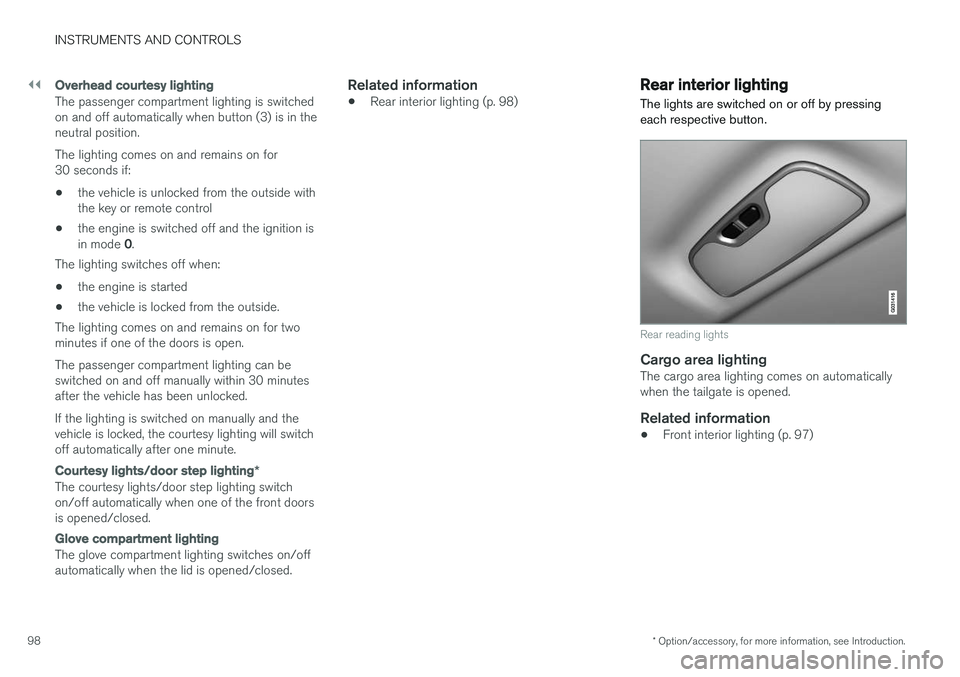
The lights are switched on or off by pressing each respective button.
Rear reading lights
Cargo area lightingThe cargo area lighting comes on automatically when the tailgate is opened.
Related information
• Front interior lighting (p. 97)
Page 101 of 398
INSTRUMENTS AND CONTROLS
}}
* Option/accessory, for more information, see Introduction.99
Home safe lighting
When you leave your vehicle at night, you can make use of the home safe lighting function toilluminate the area in front of the vehicle.
This function illuminates the headlights, parking lights, lights in the door mirrors, license platelights, front ceiling lighting and footwell lighting. These lights will remain on for 30 18
, 60 or
90 seconds. The time interval can be set in MY CAR under
SettingsCar settings
Light settingsHome safe light duration.
See My Car – introduction (p. 77) for a descrip- tion of the menu system.
1. Remove the key from the ignition slot to put
the ignition in mode 0 (see Ignition modes
(p. 80) for information about the ignition modes).
2. Pull the turn signal lever as far as possible towards the steering wheel and release it.
3. Exit the vehicle and lock the doors.
Related information
• Approach lighting (p. 99)
Approach lighting
Approach lighting activates the parking lights, door mirror lights, license plate lighting, domelighting and door step lighting when youapproach the vehicle.
This function is activated by pressing the approach light button on the remote key (see theillustration in Remote key – functions (p. 153)). The time interval for this lighting can be set by pressing MY CAR and going to
Car settings
Light settingsApproach light duration. See
My Car – introduction (p. 77) for a description of the menu system.
Related information
• Home safe lighting (p. 99)
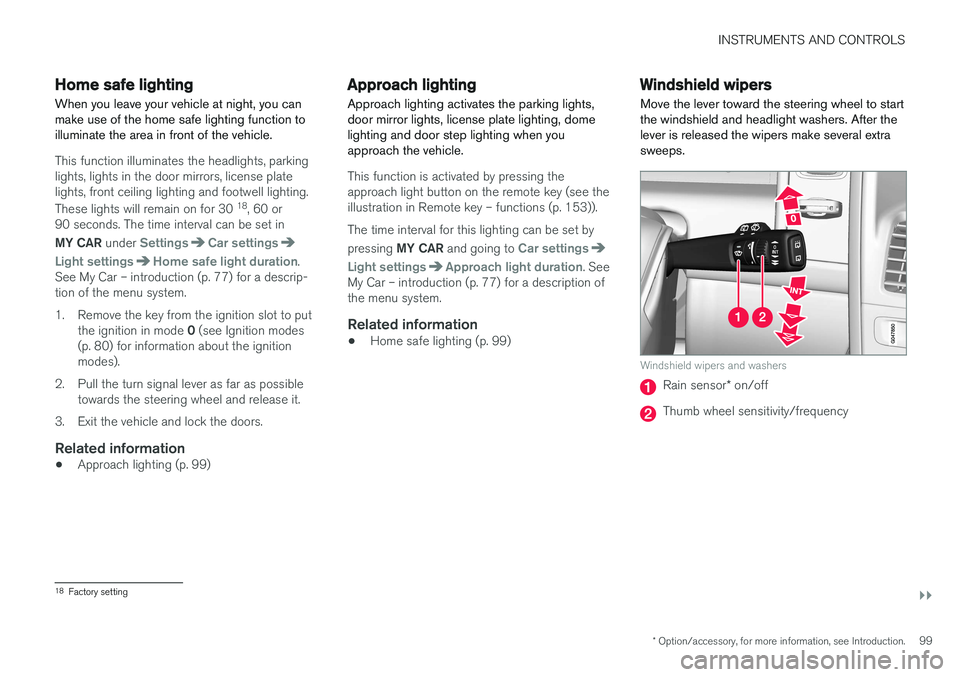
Windshield wipers Move the lever toward the steering wheel to start the windshield and headlight washers. After thelever is released the wipers make several extrasweeps.
Windshield wipers and washers
Rain sensor
* on/off
Thumb wheel sensitivity/frequency
18
Factory setting
Page 102 of 398
||
INSTRUMENTS AND CONTROLS
* Option/accessory, for more information, see Introduction.
100
CAUTION
• Use ample washer fluid when washing the windshield. The windshield should bethoroughly wet when the wipers are inoperation.
• Before using the wipers, ice and snowshould be removed from the windshield/rear window. Be sure the wiper bladesare not frozen in place.
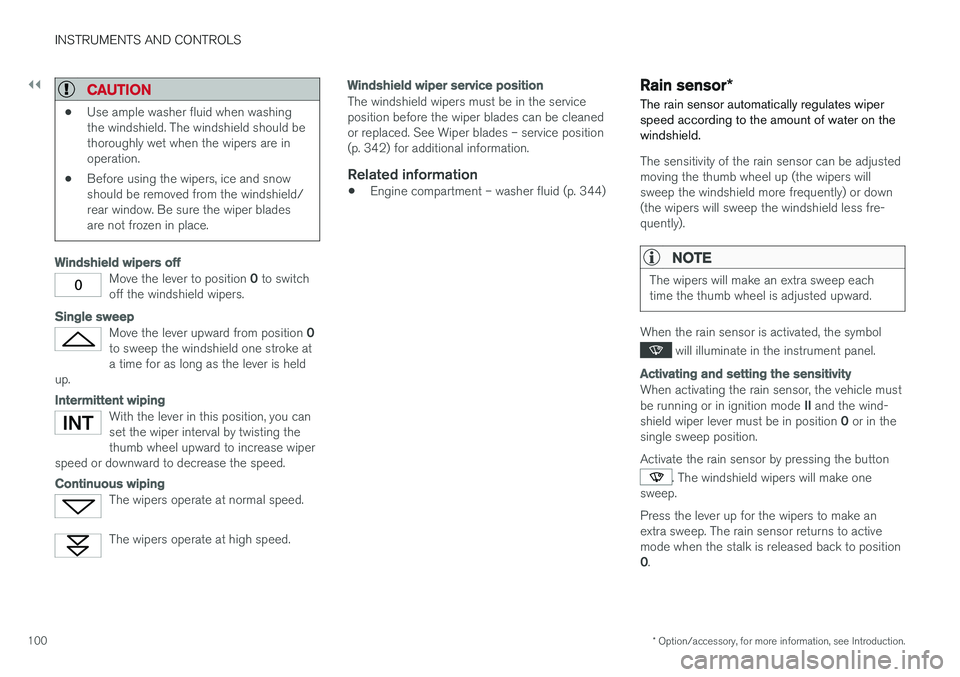
Windshield wipers off
Move the lever to position
0 to switch
off the windshield wipers.
Single sweep
Move the lever upward from position 0
to sweep the windshield one stroke at a time for as long as the lever is held
up.
Intermittent wiping
With the lever in this position, you can set the wiper interval by twisting thethumb wheel upward to increase wiper
speed or downward to decrease the speed.
Continuous wiping
The wipers operate at normal speed.
The wipers operate at high speed.
Windshield wiper service position
The windshield wipers must be in the service position before the wiper blades can be cleanedor replaced. See Wiper blades – service position(p. 342) for additional information.
Related information
• Engine compartment – washer fluid (p. 344)
Rain sensor
*
The rain sensor automatically regulates wiper speed according to the amount of water on thewindshield.
The sensitivity of the rain sensor can be adjusted moving the thumb wheel up (the wipers willsweep the windshield more frequently) or down(the wipers will sweep the windshield less fre-quently).
NOTE
The wipers will make an extra sweep each time the thumb wheel is adjusted upward.
When the rain sensor is activated, the symbol
will illuminate in the instrument panel.
Activating and setting the sensitivity
When activating the rain sensor, the vehicle must be running or in ignition mode II and the wind-
shield wiper lever must be in position 0 or in the
single sweep position. Activate the rain sensor by pressing the button
. The windshield wipers will make one
sweep. Press the lever up for the wipers to make an extra sweep. The rain sensor returns to activemode when the stalk is released back to position 0 .
Page 105 of 398
INSTRUMENTS AND CONTROLS
* Option/accessory, for more information, see Introduction.103
WARNING
•Always remove the ignition key when the vehicle is unattended to put the ignition in mode
0 (see Ignition modes (p. 80) for
information about the ignition modes).
• Never leave children unattended in the vehicle.
• Make sure that the windows are com-pletely unobstructed before they areoperated.
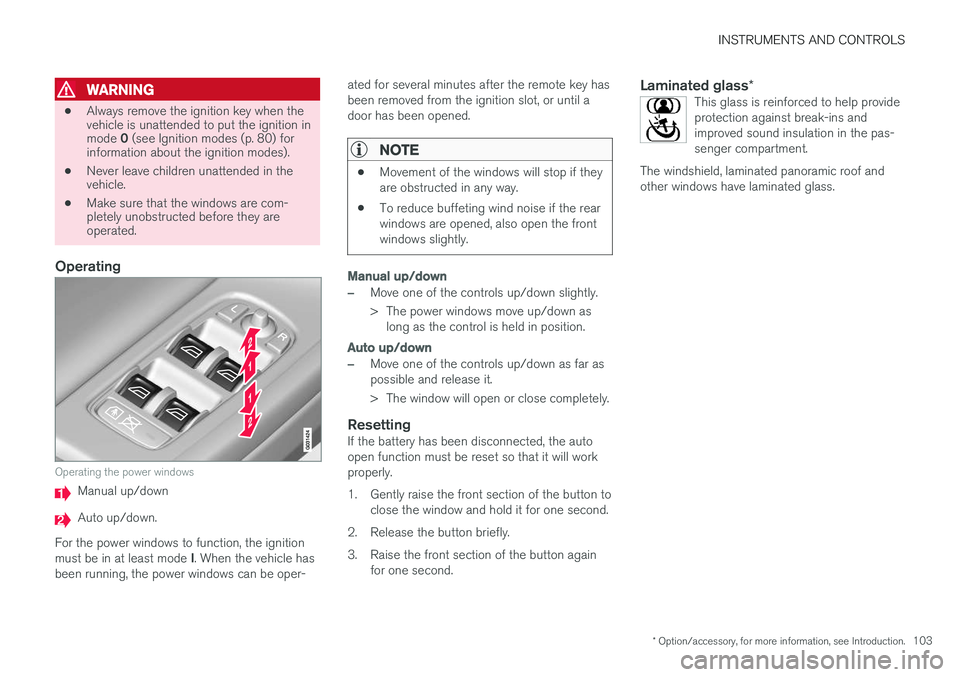
Operating
Operating the power windows
Manual up/down
Auto up/down.
For the power windows to function, the ignition must be in at least mode I. When the vehicle has
been running, the power windows can be oper- ated for several minutes after the remote key has been removed from the ignition slot, or until adoor has been opened.
NOTE
•
Movement of the windows will stop if they are obstructed in any way.
• To reduce buffeting wind noise if the rearwindows are opened, also open the frontwindows slightly.
Manual up/down
–Move one of the controls up/down slightly.
> The power windows move up/down as
long as the control is held in position.
Auto up/down
–Move one of the controls up/down as far as possible and release it.
> The window will open or close completely.
ResettingIf the battery has been disconnected, the auto open function must be reset so that it will workproperly.
1. Gently raise the front section of the button to close the window and hold it for one second.
2. Release the button briefly.
3. Raise the front section of the button again for one second.
Laminated glass *This glass is reinforced to help provide protection against break-ins andimproved sound insulation in the pas-senger compartment.
The windshield, laminated panoramic roof andother windows have laminated glass.