key battery VOLVO XC60 2017 Owner´s Manual
[x] Cancel search | Manufacturer: VOLVO, Model Year: 2017, Model line: XC60, Model: VOLVO XC60 2017Pages: 398, PDF Size: 9.17 MB
Page 348 of 398
||
MAINTENANCE AND SERVICING
346
CAUTION
The infotainment system's energy-saving fea- ture may not function correctly or at all,and/or a message may be displayed if a bat-tery charger or jumper cables are not con-nected properly. •The negative terminal on the battery must never
be used to connect a jumper cable
or a battery charger. Only the ground point on the chassis may be used.
See Jump starting (p. 251) for an illustrationand additional information.
WARNING
• Never expose the battery to open flame or electric spark.
• Do not smoke near the battery.
• Battery fluid contains sulfuric acid. Do notallow battery fluid to contact eyes, skin,fabrics or painted surfaces. If contactoccurs, flush the affected area immedi-ately with water. Obtain medical helpimmediately if eyes are affected.
NOTE
The life of the battery is shortened if it becomes discharged repeatedly.
Related information
•Battery – changing (p. 347)
• Battery – maintenance (p. 346)
• Battery – symbols (p. 345)
Battery – maintenance
Proper battery maintenance can help prolong its service life.
Maintenance
• Use a screw driver to open the caps or cover and a flashlight to inspect the level.
• If necessary, add distilled water. The levelshould never be above the indicator.
• The fluid level should be checked if the bat-tery has been recharged.
• After inspection, be sure the cap over eachbattery cell or the cover is securely in place.
• Check that the battery cables are correctlyconnected and properly tightened.
• Never disconnect the battery when theengine is running, or when the key is in theignition. This could damage the vehicle'selectrical system.
• The battery should be disconnected from thevehicle when a battery charger is useddirectly on the battery.
• To help keep the battery in good condition,the vehicle should be driven for at least 15minutes a week or connected to a chargerwith an automatic charging function.
• If the battery is fully discharged a number oftimes, this may shorten its service life. Keep-ing the battery fully charged helps prolong itsservice life.
Page 350 of 398
||
MAINTENANCE AND SERVICING
348
WARNING
Connect and disconnect the positive and neg- ative cables in the correct sequence.
Removal
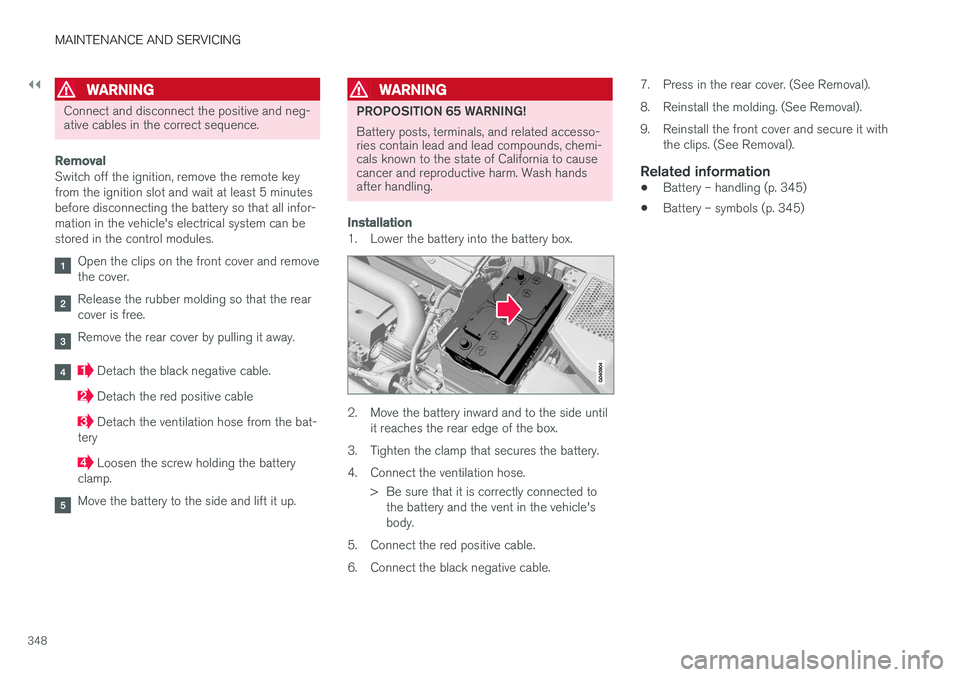
Switch off the ignition, remove the remote key from the ignition slot and wait at least 5 minutesbefore disconnecting the battery so that all infor-mation in the vehicle's electrical system can bestored in the control modules.
Open the clips on the front cover and remove the cover.
Release the rubber molding so that the rear cover is free.
Remove the rear cover by pulling it away.
Detach the black negative cable.
Detach the red positive cable
Detach the ventilation hose from the bat-
tery
Loosen the screw holding the battery
clamp.
Move the battery to the side and lift it up.
WARNING
PROPOSITION 65 WARNING! Battery posts, terminals, and related accesso- ries contain lead and lead compounds, chemi-cals known to the state of California to causecancer and reproductive harm. Wash handsafter handling.
Installation
1. Lower the battery into the battery box.
2. Move the battery inward and to the side until it reaches the rear edge of the box.
3. Tighten the clamp that secures the battery.
4. Connect the ventilation hose. > Be sure that it is correctly connected tothe battery and the vent in the vehicle's body.
5. Connect the red positive cable.
6. Connect the black negative cable. 7. Press in the rear cover. (See Removal).
8. Reinstall the molding. (See Removal).
9. Reinstall the front cover and secure it with
the clips. (See Removal).
Related information
• Battery – handling (p. 345)
• Battery – symbols (p. 345)
Page 394 of 398
INDEX
392fuel filler door 276, 277
fuel tank volume 378
Registering child restraints 49 Remote control private locking 156
Remote key 150, 151, 152, 154, 157 approach lighting 153
immobilizer 152
key blade 150, 151, 152, 154, 155,156 , 157
locking the vehicle 153
replacing the battery 158
unlocking the vehicle 153
Reporting safety defects 29
Roadside Assistance 25
Road sign information (RSI) 179
Rollover Protection System (ROPS) 45
Roll Stability Control (RSC) 45
Roof loads 144
S
Safety, occupant 28
Safety defects, reporting 29
Safety mode 45
Seat belt reminder 32
Seat belts Automatic locking retractor/Emergency
locking retractor 49
buckling 31
maintenance 31
pretensioners 30
reminder 32
reminder warning light 75
securing child restraint systems 51, 53, 55
unbuckling 31
use during pregnancy 32
using 30
Seats, front 81, 82
Sensus 114Service connected service booking 325
Shiftlock 15 override 257
Side door mirrors 104, 105
Side impact airbags 41
Sign information (RSI) 179
Snow chains 303
Snow tires 303
Spare tire 294
Spin control 174, 175SRS 33
Stability system 174, 175, 177 Corner Traction Control (CTC) 175
Engine Drag Control (EDC) 175
indicator light 74
Start/Stop (engine function) 257, 258, 259, 260, 261
Starting the engine 248 remote start 250
with keyless drive 248
Starting the vehicle after a crash (crash mode) 45, 46, 47
Start inhibitor (immobilizer) 152
Steel grid in cargo area 148Steering wheel adjusting 89
heated 90
horn 89
keypad 89
Steering wheel paddles 89
Stone chips, touching up 363
Storage spaces 140
Studded tires 303Sunroof laminated panoramic roof 108, 109
Sun shade 102